
Опаковките на вашите продукти не успяват ли да ангажират купувачите, след като напуснат рафта? Ограничената площ на физическите етикети принуждава марките да пропускат основни инструкции, съставки и промоционални оферти. Добавянето на динамични QR кодове към опаковките на продуктите свързва физическите артикули с дигитални преживявания, като същевременно стимулира проследимото ангажиране на клиентите.
Какво е интерактивна опаковка и защо е важна?
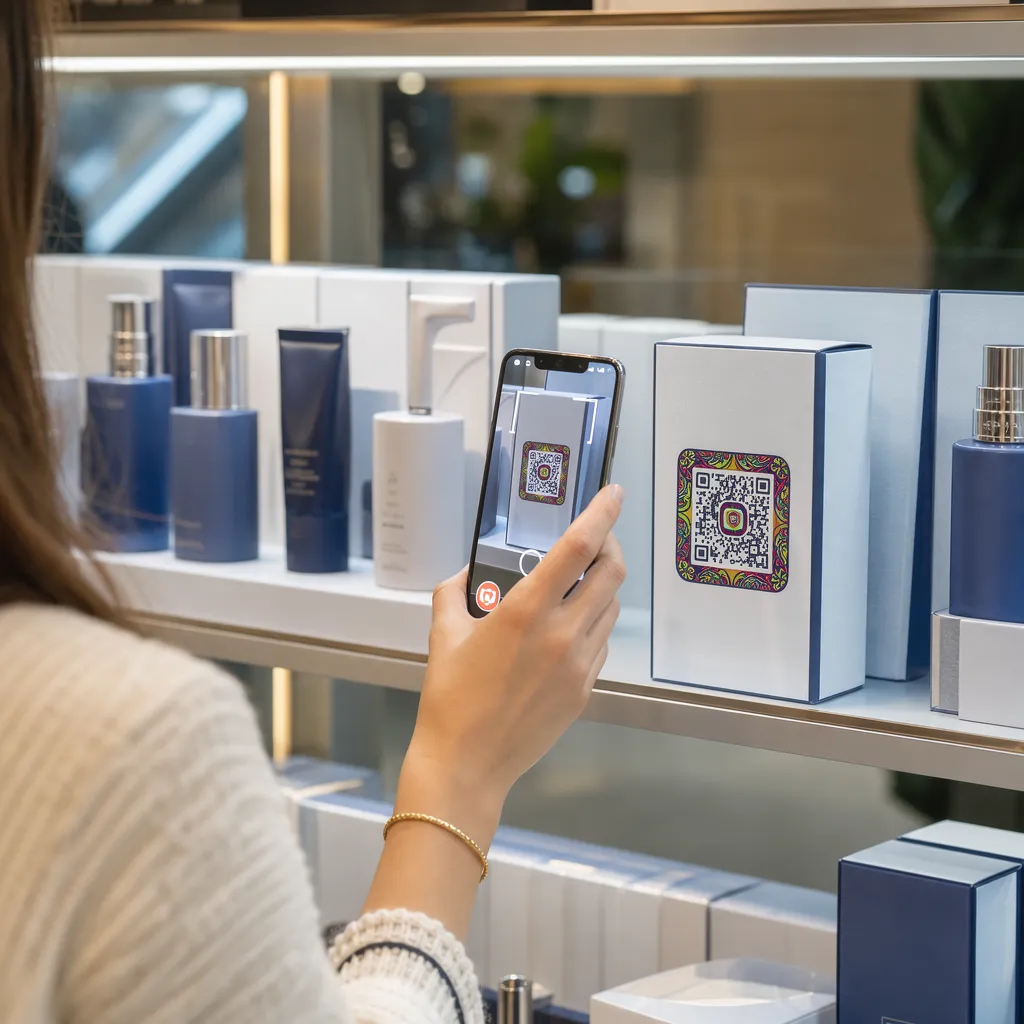
Интерактивните опаковки използват дигитални входни точки, за да свържат физически контейнери, кутии или опаковки на продукти с онлайн съдържание. Вместо да разчитат единствено на статичен печатен текст, марките могат да превърнат всяка опаковка в активен дигитален комуникационен канал.
Съвременните потребители очакват незабавна прозрачност и удобство. Независимо дали купувачите искат да проверят произхода, да гледат уроци за настройка на продукта или да се присъединят към програма за лоялност, физическите етикети рядко предоставят достатъчно място за изчерпателна информация. Добавянето на дигитални точки за контакт решава проблема с пространствените ограничения на физическите опаковки, като същевременно дава на маркетолозите проследим начин за измерване на взаимодействието с потребителите след покупката.
Стандартите за търговия на дребно също се развиват към 2D баркодове. Глобалните организации за индустриални стандарти се насочват към 2D кодове, които обработват както сканирането в търговските обекти, така и пълното взаимодействие с потребителите. QR кодове върху опаковки на продукти съобразява вашите физически продукти със съвременните изисквания за търговия на дребно, като същевременно установява директни дигитални връзки с вашата клиентска база.
5 начина да ангажирате клиентите с QR кодове за опаковки
Интерактивната опаковка работи най-добре, когато предоставя ясна стойност на клиента веднага след сканирането. Можете да използвате QR кодове върху опаковката на продукта, за да стимулирате ангажираността по пет практични начина:
- Демонстрирайте продукти с добавена реалност (AR): Позволете на клиентите да гледат 3D модели на продукти или интерактивни демонстрации директно на екраните на своите смартфони. Поставянето на AR QR код върху първичната опаковка позволява на купувачите да визуализират продуктите в домашната си среда или да видят вътрешните характеристики преди разопаковането.
- Предоставете рецепти, уроци и ръководства за потребителя: Свържете козметика, уреди или контейнери за храна с видео ръководства и подробни инструкции. Поставяне на QR кодове върху опаковки за храни може да насочва домашните готвачи към препоръки на готвачи и идеи за ястия, помагайки на потребителите да получат незабавна полза от покупката си.
- Споделяне на данни за прозрачност и съответствие на съставките: Дайте на купувачите, които са загрижени за здравето си, незабавен достъп до хранителни разбивки, записи за етични източници или разкриване на алергени. Дигиталните целеви страници ви позволяват да предоставите пълни подробности за съответствието, без да препълвате физическите етикети.
- Стимулирайте регистрациите в програми за лоялност и повторните покупки: Предлагайте незабавни отстъпки, абонаментни регистрации или бързи връзки за повторна поръчка. Включването на целеви дигитални оферти върху вторичните опаковки или кутиите за доставка насърчава купувачите да посетят отново вашия магазин, което помага да повиши ангажираността на клиентите и стойност на целия живот на клиента.
- Събирайте обратна връзка от клиенти в реално време: Насочвайте потребителите към кратки анкети за обратна връзка или платформи за рецензии веднага след разопаковането. Събирането на директни мнения от клиентите ви помага да идентифицирате проблеми с продукта рано и да изградите автентична обратна връзка от клиентите за вашата марка.
Ангажирайте клиентите си за електронна търговия още при разопаковане Искате да увеличите посещенията на магазина и повторните покупки директно от вашите кутии за доставка? Разгледайте как QR кодове за електронна търговия ще ви помогне да изградите автоматизирани кампании за лоялност и да увеличите продажбите.
Ключови насоки за дизайн и печат на кодове за опаковки
QR кодът на опаковката повишава ангажираността на клиентите само ако се сканира надеждно от първия опит. Печатът на кодове върху различни материали – като гофриран картон, прозрачна пластмаса или алуминий – изисква прецизни стандарти за проектиране, за да се предотвратят грешки при сканиране.
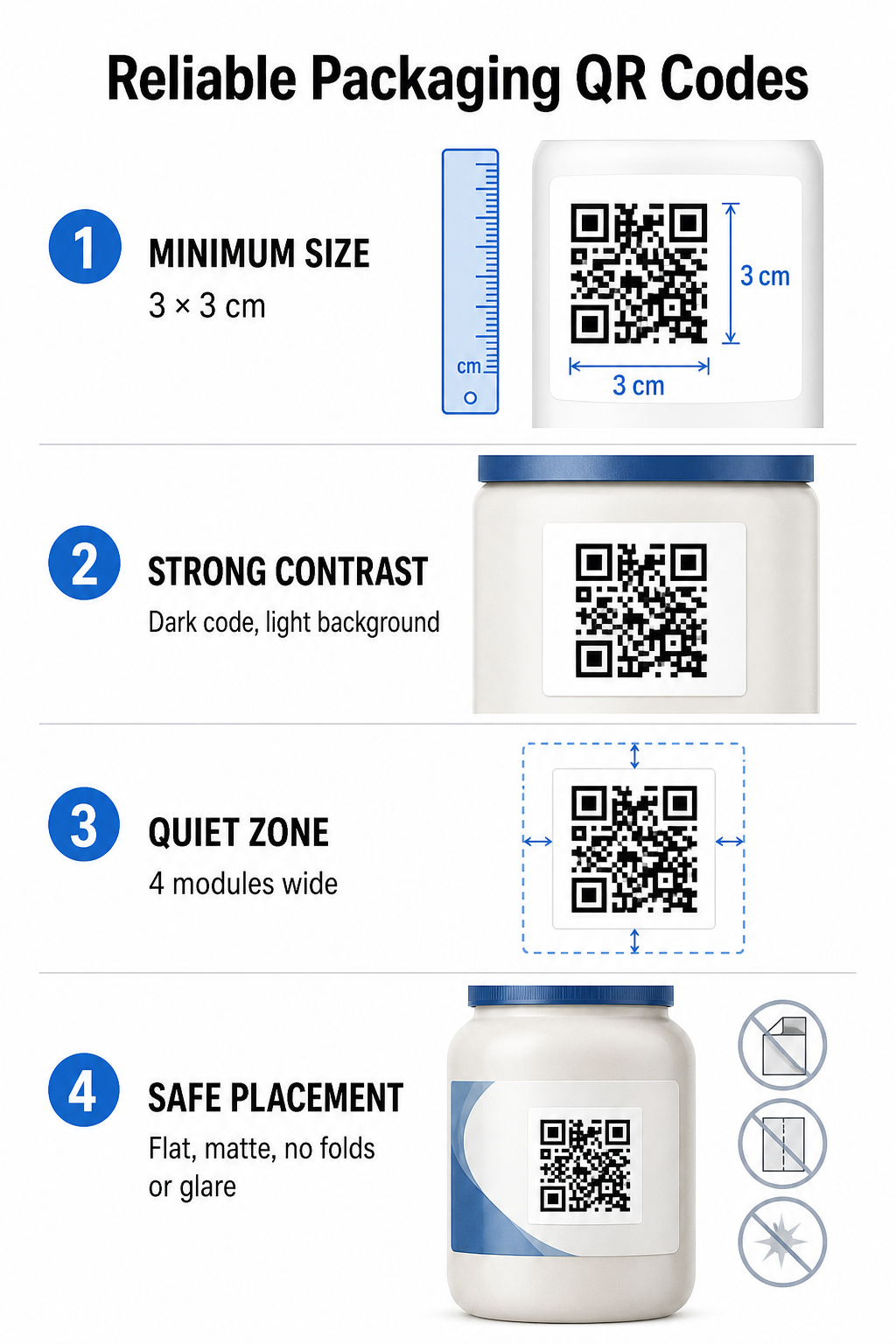
Съотношения на размер на печат и разстояние
За да гарантирате надеждна сканируемост, отпечатайте QR кодовете с минимален физически размер от 3 x 3 см (1,2 x 1,2 инча) върху потребителските опаковки. Ако кодът ще се сканира от разстояние, приложете съотношението разстояние-размер на сканиране 10:1: ширината на кода трябва да е равна на поне една десета от очакваното разстояние на сканиране. Например, код, предназначен за сканиране от 20 инча (50 см), трябва да е с размери поне 2 инча (5 см) на квадратен инч (5 см).
Цветов контраст и визуална яснота
Оптичните сензори на камерата откриват QR кодове, като идентифицират модулни шарки с висок контраст. Винаги използвайте тъмен шаблон на преден план (като черен или тъмносин), поставен на светъл фон (като плътно бяло или светли неутрални тонове). Избягвайте червени, оранжеви или пастелни цветове на преден план, защото сензорите с червен спектър трудно ги откриват. Поддържайте цветовете на шарките плътни и еднородни, като избягвате градиенти, сенки или натоварена фонова графика.
Граници на тихата зона
Поддържайте празен, неразхвърлян марж около цялата външна граница на кодовия шаблон, известен като тиха зона. Този марж трябва да е с размери поне четири пъти ширината на един QR модул. Препълването на QR кода с лога на марки, графични рамки или основен текст пречи на софтуера на мобилната камера да идентифицира къде започва и свършва кодовият шаблон.
Повърхност и разположение на материала
Физическото разположение зависи силно от структурата и материала на вашата опаковка:
- Първични контейнери (бутилки, кутии, буркани): Позиционирайте кодовете върху плоски повърхности, когато е възможно. Ако печатате върху извити контейнери, увеличете леко общия размер на кода, за да компенсирате визуалното изкривяване на ръбовете.
- Финал и размисъл: Избягвайте гланцови ламинати, отразяващи фолиа или прозрачни основи, които отразяват околното осветление в магазините. Изберете матови лакове или матови покрития, за да намалите отблясъците от светлината.
- Сгъвания и шевове: Пазете кодовете далеч от гънките на кутиите, перфорираните ленти за разкъсване, шевовете на опаковките и ръбовете на контейнерите, за да избегнете физическо разкъсване или деформация.
Преди да започнете големи производствени серии, прегледайте подробните Правила за четливост на QR кода и тествайте отпечатани физически пробни изображения, използвайки множество телефонни камери при различни настройки на осветлението.
Динамични срещу статични QR кодове за опаковки
Изборът на правилната структура на QR кода е критично стратегическо решение при проектирането на интерактивни опаковки.
| ФУНКЦИЯ | Статични QR кодове | Динамични QR кодове |
|---|---|---|
| Редактиране на съдържание | Фиксира се постоянно при създаването; не може да се променя след отпечатване. | Връзката към местоназначението може да се актуализира по всяко време в таблото за управление, без да се налага повторно отпечатване. |
| Анализи на сканиранията | Няма налични данни за проследяване или показатели за ефективност. | Проследява общия брой сканирания, уникалните посетители, времето за сканиране, местоположенията и типовете устройства. |
| Плътност на кодовите шаблони | Шаблонът става плътен и труден за сканиране при кодиране на дълги целеви URL адреси. | Използва кратък URL адрес за пренасочване, поддържайки шаблона на модула чист и лесен за сканиране. |
| Ефективност на разходите | Безплатно за генериране, но крие риск от скъпоструващо препечатване на опаковки, ако целевите URL адреси се променят. | Изисква платен абонамент, но елиминира разходите за препечатване на опаковки. |
Печатът на статични кодове в големи количества създава значителни оперативни рискове за марките. Ако URL адресът на промоционална страница се актуализира, сезонна кампания приключи или връзка прекъсне, статичните кодове за опаковки стават нефункционални, принуждавайки бизнеса ви да избира между скъпоструващо препечатване на опаковки или загуба на доверие от страна на клиентите.
Използване на Динамичен QR код генератор разделя физически отпечатания код от онлайн местоназначението му. Ако вашата целева връзка или оферта се промени, просто актуализирате целевия URL адрес в таблото си за управление, без да променяте физическото си изображение.
Динамичните кодове предоставят и подробен анализ на кампаниите. Можете да наблюдавате обема на сканиране, часовете с пикова активност, географските местоположения и типовете потребителски устройства, за да оцените как клиентите взаимодействат с вашата физическа опаковка. За да поддържате оптимална производителност, провеждайте одити на активните си динамични кодове на всеки 1 до 3 месеца, за да потвърдите, че всички целеви страници се зареждат бързо и показват активно съдържание.
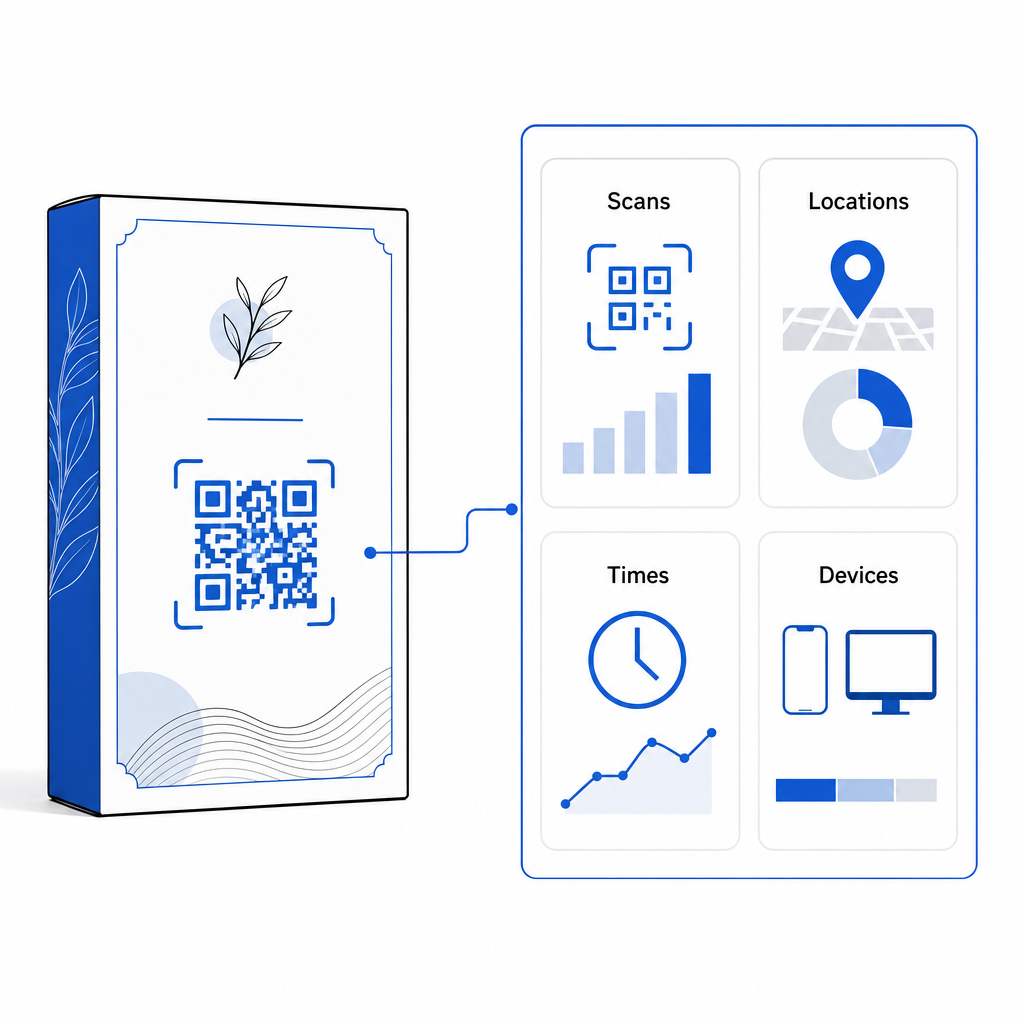
Управлявайте кампаниите си за опаковане от едно табло за управление Избягвайте скъпоструващите рискове от препечатване, като създавате редактируеми динамични кодове с анализи в реално време. Започнете да изграждате проследими опаковки с... Инструмент за динамичен QR код на Pageloot днес.
Как да внедрите интерактивни QR кодове върху опаковки
- Определете целта на кампанията: Определете конкретното взаимодействие с клиента, което искате да стимулирате, като например показване на видео урок, събиране на отзиви след покупка или предлагане на отстъпка за лоялност.
- Изберете генератор на динамични QR кодове: Настройте редактируеми URL адреси за пренасочване, за да поддържате пълен контрол върху целевото съдържание, като същевременно записвате показатели за сканиране в реално време.
- Персонализирайте в рамките на указанията на марката: Приложете висококонтрастни цветове на марката и вградете логото на вашата компания вътре 25% от кодовата област, като се гарантира, че критичните маркери за позициониране остават ясни.
- Включете убедителен призив за действие: Поставете ясен и ясен текст до кода, например “Сканирайте, за да гледате урока” или “Сканирайте за 20% отстъпка от следващата си поръчка”.”
- Тестване върху физически субстрати и устройства: Отпечатайте физически тестови мостри върху крайните опаковъчни материали и тествайте сканируемостта на iOS и Android устройства при различни условия на осветление.
- Следете и оптимизирайте анализите на кампаниите: Прегледайте данните за местоположението, устройството и времето на сканиране в таблото си за управление, за да усъвършенствате маркетинговите стратегии след покупката.
Интегрирането на QR кодове върху опаковките на продуктите превръща традиционните контейнери в динамични дигитални точки на контакт, които стимулират непрекъснатото ангажиране на клиентите. Чрез съчетаване на силен цветен контраст и ясни тихи зони с редактируеми динамични връзки, вие защитавате инвестицията си в печат, като същевременно улавяте ценни прозрения за аудиторията в реално време.
Готови ли сте да обновите опаковката си в интерактивно дигитално изживяване? Създайте проследими, напълно персонализируеми QR кодове за вашите продуктови опаковки още днес с... Генератор на динамични QR кодове на Pageloot.
Често задавани въпроси
Препоръчителният минимален размер на печат за QR кодове за опаковки е 3 x 3 см (1,2 x 1,2 инча). За извити повърхности или кодове, сканирани от по-голямо разстояние, следвайте съотношението разстояние-размер 10:1, за да осигурите надеждно сканиране.
Да, ако използвате динамични QR кодове. Динамичните кодове насочват трафика през редактируем кратък URL адрес, което ви позволява да актуализирате целеви уеб страници, видеоклипове или цифрови файлове по всяко време, без да е необходимо да препечатвате физическа опаковка.
Поставете QR кода върху равна, гладка повърхност, далеч от шевове на опаковката, гънки и силно отблясъци. Винаги поставяйте кода до ясен призив за действие, за да знаят купувачите какво съдържание да очакват при сканиране.