Vai jūsu uzņēmums izmanto QR kodus, nezinot, kuri no tiem ir tikuši bojāti? QR kodu pikšķerēšana – ko parasti sauc par “quishing” – pārvērš ikdienas ērtības par akreditācijas datu zādzības slazdu, un tradicionālie drošības filtri to bieži pilnībā nepamana. Šajā rokasgrāmatā ir aprakstīts, kā šie uzbrukumi darbojas, cik tie izmaksā uzņēmumiem un kādas konkrētas kontroles varat ieviest, lai tos apturētu.
Kā darbojas QR kodu pikšķerēšana
QR kodu pikšķerēšana izmanto fundamentālu vājumu: QR kodi nav cilvēkiem salasāmi. Ar tradicionālu URL apmācīta acs bieži vien var pamanīt viltotu domēnu vai aizdomīgu virkni. QR kods to visu slēpj. Kā skaidro Alekss Mošers, MobileIron globālais viceprezidents:
“QR kodi pēc būtības slēpj savu galamērķi. Tāpēc spēja mainīt QR kodu, lai tas norādītu uz alternatīvu resursu, netiekot atklātam, ir vienkārša un ļoti efektīva.”
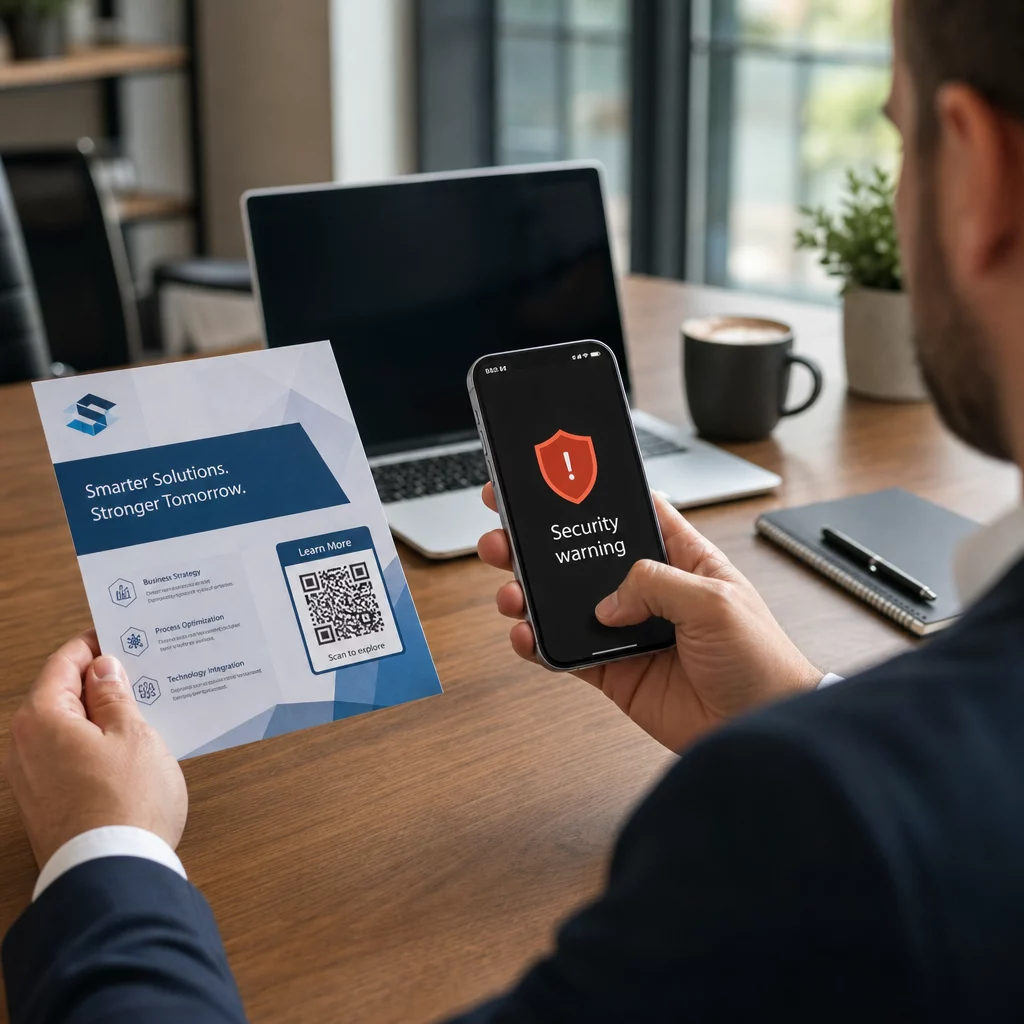
Uzbrucēji iegulda ļaunprātīgus URL QR kodos, kas novirza upurus uz viltotām pieteikšanās lapām, kas paredzētas akreditācijas datu iegūšanai, vai uz vietnēm, kas iedarbina ļaunprātīgas programmatūras lejupielādi. Problēmu sarežģī tas, ka daudzas e-pasta drošības sistēmas nevar atšifrēt QR kodu attēlus – tās redz attēlu, nevis saiti – tāpēc ļaunprātīgā slodze izslīd cauri filtriem, kas uztvertu vienkāršu pikšķerēšanas URL.
2023. gadā QR kodu pikšķerēšana veidoja 22% no visiem pikšķerēšanas uzbrukumiem. Viena liela mēroga "quishing" kampaņa dažu mēnešu laikā pieauga par 2400%, un korporatīvi mērķētas operācijas analīze atklāja, ka aptuveni 29% ļaunprātīgu e-pastu saturēja QR kodus.
Kur uzbrucēji izvieto ļaunprātīgus QR kodus
E-pasta un dokumentu uzbrukumi ir visizplatītākā piegādes metode. Uzbrucēji iegulda QR kodus PDF vai Word pielikumos, lai apietu e-pasta drošības filtrus. 2023. gadā 82% "quishing" uzbrukumu uzdevās par uzticamiem zīmoliem – Microsoft tika mērķēts 51% novēroto gadījumu, kam sekoja DocuSign ar 31% un Adobe ar 15%. Laikā no 2024. gada vidus līdz 2024. gada beigām pētnieki atklāja vairāk nekā 500 000 pikšķerēšanas e-pastu, kas saturēja PDF failos iegultus QR kodus.
Fiziska bojāšana ir vienlīdz bīstama. Uzbrucēji novieto viltotas QR kodu uzlīmes virs likumīgiem kodiem vietās ar lielu apmeklētību – restorānos, stāvvietu automātos, lidostās un tirdzniecības telpās. Sanfrancisko noziedznieki uz stāvvietu biļetēm izvietoja viltotus QR kodus, kas novirzīja lietotājus uz viltotu tranzīta lapu, kas paredzēta kredītkaršu datu zādzībai. Sociālās apdrošināšanas administrācija īpaši brīdina, ka likumīgi QR kodi uz oficiālām zīmēm parasti nav uzlīmes; kods, kas uzlikts kā uzlīme, jāuzskata par aizdomīgu.
Sociālās inženierijas ēsmas papildina ainu. Upuri tiek aicināti skenēt QR kodu, lai saņemtu atlaidi, pieslēgtos bezmaksas Wi-Fi vai aizpildītu aptauju. Vienā dokumentētā gadījumā Singapūrā sieviete skenēja kodu burbuļtējas veikalā, cerot saņemt lojalitātes balvu. Tā vietā viņas tālrunī tika lejupielādēta ļaunprātīga lietotne, un uzbrucēji iztukšoja 2000 ASV dolārus no viņas bankas konta.
Cik šie uzbrukumi izmaksā uzņēmumiem
Akreditācijas datu un datu zādzība
Gandrīz 90% "quishing" uzbrukumu ir īpaši izstrādāti, lai nozagtu pieteikšanās akreditācijas datus un sensitīvus datus. Uzbrucēji novirza upurus uz pārliecinošām Microsoft 365, SharePoint vai banku portālu replikām. Vadītāji tiek mērķēti nesamērīgi bieži, jo viņu akreditācijas dati atbloķē kritiskas sistēmas un priviliģētus datus.
Personīgās ierīces to pasliktina. Kad darbinieki skenē QR kodus tālruņos, kas nav reģistrēti uzņēmuma pārvaldībā, IT komandām nav redzamības par to, kas notika vai kam tika piekļūts.
Finansiālie zaudējumi
Vidējās datu pārkāpuma izmaksas 2023. gadā sasniedza $4,45 miljonus, savukārt biznesa e-pasta kompromitācijas (BEC) krāpniecības vidēji izmaksāja $4,89 miljonus – pirms regulatīvo sodu un juridisko izdevumu iekļaušanas. Tiešie pikšķerēšanas zaudējumi pieauga par 76% salīdzinājumā ar iepriekšējo gadu. Atsevišķi incidenti ilustrē mērogu: Lielbritānijas dzelzceļa stacijas krāpniecība atstāja vienu upuri ar £13 000 lielu parādu; Kalgari ģimene zaudēja $10 000 Facebook Marketplace QR koda krāpniecībā.
Mazie uzņēmumi absorbē nesamērīgi lielu daļu zaudējumu. Lielbritānijā mazie uzņēmumi ikdienā saskaras ar aptuveni 65 000 kiberuzbrukumu, un vidējās veiksmīga uzbrukuma atrisināšanas izmaksas ir aptuveni $33 700.
Operacionālie traucējumi un reputācijas bojājumi
Nozagti akreditācijas dati bieži kalpo kā ieejas punkts izspiedējvīrusa izvietošanai. 2023. gadā organizācijas vidēji iztērēja $1,82 miljonus, atgūstoties no izspiedējvīrusa incidentiem. Būvniecības un inženierijas uzņēmumiem QR koda uzbrukuma risks ir 19,2 reizes augstāks nekā vidēji; profesionālo pakalpojumu uzņēmumiem risks ir 18,5 reizes augstāks.
Papildus darbības dīkstāvei uzņēmumi saskaras ar klientu aizplūšanu, augstākām kiberdrošības apdrošināšanas prēmijām un regulatīvo kontroli, ja tiek atklāti klientu dati. Uzticības atjaunošana pēc pārkāpuma prasa daudz ilgāku laiku nekā paša tehniskā incidenta atrisināšana.
Kā novērst QR koda pikšķerēšanu: Daudzslāņu pieeja
Neviena atsevišķa kontrole neizslēdz "quishing" (QR koda pikšķerēšanu). Konsekventa drošības pētnieku, federālo aģentūru un uzņēmumu drošības komandu rekomendācija ir daudzslāņu aizsardzība, kas apvieno e-pasta filtrēšanu, identitātes kontroli, galapunktu aizsardzību, darbinieku apmācību un ziņošanas darbplūsmas.
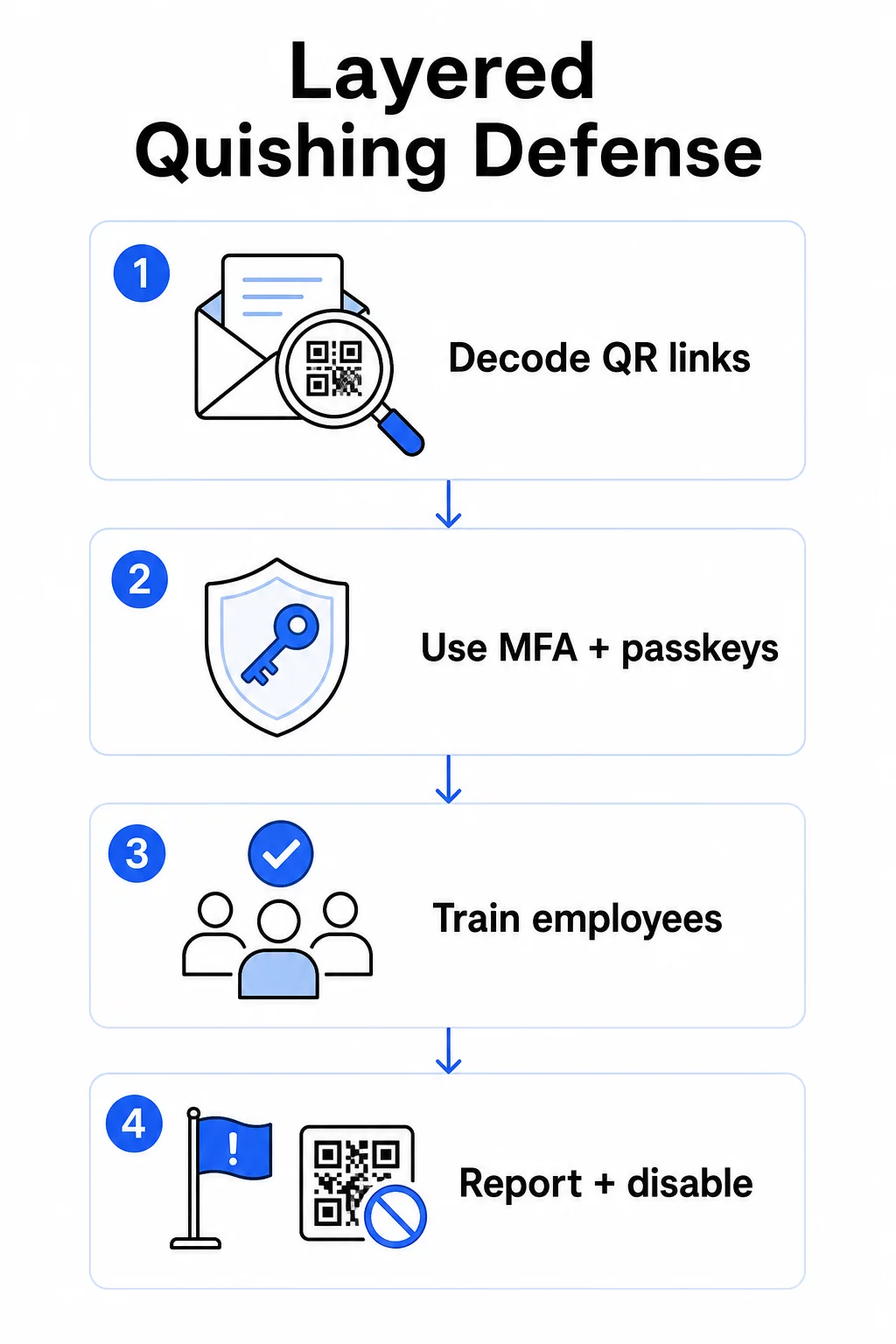
E-pasta drošības kontroles
Konfigurējiet e-pasta drošības sistēmas ar iespējām, kas pārsniedz standarta saišu skenēšanu. Efektīvas kontroles ietver:
- OCR spējīga filtrēšana kas atšifrē QR koda attēlus e-pastos un analizē iegulto URL, salīdzinot ar draudu informāciju
- Pretpikšķerēšanas politikas pielāgotas, lai atzīmētu uz attēliem balstītas datu kravas, īpaši QR kodus, kas iegulti PDF vai Office dokumentu pielikumos
- Stingri surogātpasta vārtejas noteikumi, kas pēc noklusējuma uzskata nevēlamus QR kodus e-pastā par augsta riska objektiem
Konkrēti Microsoft 365 vidēs, Microsoft Defender for Office 365 ietver QR koda attēlu dekodēšanu, lai atklātu iegultās URL adreses reputācijas pārbaudei un drošo saišu (Safe Links) novērtēšanai.
Identitātes un piekļuves kontroles
Nozagtas akreditācijas datus ir noderīgi tikai tad, ja tos var izmantot. Daudzslāņu identitātes kontroles ievērojami samazina šo risku:
- Daudzfaktoru autentifikācija (MFA) visos kontos, ar stingrākām autentifikācijas prasībām augstas privilēģijas lietotājiem un vadītājiem
- Pret pikšķerēšanu izturīgas MFA metodes piemēram, aparatūras drošības atslēgas vai piekļuves atslēgas (passkeys), kas ir saistītas ar likumīgo domēnu un ko nevar pārtvert krāpnieciska vietne
- Mantoto autentifikācijas protokolu bloķēšana, kas neatbalsta MFA, tādējādi novēršot bieži izmantotu apiet ceļu
- Nosacītas piekļuves politikas, kas atzīmē vai bloķē pieteikšanās mēģinājumus no nepārvaldītām ierīcēm
Lai iegūtu plašāku kontekstu par to, kā QR kodi krustojas ar autentifikācijas darbplūsmām, skatiet kā QR kodi vienkāršo daudzfaktoru autentifikāciju.
Gala punkta un ierīces aizsardzība
Pārvaldītas ierīces ar atjauninātu gala punkta drošību nodrošina kritisku drošības tīklu:
- Ieviest gala punkta noteikšanas un reaģēšanas (EDR) risinājumus visās pārvaldītajās ierīcēs
- Iespējot pārlūkprogrammas reputācijas pārbaudes (piemēram, Microsoft SmartScreen), kas brīdina lietotājus pirms tie sasniedz zināmu pikšķerēšanas domēnu
- Piemērot mobilo ierīču pārvaldības (MDM) politikas, kas nodrošina drošības pamatlīmeņus tālruņiem, kurus izmanto QR kodu skenēšanai darba vajadzībām
- Ierobežot lejupielādes no nepārvaldītām ierīcēm korporatīvajos tīklos
FTC iesaka uzturēt ierīču operētājsistēmas atjauninātas un izmantot spēcīgas, unikālas paroles visos kontos kā pamata higiēnu, kas samazina jebkura veiksmīga pikšķerēšanas mēģinājuma ietekmi.
Darbinieku apmācība un informētība
Jūsu darbinieki ir vis tiešākā aizsardzības līnija pret "quishing", un apmācībai jābūt skaidrai – vispārēja informētība par pikšķerēšanu automātiski nepāriet uz QR kodu draudiem.
Efektīvas apmācību programmas aptver:
- Kāpēc QR kodi ir bīstami: galamērķis ir paslēpts līdz skenēšanai
- Brīdinājuma zīmes e-pastos, kas satur QR kodus: steidzamība, vispārīgi sveicieni, nevēlami ziņojumi no zināmiem zīmoliem un pieteikšanās akreditācijas datu pieprasījumi
- Fiziskas manipulācijas pazīmes: kodi, kas uzlīmēti kā uzlīmes virs drukātiem materiāliem, kodi uz neoficiālām izkārtnēm
- Verifikācijas paradumi: ja QR kods tiek saņemts negaidītā e-pastā, sazinieties ar sūtītāju, izmantojot zināmu tālruņa numuru vai oficiālo vietni, nevis skenējiet kodu
- URL pārbaude: pēc skenēšanas pārbaudiet URL pārlūkprogrammas joslā pirms jebkādu akreditācijas datu ievadīšanas – meklējiet pareizrakstības kļūdas, samainītus burtus vai nepazīstamus domēnus
ASV Veselības un cilvēkresursu departaments iesaka apmācīt galalietotājus saglabāt veselīgu skepses pakāpi un atpazīt indikatorus, piemēram, aizdomīgas sūtītāju adreses, viltotas saites un nepareizu gramatiku – tas viss parādās QR kodu pikšķerēšanas kampaņās tāpat kā teksta kampaņās.
Veiciet simulētus "quishing" vingrinājumus kopā ar standarta pikšķerēšanas simulācijām. Mērķējiet uz augsta riska grupām – vadītājiem, finanšu komandām un ikvienu ar administratīvām privilēģijām – ar biežākiem un reālistiskākiem scenārijiem.
Lai iegūtu plašāku skatījumu uz QR kodu drošības labāko praksi kiberdrošībā, tostarp šifrēšanu un autentifikācijas savienošanu pārī, šis ceļvedis padziļināti aptver tehniskās kontroles.
Ziņošana un incidentu reaģēšana
Darbiniekiem ir nepieciešams skaidrs, viegli pieejams veids, kā ziņot par aizdomīgiem QR kodiem – gan e-pastā, gan fiziskās telpās. Poga "ziņot par pikšķerēšanu" e-pasta klientos novērš šķēršļus digitālajiem ziņojumiem. Fiziskiem kodiem sniedziet norādījumus, kā atzīmēt un fotografēt aizdomīgas uzlīmes vai bojātus materiālus.
Jūsu incidentu reaģēšanas plānam ir īpaši jāpievēršas pikšķerēšanas ar QR kodiem (quishing) scenārijiem ar definētiem soļiem:
- Izolējiet jebkuru kontu, kas, iespējams, ir iesniedzis akreditācijas datus, izmantojot ļaunprātīgu QR kodu
- Nekavējoties atsaukite aktīvās sesijas un atiestatiet paroles
- Pārbaudiet, vai nav notikusi neatļauta piekļuve vai datu pārvietošana laika posmā starp skenēšanu un reakciju
- Paziņojiet skartajām personām saskaņā ar jūsu datu pārkāpumu paziņošanas politiku
- Veiciet pēcinicidenta pārskatu, lai identificētu, kā QR kods apieta esošās kontroles
Veiciet iespiešanās testēšanu, kas ietver pikšķerēšanas ar QR kodiem (quishing) scenārijus, lai atrastu nepilnības, pirms to izdara uzbrucēji.
Jūsu uzņēmuma izvietotie QR kodi: savu kodu nodrošināšana
Pikšķerēšanas ar QR kodiem (quishing) novēršana nozīmē arī nodrošināt, ka jūsu uzņēmuma publicētos QR kodus nevar izmantot kā ieroci pret jūsu klientiem vai darbiniekiem.
Izmantojiet dinamiskos QR kodus statisko vietā. Statiskie kodi pastāvīgi kodē galamērķa URL. Ja šis galamērķis tiek apdraudēts, kods kļūst par saistību, ko nevarat novērst bez atkārtotas drukāšanas. Dinamiskie QR kodi norādiet uz īsu novirzīšanas URL, ko kontrolējat – jūs varat atjaunināt galamērķi, novirzīt uz jaunu lapu vai pilnībā atspējot kodu no pārvaldības paneļa, nepieskaroties drukātajam materiālam.
Kontrolējiet savus publicētos QR kodus Ja jums ir aizdomas, ka kāds no jūsu izvietotajiem kodiem ir ticis bojāts vai norāda uz nedrošu vietu, varat to nekavējoties atjaunināt vai atspējot. Izmantojiet Dinamisks QR kodu ģenerators lai pārvaldītu visus savus kodus no centralizēta paneļa ar reāllaika skenēšanas analīzi.
Pielietojiet konsekventu zīmolu saviem kodiem. Septiņdesmit viens procents cilvēku nevar droši atšķirt viltotu QR kodu no likumīga. Zīmoloti QR kodi – ar jūsu logotipu, uzņēmuma krāsām un pielāgotu domēnu galamērķa URL – sniedz lietotājiem vizuālu signālu, ka kods ir autentisks. Vispārīgi melnbalti QR kodi ar neskaidriem īsajiem URL nesniedz šādu pārliecību.
Pārraugiet skenēšanas analītiku, lai atklātu anomālijas. Dinamiskie QR kodi vāc skenēšanas datus, tostarp laika zīmogus, ierīču tipus un ģeogrāfiskās atrašanās vietas. Pēkšņs skenēšanas pieaugums no negaidītiem reģioniem vai skenēšanas aktivitāte ārpus parastā darba laika var liecināt, ka kāds no jūsu kodiem ir ļaunprātīgi kopēts un izplatīts. Pageloot analītikas panelis parāda šos modeļus, lai jūs varētu ātri izmeklēt un reaģēt.
Lai detalizēti aplūkotu, kādus skenēšanas datus vāc jūsu kodi un kā tos atbildīgi interpretēt, skatiet izpratne par to, kādus datus izseko jūsu dinamiskie QR kodi.
Veiciet regulāras fiziskas revīzijas. Attiecībā uz visiem QR kodiem, kas tiek rādīti publiskās vai daļēji publiskās vietās – restorānu galdiem, pasākumu izkārtnēm, transportlīdzekļu displejiem vai veikalu skatlogiem – regulāri fiziski pārbaudiet kodus. Meklējiet uzlīmes, kas uzlīmētas virs oriģinālā koda, un pārbaudiet katra koda galamērķi, pirms ar to saskaras klienti.
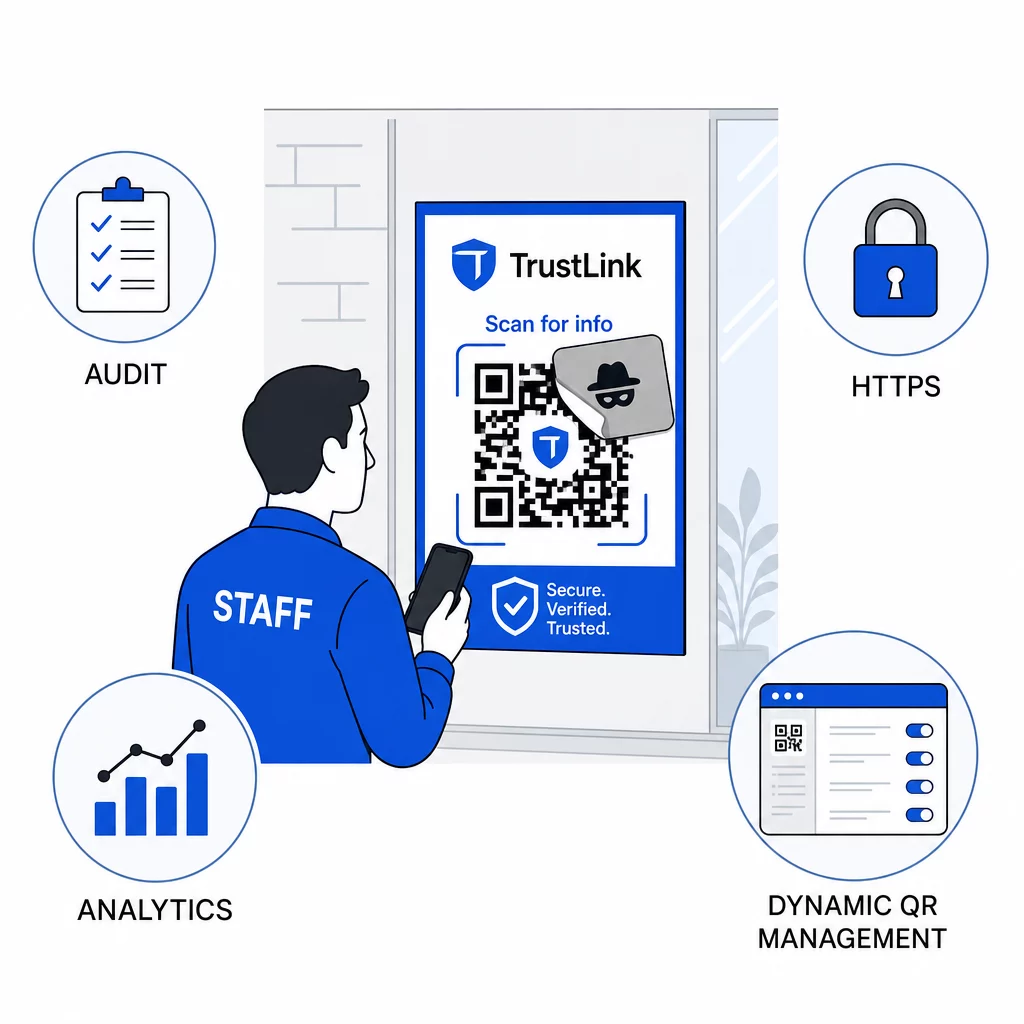
Izmantojiet tikai HTTPS galamērķus. Katram URL, uz kuru ved jūsu QR kodi, jāizmanto HTTPS. Lietotāju nosūtīšana uz nešifrētu HTTP galamērķi mazina uzticību un pakļauj datus tranzītā.
Lai iegūtu papildu norādījumus par QR kodu privātuma riskiem un to, kā no tiem izvairīties, tostarp par to, kā līdzsvarot analītiku ar lietotāju privātumu, šis resurss aptver datu apsvērumus, ko uzņēmumi bieži vien aizmirst.
Detekcijas rīku novērtēšana
Darbinieku apmācība un platformas kontroles novērš ievērojamu riska daļu, taču īpaši detekcijas rīki pievieno vēl vienu slāni – īpaši organizācijām ar lielu e-pasta apjomu vai sarežģītām QR kodu izvietošanām. Ja jūs vērtējat iespējas, rīki, kas paredzēti QR kodu pikšķerēšanas atklāšanai svārstās no uzņēmuma uzvedības analītikas platformām līdz e-pasta vārtejas papildinājumiem un mobilajām skenēšanas lietotnēm ar iebūvētām reputācijas pārbaudēm.
Pareizā kombinācija ir atkarīga no jūsu esošās drošības sistēmas, saņemto un izvietoto QR kodu apjoma, kā arī no tā, vai fiziska manipulācija ir nozīmīga problēma jūsu atrašanās vietās. Pikšķerēšana ar QR kodiem nav hipotētisks drauds. Tā veido ievērojamu daļu no reālās pikšķerēšanas aktivitātes, apiet lielākās daļas organizāciju jau ieviestās kontroles un nesamērīgi mērķē uz uzņēmumiem un lietotājiem, kas vismazāk ir aprīkoti, lai to atpazītu. Šīs plaisas novēršana prasa apzinātu rīcību e-pasta drošības, identitātes kontroles, darbinieku apmācības un pašu publicēto QR kodu jomā.
Sāciet ar kontrolēm, ko varat ieviest nekavējoties – MFA, darbinieku informētību un publicēto kodu pārslēgšanu uz dinamisku pārvaldību – un pēc tam veidojiet daudzslāņu aizsardzību, kas padara pikšķerēšanas uzbrukumus ar QR kodiem konsekventi neveiksmīgus pret jūsu organizāciju.
Biežāk uzdotie jautājumi
Parastā pikšķerēšana parasti izmanto redzamas URL adreses e-pasta tekstā vai hipersaitēs, kuras apmācīts lietotājs var pārbaudīt pirms noklikšķināšanas. QR koda pikšķerēšana pilnībā slēpj galamērķi – ļaunprātīgā URL adrese ir kodēta attēlā, neredzama līdz skenēšanai. Tas arī apgrūtina e-pasta drošības filtru noteikšanu, jo tie redz attēlu, nevis saiti. Rezultātā QR koda pikšķerēšana apiet daudzas kontroles, kas efektīvi uztver uz tekstu balstītu pikšķerēšanu.
Vispirms koncentrējieties uz vislielākās ietekmes kontrolēm: iespējojiet daudzfaktoru autentifikāciju visos kontos, apmāciet darbiniekus uzskatīt negaidītus QR kodus par aizdomīgiem un pārbaudīt, izmantojot neatkarīgus kanālus, un nomainiet visus publicētos QR kodus no statiskiem uz dinamiskiem, lai tos varētu atjaunināt vai atspējot, ja tiek konstatēta problēma. Šie soļi maksā maz un novērš visbiežāk sastopamos uzbrukumu ceļus. Izmantojiet QR kodu skeneri ar URL priekšskatījuma iespēju pirms nezināmu kodu skenēšanas un izveidojiet skaidru procesu darbiniekiem, lai ziņotu par aizdomīgiem kodiem IT nodaļai.
Statiskie QR kodi pastāvīgi kodē galamērķa URL. Ja šis URL tiek kompromitēts – vai ja uzbrucējs nokopē jūsu kodu un izplata to, norādot uz ļaunprātīgu vietni – jums nav iespējas labot oriģinālo drukāto kodu bez visa pārdrukāšanas. Dinamiskie QR kodi novirza caur īsu novirzīšanas URL, ko jūs kontrolējat centralizēti. Jūs varat mainīt galamērķi, pievienot paroles aizsardzību, iestatīt derīguma termiņus un uzraudzīt skenēšanas aktivitāti reāllaikā. Ja kaut kas izskatās nepareizi, jūs varat nekavējoties atspējot kodu. Šī elastības un redzamības kombinācija padara dinamiskos kodus ievērojami drošākus jebkuram QR kodam, ko izmanto publiskās vai pastāvīgās uzņēmējdarbības kontekstos.