
Việc bệnh nhân làm thủ tục chậm và bỏ lỡ các cuộc hẹn tái khám có đang tạo ra nút thắt cổ chai trong phòng khám mắt của bạn không? Sự chậm trễ hành chính làm bệnh nhân thất vọng và làm nhân viên lễ tân sao nhãng việc cung cấp dịch vụ chăm sóc thị lực trực tiếp. Việc đặt các mã QR có thể quét được trên bàn lễ tân, phòng trưng bày quang học và các tờ hướng dẫn sau chăm sóc giúp bệnh nhân kết nối tức thì với các dịch vụ kỹ thuật số.
Thủ tục đăng ký và biểu mẫu tiếp nhận bệnh nhân không tiếp xúc
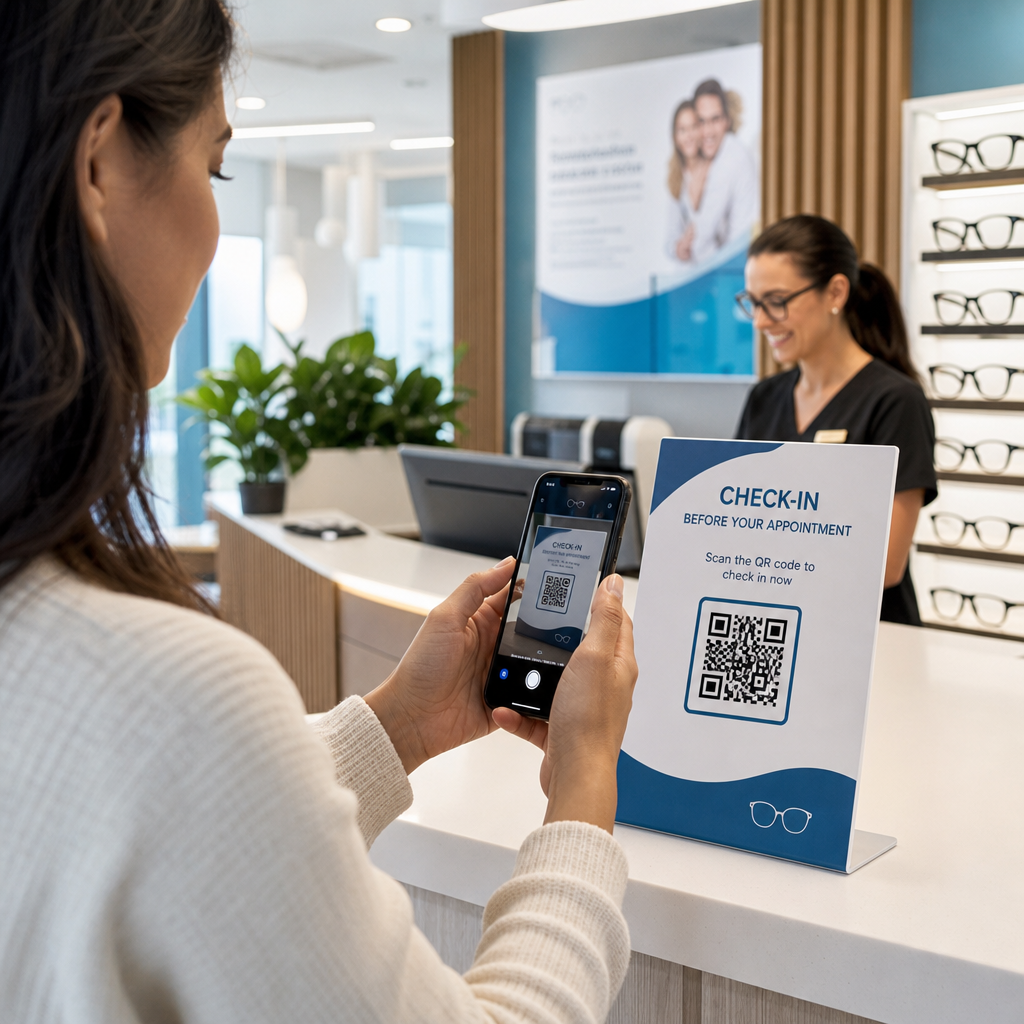
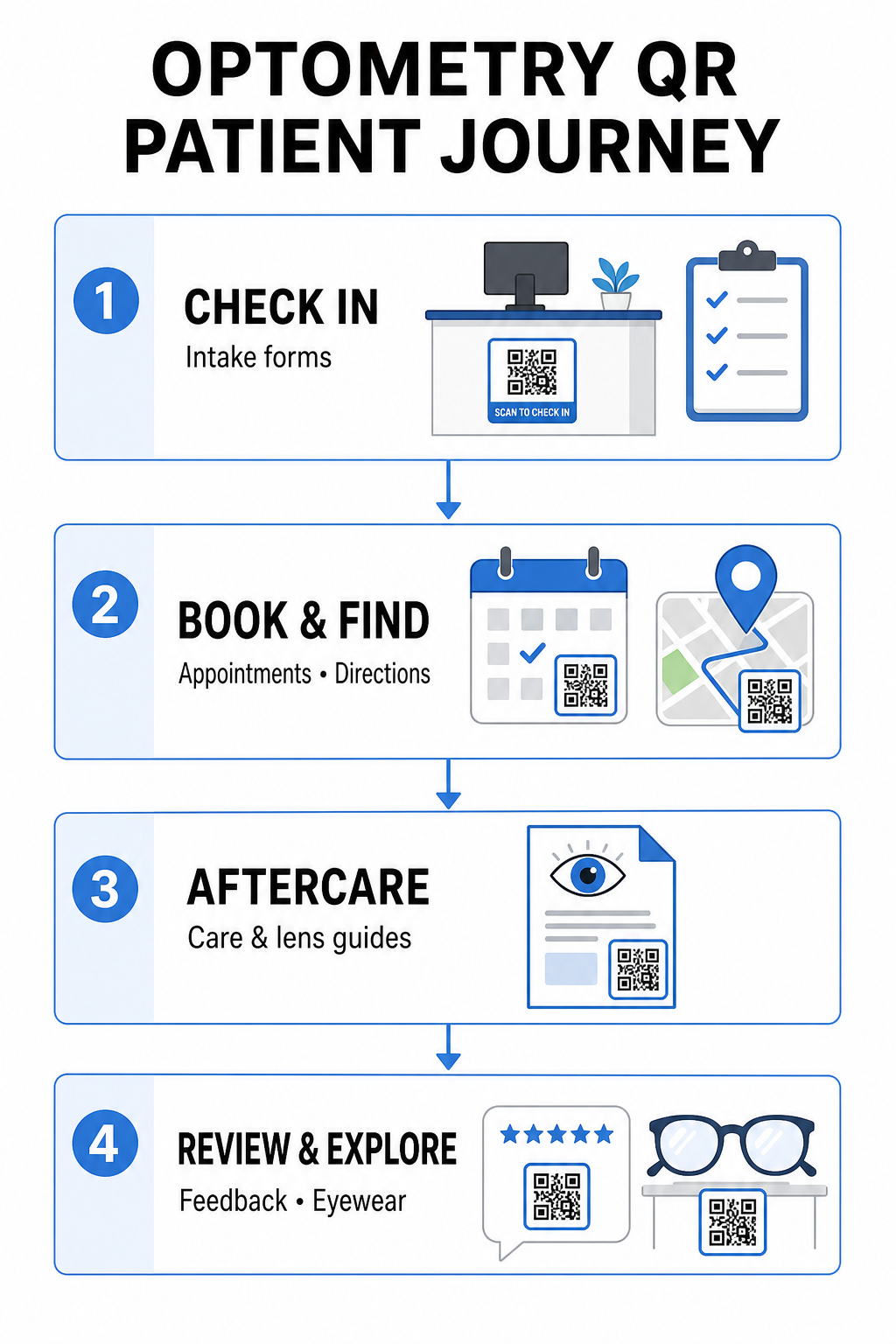
Các bộ hồ sơ đăng ký bằng giấy yêu cầu nhập dữ liệu thủ công, tạo ra sự lộn xộn vật lý trong khu vực chờ và làm tăng thời gian chờ tổng thể. Việc hiển thị mã QR check-in tại quầy lễ tân hoặc lối vào cho phép bệnh nhân đến hoàn thành các biểu mẫu tiếp nhận, cập nhật lịch sử bệnh án và ký các tài liệu chấp thuận trực tiếp trên thiết bị di động của họ.
Sử dụng một Tạo mã QR cho Google Form, phòng khám của bạn có thể chuyển đổi các bảng câu hỏi sức khỏe kỹ thuật số thành các điểm chạm quét đơn giản. Bệnh nhân đến quét mã, gửi thông tin của họ và thông báo cho đội ngũ hành chính của bạn mà không cần chờ đợi một bảng kẹp giấy vật lý. Tương tự như các quy trình làm việc kỹ thuật số được sử dụng trong phòng khám nha khoa, việc tiếp nhận tự động giảm thiểu lỗi sao chép và tăng tốc quá trình xử lý tại quầy lễ tân.
Hợp lý hóa quy trình tiếp nhận tại quầy lễ tân của bạn Bạn muốn loại bỏ các bộ hồ sơ đăng ký bằng giấy và giảm thời gian chờ của bệnh nhân? Hãy sử dụng Tạo mã QR cho Google Form để tạo các điểm chạm đăng ký không tiếp xúc cho khu vực lễ tân của bạn ngay hôm nay.
Đơn giản hóa việc đặt lịch hẹn và điều hướng vị trí
Việc quản lý các cuộc khám mắt định kỳ, lắp kính áp tròng và tư vấn tái khám đòi hỏi một quy trình lên lịch hẹn không ma sát. Việc đặt mã QR đặt lịch hẹn trên thẻ nhắc hẹn, thư nhắc nhở và biển hiệu cửa sổ phòng khám giúp bệnh nhân mở cổng đặt lịch trực tuyến của bạn trong vài giây.
Bằng cách chuyển đổi URL đặt lịch của bạn thành một mẫu có thể quét được bằng một trình tạo mã QR liên kết, bạn cung cấp cho bệnh nhân quay lại một con đường tức thì để đặt lịch hẹn tiếp theo của họ. Đối với các phòng khám mắt đa địa điểm hoặc các phòng khám nằm trong các khu phức hợp y tế lớn hơn, hướng dẫn vị trí trực tiếp cũng quan trọng không kém. Việc tích hợp một mã được tạo bởi một Tạo mã QR địa chỉ Google Map lên các bưu thiếp nhắc nhở đảm bảo bệnh nhân có thể khởi động hướng dẫn chỉ đường từng chặng trực tiếp trên điện thoại thông minh của họ.
Cung cấp Hướng dẫn Chăm sóc Sau Khám Mắt và Hướng dẫn Sử dụng Kính áp tròng
Hướng dẫn rõ ràng sau điều trị giúp giảm các cuộc gọi khẩn cấp và hỗ trợ bệnh nhân phục hồi đúng cách sau các thủ thuật chuyên biệt hoặc lần lắp kính áp tròng đầu tiên. Bệnh nhân thường làm thất lạc các tờ rơi bằng giấy hướng dẫn bảo quản gọng kính, các biện pháp phòng ngừa sau giãn đồng tử hoặc hướng dẫn vệ sinh kính áp tròng.
Bạn có thể mã hóa các hướng dẫn kỹ thuật số, video hướng dẫn và phiếu chăm sóc thành các định dạng có thể quét được bằng cách sử dụng một Chuyển PDF sang QR. chia sẻ dữ liệu sức khỏe an toàn bằng mã QR để bảo vệ quyền riêng tư của bệnh nhân trong quá trình chuyển giao thông tin.
Tiếp thị Phòng khám, Bán hàng Quang học và Đánh giá của Bệnh nhân
Mã QR kết nối cửa hàng kính vật lý của bạn với các kênh tiếp thị kỹ thuật số, thúc đẩy sự tương tác của bệnh nhân và củng cố danh tiếng trực tuyến của bạn.
- Hiển thị chi tiết gọng kính: Đặt mã có thể quét được bên cạnh các dòng gọng kính thiết kế hoặc màn hình trưng bày tròng kính chuyên dụng để bệnh nhân có thể xem các tùy chọn màu sắc, nâng cấp tròng kính hoặc câu chuyện thương hiệu khi đang duyệt xem.
- Chia sẻ chi tiết liên hệ của bác sĩ: In mã có thể quét được từ một Tạo mã QR vCard trên danh thiếp của bác sĩ để cho phép bệnh nhân lưu trực tiếp chi tiết liên hệ phòng khám vào danh bạ điện thoại di động của họ.
- Thu thập phản hồi của bệnh nhân: Khuyến khích bệnh nhân hài lòng chia sẻ trải nghiệm của họ trước khi rời phòng khám. Sử dụng một Tạo mã QR đánh giá Google Map tại quầy thanh toán sẽ hướng bệnh nhân trực tiếp đến hồ sơ đánh giá của bạn, đơn giản hóa vòng lặp phản hồi như một phần của một chiến lược rộng lớn hơn mã QR phản hồi của khách hàng chiến lược.
Mã QR Tĩnh so với Mã QR Động dành cho Phòng khám Mắt
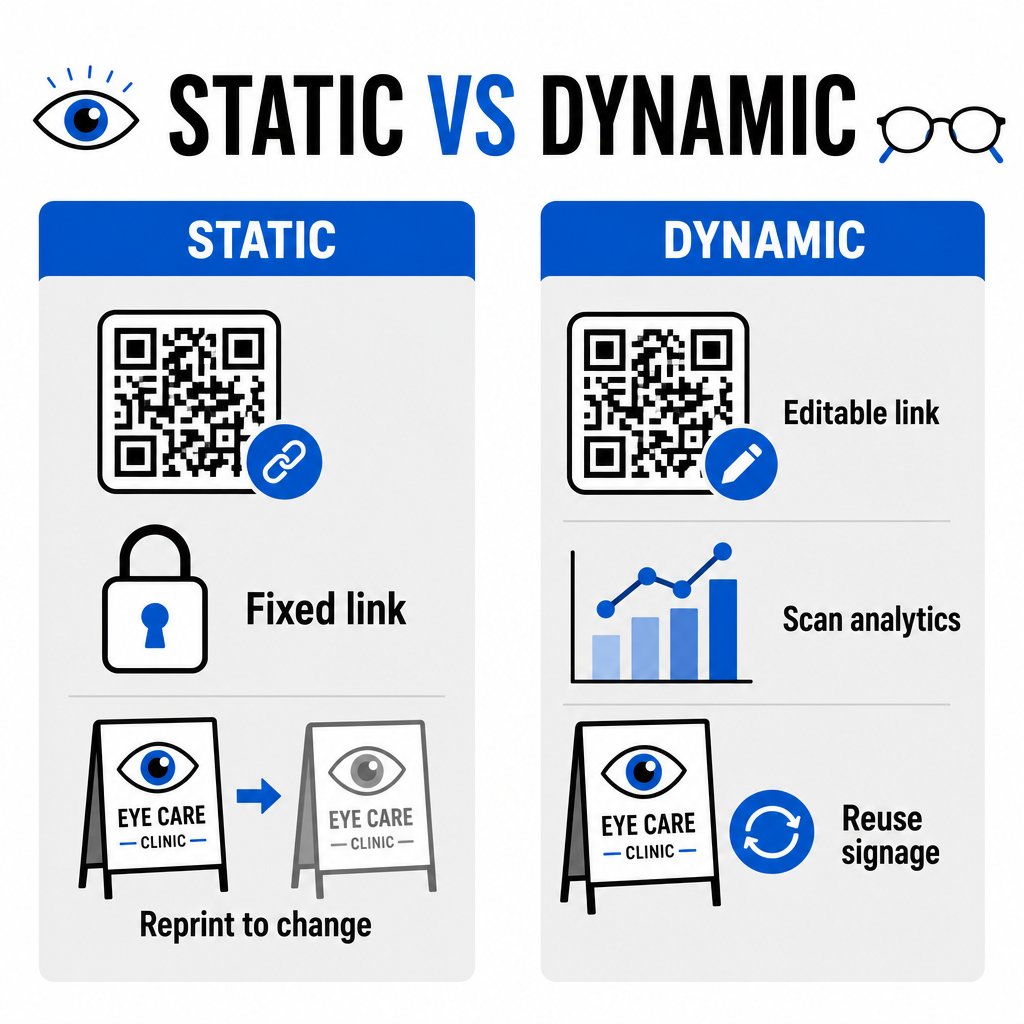
Việc lựa chọn giữa định dạng tĩnh và động phụ thuộc vào việc nội dung đích của bạn có cần cập nhật hay đo lường hiệu suất theo thời gian hay không.
| TÍNH NĂNG | Mã QR tĩnh | Mã QR động |
|---|---|---|
| URL đích | Cố định vĩnh viễn khi tạo | Có thể chỉnh sửa hoàn toàn bất cứ lúc nào mà không cần in lại |
| Phân tích lượt quét | Không khả dụng | Theo dõi thời gian thực về số lượng lượt quét, vị trí và thiết bị |
| Các trường hợp sử dụng chính | Wi-Fi vĩnh viễn của phòng khám, chỉ dẫn cố định | Đặt lịch trực tuyến, khuyến mãi theo mùa, biểu mẫu tiếp nhận bệnh nhân |
| Độ bền in ấn | Yêu cầu in lại nếu điểm đến thay đổi | Tái sử dụng liên tục biển báo vật lý đã in |
Đối với các chiến dịch phòng khám đang hoạt động và lên lịch hẹn, mã động cung cấp thông tin chi tiết vận hành thiết yếu. Việc triển khai theo dõi mã QR cho phép các quản lý phòng khám phân tích thời gian quét cao điểm và đánh giá vị trí đặt vật lý nào mang lại mức độ tương tác cao nhất từ bệnh nhân.
Tiêu chuẩn triển khai cho in ấn và quyền riêng tư của bệnh nhân
Để đảm bảo mọi bệnh nhân đều có trải nghiệm đáng tin cậy và dễ tiếp cận, hãy tuân thủ các tiêu chuẩn kỹ thuật sau khi triển khai mã có thể quét được trong toàn bộ phòng khám của bạn:
- Duy trì kích thước in: In mã ở kích thước tối thiểu là 2 × 2 cm (0.8 × 0.8 in) cho các tài liệu tầm gần như danh thiếp hoặc phiếu hướng dẫn sau chăm sóc, dành kích thước lớn hơn cho biển hiệu treo tường hoặc trưng bày cửa sổ.
- Đảm bảo độ tương phản màu sắc: Duy trì độ tương phản hình ảnh mạnh mẽ bằng cách đặt các mô-đun QR tối màu trên nền sáng với tỷ lệ tương phản ít nhất là 4:1 , tránh các hoa văn phức tạp hoặc bề mặt có kết cấu.
- Giữ vùng yên tĩnh: Để lại một lề rõ ràng xung quanh cả bốn cạnh của mã ít nhất bằng bốn mô-đun (các khối vuông nhỏ trong lưới) để ngăn chặn nhiễu máy quét quang học.
- Chọn định dạng tệp vector: Xuất các định dạng vector độ phân giải cao như SVG hoặc EPS cho các dự án in thương mại, hoặc lưu các tệp raster như PNG ở mức 300 DPI trở lên.
- Hỗ trợ các lựa chọn thay thế dễ tiếp cận: Tuân thủ các nguyên tắc về khả năng tiếp cận bằng cách hiển thị URL văn bản rõ ràng bên cạnh mã QR để bệnh nhân không có thiết bị quét vẫn có thể truy cập điểm đến.
- Bảo vệ quyền riêng tư của bệnh nhân: Thực hiện mã hóa và các biện pháp bảo vệ hành chính để bảo vệ thông tin sức khỏe có thể nhận dạng cá nhân được thu thập thông qua các biểu mẫu bệnh nhân và công cụ lên lịch kỹ thuật số.
Để biết các khuôn khổ triển khai chăm sóc sức khỏe rộng hơn, hãy tham khảo hướng dẫn tối ưu về mã QR cho chăm sóc sức khỏe và khám phá các tùy chọn chuyên biệt trong các lĩnh vực công nghiệp chăm sóc sức khỏe.
Hiện đại hóa quy trình làm việc đo thị lực của bạn
Tích hợp mã QR vào phòng khám mắt của bạn giúp loại bỏ các rắc rối hành chính, tăng tốc độ đăng ký/check-in và tạo ra các điểm tiếp xúc tương tác trong toàn bộ phòng trưng bày quang học của bạn. Bằng cách kết hợp các tiêu chuẩn thiết kế dễ tiếp cận với mã động có thể cập nhật, phòng khám của bạn có thể cung cấp dịch vụ hiện đại, hiệu quả ở mọi giai đoạn trong hành trình của bệnh nhân. Hãy bắt đầu xây dựng các mã tùy chỉnh, có thể theo dõi để nâng cấp quy trình làm việc của phòng khám mắt của bạn ngay hôm nay.
Câu hỏi thường gặp
Mã QR cho phép bệnh nhân hoàn thành đăng ký, cập nhật lịch sử sức khỏe và các biểu mẫu đồng ý trên điện thoại thông minh của riêng họ trước khi vào phòng khám. Điều này giúp loại bỏ việc nhập dữ liệu thủ công tại quầy tiếp tân và tăng tốc quá trình tiếp nhận bệnh nhân.
Có, nếu bạn sử dụng mã QR động. Mã động cho phép bạn chỉnh sửa URL đích bất cứ lúc nào trong bảng điều khiển của mình mà không cần in lại màn hình hiển thị thu nhận thông tin, tài liệu quảng cáo hoặc bưu thiếp nhắc nhở của bạn.
In mã QR với độ tương phản hình ảnh cao (tỷ lệ ít nhất 4:1) và kích thước phù hợp (ít nhất 2 × 2 cm). Ngoài ra, hãy cung cấp một URL ngắn dạng văn bản thuần túy bên cạnh mã để bệnh nhân không có khả năng quét vẫn có thể truy cập điểm đến.