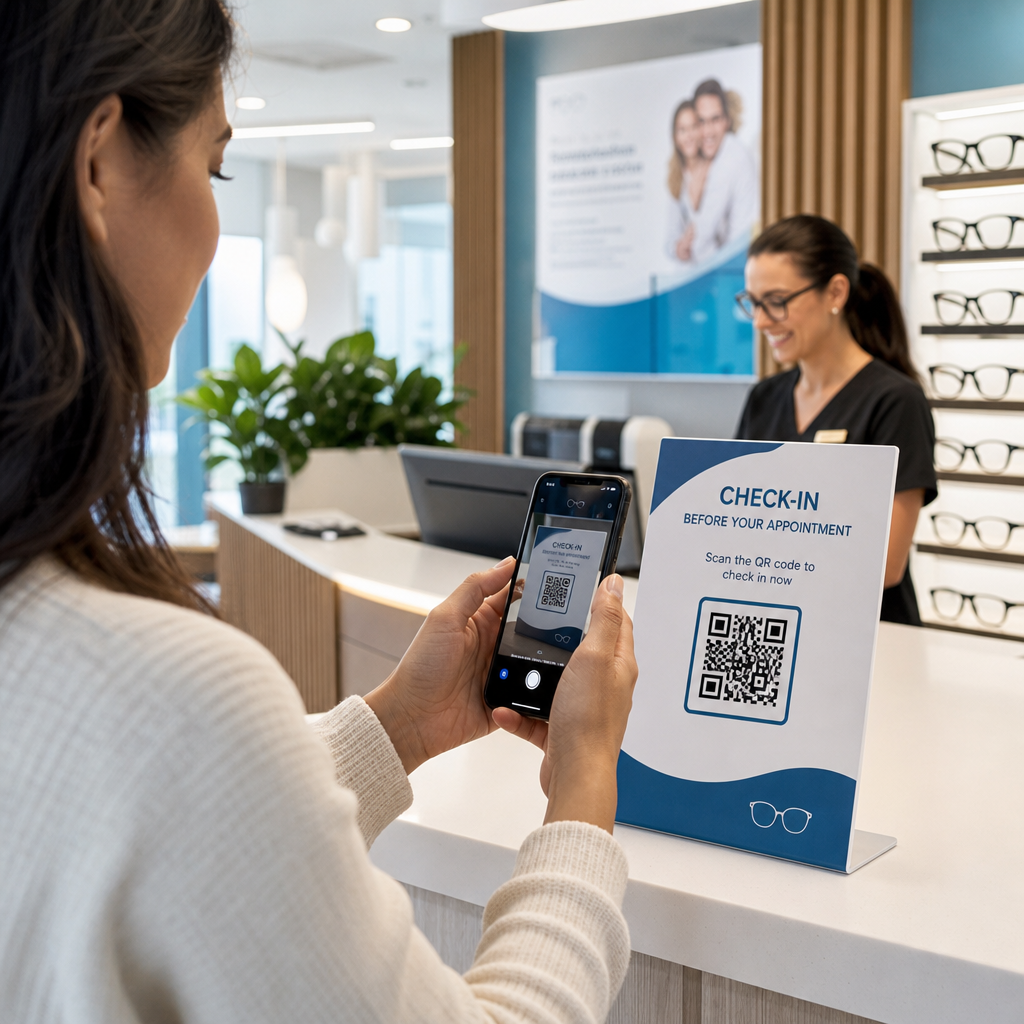

Apakah proses check-in pasien yang lambat dan janji temu tindak lanjut yang terlewatkan menciptakan hambatan dalam praktik optometri Anda? Penundaan administratif membuat pasien frustrasi dan mengalihkan staf meja depan dari penyediaan layanan perawatan mata langsung. Menempatkan kode QR yang dapat dipindai di meja resepsionis, ruang pamer optik, dan lembar pasca-perawatan yang dicetak menghubungkan pasien ke layanan digital secara instan.
Check-In Pasien Tanpa Kontak dan Formulir Pendaftaran
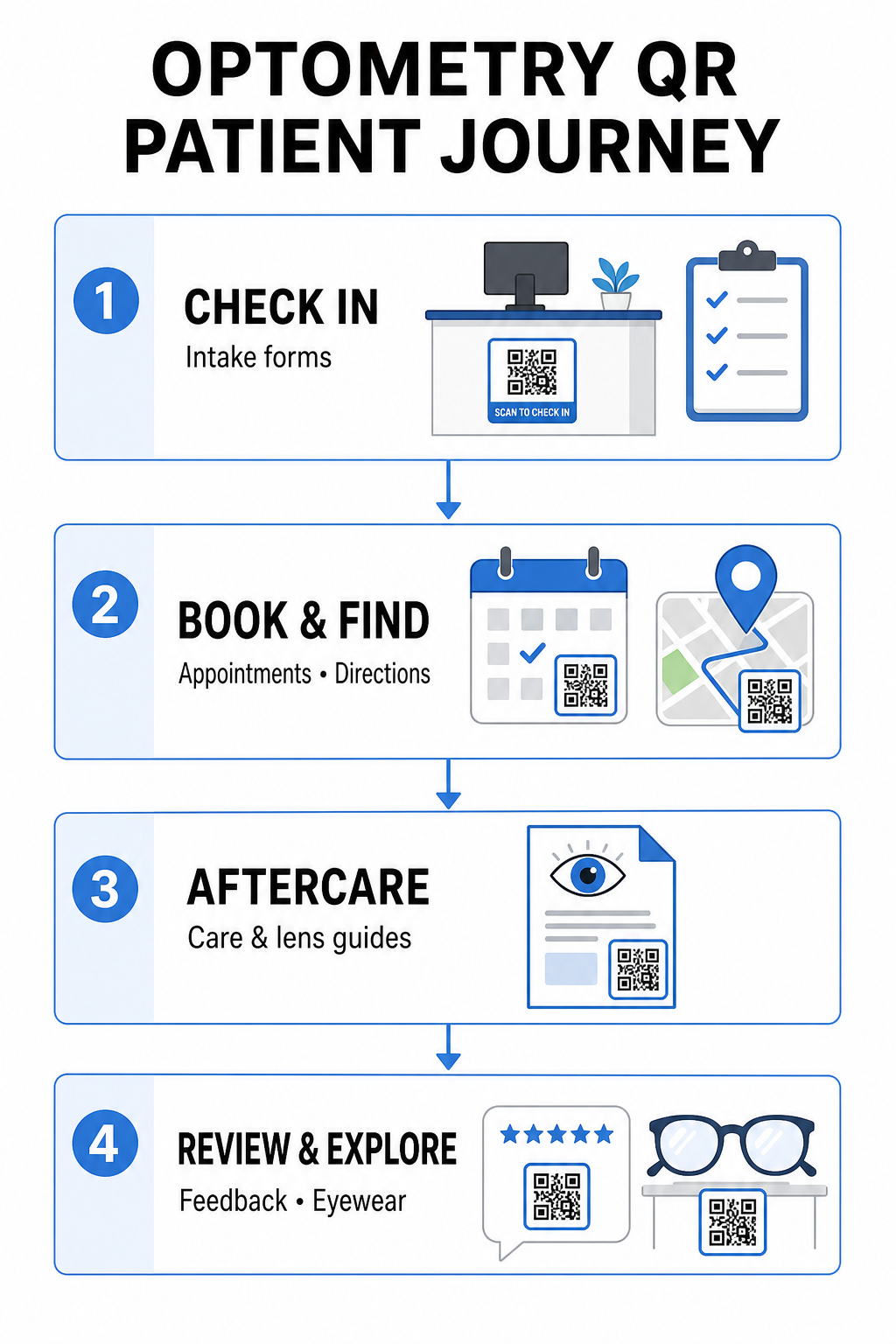
Paket pendaftaran kertas memerlukan entri data manual, menciptakan kekacauan fisik di area tunggu, dan meningkatkan waktu tunggu secara keseluruhan. Menampilkan kode QR check-in di meja resepsionis atau pintu masuk memungkinkan pasien yang datang untuk mengisi formulir pendaftaran, memperbarui riwayat medis, dan menandatangani dokumen persetujuan langsung di perangkat seluler mereka.
Menggunakan Ubah Link Google Form ke QR Code, praktik Anda dapat mengubah kuesioner kesehatan digital menjadi titik sentuh yang mudah dipindai. Pasien yang datang memindai kode, mengirimkan informasi mereka, dan memberi tahu tim administrasi Anda tanpa menunggu papan klip fisik. Mirip dengan alur kerja digital yang digunakan di klinik gigi, pendaftaran otomatis meminimalkan kesalahan transkripsi dan mempercepat pemrosesan di meja depan.
Sederhanakan Proses Pendaftaran Meja Depan Anda Ingin menghilangkan paket pendaftaran kertas dan memangkas waktu tunggu pasien? Gunakan Ubah Link Google Form ke QR Code untuk membuat titik sentuh check-in tanpa kontak untuk area resepsionis Anda hari ini.
Menyederhanakan Pemesanan Janji Temu dan Navigasi Lokasi
Mengelola pemeriksaan mata rutin, pemasangan lensa kontak, dan konsultasi tindak lanjut memerlukan alur kerja penjadwalan yang lancar. Menempatkan kode QR pemesanan pada kartu pengingat janji temu, surat panggilan kembali, dan papan nama jendela klinik memungkinkan pasien untuk membuka portal pemesanan online Anda dalam hitungan detik.
Dengan mengubah URL penjadwalan Anda menjadi pola yang dapat dipindai dengan pembuat kode QR tautan, Anda memberikan pasien yang kembali jalur langsung untuk memesan kunjungan berikutnya. Untuk praktik atau klinik perawatan mata multi-lokasi yang berada di dalam kompleks medis yang lebih besar, panduan lokasi langsung sama pentingnya. Menggabungkan kode yang dihasilkan oleh Generator QR Code Google Maps pada kartu pos panggilan ulang memastikan pasien meluncurkan petunjuk arah mengemudi belokan demi belokan langsung di ponsel cerdas mereka.
Menyampaikan Perawatan Pasca Penglihatan dan Instruksi Lensa Kontak
Instruksi pasca-perawatan yang jelas mengurangi panggilan telepon darurat dan mendukung pemulihan pasien yang tepat setelah prosedur khusus atau pemasangan lensa kontak awal. Pasien seringkali salah menempatkan selebaran kertas yang merinci perawatan bingkai, tindakan pencegahan pasca-dilatasi, atau pedoman kebersihan lensa kontak.
Anda dapat mengodekan panduan digital, video instruksional, dan lembar perawatan ke dalam format yang dapat dipindai menggunakan sebuah Ubah PDF ke QR Code. Menempelkan kode-kode ini pada kantong resep atau dokumentasi penyerahan memberikan pasien akses permanen ke sumber daya perawatan penting. Untuk pembaruan medis sensitif, tinjau praktik yang telah ditetapkan untuk berbagi data kesehatan yang aman dengan kode QR untuk melindungi privasi pasien selama transfer informasi.
Pemasaran Klinik, Penjualan Optik, dan Ulasan Pasien
Kode QR menjembatani toko optik fisik Anda dengan saluran pemasaran digital Anda, mendorong keterlibatan pasien dan memperkuat reputasi online Anda.
- Menampilkan detail bingkai: Tempatkan kode yang dapat dipindai di samping lini bingkai desainer atau pajangan lensa khusus agar pasien dapat melihat opsi warna, peningkatan lensa, atau cerita merek saat menjelajah.
- Berbagi detail kontak praktisi: Cetak kode yang dapat dipindai dari sebuah Generator kode QR vCard pada kartu nama praktisi untuk memungkinkan pasien menyimpan detail kontak klinik langsung ke daftar kontak seluler mereka.
- Mengumpulkan umpan balik pasien: Dorong pasien yang puas untuk berbagi pengalaman mereka sebelum meninggalkan klinik. Menggunakan sebuah Cara Buat QR Code Google Review saat pembayaran mengarahkan pasien langsung ke profil ulasan Anda, menyederhanakan lingkaran umpan balik sebagai bagian dari kode QR umpan balik pelanggan strategi yang lebih luas.
Kode QR Statis vs. Dinamis untuk Klinik Perawatan Mata
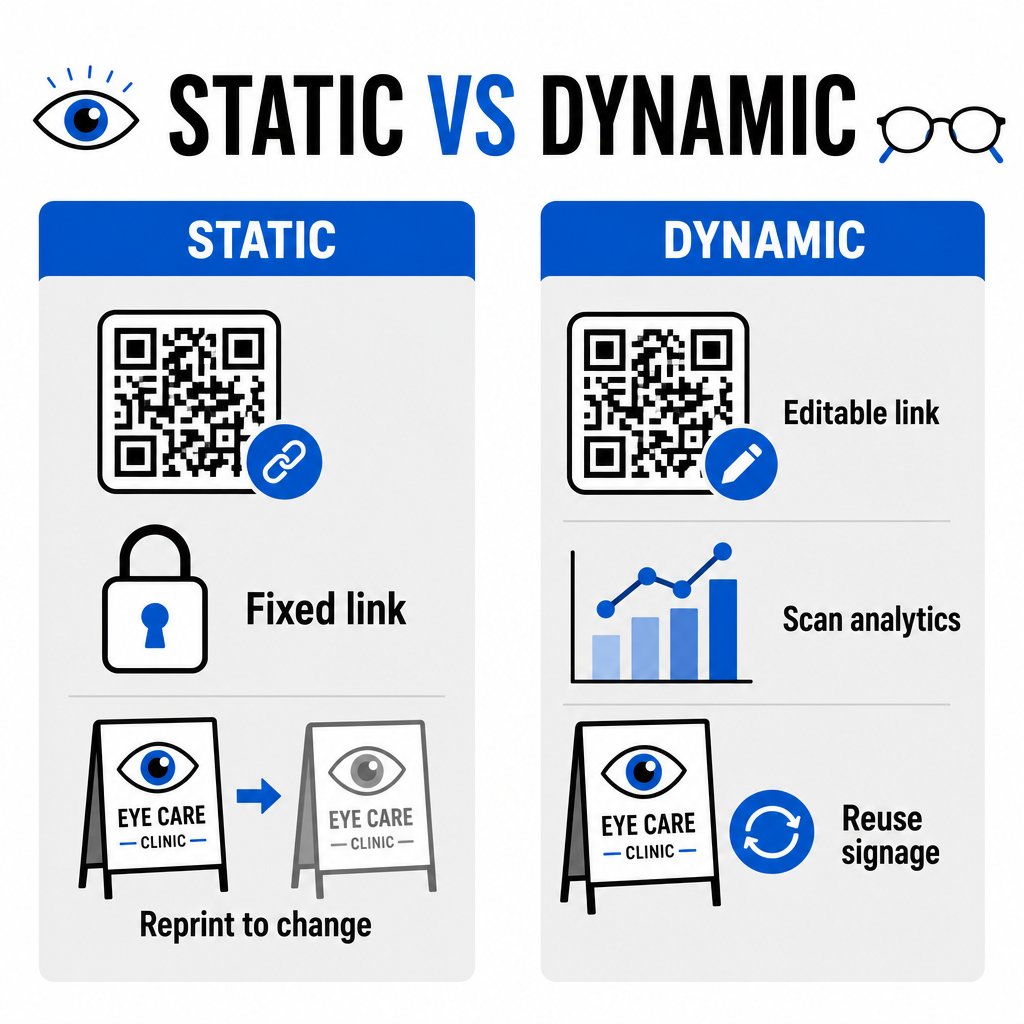
Pemilihan antara format statis dan dinamis tergantung pada apakah konten tujuan Anda memerlukan pembaruan atau pengukuran kinerja dari waktu ke waktu.
| FITUR | Kode QR Statis | Kode QR Dinamis |
|---|---|---|
| URL Tujuan | Tetap secara permanen setelah dibuat | Sepenuhnya dapat diedit kapan saja tanpa perlu dicetak ulang |
| Analitik Pindai | Tidak tersedia | Pelacakan volume pindai, lokasi, dan perangkat secara real-time |
| Kasus Penggunaan Utama | Wi-Fi praktik permanen, petunjuk arah statis | Pemesanan online, promosi musiman, formulir pendaftaran |
| Ketahanan Cetakan | Membutuhkan pencetakan ulang jika tujuan berubah | Penggunaan kembali tanda fisik tercetak secara berkelanjutan |
Untuk kampanye klinik aktif dan penjadwalan janji temu, kode dinamis memberikan wawasan operasional yang penting. Mengimplementasikan melacak kode QR memungkinkan manajer praktik untuk menganalisis waktu pemindaian puncak dan mengevaluasi lokasi penempatan fisik mana yang menghasilkan keterlibatan pasien tertinggi.
Standar Implementasi untuk Cetakan dan Privasi Pasien
Untuk memastikan setiap pasien menikmati pengalaman yang andal dan mudah diakses, ikuti standar teknis ini saat menerapkan kode yang dapat dipindai di seluruh klinik Anda:
- Menjaga ukuran cetakan: Cetak kode dengan ukuran minimal 2 × 2 cm (0,8 × 0,8 inci) untuk materi jarak dekat seperti kartu nama atau lembar pasca-perawatan, menyimpan ukuran yang lebih besar untuk tanda dinding atau pajangan jendela.
- Memastikan kontras warna: Pertahankan kontras visual yang kuat dengan menempatkan modul QR gelap di atas latar belakang terang dengan rasio kontras setidaknya 4:1 rasio kontras, hindari pola yang ramai atau permukaan bertekstur.
- Menjaga zona tenang: Sisakan margin yang jelas di keempat sisi kode setidaknya sama dengan empat modul (blok persegi kecil di dalam kisi) untuk mencegah interferensi pemindai optik.
- Memilih format file vektor: Ekspor format vektor resolusi tinggi seperti SVG atau EPS untuk proyek cetak komersial, atau simpan file raster seperti PNG pada 300 DPI atau lebih tinggi.
- Mendukung alternatif yang mudah diakses: Patuhi pedoman aksesibilitas dengan menampilkan URL teks yang terlihat di samping kode QR sehingga pasien tanpa perangkat pemindai tetap dapat mengakses tujuan.
- Menjaga privasi pasien: Terapkan enkripsi dan perlindungan administratif untuk melindungi informasi kesehatan yang dapat diidentifikasi secara individu yang dikumpulkan melalui formulir pasien dan alat penjadwalan digital.
Untuk kerangka kerja penerapan layanan kesehatan yang lebih luas, konsultasikan dengan panduan utama kode QR untuk layanan kesehatan dan jelajahi opsi khusus di berbagai sektor industri layanan kesehatan.
Memodernisasi Alur Kerja Optometri Anda
Mengintegrasikan kode QR ke dalam praktik perawatan mata Anda menghilangkan hambatan administratif, mempercepat proses check-in, dan menciptakan titik interaksi di seluruh ruang pamer optik Anda. Dengan menggabungkan standar desain yang mudah diakses dengan kode dinamis yang dapat diperbarui, klinik Anda dapat memberikan layanan modern dan efisien di setiap tahap perjalanan pasien. Mulailah membangun kode yang disesuaikan dan dapat dilacak untuk meningkatkan alur kerja praktik optometri Anda hari ini.
Pertanyaan yang sering diajukan
Kode QR memungkinkan pasien untuk menyelesaikan pendaftaran, pembaruan riwayat kesehatan, dan formulir persetujuan di ponsel cerdas mereka sendiri sebelum memasuki ruang pemeriksaan. Ini menghilangkan entri data manual di meja resepsionis dan mempercepat penerimaan pasien.
Ya, jika Anda menggunakan kode QR dinamis. Kode dinamis memungkinkan Anda untuk mengedit URL tujuan kapan saja di dasbor Anda tanpa perlu mencetak ulang tampilan penerimaan, brosur, atau kartu pos pengingat Anda.
Cetak kode QR dengan kontras visual yang tinggi (setidaknya rasio 4:1) dan ukuran yang sesuai (setidaknya 2 × 2 cm). Selain itu, sediakan URL pendek dalam bentuk teks biasa di samping kode agar pasien tanpa kemampuan memindai masih bisa mengakses tujuan.