Tillbringar din personal i taproom för mycket tid med att svara på samma frågor om dina ölsorter? Mellan roterande tapplistor, ABV-detaljer, matparningar och säsongsutgåvor är det en verklig operativ utmaning att hålla kunderna informerade utan att överbelasta ditt team. Denna guide täcker hur bryggerier använder QR-koder för att lösa det problemet – från digitala tapplistor till verktyg för kundfeedback.
Varför taprooms vänder sig till QR-koder
Taprooms och bryggeripubar representerar 73% av alla amerikanska hantverksbryggerier, men står ändå bara för 15% av den totala volymen hantverksöl. Denna struktur lägger enorm vikt vid direkt-till-konsument-upplevelsen, och branschvägledning pekar alltmer på att satsa extra på taproom-upplevelser som vägen framåt för hantverksbryggare.
QR-koder passar naturligt in i den strategin. En enda skanningsbar kod på ett bord kan ersätta en hög med laminerade menyer, ge kunder omedelbar tillgång till provsmakningsanteckningar och öldetaljer, och bjuda in dem att följa ditt bryggeri på sociala medier – allt utan att personal behöver lämna baren.
För företag inom besöksnäringen, erbjuder QR-koder ett billigt sätt att koppla fysiska utrymmen till digitalt innehåll. Bryggerier passar särskilt bra eftersom informationen kunderna vill ha – ABV, IBU, stilbeskrivningar, flygalternativ – ändras regelbundet och drar nytta av att uppdateras utan att behöva tryckas om.
Den digitala tapplistan: Ditt mest praktiska användningsfall
Den mest omedelbara tillämpningen är att ersätta eller komplettera din tryckta tapplista med en digital version som kunder kan komma åt genom att skanna en kod i baren, på bordsställ eller vid entrén.
A meny-QR-kod låter dig bygga en digital tapplista som visar ölnamn, stilar, ABV, IBU, provsmakningsanteckningar och prissättning per hällstorlek. Bryggerimenyer inkluderar ofta provhällningar och flygningar också, så du kan strukturera din digitala meny för att återspegla alla tillgängliga alternativ utan formateringsbegränsningarna hos en griffeltavla eller ett papperskort.
Den viktigaste operativa fördelen är att du kan uppdatera menyn utan att röra den fysiska QR-koden. När en fat tar slut och en ny säsongsöl ersätter den, uppdaterar du den digitala destinationen – den tryckta koden på bordet förblir densamma. Detta är viktigt i en miljö där tapplistan kan ändras dagligen eller veckovis.
Skapa en digital tapplista för ditt bryggeri Redo att bygga en meny som dina kunder kan komma åt med en skanning? Använd QR-kodgenerator för meny för att ladda upp din tapplista som en PDF eller bygga en interaktiv mobilmeny – och uppdatera den när som helst utan att trycka om.
Vad du ska inkludera på ett bryggeris digitala meny
En välstrukturerad digital tapplista hjälper kunder att fatta beslut snabbare och minskar fram-och-tillbaka-kommunikationen med personalen. Överväg att organisera den kring följande element:
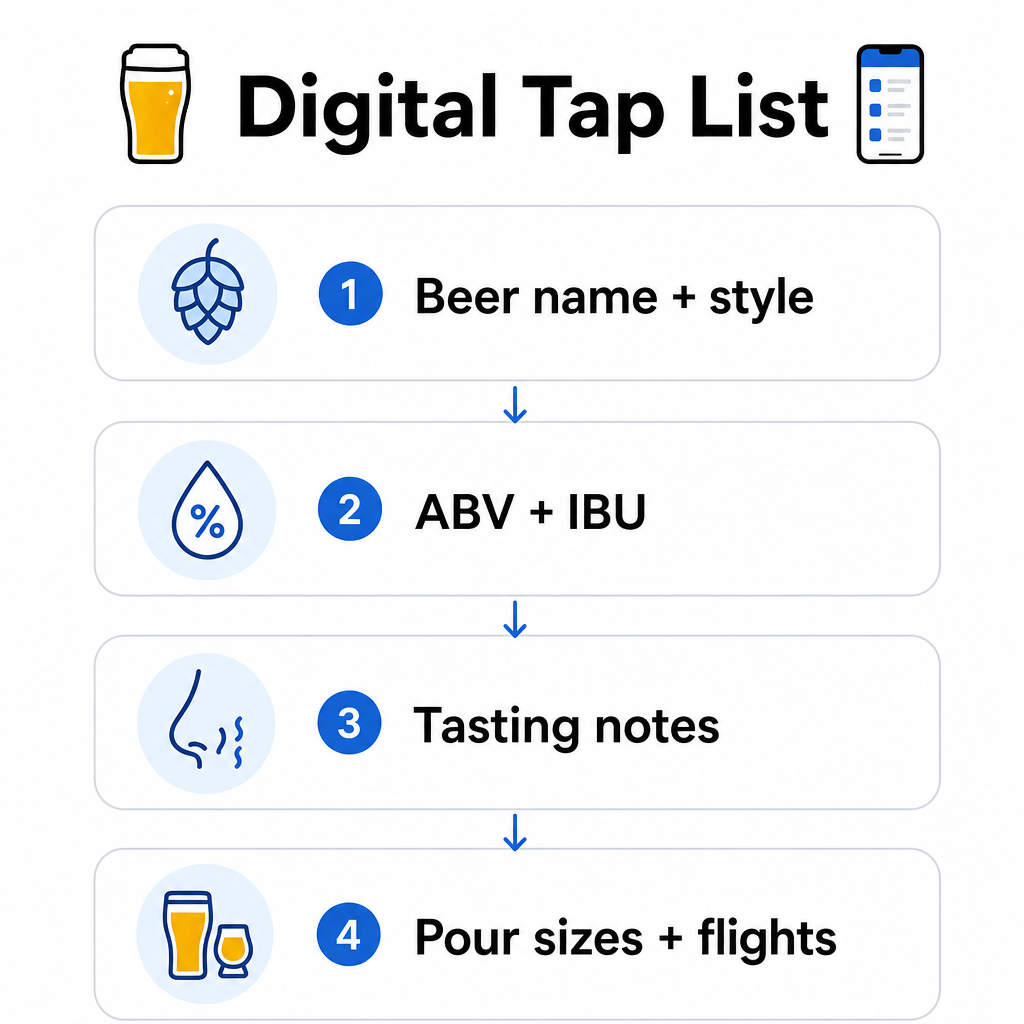
- Ölnamn och stil – t.ex. West Coast IPA, Hazy Double IPA, Dry Irish Stout
- ABV och IBU – hjälper kunder att bedöma styrka och beska med en blick
- Provsmakningsanteckningar eller smakbeskrivningar – “citrusfruktig med en torr avslutning” är mer användbart än bara “IPA”
- Tillgängliga hällstorlekar och priser – om du erbjuder 5 oz, 10 oz och en pint, bör varje storlek ha sitt eget pris listat
- Flyg- och provsmakningsalternativ – visa tydligt hur flygningar är strukturerade och prissatta
- Säsongsbetonade eller begränsade utgåvor – lyft fram dessa så att kunderna vet vad som är nytt
Om ditt bryggeri också serverar mat kan samma QR-kod länka till en komplett mat- och dryckesmeny. För gäster med kostrestriktioner eller allergiproblem gör ett digitalt format det lättare att inkludera detaljerad ingrediensinformation. Observera att TTB:s allergenmärkning för alkoholprodukter förblir frivillig enligt nuvarande bestämmelser, men att proaktivt dela denna information via din digitala meny är en god praxis för kundförtroende.
Använda PDF QR-koder för ölmenyer och marknadsföringsmaterial
Om du redan har en designad tapplista i PDF-format kan du generera en QR-kod som länkar direkt till den filen. Kunder skannar och PDF:en öppnas på deras telefon – ingen app krävs.
Detta tillvägagångssätt fungerar bra för flera bryggerispecifika scenarier:
- Säsongsbetonade menykort som du omdesignar kvartalsvis
- Ölutbildningsblad för tap takeovers eller evenemang
- Tryckt marknadsföringsmaterial för bryggeriturer som du vill utöka digitalt
- Provsmakningsguider strukturerade kring flygningar
PDF QR-koder är särskilt praktiska eftersom du kan byta ut den länkade PDF:en utan att ändra den tryckta koden. Om du trycker en upplaga bordsställ för ett säsongsevenemang och menyn ändras mitt i upplagan, uppdaterar du PDF:en istället för att trycka om koderna. De bredare tillämpningarna av PDF QR-koder för företag täcker ytterligare sätt att tillämpa detta tillvägagångssätt inom marknadsföring och drift.
Samla in Google-recensioner medan kunder fortfarande är engagerade
Det bästa ögonblicket att be om en recension är direkt efter en positiv upplevelse – vilket i en taproom betyder medan någon dricker upp en god pint, inte tre dagar senare när de har glömt ölnamnen.
A QR-kod för Google-recensioner placerad på ditt bord, din underlägg eller ditt kvitto tar kunder direkt till din Google Business recensionssida med en enda skanning. Att lägga till en kort uppmaning som “Gillade du ditt besök? Berätta för andra” får förfrågan att kännas naturlig snarare än påträngande.
Fler recensioner hjälper ditt bryggeri att rankas i lokala sökresultat och bygga trovärdighet hos nya besökare som bestämmer var de ska tillbringa en eftermiddag. Det är en kontaktpunkt med låg ansträngning med verklig nedströms inverkan på besökstrafiken.
Bortom menyn: Andra Taproom QR-kodapplikationer
QR-koder kan tjäna flera andra funktioner inom din taproom-verksamhet.
Sociala medier och nyhetsbrevsprenumerationer – En QR-kod för länk på bordsryttare eller din bardisk kan leda besökare till din Instagram, Facebook-sida eller ett e-postregistreringsformulär. Gäster som hade en trevlig stund är mottagliga för att hålla kontakten, så ge dem ett enkelt sätt att göra det medan upplevelsen fortfarande är färsk.
Evenemangs- och släppmeddelanden – Länka en QR-kod till en landningssida med kommande evenemang, ölsläppsdatum eller ändringar av taproom-öppettider. Eftersom dynamiska QR-koder kan uppdateras efter utskrift, kan du använda samma fysiska kod för att marknadsföra olika kommande evenemang över tid utan att trycka om något.
Ölutbildning och bryggerihistoria – Vissa bryggerier använder en QR-kod för att dela historien bakom en öl – jäststammen, humlesorten, inspirationen till receptet. Denna typ av innehåll fördjupar taproom-upplevelsen utan att kräva att personalen ger en fullständig förklaring vid varje servering. Det fungerar särskilt bra för begränsade eller samarbetsutgåvor där bakgrundshistorien är en del av attraktionen.
Kontaktlösa betalningar – QR-baserade betalningsalternativ kan påskynda kassaprocessen på livliga taprooms. Kunder skannar, granskar sin nota och betalar – vilket minskar fram och tillbaka vid baren under rusningstid. De fördelarna med QR-kodbetalningar i restaurangmiljöer gäller direkt för taproom-verksamhet också.
Koppla varje taproom-kontaktpunkt till digitalt innehåll Använd QR-kodgenerator för att skapa varumärkesanpassade, spårbara koder för din tapplista, sociala medier, evenemang och mer – allt hanterat från en enda instrumentpanel.
Dynamiska vs. statiska QR-koder: Vad bryggerier bör veta
Det finns två typer av QR-koder: statiska och Dynamisk. Att förstå skillnaden hjälper dig att välja rätt verktyg för varje applikation.
| FUNKTION | Statisk QR-kod | Dynamisk QR-kod |
|---|---|---|
| Mål-URL | Fast vid skapandet | Kan uppdateras när som helst |
| STATISTIK | Inga | Skanningar, platser, enhetstyper, tider |
| 9. Bäst för | Engångs- eller permanenta länkar | Tapplistor, evenemang, roterande innehåll |
| Omtryck krävs efter uppdatering? | Ja | Nej |
För de flesta bryggeriapplikationer – särskilt tapplistor och evenemangskampanjer – är dynamiska QR-koder det rätta valet. Tapplistan ändras. Evenemang kommer och går. Säsongsmenyer roterar. En dynamisk kod låter dig uppdatera destinationen utan att kassera ditt tryckta material, vilket är viktigt när du har investerat i specialtryckta bordsryttare eller underlägg.
Dynamiska koder ger dig också analyser: hur många gånger en kod skannades, från vilken plats, på vilka enheter och vid vilka tider. Den datan berättar om gästerna faktiskt interagerar med din digitala meny eller ignorerar den – vilket hjälper dig att bestämma var du ska placera koder och hur du ska designa dem för bättre synlighet. För en fullständig genomgång av vad dynamiska koder spårar och varför det är viktigt, se vilken data dynamiska QR-koder samlar in.
Designa QR-koder för en taproom-miljö
Taprooms presenterar specifika fysiska förhållanden som du behöver ta hänsyn till: omgivande belysning som kan variera från ljus till svagt upplyst, ytor som inkluderar trä, griffeltavla och glas, och gäster som kan skanna från en armlängds avstånd vid en barstol.
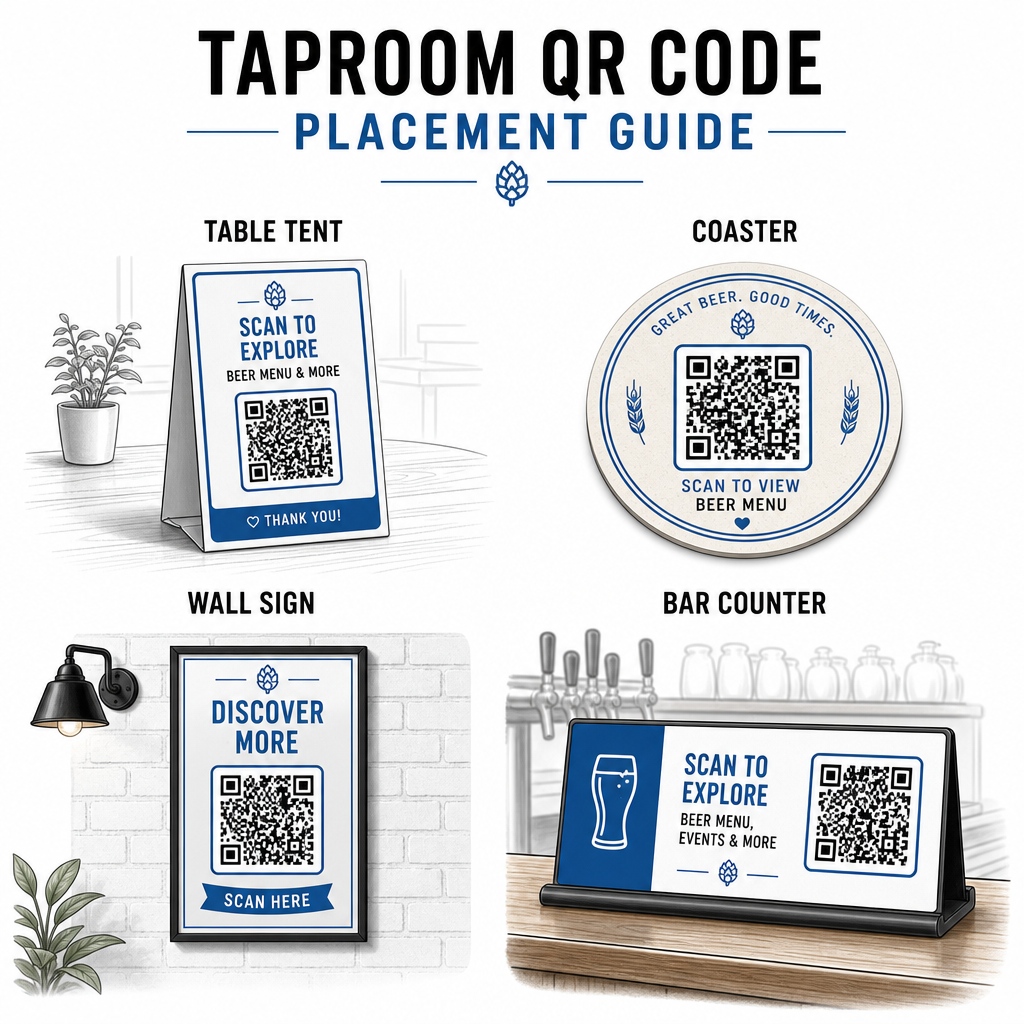
Några praktiska riktlinjer hämtade från bästa praxis för läsbarhet av QR-koder:
- Storlek – Använd minst 2 × 2 cm (cirka 0,8 × 0,8 tum) för skanning på nära håll. För koder placerade på väggar eller griffeltavlor där gäster skannar från längre avstånd, tillämpa 10:1-regeln: kodens bredd bör vara minst en tiondel av det förväntade skanningsavståndet.
- Kontrast – Bibehåll stark kontrast mellan kodmönstret och dess bakgrund. Ett mörkt mönster på en ljus bakgrund är standard. Undvik att placera koder direkt på mörkt trä utan ett vitt bakgrundsfält bakom dem.
- Tyst zon – Lämna en tydlig marginal runt koden – cirka 0,25 tum – så att skannern kan hitta och läsa koden utan att omgivande element stör.
- Yta – Undvik böjda eller texturerade ytor som flaskor. Bordsryttare, underlägg, tryckta menyer och väggskyltar är de bästa placeringarna. Använda QR-koder på bordsryttare täcker placeringsspecifika detaljer mer i detalj.
- Filformat – Ladda ner dina koder i SVG-, EPS- eller PDF-format för högkvalitativ utskrift. Rasterformat som JPG försämras vid större utskriftsstorlekar och kan bli oläsbara.
Om du lägger till din bryggerilogotyp till koden – vilket hjälper med varumärkesigenkänning – använd felkorrigeringsnivå Q eller H, och håll logotypen till högst 30% av kodområdet för att undvika att störa skanningsbarheten.
Ärliga begränsningar att planera kring
QR-koder är användbara, men de fungerar bäst som ett komplement till din taproom-upplevelse snarare än en fullständig ersättning för varje analog kontaktpunkt.
Forskning visar konsekvent att en betydande del av gäster fortfarande föredrar fysiska menyer. Enkätdata indikerar att 67% av gäster föredrar att ha både digitala och traditionella menyalternativ snarare än det ena eller det andra. Att hålla vissa tryckta menyer eller griffeltavlor tillgängliga tillsammans med QR-koder överensstämmer med de flesta gästers preferenser och undviker att stöta bort dem som tycker att QR-bara-uppsättningar är frustrerande.
Det finns också tillgänglighetsöverväganden värda att ta itu med direkt:
- Gäster utan smartphones, eller med äldre enheter som har svårt att skanna, behöver ett alternativ tillgängligt
- Menyer levererade som endast bild-PDF:er kan vara otillgängliga för gäster som använder skärmläsare – strukturerad text eller HTML-menyer är mer inkluderande
- Svagt Wi-Fi i äldre taproom-byggnader kan sakta ner menyladdningstider, vilket frustrerar gäster – se till att ditt interna nätverk kan hantera efterfrågan innan du helt tar bort fysiska menyer
Att ta itu med dessa problem i förväg – att hålla en reservpappersmeny tillgänglig, att säkerställa att ditt digitala innehåll laddas snabbt, och att testa dina koder i de faktiska ljusförhållandena i din taproom – gör QR-koder till en bekvämlighet snarare än en friktionspunkt för dina gäster.
Spåra vad som fungerar
En av de underutnyttjade fördelarna med dynamiska QR-koder i en taproom är analysskiktet. Om du placerar koder vid baren, på borden och nära ingången kan du se vilka platser som genererar flest skanningar. Om du kör en säsongskampanj och länkar den via en QR-kod kan du mäta hur många som faktiskt interagerade med den.
Med tiden hjälper denna data dig att fatta bättre placeringsbeslut, förstå vilket innehåll som tilltalar gäster, och mäta om ditt digitala engagemang växer i takt med besökstrafiken. Det hjälper dig också att identifiera döda zoner – platser där koder placeras men sällan skannas – så att du kan justera därefter.
Denna typ av mätning är särskilt relevant för taprooms som förlitar sig starkt på återkommande besök och mun-till-mun-metoden. För en bredare titt på hur QR-koder tjänar besöksnäringen, inklusive spårnings- och engagemangsstrategier, täcker besöksnäringsresursen hela bilden.
Att driva en effektiv taproom innebär att ge gästerna den information de vill ha snabbt samtidigt som din personal hålls fokuserad på det de gör bäst. QR-koder hanterar informationsskiktet – kranlistor, öldetaljer, evenemangsmeddelanden och recensionsuppmaningar – utan att lägga till operativ komplexitet. Börja med en dynamisk meny-QR-kod på dina bord, lägg till en Google-recensionsuppmaning, och använd skanningsanalys för att förfina placering och innehåll därifrån.
Kom igång med Taproom QR-koder Skapa din första QR-kod på några minuter med Pageloot QR-kodgenerator – anpassa den med ditt bryggeris varumärke, länka den till din kranlista eller valfri digital destination, och uppdatera den när som helst utan att skriva ut igen.
Vanliga frågor
Ja, om du använder en dynamisk QR-kod. Dynamiska koder använder en omdirigerings-URL som hanteras av plattformen, så du kan uppdatera destinationsinnehållet – som en ny PDF med tapplista eller en live-menysida – när som helst utan att generera en ny kod eller ersätta den fysiska koden på dina bord eller glasunderlägg.
Håll en fysisk eller griffeltavla meny tillgänglig som en backup. Enkätdata visar att 67% av gästerna föredrar att ha både digitala och traditionella menyalternativ, så en hybridlösning tjänar det bredaste utbudet av gäster. QR-koder fungerar bäst som ett komplement till, inte en ersättning för, analoga alternativ.
Med dynamiska QR-koder får du tillgång till skanningsanalys – inklusive totalt antal skanningar, skanningstider, enhetstyper och platsdata. Placera olika koder på olika platser (bar, bord, entré) för att jämföra engagemang per område, och använd den datan för att optimera placering och design över tid.