Bruker tapprompersonalet ditt for mye tid på å svare på de samme spørsmålene om ølene deres? Mellom roterende tapplister, ABV-detaljer, matkombinasjoner og sesongutgivelser er det en reell operasjonell utfordring å holde kundene informert uten å overvelde teamet ditt. Denne guiden dekker hvordan bryggerier bruker QR-koder for å løse det problemet – fra digitale tapplister til verktøy for kundetilbakemeldinger.
Hvorfor tapprom vender seg til QR-koder
Tapprom og bryggeripuber representerer 73% av alle amerikanske håndverksbryggerier, men står likevel for bare 15% av det totale volumet av håndverksøl. Denne strukturen legger enorm vekt på direkte-til-forbruker-opplevelsen, og bransjeveiledning peker i økende grad på å satse mer på tappromopplevelser som veien videre for håndverksbryggere.
QR-koder passer naturlig inn i den strategien. En enkelt skannbar kode på et bord kan erstatte en stabel med laminerte menyer, gi kundene umiddelbar tilgang til smaksnotater og øldetaljer, og invitere dem til å følge bryggeriet ditt på sosiale medier – alt uten å kreve at personalet må forlate baren.
For bedrifter innen serveringsbransjen, tilbyr QR-koder en rimelig måte å koble fysiske rom med digitalt innhold. Bryggerier passer spesielt godt fordi informasjonen kundene ønsker – ABV, IBU, stilbeskrivelser, flight-alternativer – endres regelmessig og drar nytte av å bli oppdatert uten nyutskrift.
Den digitale tapplisten: Ditt mest praktiske bruksområde
Den mest umiddelbare anvendelsen er å erstatte eller supplere din trykte tappliste med en digital versjon som kundene kan få tilgang til ved å skanne en kode i baren, på bordstativ eller ved inngangen.
EN meny-QR-kode lar deg bygge en digital tappliste som viser ølnavn, stiler, ABV, IBU, smaksnotater og priser per hellestørrelse. Bryggerimenyer inkluderer ofte smaksprøver og flights også, slik at du kan strukturere din digitale meny for å gjenspeile alle tilgjengelige alternativer uten formateringsbegrensningene til en tavle eller et papirkort.
Den viktigste operasjonelle fordelen er at du kan oppdatere menyen uten å røre den fysiske QR-koden. Når en tønne er tom og en ny sesongøl erstatter den, oppdaterer du den digitale destinasjonen – den trykte koden på bordet forblir den samme. Dette er viktig i et miljø der tapplisten kan endres daglig eller ukentlig.
Lag en digital tappliste for bryggeriet ditt Klar til å bygge en meny kundene dine kan få tilgang til med ett skann? Bruk QR-kode generator for meny for å laste opp tapplisten din som en PDF eller bygge en interaktiv mobilmeny – og oppdatere den når som helst uten nyutskrift.
Hva du bør inkludere på et bryggeris digitale meny
En godt strukturert digital tappliste hjelper kundene med å ta raskere beslutninger og reduserer frem og tilbake med personalet. Vurder å organisere den rundt følgende elementer:
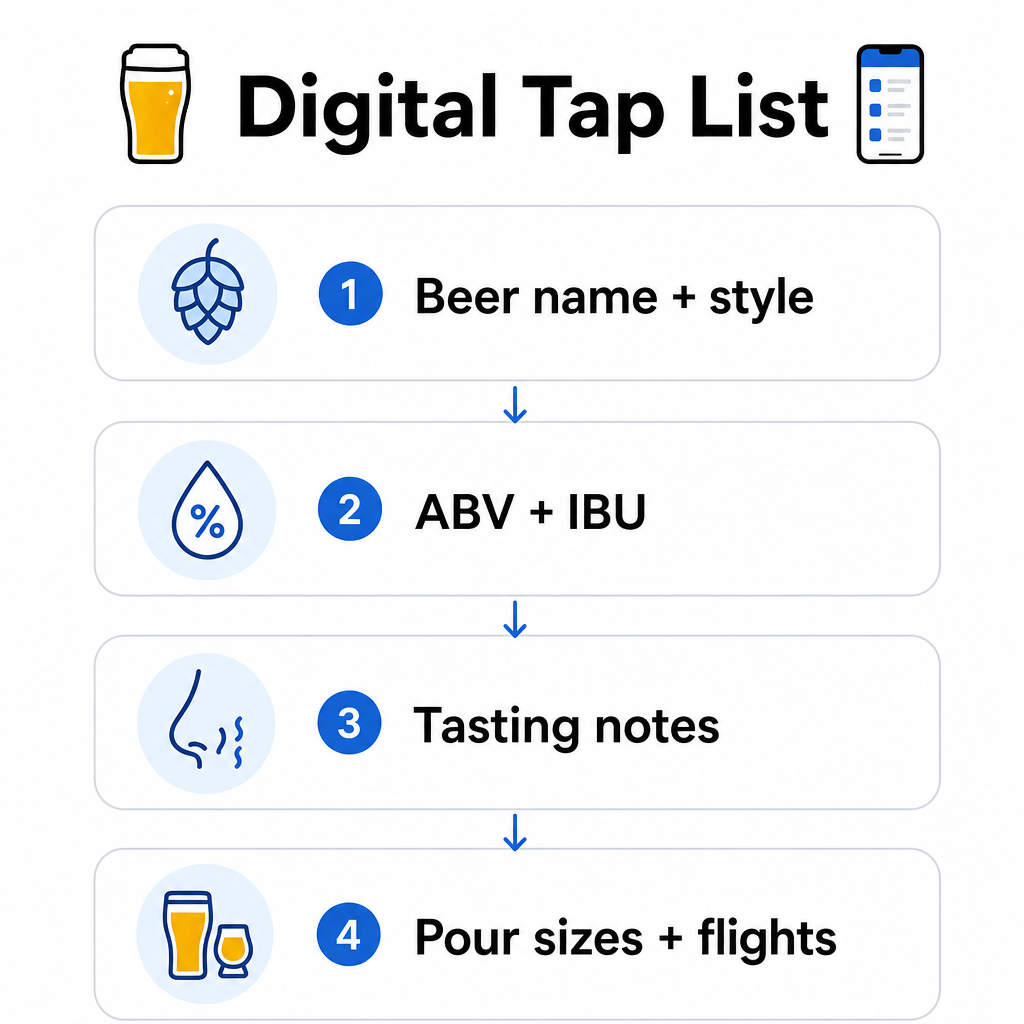
- Ølnavn og stil – f.eks. West Coast IPA, Hazy Double IPA, Dry Irish Stout
- ABV og IBU – hjelper kundene med å vurdere styrke og bitterhet med et øyekast
- Smaksnotater eller smaksbeskrivelser – “sitruspreget med en tørr avslutning” er mer nyttig enn bare “IPA”
- Tilgjengelige hellestørrelser og priser – hvis du tilbyr 5 oz, 10 oz og en pint, bør hver størrelse ha sin egen pris oppført
- Flight- og smaksprøvealternativer – vis tydelig hvordan flights er strukturert og priset
- Sesongbaserte eller begrensede utgivelser – fremhev disse slik at kundene vet hva som er nytt
Hvis bryggeriet ditt også serverer mat, kan den samme QR-koden lenke til en komplett mat- og drikkemeny. For gjester med kostholdsrestriksjoner eller allergihensyn gjør et digitalt format det enklere å inkludere detaljert ingrediensinformasjon. Merk at TTB-allergenmerking for alkoholholdige drikker fortsatt er frivillig under gjeldende forskrifter, men å proaktivt dele denne informasjonen via din digitale meny er en god praksis for kundetillit.
Bruke PDF QR-koder for ølmenyer og materiell
Hvis du allerede har en designet tappliste i PDF-format, kan du generere en QR-kode som lenker direkte til den filen. Kunder skanner og PDF-en åpnes på telefonen deres – ingen app nødvendig.
Denne tilnærmingen fungerer bra for flere bryggerispesifikke scenarier:
- Sesongbaserte menykort du redesigner kvartalsvis
- Ølopplæringsark for tap takeovers eller arrangementer
- Trykt materiell for bryggeriturer som du ønsker å utvide digitalt
- Smaksguider strukturert rundt flights
PDF QR-koder er spesielt praktiske fordi du kan bytte ut den lenkede PDF-en uten å endre den trykte koden. Hvis du trykker et opplag med bordstativ for et sesongbasert arrangement og menyen endres midt i opplaget, oppdaterer du PDF-en i stedet for å trykke kodene på nytt. De bredere bruksområdene for PDF QR-koder for bedrifter dekker ytterligere måter å anvende denne tilnærmingen på tvers av markedsføring og drift.
Samle inn Google-anmeldelser mens kundene fortsatt er engasjerte
Det beste tidspunktet å be om en anmeldelse er rett etter en positiv opplevelse – noe som i et tapperi betyr mens noen avslutter en god halvliter, ikke tre dager senere når de har glemt ølnavnene.
EN Google Anmeldelse QR-kode plassert på bordet, glassbrikken eller kvitteringen din tar kundene direkte til din Google Bedrift-anmeldelsesside med en enkelt skanning. Å legge til en kort oppfordring som “Likte du besøket? Fortell andre” gjør at forespørselen føles naturlig snarere enn påtrengende.
Flere anmeldelser hjelper bryggeriet ditt med å rangere i lokale søkeresultater og bygge troverdighet hos nye besøkende som bestemmer seg for hvor de skal tilbringe en ettermiddag. Det er et lavinnsats-kontaktpunkt med reell nedstrømseffekt på kundestrømmen.
Utover menyen: Andre bruksområder for QR-koder i tapperiet
QR-koder kan ha flere andre funksjoner i tapperidriften din.
Sosiale medier og påmelding til nyhetsbrev – En lenke-QR-kode på bordkort eller bardisken din kan lede besøkende til din Instagram, Facebook-side eller et skjema for e-postpåmelding. Gjester som hadde det hyggelig er mottakelige for å holde kontakten, så gi dem en enkel måte å gjøre det på mens opplevelsen fortsatt er fersk.
Arrangement- og lanseringskunngjøringer – Koble en QR-kode til en landingsside med kommende arrangementer, øllanseringsdatoer eller endringer i tapperitider. Fordi dynamiske QR-koder kan oppdateres etter utskrift, kan du bruke den samme fysiske koden til å promotere forskjellige kommende arrangementer over tid uten å skrive ut noe på nytt.
Ølkunnskap og bryggeriets historie – Noen bryggerier bruker en QR-kode for å dele historien bak et øl – gjærstammen, humlesorten, inspirasjonen til oppskriften. Denne typen innhold fordyper tapperiopplevelsen uten å kreve at personalet gir en full forklaring ved hver skjenking. Det fungerer spesielt godt for begrensede utgivelser eller samarbeidsutgivelser hvor bakgrunnshistorien er en del av appellen.
Kontaktløse betalinger – QR-baserte betalingsalternativer kan fremskynde betalingsprosessen i travle tappesteder. Kunder skanner, gjennomgår regningen sin og betaler – noe som reduserer frem og tilbake ved baren i rushtiden. De fordelene med QR-kodebetalinger i restaurantinnstillinger gjelder direkte for tappestedsdriften også.
Koble hvert tappestedskontaktpunkt til digitalt innhold Bruke QR-kodegenerator for å lage merkevarebaserte, sporbare koder for din tappliste, sosiale medier, arrangementer og mer – alt administrert fra ett enkelt dashbord.
Dynamiske vs. statiske QR-koder: Hva bryggerier bør vite
Det finnes to typer QR-koder: statisk og Dynamisk. Å forstå forskjellen hjelper deg med å velge riktig verktøy for hver applikasjon.
| FUNKSJON | Statisk QR-kode | Dynamisk QR-kode |
|---|---|---|
| Destinasjons-URL | Fast ved opprettelse | Kan oppdateres når som helst |
| STATISTIKK | Ingen | Skanninger, steder, enhetstyper, tider |
| 9. Best for | Engangs- eller permanente lenker | Tapplister, arrangementer, roterende innhold |
| Kreves ny utskrift etter oppdatering? | Ja | Nei |
For de fleste bryggeri-applikasjoner – spesielt tapplister og arrangementkampanjer – er dynamiske QR-koder det riktige valget. Tapplisten endres. Arrangementer kommer og går. Sesongmenyer roterer. En dynamisk kode lar deg oppdatere destinasjonen uten å kaste trykt materiale, noe som er viktig når du har investert i spesialtrykte bordtelt eller brikker.
Dynamiske koder gir deg også analyser: hvor mange ganger en kode ble skannet, fra hvilket sted, på hvilke enheter og til hvilke tider. Disse dataene forteller deg om gjestene faktisk engasjerer seg med din digitale meny eller ignorerer den – noe som hjelper deg å bestemme hvor du skal plassere koder og hvordan du skal designe dem for bedre synlighet. For en fullstendig oversikt over hva dynamiske koder sporer og hvorfor det er viktig, se hvilke data dynamiske QR-koder samler inn.
Designe QR-koder for et tappestedsmiljø
Tappesteder presenterer spesifikke fysiske forhold du må ta hensyn til: omgivelseslys som kan variere fra lyst til dempet, overflater som inkluderer tre, tavle og glass, og gjester som kan skanne fra en armlengdes avstand fra en barkrakk.
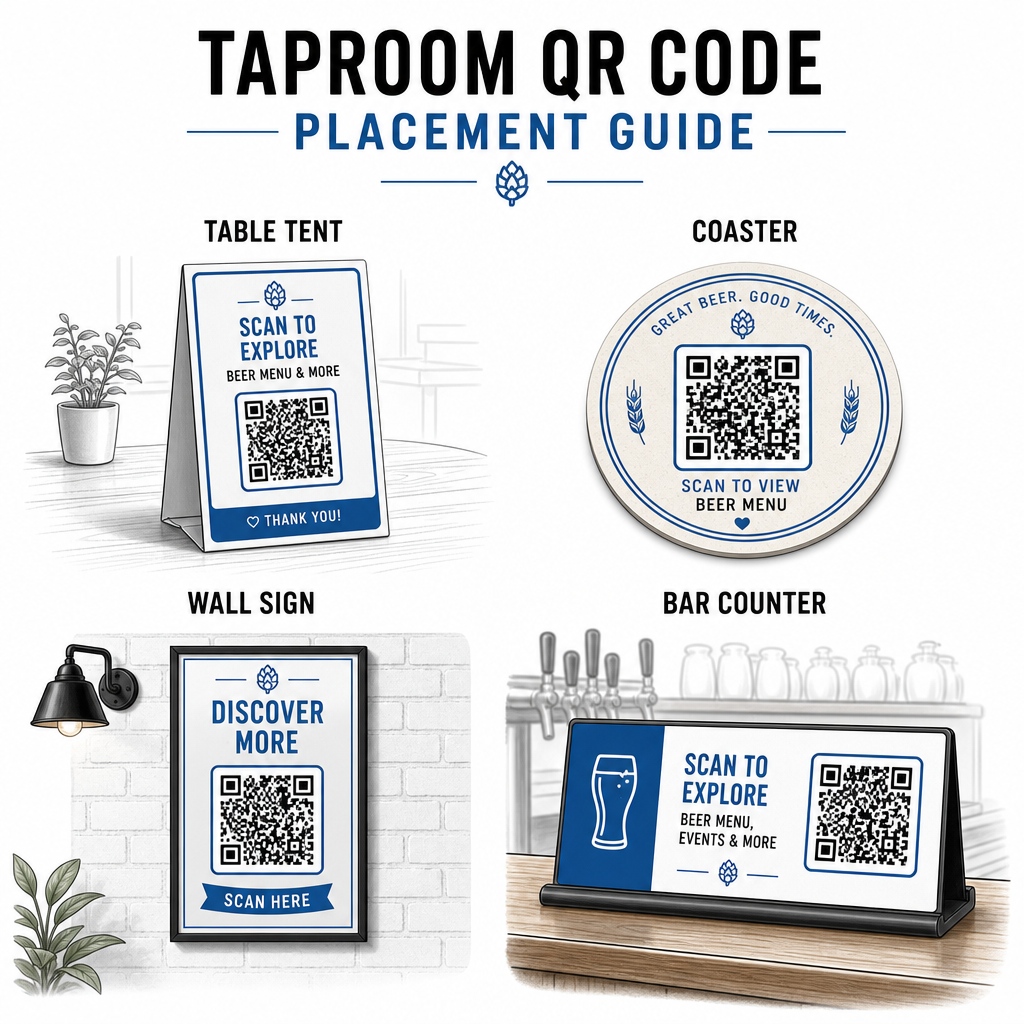
Noen praktiske retningslinjer hentet fra beste praksis for lesbarhet av QR-koder:
- Størrelse – Bruk minimum 2 × 2 cm (omtrent 0,8 × 0,8 tommer) for skanning på nært hold. For koder plassert på vegger eller tavler der gjester skanner fra lengre avstand, bruk 10:1-regelen: kodebredden bør være minst en tidel av den forventede skanneavstanden.
- Kontrast – Oppretthold sterk kontrast mellom kodemønsteret og bakgrunnen. Et mørkt mønster på en lys bakgrunn er standard. Unngå å plassere koder direkte på mørkt tre uten et hvitt bakgrunnsfelt bak dem.
- Stille sone – La det være en klar marg rundt koden – omtrent 0,25 tommer – slik at skanneren kan finne og lese koden uten at omkringliggende elementer forstyrrer.
- Overflate – Unngå buede eller teksturerte overflater som flasker. Bordstativ, brikker, trykte menyer og veggskilt er de beste plasseringene. Bruk av QR-koder på bordstativ dekker plasseringsspesifikasjoner mer detaljert.
- Filformat – Last ned kodene dine i SVG-, EPS- eller PDF-format for utskrift av høy kvalitet. Rasterformater som JPG forringes ved større utskriftsstørrelser og kan bli uleselige.
Hvis du legger til bryggerilogoen din til koden – noe som hjelper med merkevaregjenkjenning – bruk feilrettingsnivå Q eller H, og hold logoen til ikke mer enn 30% av kodeområdet for å unngå å forstyrre skannbarheten.
Ærlige begrensninger å planlegge rundt
QR-koder er nyttige, men de fungerer best som et supplement til din taproom-opplevelse snarere enn en full erstatning for hvert analoge berøringspunkt.
Forskning viser konsekvent at en betydelig andel av gjestene fortsatt foretrekker fysiske menyer. Undersøkelsesdata indikerer at 67% av gjestene foretrekker å ha både digitale og tradisjonelle menyalternativer fremfor det ene eller det andre. Å holde noen trykte eller tavlemenyer tilgjengelige sammen med QR-koder stemmer overens med de fleste gjesters preferanser og unngår å fremmedgjøre de som finner QR-kun-oppsett frustrerende.
Det er også tilgjengelighetshensyn verdt å adressere direkte:
- Gjester uten smarttelefoner, eller med eldre enheter som sliter med å skanne, trenger et alternativ tilgjengelig
- Menyer levert som bilde-kun-PDF-er kan være utilgjengelige for gjester som bruker skjermlesere – strukturert tekst eller HTML-menyer er mer inkluderende
- Svakt Wi-Fi i eldre taproom-bygninger kan senke menylastetider, noe som frustrerer gjestene – sørg for at ditt interne nettverk kan håndtere etterspørselen før du fjerner fysiske menyer helt
Å adressere disse problemene på forhånd – å holde en reservepapirmeny tilgjengelig, sikre at ditt digitale innhold lastes raskt, og teste kodene dine under de faktiske lysforholdene i ditt taproom – holder QR-koder en bekvemmelighet snarere enn et friksjonspunkt for gjestene dine.
Spore hva som fungerer
En av de underutnyttede fordelene med dynamiske QR-koder i et taproom er analyselaget. Hvis du plasserer koder i baren, på bordene og nær inngangen, kan du se hvilke steder som genererer flest skanninger. Hvis du kjører en sesongbasert kampanje og lenker den via en QR-kode, kan du måle hvor mange som faktisk engasjerte seg i den.
Over tid hjelper disse dataene deg med å ta bedre plasseringsbeslutninger, forstå hvilket innhold som resonerer med gjestene, og måle om ditt digitale engasjement vokser sammen med fottrafikken. Det hjelper deg også med å identifisere dødpunkter – steder der koder er plassert, men sjelden skannes – slik at du kan justere deretter.
Denne typen måling er spesielt relevant for taprooms som er sterkt avhengige av gjentatte besøk og jungeltelegrafen. For en bredere titt på hvordan QR-koder tjener serveringsbransjen, inkludert sporings- og engasjementsstrategier, dekker serveringsressursen hele bildet.
Å drive et effektivt taproom betyr å gi gjestene informasjonen de ønsker raskt samtidig som personalet ditt holdes fokusert på det de gjør best. QR-koder håndterer informasjonslaget – tapplister, øldetaljer, arrangementskunngjøringer og anmeldelsesforespørsler – uten å legge til operasjonell kompleksitet. Start med en dynamisk meny-QR-kode på bordene dine, legg til en Google-anmeldelsesforespørsel, og bruk skanneanalyser for å forbedre plassering og innhold derfra.
Kom i gang med Taproom QR-koder Lag din første QR-kode på minutter med Pageloot QR-kodegenerator – tilpass den med bryggeriets merkevare, lenk den til tapplisten din eller en hvilken som helst digital destinasjon, og oppdater den når som helst uten å trykke på nytt.
Ofte stilte spørsmål
Ja, hvis du bruker en dynamisk QR-kode. Dynamiske koder bruker en omdirigerings-URL som administreres av plattformen, slik at du kan oppdatere destinasjonsinnholdet – som for eksempel en ny PDF med tappliste eller en live menyside – når som helst uten å generere en ny kode eller erstatte den fysiske koden på bordene eller brikkene dine.
Ha en fysisk eller tavlemeny tilgjengelig som en sikkerhetskopi. Undersøkelsesdata viser at 67% av gjestene foretrekker å ha både digitale og tradisjonelle menyalternativer, så en hybrid tilnærming betjener det bredeste spekteret av gjester. QR-koder fungerer best som et supplement til, ikke en erstatning for, analoge alternativer.
Med dynamiske QR-koder får du tilgang til skanneanalyser – inkludert totalt antall skanninger, skannetider, enhetstyper og stedsdata. Plasser forskjellige koder på forskjellige steder (bar, bord, inngang) for å sammenligne engasjement per område, og bruk disse dataene til å optimalisere plassering og design over tid.