
Har du någonsin skannat en QR-kod på en fraktlåda och undrat vad den egentligen gör? Beroende på vem som placerade den där och varför, varierar svaret avsevärt. Denna guide förklarar varje större användningsfall – från transportörsruttning till lagerhantering till kundvända returer – så att du vet exakt vad du tittar på och hur du implementerar din egen.
Varför fraktlådor har QR-koder
En fraktlåda kan passera genom dussintals händer innan den når sin destination. I varje steg – distributionscenter, transportörsnav, leveransfordon, kundens dörr – behöver någon eller något läsa information om det paketet snabbt och korrekt.
QR-koder löser detta genom att packa flera datapunkter i en enda skanningsbar bild. Till skillnad från en standard 1D-streckkod, som vanligtvis rymmer 20–85 tecken, kan en QR-kod koda över 7 000 tecken. Det betyder att en enda kod på en låda kan bära ett ordernummer, leveransadress, produktidentifierare, batchnummer och en URL – allt läsbart i en skanning. För en djupare titt på hur 1D- och 2D-etikettformat jämförs, se denna översikt över streckkoder för fraktetiketter.
Anledningen till att en QR-kod visas på din fraktlåda beror på vilket lager i leveranskedjan som placerade den där.
QR-koder för transportör och fraktetikett
De vanligaste QR-koderna på fraktlådor kommer från transportören och visas direkt på fraktetiketten eller som ett kompletterande element bredvid den.
Spårning och ruttning
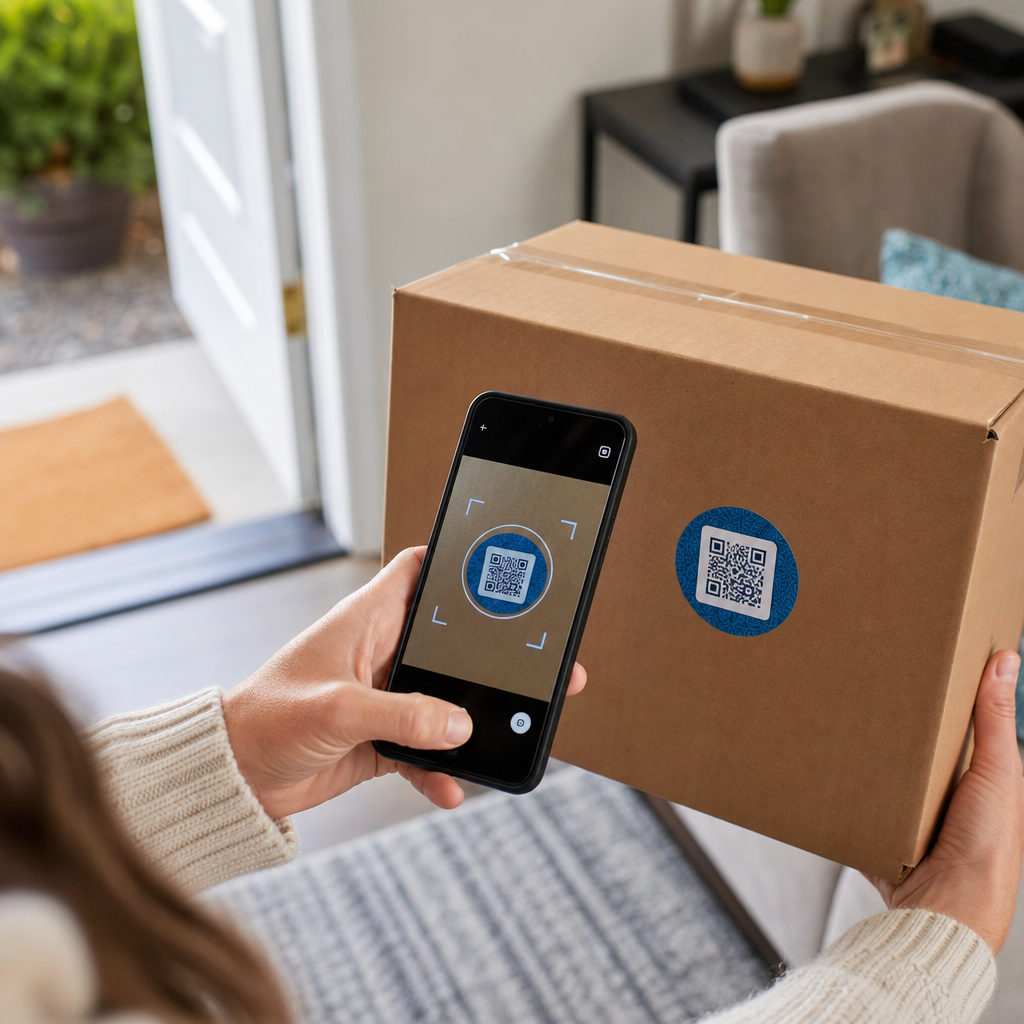
Transportörer använder QR-koder för att dirigera paket genom sitt nätverk. När en skanner på en sorteringsanläggning läser koden uppdateras paketets plats i realtid. Detta är samma skanningshändelse som utlöser spårningsmeddelandet du ser när du kontrollerar en försändelsestatus online. För kunder drar skanning av QR-koden på ett inkommande paket omedelbart upp live spårningsdata – inget behov av att leta efter ett spårningsnummer eller navigera till en transportörs webbplats manuellt.
Etikettleverans utan skrivare
En allt vanligare användning är Etikettservice modell. Istället för att kräva att kunder skriver ut en retur- eller utgående etikett hemma, skickar handlaren en QR-kod via e-post eller text. Kunden tar paketet till en deltagande transportörsplats – ett USPS-postkontor, UPS Store eller FedEx-plats – och tjänstemannen skannar QR-koden för att skriva ut etiketten vid disken.
USPS Label Broker, till exempel, låter handlare lagra etiketter i ett digitalt arkiv och distribuera dem till kunder som unika QR-kodade ID:n. Handlare kan också uppdatera, radera eller kontrollera spårningsstatus för dessa etiketter när som helst. Transportörer inklusive USPS och FedEx stöder QR-koder för inhemska returförsändelser, och UPS utökar denna förmåga över sitt butiksnätverk.
Detta arbetsflöde är praktiskt för e-handelsföretag eftersom det tar bort friktionen med att kräva en skrivare – ett betydande hinder för många kunder som initierar en retur.
Lägg till QR-koder i ditt fraktarbetsflöde Behöver du generera skanningsbara QR-koder länkade till spårningssidor, returportaler eller orderdetaljer? Använd Pageloot QR-kodgenerator för att skapa och hantera koder för dina fraktlådor på några minuter.
Returer och omvänd logistik
Returer är en stor operativ utmaning. Amerikanska återförsäljare förväntade sig att 15.8% av all försäljning skulle returneras under 2025, vilket uppgår till cirka $849.9 miljarder, och e-handelns returfrekvens ligger på cirka 19.3% – vilket innebär att nästan var femte onlinebeställning kommer tillbaka. Att behandla en enda retur kostar mellan $20 och $30 i genomsnitt, med vissa kategorier som går så högt som $65.
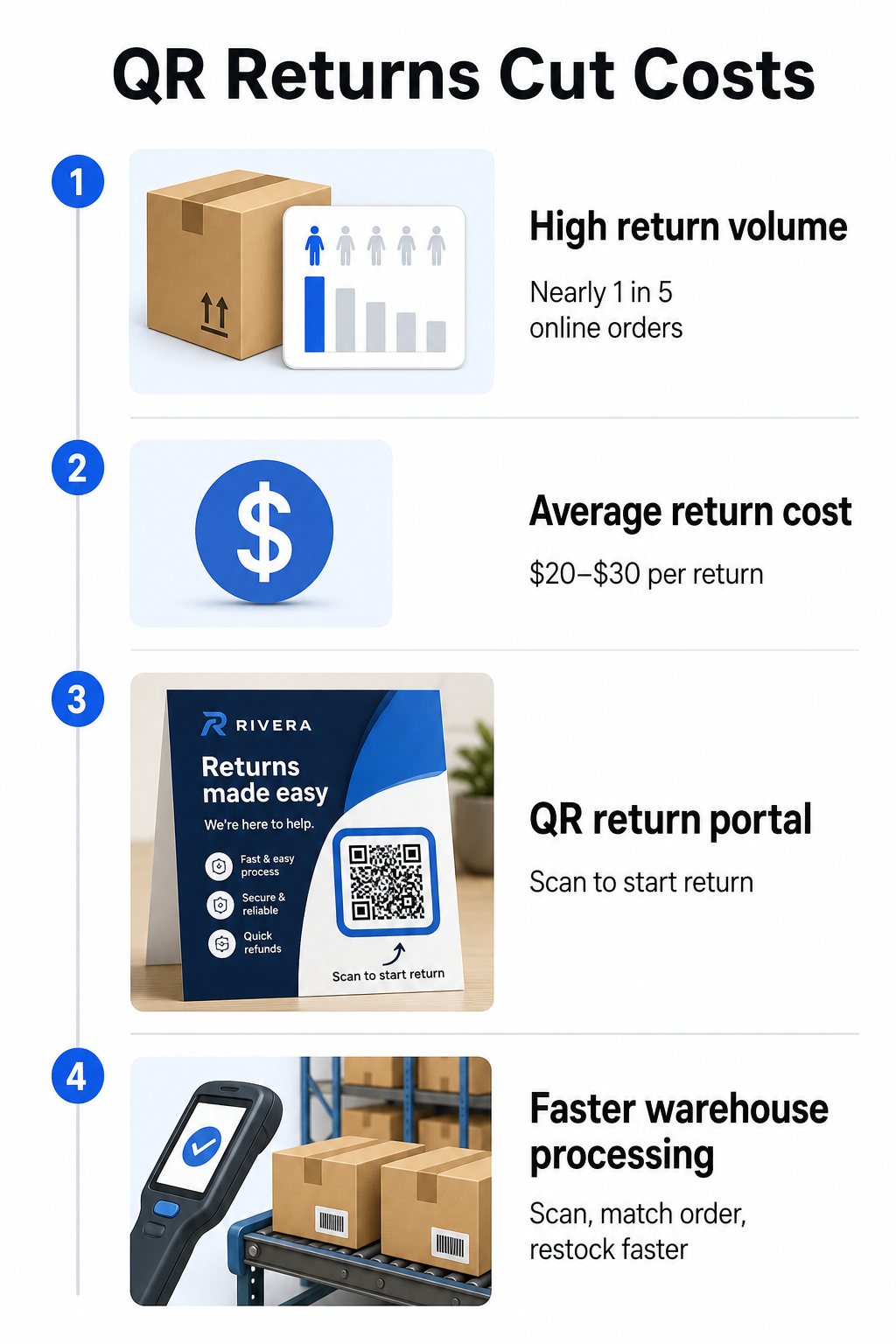
QR-koder minskar den kostnaden genom att göra returprocessen snabbare och mindre felbenägen. Istället för att kräva att kunder fyller i pappersformulär eller letar upp returadresser, kan en QR-kod tryckt på lådan eller inkluderad på en packsedel länka direkt till en returportal där de initierar processen digitalt.
Fördelar med QR-kodbaserade returer inkluderar:
- Färre supportkontakter – kunder självbetjänar istället för att mejla eller ringa
- Minskad returbedrägeri – QR-koder kopplade till specifika beställningar förhindrar manipulering av etikettinformation
- Snabbare hantering – lagerpersonal skannar retur-QR-koden för att omedelbart hämta den ursprungliga beställningen istället för att mata in data manuellt
- Skrivarlösa alternativ – stöds av USPS och FedEx nationellt, med handlare som kan erbjuda kunder en QR-kod, en utskrivbar etikett eller båda
För en praktisk titt på att koppla retur-QR-koder till automatiserade arbetsflöden, guiden om QR-koder för e-handelsleveranser går igenom hela installationen.
Användningsområden för lager och intern logistik
QR-koder på fraktlådor är inte bara för transportörer och kunder. Inne i distributionscentraler och lager är de ett primärt verktyg för att spåra lagerrörelser utan manuell datainmatning.
Mottagning och Inlagring
När en låda anländer till ett lager, hämtar skanning av dess QR-kod omedelbart sändningsposten – leverantörsdetaljer, antal artiklar, SKU-identifierare och förväntad lagringsplats. Personalen behöver inte skriva något eller korsreferera pappersarbete. Skanningen uppdaterar lagerhanteringssystemet (WMS) i realtid, vilket minskar avvikelserna som manuell inmatning vanligtvis introducerar.
Plockning, Packning och Sändningsverifiering
Under orderuppfyllnad vägleder QR-koder på lådor och backar personalen till rätt artiklar och kvantiteter. I packningsskedet fungerar skanning av lådans kod som en sista kontrollpunkt – bekräftar att rätt artiklar ingår innan lådan förseglas. I distributionsarbetsflöden som Amazon FBA, låter aktivering av 2D-streckkoder på systemnivå WMS generera en kod som representerar lådans innehåll under packning, så att samma kod hanterar sändningsspårning utan att någon behöver öppna lådan senare.
Plats och Lagerhantering
QR-koder kan tilldelas inte bara produkter utan till lagringsplatser – hyllor, zoner, rum eller backar. Skanning av en platskod tillsammans med en produktkod loggar exakt var lagret befinner sig vid varje given tidpunkt, vilket ger ditt team live-synlighet över hela lagret. Guiden om att skapa QR-koder för produktlager täcker hur man ställer in detta i praktiken.
Spåra varje skanning, överallt Vill du ha realtidsdata om när och var dina fraktlådans QR-koder skannas? Pageloots Statistik för QR-koder instrumentpanel fångar skanningstid, plats och enhetsdetaljer automatiskt.
Kundinriktade QR-koder på fraktlådor
Bortom logistiken använder vissa företag själva fraktlådan som en marknadsföringskontaktpunkt. En QR-kod på utsidan eller insidan av en låda kan länka till:
- En spårningssida för den aktuella sändningen
- En landningssida efter köp med produktguider eller installationsvideor
- En anmälan till lojalitetsprogram eller rabatterbjudande
- En recensionsförfrågan eller feedbackformulär
- Digital produktdokumentation eller manualer
Detta förvandlar uppackningsögonblicket till en varumärkesinteraktion. För e-handelsföretag är det en av de få fysiska kontaktpunkterna du helt kontrollerar efter kassan. Den Pageloots e-handels QR-kodssida beskriver föreslagna placeringar – fraktlådans utsida, packningsinlägg och produktmanualer – var och en utformad för att utlösa en annan typ av engagemang.
En praktisk anmärkning om placering: baserat på feedback från USPS-anställda tillåter USPS sannolikt inte anpassade QR-koder på själva fraktetiketten. Däremot är det tillåtet att placera en QR-kodsetikett direkt på lådan – inte på etiketten – och bör inte orsaka några problem med posthantering eller leverans.
Dynamiska QR-koder: Den praktiska fördelen för frakt
Om du lägger till QR-koder till dina fraktlådor, dynamiska QR-koder är det rätta valet framför statiska. En statisk QR-kod kodar en fast sträng av data permanent. En dynamisk QR-kod pekar på en omdirigerings-URL som du kan uppdatera när som helst utan att ändra den tryckta koden.
För fraktapplikationer är detta viktigt på flera sätt:
- En spårnings-URL kan ändra format eller flytta till en ny domän utan att kräva en ny tryckning
- Säsongskampanjer länkade från lådan kan bytas ut utan ny förpackning
- Om en returportal ändrar sin adress, fortsätter QR-koden på redan tryckta lådor att fungera
Dynamiska koder möjliggör också skanningsspårning. Du kan se hur många kunder skannade koden på sin låda, från vilken stad och på vilken typ av enhet. Denna data, tillgänglig via Pageloots analysverktyg, berättar om kunder engagerar sig med efterköpsupplevelsen och vilka produkter eller regioner som genererar mest aktivitet. För en bredare titt på vad spårnings-QR-koder kan avslöja om kundbeteende, den guide för QR-kodspårning täcker de viktigaste mätvärdena värda att övervaka.
GS1 Digital Link: Industristandarden som växer fram inom logistiken
Om du arbetar inom detaljhandel eller grossistdistribution kan du stöta på GS1 Digital Link – en standardiserad metod för att bädda in produktidentifierare såsom GTIN (Global Trade Item Numbers), batchnummer och utgångsdatum i en enda 2D-streckkod eller QR-kod.
GS1 Digital Link gör att en kod kan tjäna flera funktioner samtidigt. Den kan skannas vid försäljningsstället för kassan, på ett lager för lagerhantering, eller av en konsument för produktinformation – allt från samma tryckta kod. Leverantörer kan också uppdatera innehållet som levereras vid skanning (kampanjmeddelanden, återkallningsinstruktioner, allergenuppdateringar) utan att trycka om förpackningen, eftersom koden pekar på en webbaserad lösare istället för att koda all data direkt.
För företag som förbereder sig för GS1 Sunrise 2027 efterlevnadskrav är förståelsen för denna standard alltmer relevant. Guiden om QR-koder i spårning av leveranskedjan täcker hur 2D-streckkoder som dessa passar in i bredare spårbarhetsarbetsflöden.
Så här lägger du till QR-koder på dina fraktlådor
Om du vill implementera QR-koder på dina egna fraktlådor kommer följande steg att ta dig från koncept till driftsättning på ett tillförlitligt sätt.
Definiera destinationen först. Bestäm vad QR-koden ska länka till – en spårningssida, returportal, produktsida eller efterköpserbjudande. Använd en kort URL istället för en lång spårningssträng; kortare kodad data ger ett mindre tätt kodmönster som skannar snabbare och mer tillförlitligt, särskilt vid mindre utskriftsstorlekar.
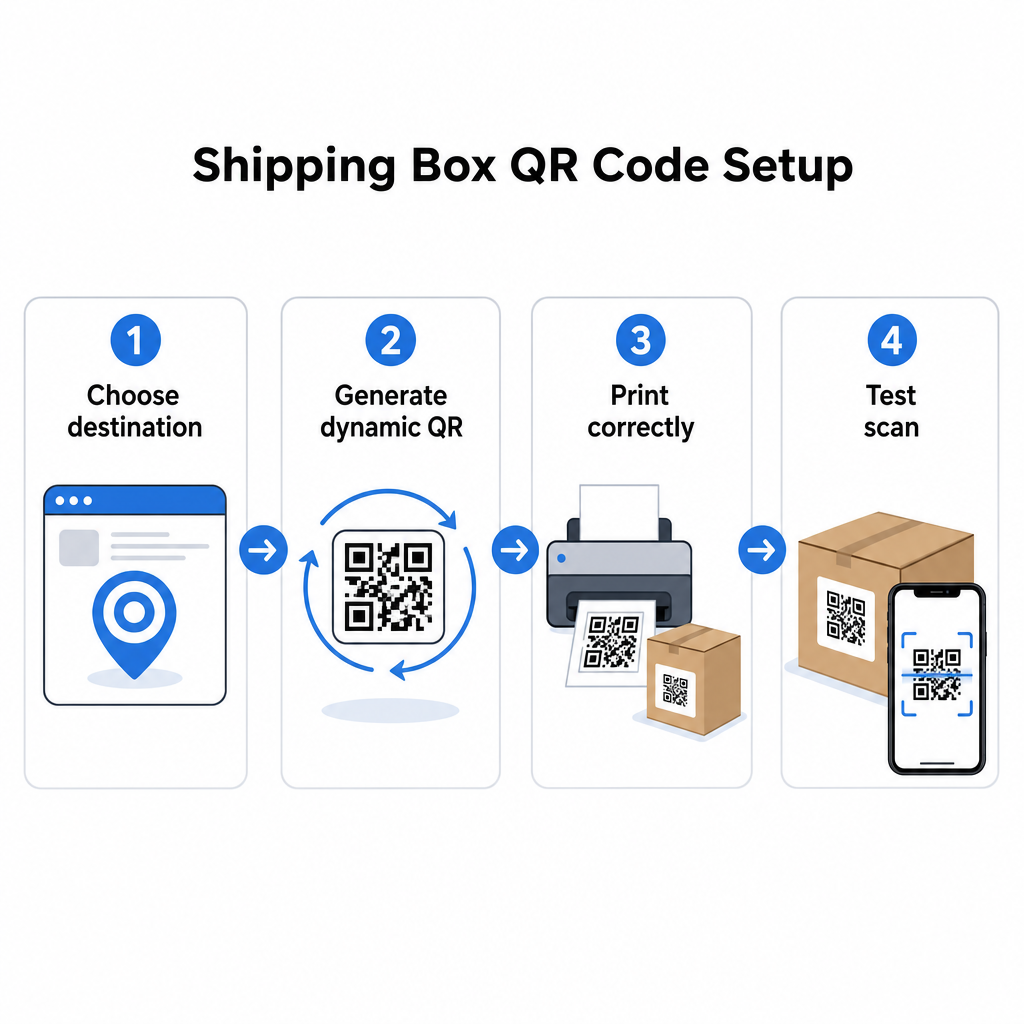
Generera en dynamisk QR-kod. Använda en länk-QR-kodgenerator för att skapa en dynamisk kod kopplad till din destinations-URL. Detta ger dig möjlighet att uppdatera destinationen senare utan att röra den tryckta förpackningen.
Följ utskriftsspecifikationerna. Skriv ut koden med minst 2 × 2 cm (0,8 × 0,8 tum), med 3 × 3 cm föredraget för tillförlitlighet i verkligheten. Använd mörka moduler på en vit eller ljus bakgrund – svart på vitt är idealiskt. Exportera som en vektorfil (SVG eller PDF) eller med 300–600 DPI för att säkerställa skärpa i slutlig storlek. Bibehåll en tyst zon på minst fyra tomma moduler på kodens alla fyra sidor, utan text, logotyper eller ramar som tränger in i den marginalen.
Placera den korrekt. Placera koden på en platt, ovikt panel bort från sömmar, hörn, tejpspår och områden som utsätts för slitage under frakt. Undvik glansiga ytor runt kodområdet, eftersom bländning stör kamerans igenkänning. Den främre eller övre panelen fungerar bäst för kundriktade koder. För detaljerad placeringsvägledning specifikt för lådor och etiketter, täcker QR-koder på produktförpackningar sidan de viktigaste övervägandena.
Testa innan utskrift i stor skala. Skanna koden på faktiska lådprover med flera smartphones, under varierande ljusförhållanden, och från de avstånd som dina kunder eller lagerpersonal realistiskt kommer att skanna från. Att upptäcka ett kontrast- eller storleksproblem före en full produktionskörning är betydligt mindre kostsamt än att upptäcka det efteråt.
Redo att bygga ditt QR-kodsystem för frakt? Oavsett om du behöver koder för spårningssidor, returportaler eller efterköpsengagemang, ger Pageloot QR-kodgenerator dig dynamiska, spårbara koder med en komplett analyspanel. Börja gratis – inget kreditkort krävs.
Vanliga frågor
USPS tillåter troligen inte anpassade QR-koder på själva fraktetiketten. Däremot är det tillåtet att placera en QR-kodsetikett direkt på lådan – inte på etiketten – och bör inte orsaka problem med posthantering eller leverans.
Transportörs-QR-koder genereras av frakttransportören (USPS, UPS, FedEx) och är kopplade till deras spårnings- och ruttingsystem. Anpassade QR-koder läggs till av handlaren och kan länka till vad som helst – spårningssidor, returportaler, produktinnehåll eller kampanjer. Båda kan visas på samma låda, men de tjänar olika målgrupper och syften.
Inte om du använder en dynamisk QR-kod. Dynamiska koder pekar till en omdirigering som du kan uppdatera när som helst i din QR-kodplattform, så den tryckta koden fortsätter att fungera även efter att destinations-URL:en ändras. Detta är en av de främsta anledningarna till att företag väljer dynamiska koder för förpackningsapplikationer.