> 산업 > QR Codes for Breweries: A Practical Guide for Taproom Operations
Taproom QR code

QR Codes for Breweries: A Practical Guide for Taproom Operations

Optimize your taproom operations with QR codes for digital tap lists, tasting notes, and reviews. Learn how to update menus instantly without reprinting.
Updated on 7월 2, 2026
목차

Are your taproom staff spending too much time answering the same questions about your beers? Between rotating tap lists, ABV details, food pairings, and seasonal releases, keeping customers informed without overwhelming your team is a real operational challenge. This guide covers how breweries are using QR codes to solve that problem – from digital tap lists to customer feedback tools.

Why Taprooms Are Turning to QR Codes

Taprooms and brewpubs represent 73% of all U.S. craft brewing businesses, yet account for only 15% of total craft beer volume. That structure puts enormous weight on the direct-to-consumer experience, and industry guidance increasingly points to doubling down on taproom experiences as the path forward for craft brewers.

QR codes fit naturally into that strategy. A single scannable code on a table can replace a stack of laminated menus, give customers instant access to tasting notes and beer details, and invite them to follow your brewery on social media – all without requiring staff to step away from the bar.

For businesses in hospitality, QR codes offer a low-cost way to connect physical spaces with digital content. Breweries are a particularly good fit because the information customers want – ABV, IBUs, style descriptions, flight options – changes regularly and benefits from being updated without reprinting.

The Digital Tap List: Your Most Practical Use Case

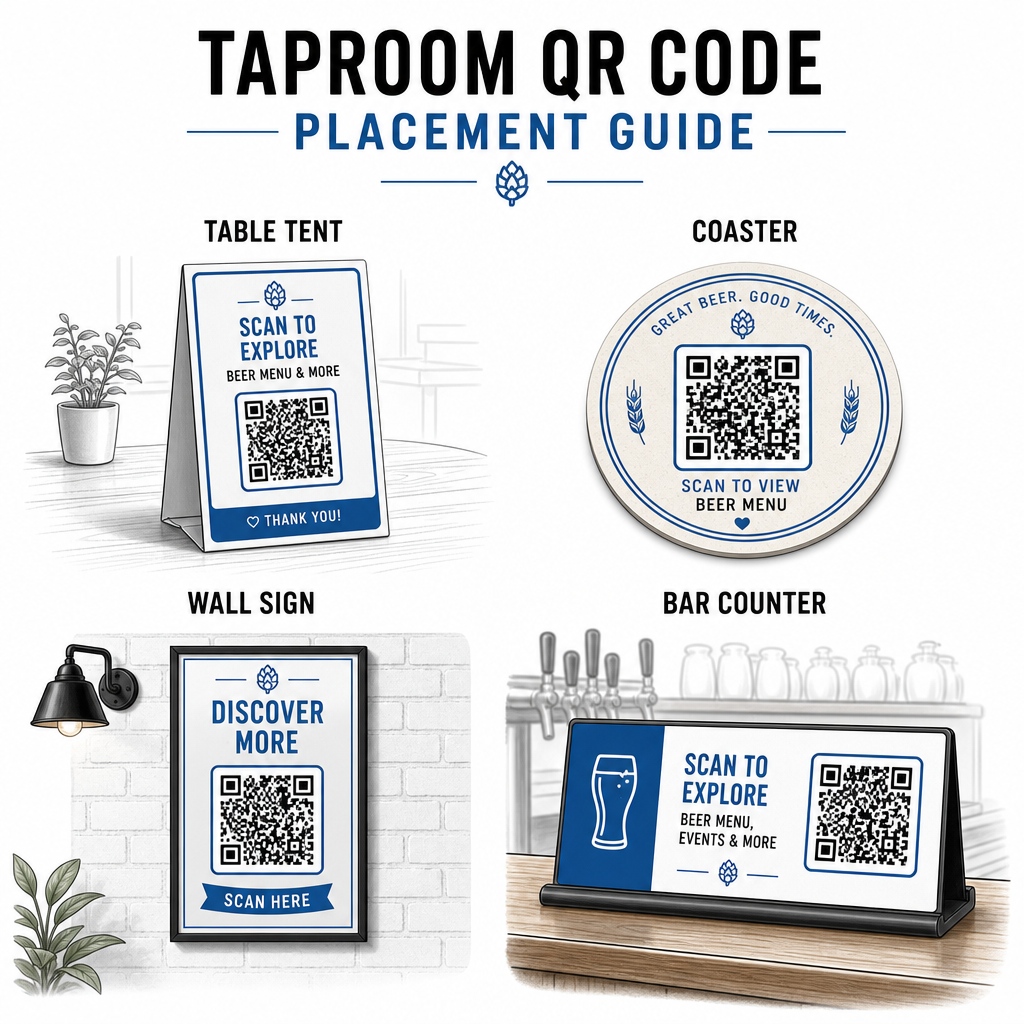
The most immediate application is replacing or supplementing your printed tap list with a digital version customers can access by scanning a code at the bar, on table tents, or at the entrance.

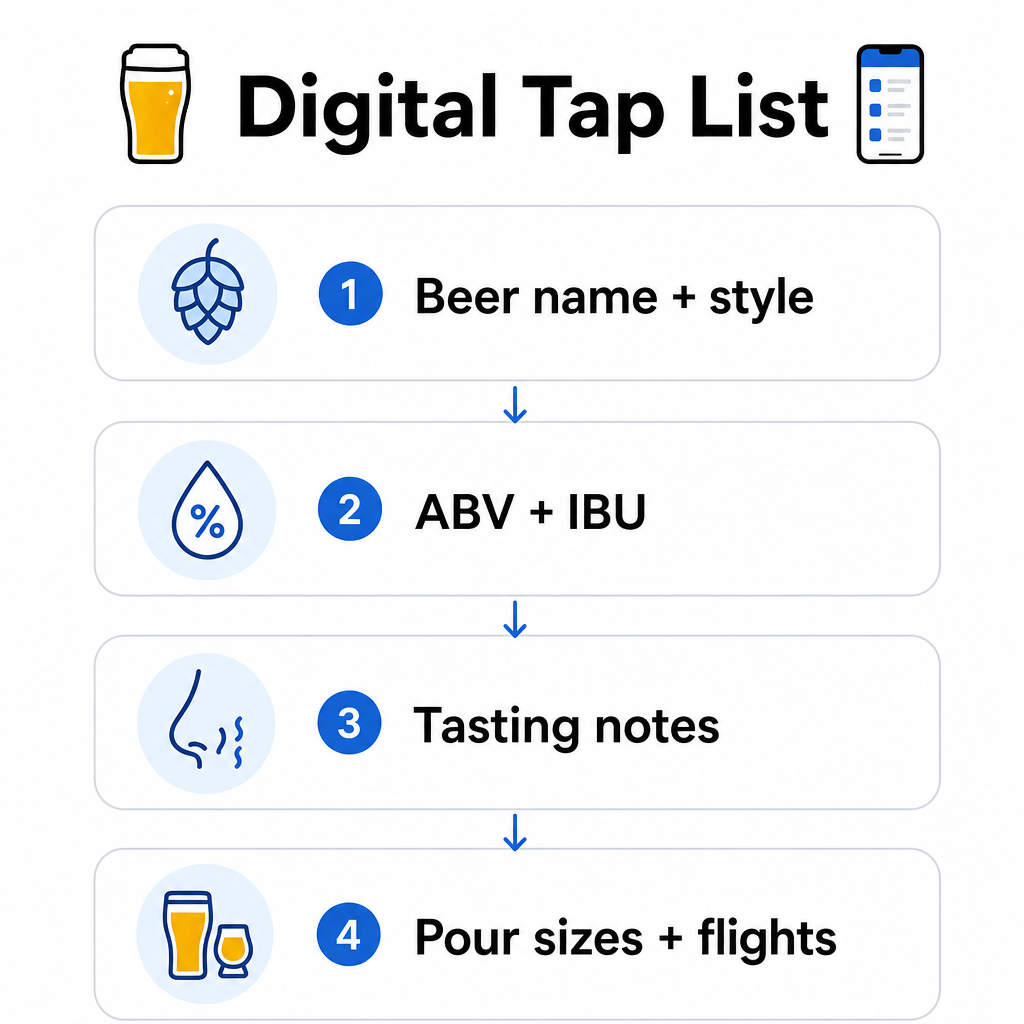
메뉴 QR 코드 lets you build a digital tap list that shows beer names, styles, ABV, IBU, tasting notes, and pricing by pour size. Brewery menus often include sample pours and flights as well, so you can structure your digital menu to reflect all available options without the formatting constraints of a chalkboard or paper card.

The key operational advantage is that you can update the menu without touching the physical QR code. When a keg kicks and a new seasonal replaces it, you update the digital destination – the printed code on the table stays the same. This matters in a setting where the tap list can change daily or weekly.

Create a Digital Tap List for Your Brewery Ready to build a menu your customers can access with one scan? Use the 메뉴 QR 코드 생성기 to upload your tap list as a PDF or build an interactive mobile menu – and update it any time without reprinting.

What to Include on a Brewery’s Digital Menu

A well-structured digital tap list helps customers make decisions faster and reduces back-and-forth with staff. Consider organizing it around the following elements:

Digital menu guide
  • Beer name and style – e.g., West Coast IPA, Hazy Double IPA, Dry Irish Stout
  • ABV and IBU – helps customers gauge strength and bitterness at a glance
  • Tasting notes or flavor descriptors – “citrus forward with a dry finish” is more useful than just “IPA”
  • Available pour sizes and prices – if you offer a 5 oz, 10 oz, and pint, each size should have its own price listed
  • Flight and sample options – clearly show how flights are structured and priced
  • Seasonal or limited releases – call these out so customers know what’s new

If your brewery also serves food, the same QR code can link to a full food and drink menu. For guests with dietary restrictions or allergen concerns, a digital format makes it easier to include detailed ingredient information. Note that TTB allergen labeling for alcohol labels remains voluntary under current regulations, but proactively sharing this information via your digital menu is a sound practice for customer trust.

Using PDF QR Codes for Beer Menus and Collateral

If you already have a designed tap list in PDF format, you can generate a QR code that links directly to that file. Customers scan and the PDF opens on their phone – no app required.

This approach works well for several brewery-specific scenarios:

  • Seasonal menu cards you redesign quarterly
  • Beer education sheets for tap takeovers or events
  • Printed collateral for brewery tours that you want to extend digitally
  • Tasting guides structured around flights

PDF QR 코드 are especially practical because you can swap out the linked PDF without changing the printed code. If you print a run of table tents for a seasonal event and the menu changes mid-run, you update the PDF rather than reprinting the codes. The broader applications of PDF QR codes for businesses cover additional ways to apply this approach across marketing and operations.

Collecting Google Reviews While Customers Are Still Engaged

The best moment to ask for a review is right after a positive experience – which in a taproom means while someone is finishing a great pint, not three days later when they’ve forgotten the beer names.

Google 리뷰 QR 코드 placed on your table, coaster, or receipt takes customers directly to your Google Business review page with a single scan. Adding a short prompt like “Enjoyed your visit? Tell others” makes the ask feel natural rather than pushy.

More reviews help your brewery rank in local search results and build credibility with new visitors who are deciding where to spend an afternoon. It’s a low-effort touchpoint with real downstream impact on foot traffic.

Beyond the Menu: Other Taproom QR Code Applications

QR codes can serve several other functions across your taproom operations.

Social media and newsletter sign-ups – A QR 코드 링크 on table tents or your bar top can direct visitors to your Instagram, Facebook page, or an email signup form. Guests who had a good time are receptive to staying connected, so give them an easy way to do it while the experience is still fresh.

Event and release announcements – Link a QR code to a landing page with upcoming events, beer release dates, or taproom hour changes. Because dynamic QR codes can be updated after printing, you can use the same physical code to promote different upcoming events over time without reprinting anything.

Beer education and brewery story – Some breweries use a QR code to share the story behind a beer – the yeast strain, the hop variety, the inspiration for the recipe. This kind of content deepens the taproom experience without requiring staff to deliver a full explanation with every pour. It works especially well for limited or collaboration releases where the backstory is part of the appeal.

Contactless payments – QR-based payment options can speed up the checkout process at busy taprooms. Customers scan, review their tab, and pay – reducing back-and-forth at the bar during peak hours. The benefits of QR code payments in restaurant settings apply directly to taproom operations as well.

Connect Every Taproom Touchpoint to Digital Content 사용 QR 코드 생성기 to create branded, trackable codes for your tap list, social media, events, and more – all managed from a single dashboard.

Dynamic vs. Static QR Codes: What Breweries Should Know

There are two types of QR codes: 정적동적. Understanding the difference helps you choose the right tool for each application.

기능 정적 QR 코드 동적 QR 코드
Destination URL Fixed at creation Can be updated anytime
해석학 없음 Scans, locations, device types, times
가장 적합한 대상 One-time or permanent links Tap lists, events, rotating content
Reprinting required after update? 아니요

For most brewery applications – especially tap lists and event promotions – dynamic QR codes are the right choice. The tap list changes. Events come and go. Seasonal menus rotate. A dynamic code lets you update the destination without discarding your printed materials, which matters when you’ve invested in custom-printed table tents or coasters.

Dynamic codes also give you analytics: how many times a code was scanned, from which location, on which devices, and at what times. That data tells you whether guests are actually engaging with your digital menu or ignoring it – which helps you decide where to place codes and how to design them for better visibility. For a full breakdown of what dynamic codes track and why it matters, see 동적 QR 코드가 수집하는 데이터.

Designing QR Codes for a Taproom Environment

Taprooms present specific physical conditions you need to account for: ambient lighting that can range from bright to dimly lit, surfaces that include wood, chalkboard, and glass, and guests who may be scanning from an arm’s reach away at a bar stool.

Taproom placement tips

A few practical guidelines drawn from QR 코드 가독성을 위한 모범 사례:

  • 크기 – Use a minimum of 2 × 2 cm (about 0.8 × 0.8 inches) for close-range scanning. For codes placed on walls or chalkboards where guests scan from further away, apply the 10:1 rule: the code width should be at least one-tenth of the expected scanning distance.
  • 대비 – Maintain strong contrast between the code pattern and its background. A dark pattern on a light background is standard. Avoid placing codes directly on dark wood without a white background field behind them.
  • Quiet zone – Leave a clear margin around the code – roughly 0.25 inches – so the scanner can find and read the code without surrounding elements interfering.
  • Surface – Avoid curved or textured surfaces like bottles. Table tents, coasters, printed menus, and wall signs are the best placements. Using QR codes on table tents covers placement specifics in more detail.
  • File format – Download your codes in SVG, EPS, or PDF format for high-quality printing. Raster formats like JPG degrade at larger print sizes and can become unreadable.

If you add your brewery logo to the code – which helps with brand recognition – use error correction level Q or H, and keep the logo to no more than 30% of the code area to avoid interfering with scannability.

Honest Limitations to Plan Around

QR codes are useful, but they work best as a supplement to your taproom experience rather than a full replacement for every analog touchpoint.

Research consistently shows that a significant share of diners still prefer physical menus. Survey data indicates that 67% of diners prefer having both digital and traditional menu options rather than one or the other. Keeping some printed or chalkboard menus available alongside QR codes aligns with most guests’ preferences and avoids alienating those who find QR-only setups frustrating.

There are also accessibility considerations worth addressing directly:

  • Guests without smartphones, or with older devices that struggle to scan, need an alternative option available
  • Menus delivered as image-only PDFs can be inaccessible to guests using screen readers – structured text or HTML menus are more inclusive
  • Weak Wi-Fi in older taproom buildings can slow menu load times, frustrating guests – ensure your in-house network can handle the demand before removing physical menus entirely

Addressing these issues upfront – keeping a backup paper menu available, ensuring your digital content loads quickly, and testing your codes in the actual lighting conditions of your taproom – keeps QR codes a convenience rather than a friction point for your guests.

Tracking What’s Working

One of the underused advantages of dynamic QR codes in a taproom is the analytics layer. If you place codes at the bar, on tables, and near the entrance, you can see which locations generate the most scans. If you run a seasonal promotion and link it through a QR code, you can measure how many people actually engaged with it.

Over time, this data helps you make better placement decisions, understand which content resonates with guests, and measure whether your digital engagement is growing alongside foot traffic. It also helps you identify dead zones – locations where codes are placed but rarely scanned – so you can adjust accordingly.

This kind of measurement is especially relevant for taprooms that rely heavily on repeat visits and word-of-mouth. For a broader look at how QR codes serve the hospitality industry, including tracking and engagement strategies, the hospitality resource covers the full picture.

Running an efficient taproom means giving guests the information they want quickly while keeping your staff focused on what they do best. QR codes handle the information layer – tap lists, beer details, event announcements, and review prompts – without adding operational complexity. Start with a dynamic menu QR code on your tables, add a Google review prompt, and use scan analytics to refine placement and content from there.

Get Started with Taproom QR Codes Create your first QR code in minutes with the Pageloot QR 코드 생성기 – customize it with your brewery’s branding, link it to your tap list or any digital destination, and update it any time without reprinting.

자주 묻는 질문

Can I update my tap list on a QR code without reprinting it?

Yes, if you use a dynamic QR code. Dynamic codes use a redirect URL managed by the platform, so you can update the destination content – such as a new tap list PDF or a live menu page – at any time without generating a new code or replacing the physical code on your tables or coasters.

What should I do if some of my taproom guests can’t use QR codes?

Keep a physical or chalkboard menu available as a backup. Survey data shows that 67% of diners prefer having both digital and traditional menu options, so a hybrid approach serves the broadest range of guests. QR codes work best as a supplement to, not a replacement for, analog alternatives.

How do I know if my taproom QR codes are actually being used?

With dynamic QR codes, you get access to scan analytics – including total scans, scan times, device types, and location data. Place different codes in different locations (bar, tables, entrance) to compare engagement by area, and use that data to optimize placement and design over time.

작성자 정보

시임 코스타비는 페이지루트의 콘텐츠 책임자입니다. 그는 페이지루트의 혁신적인 QR 코드 생성 서비스에 대한 글을 쓰고 있습니다. 5년 이상 QR 코드 분야에서 쌓아온 깊이 있는 전문 지식을 바탕으로, 시임은 이 분야의 전문가로 인정받고 있습니다. 그는 QR 기술을 활용하여 디지털 상호작용을 간소화하고 향상시키는 데 크게 기여하고 있습니다.

범주
에 대해 자세히 알아보기

온라인으로 QR 코드를 생성해야하는 경우 QR 코드 만들기 무료로 여기!
Pageloot는 #1 Go-To 솔루션 QR 코드를 만들고 스캔합니다.

BL-0313

블로그 세대

20,000개 이상의 브랜드로부터 신뢰를 받아 더 많은 매출, 리뷰, 팔로워를 확보했습니다.

클라이언트 로고
최고 브랜드의 신뢰
5 중 4.8 평가

4.86 / 5 별점

휴고 로랑
휴고 로랑
레스토랑 주인
가장 쉽고 안정적인 QR 코드 생성기. PDF 파일을 즉시 업로드할 수 있습니다. 이제 레스토랑 메뉴가 디지털화되었습니다.
루카스 얀센
루카스 얀센
부동산 개발사
이것은 훌륭한 도구이며 QR 코드를 사용하면 원하는 곳으로 이동할 수 있습니다. 우리는 위치 QR 코드만 사용하지만 유용한 기능이 너무 많습니다.
엠마 모레티
엠마 모레티
소매 제품
사용하기 쉽고 빠릅니다. 그것은 훌륭하게 작동하고 완벽한 이미지를 생성하므로 직원들이 내 vCard를 다운로드할 수 있습니다.
휴고 로랑
휴고 로랑
레스토랑 주인
가장 쉽고 안정적인 QR 코드 생성기. PDF 파일을 즉시 업로드할 수 있습니다. 이제 레스토랑 메뉴가 디지털화되었습니다.
루카스 얀센
루카스 얀센
부동산 개발사
이것은 훌륭한 도구이며 QR 코드를 사용하면 원하는 곳으로 이동할 수 있습니다. 우리는 위치 QR 코드만 사용하지만 유용한 기능이 너무 많습니다.
엠마 모레티
엠마 모레티
소매 제품
사용하기 쉽고 빠릅니다. 그것은 훌륭하게 작동하고 완벽한 이미지를 생성하므로 직원들이 내 vCard를 다운로드할 수 있습니다.
더 많은 QR 코드보기
쇼핑객이 QR 코드를 스캔한다
QR 코드 소매상
데이터 매트릭스 및 QR
데이터 매트릭스 대 QR 코드
고객이 QR 배너를 스캔합니다.
QR 코드 사용 야외 배너
무엇이든 디지털 경험으로 전환하세요 3분 이내에.

14일 무료 체험.

신용카드는 필요 없습니다.

첫 구매 시 30% 할인

코드를 사용하세요:

MP3 파일 공유

PDF QR 코드를 생성하려면 가입하세요

필요한 모든 것을 업로드하고 표시합니다.

  • 오디오 파일
  • 팟캐스트
  • 음악

가입 시 14일 무료 체험.
체험 기간 후 QR 코드 만료.

오디오 mp3 QR 코드를 생성하려면 가입하세요

프레임으로 더 많은 스캔 확보

QR 코드에 더 많은 프레임을 추가하려면 가입하세요

클릭 유도 문안 프레임은 고객이 QR 코드와 쉽게 상호 작용할 수 있도록 도와줍니다. 사용해 보세요!

가입 시 14일 무료 체험.
체험 기간 후 QR 코드 만료.

QR 코드에 더 많은 프레임을 추가하려면 가입하세요

도형으로 더 많은 스타일 추가

더 많은 도형을 만들려면 가입하세요

QR 코드는 정사각형일 필요가 없습니다. 브랜드 이미지에 맞게 전환해 보세요.

가입 시 14일 무료 체험.
체험 기간 후 QR 코드 만료.

더 많은 도형을 만들려면 가입하세요

QR 코드에 로고 추가

QR 코드에 로고를 추가하려면 가입하세요

로고와 브랜드를 추가하여 QR 코드를 돋보이게 만드세요.

가입 시 14일 무료 체험.
체험 기간 후 QR 코드 만료.

QR 코드에 로고를 추가하려면 가입하세요

스마트 앱 스토어 리디렉션

앱 스토어 QR 코드를 생성하려면 가입하세요

스마트 앱 스토어 QR 코드에 앱 링크를 추가하세요. 사용자는 장치에 따라 리디렉션됩니다.

가입 시 14일 무료 체험.
체험 기간 후 QR 코드 만료.

앱 스토어 QR 코드를 생성하려면 가입하세요

QR 코드에 이미지 업로드

이미지 QR 코드를 생성하려면 가입하세요

이미지를 쉽게 공유하세요. 몇 초 안에 동적으로 이미지를 변경하십시오.

가입 시 14일 무료 체험.
체험 기간 후 QR 코드 만료.

이미지 QR 코드를 생성하려면 가입하세요

PDF 파일 공유

PDF QR 코드를 생성하려면 가입하세요

필요한 모든 것을 업로드하고 표시합니다.

  • 메뉴 및 가격표
  • 명령
  • 모든 문서

가입 시 14일 무료 체험.
체험 기간 후 QR 코드 만료.

PDF QR 코드를 생성하려면 가입하세요

인쇄 없이 나중에 편집

다시 인쇄하지 않고 QR 코드를 편집하려면 가입하세요

동적 QR 코드를 사용하면 새 QR 코드를 인쇄하지 않고도 QR 코드의 내용을 변경할 수 있습니다.

가입 시 14일 무료 체험.
체험 기간 후 QR 코드 만료.

다시 인쇄하지 않고 QR 코드를 편집하려면 가입하세요

언제? 어디서? QR 코드 스캔 추적

QR 코드를 추적하려면 가입하세요

어떤 QR 코드가 가장 많이 스캔되고 무엇이 고객을 가장 흥분시키는지 알아보십시오.

가입 시 14일 무료 체험.
체험 기간 후 QR 코드 만료.

QR 코드를 추적하려면 가입하세요

인쇄 준비 파일 제공

PDF 및 SVG와 같은 벡터 QR 코드를 생성하려면 가입하세요.

.EPS, .PDF, .SVG

HD 해상도로 QR 코드를 다운로드하고 싶으신가요? 인쇄할 준비가 된 벡터 또는 픽셀 형식을 가져옵니다.

가입 시 14일 무료 체험.
체험 기간 후 QR 코드 만료.

PDF 및 SVG와 같은 벡터 QR 코드를 생성하려면 가입하세요.

기다리세요. 귀하의 QR 코드는 로드 중... 로드 중...

나만의 것으로 만들기

나중을 위해 QR 코드를 저장하려면 가입하세요.

다양한 색상, 로고 및 클릭 유도문안 프레임으로 멋진 QR 코드를 만들어 더 많은 스캔을 받으세요.

가입 시 14일 무료 체험.
체험 기간 후 QR 코드 만료.

나중을 위해 QR 코드를 저장하려면 가입하세요.