Sunumunuzun ortasında hedef kitlenizle bir bağlantı veya belge paylaşmanız mı gerekiyor? Bir slayt üzerindeki uzun URL'lerle uğraşmak akışınızı bozar ve izleyicileri hayal kırıklığına uğratır. Bu kılavuz size herhangi bir PowerPoint slaytına dakikalar içinde taranabilir bir QR kodu eklemek için iki pratik yöntem sunar.
QR Kodları Sunumlarda Neden İyi Çalışır
Bir slayt üzerindeki bir QR kodu, hedef kitlenize destekleyici içeriğe anında erişim sağlar – yazmaya gerek kalmadan. Bir URL'yi okumak veya katılımcıların onu yazmasını ummak yerine, slayta bir kod yerleştirir ve telefonlarıyla taramalarına izin verirsiniz.
Yaygın kullanım durumları şunlardır:
- Bir sunumdan sonra bir açılış sayfasına veya kayıt formuna bağlantı vermek
- Bir PDF'i – bir rapor, teknik inceleme veya el ilanı gibi – kopya basmadan paylaşmak
- İzleyicileri bir videoya, portföye veya ürün sayfasına yönlendirmek
- Oturum sırasında veya sonrasında bir form veya anket aracılığıyla geri bildirim toplamak
QR kodunun kendisi sadece bir görsel dosyasıdır. Onu oluşturduktan sonra, PowerPoint'e eklemek yaklaşık 30 saniye sürer.
Yöntem 1: Harici Bir Araçla QR Kodu Oluşturun, Sonra Ekleyin
Bu yöntem size özelleştirme, dinamik güncellemeler ve tarama takibi üzerinde en fazla kontrolü sağlar – ve PowerPoint'in herhangi bir sürümüyle çalışır.
Adım 1: QR Kodunuzu Oluşturun
Git Pageloot QR kod oluşturucu ve kodlamak istediğiniz içeriğin türünü seçin:
- URL veya bağlantı – kullanın Bağlantı QR Kod Oluşturucu herhangi bir web adresini kodlamak için
- PDF belgesi – kullanın PDF QR Kod Oluşturucu bir dosyayı doğrudan yüklemek ve paylaşmak için
- Görsel veya görsel içerik – kullanın Resim QR Kod Oluşturucu bir fotoğraf galerisine veya görsel varlığa bağlantı vermek için
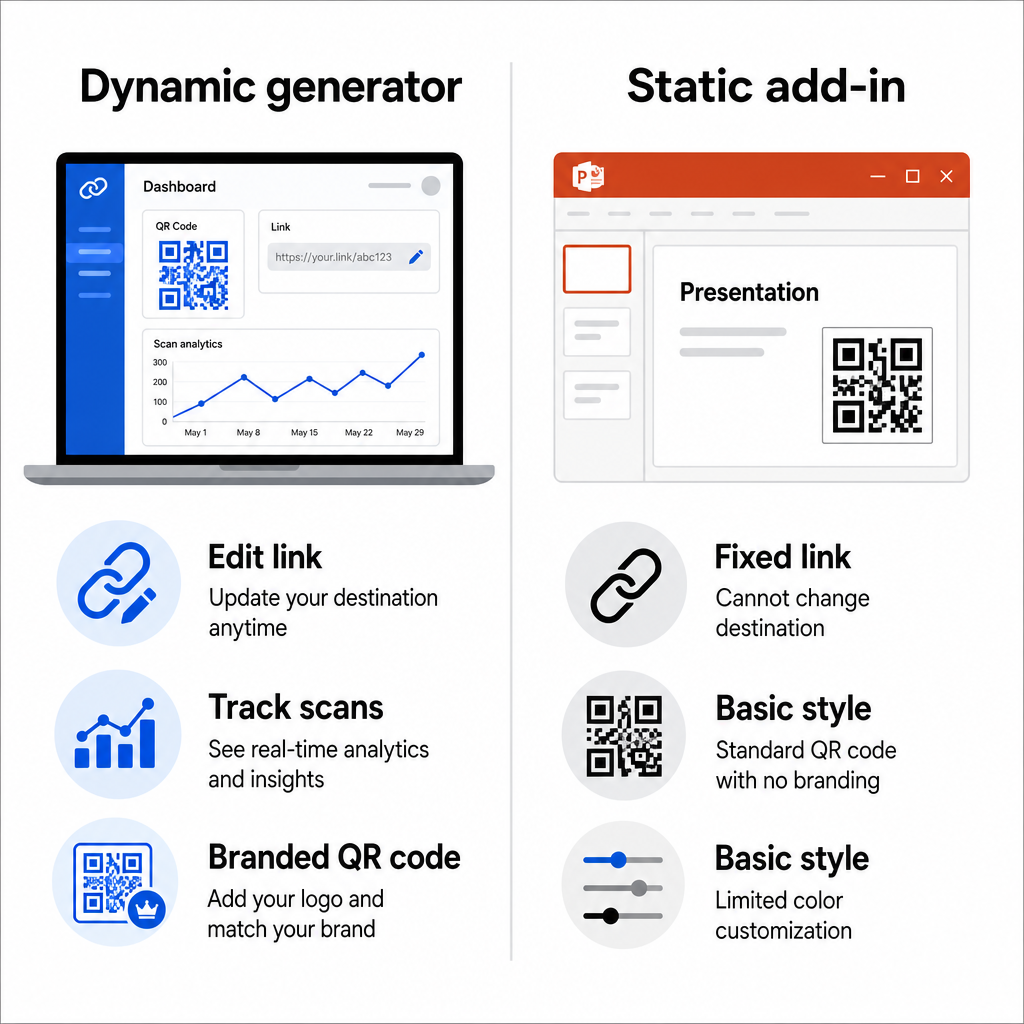
Sunumu tamamladıktan sonra hedef URL değişebilirse, bir tane seçin dinamik QR kodu. Dinamik kodlar, slaytlarınızdaki görseli yeniden oluşturmadan veya değiştirmeden bağlantılı içeriği herhangi bir zamanda güncellemenize olanak tanır – özellikle aynı sunumu birden fazla etkinlikte sunuyorsanız kullanışlıdır.
Adım 2: Tasarımı Özelleştirin
QR kodunu sunumunuzun görsel stiline uygun hale getirin. Ayarlayabilirsiniz:
- Ön plan ve arka plan renkleri
- Nokta şekilleri ve köşe stilleri
- Kodun ortasına yerleştirilmiş bir logo
- Bir harekete geçirici mesaj çerçevesi (örn., “Kılavuzu indirmek için tarayın”)
Bir logo eklerseniz, yüksek bir hata düzeltme seviyesi (Q veya H) kullanın, böylece desenin bir kısmı kapalı olsa bile kod taranabilir kalır. Bir kuralı kesin olarak uygulayın: açık arka plan üzerinde koyu desen. Ters tasarımlar – koyu arka planlar üzerinde açık kodlar – tarayıcı uygulamalarını, özellikle de eski olanları karıştırabilir. Bir hedefleyin en az 4:1 kontrast oranı ön plan ve arka plan renkleri arasında.
Adım 3: QR Kodu Görselini İndirin
Kodu genel kullanım için PNG olarak indirin veya herhangi bir boyutta temiz bir şekilde ölçeklenen bir vektör formatı istiyorsanız SVG veya EPS dosyası olarak indirin. Çoğu PowerPoint slaytı için yüksek çözünürlüklü bir PNG yeterlidir.
Devam etmeden önce kodu test edin. Doğru hedefe çözümlendiğini doğrulamak için telefonunuzla tarayın.
Adım 4: Görseli PowerPoint'e Ekleyin
- PowerPoint sunumunuzu açın ve QR kodunu istediğiniz slayta gidin.
- Şeritteki Ekle sekmesine tıklayın.
- grubunda, Görüntüler Resimler tıklayın, sonra, Bu Cihaz (veya Dosyadan Resim sürümünüze bağlı olarak) seçin. İndirdiğiniz QR kodu görseline gidin, onu seçin ve tıklayın.
- Görseli slayt üzerinde gerektiği gibi yeniden boyutlandırın ve yeniden konumlandırın. Ekle.
- Sunum Bağlantınızı İzlenebilir Bir QR Koduna Dönüştürün.
Slaytınızı kaç kişinin ve ne zaman taradığını bilmek ister misiniz? İçeriğiniz değişirse yeniden yazdırmaya gerek kalmadan yerleşik analizlerle dinamik bir kod oluşturmak için kullanın. Pageloot QR Kodu Oluşturucu Yöntem 2: PowerPoint İçinde QR4Office Eklentisini Kullanın.
QR kodunu PowerPoint'ten ayrılmadan oluşturmayı tercih ediyorsanız,
QR4Office eklentisi tüm süreci uygulama içinden yönetir. Windows'ta PowerPoint 2013 veya sonraki sürümleriyle, web'de PowerPoint, iPad'de PowerPoint ve Mac'te PowerPoint 2016 veya sonraki sürümleriyle çalışır. Adım 1: QR4Office'i Yükleyin.
PowerPoint'i açın ve
- sekmesine tıklayın. Ekle Eklentileri Al.
- Tıklayın Eklentiler Dosyadan Resim sürümünüze bağlı olarak) Eklentiler grubunda. Arama çubuğuna.
- yazın ve Enter tuşuna basın. Soru-Cevap sonuçlarda ve.
- Bulmak eklentisi tüm süreci uygulama içinden yönetir. Windows'ta PowerPoint 2013 veya sonraki sürümleriyle, web'de PowerPoint, iPad'de PowerPoint ve Mac'te PowerPoint 2016 veya sonraki sürümleriyle çalışır. Ekle tıklayın.
- Kurulumu tamamlamak için şartları kabul edin.
Adım 2: QR Kodunu Oluşturun ve Ekleyin
- Kurulduktan sonra, QR4Office'i Ekle sekmesinden veya eklenti panelinden açın.
- Kodlamak istediğiniz URL'yi veya metni girin.
- Panel içinde rengi, arka planı, boyutu ve hata düzeltme seviyesini ayarlayın.
- Tıklayın Ekle QR kodunu doğrudan etkin slayta yerleştirmek için.
Eklenti, QR kodunu bir görsel nesnesi olarak yerleştirir, böylece onu slayttaki diğer herhangi bir şekil gibi taşıyabilir ve yeniden boyutlandırabilirsiniz.
Bu yöntemin ana dezavantajı, QR4Office'in temel özelleştirme seçeneklerine sahip statik bir kod üretmesidir. Dinamik düzenleme, tarama takibi veya gelişmiş marka özellikleri elde edemezsiniz. Basitliğin öncelik olduğu tek seferlik bir slayt için iyi çalışır. Hedefin değişebileceği veya etkileşimi ölçmek istediğiniz devam eden sunumlar veya kampanyalar için, harici jeneratör yaklaşımı size önemli ölçüde daha fazla esneklik sağlar.
Bir Sunum için QR Kodunuzu Boyutlandırma
Boyut, bir sunum bağlamında baskıdan daha önemlidir, çünkü kitleniz yakından ziyade uzaktan tarama yapar.
Pageloot'un QR kodu okunabilirlik yönergeleri bir kurala uyun 10:1 kuralı: QR kodu, beklenen her 10 cm tarama mesafesi için en az 1 cm genişliğinde olmalıdır. Katılımcıların 4-7 fit uzakta olabileceği tipik bir konferans salonunda, kodu slaytın üzerinde cömert bir boyutta oluşturmak pratik bir başlangıç noktasıdır.
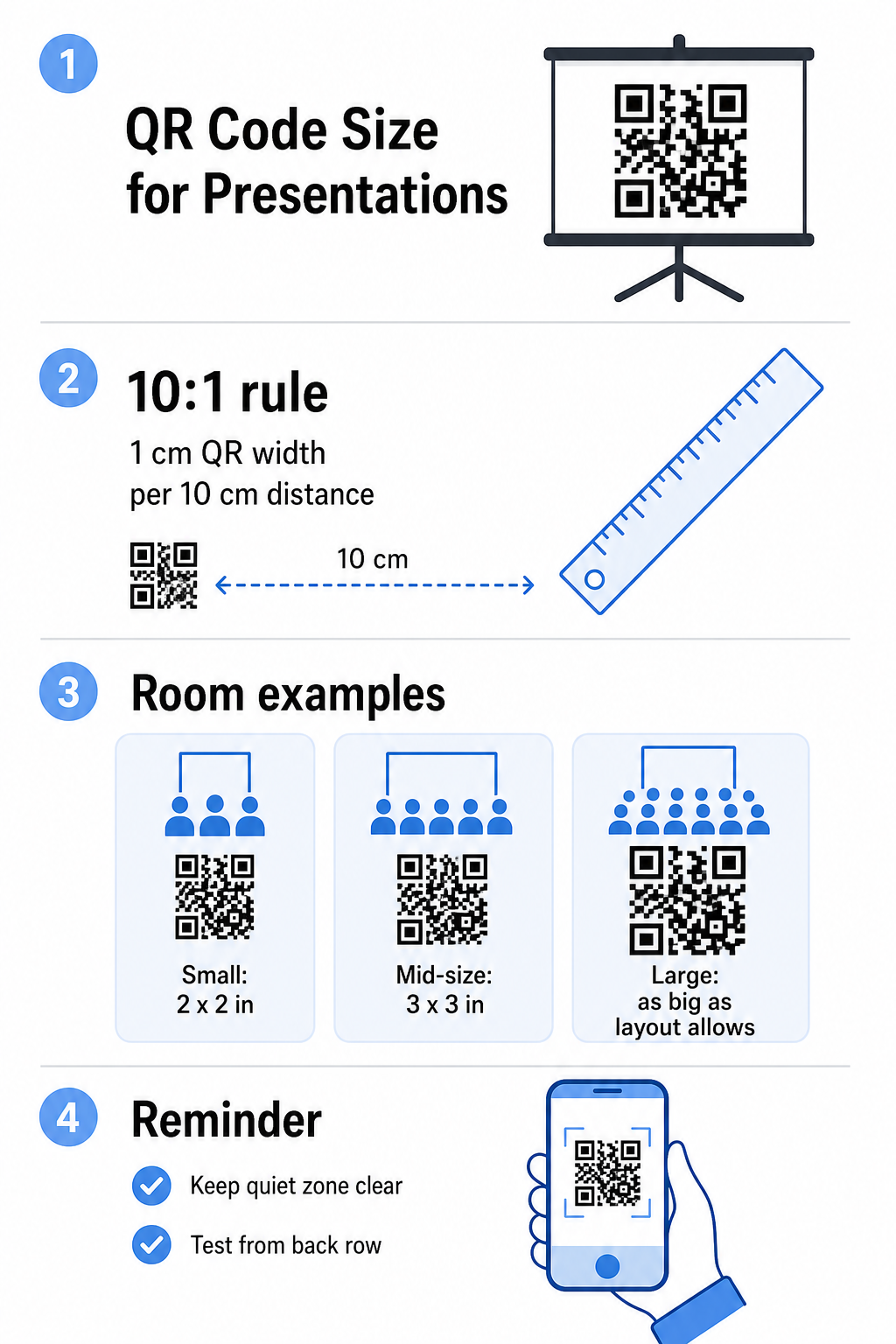
- Küçük oda veya toplantı alanı: oluşturulan slaytın üzerinde en az 2 × 2 inç hedefleyin
- Orta büyüklükte toplantı odası: 3 × 3 inç veya daha büyük
- Büyük konferans veya etkinlik salonu: kodu düzenin izin verdiği kadar büyük yapın ve bir yedek olarak URL'yi altına metin olarak yerleştirmeyi düşünün
QR kodunu çevreleyen metin veya grafiklerle kalabalıklaştırmaktan kaçının. Sessiz bölge – kodun etrafındaki boş kenar boşluğu – açık kalmalıdır, böylece tarayıcılar sınır desenini doğru bir şekilde bulabilir ve okuyabilir.
Tasarım ve Sunum İpuçları
Yayına geçmeden önce birkaç pratik husus:
- Yapabilirseniz odada test edin. Projektör parlaklığı, ekran parlaması ve ortam aydınlatması hepsi taranabilirliği etkiler. Mat projeksiyon yüzeyleri parlak olanlardan daha iyi çalışma eğilimindedir.
- QR koduna kendi slaytını veya bekleme süresi verin. Hızlıca geçtiğiniz bir slaytın üzerine yerleştirmeyin – kitlenizin kamera uygulamasını açıp taramak için bir anı ihtiyacı var.
- Kısa bir talimat satırı ekleyin. “Telefon kameranızla tarayın” gibi bir şey, QR kodlarına daha az aşina olan izleyicilerden herhangi bir tereddütü ortadan kaldırır.
- Tekrarlanan sunumlar için dinamik bir kod kullanın. Oturumlar arasında bağlantılı kaynağı güncellerseniz, dinamik bir kod, hedefi kontrol panelinizden bir kez değiştirdiğiniz anlamına gelir – slaytı değiştirmeye veya görüntüyü yeniden oluşturmaya gerek yok.
Kodunuzun gerçekten taranıp taranmadığını etkileyen tasarım kararlarına daha derinlemesine bir bakış için, bu QR kod renk kontrast kılavuzu kontrast oranlarını, kaçınılması gereken renk kombinasyonlarını ve cihazlar ile aydınlatma koşullarında nasıl test edileceğini kapsar.
Temel bilgilerle rahat olduğunuzda, tüm yelpazesini keşfedin Pageloot QR kodu özellikleri basit bağlantı kodlarının ötesine geçmek için – PDF paylaşımından ve resim galerilerinden tarama analizlerine ve tamamen markalı tasarımlara kadar.
Sıkça sorulan sorular
Evet, Pageloot gibi bir araçtan dinamik bir QR kod kullanırsanız. Dinamik kodlar, sizin kontrol panelinizden her zaman değiştirebileceğiniz bir yönlendirme URL'si depolar. Sizin PowerPoint'inizdeki görüntü aynı kalır – sadece hedef değişir. Statik kodlar, çoğu eklenti tarafından oluşturulanlar da dahil olmak üzere, oluşturulduktan sonra güncellenemez.
PNG çoğu sunum için iyi çalışır. Şeffaf arka planları destekler ve standart slayt boyutlarında temiz kenarları korur. Kodu önemli ölçüde yeniden boyutlandırmayı veya birden çok formatta kullanmayı planlıyorsanız, bunun yerine bir SVG veya EPS vektör dosyası indirin – bunlar keskinlik kaybetmeden ölçeklenir.
10:1 boyutlandırma kuralını uygulayın – her 10 cm tarama mesafesi için, kod ekranda en az 1 cm genişliğinde olmalıdır. En uzaktaki izleyicinin yaklaşık 15 fit uzakta olduğu bir oda için, kodun yansıtılan ekranda büyük ve engelsiz görünmesini istersiniz. Mümkünse gerçek slaytı yansıtılan bir yüzeyde test edin ve doğru çözümlendiğini doğrulamak için sunum yapmadan önce kodu her zaman kendiniz tarayın.