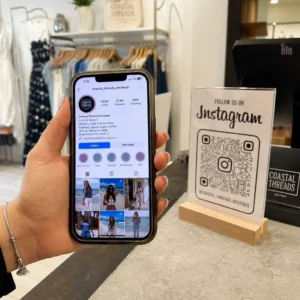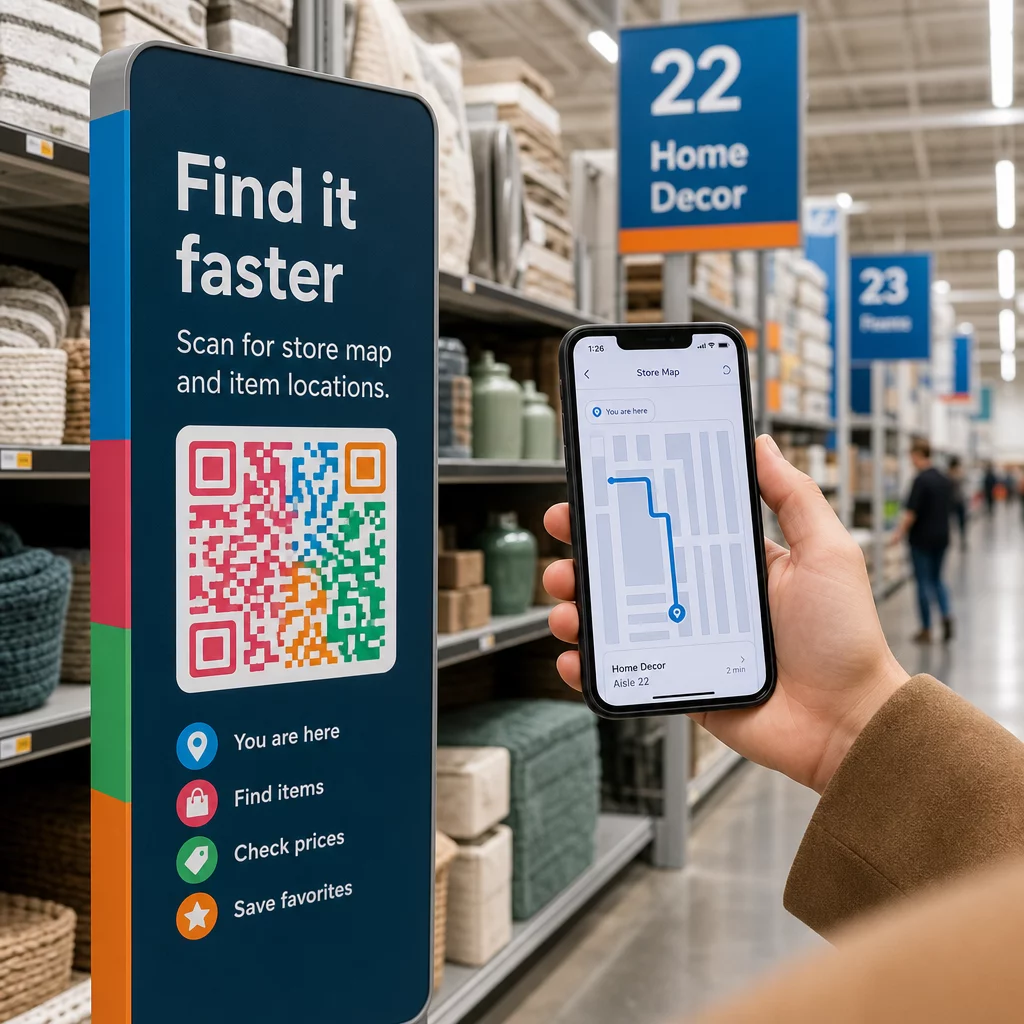
Adakah pelanggan anda merayau di lorong, kecewa dan pulang dengan tangan kosong? Navigasi dalam kedai yang lemah menyebabkan pembeli keluar sebelum mereka membeli. Panduan ini menunjukkan cara menggunakan kod QR untuk membimbing pelanggan terus ke produk, peta dan promosi yang mereka perlukan.
Mengapa Navigasi Dalam Kedai Adalah Masalah Sebenar bagi Peruncit
Ruang runcit yang besar sukar untuk dinavigasi. Pelanggan yang mencari item tertentu di kedai perkakasan atau peruncit kotak besar mungkin menghabiskan beberapa minit mencari sebelum berputus asa. Geseran itu merugikan anda jualan.
Pencarian jalan digital menyelesaikan masalah ini, tetapi membina aplikasi kedai khusus adalah mahal dan kebanyakan pelanggan tidak akan memuat turunnya. 72% pengguna lebih suka mengimbas kod QR daripada memuat turun aplikasi khusus perniagaan, yang menjadikan kod QR alternatif yang praktikal dan kos rendah. Ia berfungsi dengan kamera yang sudah ada dalam poket setiap pembeli – tiada pemasangan diperlukan.
Dengan 89 juta rakyat Amerika mengimbas kod QR pada tahun 2025, pelanggan anda sudah tahu cara menggunakannya. Persoalannya ialah sama ada anda menggunakannya dengan berkesan.
Apa yang Kod QR Boleh Lakukan untuk Navigasi Dalam Kedai
Kod QR bertindak sebagai jambatan segera antara lokasi fizikal dan kandungan digital. Dalam konteks runcit, ini bermakna anda boleh melampirkan kod yang boleh diimbas pada hampir mana-mana permukaan – tag rak, tanda lantai, paparan tingkap – dan menghantar pembeli terus ke maklumat berguna.
Berikut adalah kes penggunaan navigasi teras:
- Peta kedai dan pelan lantai – Pautkan ke PDF atau halaman web yang menunjukkan susun atur kedai anda, dengan bahagian dilabelkan dengan jelas
- Panduan lokasi produk – Arahkan pelanggan ke lorong atau jabatan tertentu
- Arah Google Maps – Bantu pelanggan mencari pintu masuk kedai anda, tempat letak kereta, atau lokasi tertentu dalam hartanah yang besar
- Zon promosi – Bimbing pembeli ke kawasan jualan semasa atau paparan yang ditampilkan
- Butiran produk dan ketersediaan – Biarkan pembeli melihat spesifikasi, status inventori, atau item berkaitan semasa berada di lorong
Setiap kes penggunaan ini boleh dicapai dengan satu kod QR dan halaman destinasi yang direka dengan baik.
Letakkan Kedai Anda di Peta Cipta kod boleh imbas yang membuka lokasi kedai anda terus dalam Google Maps. Gunakan Penjana Kod QR Peta Google untuk membawa pelanggan dari tempat letak kereta ke pintu masuk yang betul dalam beberapa saat.
Cara Menyediakan Kod QR untuk Navigasi: Panduan Praktikal
Langkah 1: Takrifkan Masalah Navigasi yang Anda Selesaikan
Mulakan dengan titik geseran tertentu. Adakah pelanggan sukar mencari jabatan tertentu? Adakah mereka keliru berhampiran pintu masuk? Adakah promosi bermusim sukar dicari? Mengenal pasti masalah sebenar membantu anda memutuskan apa yang harus dipautkan oleh kod QR dan di mana ia harus diletakkan.
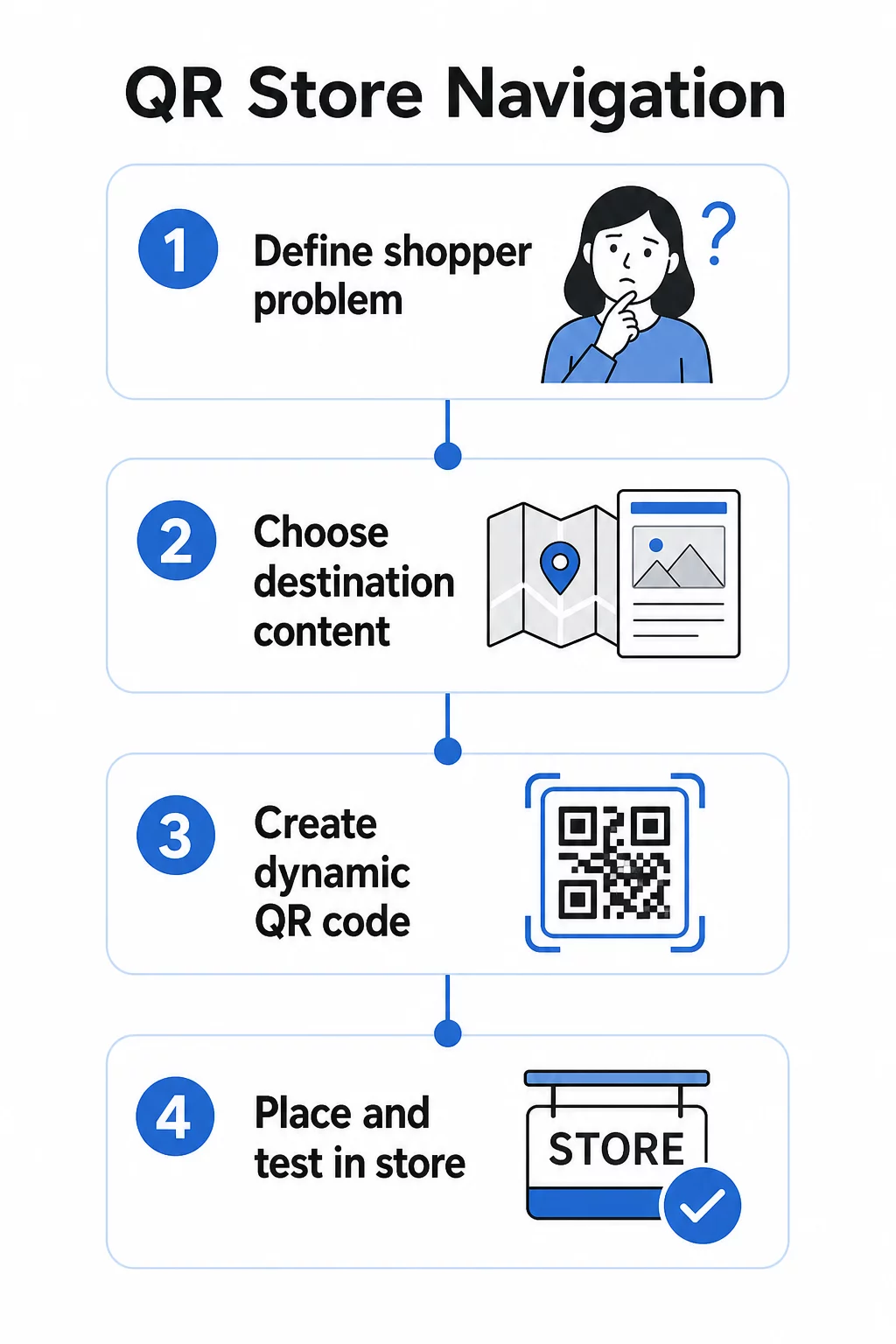
Langkah 2: Pilih Kandungan Destinasi yang Betul
Padankan destinasi kod QR dengan keperluan pembeli:
| Masalah Pembeli | Destinasi QR |
|---|---|
| Tidak dapat mencari jabatan | Peta kedai PDF atau pelan lantai berlabel |
| Memerlukan butiran produk di lorong | Halaman produk atau helaian spesifikasi |
| Mencari promosi semasa | Halaman pendaratan kupon atau halaman tawaran |
| Cuba mencari kedai anda | Pautan Peta Google |
| Ingin membandingkan pilihan | Katalog PDF atau buku rupa |
Untuk peta kedai dan panduan produk, a Kod QR PDF adalah salah satu pilihan paling praktikal – anda boleh mereka bentuk pelan lantai yang jelas, memuat naiknya sekali, dan mengemas kininya pada bila-bila masa susun atur anda berubah tanpa mencetak kod baharu.
Langkah 3: Gunakan Kod QR Dinamik Supaya Anda Boleh Mengemas Kini Tanpa Mencetak Semula
Langkah ini lebih penting daripada yang disedari kebanyakan peruncit. Susun atur kedai berubah. Promosi berputar. Produk bergerak. Jika anda mencetak kod QR statik yang terikat pada URL tetap dan kemudian perlu mengemas kini destinasi, setiap kod yang dicetak menjadi tidak berguna.
Kod QR dinamik menyelesaikan masalah ini dengan menyimpan URL pengalihan pendek yang boleh anda kemas kini dari papan pemuka. Kod pada rak kekal sama; hanya destinasi yang berubah. Untuk persekitaran runcit di mana maklumat berubah setiap minggu atau mengikut musim, ini adalah penting.
Pageloot penjana kod QR mencipta kod dinamik yang membolehkan anda mengemas kini peta kedai anda, menukar promosi, atau mengalihkan ke halaman produk baharu – semuanya tanpa menyentuh papan tanda fizikal.
Langkah 4: Letakkan Kod Di Mana Pembeli Sebenarnya Memerlukannya
Penempatan menentukan sama ada kod QR digunakan atau diabaikan. Ikuti garis panduan ini:
- Paras mata dan capaian tangan – Letakkan kod di mana pembeli boleh mengimbasnya secara semula jadi, tanpa membongkok atau meregang. Jarak imbasan optimum untuk kebanyakan telefon pintar adalah kira-kira 10–50 cm.
- Pada titik kekeliruan – Kod di pintu masuk yang memaut ke peta kedai paling berguna apabila pelanggan mula-mula masuk dan sedang menyesuaikan diri.
- Berhampiran produk atau bahagian yang berkaitan – Kod di tepi rak untuk butiran produk berfungsi paling baik apabila ia berada betul-betul di sebelah item, bukan di hujung lorong.
- Pada papan tanda penunjuk arah – Papan tanda jabatan, sepanduk atas, dan grafik lantai semuanya adalah permukaan yang berkesan untuk kod QR navigasi.
- Boleh diakses oleh semua pembeli – Pastikan ketinggian penempatan sesuai untuk pelanggan yang menggunakan kerusi roda. Elakkan meletakkan kod terlalu rendah atau terlalu tinggi sehingga ia mengecualikan mana-mana segmen pembeli anda.
Untuk nasihat penempatan terperinci, lihat panduan kami mengenai penempatan kod QR terbaik untuk kedai runcit.
Langkah 5: Reka Kod Yang Sebenarnya Boleh Diimbas
Kod yang tidak boleh diimbas dengan boleh dipercayai merosakkan pengalaman. Ikuti minimum teknikal ini:
- Saiz – Untuk tag dan label rak, gunakan minimum 2 × 2 cm. Untuk papan tanda yang lebih besar, gunakan peraturan 10:1: jarak imbasan maksimum tidak boleh melebihi sepuluh kali lebar kod.
- Berbeza – Gunakan latar depan gelap pada latar belakang terang. Elakkan skema warna terbalik atau kontras rendah.
- Zon senyap – Kekalkan margin jelas sekurang-kurangnya empat modul di semua sisi. Jangan biarkan teks, sempadan, atau grafik melimpah ke ruang ini.
- Permukaan – Elakkan permukaan yang memantul, bertekstur, atau melengkung jika boleh. Kemasan matte mengimbas dengan lebih boleh dipercayai berbanding yang berkilat.
- Pemisahan – Jika anda meletakkan beberapa kod berdekatan antara satu sama lain (cth., pada paparan produk dengan beberapa item), jarakkan ia cukup jauh supaya kamera tidak tersilap membaca kod yang salah.
Sentiasa uji kod anda pada saiz, jarak, dan keadaan pencahayaan sebenar yang akan dihadapi oleh pembeli sebelum menggunakannya di seluruh kedai anda. Untuk butiran lanjut, lihat panduan kami mengenai amalan terbaik kebolehbacaan kod QR dan saiz kod QR untuk bahan cetakan yang berbeza.
Senario Navigasi Spesifik dan Cara Melaksanakannya
Memautkan ke Peta Kedai
Reka pelan lantai yang ringkas dan berlabel jelas dalam format PDF. Bahagikan kedai kepada zon-zon bernama – Elektronik, Pakaian, Khidmat Pelanggan, Tandas – dan serlahkan lokasi semasa dengan penanda “Anda di sini”. Muat naik PDF ke Pageloot’s Penjana kod QR PDF dan letakkan kod yang terhasil di pintu masuk kedai anda, berhampiran meja khidmat pelanggan, dan di persimpangan lorong utama.
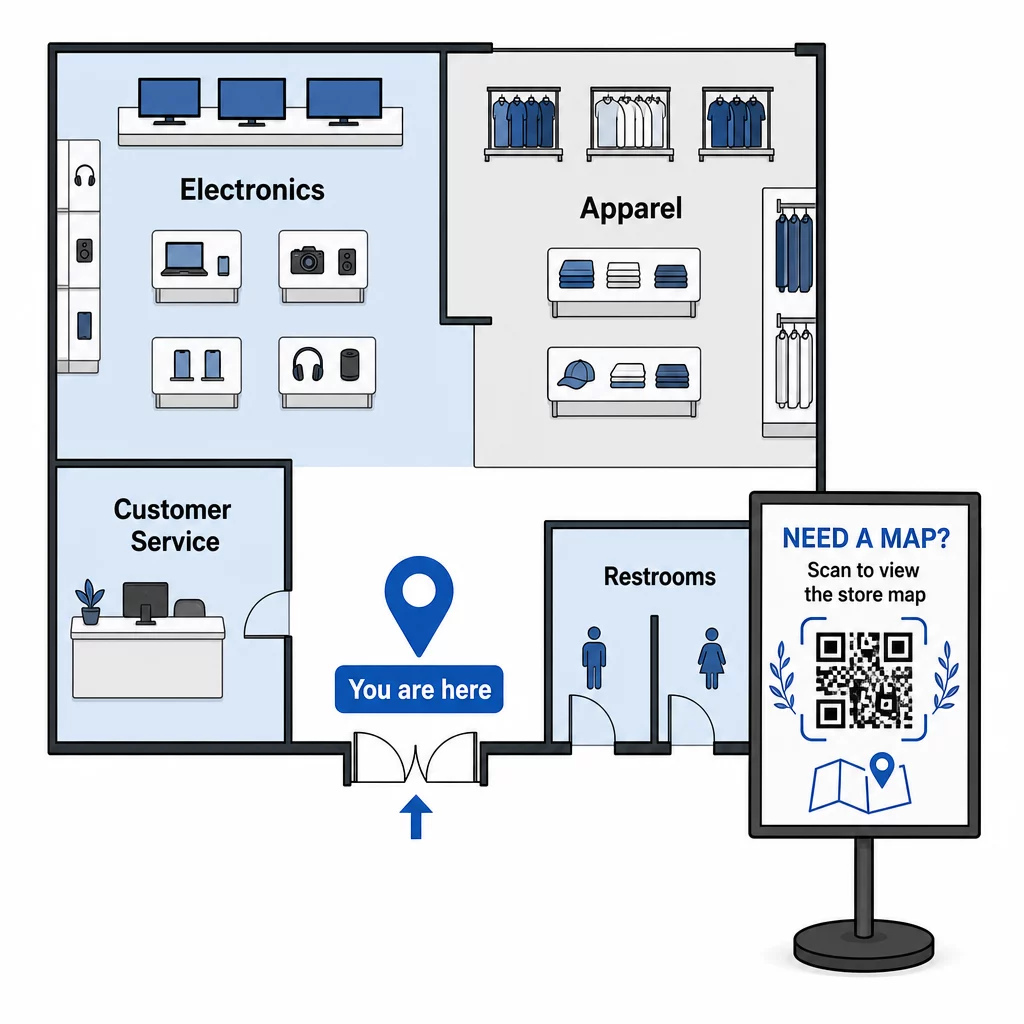
Apabila susun atur anda berubah untuk penetapan semula bermusim, kemas kini PDF dalam papan pemuka anda. Kod QR yang dicetak akan terus berfungsi.
Membimbing Pelanggan ke Pintu Masuk Kedai atau Tempat Letak Kereta Anda
Untuk hartanah runcit yang lebih besar, pusat membeli-belah, atau kedai dengan pelbagai pintu masuk, sebuah Kod QR Peta Google boleh disematkan dalam komunikasi pra-lawatan – pengesahan e-mel, resit, atau laman web anda – supaya pelanggan tiba dengan mengetahui dengan tepat ke mana hendak pergi. Letakkan kod yang sama pada papan tanda luaran untuk membantu pelanggan yang meletak kereta di kawasan yang tidak biasa mencari pintu masuk yang betul.
Untuk kedai-kedai yang berkongsi kompleks atau kampus dengan peruncit lain, pendekatan ini juga berfungsi untuk mengarahkan pembeli ke bangunan atau lot tertentu. Ketahui lebih lanjut tentang bagaimana kod QR menyokong arah dan perkongsian lokasi merentasi perkhidmatan peta yang berbeza.
Mengarahkan Pembeli ke Promosi
Semasa jualan atau acara bermusim, letakkan kod QR di pintu masuk kedai dan pada papan tanda yang berkaitan yang memaut terus ke halaman pendaratan promosi. Pageloot’s penjana kod QR kupon membolehkan anda mencipta halaman khusus untuk tawaran semasa, yang boleh diakses serta-merta oleh pembeli dan ditunjukkan semasa pembayaran.
Oleh kerana anda menggunakan kod dinamik, anda boleh menukar halaman promosi pada akhir jualan tanpa menggantikan sebarang papan tanda dalam kedai.
Navigasi Peringkat Produk di Rak
Letakkan kod QR kecil pada label tepi rak di sebelah produk utama. Pautkannya ke halaman yang merangkumi:
- Spesifikasi produk atau carta perbandingan
- Maklumat inventori (dalam stok, ketersediaan terhad)
- Produk berkaitan atau aksesori
- Video arahan atau panduan persediaan
Pendekatan ini amat berkesan untuk pembelian yang memerlukan pertimbangan tinggi – elektronik, perkakas, atau alatan khusus – di mana pembeli mahukan lebih banyak maklumat daripada yang boleh diberikan oleh tanda harga. Peruncit boleh menggunakan QR pautan anda untuk menunjuk terus ke mana-mana halaman produk atau halaman pendaratan tersuai.
Pastikan Kandungan Navigasi Anda Sentiasa Baharu Susun atur kedai, promosi, dan barisan produk berubah sentiasa. Gunakan kod QR dinamik Pageloot untuk mengemas kini halaman destinasi anda bila-bila masa tanpa mencetak semula papan tanda dalam kedai anda.
Menjejaki Kod Navigasi Mana Yang Berfungsi
Salah satu kelebihan navigasi berasaskan QR yang paling kurang digunakan ialah data yang dihasilkannya. Setiap imbasan adalah isyarat: pelanggan memerlukan bantuan mencari sesuatu di lokasi itu, pada masa itu.
Dengan kod QR dinamik dan analitik terbina dalam, anda boleh menjejaki:
- Lokasi mana yang menjana imbasan terbanyak – Jumlah imbasan yang tinggi berhampiran jabatan tertentu mungkin menunjukkan papan tanda fizikal yang kurang baik di kawasan tersebut.
- Apabila pembeli sedang menavigasi – Waktu imbasan puncak memberitahu anda bila pelanggan paling aktif dan paling memerlukan panduan.
- Kandungan mana yang mendapat penglibatan terbanyak – Jika peta kedai anda mendapat sepuluh kali ganda lebih banyak imbasan daripada kod promosi anda, anda tahu di mana pembeli menghadapi masalah.
Data ini membantu anda memperhalusi susun atur kedai anda, menambah baik papan tanda, dan membuat keputusan yang lebih baik tentang di mana promosi harus diletakkan secara fizikal. Bagi peruncit yang menguruskan pelbagai lokasi, kerangka analitik yang sama digunakan di semua kedai, membolehkan anda membandingkan prestasi dan menyeragamkan apa yang berkesan.
Yang Penyelesaian kod QR runcit Pageloot dibina khusus untuk pengoptimuman berterusan seperti ini, memberikan pengurus kedai papan pemuka berpusat untuk mengurus dan menganalisis setiap kod di kedai mereka.
Kesilapan Biasa yang Perlu Dielakkan
- Mencetak kod statik untuk kandungan yang berubah – Sentiasa gunakan kod dinamik untuk apa-apa yang mungkin memerlukan kemas kini.
- Meletakkan kod di tempat tiada isyarat – Uji halaman yang dipautkan anda pada data selular, bukan hanya Wi-Fi kedai. Sesetengah pembeli tidak akan disambungkan ke rangkaian anda.
- Terlepas seruan untuk bertindak – Kod QR tanpa konteks akan diabaikan. Sentiasa sertakan baris teks pendek yang menerangkan apa yang akan diperoleh pembeli: “Imbas untuk peta kedai,” “Imbas untuk tawaran hari ini,” atau “Imbas untuk butiran produk.”
- Kod terlalu kecil untuk diimbas dari jarak semula jadi – Gunakan peraturan saiz 10:1 dan uji sebelum mencetak pada skala.
- Memautkan ke halaman yang tidak dioptimumkan untuk mudah alih – Setiap destinasi harus dimuatkan dengan cepat dan dipaparkan dengan jelas pada skrin telefon pintar.
Memulakan
Navigasi berasaskan QR adalah salah satu cara paling kos efektif untuk meningkatkan pengalaman dalam kedai. Anda tidak memerlukan aplikasi tersuai, bajet yang besar, atau infrastruktur yang kompleks. Anda memerlukan kod yang diletakkan dengan baik, kandungan destinasi yang jelas, dan keupayaan untuk mengemas kini kedua-duanya seiring dengan perkembangan kedai anda.
Mulakan dengan satu titik geseran tinggi di kedai anda – pintu masuk, jabatan yang terkenal sukar dicari, atau kawasan promosi semasa anda – dan bina dari situ. Gunakan kod dinamik dari awal supaya anda tidak mencetak semula bahan setiap kali ada perubahan.
Terokai alatan kod QR Pageloot untuk runcit untuk mencipta kod navigasi pertama anda, atau semak imbas rangkaian penuh penyelesaian QR khusus industri untuk melihat bagaimana perniagaan lain menggunakan teknologi yang sama.
Soalan Lazim
Kod QR PDF berfungsi dengan baik untuk peta kedai – anda boleh mereka bentuk pelan lantai yang jelas, memuat naiknya sebagai PDF, dan memautkan kod kepadanya. Gunakan kod QR dinamik supaya anda boleh mengemas kini peta setiap kali susun atur anda berubah tanpa mencetak semula sebarang papan tanda. Penjana kod QR PDF Pageloot mengendalikan kedua-dua muat naik dan kemas kini dinamik di satu tempat.
Letakkan kod navigasi di tempat-tempat di mana pelanggan paling berkemungkinan memerlukan panduan: pintu masuk kedai (untuk peta gambaran keseluruhan), persimpangan lorong utama (untuk arah jabatan), dan terus di sebelah produk atau paparan promosi (untuk kandungan khusus item). Kod hendaklah pada paras mata, di kawasan yang terang, dan pada permukaan rata, legap untuk pengimbasan yang boleh dipercayai. Lihat panduan lengkap kami mengenai penempatan kod QR terbaik untuk kedai runcit untuk cadangan penempatan mengikut zon kedai.
Gunakan kod QR dinamik dan bukannya yang statik. Kod dinamik mengandungi URL pengalihan pendek yang anda kawal dari papan pemuka. Apabila susun atur kedai anda berubah atau promosi berakhir, anda mengemas kini destinasi dalam akaun anda dan kod bercetak sedia ada secara automatik menunjuk ke kandungan baharu. Penjana kod QR Pageloot mencipta kod dinamik dengan akses penyuntingan dan analitik penuh.