Blúdia vaši zákazníci uličkami, frustrovaní a s prázdnymi rukami? Zlá navigácia v obchode vyháňa nakupujúcich von skôr, ako nakúpia. Tento sprievodca vám ukáže, ako používať QR kódy na priame navádzanie zákazníkov k produktom, mapám a akciám, ktoré potrebujú.
Prečo je navigácia v obchode skutočným problémom pre maloobchodníkov
Vo veľkých maloobchodných priestoroch je ťažké sa orientovať. Zákazník hľadajúci konkrétnu položku v železiarstve alebo vo veľkom obchodnom reťazci môže stráviť niekoľko minút hľadaním, kým sa vzdá. Toto trenie vás stojí predaj.
Digitálne navádzanie to rieši, ale vytvorenie špecializovanej aplikácie pre obchod je drahé a väčšina zákazníkov si ju nestiahne. 72% spotrebiteľov uprednostňuje skenovanie QR kódu pred stiahnutím aplikácie špecifickej pre firmu, čo robí QR kódy praktickou a lacnou alternatívou. Fungujú s fotoaparátom, ktorý už má každý nakupujúci vo vrecku – nie je potrebná žiadna inštalácia.
S 89 miliónmi Američanov skenujúcich QR kódy v roku 2025 vaši zákazníci už vedia, ako ich používať. Otázkou je, či ich používate efektívne.
Čo dokážu QR kódy pre navigáciu v obchode
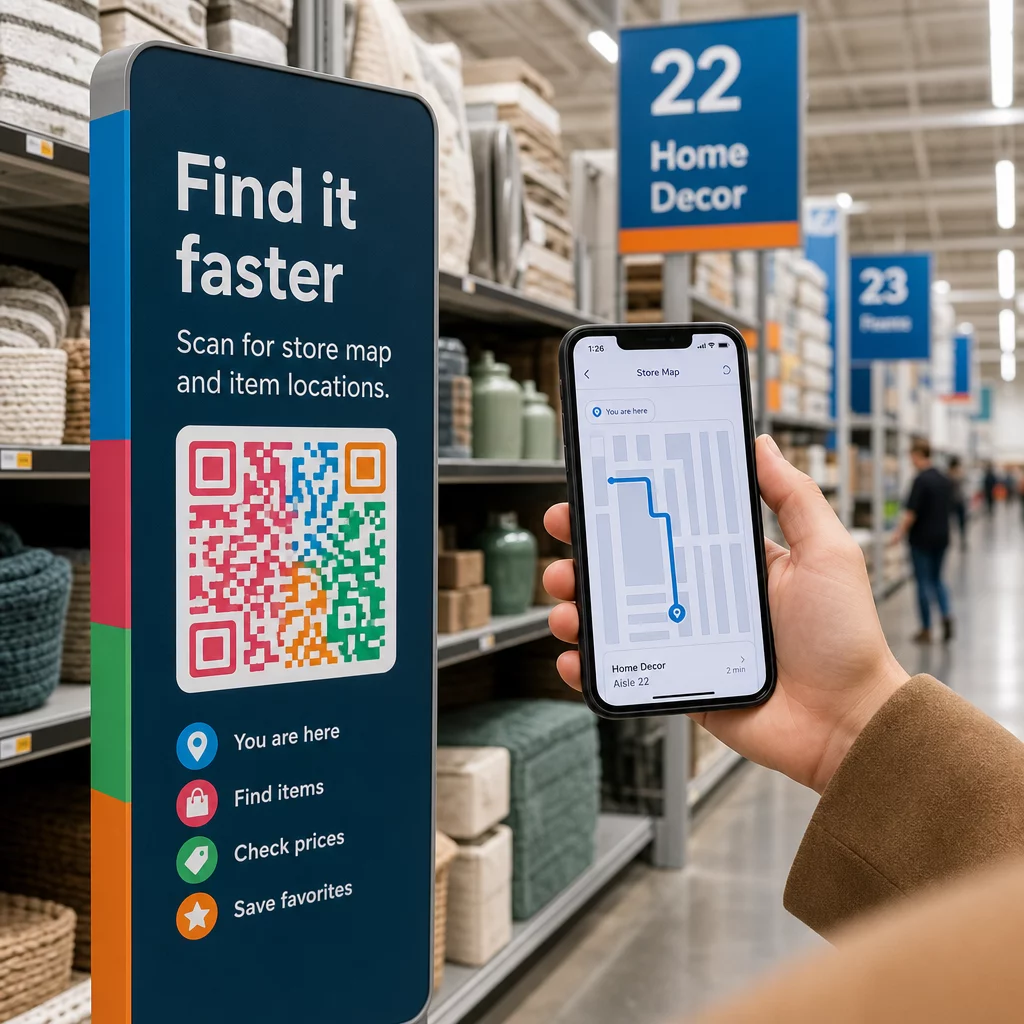
QR kódy fungujú ako okamžité mosty medzi fyzickým miestom a digitálnym obsahom. V maloobchodnom kontexte to znamená, že môžete pripojiť skenovateľný kód takmer na akýkoľvek povrch – štítok na poličke, podlahový nápis, výklad – a poslať nakupujúcich priamo k užitočným informáciám.
Tu sú hlavné prípady použitia navigácie:
- Mapy obchodov a pôdorysy – Odkaz na PDF alebo webovú stránku zobrazujúcu rozloženie vášho obchodu s jasne označenými sekciami
- Sprievodcovia umiestnením produktov – Nasmerujte zákazníkov k určitej uličke alebo oddeleniu
- Pokyny pre Google Mapy – Pomôžte zákazníkom nájsť vchod do vášho obchodu, parkovisko alebo konkrétne miesto v rámci veľkého objektu
- Propagačné zóny – Navádzajte nakupujúcich k aktuálnym výpredajovým oblastiam alebo prezentovaným vystaveniam
- Podrobnosti o produkte a dostupnosť – Umožnite nakupujúcim zobraziť špecifikácie, stav zásob alebo súvisiace položky priamo v uličke
Každý z týchto prípadov použitia je dosiahnuteľný pomocou jediného QR kódu a dobre navrhnutej cieľovej stránky.
Umiestnite svoj obchod na mapu Vytvorte skenovateľný kód, ktorý otvorí polohu vášho obchodu priamo v Google Maps. Použite Generátor QR kódov Google Maps na to, aby ste zákazníkov dostali z parkoviska k správnemu vchodu v priebehu sekúnd.
Ako nastaviť QR kódy pre navigáciu: Praktický sprievodca
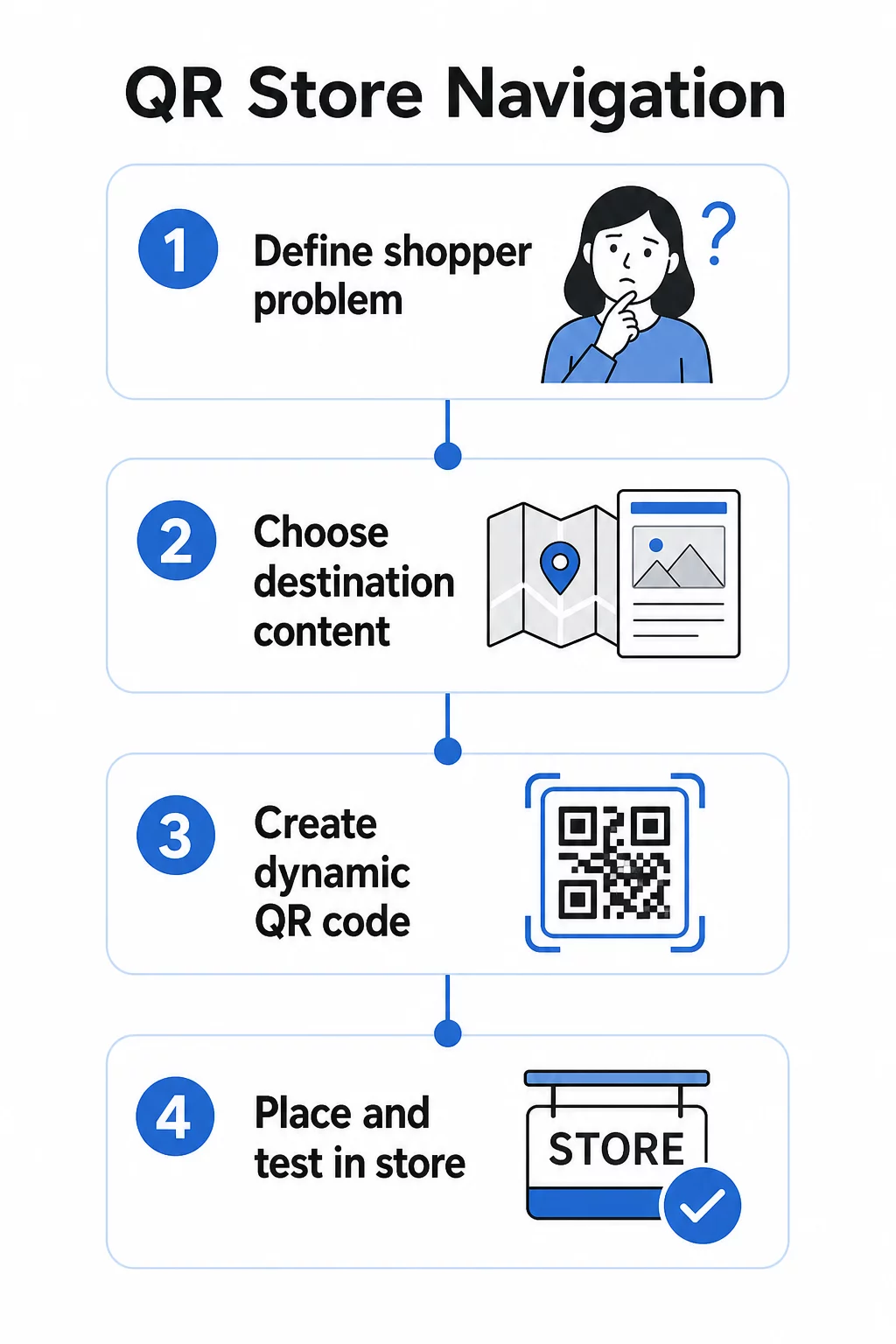
Krok 1: Definujte navigačný problém, ktorý riešite
Začnite s konkrétnym problémom. Majú zákazníci problém nájsť konkrétne oddelenie? Sú zmätení pri vchode? Je ťažké nájsť sezónne akcie? Identifikácia presného problému vám pomôže rozhodnúť, na čo by mal QR kód odkazovať a kam by mal byť umiestnený.
Krok 2: Vyberte správny cieľový obsah
Priraďte cieľ QR kódu k potrebám nakupujúceho:
| Problém nakupujúceho | Cieľ QR kódu |
|---|---|
| Nemôže nájsť oddelenie | PDF mapa obchodu alebo označený pôdorys |
| Potrebuje podrobnosti o produkte v uličke | Stránka produktu alebo technický list |
| Hľadá aktuálne akcie | Vstupná stránka kupónov alebo stránka ponúk |
| Snaží sa nájsť váš obchod | Odkaz na Mapy Google |
| Chce porovnať možnosti | PDF katalóg alebo lookbook |
Pre mapy obchodov a produktových sprievodcov, a Kód QR vo formáte PDF je jednou z najpraktickejších možností – môžete navrhnúť jasný pôdorys, nahrať ho raz a aktualizovať ho kedykoľvek sa zmení vaše usporiadanie bez tlače nových kódov.
Krok 3: Používajte dynamické QR kódy, aby ste mohli aktualizovať bez pretlačenia
Tento krok je dôležitejší, než si väčšina maloobchodníkov uvedomuje. Usporiadanie obchodov sa mení. Akcie sa striedajú. Produkty sa presúvajú. Ak vytlačíte statické QR kódy viazané na pevnú URL adresu a potom potrebujete aktualizovať cieľ, každý vytlačený kód sa stane zbytočným.
Dynamické kódy QR to vyriešte uložením krátkej presmerovacej URL adresy, ktorú môžete aktualizovať z ovládacieho panela. Kód na poličke zostáva rovnaký; mení sa iba cieľ. Pre maloobchodné prostredie, kde sa informácie menia týždenne alebo sezónne, je to nevyhnutné.
Pageloot generátor QR kódov vytvára dynamické kódy, ktoré vám umožňujú aktualizovať mapu obchodu, vymeniť akciu alebo presmerovať na novú stránku produktu – to všetko bez dotyku fyzického označenia.
Krok 4: Umiestnite kódy tam, kde ich nakupujúci skutočne potrebujú
Umiestnenie určuje, či sa QR kód použije alebo ignoruje. Dodržujte tieto pokyny:
- Vo výške očí a na dosah ruky – Umiestnite kódy tam, kde ich nakupujúci môžu prirodzene skenovať, bez krčenia sa alebo naťahovania. Optimálna vzdialenosť skenovania pre väčšinu smartfónov je približne 10–50 cm.
- V bode zmätku – Kód pri vchode, ktorý odkazuje na mapu obchodu, je najužitočnejší, keď zákazník prvýkrát vstúpi a orientuje sa.
- V blízkosti relevantného produktu alebo sekcie – Kódy na okraji police pre detaily produktu fungujú najlepšie, keď sú priamo vedľa položky, nie na konci uličky.
- Na navigačných značkách – Značky oddelení, závesné bannery a podlahová grafika sú všetky efektívne povrchy pre navigačné QR kódy.
- Prístupné pre všetkých nakupujúcich – Zabezpečte, aby výška umiestnenia vyhovovala zákazníkom používajúcim invalidné vozíky. Vyhnite sa umiestňovaniu kódov príliš nízko alebo príliš vysoko, aby nevylúčili žiadnu skupinu vašich zákazníkov.
Podrobné rady k umiestneniu nájdete v našom sprievodcovi najlepším umiestneniam QR kódov pre maloobchodné predajne.
Krok 5: Navrhnite kódy, ktoré skutočne skenujú
Kód, ktorý sa neskenuje spoľahlivo, ničí zážitok. Dodržujte tieto technické minimá:
- Veľkosť – Pre štítky a etikety na policiach použite minimálne 2 × 2 cm. Pre väčšie značenie aplikujte pravidlo 10:1: maximálna vzdialenosť skenovania by nemala byť väčšia ako desaťnásobok šírky kódu.
- Kontrast – Použite tmavé popredie na svetlom pozadí. Vyhnite sa obráteným alebo nízkokontrastným farebným schémam.
- Tichá zóna – Udržujte jasný okraj minimálne štyroch modulov na všetkých stranách. Nedovoľte, aby text, okraje alebo grafika zasahovali do tohto priestoru.
- Povrch – Pokiaľ je to možné, vyhnite sa reflexným, textúrovaným alebo zakriveným povrchom. Matné povrchy sa skenujú spoľahlivejšie ako lesklé.
- Oddelenie – Ak umiestňujete viacero kódov blízko seba (napr. na produktovom displeji s viacerými položkami), rozmiestnite ich dostatočne ďaleko od seba, aby kamera náhodne nenačítala nesprávny kód.
Vždy otestujte svoje kódy v skutočnej veľkosti, vzdialenosti a svetelných podmienkach, s ktorými sa stretnú nakupujúci, predtým, ako ich rozmiestnite po celom obchode. Viac podrobností nájdete v našich príručkách o osvedčené postupy čitateľnosti QR kódov a dimenzovaní QR kódu pre rôzne tlačové materiály.
Špecifické navigačné scenáre a ako ich implementovať
Odkaz na mapu obchodu
Navrhnite jednoduchý, jasne označený pôdorys vo formáte PDF. Rozdeľte obchod na pomenované zóny – Elektronika, Oblečenie, Zákaznícky servis, Toalety – a zvýraznite aktuálnu polohu značkou “Tu ste”. Nahrajte PDF do Pageloot’s Generátor kódov QR vo formáte PDF a umiestnite výsledný kód pri vchode do obchodu, v blízkosti pultov zákazníckeho servisu a na hlavných križovatkách uličiek.
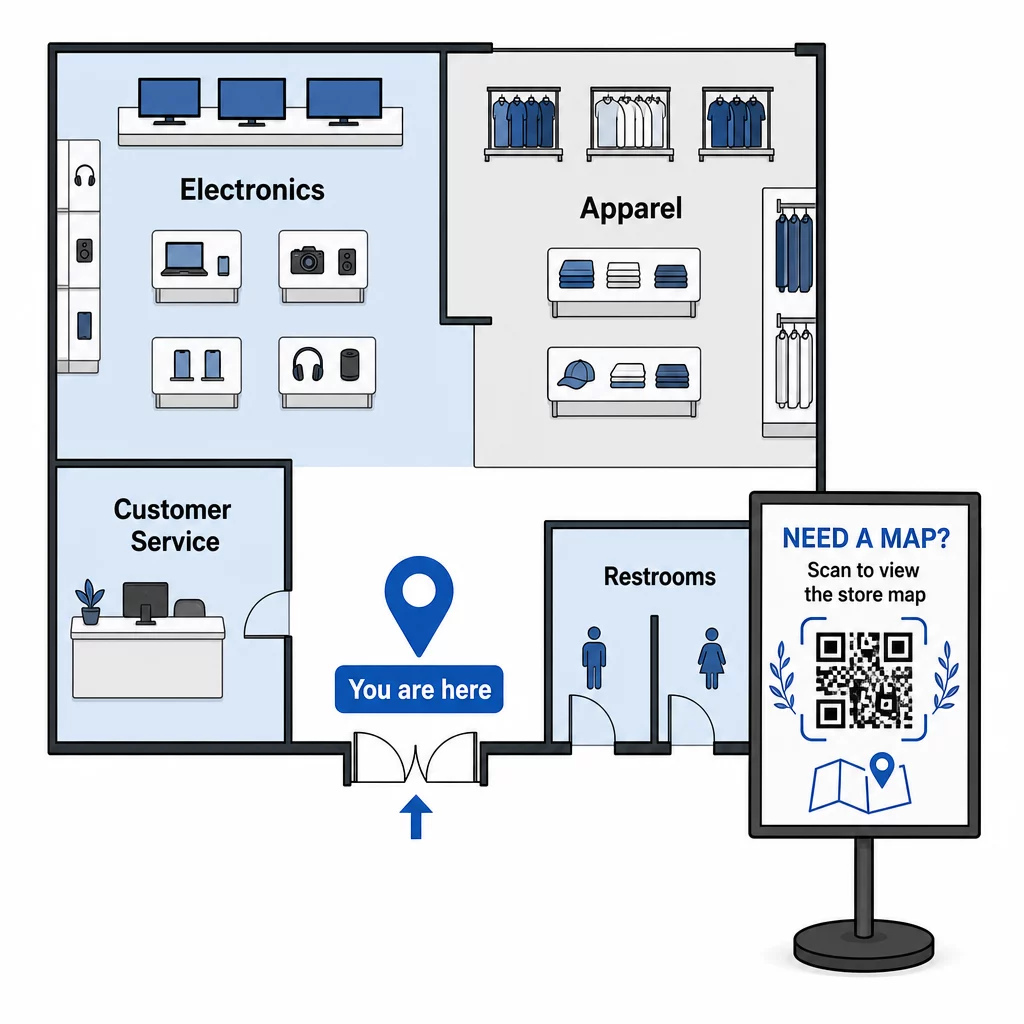
Keď sa vaše rozloženie zmení pri sezónnom resete, aktualizujte PDF vo svojom paneli. Vytlačené QR kódy budú naďalej fungovať.
Navádzanie zákazníkov k vchodu do obchodu alebo na parkovisko
Pre väčšie maloobchodné nehnuteľnosti, nákupné centrá alebo obchody s viacerými vchodmi, a Kód QR Mapy Google môže byť vložený do komunikácie pred návštevou – potvrdenia e-mailom, účtenky alebo vaša webová stránka – aby zákazníci prišli s presnou vedomosťou, kam ísť. Umiestnite rovnaký kód na vonkajšie značenie, aby ste pomohli zákazníkom, ktorí zaparkovali v neznámej oblasti, nájsť správny vchod.
Pre obchody, ktoré zdieľajú komplex alebo kampus s inými maloobchodníkmi, tento prístup funguje aj pre nasmerovanie nakupujúcich do konkrétnej budovy alebo na pozemok. Zistite viac o tom, ako QR kódy podporujú smery a zdieľanie polohy naprieč rôznymi mapovými službami.
Nasmerovanie nakupujúcich k akciám
Počas výpredaja alebo sezónnej akcie umiestnite QR kódy pri vchode do obchodu a na príslušné značenie, ktoré odkazuje priamo na vstupnú stránku akcií. Pageloot’s generátor QR kódov pre kupóny umožňuje vám vytvoriť vyhradenú stránku pre aktuálne ponuky, ktorú si nakupujúci môžu okamžite zobraziť a predložiť pri pokladni.
Pretože používate dynamické kódy, môžete vymeniť propagačnú stránku na konci výpredaja bez výmeny akéhokoľvek označenia v obchode.
Navigácia na úrovni produktu na poličke
Umiestnite malé QR kódy na štítky na okraji police vedľa kľúčových produktov. Prepojte ich so stránkou, ktorá obsahuje:
- Špecifikácie produktu alebo porovnávacie tabuľky
- Informácie o zásobách (na sklade, obmedzená dostupnosť)
- Súvisiace produkty alebo príslušenstvo
- Inštruktážne videá alebo sprievodcovia nastavením
Tento prístup je obzvlášť účinný pre nákupy s vysokou mierou zvažovania – elektronika, spotrebiče alebo špeciálne nástroje – kde nakupujúci chcú viac informácií, než môže poskytnúť cenovka. Maloobchodníci môžu použiť prepojené QR kódy na priame nasmerovanie na akúkoľvek produktovú stránku alebo vlastnú vstupnú stránku.
Udržujte svoj navigačný obsah aktuálny Rozloženie obchodov, akcie a produktové rady sa neustále menia. Použite Dynamické QR kódy Pageloot na aktualizáciu vašich cieľových stránok kedykoľvek bez opätovnej tlače označenia v obchode.
Sledovanie, ktoré navigačné kódy fungujú
Jednou z najmenej využívaných výhod navigácie založenej na QR kódoch sú dáta, ktoré generuje. Každé skenovanie je signál: zákazník potreboval pomoc s nájdením niečoho na danom mieste, v danom čase.
S dynamickými QR kódmi a vstavanou analýzou môžete sledovať:
- Ktoré miesta generujú najviac skenov – Vysoký objem skenov v blízkosti konkrétneho oddelenia môže naznačovať slabé fyzické označenie v tejto oblasti.
- Keď sa nakupujúci orientujú – Časy špičkového skenovania vám povedia, kedy sú zákazníci najaktívnejší a najviac potrebujú usmernenie.
- Ktorý obsah získava najviac interakcií – Ak vaša mapa obchodu získa desaťkrát viac skenov ako váš propagačný kód, viete, kde majú nakupujúci problémy.
Tieto údaje vám pomôžu vylepšiť rozloženie obchodu, zlepšiť označenie a robiť lepšie rozhodnutia o tom, kam by mali byť fyzicky umiestnené propagačné akcie. Pre maloobchodníkov spravujúcich viacero pobočiek platí rovnaký analytický rámec pre všetky obchody, čo vám umožňuje porovnávať výkon a štandardizovať to, čo funguje.
Ten Riešenie QR kódov Pageloot pre maloobchod je vytvorené presne pre tento druh neustálej optimalizácie, poskytujúc manažérom obchodov centralizovaný panel na správu a analýzu každého kódu v ich obchodoch.
Bežné chyby, ktorým sa treba vyhnúť
- Tlač statických kódov pre meniaci sa obsah – Vždy používajte dynamické kódy pre všetko, čo môže vyžadovať aktualizáciu.
- Umiestňovanie kódov tam, kde nie je signál – Testujte svoje prepojené stránky na mobilných dátach, nielen na Wi-Fi obchodu. Niektorí nakupujúci nebudú pripojení k vašej sieti.
- Chýbajúca výzva na akciu – QR kód bez kontextu je ignorovaný. Vždy uveďte krátky text vysvetľujúci, čo nakupujúci získa: “Skenujte pre mapu obchodu”, “Skenujte pre dnešné ponuky” alebo “Skenujte pre detaily produktu.”
- Kódy príliš malé na skenovanie z prirodzenej vzdialenosti – Použite pravidlo veľkosti 10:1 a otestujte pred tlačou vo veľkom.
- Odkazovanie na stránky neoptimalizované pre mobilné zariadenia – Každá destinácia by sa mala rýchlo načítať a čisto zobraziť na obrazovke smartfónu.
Začíname
Navigácia založená na QR kódoch je jedným z nákladovo najefektívnejších spôsobov, ako zlepšiť zážitok v obchode. Nepotrebujete vlastnú aplikáciu, veľký rozpočet ani komplexnú infraštruktúru. Potrebujete dobre umiestnené kódy, jasný obsah destinácie a možnosť aktualizovať oboje, ako sa váš obchod vyvíja.
Začnite s jedným problematickým bodom vo vašom obchode – vchodom, notoricky ťažko nájditeľným oddelením alebo vašou aktuálnou propagačnou oblasťou – a odtiaľ pokračujte. Používajte dynamické kódy od začiatku, aby ste nemuseli pretláčať materiály zakaždým, keď sa niečo zmení.
Preskúmajte nástroje Pageloot pre QR kódy pre maloobchod na vytvorenie vášho prvého navigačného kódu, alebo si prezrite celú škálu priemyselne špecifických QR riešení aby ste videli, ako iné podniky používajú rovnakú technológiu.
Často kladené otázky
QR kód PDF funguje dobre pre mapy obchodov – môžete navrhnúť jasný pôdorys, nahrať ho ako PDF a prepojiť s ním kód. Použite dynamický QR kód, aby ste mohli aktualizovať mapu vždy, keď sa zmení vaše usporiadanie, bez pretláčania akýchkoľvek značiek. Generátor QR kódov PDF od Pagelootu spracováva nahrávanie aj dynamickú aktualizáciu na jednom mieste.
Umiestnite navigačné kódy na miesta, kde zákazníci najpravdepodobnejšie potrebujú usmernenie: pri vchode do obchodu (pre prehľadnú mapu), na hlavných križovatkách uličiek (pre smerovanie k oddeleniam) a priamo vedľa produktov alebo propagačných vystavení (pre obsah špecifický pre položku). Kódy by mali byť vo výške očí, v dobre osvetlených priestoroch a na rovných, matných povrchoch pre spoľahlivé skenovanie. Pozrite si náš kompletný sprievodca najlepšími umiestneniami QR kódov pre maloobchodné predajne pre odporúčania umiestnenia podľa zóny obchodu.
Používajte dynamické QR kódy namiesto statických. Dynamický kód obsahuje krátku presmerovaciu URL adresu, ktorú ovládate z palubnej dosky. Keď sa zmení usporiadanie vášho obchodu alebo sa skončí akcia, aktualizujete cieľ vo svojom účte a existujúce vytlačené kódy automaticky odkazujú na nový obsah. Generátor QR kódov Pageloot vytvára dynamické kódy s plným prístupom k úpravám a analýzam.