Irren Ihre Kunden frustriert und mit leeren Händen durch die Gänge? Eine schlechte Ladennavigation treibt Kunden aus dem Laden, bevor sie etwas kaufen. Dieser Leitfaden zeigt Ihnen, wie Sie QR-Codes verwenden können, um Kunden direkt zu den Produkten, Karten und Aktionen zu führen, die sie benötigen.
Warum die Ladennavigation ein echtes Problem für Einzelhändler ist
Große Verkaufsflächen sind schwer zu navigieren. Ein Kunde, der in einem Baumarkt oder einem Großflächenmarkt nach einem bestimmten Artikel sucht, verbringt möglicherweise mehrere Minuten mit der Suche, bevor er aufgibt. Diese Reibung kostet Sie Verkäufe.
Digitale Wegweiser lösen dieses Problem, aber der Aufbau einer dedizierten Store-App ist teuer, und die meisten Kunden werden sie nicht herunterladen. 72% der Verbraucher ziehen es vor, einen QR-Code zu scannen, anstatt eine unternehmensspezifische App herunterzuladen, was QR-Codes zu einer praktischen, kostengünstigen Alternative macht. Sie funktionieren mit der Kamera, die bereits in jeder Tasche eines Käufers steckt – keine Installation erforderlich.
Da 89 Millionen Amerikaner im Jahr 2025 QR-Codes scannen werden, wissen Ihre Kunden bereits, wie man sie benutzt. Die Frage ist, ob Sie sie effektiv einsetzen.
Was QR-Codes für die Ladennavigation leisten können
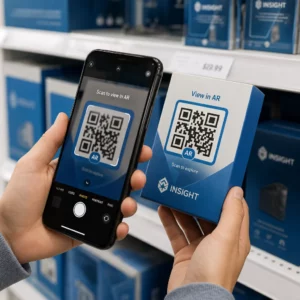
QR-Codes fungieren als sofortige Brücken zwischen einem physischen Ort und digitalen Inhalten. Im Einzelhandel bedeutet das, dass Sie einen scannbaren Code an fast jeder Oberfläche anbringen können – einem Regaletikett, einem Bodenschild, einer Schaufensteranzeige – und Käufer direkt zu nützlichen Informationen senden können.
Hier sind die wichtigsten Anwendungsfälle für die Navigation:
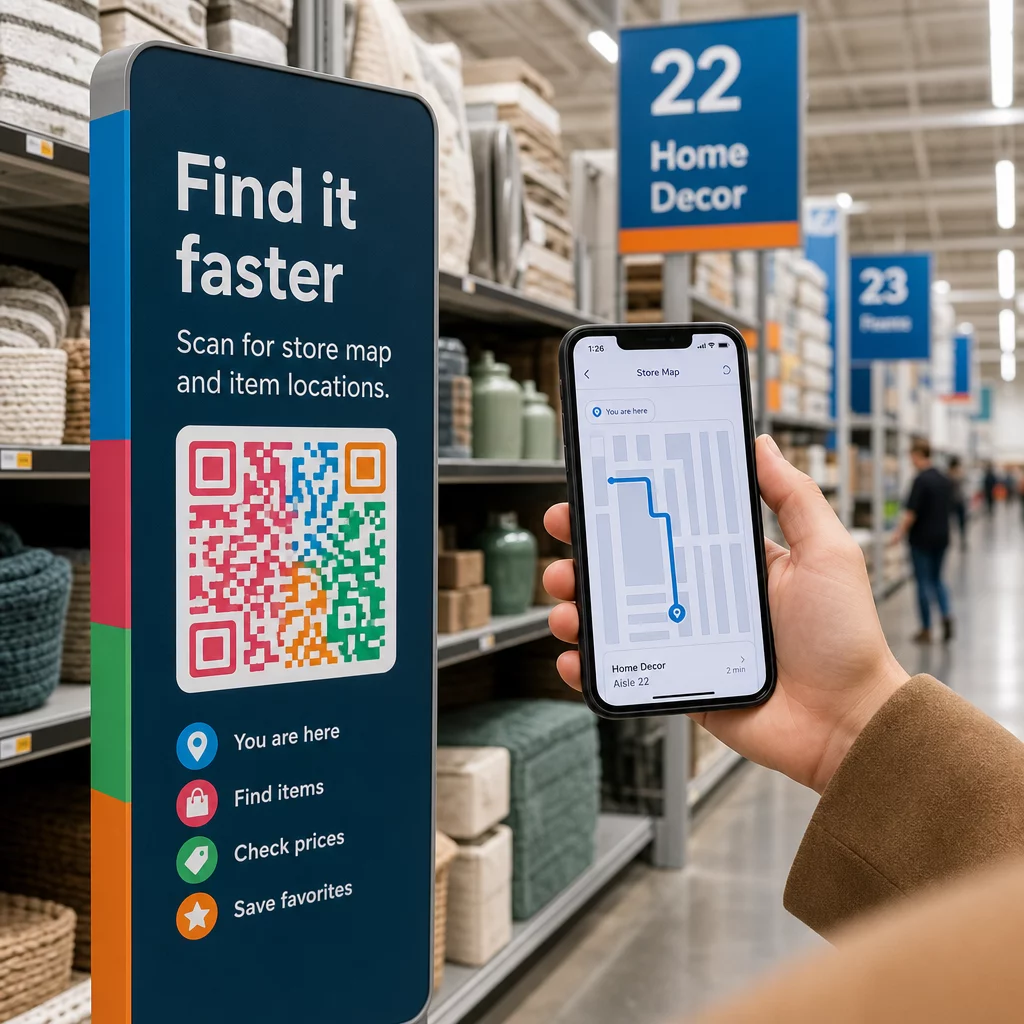
- Ladenkarten und Grundrisse – Link zu einem PDF oder einer Webseite, die Ihr Ladenlayout mit deutlich gekennzeichneten Bereichen zeigt
- Produktstandortführer – Kunden zu einem bestimmten Gang oder einer Abteilung leiten
- Google Maps Wegbeschreibungen – Helfen Sie Kunden, Ihren Ladeneingang, Parkplätze oder einen bestimmten Ort innerhalb eines großen Geländes zu finden
- Aktionszonen – Führen Sie Käufer zu aktuellen Verkaufsbereichen oder speziellen Auslagen
- Produktinformationen und Verfügbarkeit – Lassen Sie Kunden Spezifikationen, Lagerbestand oder verwandte Artikel abrufen, während sie im Gang stehen
Jeder dieser Anwendungsfälle ist mit einem einzigen QR-Code und einer gut gestalteten Zielseite realisierbar.
Bringen Sie Ihr Geschäft auf die Karte Erstellen Sie einen scannbaren Code, der Ihren Geschäftsstandort direkt in Google Maps öffnet. Verwenden Sie den Google Maps QR-Code erstellen , um Kunden in Sekundenschnelle vom Parkplatz zum richtigen Eingang zu leiten.
QR-Codes für die Navigation einrichten: Eine praktische Anleitung
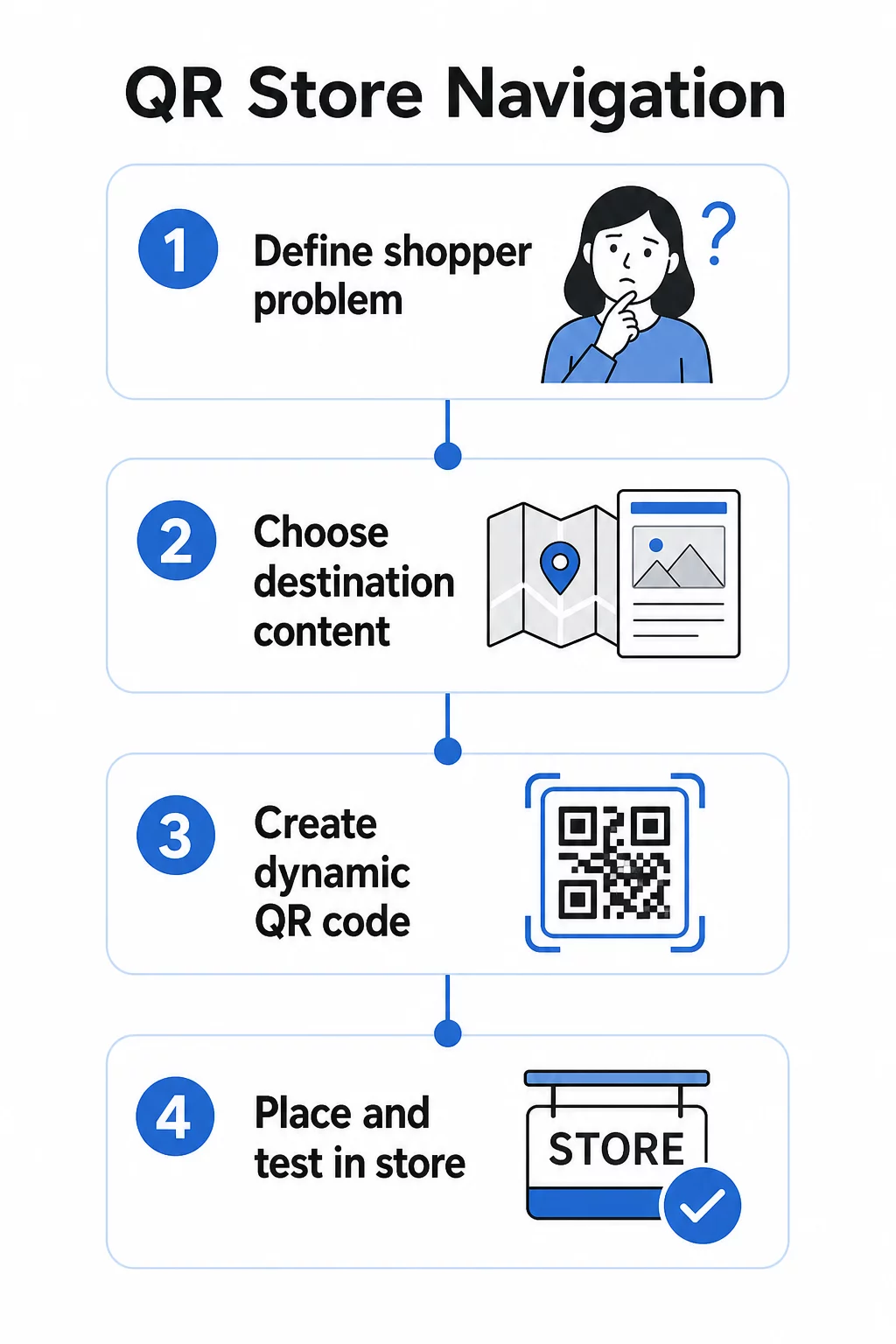
Schritt 1: Definieren Sie das Navigationsproblem, das Sie lösen
Beginnen Sie mit einem spezifischen Reibungspunkt. Haben Kunden Schwierigkeiten, eine bestimmte Abteilung zu finden? Sind sie in der Nähe des Eingangs verwirrt? Sind saisonale Aktionen schwer zu finden? Die Identifizierung des genauen Problems hilft Ihnen zu entscheiden, worauf der QR-Code verlinken und wo er platziert werden soll.
Schritt 2: Wählen Sie den richtigen Zielinhalt
Passen Sie das Ziel des QR-Codes an die Bedürfnisse des Kunden an:
| Problem des Kunden | QR-Ziel |
|---|---|
| Abteilung nicht finden können | PDF-Ladenplan oder beschrifteter Grundriss |
| Benötigt Produktdetails im Gang | Produktseite oder Datenblatt |
| Auf der Suche nach aktuellen Aktionen | Coupon-Landingpage oder Angebotsseite |
| Versucht, Ihr Geschäft zu finden | Google Maps Link |
| Möchte Optionen vergleichen | PDF-Katalog oder Lookbook |
Für Ladenpläne und Produktführer ist ein PDF QR-Code eine der praktischsten Optionen – Sie können einen übersichtlichen Grundriss entwerfen, ihn einmal hochladen und jederzeit aktualisieren, wenn sich Ihr Layout ändert, ohne neue Codes drucken zu müssen.
Schritt 3: Dynamische QR-Codes verwenden, damit Sie ohne Neudruck aktualisieren können
Dieser Schritt ist wichtiger, als die meisten Einzelhändler erkennen. Ladenlayouts ändern sich. Aktionen wechseln. Produkte bewegen sich. Wenn Sie statische QR-Codes drucken, die an eine feste URL gebunden sind, und dann das Ziel aktualisieren müssen, wird jeder gedruckte Code nutzlos.
Dynamische QR-Codes lösen dies, indem sie eine kurze Weiterleitungs-URL speichern, die Sie über ein Dashboard aktualisieren können. Der Code im Regal bleibt derselbe; nur das Ziel ändert sich. Für eine Einzelhandelsumgebung, in der sich Informationen wöchentlich oder saisonal ändern, ist dies unerlässlich.
Pageloots QR-Code-Generator erstellt dynamische Codes, mit denen Sie Ihren Ladenplan aktualisieren, eine Aktion austauschen oder auf eine neue Produktseite umleiten können – alles ohne die physische Beschilderung zu berühren.
Schritt 4: Codes dort platzieren, wo Kunden sie tatsächlich benötigen
Die Platzierung entscheidet darüber, ob ein QR-Code verwendet oder ignoriert wird. Beachten Sie diese Richtlinien:
- Augenhöhe und Armreichweite – Platzieren Sie Codes dort, wo Kunden sie natürlich scannen können, ohne sich zu bücken oder zu strecken. Der optimale Scanabstand für die meisten Smartphones beträgt etwa 10–50 cm.
- Am Punkt der Verwirrung – Ein Code am Eingang, der zu einem Ladenplan führt, ist am nützlichsten, wenn ein Kunde zum ersten Mal hereinkommt und sich orientiert.
- In der Nähe des relevanten Produkts oder Bereichs – Regalrand-Codes für Produktdetails funktionieren am besten, wenn sie direkt neben dem Artikel sind, nicht am Ende des Ganges.
- Auf Wegweiser-Beschilderung – Abteilungsbeschilderungen, Deckenbanner und Bodenaufkleber sind allesamt effektive Oberflächen für Navigations-QR-Codes.
- Für alle Käufer zugänglich – Stellen Sie sicher, dass die Platzierungshöhe für Kunden im Rollstuhl geeignet ist. Vermeiden Sie es, Codes so niedrig oder so hoch zu positionieren, dass sie bestimmte Kundensegmente ausschließen.
Für detaillierte Platzierungshinweise siehe unseren Leitfaden zu Top-QR-Code-Platzierungen für Einzelhandelsgeschäfte.
Schritt 5: Codes entwerfen, die tatsächlich scannen
Ein Code, der nicht zuverlässig scannt, zerstört das Erlebnis. Beachten Sie diese technischen Mindestanforderungen:
- Größe – Für Regaletiketten und Aufkleber verwenden Sie ein Minimum von 2 × 2 cm. Für größere Beschilderungen wenden Sie die 10:1-Regel an: Der maximale Scanabstand sollte nicht mehr als das Zehnfache der Codebreite betragen.
- Kontrast – Verwenden Sie einen dunklen Vordergrund auf einem hellen Hintergrund. Vermeiden Sie invertierte oder kontrastarme Farbschemata.
- Ruhezone – Halten Sie einen klaren Rand von mindestens vier Modulen auf allen Seiten ein. Lassen Sie keine Texte, Ränder oder Grafiken in diesen Bereich übergehen.
- Oberfläche – Vermeiden Sie nach Möglichkeit reflektierende, strukturierte oder gekrümmte Oberflächen. Matte Oberflächen scannen zuverlässiger als glänzende.
- Trennung – Wenn Sie mehrere Codes nahe beieinander platzieren (z. B. auf einer Produktpräsentation mit mehreren Artikeln), halten Sie diese weit genug auseinander, damit eine Kamera nicht versehentlich den falschen Code liest.
Testen Sie Ihre Codes immer in der tatsächlichen Größe, Entfernung und den Lichtverhältnissen, denen Käufer begegnen werden, bevor Sie sie in Ihrem Geschäft einsetzen. Weitere Details finden Sie in unseren Anleitungen zu Best Practices für die Lesbarkeit von QR-Codes und QR-Code-Größen für verschiedene Druckmaterialien.
Spezifische Navigationsszenarien und deren Implementierung
Verlinkung zu einem Ladenplan
Entwerfen Sie einen einfachen, klar beschrifteten Grundriss im PDF-Format. Teilen Sie das Geschäft in benannte Zonen ein – Elektronik, Bekleidung, Kundenservice, Toiletten – und markieren Sie den aktuellen Standort mit einem “Sie sind hier”-Marker. Laden Sie das PDF auf Pageloot’s hoch PDF QR-Code Generator und platzieren Sie den resultierenden Code an Ihrem Ladeneingang, in der Nähe von Kundendienstschaltern und an wichtigen Gangkreuzungen.
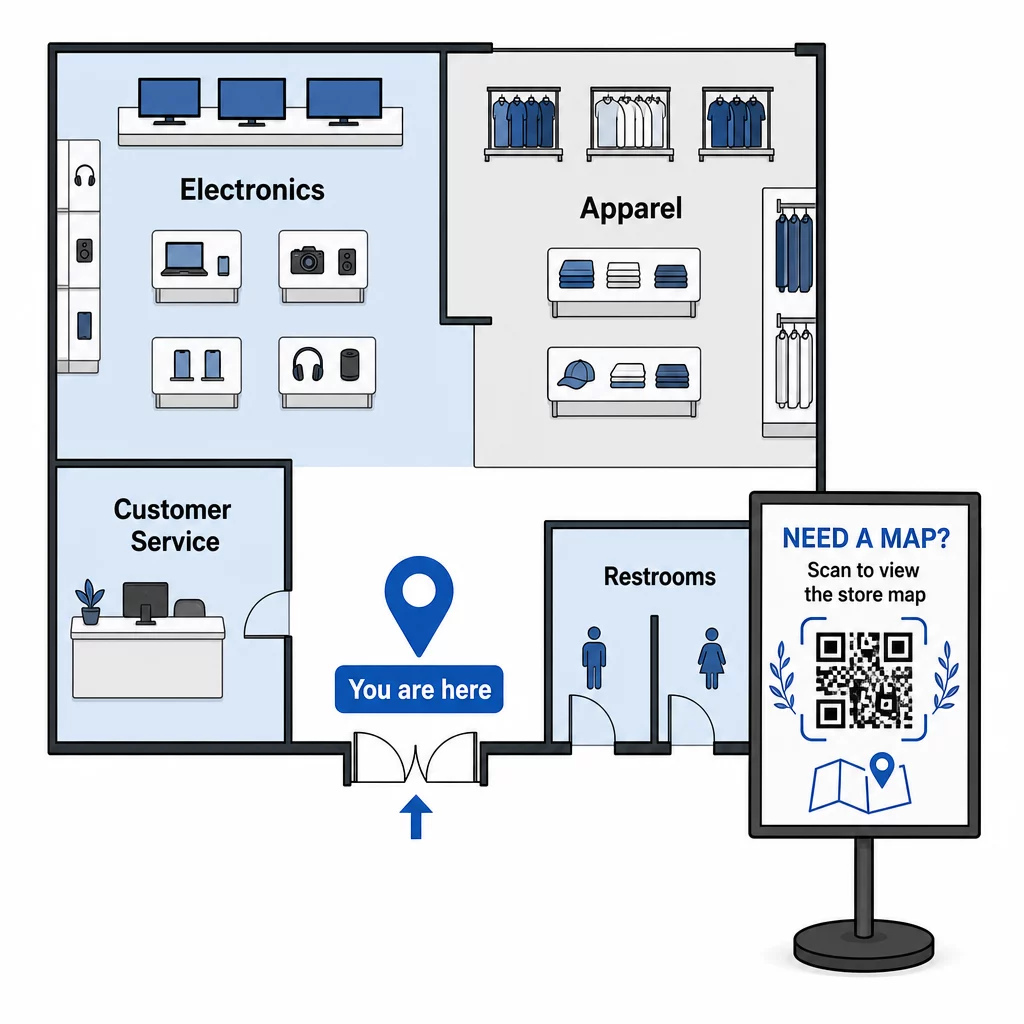
Wenn sich Ihr Layout für eine saisonale Umgestaltung ändert, aktualisieren Sie das PDF in Ihrem Dashboard. Die gedruckten QR-Codes funktionieren weiterhin.
Kunden zu Ihrem Ladeneingang oder Parkplatz leiten
Für größere Einzelhandelsimmobilien, Einkaufszentren oder Geschäfte mit mehreren Eingängen kann ein Google Maps QR-Code in Vorab-Kommunikationen – E-Mail-Bestätigungen, Quittungen oder Ihre Website – eingebettet werden, damit Kunden genau wissen, wohin sie gehen müssen. Platzieren Sie denselben Code auf der Außenbeschilderung, um Kunden, die in einem unbekannten Bereich geparkt haben, zu helfen, den richtigen Eingang zu finden.
Für Geschäfte, die einen Komplex oder Campus mit anderen Einzelhändlern teilen, funktioniert dieser Ansatz auch, um Käufer zu einem bestimmten Gebäude oder Parkplatz zu leiten. Erfahren Sie mehr darüber, wie QR-Codes Wegbeschreibungen und Standortfreigabe über verschiedene Kartendienste hinweg unterstützen.
Käufer zu Aktionen leiten
Platzieren Sie während eines Verkaufs oder einer saisonalen Veranstaltung QR-Codes am Ladeneingang und auf relevanter Beschilderung, die direkt zu einer Landingpage für Aktionen verlinken. Pageloot’s Gutschein QR-Code Generator ermöglicht Ihnen die Erstellung einer speziellen Seite für aktuelle Angebote, die Kunden sofort aufrufen und an der Kasse vorzeigen können.
Da Sie dynamische Codes verwenden, können Sie die Aktionsseite am Ende eines Verkaufs austauschen, ohne die Beschilderung im Geschäft zu ersetzen.
Navigation auf Produktebene im Regal
Platzieren Sie kleine QR-Codes auf Regaletiketten neben wichtigen Produkten. Verlinken Sie diese mit einer Seite, die Folgendes enthält:
- Produktspezifikationen oder Vergleichstabellen
- Bestandsinformationen (auf Lager, begrenzte Verfügbarkeit)
- Verwandte Produkte oder Zubehör
- Anleitungsvideos oder Einrichtungsanleitungen
Dieser Ansatz ist besonders effektiv bei Anschaffungen, die eine hohe Überlegung erfordern – Elektronik, Haushaltsgeräte oder Spezialwerkzeuge – bei denen Kunden mehr Informationen wünschen, als ein Preisschild bieten kann. Einzelhändler können verknüpften QR-Codes verwenden, um direkt auf eine beliebige Produktseite oder benutzerdefinierte Landingpage zu verweisen.
Halten Sie Ihre Navigationsinhalte aktuell Ladenlayouts, Aktionen und Produktlinien ändern sich ständig. Verwenden Sie Die dynamischen QR-Codes von Pageloot um Ihre Zielseiten jederzeit zu aktualisieren, ohne Ihre Beschilderung im Geschäft neu drucken zu müssen.
Verfolgen, welche Navigationscodes funktionieren
Einer der am meisten unterschätzten Vorteile der QR-basierten Navigation sind die Daten, die sie generiert. Jeder Scan ist ein Signal: Ein Kunde benötigte zu diesem Zeitpunkt an diesem Ort Hilfe, um etwas zu finden.
Mit dynamischen QR-Codes und integrierten Analysen können Sie Folgendes verfolgen:
- Welche Standorte generieren die meisten Scans – Hohes Scanvolumen in der Nähe einer bestimmten Abteilung könnte auf eine schlechte physische Beschilderung in diesem Bereich hinweisen.
- Wenn Käufer navigieren – Spitzen-Scanzeiten verraten Ihnen, wann Kunden am aktivsten sind und am dringendsten Orientierung benötigen.
- Welcher Inhalt die meiste Interaktion erhält – Wenn Ihr Ladenplan zehnmal mehr Scans erhält als Ihr Aktionscode, wissen Sie, wo Käufer Schwierigkeiten haben.
Diese Daten helfen Ihnen, Ihr Ladenlayout zu verfeinern, die Beschilderung zu verbessern und bessere Entscheidungen darüber zu treffen, wo Werbeaktionen physisch platziert werden sollten. Für Einzelhändler, die mehrere Standorte verwalten, gilt dasselbe Analyse-Framework für alle Filialen, sodass Sie die Leistung vergleichen und bewährte Praktiken standardisieren können.
Die Pageloot QR-Code-Lösung für den Einzelhandel ist genau für diese Art der kontinuierlichen Optimierung konzipiert und bietet Filialleitern ein zentrales Dashboard zur Verwaltung und Analyse jedes Codes in ihren Filialen.
Häufig zu vermeidende Fehler
- Drucken statischer Codes für Inhalte, die sich ändern – Verwenden Sie immer dynamische Codes für alles, was möglicherweise aktualisiert werden muss.
- Platzieren von Codes, wo kein Signal ist – Testen Sie Ihre verlinkten Seiten mit Mobilfunkdaten, nicht nur mit dem Laden-WLAN. Einige Käufer werden nicht mit Ihrem Netzwerk verbunden sein.
- Fehlender Call-to-Action – Ein QR-Code ohne Kontext wird ignoriert. Fügen Sie immer eine kurze Textzeile hinzu, die erklärt, was der Käufer erhält: “Scannen für Ladenplan”, “Scannen für heutige Angebote” oder “Scannen für Produktdetails.”
- Codes zu klein, um aus natürlicher Entfernung gescannt zu werden – Wenden Sie die 10:1 Größenregel an und testen Sie, bevor Sie im Maßstab drucken.
- Verlinkung zu nicht für Mobilgeräte optimierten Seiten – Jedes Ziel sollte schnell laden und sauber auf einem Smartphone-Bildschirm angezeigt werden.
Erste Schritte
QR-basierte Navigation ist eine der kostengünstigsten Möglichkeiten, das Einkaufserlebnis im Geschäft zu verbessern. Sie benötigen keine benutzerdefinierte App, kein großes Budget oder eine komplexe Infrastruktur. Sie benötigen gut platzierte Codes, klare Zielinhalte und die Möglichkeit, beides zu aktualisieren, wenn sich Ihr Geschäft entwickelt.
Beginnen Sie mit einem Punkt mit hoher Reibung in Ihrem Geschäft – dem Eingang, einer notorisch schwer zu findenden Abteilung oder Ihrem aktuellen Aktionsbereich – und bauen Sie darauf auf. Verwenden Sie von Anfang an dynamische Codes, damit Sie Materialien nicht jedes Mal neu drucken müssen, wenn sich etwas ändert.
Entdecken Sie Pageloots QR-Code-Tools für den Einzelhandel um Ihren ersten Navigationscode zu erstellen, oder durchsuchen Sie das gesamte Spektrum an branchenspezifischen QR-Lösungen um zu sehen, wie andere Unternehmen dieselbe Technologie nutzen.
Häufig gestellte Fragen
Ein PDF-QR-Code eignet sich gut für Ladenpläne – Sie können einen klaren Grundriss entwerfen, ihn als PDF hochladen und den Code damit verknüpfen. Verwenden Sie einen dynamischen QR-Code, damit Sie die Karte jederzeit aktualisieren können, wenn sich Ihr Layout ändert, ohne Beschilderungen neu drucken zu müssen. Pageloots PDF-QR-Code-Generator übernimmt sowohl den Upload als auch die dynamische Aktualisierung an einem Ort.
Platzieren Sie Navigationscodes an den Stellen, wo Kunden am ehesten Orientierung benötigen: am Ladeneingang (für eine Übersichtskarte), an wichtigen Gangkreuzungen (für Abteilungsanweisungen) und direkt neben Produkten oder Werbedisplays (für artikelspezifische Inhalte). Codes sollten auf Augenhöhe sein, in gut beleuchteten Bereichen und auf flachen, matten Oberflächen für zuverlässiges Scannen. Lesen Sie unseren vollständigen Leitfaden zu den besten QR-Code-Platzierungen für Einzelhandelsgeschäfte für Platzierungsempfehlungen nach Ladenbereich.
Verwenden Sie dynamische QR-Codes anstelle von statischen. Ein dynamischer Code enthält eine kurze Weiterleitungs-URL, die Sie über ein Dashboard steuern. Wenn sich Ihr Ladenlayout ändert oder eine Aktion endet, aktualisieren Sie das Ziel in Ihrem Konto und die vorhandenen gedruckten Codes verweisen automatisch auf den neuen Inhalt. Pageloots QR-Code-Generator erstellt dynamische Codes mit vollem Bearbeitungs- und Analyse-Zugriff.