Verlassen Ihre Besucher den Parkplatz, ohne sich mit Ihrem Inventar zu beschäftigen oder ihre Kontaktinformationen zu teilen? Autokäufer sind zunehmend mobil-orientiert, und QR-Codes bieten Ihnen eine direkte Brücke zwischen Ihrem physischen Gelände und Ihren digitalen Tools. Dieser Leitfaden behandelt praktische Wege zur Implementierung von QR-Codes in den Vertriebs- und Marketingabläufen Ihres Autohauses, von Fahrzeugfensteraufklebern bis zur Serviceplanung.
Warum QR-Codes für Autohäuser gerade jetzt sinnvoll sind
Laut der CarGurus-Verbraucherstudie 2025 in den USA nutzen 54 % der Autokäufer ihre Telefone häufiger als Desktops bei der Fahrzeugrecherche, wobei weitere 31 % beide gleichermaßen nutzen. Gleichzeitig bevorzugen 83 % der Verbraucher, einen größeren Teil des Kaufprozesses von zu Hause aus abzuschließen, bevor sie persönlich vorbeikommen. Diese Kombination bedeutet, dass Ihre Kunden bereits an ihren Telefonen sind – auf dem Parkplatz, in Ihrem Ausstellungsraum und bevor sie überhaupt ankommen.
Ein QR-Code auf einem Fensteraufkleber, einem Werkstatt-Schild oder einem Direktmailing gibt diesen telefon-orientierten Käufern eine sofortige Verbindung zu den gewünschten Informationen, ohne dass ein Verkäufer genau in diesem Moment verfügbar sein muss.
Dynamische QR-Codes – Codes, deren Ziel-URL aktualisiert werden kann, ohne den physischen Code neu drucken zu müssen – eignen sich besonders gut für Autohausumgebungen, in denen sich der Bestand häufig ändert, Aktionen rotieren und Preise regelmäßig aktualisiert werden.
Beginnen Sie mit der Erstellung von QR-Codes für Autohäuser Bereit, Ihren Parkplatz mit Ihren digitalen Inhalten zu verbinden? Nutzen Sie die QR-Code-Generator um Ihren ersten Code in wenigen Minuten zu erstellen, ohne technische Kenntnisse.
Fahrzeugfensteraufkleber und Bestandsseiten
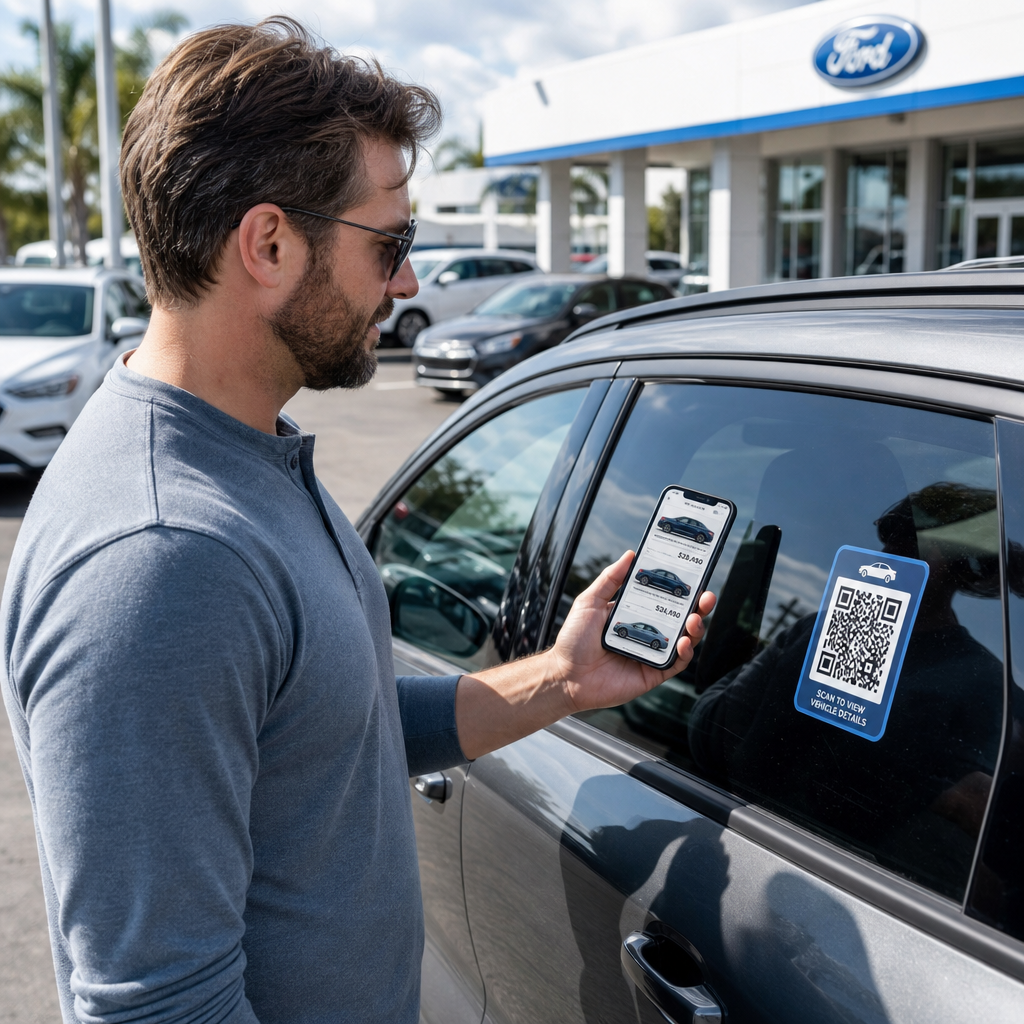
Die direkteste Anwendung für ein Autohaus ist das Anbringen eines QR-Codes auf dem Fensteraufkleber jedes Fahrzeugs. Wenn ein Käufer nach Feierabend oder während Ihr Verkaufsteam beschäftigt ist, über den Parkplatz geht, kann ein Scan sofort eine spezielle Fahrzeugseite aufrufen, die Spezifikationen, Ausstattungsdetails, aktuelle Preise, Finanzierungsoptionen, Fotos und ein Lead-Erfassungsformular anzeigt.
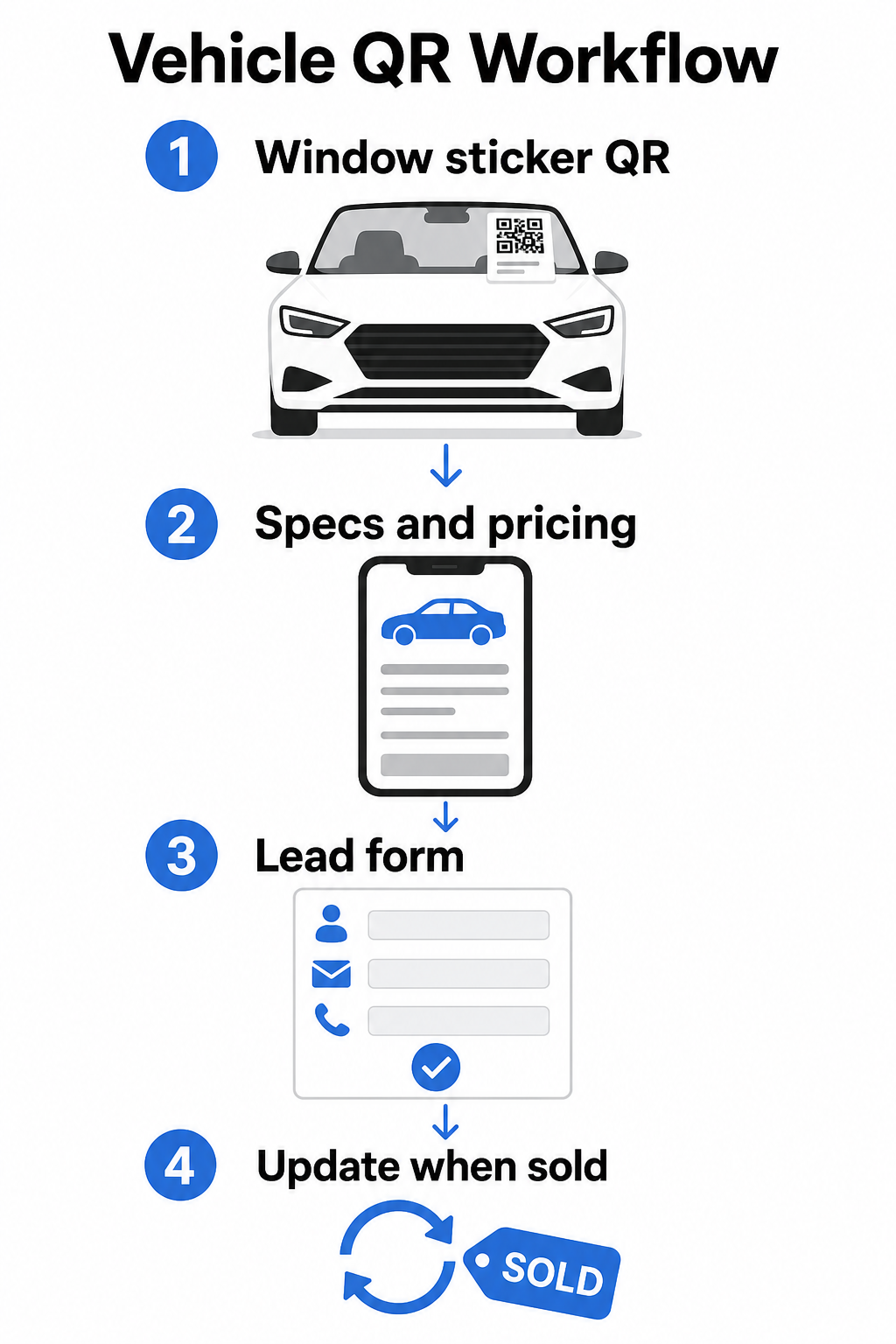
Da sich der Bestand schnell ändert, sind dynamische QR-Codes hier die praktische Wahl. Wenn ein Fahrzeug verkauft wird, können Sie diesen Code auf ein ähnliches Modell oder eine allgemeine Bestandsseite umleiten, ohne den physischen Aufkleber zu berühren. Wie der Leitfaden für Fahrzeug-QR-Codes feststellt, sind dynamische Codes ideal für Autohausanwendungen, bei denen sich Kampagnen und Bestand ständig ändern.
Für die Platzierung bieten die Heckscheibe und die Seitenwände die beste Sichtbarkeit für Kunden, die über den Parkplatz gehen. Stellen Sie sicher, dass der Code groß genug ist, um bequem aus dem Stand gescannt werden zu können – ein Minimum von 1,2 Zoll ist ein zuverlässiger Ausgangspunkt für gedruckte Materialien aus nächster Nähe, obwohl größer besser ist, wenn der Code mit anderen Elementen auf einem Aufkleber konkurriert. Befolgen Sie immer Designprinzipien mit hohem Kontrast, indem Sie einen dunklen Code auf hellem Hintergrund verwenden, damit der Code unter verschiedenen Außenlichtbedingungen zuverlässig gescannt werden kann. Der Leitfaden von Pageloot zu Best Practices für den Farbkontrast von QR-Codes behandelt dies ausführlich.
Bestandslinks aktuell halten ohne Neudruck Verwenden Sie die Dynamischer QR-Code Generator um Codes für Fensteraufkleber zu erstellen, die Sie jederzeit umleiten können, wenn ein Fahrzeug verkauft wird oder eine Aktion sich ändert.
Showroom-Beschilderung und Verkaufsflächen-Engagement
Im Ausstellungsraum können QR-Codes die Informationslast bewältigen, die Verkäufer nicht immer sofort liefern können. Platzieren Sie Codes in der Nähe von Ausstellungsfahrzeugen, Finanzierungsschaltern oder Inzahlungnahme-Bewertungsbereichen, um Kunden mit relevanten Inhalten zu verknüpfen – detaillierte Datenblätter oder Vergleichsseiten, aktuelle Finanzierungsangebote und Zahlungsrechner, Inzahlungnahme-Bewertungstools, Video-Rundgänge oder Kundenreferenzen und Bewertungsseiten.
EIN QR-Code der Zielseite funktioniert hier besonders gut, da Sie mehrere Links mit einem einzigen Scan aufrufen können. Zum Beispiel kann eine Fahrzeug-Landingpage ein Video, ein Spezifikations-PDF, ein Finanzierungsanfrageformular und eine Kontaktoption enthalten – alles in einem mobilfreundlichen Layout, das konsistent mit Ihrer Marke aussieht.
Für Kunden, die sich tiefer im Entscheidungsprozess befinden, kann ein QR-Code, der direkt zu einem Lead-Formular verlinkt, deren Namen, Kontaktinformationen und Fahrzeuginteresse erfassen, während sie noch auf der Verkaufsfläche engagiert sind. Der Google Forms QR-Code erstellen macht es einfach, Anfrage-Codes auf Beschilderungen, Thekenkarten oder Schreibtischdisplays zu erstellen und anzuzeigen, mit der zusätzlichen Möglichkeit, Antworten direkt zu verfolgen.
Terminplanung der Serviceabteilung
Servicekunden erwarten zunehmend Self-Service-Buchungsoptionen. Die Online-Terminplanung wächst jedes Jahr stetig, da Kunden die Bequemlichkeit suchen, ihre eigenen Termine ohne Telefonanruf zu wählen. QR-Codes in Ihrer Serviceannahme, im Wartebereich und auf Mahnungen für überfällige Services geben Kunden einen Ein-Scan-Pfad zu Ihrem Online-Buchungstool.
Praktische Platzierungspunkte sind:
- Serviceannahme-Einfahrt: Ein Schild oder Aufkleber an der Einfahrtsspur mit einem Scan-zum-Termin-Code für Kunden, die für wiederholte Services zurückkehren
- Wartezimmer-Beschilderung: Ein Code, der zu Ihrem Service-Menü, Ihrer Service-Statusseite oder Ihrem Terminplanungstool verlinkt
- Service-Erinnerungspostkarten: Ein gedruckter Code auf Direktwerbung, der Kunden ermöglicht, einen Ölwechsel, Reifenwechsel oder Rückrufservice zu buchen, ohne anzurufen
- Auf Leihwagen oder Flottenfahrzeugen: A QR-Code-Magnet oder -Aufkleber kann Fahrer mit Service-Kontaktinformationen oder Terminplanungsoptionen verlinken
Da Service-Aktionen rotieren – saisonale Reifenangebote, kostenlose Mehrpunktinspektionen und ähnliche Angebote – ermöglichen dynamische QR-Codes in der Serviceabteilung, das Ziel an die aktuelle Aktion anzupassen, ohne die Beschilderung zu ersetzen.
Direktwerbung und Print-Werbekampagnen
Direktwerbekampagnen von Autohäusern – Akquise-Mailings, Service-Bindungs-Materialien, Leasing-Ende-Benachrichtigungen – fordern Kunden typischerweise auf, anzurufen oder eine URL zu besuchen. Ein QR-Code auf demselben Stück gibt Empfängern einen schnelleren Weg zur relevanten Landingpage und, was noch wichtiger ist, gibt Ihnen eine Möglichkeit, genau zu messen, wie viele Personen mit diesem Mailing interagiert haben.
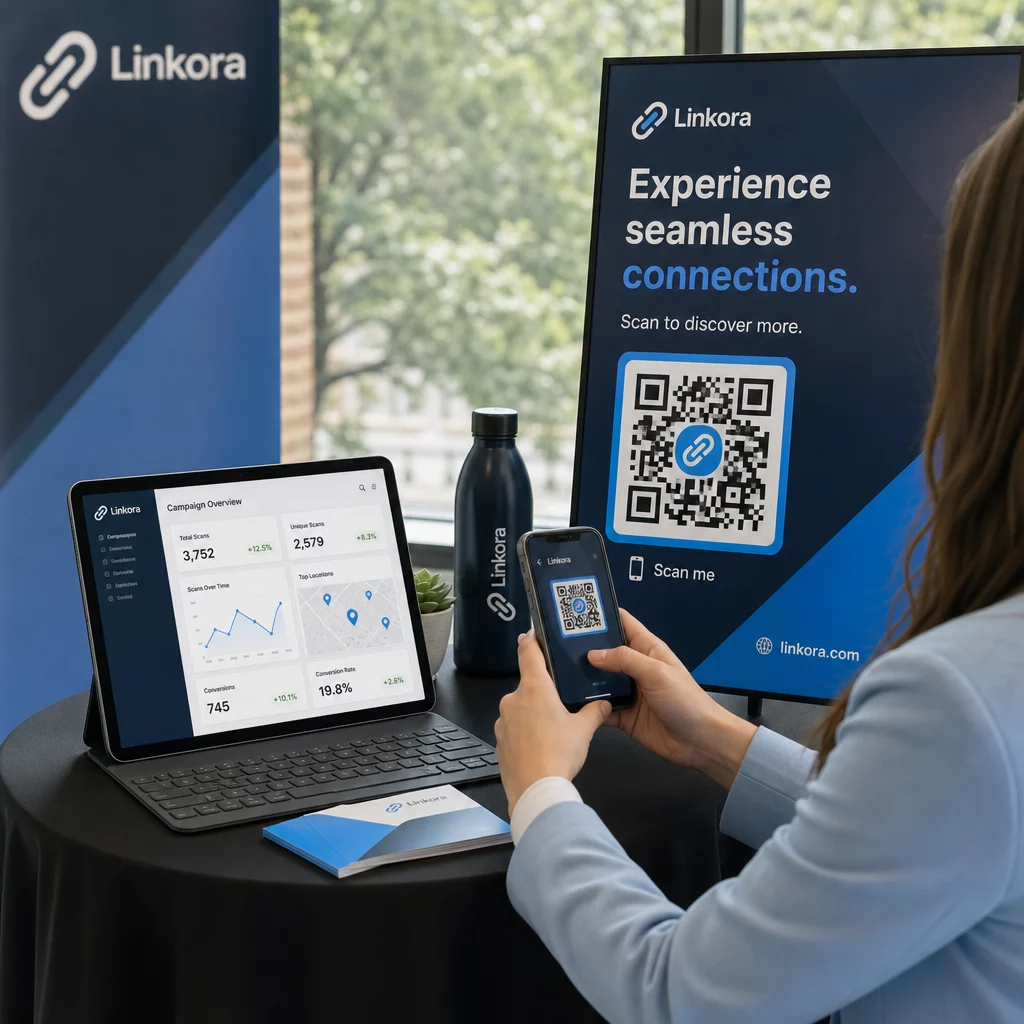
Mit dynamische QR-Codes und Scan-Analysen, können Sie Gesamtscans, eindeutige Scans, Scan-Zeiten, geografische Standorte und Gerätetypen sehen – alles gebunden an dieses spezifische Kampagnenstück. Dieses Messniveau ist deutlich umsetzbarer als das Verfolgen einer Telefonnummer oder einer generischen URL.
Für A/B-Tests können Sie zwei Versionen eines Mailings mit unterschiedlichen QR-Code-Zielen erstellen – eine, die zu einer spezifischen Angebotsseite verlinkt, und eine, die zu einer allgemeinen Inventarseite verlinkt, zum Beispiel – und Scan- und Konversionsraten vergleichen, um zukünftige Kampagnen zu informieren. Das Hinzufügen von UTM-Parametern zu Ihren Ziel-URLs erweitert dieses Tracking in Ihre umfassendere Webanalyse, indem QR-Scan-Daten mit Formularabschlüssen, Verweildauer auf der Website und anderen nachgelagerten Aktionen verbunden werden.
Verfolgen Sie, welche Kampagnen Engagement fördern Erstellen Sie verfolgbare QR-Codes für jede Printkampagne mit dem Link QR-Code-Generator und überwachen Sie die Scan-Leistung von einem einzigen Dashboard aus.
Sammeln von Bewertungen und Kundenfeedback
Die Car Buyer Journey Studie 2025 von Cox Automotive ergab, dass Käufer, die mehr Schritte digital abschließen, eine höhere Zufriedenheit berichten – was bedeutet, dass die Nachbereitung nach dem Kauf genauso wichtig ist wie der Verkauf selbst. QR-Codes, die bei der Übergabe, auf Dankeskarten oder in Service-Wartebereichen platziert werden, können zufriedene Kunden direkt zu Ihrer Google Business Bewertungsseite leiten.
EIN Google-Bewertungs-QR-Code entfernt jegliche Reibung aus dem Bewertungsprozess: ein Scan bringt den Kunden direkt zum Bewertungsformular, ohne dass er Ihr Autohaus suchen oder Google Maps navigieren muss. Effektive Platzierung umfasst:
- Der Lieferpult oder das F&I-Büro
- Service-Kassenschalter
- In einer Marken-Dankeskarte, die neuen Fahrzeuglieferungen beiliegt
- Service-Follow-up-Mailings, die nach einem abgeschlossenen Termin versandt werden
Design- und Platzierungsprinzipien für Autohaus-QR-Codes
Einige praktische Standards gelten für alle QR-Code-Anwendungen im Autohaus:
- Kontrast: Verwenden Sie eine dunkle Modulfarbe auf hellem Hintergrund. Schwarz auf Weiß ist die zuverlässigste Kombination. Vermeiden Sie invertierte Codes (hell auf dunkel), da einige Scanner-Apps damit Schwierigkeiten haben.
- Größe: Für Fensteraufkleber und Gelände-Beschilderung lieber größer als kleiner. Bei einem Scanabstand von einem bis zwei Fuß funktioniert ein 1,5-Zoll-Code zuverlässig auf glatten Oberflächen. Für großformatige Beschilderung proportional vergrößern – der QR-Code-Größenleitfaden für Druckmaterialien deckt diese Verhältnisse im Detail ab.
- Ruhezone: Lassen Sie freien Platz um den Code herum, frei von Text oder Designelementen, damit Scanner die Code-Grenzen genau lokalisieren können.
- CTA-Text: Kombinieren Sie den Code immer mit einem kurzen Call to Action – “Scannen für Preise”, “Service online buchen”, “Alle Spezifikationen ansehen” – damit Kunden wissen, was sie vor dem Scannen erhalten.
- Testen: Testen Sie jeden Code unter realen Bedingungen vor der Bereitstellung – draußen auf dem Gelände, unter Showroom-Beleuchtung, bei direkter Sonneneinstrahlung – auf iOS- und Android-Geräten. Der Leitfaden für bewährte Verfahren zur Lesbarkeit von QR-Codes bietet eine vollständige Checkliste.
Verfolgung und Messung der QR-Code-Leistung
Einer der stärksten Gründe, dynamische QR-Codes gegenüber statischen zu verwenden, sind integrierte Scan-Analysen. Für ein Autohaus mit aktiven Codes auf dem Gelände, im Showroom, im Servicebereich und in Printkampagnen ermöglicht ein zentralisiertes Dashboard den Vergleich, welche Platzierungen und Kampagnen das meiste Engagement erzeugen.
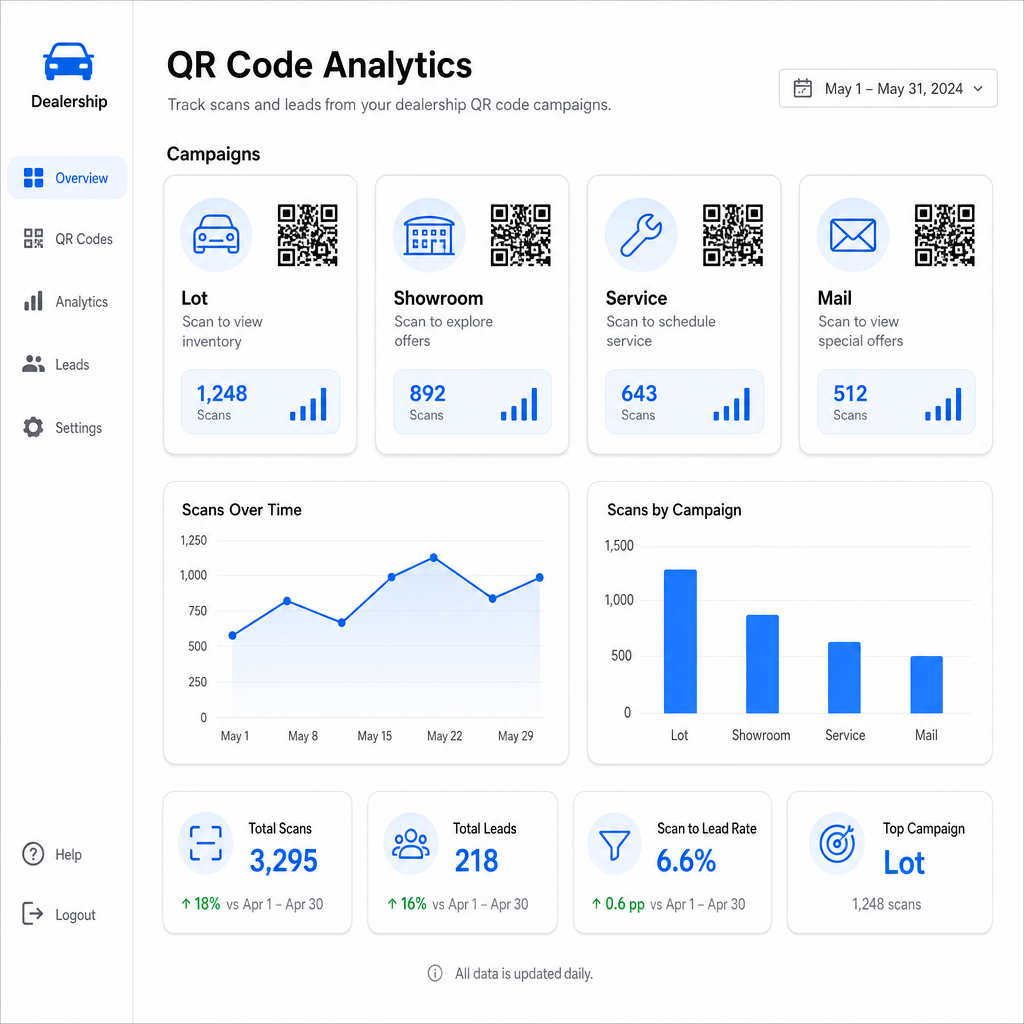
Wichtige Metriken, die über Pageloots Tracking verfügbar sind, umfassen:
- Gesamte und eindeutige Scan-Anzahlen pro Code
- Scan-Zeiten und -Daten, nützlich zum Verständnis von Gelände-Verkehrsmustern
- Geografische Standortdaten, relevant für Direktwerbekampagnen über Postleitzahlen hinweg
- Gerätetypen und Betriebssysteme
- Scan-Trends im Zeitverlauf
Diese Daten fließen direkt zurück in Entscheidungen darüber, wo Codes platziert werden sollen, welche Angebote beworben werden sollen und welche Fahrzeuge hervorgehoben werden sollen. Pageloots QR-Code-Tracking-Leitfaden erklärt, wie man Scan-Daten mit UTM-Parametern und externen Analysetools für vollständige Funnel-Sichtbarkeit verbindet.
Pageloots Plattform deckt auch ab QR-Code-Lösungen branchenübergreifend, sodass, wenn Ihre Händlergruppe über verschiedene Geschäftstypen oder Standorte hinweg tätig ist, dieselben Tools und die gleiche Tracking-Infrastruktur konsistent angewendet werden.
Überwachen Sie alle Ihre Codes von einem Dashboard aus Verwalten Sie jeden Händler-QR-Code – Gelände, Service, Mailings, Showroom – mit dem Dynamischer QR-Code Generator und greifen Sie auf Echtzeit-Scan-Daten über alle Ihre Kampagnen hinweg zu.
QR-Codes geben Ihrem Autohaus eine messbare, flexible Möglichkeit, Ihre physischen Standorte mit digitalem Engagement zu überbrücken – egal ob ein Kunde um Mitternacht über Ihr Gelände geht oder in Ihrem Service-Wartebereich sitzt. Beginnen Sie mit Ihren meistfrequentierten Kontaktpunkten, verwenden Sie dynamische Codes, damit Sie Ziele ohne Neudruck aktualisieren können, und lassen Sie die Scan-Analysen leiten, wohin Sie sich von dort aus ausdehnen.
Häufig gestellte Fragen
Ja, wenn Sie einen dynamischen QR-Code verwenden. Dynamische Codes verweisen auf einen kurzen Weiterleitungslink, den Sie jederzeit von Ihrem Dashboard aus aktualisieren können, sodass der physische Aufkleber gleich bleibt, während das Ziel die aktuellen Preise oder die Verfügbarkeit widerspiegelt. Wenn ein Fahrzeug verkauft wird, können Sie diesen Code auf ein ähnliches Modell umleiten, ohne etwas neu drucken zu müssen.
Dynamische QR-Codes beinhalten Scan-Analysen, die Ihnen zeigen, wie viele Personen jeden Code gescannt haben, wann, von welchem Standort aus und auf welchem Gerät. Durch die Kopplung von QR-Code-Zielen mit UTM-Parametern können Sie verfolgen, welche Scans zu Formularausfüllungen, Terminbuchungen oder Bestandsseitenaufrufen innerhalb Ihrer umfassenderen Webanalyseplattform geführt haben.
Für einen Fensteraufkleber, der aus Armeslänge gescannt wird – etwa ein bis zwei Fuß – sind mindestens 1,2 Zoll ein vernünftiger Ausgangspunkt auf einer glatten, kontrastreichen Oberfläche. Größere Codes scannen zuverlässiger, besonders im Freien bei wechselndem Licht. Wenn der Aufkleber Ihr Händlerlogo im Code enthält, erhöhen Sie die Größe um 20–30%, um die Scannbarkeit zu erhalten. Testen Sie immer die endgültige gedruckte Version unter realen Bedingungen vor der vollständigen Bereitstellung.