> 산업 > QR Codes for Car Dealerships: Use Cases and Implementation Guide
Shopper scanning car QR

QR Codes for Car Dealerships: Use Cases and Implementation Guide

Learn how car dealerships use QR codes on window stickers, showroom signs, and service bays to engage mobile shoppers, schedule service, and track scan data.
Updated on 7월 2, 2026
목차

Are your lot visitors leaving without engaging with your inventory or sharing their contact information? Car shoppers are increasingly mobile-first, and QR codes give you a direct bridge between your physical lot and your digital tools. This guide covers practical ways to implement QR codes across your dealership’s sales and marketing operations, from vehicle window stickers to service scheduling.

Why QR Codes Make Sense for Dealerships Right Now

According to CarGurus’ 2025 U.S. consumer study, 54% of car shoppers use their phones more than desktops when researching vehicles, with another 31% using both equally. At the same time, 83% of consumers prefer to complete more of the buying process from home before visiting in person. That combination means your customers are already on their phones – on the lot, in your showroom, and before they ever arrive.

A QR code on a window sticker, a service bay sign, or a direct mail piece gives those phone-first shoppers an instant connection to the information they want, without requiring a salesperson to be available at that exact moment.

동적 QR 코드 – codes whose destination URL can be updated without reprinting the physical code – are particularly well-suited to dealership environments where inventory changes frequently, promotions rotate, and pricing updates regularly.

Start Creating Dealership QR Codes Ready to connect your lot to your digital content? Use the QR 코드 생성기 to create your first code in minutes, with no technical knowledge required.

Vehicle Window Stickers and Inventory Pages

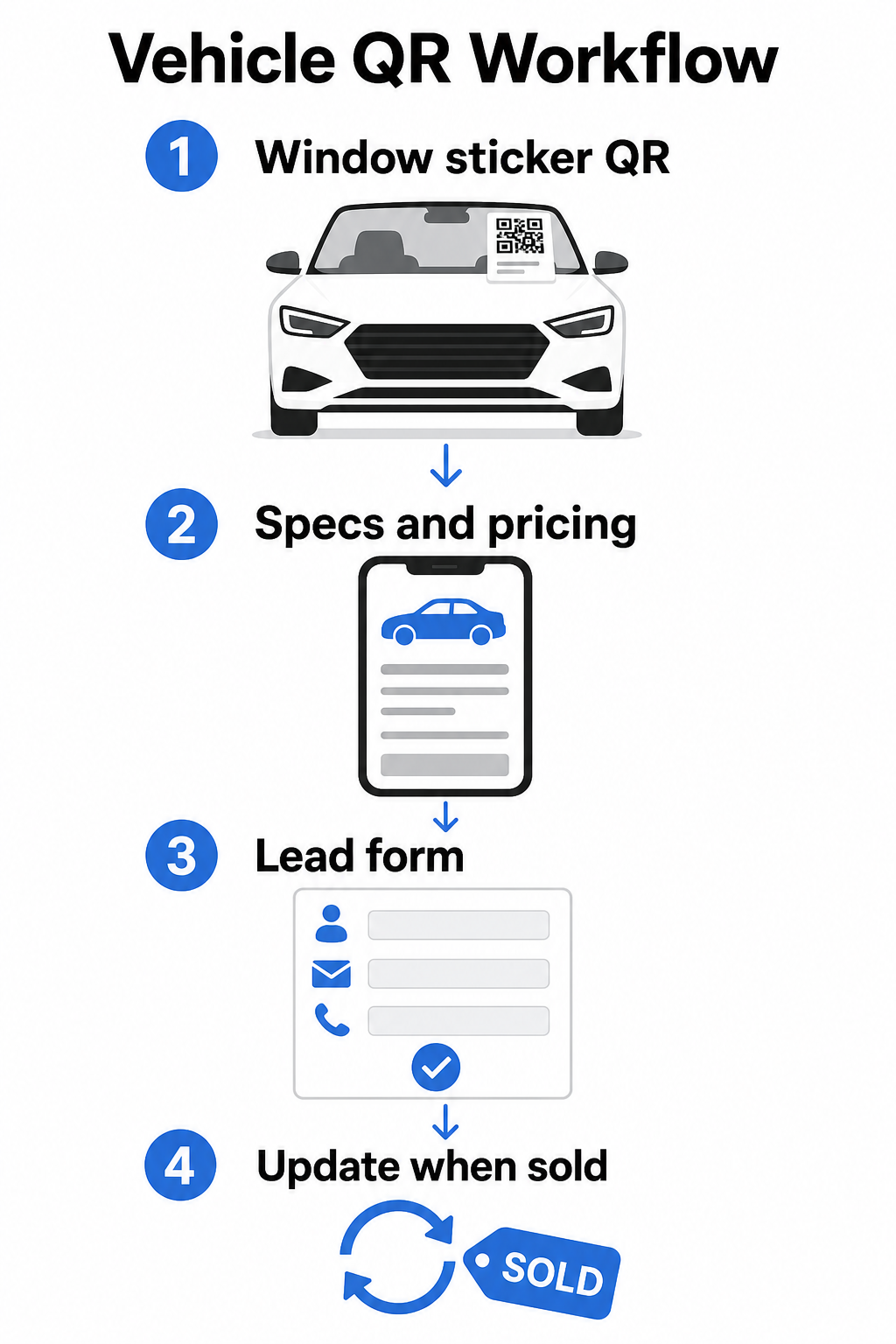
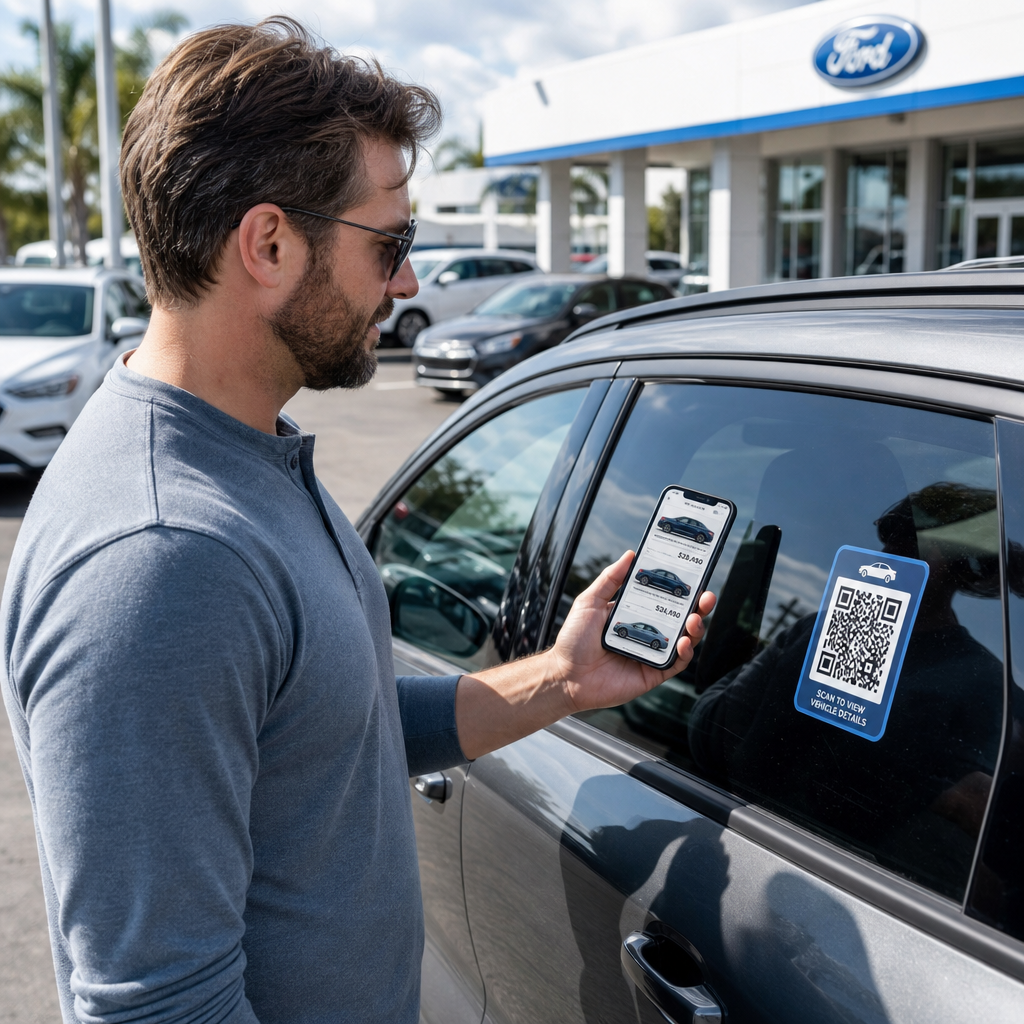
The most direct application for a dealership is placing a QR code on each vehicle’s window sticker. When a shopper walks the lot after hours, or while your sales team is occupied, a scan can immediately pull up a dedicated vehicle page showing specs, trim details, current pricing, financing options, photos, and a lead capture form.

Vehicle QR workflow

Because inventory moves fast, dynamic QR codes are the practical choice here. When a vehicle sells, you can redirect that code to a similar model or a general inventory page without touching the physical sticker. As the vehicle QR code guide notes, dynamic codes are ideal for dealership applications where campaigns and inventory are constantly changing.

For placement, the back window and side panels offer the best visibility to customers walking the lot. Make sure the code is large enough to scan comfortably from a standing position – a minimum of 1.2 inches is a reliable starting point for printed materials at close range, though larger is better when the code competes with other elements on a sticker. Always follow high-contrast design principles, using a dark code on a light background, so the code scans reliably under varying outdoor lighting conditions. Pageloot’s guide on QR 코드 색상 대비 모범 사례 covers this in detail.

Keep Inventory Links Current Without Reprinting 사용 동적 QR 코드 생성기 to create codes for window stickers that you can redirect any time a vehicle sells or a promotion changes.

Showroom Signage and Sales Floor Engagement

Inside the showroom, QR codes can handle the informational load that salespeople can’t always deliver instantly. Place codes near display vehicles, financing desks, or trade-in appraisal areas to link customers to relevant content – detailed spec sheets or comparison pages, current financing offers and payment calculators, trade-in valuation tools, video walkarounds, or customer testimonials and review pages.

랜딩페이지 QR코드 works especially well here because you can surface multiple links from a single scan. For example, a vehicle landing page can include a video, a spec PDF, a financing inquiry form, and a contact option – all in one mobile-friendly layout that looks consistent with your brand.

For customers who are deeper in the consideration process, a QR code linking directly to a lead form can capture their name, contact information, and vehicle interest while they’re still engaged on the floor. The Google 양식 QR 코드 생성기 makes it straightforward to create and display inquiry codes on signage, counter cards, or desk displays, with the added ability to track responses directly.

Service Department Scheduling

Service customers increasingly expect self-service booking options. Online scheduling is growing steadily each year as customers seek the convenience of choosing their own appointment times without a phone call. QR codes in your service drive, waiting area, and on past-due service reminder mailers give customers a one-scan path to your online booking tool.

Practical placement points include:

  • Service drive entry: A sign or decal at the pull-in lane with a scan-to-schedule code for customers returning for repeat services
  • Waiting room signage: A code linking to your service menu, service status page, or scheduling tool
  • Service reminder postcards: A printed code on direct mail that lets customers book an oil change, tire rotation, or recall service without calling in
  • On courtesy loaners or fleet vehicles: A QR code magnet or decal can link drivers to service contact information or scheduling options

Since service promotions rotate – seasonal tire deals, free multi-point inspections, and similar offers – dynamic QR codes in the service department let you update the destination to match the current promotion without replacing signage.

Direct Mail and Print Advertising Campaigns

Dealership direct mail campaigns – conquest mailers, service retention pieces, lease-end notifications – typically ask customers to call or visit a URL. A QR code on the same piece gives recipients a faster path to the relevant landing page, and more importantly, gives you a way to measure exactly how many people engaged with that mailer.

dynamic QR codes and scan analytics, you can see total scans, unique scans, scan times, geographic locations, and device types – all tied to that specific campaign piece. This level of measurement is significantly more actionable than tracking a phone number or a generic URL.

For A/B testing, you can create two versions of a mailer with different QR code destinations – one linking to a specific offer page and one to a general inventory page, for example – and compare scan and conversion rates to inform future campaigns. Adding UTM parameters to your destination URLs extends this tracking into your broader web analytics, connecting QR scan data to form completions, time on site, and other downstream actions.

Track Which Campaigns Are Driving Engagement Create trackable QR codes for every print campaign with the 링크 QR 코드 생성기 and monitor scan performance from a single dashboard.

Collecting Reviews and Customer Feedback

Cox Automotive’s 2025 Car Buyer Journey Study found that buyers who complete more steps digitally report higher satisfaction – which means post-purchase follow-through matters as much as the sale itself. QR codes placed at delivery handoff, on thank-you cards, or in service waiting areas can funnel satisfied customers directly to your Google Business review page.

Google 리뷰 QR 코드 removes all friction from the review process: one scan takes the customer directly to the review submission screen, without requiring them to search for your dealership or navigate Google Maps. Effective placement includes:

  • The delivery desk or F&I office
  • Service cashier counters
  • Inside a branded thank-you card included with new vehicle deliveries
  • Service follow-up mailers sent after a completed appointment

Design and Placement Principles for Dealership QR Codes

A few practical standards apply across all dealership QR code applications:

  • 대비: Use a dark module color on a light background. Black on white is the most reliable combination. Avoid reversed codes (light on dark), as some scanner apps struggle with them.
  • 크기: For window stickers and lot signage, err larger rather than smaller. At a scanning distance of one to two feet, a 1.5-inch code works reliably on smooth surfaces. For larger format signage, scale up proportionally – the 인쇄물용 QR 코드 크기 조정 가이드 covers these ratios in detail.
  • Quiet zone: Leave clear space around the code, free of text or design elements, so scanners can locate the code boundaries accurately.
  • CTA text: Always pair the code with a short call to action – “Scan for Pricing,” “Book Service Online,” “See Full Specs” – so customers know what they’ll get before scanning.
  • Testing: Test every code in actual conditions before deploying – outdoors on the lot, under showroom lighting, in direct sunlight – on both iOS and Android devices. The QR code readability best practices guide provides a full checklist.

Tracking and Measuring QR Code Performance

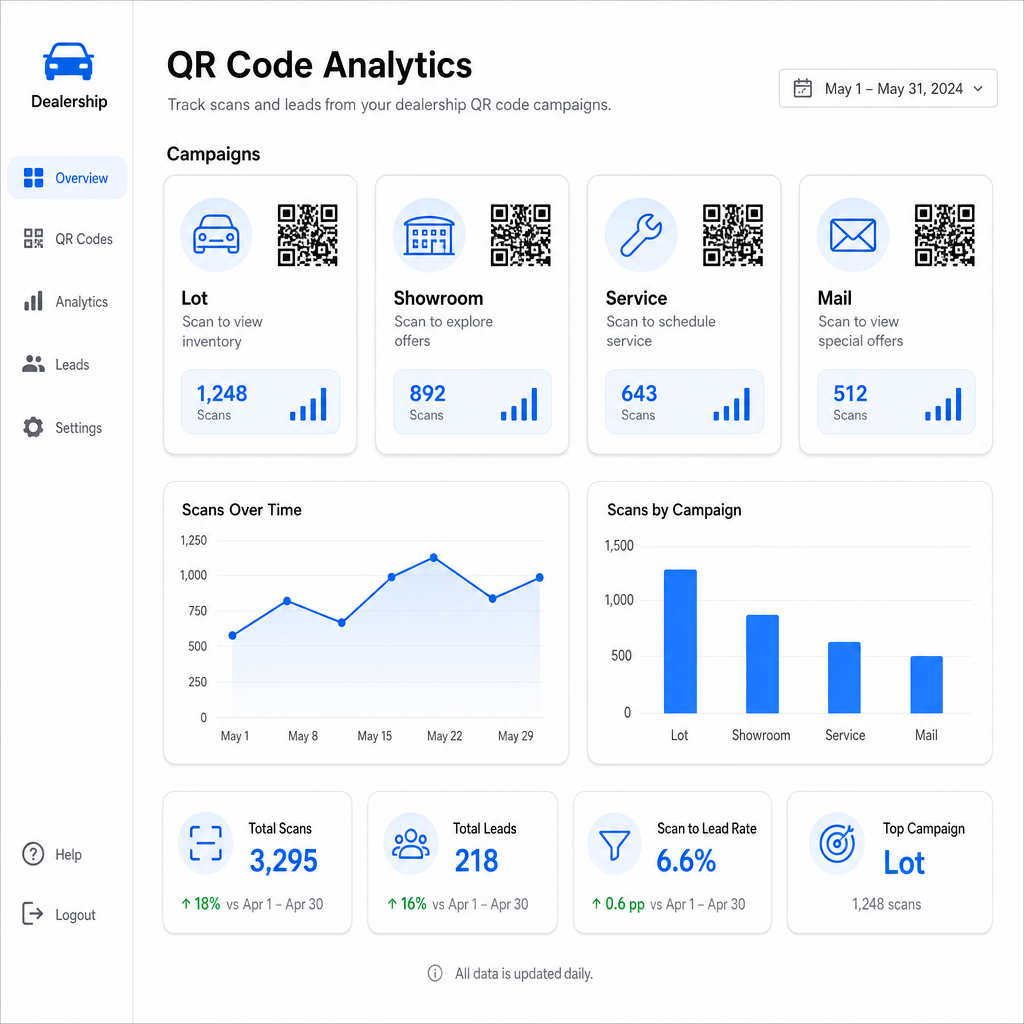
One of the strongest reasons to use dynamic QR codes over static ones is built-in scan analytics. For a dealership with active codes across the lot, showroom, service drive, and print campaigns, a centralized dashboard lets you compare which placements and campaigns are generating the most engagement.

Dealership scan analytics

Key metrics available through Pageloot’s tracking include:

  • Total and unique scan counts per code
  • Scan times and dates, useful for understanding lot traffic patterns
  • Geographic location data, relevant for direct mail campaigns across zip codes
  • Device types and operating systems
  • Scan trends over time

This data feeds directly back into decisions about where to place codes, which offers to promote, and which vehicles to feature. Pageloot’s QR code tracking guide explains how to connect scan data with UTM parameters and external analytics tools for full-funnel visibility.

Pageloot’s platform also covers QR code solutions across industries, so if your dealership group operates across multiple business types or locations, the same tools and tracking infrastructure apply consistently.

Monitor All Your Codes from One Dashboard Manage every dealership QR code – lot, service, mailers, showroom – with the 동적 QR 코드 생성기 and access real-time scan data across all your campaigns.

QR codes give your dealership a measurable, flexible way to bridge your physical locations with digital engagement – whether a customer is walking your lot at midnight or sitting in your service waiting room. Start with your highest-traffic touchpoints, use dynamic codes so you can update destinations without reprinting, and let scan analytics guide where you expand from there.

자주 묻는 질문

Can I use the same QR code on a window sticker if the vehicle’s price changes?

Yes, if you use a dynamic QR code. Dynamic codes point to a short redirect link that you can update at any time from your dashboard, so the physical sticker stays the same while the destination reflects current pricing or availability. If a vehicle sells, you can redirect that code to a similar model without reprinting anything.

How do I know if my QR code campaigns are actually driving leads?

Dynamic QR codes include scan analytics that show you how many people scanned each code, when, from what location, and on what device. By pairing QR code destinations with UTM parameters, you can track which scans resulted in form completions, appointment bookings, or inventory page views inside your broader web analytics platform.

What’s the right size for a QR code on a vehicle window sticker?

For a window sticker scanned at arm’s length – roughly one to two feet – a minimum of 1.2 inches is a reasonable starting point on a smooth, high-contrast surface. Larger codes scan more reliably, especially outdoors in varying light. If the sticker includes your dealership logo inside the code, increase the size by 20–30% to maintain scannability. Always test the final printed version in real conditions before full deployment.

작성자 정보

시임 코스타비는 페이지루트의 콘텐츠 책임자입니다. 그는 페이지루트의 혁신적인 QR 코드 생성 서비스에 대한 글을 쓰고 있습니다. 5년 이상 QR 코드 분야에서 쌓아온 깊이 있는 전문 지식을 바탕으로, 시임은 이 분야의 전문가로 인정받고 있습니다. 그는 QR 기술을 활용하여 디지털 상호작용을 간소화하고 향상시키는 데 크게 기여하고 있습니다.

범주
에 대해 자세히 알아보기
Creating branded QR codes
궁극적 인 가이드 QR 코드 만들기

온라인으로 QR 코드를 생성해야하는 경우 QR 코드 만들기 무료로 여기!
Pageloot는 #1 Go-To 솔루션 QR 코드를 만들고 스캔합니다.

BL-0279

블로그 세대

20,000개 이상의 브랜드로부터 신뢰를 받아 더 많은 매출, 리뷰, 팔로워를 확보했습니다.

클라이언트 로고
최고 브랜드의 신뢰
5 중 4.8 평가

4.86 / 5 별점

휴고 로랑
휴고 로랑
레스토랑 주인
가장 쉽고 안정적인 QR 코드 생성기. PDF 파일을 즉시 업로드할 수 있습니다. 이제 레스토랑 메뉴가 디지털화되었습니다.
루카스 얀센
루카스 얀센
부동산 개발사
이것은 훌륭한 도구이며 QR 코드를 사용하면 원하는 곳으로 이동할 수 있습니다. 우리는 위치 QR 코드만 사용하지만 유용한 기능이 너무 많습니다.
엠마 모레티
엠마 모레티
소매 제품
사용하기 쉽고 빠릅니다. 그것은 훌륭하게 작동하고 완벽한 이미지를 생성하므로 직원들이 내 vCard를 다운로드할 수 있습니다.
휴고 로랑
휴고 로랑
레스토랑 주인
가장 쉽고 안정적인 QR 코드 생성기. PDF 파일을 즉시 업로드할 수 있습니다. 이제 레스토랑 메뉴가 디지털화되었습니다.
루카스 얀센
루카스 얀센
부동산 개발사
이것은 훌륭한 도구이며 QR 코드를 사용하면 원하는 곳으로 이동할 수 있습니다. 우리는 위치 QR 코드만 사용하지만 유용한 기능이 너무 많습니다.
엠마 모레티
엠마 모레티
소매 제품
사용하기 쉽고 빠릅니다. 그것은 훌륭하게 작동하고 완벽한 이미지를 생성하므로 직원들이 내 vCard를 다운로드할 수 있습니다.
더 많은 QR 코드보기
Visitor scanning exhibit code
QR 코드 박물관
Dropbox QR 코드 스캔
QR 코드 드롭 박스
무엇이든 디지털 경험으로 전환하세요 3분 이내에.

14일 무료 체험.

신용카드는 필요 없습니다.

첫 구매 시 30% 할인

코드를 사용하세요:

MP3 파일 공유

PDF QR 코드를 생성하려면 가입하세요

필요한 모든 것을 업로드하고 표시합니다.

  • 오디오 파일
  • 팟캐스트
  • 음악

가입 시 14일 무료 체험.
체험 기간 후 QR 코드 만료.

오디오 mp3 QR 코드를 생성하려면 가입하세요

프레임으로 더 많은 스캔 확보

QR 코드에 더 많은 프레임을 추가하려면 가입하세요

클릭 유도 문안 프레임은 고객이 QR 코드와 쉽게 상호 작용할 수 있도록 도와줍니다. 사용해 보세요!

가입 시 14일 무료 체험.
체험 기간 후 QR 코드 만료.

QR 코드에 더 많은 프레임을 추가하려면 가입하세요

도형으로 더 많은 스타일 추가

더 많은 도형을 만들려면 가입하세요

QR 코드는 정사각형일 필요가 없습니다. 브랜드 이미지에 맞게 전환해 보세요.

가입 시 14일 무료 체험.
체험 기간 후 QR 코드 만료.

더 많은 도형을 만들려면 가입하세요

QR 코드에 로고 추가

QR 코드에 로고를 추가하려면 가입하세요

로고와 브랜드를 추가하여 QR 코드를 돋보이게 만드세요.

가입 시 14일 무료 체험.
체험 기간 후 QR 코드 만료.

QR 코드에 로고를 추가하려면 가입하세요

스마트 앱 스토어 리디렉션

앱 스토어 QR 코드를 생성하려면 가입하세요

스마트 앱 스토어 QR 코드에 앱 링크를 추가하세요. 사용자는 장치에 따라 리디렉션됩니다.

가입 시 14일 무료 체험.
체험 기간 후 QR 코드 만료.

앱 스토어 QR 코드를 생성하려면 가입하세요

QR 코드에 이미지 업로드

이미지 QR 코드를 생성하려면 가입하세요

이미지를 쉽게 공유하세요. 몇 초 안에 동적으로 이미지를 변경하십시오.

가입 시 14일 무료 체험.
체험 기간 후 QR 코드 만료.

이미지 QR 코드를 생성하려면 가입하세요

PDF 파일 공유

PDF QR 코드를 생성하려면 가입하세요

필요한 모든 것을 업로드하고 표시합니다.

  • 메뉴 및 가격표
  • 명령
  • 모든 문서

가입 시 14일 무료 체험.
체험 기간 후 QR 코드 만료.

PDF QR 코드를 생성하려면 가입하세요

인쇄 없이 나중에 편집

다시 인쇄하지 않고 QR 코드를 편집하려면 가입하세요

동적 QR 코드를 사용하면 새 QR 코드를 인쇄하지 않고도 QR 코드의 내용을 변경할 수 있습니다.

가입 시 14일 무료 체험.
체험 기간 후 QR 코드 만료.

다시 인쇄하지 않고 QR 코드를 편집하려면 가입하세요

언제? 어디서? QR 코드 스캔 추적

QR 코드를 추적하려면 가입하세요

어떤 QR 코드가 가장 많이 스캔되고 무엇이 고객을 가장 흥분시키는지 알아보십시오.

가입 시 14일 무료 체험.
체험 기간 후 QR 코드 만료.

QR 코드를 추적하려면 가입하세요

인쇄 준비 파일 제공

PDF 및 SVG와 같은 벡터 QR 코드를 생성하려면 가입하세요.

.EPS, .PDF, .SVG

HD 해상도로 QR 코드를 다운로드하고 싶으신가요? 인쇄할 준비가 된 벡터 또는 픽셀 형식을 가져옵니다.

가입 시 14일 무료 체험.
체험 기간 후 QR 코드 만료.

PDF 및 SVG와 같은 벡터 QR 코드를 생성하려면 가입하세요.

기다리세요. 귀하의 QR 코드는 로드 중... 로드 중...

나만의 것으로 만들기

나중을 위해 QR 코드를 저장하려면 가입하세요.

다양한 색상, 로고 및 클릭 유도문안 프레임으로 멋진 QR 코드를 만들어 더 많은 스캔을 받으세요.

가입 시 14일 무료 체험.
체험 기간 후 QR 코드 만료.

나중을 위해 QR 코드를 저장하려면 가입하세요.