Khách ghé thăm bãi xe của bạn có rời đi mà không tương tác với kho hàng của bạn hoặc chia sẻ thông tin liên hệ của họ không? Người mua xe ngày càng ưu tiên thiết bị di động, và mã QR cung cấp cho bạn một cầu nối trực tiếp giữa bãi xe vật lý và các công cụ kỹ thuật số của bạn. Hướng dẫn này bao gồm các cách thực tế để triển khai mã QR trong các hoạt động bán hàng và tiếp thị của đại lý của bạn, từ nhãn dán cửa sổ xe đến lên lịch dịch vụ.
Tại Sao Mã QR Lại Hợp Lý Đối Với Các Đại Lý Ngay Bây Giờ
Theo nghiên cứu người tiêu dùng Hoa Kỳ năm 2025 của CarGurus, 54% người mua xe sử dụng điện thoại của họ nhiều hơn máy tính để bàn khi nghiên cứu xe, với 31% khác sử dụng cả hai như nhau. Đồng thời, 83% người tiêu dùng thích hoàn thành nhiều hơn quá trình mua hàng tại nhà trước khi đến thăm trực tiếp. Sự kết hợp đó có nghĩa là khách hàng của bạn đã sử dụng điện thoại của họ – tại bãi xe, trong phòng trưng bày của bạn và trước khi họ đến.
Mã QR trên nhãn dán cửa sổ, biển hiệu khoang dịch vụ hoặc tài liệu gửi thư trực tiếp cung cấp cho những người mua sắm ưu tiên điện thoại đó một kết nối tức thì đến thông tin họ muốn, mà không yêu cầu nhân viên bán hàng phải có mặt ngay lúc đó.
Mã QR động – mã có URL đích có thể được cập nhật mà không cần in lại mã vật lý – đặc biệt phù hợp với môi trường đại lý nơi kho hàng thay đổi thường xuyên, các chương trình khuyến mãi xoay vòng và giá cả được cập nhật thường xuyên.
Bắt Đầu Tạo Mã QR Cho Đại Lý Sẵn sàng kết nối bãi xe của bạn với nội dung kỹ thuật số của bạn chưa? Sử dụng Trình tạo mã QR để tạo mã đầu tiên của bạn trong vài phút, mà không yêu cầu kiến thức kỹ thuật.
Nhãn Dán Cửa Sổ Xe Và Trang Kho Hàng
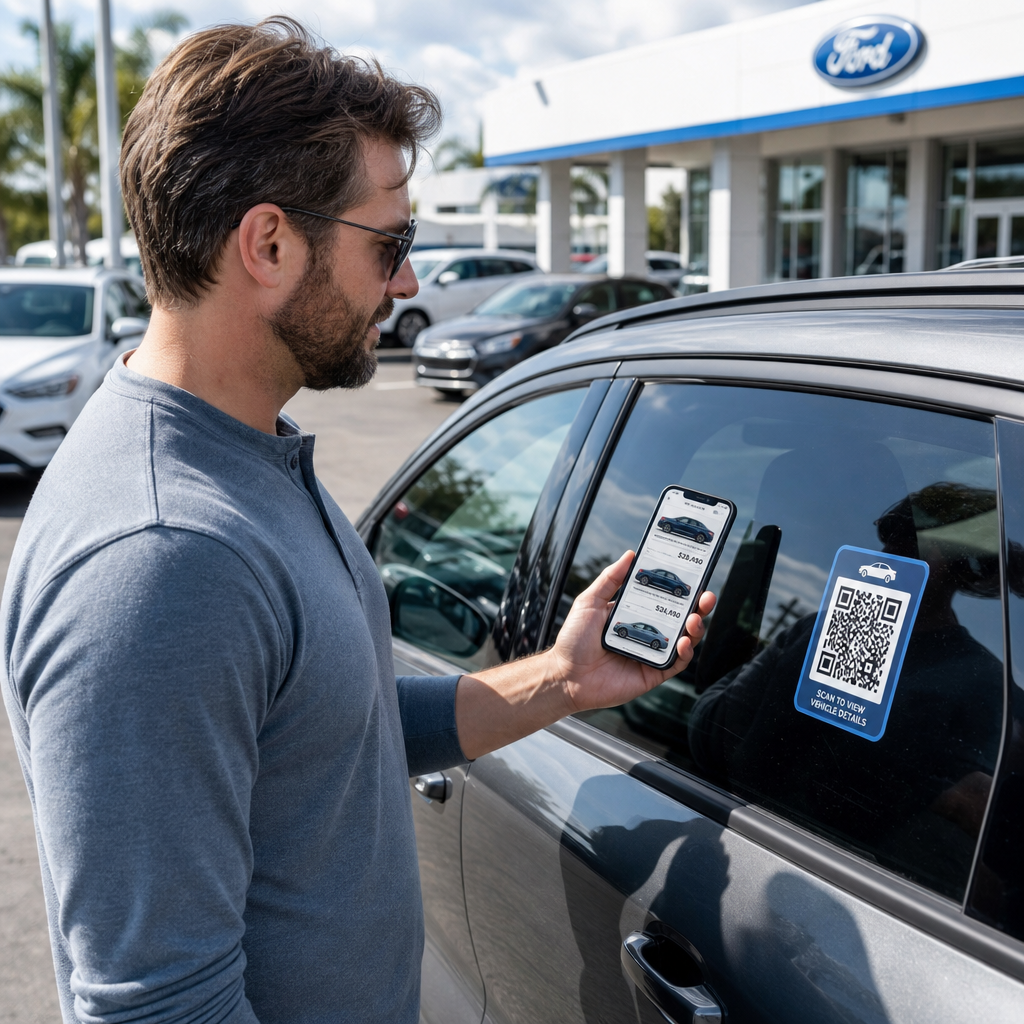
Ứng dụng trực tiếp nhất cho một đại lý là đặt mã QR trên nhãn dán cửa sổ của mỗi xe. Khi người mua sắm đi bộ quanh bãi xe sau giờ làm việc, hoặc trong khi đội ngũ bán hàng của bạn đang bận, một lần quét có thể ngay lập tức hiển thị một trang xe chuyên dụng hiển thị thông số kỹ thuật, chi tiết phiên bản, giá hiện tại, tùy chọn tài chính, ảnh và biểu mẫu thu thập khách hàng tiềm năng.
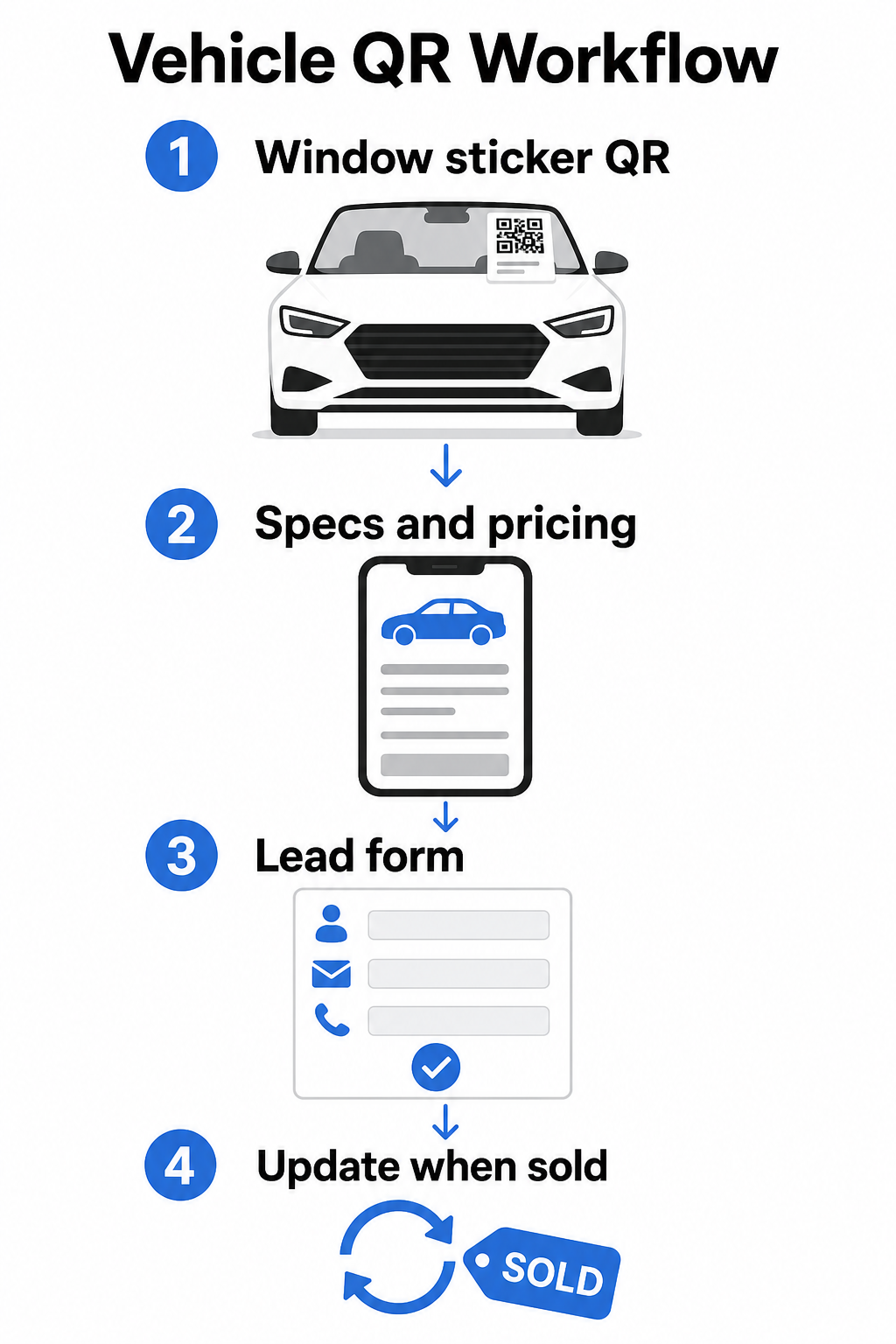
Bởi vì kho hàng di chuyển nhanh, mã QR động là lựa chọn thực tế ở đây. Khi một chiếc xe được bán, bạn có thể chuyển hướng mã đó đến một mẫu xe tương tự hoặc một trang kho hàng chung mà không cần chạm vào nhãn dán vật lý. Như hướng dẫn mã QR xe lưu ý, mã động lý tưởng cho các ứng dụng đại lý nơi các chiến dịch và kho hàng liên tục thay đổi.
Để đặt, cửa sổ sau và các tấm bên hông mang lại khả năng hiển thị tốt nhất cho khách hàng đi bộ quanh bãi xe. Đảm bảo mã đủ lớn để quét thoải mái từ vị trí đứng – tối thiểu 1.2 inch là điểm khởi đầu đáng tin cậy cho các tài liệu in ở cự ly gần, mặc dù lớn hơn sẽ tốt hơn khi mã cạnh tranh với các yếu tố khác trên nhãn dán. Luôn tuân thủ các nguyên tắc thiết kế độ tương phản cao, sử dụng mã tối trên nền sáng, để mã quét đáng tin cậy trong các điều kiện ánh sáng ngoài trời khác nhau. Hướng dẫn của Pageloot về các phương pháp hay nhất về độ tương phản màu của mã QR bao gồm chi tiết này.
Giữ Liên Kết Kho Hàng Luôn Cập Nhật Mà Không Cần In Lại Sử dụng Tạo mã QR động để tạo mã cho nhãn dán cửa sổ mà bạn có thể chuyển hướng bất cứ khi nào một chiếc xe được bán hoặc một chương trình khuyến mãi thay đổi.
Biển Hiệu Phòng Trưng Bày Và Tương Tác Tại Sàn Bán Hàng
Bên trong phòng trưng bày, mã QR có thể xử lý lượng thông tin mà nhân viên bán hàng không phải lúc nào cũng có thể cung cấp ngay lập tức. Đặt mã gần các xe trưng bày, bàn tài chính hoặc khu vực định giá xe cũ để liên kết khách hàng đến nội dung liên quan – bảng thông số kỹ thuật chi tiết hoặc trang so sánh, ưu đãi tài chính hiện tại và công cụ tính toán thanh toán, công cụ định giá xe cũ, video giới thiệu xe hoặc lời chứng thực của khách hàng và trang đánh giá.
A mã QR trang đích hoạt động đặc biệt tốt ở đây vì bạn có thể hiển thị nhiều liên kết từ một lần quét. Ví dụ, một trang đích xe có thể bao gồm một video, một PDF thông số kỹ thuật, một biểu mẫu yêu cầu tài chính và một tùy chọn liên hệ – tất cả trong một bố cục thân thiện với thiết bị di động trông nhất quán với thương hiệu của bạn.
Đối với những khách hàng đang trong quá trình cân nhắc sâu hơn, một mã QR liên kết trực tiếp đến biểu mẫu khách hàng tiềm năng có thể thu thập tên, thông tin liên hệ và sự quan tâm đến xe của họ trong khi họ vẫn đang tương tác tại sàn. Tạo mã QR cho Google Form giúp việc tạo và hiển thị mã yêu cầu trở nên đơn giản trên biển hiệu, thẻ quầy hoặc màn hình bàn, với khả năng bổ sung là theo dõi phản hồi trực tiếp.
Lên Lịch Bộ Phận Dịch Vụ
Khách hàng dịch vụ ngày càng mong đợi các tùy chọn đặt lịch tự phục vụ. Lên lịch trực tuyến đang tăng trưởng đều đặn mỗi năm khi khách hàng tìm kiếm sự tiện lợi khi chọn thời gian hẹn của riêng họ mà không cần gọi điện thoại. Mã QR trong khu vực dịch vụ của bạn, khu vực chờ và trên các thư nhắc nhở dịch vụ quá hạn cung cấp cho khách hàng một đường dẫn một lần quét đến công cụ đặt lịch trực tuyến của bạn.
Các điểm đặt thực tế bao gồm:
- Lối vào khu vực dịch vụ: Một biển báo hoặc đề can tại làn kéo vào với mã quét để đặt lịch cho khách hàng quay lại để sử dụng dịch vụ lặp lại
- Biển báo phòng chờ: Một mã liên kết đến menu dịch vụ của bạn, trang trạng thái dịch vụ hoặc công cụ đặt lịch
- Bưu thiếp nhắc nhở dịch vụ: Một mã in trên thư trực tiếp cho phép khách hàng đặt một lần thay dầu, đảo lốp hoặc dịch vụ triệu hồi mà không cần gọi điện
- Trên xe cho mượn lịch sự hoặc xe đội xe: Một Nam châm mã QR hoặc đề can có thể liên kết người lái xe đến thông tin liên hệ dịch vụ hoặc các tùy chọn đặt lịch
Vì các chương trình khuyến mãi dịch vụ xoay vòng – ưu đãi lốp xe theo mùa, kiểm tra đa điểm miễn phí và các ưu đãi tương tự – mã QR động trong bộ phận dịch vụ cho phép bạn cập nhật điểm đến để phù hợp với chương trình khuyến mãi hiện tại mà không cần thay thế biển báo.
Thư trực tiếp và các chiến dịch quảng cáo in ấn
Các chiến dịch thư trực tiếp của đại lý – thư chinh phục, các phần giữ chân dịch vụ, thông báo kết thúc hợp đồng thuê – thường yêu cầu khách hàng gọi điện hoặc truy cập một URL. Một mã QR trên cùng một ấn phẩm mang lại cho người nhận một con đường nhanh hơn đến trang đích liên quan, và quan trọng hơn, cung cấp cho bạn một cách để đo lường chính xác có bao nhiêu người đã tương tác với thư đó.
Với mã QR động và phân tích quét, bạn có thể thấy tổng số lượt quét, lượt quét duy nhất, thời gian quét, vị trí địa lý và loại thiết bị – tất cả đều gắn liền với ấn phẩm chiến dịch cụ thể đó. Mức độ đo lường này có khả năng hành động hơn đáng kể so với việc theo dõi một số điện thoại hoặc một URL chung chung.
Để thử nghiệm A/B, bạn có thể tạo hai phiên bản của một thư với các điểm đến mã QR khác nhau – một liên kết đến một trang ưu đãi cụ thể và một đến một trang kho hàng chung, chẳng hạn – và so sánh tỷ lệ quét và chuyển đổi để thông báo cho các chiến dịch trong tương lai. Thêm các tham số UTM vào URL đích của bạn mở rộng việc theo dõi này vào phân tích web rộng hơn của bạn, kết nối dữ liệu quét QR với việc hoàn thành biểu mẫu, thời gian trên trang web và các hành động tiếp theo khác.
Theo dõi những chiến dịch nào đang thúc đẩy sự tương tác Tạo mã QR có thể theo dõi cho mọi chiến dịch in ấn với Trình tạo mã QR liên kết và theo dõi hiệu suất quét từ một bảng điều khiển duy nhất.
Thu thập đánh giá và phản hồi của khách hàng
Nghiên cứu Hành trình Người mua Ô tô năm 2025 của Cox Automotive cho thấy rằng những người mua hoàn thành nhiều bước hơn bằng kỹ thuật số báo cáo mức độ hài lòng cao hơn – điều đó có nghĩa là việc theo dõi sau mua hàng quan trọng không kém gì bản thân việc bán hàng. Mã QR được đặt tại điểm giao hàng, trên thiệp cảm ơn hoặc trong khu vực chờ dịch vụ có thể dẫn khách hàng hài lòng trực tiếp đến trang đánh giá Google Business của bạn.
A mã QR đánh giá Google loại bỏ mọi ma sát khỏi quy trình đánh giá: một lần quét đưa khách hàng trực tiếp đến màn hình gửi đánh giá, mà không yêu cầu họ tìm kiếm đại lý của bạn hoặc điều hướng Google Maps. Vị trí hiệu quả bao gồm:
- Bàn giao hàng hoặc văn phòng F&I
- Quầy thu ngân dịch vụ
- Bên trong một thiệp cảm ơn có thương hiệu đi kèm với việc giao xe mới
- Thư theo dõi dịch vụ được gửi sau một cuộc hẹn đã hoàn thành
Nguyên tắc thiết kế và vị trí cho mã QR của đại lý
Một vài tiêu chuẩn thực tế áp dụng cho tất cả các ứng dụng mã QR của đại lý:
- Sự tương phản: Sử dụng màu mô-đun tối trên nền sáng. Đen trên trắng là sự kết hợp đáng tin cậy nhất. Tránh các mã đảo ngược (sáng trên tối), vì một số ứng dụng quét gặp khó khăn với chúng.
- Kích thước: Đối với nhãn dán cửa sổ và biển báo bãi xe, hãy làm lớn hơn thay vì nhỏ hơn. Ở khoảng cách quét từ một đến hai feet, một mã 1,5 inch hoạt động đáng tin cậy trên các bề mặt nhẵn. Đối với biển báo định dạng lớn hơn, hãy tăng tỷ lệ tương ứng – hướng dẫn kích thước mã QR cho vật liệu in bao gồm các tỷ lệ này chi tiết.
- Vùng yên tĩnh: Để lại không gian trống xung quanh mã, không có văn bản hoặc yếu tố thiết kế, để máy quét có thể xác định chính xác các ranh giới mã.
- Văn bản CTA: Luôn ghép mã với một lời kêu gọi hành động ngắn gọn – “Quét để xem giá,” “Đặt dịch vụ trực tuyến,” “Xem thông số kỹ thuật đầy đủ” – để khách hàng biết họ sẽ nhận được gì trước khi quét.
- Kiểm tra: Kiểm tra mọi mã trong điều kiện thực tế trước khi triển khai – ngoài trời trên bãi xe, dưới ánh sáng phòng trưng bày, dưới ánh nắng trực tiếp – trên cả thiết bị iOS và Android. thực hành tốt nhất về khả năng đọc mã QR cung cấp một danh sách kiểm tra đầy đủ.
Theo dõi và đo lường hiệu suất mã QR
Một trong những lý do mạnh mẽ nhất để sử dụng mã QR động thay vì mã tĩnh là phân tích quét tích hợp. Đối với một đại lý có mã hoạt động trên bãi xe, phòng trưng bày, khu vực dịch vụ và các chiến dịch in ấn, một bảng điều khiển tập trung cho phép bạn so sánh những vị trí và chiến dịch nào đang tạo ra nhiều tương tác nhất.
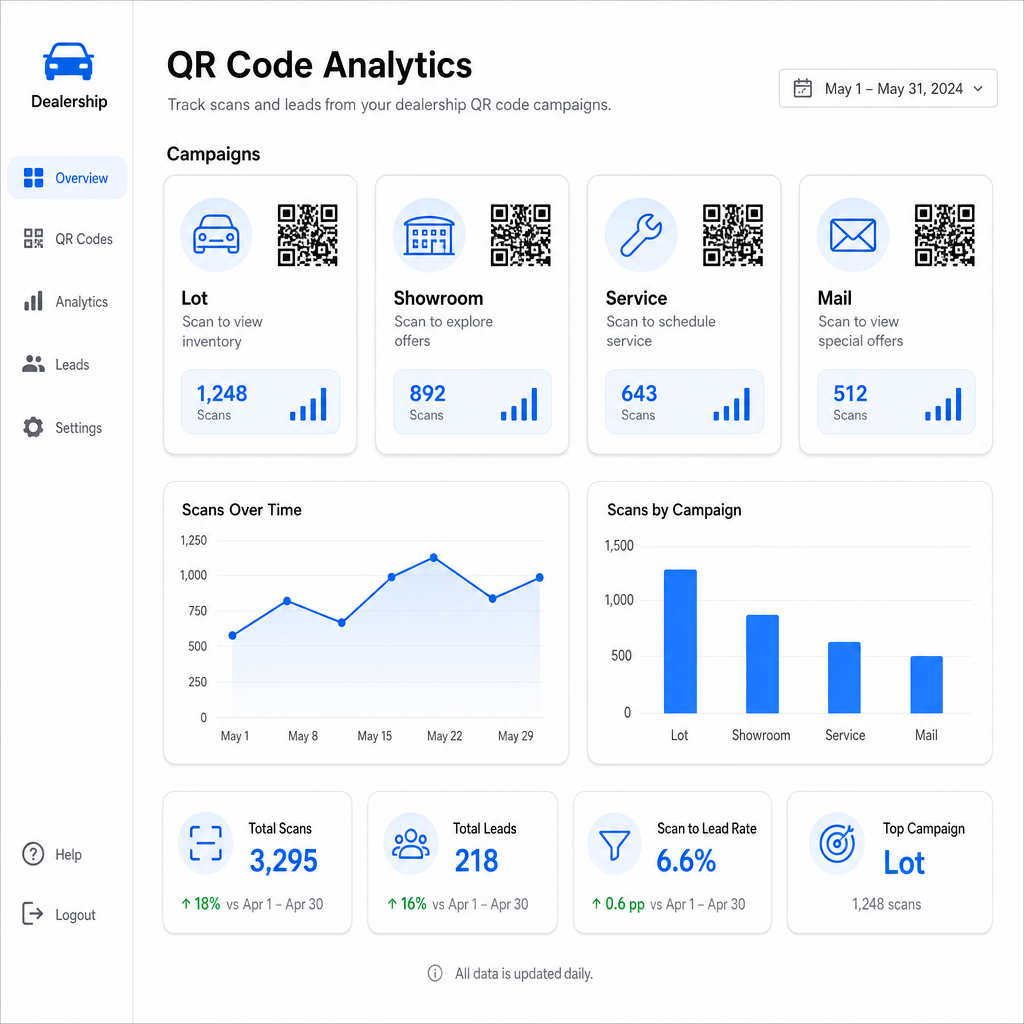
Các chỉ số chính có sẵn thông qua tính năng theo dõi của Pageloot bao gồm:
- Tổng số lượt quét và số lượt quét duy nhất cho mỗi mã
- Thời gian và ngày quét, hữu ích để hiểu các mẫu lưu lượng truy cập bãi xe
- Dữ liệu vị trí địa lý, liên quan đến các chiến dịch thư trực tiếp trên các mã bưu chính
- Loại thiết bị và hệ điều hành
- Xu hướng quét theo thời gian
Dữ liệu này trực tiếp hỗ trợ các quyết định về nơi đặt mã, những ưu đãi nào cần quảng bá và những phương tiện nào cần giới thiệu. Của Pageloot hướng dẫn theo dõi mã QR giải thích cách kết nối dữ liệu quét với các thông số UTM và công cụ phân tích bên ngoài để có khả năng hiển thị toàn bộ kênh.
Nền tảng của Pageloot cũng bao gồm các giải pháp mã QR trên các ngành công nghiệp, vì vậy nếu nhóm đại lý của bạn hoạt động trên nhiều loại hình kinh doanh hoặc địa điểm, thì các công cụ và cơ sở hạ tầng theo dõi tương tự sẽ được áp dụng một cách nhất quán.
Giám sát tất cả các mã của bạn từ một bảng điều khiển Quản lý mọi mã QR của đại lý – bãi xe, dịch vụ, thư quảng cáo, phòng trưng bày – với Tạo mã QR động và truy cập dữ liệu quét theo thời gian thực trên tất cả các chiến dịch của bạn.
Mã QR cung cấp cho đại lý của bạn một cách thức có thể đo lường, linh hoạt để kết nối các địa điểm vật lý của bạn với tương tác kỹ thuật số – cho dù khách hàng đang đi bộ trong bãi xe của bạn vào nửa đêm hay đang ngồi trong phòng chờ dịch vụ của bạn. Bắt đầu với các điểm tiếp xúc có lưu lượng truy cập cao nhất của bạn, sử dụng mã động để bạn có thể cập nhật điểm đến mà không cần in lại và để phân tích quét hướng dẫn nơi bạn mở rộng từ đó.
Câu hỏi thường gặp
Vâng, nếu bạn sử dụng một mã QR động. Mã động trỏ đến một liên kết chuyển hướng ngắn mà bạn có thể cập nhật bất cứ lúc nào từ bảng điều khiển của mình, vì vậy nhãn dán vật lý vẫn giữ nguyên trong khi đích đến phản ánh giá cả hoặc tình trạng sẵn có hiện tại. Nếu một phương tiện được bán, bạn có thể chuyển hướng mã đó đến một mẫu tương tự mà không cần in lại bất cứ thứ gì.
Mã QR động bao gồm phân tích lượt quét cho bạn biết có bao nhiêu người đã quét từng mã, khi nào, từ vị trí nào và trên thiết bị nào. Bằng cách kết hợp các đích đến của mã QR với các thông số UTM, bạn có thể theo dõi lượt quét nào đã dẫn đến việc hoàn thành biểu mẫu, đặt lịch hẹn hoặc lượt xem trang tồn kho bên trong nền tảng phân tích web rộng hơn của bạn.
Đối với nhãn dán cửa sổ được quét ở khoảng cách sải tay – khoảng một đến hai feet – tối thiểu 1,2 inch là một điểm khởi đầu hợp lý trên bề mặt nhẵn, có độ tương phản cao. Mã lớn hơn quét đáng tin cậy hơn, đặc biệt là ngoài trời trong điều kiện ánh sáng khác nhau. Nếu nhãn dán bao gồm logo đại lý của bạn bên trong mã, hãy tăng kích thước lên 20–30% để duy trì khả năng quét. Luôn kiểm tra phiên bản in cuối cùng trong điều kiện thực tế trước khi triển khai đầy đủ.