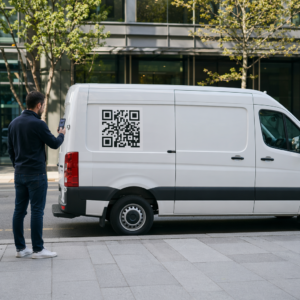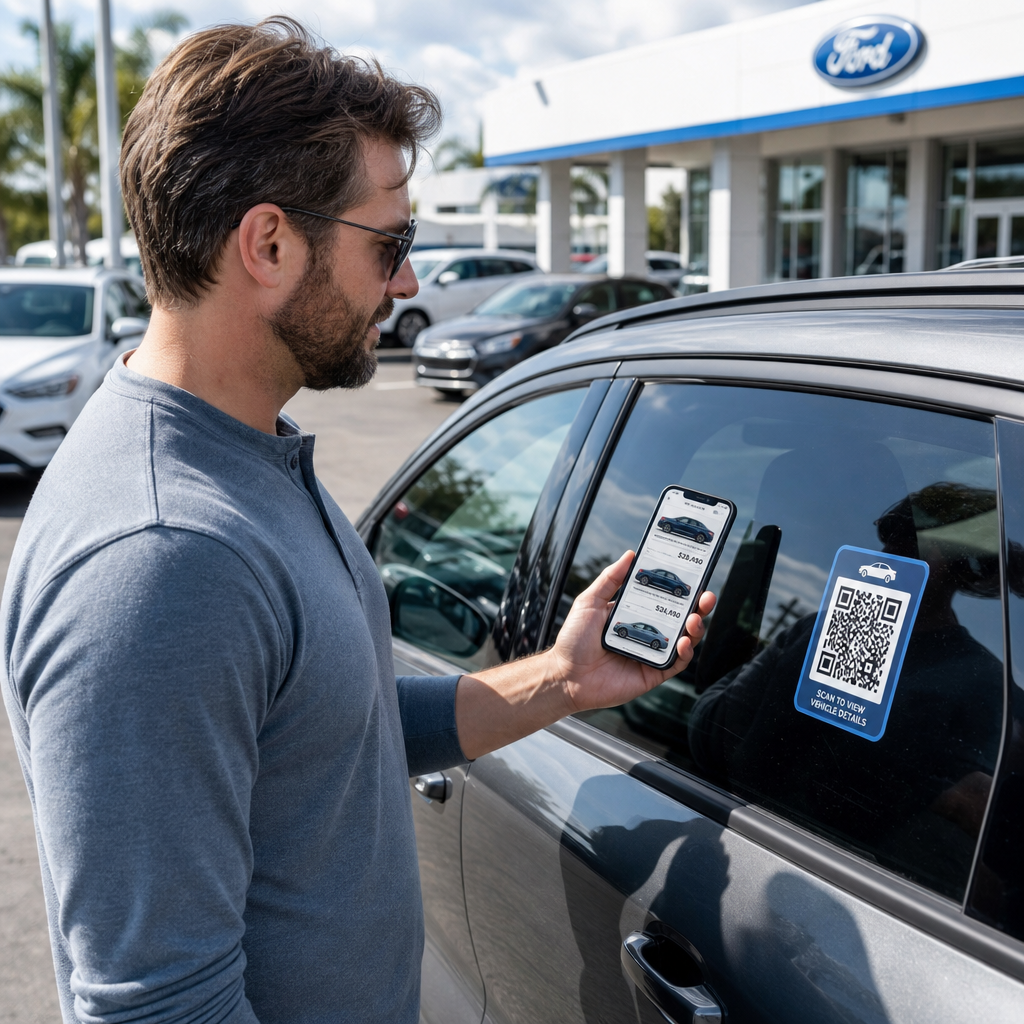
Apakah pengunjung dealer Anda pergi tanpa berinteraksi dengan inventaris Anda atau membagikan informasi kontak mereka? Pembeli mobil semakin mengutamakan perangkat seluler, dan kode QR memberi Anda jembatan langsung antara dealer fisik Anda dan alat digital Anda. Panduan ini mencakup cara-cara praktis untuk menerapkan kode QR di seluruh operasi penjualan dan pemasaran dealer Anda, mulai dari stiker jendela kendaraan hingga penjadwalan layanan.
Mengapa Kode QR Masuk Akal untuk Dealer Saat Ini
Menurut studi konsumen AS CarGurus tahun 2025, 54% pembeli mobil menggunakan ponsel mereka lebih dari desktop saat meneliti kendaraan, dengan 31% lainnya menggunakan keduanya secara seimbang. Pada saat yang sama, 83% konsumen lebih suka menyelesaikan sebagian besar proses pembelian dari rumah sebelum berkunjung secara langsung. Kombinasi itu berarti pelanggan Anda sudah menggunakan ponsel mereka – di dealer, di ruang pamer Anda, dan sebelum mereka tiba.
Kode QR pada stiker jendela, tanda ruang servis, atau surat langsung memberikan koneksi instan kepada pembeli yang mengutamakan ponsel ke informasi yang mereka inginkan, tanpa memerlukan tenaga penjualan untuk tersedia pada saat itu juga.
Kode QR dinamis – kode yang URL tujuannya dapat diperbarui tanpa mencetak ulang kode fisik – sangat cocok untuk lingkungan dealer di mana inventaris sering berubah, promosi berputar, dan harga diperbarui secara teratur.
Mulai Membuat Kode QR Dealer Siap menghubungkan dealer Anda ke konten digital Anda? Gunakan Generator Kode QR untuk membuat kode pertama Anda dalam hitungan menit, tanpa memerlukan pengetahuan teknis.
Stiker Jendela Kendaraan dan Halaman Inventaris
Aplikasi paling langsung untuk dealer adalah menempatkan kode QR pada stiker jendela setiap kendaraan. Ketika pembeli berjalan di dealer setelah jam kerja, atau saat tim penjualan Anda sibuk, pemindaian dapat segera menampilkan halaman kendaraan khusus yang menunjukkan spesifikasi, detail trim, harga saat ini, opsi pembiayaan, foto, dan formulir penangkapan prospek.
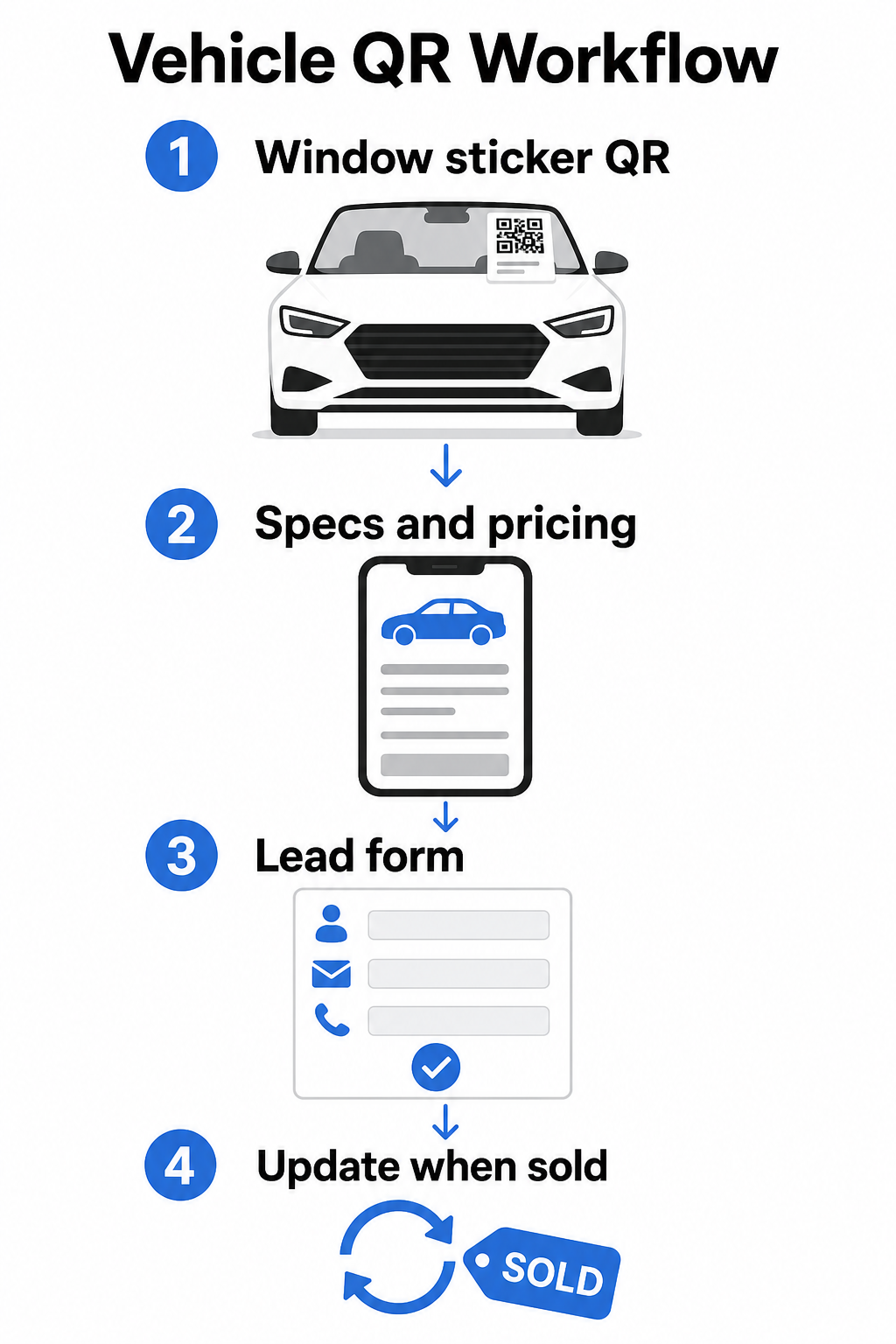
Karena inventaris bergerak cepat, kode QR dinamis adalah pilihan praktis di sini. Ketika sebuah kendaraan terjual, Anda dapat mengarahkan ulang kode tersebut ke model serupa atau halaman inventaris umum tanpa menyentuh stiker fisik. Seperti yang panduan kode QR kendaraan catat, kode dinamis sangat ideal untuk aplikasi dealer di mana kampanye dan inventaris terus berubah.
Untuk penempatan, jendela belakang dan panel samping menawarkan visibilitas terbaik bagi pelanggan yang berjalan di dealer. Pastikan kode cukup besar untuk dipindai dengan nyaman dari posisi berdiri – minimal 1,2 inci adalah titik awal yang andal untuk bahan cetak pada jarak dekat, meskipun lebih besar lebih baik ketika kode bersaing dengan elemen lain pada stiker. Selalu ikuti prinsip desain kontras tinggi, menggunakan kode gelap pada latar belakang terang, sehingga kode memindai dengan andal di bawah kondisi pencahayaan luar ruangan yang bervariasi. Panduan Pageloot tentang praktik terbaik kontras warna kode QR membahas ini secara rinci.
Jaga Tautan Inventaris Tetap Terkini Tanpa Mencetak Ulang Menggunakan Generator QR Code Dinamis untuk membuat kode untuk stiker jendela yang dapat Anda arahkan ulang kapan saja kendaraan terjual atau promosi berubah.
Papan Nama Ruang Pamer dan Keterlibatan Lantai Penjualan
Di dalam ruang pamer, kode QR dapat menangani beban informasi yang tidak selalu dapat disampaikan oleh tenaga penjualan secara instan. Tempatkan kode di dekat kendaraan pajangan, meja pembiayaan, atau area penilaian tukar tambah untuk menghubungkan pelanggan ke konten yang relevan – lembar spesifikasi terperinci atau halaman perbandingan, penawaran pembiayaan saat ini dan kalkulator pembayaran, alat penilaian tukar tambah, video walkaround, atau testimoni pelanggan dan halaman ulasan.
SEBUAH kode QR halaman arahan berfungsi sangat baik di sini karena Anda dapat menampilkan beberapa tautan dari satu pemindaian. Misalnya, halaman arahan kendaraan dapat mencakup video, PDF spesifikasi, formulir pertanyaan pembiayaan, dan opsi kontak – semuanya dalam satu tata letak yang ramah seluler yang terlihat konsisten dengan merek Anda.
Untuk pelanggan yang lebih mendalam dalam proses pertimbangan, kode QR yang terhubung langsung ke formulir prospek dapat menangkap nama, informasi kontak, dan minat kendaraan mereka saat mereka masih terlibat di lantai. Yang Ubah Link Google Form ke QR Code membuatnya mudah untuk membuat dan menampilkan kode pertanyaan pada papan nama, kartu konter, atau pajangan meja, dengan kemampuan tambahan untuk melacak respons secara langsung.
Penjadwalan Departemen Servis
Pelanggan servis semakin mengharapkan opsi pemesanan swalayan. Penjadwalan online terus berkembang setiap tahun karena pelanggan mencari kenyamanan memilih waktu janji temu mereka sendiri tanpa panggilan telepon. Kode QR di jalur servis Anda, area tunggu, dan pada surat pengingat servis yang sudah lewat jatuh tempo memberikan pelanggan jalur satu pemindaian ke alat pemesanan online Anda.
Titik penempatan praktis meliputi:
- Pintu masuk jalur servis: Sebuah tanda atau stiker di jalur masuk dengan kode pindai-untuk-jadwal bagi pelanggan yang kembali untuk layanan berulang
- Papan tanda ruang tunggu: Sebuah kode yang menautkan ke menu layanan Anda, halaman status layanan, atau alat penjadwalan
- Kartu pos pengingat layanan: Sebuah kode tercetak pada surat langsung yang memungkinkan pelanggan memesan ganti oli, rotasi ban, atau layanan penarikan kembali tanpa menelepon
- Pada kendaraan pinjaman atau kendaraan armada: A Magnet atau stiker kode QR dapat menautkan pengemudi ke informasi kontak layanan atau opsi penjadwalan
Karena promosi layanan berputar – penawaran ban musiman, inspeksi multi-titik gratis, dan penawaran serupa – kode QR dinamis di departemen layanan memungkinkan Anda memperbarui tujuan agar sesuai dengan promosi saat ini tanpa mengganti papan tanda.
Kampanye Surat Langsung dan Iklan Cetak
Kampanye surat langsung dealer – surat penarik pelanggan baru, materi retensi layanan, pemberitahuan akhir sewa – biasanya meminta pelanggan untuk menelepon atau mengunjungi URL. Kode QR pada materi yang sama memberikan penerima jalur yang lebih cepat ke halaman arahan yang relevan, dan yang lebih penting, memberi Anda cara untuk mengukur dengan tepat berapa banyak orang yang berinteraksi dengan surat tersebut.
Dengan kode QR dinamis dan analitik pemindaian, Anda dapat melihat total pemindaian, pemindaian unik, waktu pemindaian, lokasi geografis, dan jenis perangkat – semuanya terikat pada materi kampanye spesifik tersebut. Tingkat pengukuran ini secara signifikan lebih dapat ditindaklanjuti daripada melacak nomor telepon atau URL generik.
Untuk pengujian A/B, Anda dapat membuat dua versi surat dengan tujuan kode QR yang berbeda – satu menautkan ke halaman penawaran spesifik dan satu ke halaman inventaris umum, misalnya – dan membandingkan tingkat pemindaian dan konversi untuk menginformasikan kampanye di masa mendatang. Menambahkan parameter UTM ke URL tujuan Anda memperluas pelacakan ini ke analitik web Anda yang lebih luas, menghubungkan data pemindaian QR ke penyelesaian formulir, waktu di situs, dan tindakan hilir lainnya.
Lacak Kampanye Mana yang Mendorong Keterlibatan Buat kode QR yang dapat dilacak untuk setiap kampanye cetak dengan Generator Kode QR Tautan dan pantau kinerja pemindaian dari satu dasbor.
Mengumpulkan Ulasan dan Umpan Balik Pelanggan
Studi Perjalanan Pembeli Mobil Cox Automotive 2025 menemukan bahwa pembeli yang menyelesaikan lebih banyak langkah secara digital melaporkan kepuasan yang lebih tinggi – yang berarti tindak lanjut pasca-pembelian sama pentingnya dengan penjualan itu sendiri. Kode QR yang ditempatkan saat serah terima pengiriman, pada kartu ucapan terima kasih, atau di area tunggu layanan dapat mengarahkan pelanggan yang puas langsung ke halaman ulasan Google Bisnis Anda.
SEBUAH QR code Google review menghilangkan semua gesekan dari proses ulasan: satu pemindaian membawa pelanggan langsung ke layar pengiriman ulasan, tanpa mengharuskan mereka mencari dealer Anda atau menavigasi Google Maps. Penempatan yang efektif meliputi:
- Meja pengiriman atau kantor F&I
- Meja kasir layanan
- Di dalam kartu ucapan terima kasih bermerek yang disertakan dengan pengiriman kendaraan baru
- Surat tindak lanjut layanan yang dikirim setelah janji temu selesai
Prinsip Desain dan Penempatan Kode QR Dealer
Beberapa standar praktis berlaku di semua aplikasi kode QR dealer:
- Kontras: Gunakan warna modul gelap pada latar belakang terang. Hitam di atas putih adalah kombinasi yang paling andal. Hindari kode terbalik (terang di atas gelap), karena beberapa aplikasi pemindai kesulitan dengan itu.
- Ukuran: Untuk stiker jendela dan papan tanda di lahan, lebih baik lebih besar daripada lebih kecil. Pada jarak pemindaian satu hingga dua kaki, kode 1,5 inci berfungsi dengan andal pada permukaan halus. Untuk papan tanda format yang lebih besar, skalakan secara proporsional – panduan ukuran kode QR untuk bahan cetak mencakup rasio-rasio ini secara rinci.
- Zona tenang: Sisakan ruang kosong di sekitar kode, bebas dari teks atau elemen desain, agar pemindai dapat menemukan batas kode dengan akurat.
- Teks CTA: Selalu pasangkan kode dengan ajakan bertindak singkat – “Pindai untuk Harga,” “Pesan Layanan Online,” “Lihat Spesifikasi Lengkap” – agar pelanggan tahu apa yang akan mereka dapatkan sebelum memindai.
- Pengujian: Uji setiap kode dalam kondisi sebenarnya sebelum diterapkan – di luar ruangan di lahan, di bawah pencahayaan showroom, di bawah sinar matahari langsung – pada perangkat iOS dan Android. praktik terbaik keterbacaan kode QR menyediakan daftar periksa lengkap.
Melacak dan Mengukur Kinerja Kode QR
Salah satu alasan terkuat untuk menggunakan kode QR dinamis daripada yang statis adalah analitik pemindaian bawaan. Untuk dealer dengan kode aktif di seluruh lahan, showroom, jalur layanan, dan kampanye cetak, dasbor terpusat memungkinkan Anda membandingkan penempatan dan kampanye mana yang menghasilkan keterlibatan paling banyak.
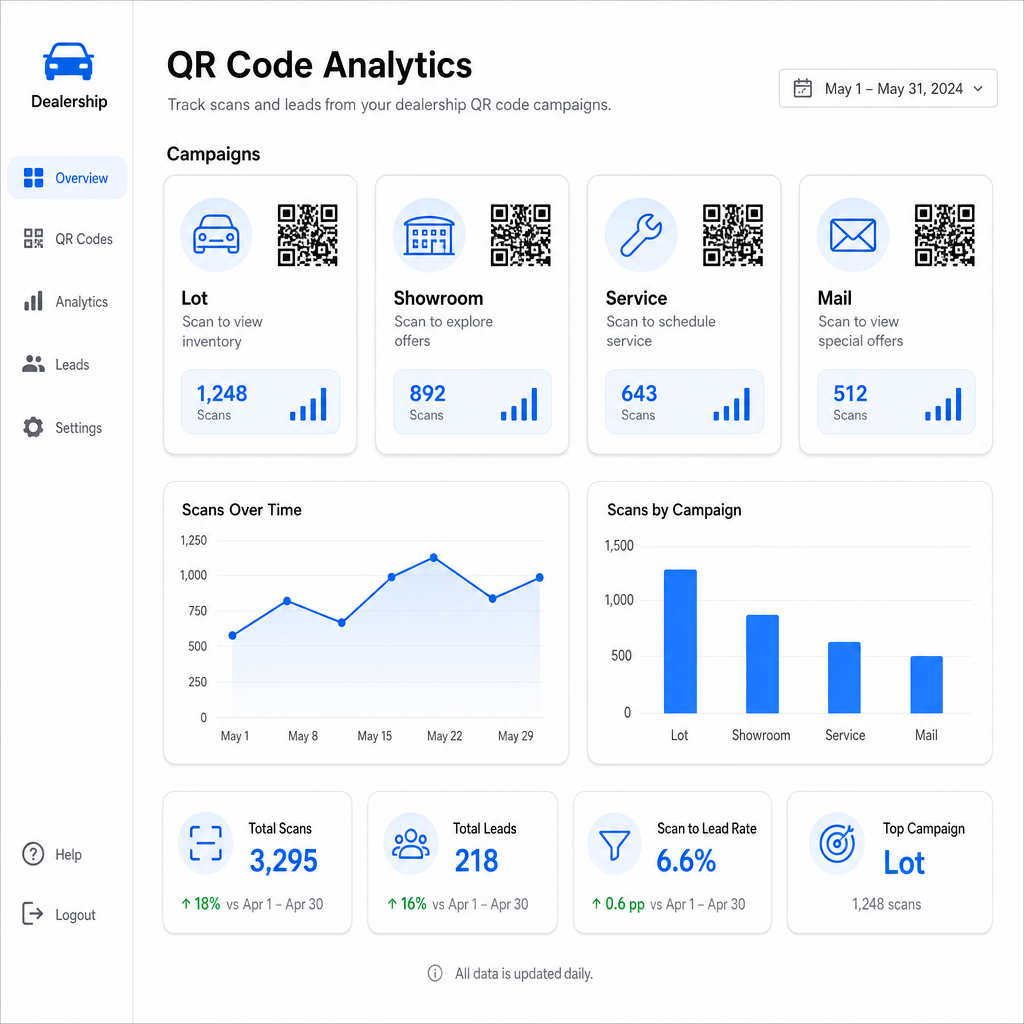
Metrik utama yang tersedia melalui pelacakan Pageloot meliputi:
- Jumlah pemindaian total dan unik per kode
- Waktu dan tanggal pemindaian, berguna untuk memahami pola lalu lintas di lahan
- Data lokasi geografis, relevan untuk kampanye surat langsung di seluruh kode pos
- Jenis perangkat dan sistem operasi
- Tren pemindaian seiring waktu
Data ini langsung menjadi masukan untuk keputusan tentang di mana menempatkan kode, penawaran mana yang akan dipromosikan, dan kendaraan mana yang akan ditampilkan. Pageloot panduan pelacakan kode QR menjelaskan cara menghubungkan data pemindaian dengan parameter UTM dan alat analitik eksternal untuk visibilitas corong penuh.
Platform Pageloot juga mencakup solusi kode QR di berbagai industri, jadi jika grup dealer Anda beroperasi di berbagai jenis bisnis atau lokasi, alat dan infrastruktur pelacakan yang sama berlaku secara konsisten.
Pantau Semua Kode Anda dari Satu Dasbor Kelola setiap kode QR dealer – lahan, layanan, surat, ruang pamer – dengan Generator QR Code Dinamis dan akses data pemindaian waktu nyata di semua kampanye Anda.
Kode QR memberi dealer Anda cara yang terukur dan fleksibel untuk menjembatani lokasi fisik Anda dengan keterlibatan digital – apakah pelanggan sedang berjalan di lahan Anda pada tengah malam atau duduk di ruang tunggu layanan Anda. Mulailah dengan titik sentuh lalu lintas tertinggi Anda, gunakan kode dinamis sehingga Anda dapat memperbarui tujuan tanpa mencetak ulang, dan biarkan analitik pemindaian memandu ke mana Anda akan berkembang dari sana.
Pertanyaan yang sering diajukan
Ya, jika Anda menggunakan kode QR dinamis. Kode dinamis mengarah ke tautan pengalihan singkat yang dapat Anda perbarui kapan saja dari dasbor Anda, sehingga stiker fisik tetap sama sementara tujuan mencerminkan harga atau ketersediaan saat ini. Jika kendaraan terjual, Anda dapat mengarahkan ulang kode tersebut ke model serupa tanpa mencetak ulang apa pun.
Kode QR Dinamis menyertakan analitik pemindaian yang menunjukkan kepada Anda berapa banyak orang yang memindai setiap kode, kapan, dari lokasi mana, dan di perangkat apa. Dengan memasangkan tujuan kode QR dengan parameter UTM, Anda dapat melacak pemindaian mana yang menghasilkan penyelesaian formulir, pemesanan janji temu, atau tampilan halaman inventaris di dalam platform analitik web Anda yang lebih luas.
Untuk stiker jendela yang dipindai sejauh lengan – kira-kira satu hingga dua kaki – minimal 1,2 inci adalah titik awal yang wajar pada permukaan yang halus dan kontras tinggi. Kode yang lebih besar memindai lebih andal, terutama di luar ruangan dalam cahaya yang bervariasi. Jika stiker menyertakan logo dealer Anda di dalam kode, tingkatkan ukurannya sebesar 20–30% untuk menjaga kemampuan pemindaian. Selalu uji versi cetak akhir dalam kondisi nyata sebelum penerapan penuh.