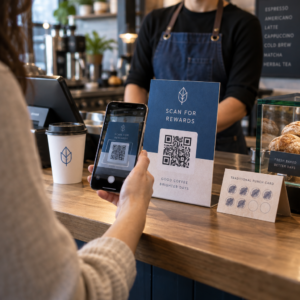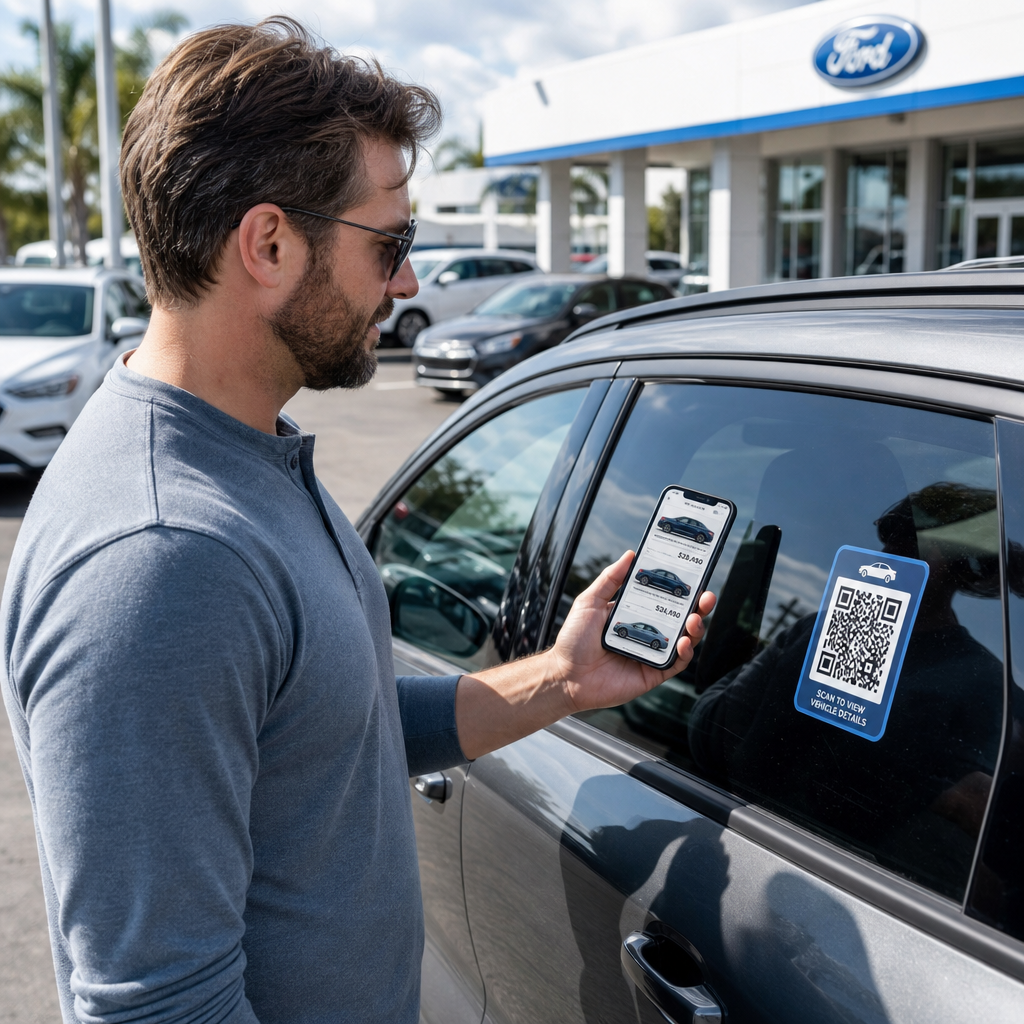
¿Sus visitantes del lote se van sin interactuar con su inventario o sin compartir su información de contacto? Los compradores de coches priorizan cada vez más el móvil, y los códigos QR le ofrecen un puente directo entre su lote físico y sus herramientas digitales. Esta guía cubre formas prácticas de implementar códigos QR en todas las operaciones de ventas y marketing de su concesionario, desde pegatinas de ventanilla de vehículos hasta la programación de servicios.
Por qué los códigos QR tienen sentido para los concesionarios ahora mismo
Según el estudio de consumidores de EE. UU. de CarGurus de 2025, el 54 % de los compradores de coches usan sus teléfonos más que los ordenadores de escritorio al investigar vehículos, con otro 31 % usando ambos por igual. Al mismo tiempo, el 83 % de los consumidores prefieren completar más del proceso de compra desde casa antes de visitar en persona. Esa combinación significa que sus clientes ya están en sus teléfonos – en el lote, en su sala de exposición y antes de que lleguen.
Un código QR en una pegatina de ventanilla, un letrero de bahía de servicio o una pieza de correo directo ofrece a esos compradores que priorizan el teléfono una conexión instantánea a la información que desean, sin requerir que un vendedor esté disponible en ese momento exacto.
Códigos QR dinámicos – códigos cuya URL de destino puede actualizarse sin reimprimir el código físico – son particularmente adecuados para entornos de concesionarios donde el inventario cambia con frecuencia, las promociones rotan y los precios se actualizan regularmente.
Empiece a crear códigos QR para concesionarios ¿Listo para conectar su lote a su contenido digital? Utilice el Generador de códigos QR para crear su primer código en minutos, sin necesidad de conocimientos técnicos.
Pegatinas de ventanilla de vehículos y páginas de inventario
La aplicación más directa para un concesionario es colocar un código QR en la pegatina de ventanilla de cada vehículo. Cuando un comprador camina por el lote fuera del horario de atención, o mientras su equipo de ventas está ocupado, un escaneo puede abrir inmediatamente una página de vehículo dedicada mostrando especificaciones, detalles de acabado, precios actuales, opciones de financiación, fotos y un formulario de captura de clientes potenciales.
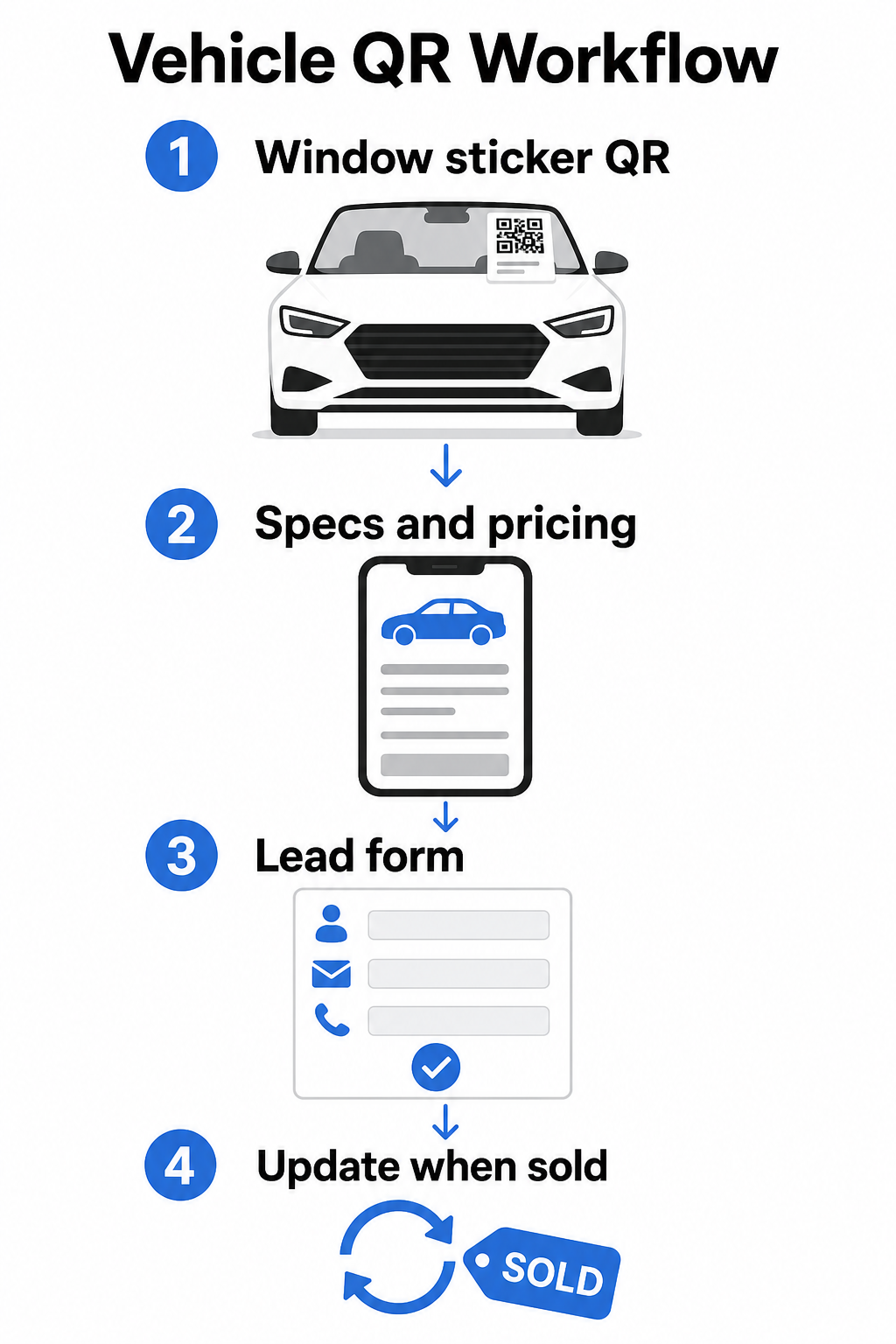
Debido a que el inventario se mueve rápido, los códigos QR dinámicos son la opción práctica aquí. Cuando un vehículo se vende, puede redirigir ese código a un modelo similar o a una página de inventario general sin tocar la pegatina física. Como la guía de códigos QR para vehículos señala, los códigos dinámicos son ideales para aplicaciones de concesionarios donde las campañas y el inventario cambian constantemente.
Para la colocación, la ventanilla trasera y los paneles laterales ofrecen la mejor visibilidad a los clientes que caminan por el lote. Asegúrese de que el código sea lo suficientemente grande como para escanearlo cómodamente desde una posición de pie – un mínimo de 1.2 pulgadas es un punto de partida fiable para materiales impresos a corta distancia, aunque más grande es mejor cuando el código compite con otros elementos en una pegatina. Siga siempre los principios de diseño de alto contraste, utilizando un código oscuro sobre un fondo claro, para que el código se escanee de forma fiable bajo diversas condiciones de iluminación exterior. La guía de Pageloot sobre mejores prácticas de contraste de color de códigos QR cubre esto en detalle.
Mantenga los enlaces de inventario actualizados sin reimprimir Use el Generador de códigos QR dinámicos para crear códigos para pegatinas de ventanilla que puede redirigir cada vez que un vehículo se vende o una promoción cambia.
Señalización de sala de exposición y compromiso en el piso de ventas
Dentro de la sala de exposición, los códigos QR pueden manejar la carga de información que los vendedores no siempre pueden entregar al instante. Coloque códigos cerca de vehículos en exhibición, escritorios de financiación o áreas de tasación de vehículos usados para vincular a los clientes con contenido relevante – hojas de especificaciones detalladas o páginas de comparación, ofertas de financiación actuales y calculadoras de pagos, herramientas de valoración de vehículos usados, videos de recorrido o testimonios de clientes y páginas de reseñas.
UNA Código QR de la página de destino funciona especialmente bien aquí porque puede mostrar múltiples enlaces desde un solo escaneo. Por ejemplo, una página de destino de vehículo puede incluir un video, un PDF de especificaciones, un formulario de consulta de financiación y una opción de contacto – todo en un diseño compatible con dispositivos móviles que se ve consistente con su marca.
Para los clientes que están más avanzados en el proceso de consideración, un código QR que enlaza directamente a un formulario de clientes potenciales puede capturar su nombre, información de contacto e interés en el vehículo mientras aún están interactuando en el piso de ventas. El Generador de código QR para Google Forms facilita la creación y visualización de códigos de consulta en señalización, tarjetas de mostrador o exhibidores de escritorio, con la capacidad adicional de rastrear las respuestas directamente.
Programación del departamento de servicio
Los clientes de servicio esperan cada vez más opciones de reserva de autoservicio. La programación en línea crece constantemente cada año a medida que los clientes buscan la comodidad de elegir sus propios horarios de citas sin una llamada telefónica. Los códigos QR en su área de servicio, sala de espera y en los recordatorios de servicio vencidos ofrecen a los clientes un camino de un solo escaneo a su herramienta de reserva en línea.
Los puntos de colocación prácticos incluyen:
- Entrada del área de servicio: Un letrero o calcomanía en el carril de entrada con un código de escaneo para programar para clientes que regresan para servicios repetidos
- Señalización de la sala de espera: Un código que enlaza a su menú de servicio, página de estado del servicio o herramienta de programación
- Postales de recordatorio de servicio: Un código impreso en correo directo que permite a los clientes reservar un cambio de aceite, rotación de neumáticos o servicio de retirada sin llamar
- En vehículos de cortesía o de flota: Un Imán o calcomanía con código QR puede enlazar a los conductores a información de contacto de servicio o a opciones de programación
Dado que las promociones de servicio rotan – ofertas de neumáticos de temporada, inspecciones multipunto gratuitas y ofertas similares – los códigos QR dinámicos en el departamento de servicio le permiten actualizar el destino para que coincida con la promoción actual sin reemplazar la señalización.
Campañas de correo directo y publicidad impresa
Las campañas de correo directo del concesionario – correos de captación, piezas de retención de servicio, notificaciones de fin de arrendamiento – suelen pedir a los clientes que llamen o visiten una URL. Un código QR en la misma pieza da a los destinatarios un camino más rápido a la página de destino relevante y, lo que es más importante, le da una forma de medir exactamente cuántas personas interactuaron con ese correo.
Con códigos QR dinámicos y análisis de escaneo, puede ver el total de escaneos, escaneos únicos, tiempos de escaneo, ubicaciones geográficas y tipos de dispositivo – todo vinculado a esa pieza de campaña específica. Este nivel de medición es significativamente más procesable que el seguimiento de un número de teléfono o una URL genérica.
Para pruebas A/B, puede crear dos versiones de un correo con diferentes destinos de código QR – uno que enlace a una página de oferta específica y otro a una página de inventario general, por ejemplo – y comparar las tasas de escaneo y conversión para informar futuras campañas. Añadir parámetros UTM a sus URL de destino extiende este seguimiento a su análisis web más amplio, conectando los datos de escaneo QR a las finalizaciones de formularios, el tiempo en el sitio y otras acciones posteriores.
Rastree qué campañas están impulsando la interacción Cree códigos QR rastreables para cada campaña impresa con el Generador de códigos QR de enlace y monitoree el rendimiento del escaneo desde un solo panel.
Recopilación de reseñas y comentarios de clientes
El estudio de Cox Automotive sobre el viaje del comprador de automóviles de 2025 encontró que los compradores que completan más pasos digitalmente reportan mayor satisfacción – lo que significa que el seguimiento post-compra importa tanto como la venta misma. Los códigos QR colocados en la entrega, en tarjetas de agradecimiento o en áreas de espera de servicio pueden dirigir a los clientes satisfechos directamente a su página de reseñas de Google Business.
UNA código QR para reseñas de Google elimina toda fricción del proceso de revisión: un escaneo lleva al cliente directamente a la pantalla de envío de reseñas, sin requerirles que busquen su concesionario o naveguen por Google Maps. La colocación efectiva incluye:
- El mostrador de entrega o la oficina de F&I
- Mostradores de caja de servicio
- Dentro de una tarjeta de agradecimiento de marca incluida con las entregas de vehículos nuevos
- Correos de seguimiento de servicio enviados después de una cita completada
Principios de diseño y colocación para códigos QR de concesionarios
Se aplican algunos estándares prácticos a todas las aplicaciones de códigos QR de concesionarios:
- Contraste: Use un color de módulo oscuro sobre un fondo claro. Negro sobre blanco es la combinación más fiable. Evite los códigos invertidos (claros sobre oscuros), ya que algunas aplicaciones de escáner tienen dificultades con ellos.
- Tamaño: Para pegatinas de ventana y señalización de lote, es mejor que sean más grandes que más pequeños. A una distancia de escaneo de uno a dos pies, un código de 1.5 pulgadas funciona de manera fiable en superficies lisas. Para señalización de formato más grande, escale proporcionalmente – el guía de tamaño de códigos QR para materiales impresos cubre estas proporciones en detalle.
- Zona tranquila: Deje espacio libre alrededor del código, libre de texto o elementos de diseño, para que los escáneres puedan localizar los límites del código con precisión.
- Texto de CTA: Siempre empareje el código con una breve llamada a la acción – “Escanee para ver precios,” “Reserve servicio en línea,” “Ver especificaciones completas” – para que los clientes sepan lo que obtendrán antes de escanear.
- Pruebas: Pruebe cada código en condiciones reales antes de implementar – al aire libre en el lote, bajo la iluminación de la sala de exposición, bajo la luz solar directa – en dispositivos iOS y Android. El guía de mejores prácticas de legibilidad de códigos QR proporciona una lista de verificación completa.
Seguimiento y medición del rendimiento del código QR
Una de las razones más sólidas para usar códigos QR dinámicos sobre los estáticos es el análisis de escaneo incorporado. Para un concesionario con códigos activos en todo el lote, sala de exposición, área de servicio y campañas impresas, un panel centralizado le permite comparar qué ubicaciones y campañas están generando la mayor interacción.
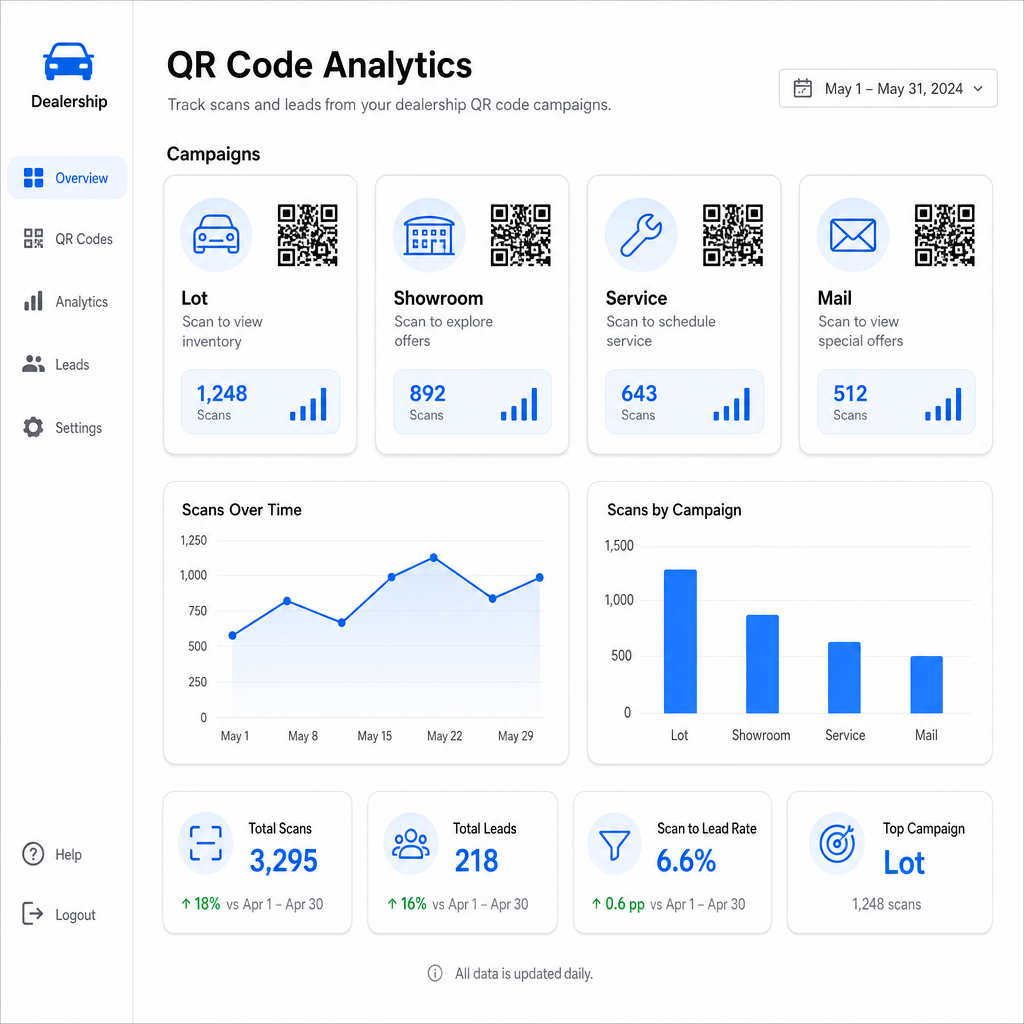
Métricas clave disponibles a través del seguimiento de Pageloot incluyen:
- Recuentos de escaneos totales y únicos por código
- Tiempos y fechas de escaneo, útiles para comprender los patrones de tráfico del lote
- Datos de ubicación geográfica, relevantes para campañas de correo directo en todos los códigos postales
- Tipos de dispositivo y sistemas operativos
- Tendencias de escaneo a lo largo del tiempo
Estos datos se retroalimentan directamente en las decisiones sobre dónde colocar códigos, qué ofertas promocionar y qué vehículos destacar. de Pageloot guía de seguimiento de códigos QR explica cómo conectar datos de escaneo con parámetros UTM y herramientas de análisis externas para una visibilidad completa del embudo.
La plataforma de Pageloot también cubre soluciones de códigos QR en todas las industrias, por lo que si su grupo de concesionarios opera en múltiples tipos de negocios o ubicaciones, las mismas herramientas e infraestructura de seguimiento se aplican de manera consistente.
Supervise todos sus códigos desde un solo panel Gestione cada código QR de concesionario – lote, servicio, folletos, sala de exposición – con el Generador de códigos QR dinámicos y acceda a datos de escaneo en tiempo real en todas sus campañas.
Los códigos QR le dan a su concesionario una forma medible y flexible de unir sus ubicaciones físicas con el compromiso digital – ya sea que un cliente esté caminando por su lote a medianoche o sentado en su sala de espera de servicio. Comience con sus puntos de contacto de mayor tráfico, use códigos dinámicos para que pueda actualizar destinos sin reimprimir, y deje que el análisis de escaneo guíe dónde expandirse a partir de ahí.
Preguntas frecuentes
Sí, si usa un código QR dinámico. Los códigos dinámicos apuntan a un enlace de redirección corto que puede actualizar en cualquier momento desde su panel de control, por lo que la pegatina física permanece igual mientras que el destino refleja los precios o la disponibilidad actuales. Si un vehículo se vende, puede redirigir ese código a un modelo similar sin reimprimir nada.
Los códigos QR dinámicos incluyen análisis de escaneo que le muestran cuántas personas escanearon cada código, cuándo, desde qué ubicación y en qué dispositivo. Al emparejar destinos de códigos QR con parámetros UTM, puede rastrear qué escaneos resultaron en finalizaciones de formularios, reservas de citas o vistas de páginas de inventario dentro de su plataforma de análisis web más amplia.
Para una pegatina de ventana escaneada a la distancia de un brazo – aproximadamente uno a dos pies – un mínimo de 1.2 pulgadas es un punto de partida razonable en una superficie lisa y de alto contraste. Los códigos más grandes se escanean de manera más fiable, especialmente al aire libre con luz variable. Si la pegatina incluye el logotipo de su concesionario dentro del código, aumente el tamaño en un 20–30% para mantener la escaneabilidad. Siempre pruebe la versión impresa final en condiciones reales antes de la implementación completa.