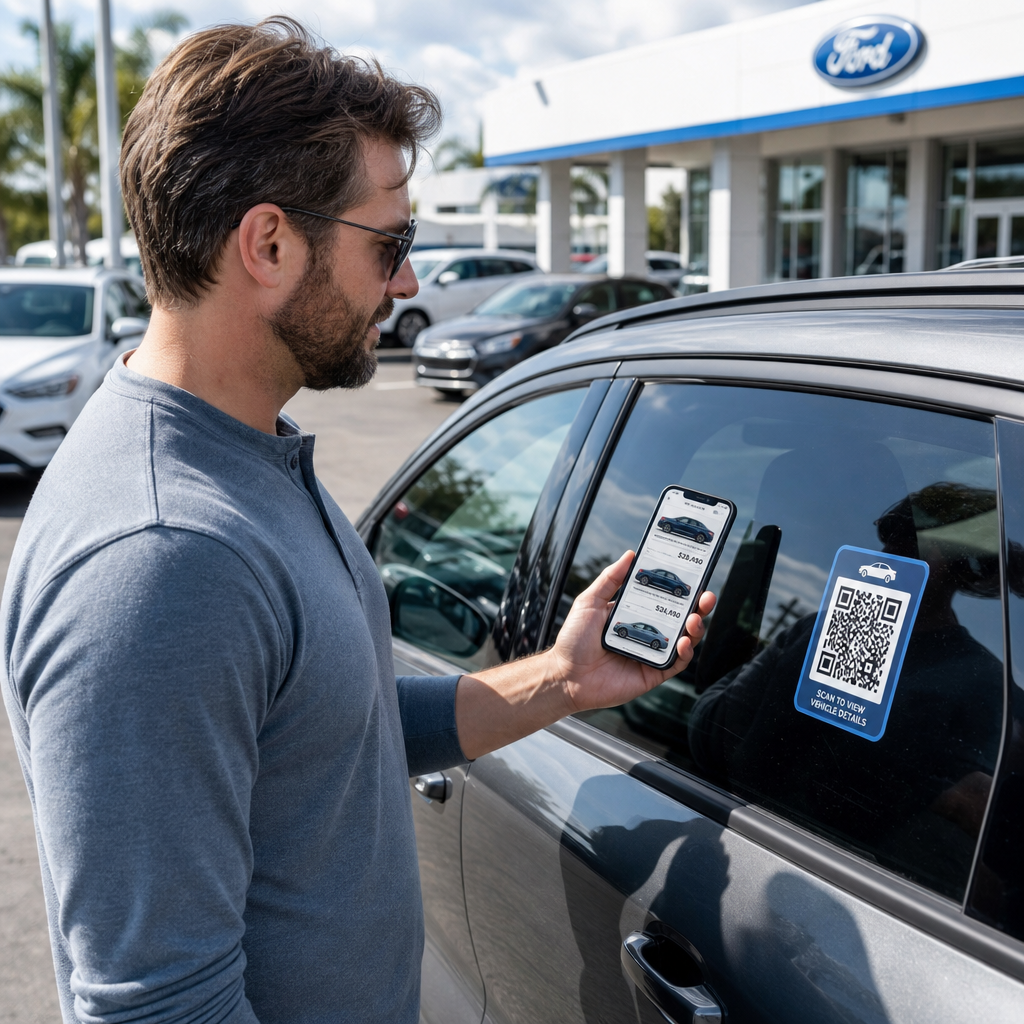
Kas teie platsi külastajad lahkuvad ilma teie laoseisuga tegelemata või oma kontaktandmeid jagamata? Autoostjad on üha enam mobiilikesksed ja QR-koodid annavad teile otsese silla teie füüsilise platsi ja digitaalsete tööriistade vahel. See juhend käsitleb praktilisi viise QR-koodide rakendamiseks teie autokeskuse müügi- ja turundustegevuses, alates sõidukite aknakleebistest kuni teeninduse ajastamiseni.
Miks QR-koodid autokeskustele praegu mõistlikud on
CarGuruse 2025. aasta USA tarbijauuringu kohaselt kasutab 54% autoostjatest sõidukite uurimisel telefone rohkem kui lauaarvuteid, veel 31% kasutab mõlemat võrdselt. Samal ajal eelistab 83% tarbijatest suurema osa ostuprotsessist kodus lõpule viia enne isiklikku külastust. See kombinatsioon tähendab, et teie kliendid on juba oma telefonides – platsil, teie müügisaalis ja enne, kui nad üldse kohale jõuavad.
QR-kood aknakleebisel, teenindusboksi sildil või otsepostituse materjalil annab neile telefonikesksetele ostjatele kohese ühenduse soovitud teabega, ilma et müüja peaks sel täpsel hetkel saadaval olema.
Dünaamilised QR-koodid – koodid, mille siht-URL-i saab uuendada füüsilist koodi uuesti printimata – sobivad eriti hästi autokeskuste keskkondadesse, kus laoseis muutub sageli, kampaaniad roteeruvad ja hinnad uuenevad regulaarselt.
Alustage autokeskuse QR-koodide loomist Kas olete valmis ühendama oma platsi digitaalse sisuga? Kasutage QR-koodi generaator oma esimese koodi loomiseks minutitega, ilma tehnilisi teadmisi vajamata.
Sõidukite aknakleebised ja laoseisu lehed
Kõige otsesem rakendus autokeskusele on QR-koodi paigutamine iga sõiduki aknakleebisele. Kui ostja jalutab platsil pärast tööaega või kui teie müügimeeskond on hõivatud, saab skaneerimine koheselt avada pühendatud sõiduki lehe, mis näitab spetsifikatsioone, varustuse detaile, praegust hinda, finantseerimisvõimalusi, fotosid ja müügivihje kogumise vormi.
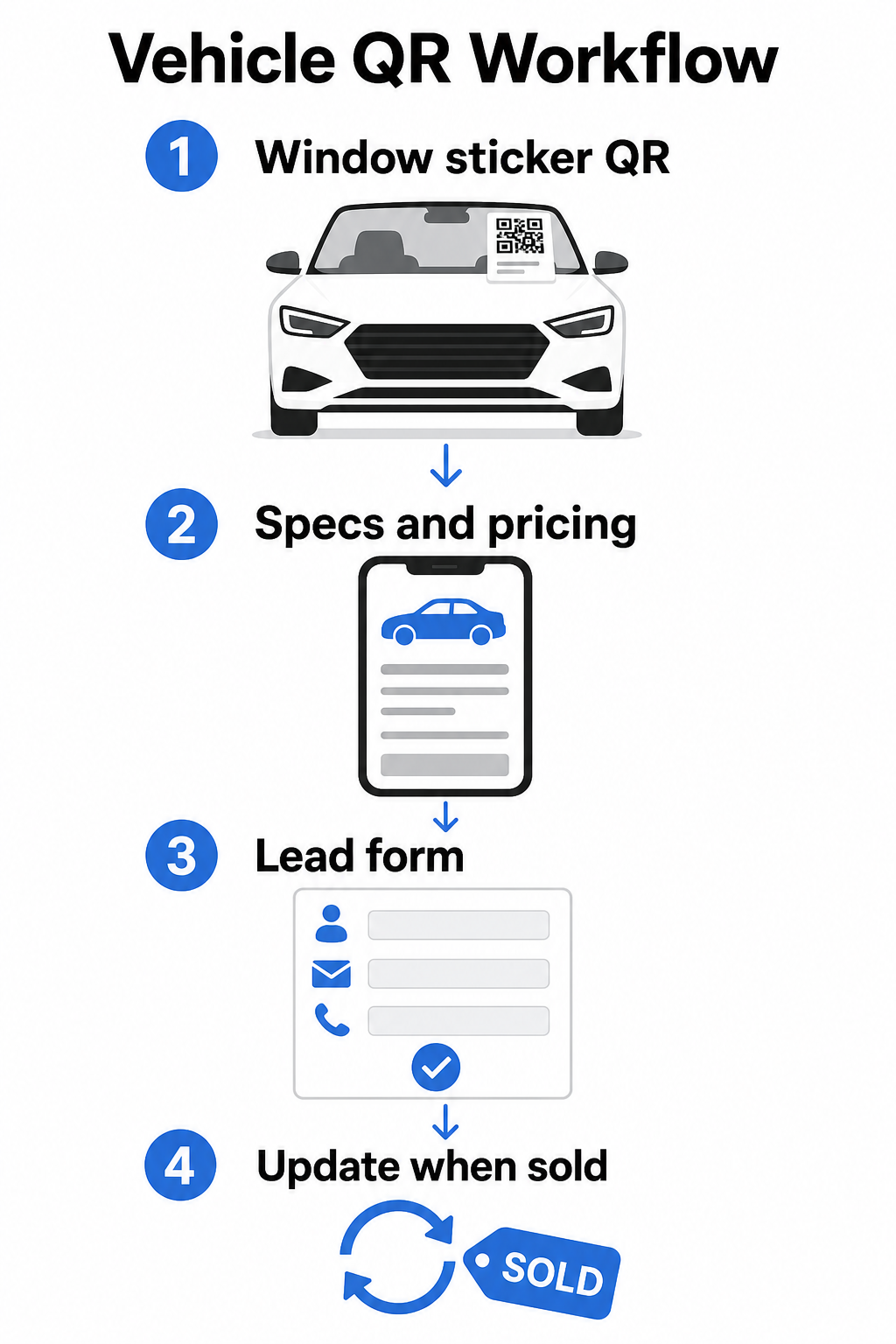
Kuna laoseis liigub kiiresti, on dünaamilised QR-koodid siin praktiline valik. Kui sõiduk müüakse, saate selle koodi ümber suunata sarnasele mudelile või üldisele laoseisu lehele, füüsilist kleebist puudutamata. Nagu sõiduki QR-koodi juhend märgib, on dünaamilised koodid ideaalsed autokeskuste rakenduste jaoks, kus kampaaniad ja laoseis pidevalt muutuvad.
Paigutuse osas pakuvad tagaklaas ja küljepaneelid parimat nähtavust platsil jalutavatele klientidele. Veenduge, et kood oleks piisavalt suur, et seda saaks mugavalt skaneerida seisvast asendist – minimaalselt 1,2 tolli on usaldusväärne lähtepunkt trükitud materjalidele lähivaates, kuigi suurem on parem, kui kood konkureerib kleebisel teiste elementidega. Järgige alati kõrge kontrastsusega disainiprintsiipe, kasutades tumedat koodi heledal taustal, et kood skaneeriks usaldusväärselt erinevates välistingimustes. Pagelooti juhend teemal QR-koodi värvikontrasti parimaid tavasid käsitleb seda üksikasjalikult.
Hoidke laoseisu lingid ajakohasena ilma uuesti printimata Kasuta Dünaamilise QR koodi generaator koodide loomiseks aknakleebistele, mida saate ümber suunata igal ajal, kui sõiduk müüakse või kampaania muutub.
Müügisaali sildid ja müügipõranda kaasamine
Müügisaalis saavad QR-koodid hakkama infokoormusega, mida müüjad ei suuda alati koheselt edastada. Asetage koodid näidissõidukite, finantseerimislaudade või vahetusväärtuse hindamise alade lähedusse, et linkida kliente asjakohase sisuga – üksikasjalikud spetsifikatsioonilehed või võrdluslehed, praegused finantseerimispakkumised ja maksekalkulaatorid, vahetusväärtuse hindamise tööriistad, videoülevaated või klientide iseloomustused ja arvustuste lehed.
A sihtlehe QR-kood töötab siin eriti hästi, sest ühe skaneerimisega saate kuvada mitu linki. Näiteks võib sõiduki sihtleht sisaldada videot, spetsifikatsiooni PDF-i, finantseerimispäringu vormi ja kontaktivõimalust – kõik ühes mobiilisõbralikus paigutuses, mis on teie brändiga kooskõlas.
Klientidele, kes on kaalutlusprotsessis sügavamal, saab otse müügivihje vormile linkiv QR-kood jäädvustada nende nime, kontaktandmed ja sõidukihuvi, samal ajal kui nad on veel müügisaalis hõivatud. See Google vorm: QR-koodi generaator muudab päringukoodide loomise ja kuvamise siltidel, letikaartidel või lauakuvaritel lihtsaks, lisaks võimalusega vastuseid otse jälgida.
Teenindusosakonna ajastamine
Teeninduskliendid ootavad üha enam iseteeninduse broneerimisvõimalusi. Veebipõhine ajastamine kasvab igal aastal pidevalt, kuna kliendid otsivad mugavust valida oma kohtumisaegu ilma telefonikõneta. QR-koodid teie teenindussõiduteel, ootealal ja möödunud tähtajaga teeninduse meeldetuletuskirjadel annavad klientidele ühe skaneerimisega tee teie veebipõhisele broneerimistööriistale.
Praktilised paigutuspunktid hõlmavad:
- Teenindussõidutee sissepääs: Silt või kleebis sissesõidurajal koos skaneerimiseks ajastamise koodiga korduvate teenuste jaoks tagasi pöörduvatele klientidele
- Ooteruumi sildid: Kood, mis lingib teie teenindusmenüüle, teeninduse olekulehele või ajastamisvahendile
- Teeninduse meeldetuletuskaardid: Trükitud kood otsepostitusel, mis võimaldab klientidel broneerida õlivahetuse, rehvivahetuse või tagasikutsumisteenuse ilma sisse helistamata
- Viisakusautodel või autopargi sõidukitel: A QR-koodi magnet või kleebis saab linkida juhte teeninduse kontaktandmetele või ajastamisvõimalustele
Kuna teeninduspakkumised roteeruvad – hooajalised rehvipakkumised, tasuta mitmepunktilised ülevaatused ja sarnased pakkumised – võimaldavad dünaamilised QR-koodid teenindusosakonnas teil sihtkohta värskendada vastavalt praegusele pakkumisele ilma silte asendamata.
Otsepostituse ja trükireklaami kampaaniad
Autokeskuse otsepostituse kampaaniad – uute klientide meelitamise kirjad, teeninduse hoidmise materjalid, liisingu lõppemise teavitused – paluvad tavaliselt klientidel helistada või külastada URL-i. QR-kood samal materjalil annab saajatele kiirema tee asjakohasele sihtlehele ja, mis veelgi olulisem, annab teile võimaluse täpselt mõõta, kui paljud inimesed selle postitusega suhtlesid.
Koos dünaamilised QR-koodid ja skaneerimisanalüütika, näete skaneeringute koguarvu, unikaalseid skaneeringuid, skaneerimisaegu, geograafilisi asukohti ja seadmetüüpe – kõik seotud selle konkreetse kampaania materjaliga. See mõõtmise tase on oluliselt teostatavam kui telefoninumbri või üldise URL-i jälgimine.
A/B testimiseks saate luua postituse kaks versiooni erinevate QR-koodi sihtkohtadega – näiteks üks, mis lingib konkreetsele pakkumislehele ja teine üldisele laolehele – ning võrrelda skaneerimis- ja konversioonimäärasid tulevaste kampaaniate teavitamiseks. UTM-parameetrite lisamine teie siht-URL-idele laiendab seda jälgimist teie laiemasse veebianalüütikasse, ühendades QR-skaneerimisandmed vormide täitmise, saidil veedetud aja ja muude järgnevate toimingutega.
Jälgige, millised kampaaniad suurendavad kaasatust Looge jälgitavad QR-koodid iga trükikampaania jaoks koos Lingi QR-koodi generaator ja jälgige skaneerimise jõudlust ühest juhtpaneelist.
Arvustuste ja klienditagasiside kogumine
Cox Automotive'i 2025. aasta autoostja teekonna uuring leidis, et ostjad, kes läbivad rohkem samme digitaalselt, teatavad kõrgemast rahulolust – mis tähendab, et ostujärgne järeltegevus on sama oluline kui müük ise. QR-koodid, mis on paigutatud üleandmisel, tänukaartidele või teeninduse ootealadele, saavad suunata rahulolevad kliendid otse teie Google Businessi arvustuste lehele.
A Google'i arvustuse QR-koodile eemaldab kogu hõõrdumise arvustuste protsessist: üks skaneering viib kliendi otse arvustuse esitamise ekraanile, ilma et nad peaksid otsima teie autokeskust või navigeerima Google Mapsis. Tõhus paigutus hõlmab:
- Tarnelett või F&I kontor
- Teeninduse kassaletid
- Bränditud tänukaardi sees, mis on kaasas uute sõidukite tarnetega
- Teeninduse järelpostitused, mis saadetakse pärast lõpetatud kohtumist
Autokeskuse QR-koodide disaini- ja paigutusprintsiibid
Mõned praktilised standardid kehtivad kõigi autokeskuse QR-koodi rakenduste puhul:
- Kontrast: Kasutage tumedat moodulivärvi heledal taustal. Must valgel on kõige usaldusväärsem kombinatsioon. Vältige pööratud koode (hele tumedal), kuna mõned skannerirakendused näevad nendega vaeva.
- Suurus: Aknale kleebiste ja platsi siltide puhul eksige pigem suurema kui väiksema poole. Ühe kuni kahe jala skaneerimiskaugusel töötab 1,5-tolline kood usaldusväärselt siledatel pindadel. Suureformaadiliste siltide puhul suurendage proportsionaalselt – the QR-koodi suuruse juhend trükimaterjalidele käsitleb neid suhteid üksikasjalikult.
- Vaikne tsoon: Jätke koodi ümber selge ruum, vaba tekstist või disainielementidest, et skannerid saaksid koodi piire täpselt leida.
- Kutse tegevusele tekst: Siduge kood alati lühikese tegevusele kutsega – “Skaneeri hinna saamiseks”, “Broneeri teenindus veebis”, “Vaata täielikke spetsifikatsioone” – et kliendid teaksid, mida nad enne skaneerimist saavad.
- Testimine: Testige iga koodi tegelikes tingimustes enne kasutuselevõttu – õues platsil, müügisaali valgustuse all, otsese päikesevalguse käes – nii iOS-i kui ka Android-seadmetel. The QR-koodi loetavuse parimate tavade juhend pakub täielikku kontrollnimekirja.
QR-koodi jõudluse jälgimine ja mõõtmine
Üks tugevamaid põhjuseid dünaamiliste QR-koodide kasutamiseks staatiliste asemel on sisseehitatud skaneerimisanalüütika. Autokeskuse jaoks, millel on aktiivsed koodid üle platsi, müügisaali, teenindussõidutee ja trükikampaaniate, võimaldab tsentraliseeritud juhtpaneel võrrelda, millised paigutused ja kampaaniad genereerivad kõige rohkem kaasatust.
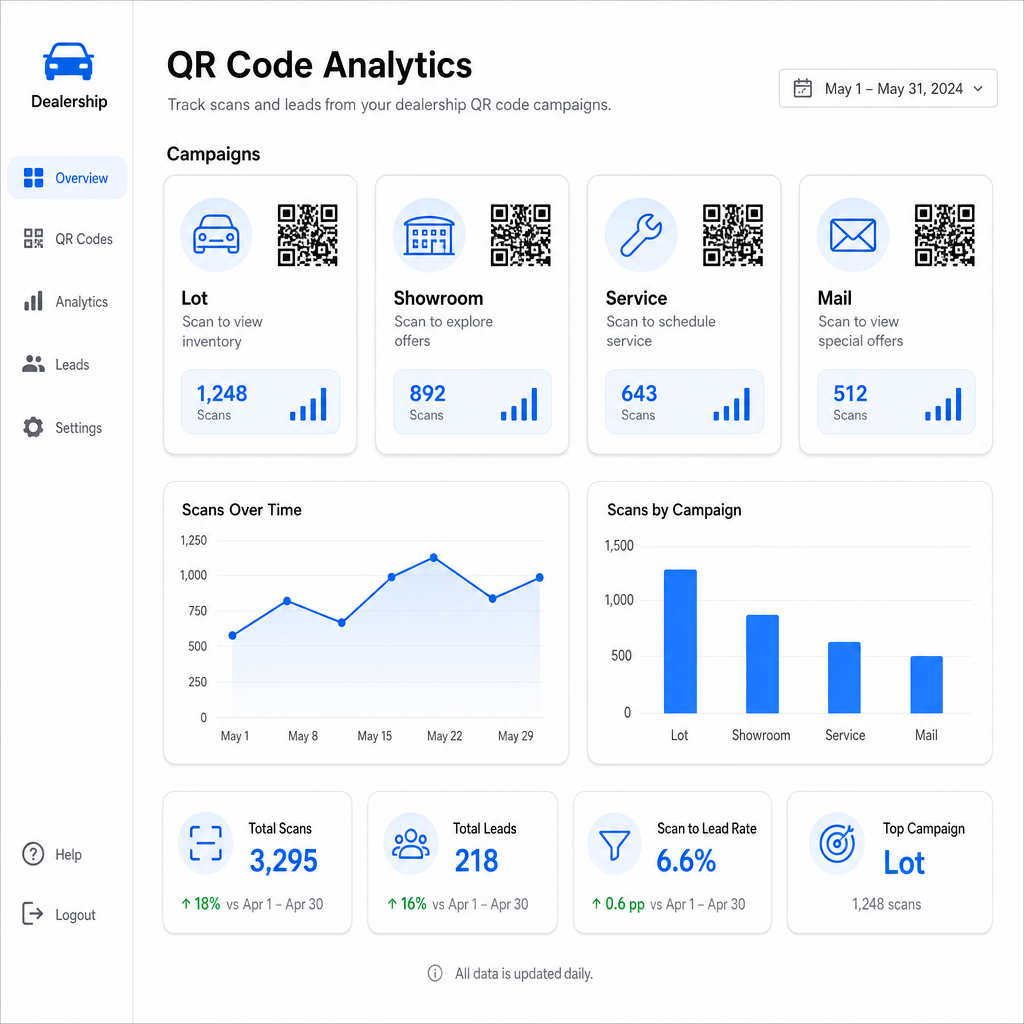
Pagelooti jälgimise kaudu saadaval olevad peamised mõõdikud hõlmavad:
- Skaneeringute koguarv ja unikaalsete skaneeringute arv koodi kohta
- Skaneerimisajad ja -kuupäevad, mis on kasulikud platsi liikluse mustrite mõistmiseks
- Geograafilise asukoha andmed, mis on asjakohased otsepostituse kampaaniate jaoks üle sihtnumbrite
- Seadmetüübid ja operatsioonisüsteemid
- Skaneerimistrendid aja jooksul
Need andmed suunavad otseselt tagasi otsustesse selle kohta, kuhu koode paigutada, milliseid pakkumisi reklaamida ja milliseid sõidukeid esile tõsta. Pagelooti QR-koodi jälgimise juhendist selgitab, kuidas ühendada skannimisandmed UTM-parameetritega ja väliste analüüsivahenditega täieliku müügilehtri nähtavuse tagamiseks.
Pagelooti platvorm hõlmab ka QR-koodi lahendusi erinevates tööstusharudes, nii et kui teie autokeskuste grupp tegutseb mitme äritüübi või asukoha lõikes, kehtivad samad tööriistad ja jälgimisinfrastruktuur ühtlaselt.
Jälgige kõiki oma koode ühest juhtpaneelist Hallake iga autokeskuse QR-koodi – platsil, teeninduses, postitustes, müügisaalis – koos Dünaamilise QR koodi generaator ja pääsete ligi reaalajas skannimisandmetele kõigis oma kampaaniates.
QR-koodid annavad teie autokeskusele mõõdetava, paindliku viisi ühendada teie füüsilised asukohad digitaalse kaasamisega – olgu klient teie platsil südaööl jalutamas või istumas teie teeninduse ooteruumis. Alustage oma kõige suurema liiklusega puutepunktidest, kasutage dünaamilisi koode, et saaksite sihtkohti uuendada ilma uuesti trükkimata, ja laske skannimisanalüüsil suunata, kuhu sealt edasi laieneda.
Korduma kippuvad küsimused
Jah, kui sa kasutad dünaamilist QR-koodi. Dünaamilised koodid viitavad lühikesele ümbersuunamislingile, mida sa saad igal ajal oma juhtpaneelilt uuendada, nii et füüsiline kleebis jääb samaks, samal ajal kui sihtkoht peegeldab praegust hinda või saadavust. Kui sõiduk müüakse, saad sa selle koodi ümber suunata sarnasele mudelile, ilma et peaksid midagi uuesti printima.
Dünaamilised QR-koodid sisaldavad skannimisanalüütikat, mis näitab teile, kui palju inimesi iga koodi skannis, millal, millisest asukohast ja millisel seadmel. Sidudes QR-koodi sihtkohad UTM-parameetritega, saate jälgida, millised skannimised tõid kaasa vormide täitmised, kohtumiste broneeringud või laoseisu lehevaatamised teie laiemas veebianalüütika platvormis.
Aknakleebise puhul, mida skannitakse käeulatusest – umbes ühe kuni kahe jala kauguselt – on minimaalselt 1,2 tolli mõistlik lähtepunkt siledal, suure kontrastsusega pinnal. Suuremad koodid skannivad usaldusväärsemalt, eriti õues erinevates valgustingimustes. Kui kleebis sisaldab teie autokeskuse logo koodi sees, suurendage suurust 20–30% skannitavuse säilitamiseks. Testige alati lõplikku trükitud versiooni reaalsetes tingimustes enne täielikku kasutuselevõttu.