
Bạn có mệt mỏi vì phải lục tung các thùng chứa không có nhãn chỉ để tìm một món đồ duy nhất không? Việc mò mẫm một cách mù quáng qua các thùng chứa xếp chồng lên nhau làm lãng phí thời gian quý báu và gây ra vô số vấn đề vận hành. Sử dụng nhãn kiểm kê mã QR cho phép bạn theo dõi, định vị và quản lý các mặt hàng đã lưu trữ ngay lập tức chỉ bằng một lần quét điện thoại thông minh đơn giản.
Cách thức Hoạt động của Theo dõi Lưu trữ bằng Mã QR
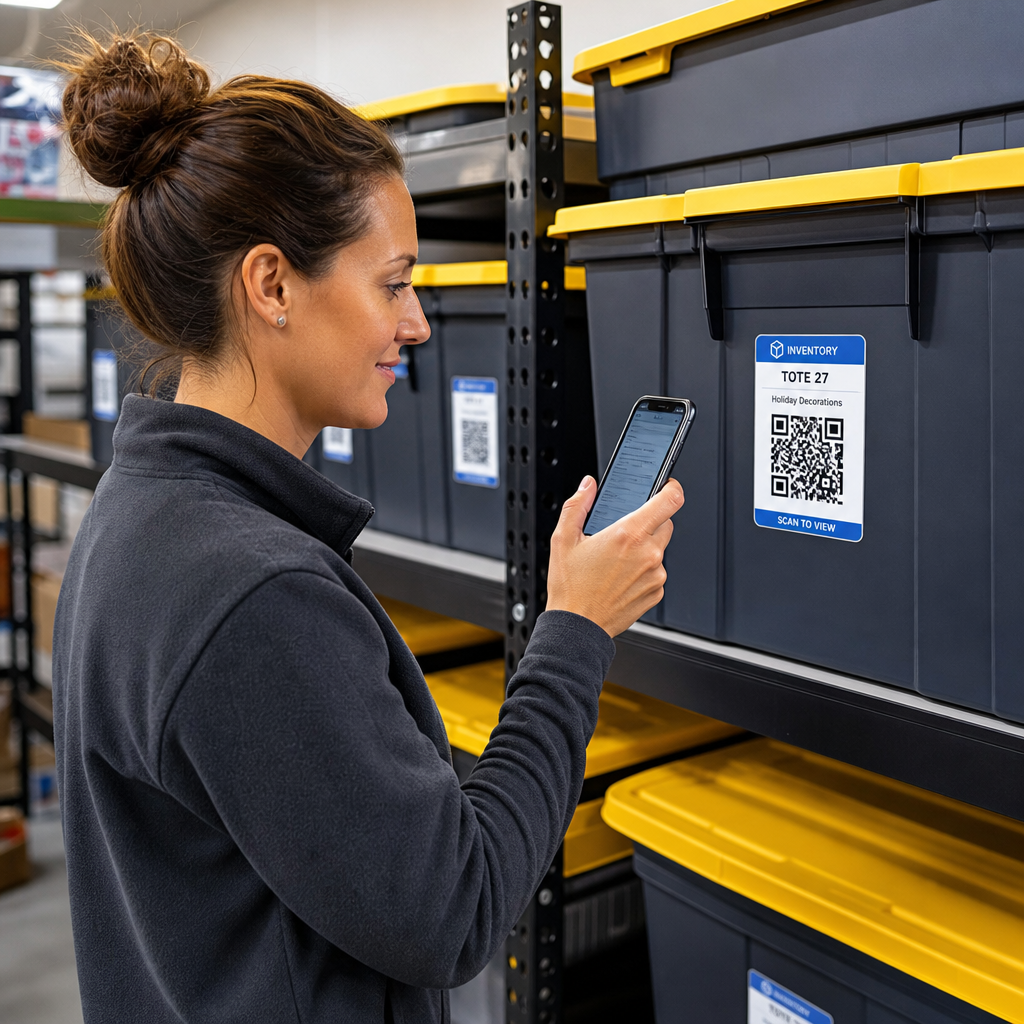
Một hệ thống lưu trữ mã QR kết nối các thùng chứa vật lý, kệ hoặc đơn vị cơ sở với các bản ghi kỹ thuật số. Khi bạn quét một nhãn được gắn vào một thùng hoặc giá đỡ, thiết bị của bạn sẽ đọc mẫu mã đã được mã hóa và mở một tài liệu, trang web hoặc mục nhập cơ sở dữ liệu được liên kết hiển thị nội dung được lưu trữ bên trong.
Tùy thuộc vào yêu cầu vận hành của bạn, bạn có thể chọn giữa hai loại mã QR chính:
- Mã QR tĩnh: Các mã này mã hóa văn bản thuần túy trực tiếp vào mẫu vật lý. Bằng cách sử dụng Tạo mã QR văn bản, bạn có thể tạo các nhãn ngoại tuyến, đơn giản hiển thị thông tin chi tiết cơ bản của mặt hàng. Tuy nhiên, mã tĩnh không thể được sửa đổi sau khi in.
- Mã QR động: Các mã này lưu trữ một URL chuyển hướng ngắn trỏ đến một bảng tính trực tuyến, thư mục đám mây hoặc mục nhập cơ sở dữ liệu. Bằng cách sử dụng Tạo mã QR động, bạn có thể cập nhật danh sách thùng, thêm ảnh nội dung hoặc chỉnh sửa số lượng mặt hàng bất kỳ lúc nào mà không cần in lại nhãn dán vật lý.
Việc áp dụng nhãn kỹ thuật số tạo ra một khuôn khổ đáng tin cậy để theo dõi hàng tồn kho theo thời gian thực, mang lại cho bạn khả năng hiển thị hoàn toàn vào hàng tồn kho đã lưu trữ trên khắp các nhà để xe gia đình, nhà kho thương mại hoặc đơn vị tự lưu trữ.
Các Bước để Thiết lập Hệ thống Kiểm kê Lưu trữ
Xây dựng một bố cục lưu trữ có tổ chức đòi hỏi việc ghi chép có hệ thống, tạo nhãn bền và quy trình quét được tiêu chuẩn hóa.
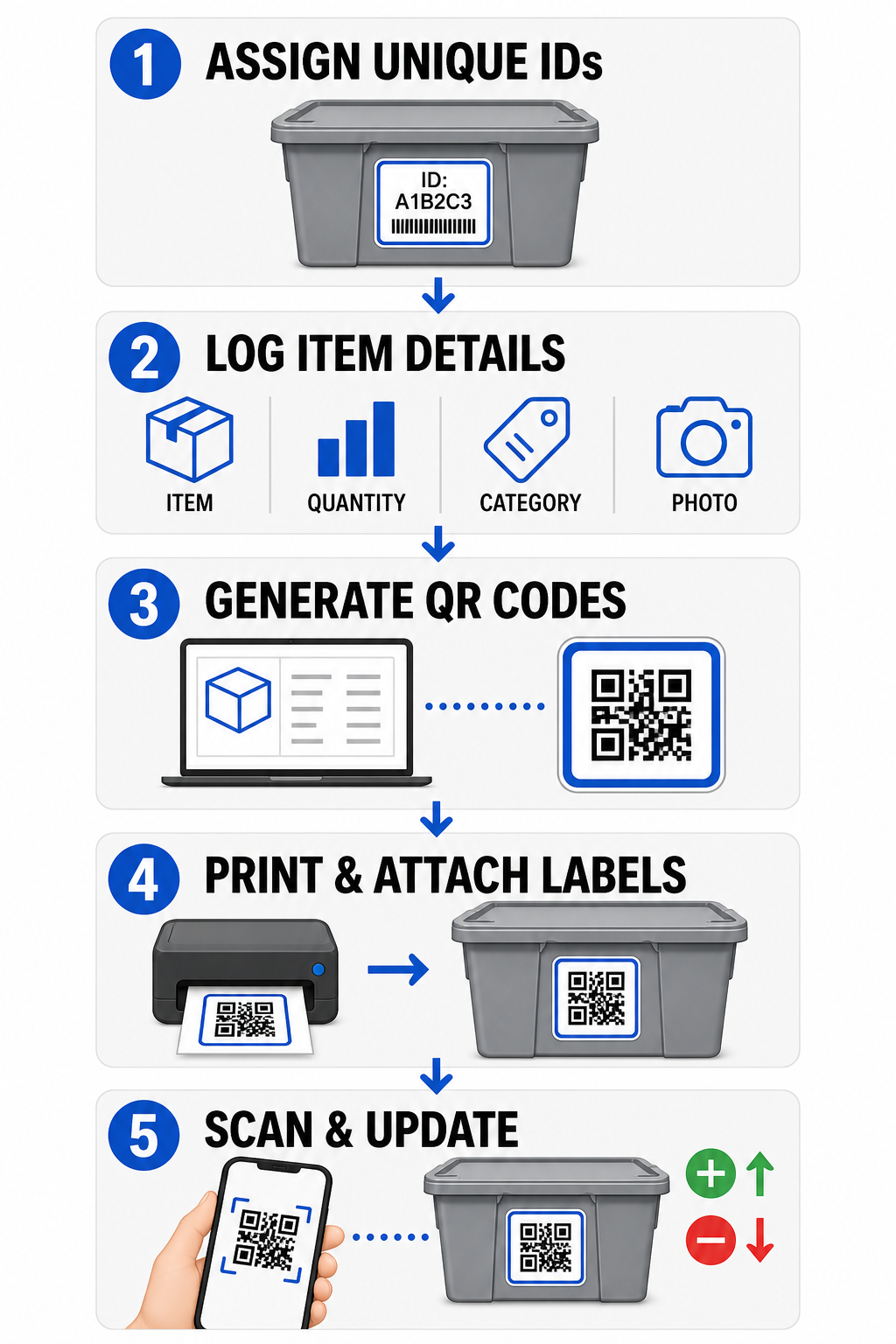
- Gán mã định danh duy nhất: Tạo một định dạng đặt tên rõ ràng hoặc cấu trúc đơn vị lưu kho (SKU) cho mọi thùng, hộp, kệ hoặc tủ khóa lưu trữ.
- Biên soạn hồ sơ mặt hàng: Nhập các chi tiết như tên mặt hàng, số lượng, danh mục và ảnh chụp vào một cơ sở dữ liệu tập trung hoặc tài liệu kỹ thuật số.
- Tạo mã có thể quét được: Nhập các liên kết hồ sơ kỹ thuật số của bạn vào một trình tạo trực tuyến để tạo mã QR cho hàng tồn kho sản phẩm. Bạn cũng có thể kết nối Tạo mã QR cho Google Form với một bảng tính theo dõi để đơn giản hóa việc nhập dữ liệu đầu vào.
- In và dán nhãn: Dán nhãn đã in lên mặt trước hoặc mặt trên của các thùng chứa, nơi công nhân có thể quét chúng mà không cần di chuyển các chồng hàng nặng.
- Quét và cập nhật thường xuyên: Sử dụng Quét mã QR dựa trên web hoặc máy ảnh điện thoại thông minh tiêu chuẩn để cập nhật bản ghi trực tiếp bất cứ khi nào các mặt hàng được thêm vào, loại bỏ hoặc di chuyển.
Hợp lý hóa Quản lý Lưu trữ của Bạn Cần nhãn linh hoạt cho phép bạn cập nhật chi tiết thùng đã lưu trữ mà không cần in lại nhãn dán? Sử dụng Tạo mã QR động để xây dựng các thẻ kiểm kê có thể chỉnh sửa với tính năng theo dõi quét tích hợp ngay hôm nay.
Hướng dẫn Thiết kế và Vị trí Đặt Nhãn
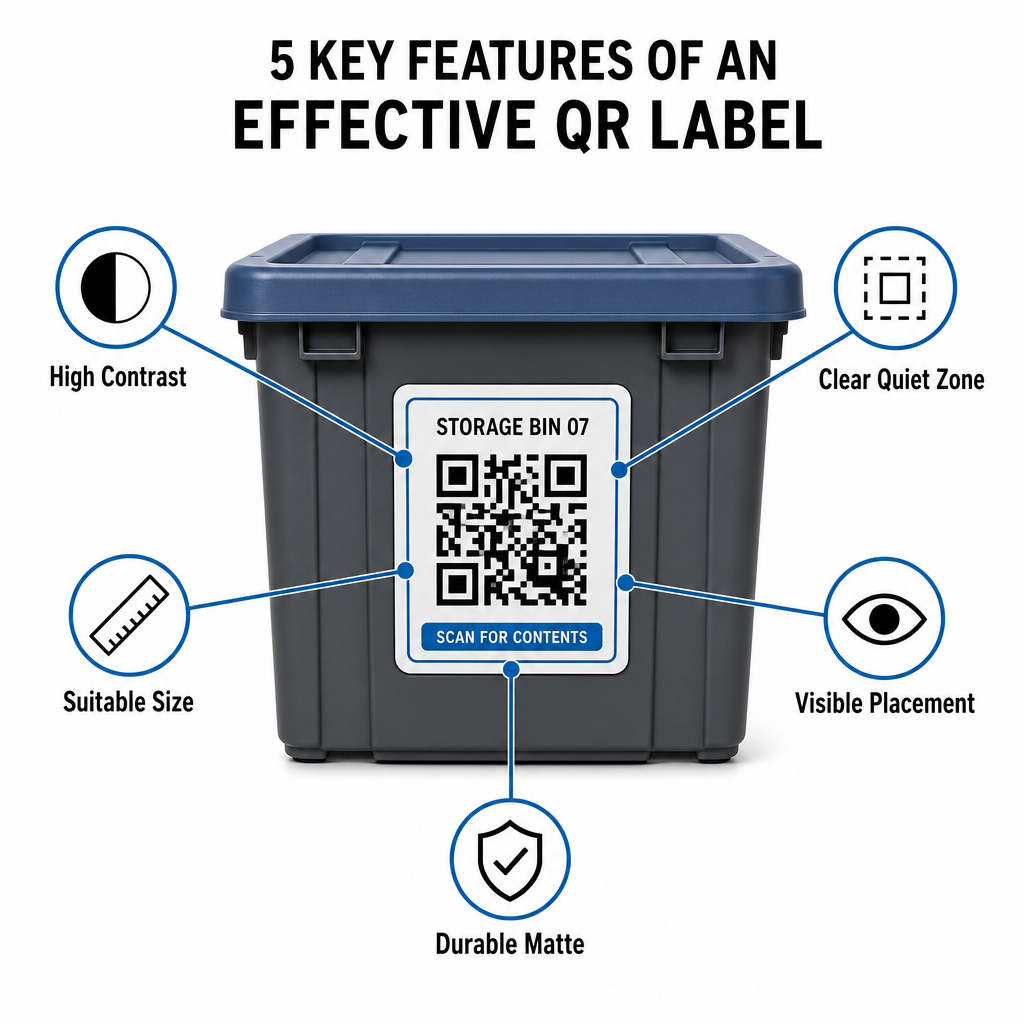
Để đảm bảo quét nhanh trong các cơ sở thiếu sáng hoặc tủ khóa lưu trữ đông đúc, các nhãn in của bạn phải tuân theo các tiêu chuẩn khả năng quét đã được thiết lập.
Quy tắc về Kích thước và Khoảng cách
- Kích thước nhãn tối thiểu: In các mã tầm gần không nhỏ hơn 2 x 2 cm (0,8 x 0,8 inch) cho các thùng xách tay hoặc hộp lưu trữ.
- Tỷ lệ khoảng cách: Tuân theo quy tắc khoảng cách trên kích thước là 10:1 đối với kệ cao hoặc biển báo cơ sở, nghĩa là mã được quét từ khoảng cách 10 feet phải có chiều rộng ít nhất 1 foot.
Yêu cầu về Độ tương phản và Lề
- Độ tương phản cao: Sử dụng các mẫu tối trên nền sáng. Màu đen trên nền trắng tiêu chuẩn cung cấp tỷ lệ tương phản 21:1 để có khả năng đọc quang học tối đa, trong khi duy trì tỷ lệ tương phản ít nhất 12:1 đảm bảo quét nhất quán.
- Vùng yên tĩnh biên: Chừa một lề không bị cản trở xung quanh mã QR có chiều rộng ít nhất gấp bốn lần chiều rộng của một ô vuông đơn vị.
- Tránh lộn xộn thị giác: Loại bỏ bóng nền, sự kết hợp màu sắc có độ tương phản thấp hoặc gradient đậm làm suy giảm khả năng phát hiện của cảm biến máy ảnh.
In ấn và Bảo vệ Môi trường
- Độ phân giải in cao: Xuất tác phẩm nghệ thuật ở các định dạng vector như SVG hoặc PDF, hoặc lưu tệp raster ở 300 DPI hoặc cao hơn để tránh các cạnh bị mờ.
- Vật liệu bền: Sử dụng nhãn vinyl mờ, chịu được thời tiết cho các đơn vị công nghiệp hoặc kệ ngoài trời. Đặt các thẻ bên ngoài trên các bề mặt ít tiếp xúc với ánh nắng mặt trời, chẳng hạn như mặt phía bắc của thiết bị, để ngăn ngừa sự xuống cấp do tia UV theo thời gian.
| Tham số Thiết kế | Yêu cầu Tiêu chuẩn | Lý do Thực tế |
|---|---|---|
| Kích thước Tối thiểu cho Khoảng cách Gần | 2 x 2 cm (0,8 x 0,8 inch) | Đảm bảo độ rõ nét tiêu cự của camera điện thoại thông minh. |
| Tỷ lệ Khoảng cách Quét | 10:1 (Khoảng cách : Chiều rộng) | Đảm bảo thẻ trên kệ cao được quét rõ ràng từ mặt sàn. |
| Tỷ lệ Tương phản Màu sắc | Tối thiểu 12:1 (Lý tưởng 21:1) | Giúp cảm biến quang học phân biệt các mẫu dữ liệu dễ dàng. |
| Lề Vùng Yên tĩnh | 4 lần chiều rộng mô-đun ở tất cả các cạnh | Ngăn văn bản hoặc đường viền liền kề làm biến dạng quá trình quét. |
| Độ phân giải In ấn | 300 DPI hoặc xuất SVG/PDF | Ngăn các điểm ảnh bị nhòe hoặc mờ trong quá trình in. |
Ứng dụng Thực tế cho Người vận hành và Khách hàng
Người quản lý cơ sở lưu trữ và khách hàng lưu trữ cá nhân sử dụng mã QR để giải quyết các nhu cầu tổ chức riêng biệt.
Người vận hành Cơ sở Tự lưu trữ
Người vận hành đặt các thẻ có thể quét trên khắp tài sản của họ để cải thiện việc theo dõi tài sản và quy trình bảo trì hàng ngày:
- Giám sát trạng thái đơn vị: Gắn thẻ cửa đơn vị để nhân viên cơ sở có thể quét trong khi đi kiểm tra để ghi lại các lần kiểm tra khóa, yêu cầu bảo trì hoặc cập nhật tình trạng sẵn có.
- Kiểm tra thiết bị: Dán nhãn xe đẩy tay, dụng cụ và thiết bị xe nâng của cơ sở để ghi lại quyền sở hữu trong các quy trình vận hành hàng ngày.
- Hiệu quả thực hiện đơn hàng: Các cơ sở hỗ trợ hậu cần bên thứ ba sử dụng thẻ có thể quét để hợp lý hóa việc thực hiện đơn hàng và các quy trình nhận hàng đến.
Khách hàng Lưu trữ Cá nhân và Doanh nghiệp
Cá nhân và người thuê thương mại tổ chức nhà để xe, phòng lưu trữ hoặc đơn vị cho thuê thông qua lập chỉ mục kỹ thuật số có cấu trúc:
- Lập chỉ mục container theo mùa: Dán nhãn đồ trang trí ngày lễ, dụng cụ thể thao và thùng quần áo theo mùa để xem nội dung thùng mà không cần mở nắp kín.
- Theo dõi lưu trữ doanh nghiệp: Phân loại tài liệu thuế, hồ sơ pháp lý và hồ sơ khách hàng bằng cách liên kết thẻ vật lý trên thùng với các thư mục trực tuyến an toàn.
- Tính linh hoạt liên ngành: Từ hàng hóa bán lẻ đến các công cụ chuyên dụng trong nhiều ngành công nghiệp, các thẻ tùy chỉnh được xây dựng với một trình tạo mã QR giữ cho hàng tồn kho được lưu trữ có tổ chức và dễ dàng truy xuất.
Kiểm soát Hàng tồn kho Đã lưu trữ của Bạn
Việc triển khai nhãn lưu trữ mã QR loại bỏ sự phỏng đoán, tăng tốc kiểm kê hàng tồn kho và ngăn ngừa thất lạc hàng hóa trong các đơn vị lưu trữ cá nhân và nhà kho thương mại. Bằng cách chọn nhãn động, in các mẫu có độ tương phản cao và áp dụng các quy tắc vị trí rõ ràng, bạn duy trì khả năng hiển thị hoàn toàn đối với mọi tài sản được lưu trữ.
Bắt đầu số hóa quy trình lưu trữ của bạn ngay hôm nay bằng cách tạo nhãn kiểm kê sẵn sàng in với Pageloot.
Câu hỏi thường gặp
Kích thước tối thiểu để quét ở khoảng cách gần trên container hoặc thùng là 2 x 2 cm (0,8 x 0,8 inch). Đối với nhãn đặt trên kệ cao hoặc cửa cơ sở được quét từ xa, tuân theo tỷ lệ 10:1 trong đó chiều rộng của mã bằng một phần mười tổng khoảng cách quét.
Có, miễn là bạn sử dụng mã QR động. Mã QR động trỏ đến một liên kết ngắn có thể chỉnh sửa, cho phép bạn cập nhật danh sách mặt hàng, tải lên ảnh hoặc điều chỉnh số lượng trong cơ sở dữ liệu kỹ thuật số của mình trong khi vẫn giữ nguyên nhãn vật lý trên hộp của bạn.
Nhà vận hành cơ sở đặt nhãn mã QR trên cửa đơn vị, vị trí lối đi và thiết bị dùng chung. Quét các mã này cho phép nhân viên hoàn thành kiểm kê chu kỳ, ghi lại lịch sử bảo trì đơn vị, xác nhận tình trạng sử dụng và quản lý việc mượn tài sản theo thời gian thực.