
Oletko kyllästynyt penkomaan merkitsemättömiä säilytyslaatikoita löytääksesi yhden ainoan esineen? Sokeasti pinottujen säiliöiden läpi kaivaminen tuhlaa arvokasta aikaa ja aiheuttaa loputtomia toiminnallisia päänvaivoja. QR-koodin inventaariotarrojen avulla voit seurata, paikantaa ja hallita varastoituja esineitä välittömästi yksinkertaisella älypuhelimen skannauksella.
Miten QR-koodin säilytyksen seuranta toimii
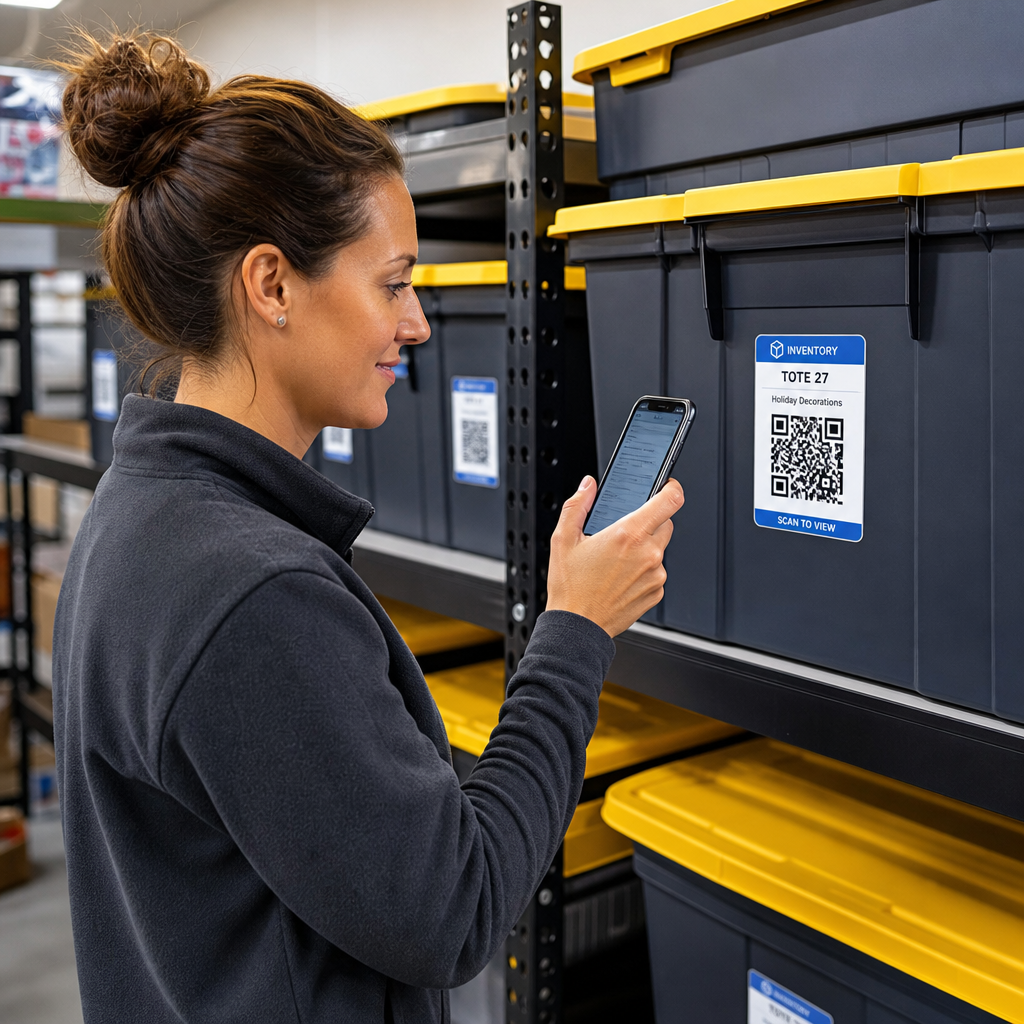
QR-koodin säilytysjärjestelmä yhdistää fyysiset säiliöt, hyllyt tai tilayksiköt digitaalisiin tietueisiin. Kun skannaat tarran, joka on kiinnitetty koriin tai telineeseen, laitteesi lukee koodatun kuvion ja avaa linkitetyn asiakirjan, verkkosivun tai tietokantamerkinnän, joka näyttää sisällä olevan sisällön.
Toiminnallisista vaatimuksistasi riippuen voit valita kahden ensisijaisen QR-koodityypin välillä:
- Staattiset QR-koodit: Nämä koodaavat pelkkää tekstiä suoraan fyysiseen kuvioon. Käyttämällä Tekstin QR-koodi generaattori, voit luoda yksinkertaisia, offline-tarroja, jotka näyttävät perustiedot esineistä. Staattisia koodeja ei kuitenkaan voi muokata tulostamisen jälkeen.
- Dynaamiset QR-koodit: Nämä tallentavat lyhyen uudelleenohjaus-URL-osoitteen, joka osoittaa online-taulukkolaskentaan, pilvikansioon tai tietokantamerkintään. Käyttämällä Dynaaminen QR-koodi generaattori, voit päivittää laatikkoluetteloita, lisätä sisältökuvia tai muokata esinemääriä milloin tahansa ilman fyysisen tarran uudelleentulostamista.
Digitaalisten tarrojen käyttöönotto luo luotettavan kehyksen seurata inventaaria reaaliajassa, antaen sinulle täyden näkyvyyden varastoituun varastoon kotivarastoissa, kaupallisissa varastoissa tai itsepalveluvarastoissa.
Vaiheet säilytysinventaarijärjestelmän perustamiseen
Järjestetyn säilytysasettelun rakentaminen vaatii systemaattista kirjaamista, kestävien tarrojen luomista ja standardoituja skannausrutiineja.
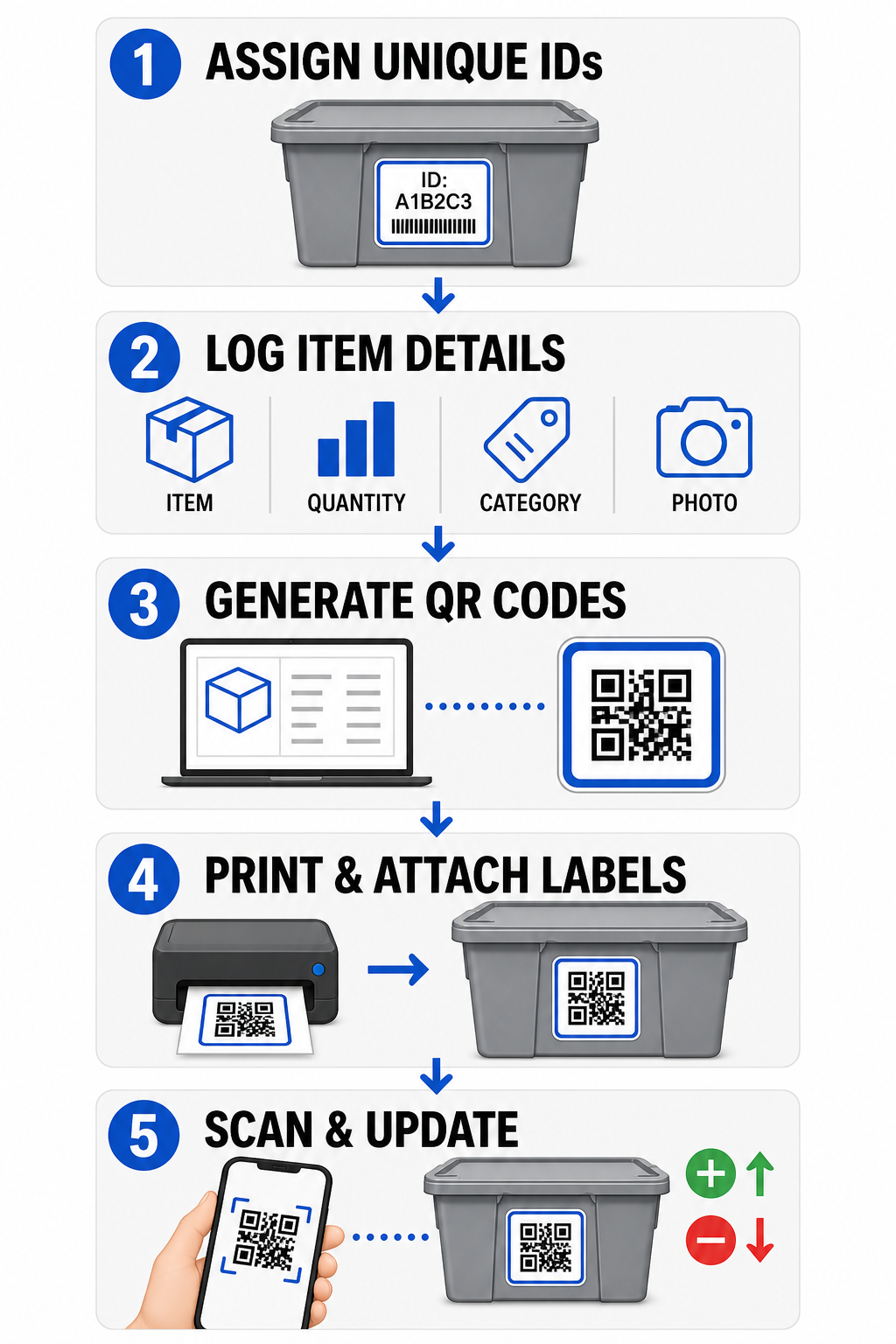
- Määritä yksilölliset tunnisteet: Luo selkeä nimeämismuoto tai varastonhallintayksikkö (SKU) -rakenne jokaiselle laatikolle, laatikolle, hyllylle tai säilytyslokeroile.
- Kokoa esinetietueet: Syötä tiedot, kuten esinenimet, määrät, luokat ja valokuvat, keskitettyyn tietokantaan tai digitaaliseen asiakirjaan.
- Luo skannattavia koodeja: Syötä digitaalisten tietueidesi linkit online-generaattoriin luoda QR-koodeja tuotevarastoon. Voit myös yhdistää Google Forms QR-koodi generaattori seurantataulukkolaskentaan yksinkertaistaaksesi vastaanottotietojen syöttöä.
- Tulosta ja kiinnitä tarrat: Kiinnitä tulostetut tarrat säiliöiden etu- tai yläosaan, jossa työntekijät voivat skannata ne siirtämättä raskaita pinoja.
- Skannaa ja päivitä rutiininomaisesti: Käytä verkkopohjaista QR-koodin lukija tai tavallista älypuhelimen kameraa päivittääksesi live-tietuetta aina, kun esineitä lisätään, poistetaan tai siirretään.
Tehosta säilytyksen hallintaasi Tarvitsetko joustavia tarroja, joiden avulla voit päivittää varastoitujen laatikoiden tietoja ilman tarrojen uudelleentulostamista? Käytä Dynaaminen QR-koodi generaattori rakentaaksesi muokattavia inventaariotunnisteita sisäänrakennetulla skannauksen seurannalla jo tänään.
Tarrasuunnittelun ja sijoittelun ohjeet
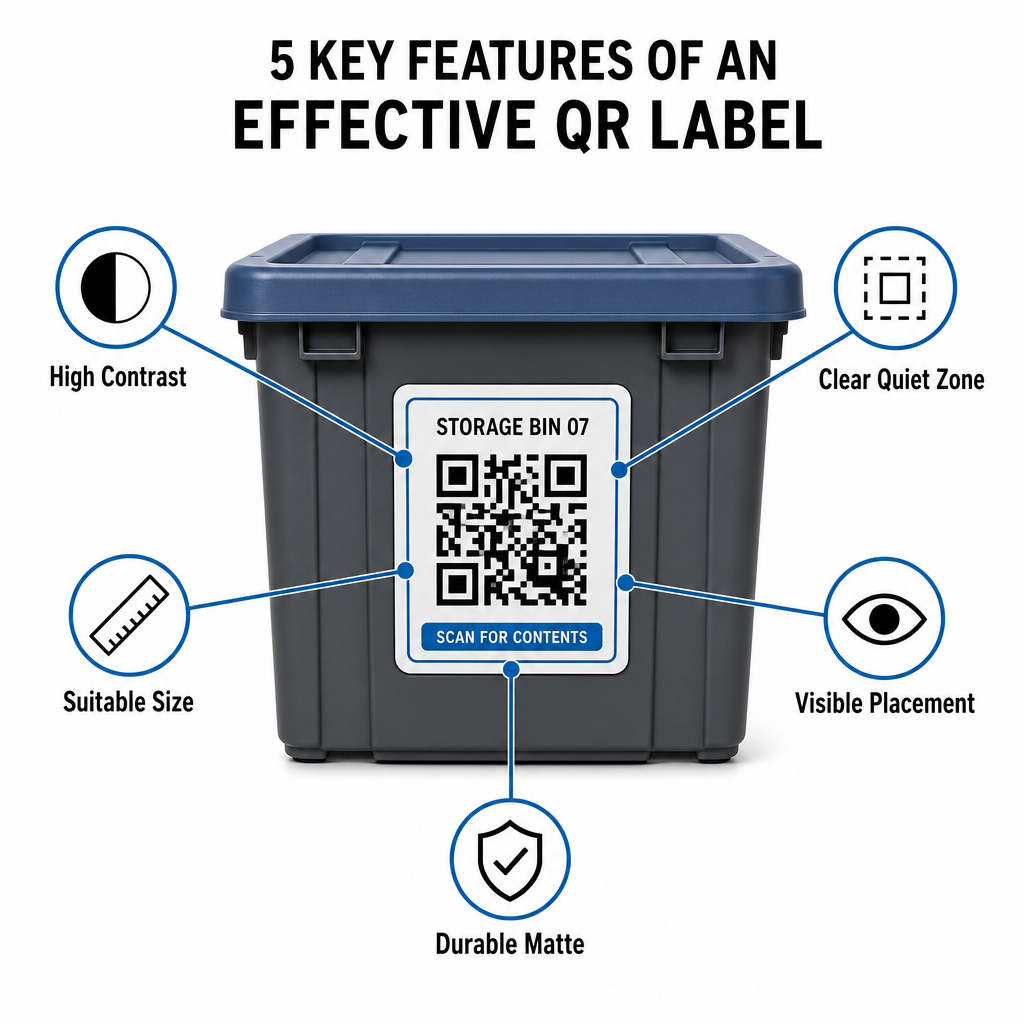
Varmistaaksesi nopeat skannaukset hämärissä tiloissa tai täynnä olevissa säilytyslokeroissa, tulostettujen tarrojesi on noudatettava vakiintuneita skannattavuusstandardeja.
Koko- ja etäisyyssäännöt
- Vähimmäistarran koko: Tulosta lähietäisyyden koodit vähintään 2 x 2 cm (0,8 x 0,8 tuumaa) käsikoreille tai arkistolaatikoille.
- Etäisyyssuhde: Noudata 10:1 etäisyys-koko-sääntöä korkeille hyllyille tai tilakylteille, mikä tarkoittaa, että 10 jalan päästä skannatun koodin on oltava vähintään 1 jalka leveä.
Kontrasti- ja marginaalivaatimukset
- Korkea kontrasti: Käytä tummia kuvioita vaaleilla taustoilla. Tavallinen musta valkoisella tarjoaa 21:1 kontrastisuhteen maksimaalista optista luettavuutta varten, samalla kun vähintään 12:1 kontrastisuhteen ylläpitäminen varmistaa johdonmukaisen skannauksen.
- Hiljaisen vyöhykkeen reunus: Jätä esteetön marginaali QR-koodin ympärille, joka on vähintään neljä kertaa yksittäisen moduulineliön leveys.
- Vältä visuaalista sotkua: Poista taustavarjot, matalakontrastiset väriyhdistelmät tai voimakkaat liukuvärit, jotka heikentävät kameran anturin tunnistusta.
Tulostus ja ympäristönsuojelu
- Korkea tulostusresoluutio: Vie taidetta vektorimuodoissa, kuten SVG tai PDF, tai tallenna rasteritiedostot 300 DPI tai korkeammalla resoluutiolla välttääksesi epätarkat reunat.
- Kestävät materiaalit: Käytä säänkestäviä, mattavinyylitarroja teollisuusyksiköille tai ulkotelineille. Aseta ulkotunnisteet vähemmän auringolle altistuville pinnoille, kuten laitteiden pohjoispuolelle, estääksesi UV-hajoamisen ajan myötä.
| Suunnitteluparametri | Vakiovaatimus | Käytännön syy |
|---|---|---|
| Pienin lähietäisyyden koko | 2 x 2 cm (0,8 x 0,8 tuumaa). | Takaa älypuhelimen kameran tarkennuksen luettavuuden. |
| Skannausetäisyyssuhde | 10:1 (Etäisyys : Leveys) | Varmistaa, että korkealla hyllyllä olevat tunnisteet skannautuvat selvästi lattiatasolta. |
| Värikontrastisuhde | Vähintään 12:1 (21:1 ihanteellinen) | Auttaa optisia antureita erottamaan datakuviot helposti. |
| Hiljaisen vyöhykkeen marginaali | 4 moduulin leveys joka sivulla | Estää viereisen tekstin tai reunaviivojen vääristämästä skannauksia. |
| Tulostustarkkuus | 300 DPI tai SVG/PDF- vienti | Estää tahriintuneet tai epätarkat pikselit tulostuksen aikana. |
Käytännön sovellukset operaattoreille ja asiakkaille
Varastotilojen hallinnoijat ja henkilökohtaisten varastojen asiakkaat käyttävät QR- koodeja vastatakseen erilaisiin organisatorisiin tarpeisiin.
Itsepalveluvaraston operaattorit
Operaattorit sijoittavat skannattavia tunnisteita kiinteistöihinsä parantaakseen omaisuuden seurantaa ja päivittäisiä kunnossapitotyönkulkuja:
- Yksikön tilan seuranta: Merkitse yksiköiden ovet tunnisteilla, jotta tilan henkilökunta voi skannata niitä kiertokäyntien aikana kirjatakseen lukkotarkastukset, huoltopyynnöt tai saatavuuspäivitykset.
- Laitteiden lainaus: Merkitse tilan kärryt, työkalut ja trukkilaitteet tunnisteilla kirjataksesi niiden hallinnan päivittäisten toimintarutiinien aikana.
- Täyttötehokkuus: Kolmannen osapuolen logistiikkaa tukevat tilat käyttävät skannattavia tunnisteita tilauskäsittelyn tehostamiseen ja saapuvan tavaran vastaanottoprosesseihin.
Henkilökohtaiset ja yritysvaraston asiakkaat
Yksityishenkilöt ja kaupalliset vuokraajat järjestävät kotitallit, arkistohuoneet tai vuokrayksiköt jäsennellyn digitaalisen indeksoinnin avulla:
- Kausiluonteisten konttien indeksointi: Merkitse joulukoristeet, urheiluvälineet ja sesonkivaatteiden laatikot tunnisteilla tarkastaaksesi laatikoiden sisällön avaamatta suljettuja kansia.
- Yritysarkiston seuranta: Luokittele verodokumentit, lakiasiakirjat ja asiakastiedot yhdistämällä fyysiset laatikkotunnisteet suojattuihin verkkokansioihin.
- Toimialojen välinen joustavuus: Vähittäiskaupan tuotteista erikoistyökaluihin eri toimialoilla, räätälöidyt tunnisteet, jotka on rakennettu monipuolisella QR-koodigeneraattori pitävät varastoidun varaston järjestyksessä ja helposti haettavana.
Ota hallintaasi varastoitu inventaariosi
QR- koodien käyttöönotto varastotarroissa poistaa arvailun, nopeuttaa inventaariotarkastuksia ja estää kadonneen tavaran henkilökohtaisissa varastoyksiköissä ja kaupallisissa varastoissa. Valitsemalla dynaamiset tunnisteet, tulostamalla korkeakontrastisia kuvioita ja soveltamalla selkeitä sijoittelusääntöjä, säilytät täyden näkyvyyden jokaiseen varastoituun omaisuuserään.
Aloita varastotyönkulkujesi digitalisointi tänään luomalla tulostusvalmiita inventaariotunnisteita Pagelootilla.
Usein kysytyt kysymykset
Pienin koko lähietäisyyden skannaukseen konteissa tai laatikoissa on 2 x 2 cm (0,8 x 0,8 tuumaa). Korkeille hyllyille tai tilojen oviin sijoitettaville tunnisteille, joita skannataan etäältä, noudata 10:1- suhdetta, jossa koodin leveys on yksi kymmenesosa kokonaisskannausetäisyydestä.
Kyllä, edellyttäen että käytät dynaamisia QR-koodeja. Dynaamiset QR-koodit osoittavat muokattavaan lyhytlinkkiin, jolloin voit päivittää tuoteluetteloita, ladata valokuvia tai säätää määriä digitaalisessa tietokannassasi samalla kun fyysinen etiketti laatikossasi pysyy täsmälleen samana.
Tilojen ylläpitäjät asettavat QR-kooditarroja yksiköiden oviin, käytäväpaikkoihin ja yhteisiin laitteisiin. Näiden koodien skannaaminen mahdollistaa henkilökunnalle kiertolaskennan suorittamisen, yksikön huoltohistorian tallentamisen, käyttöasteen vahvistamisen ja omaisuuden lainausten hallinnan reaaliajassa.