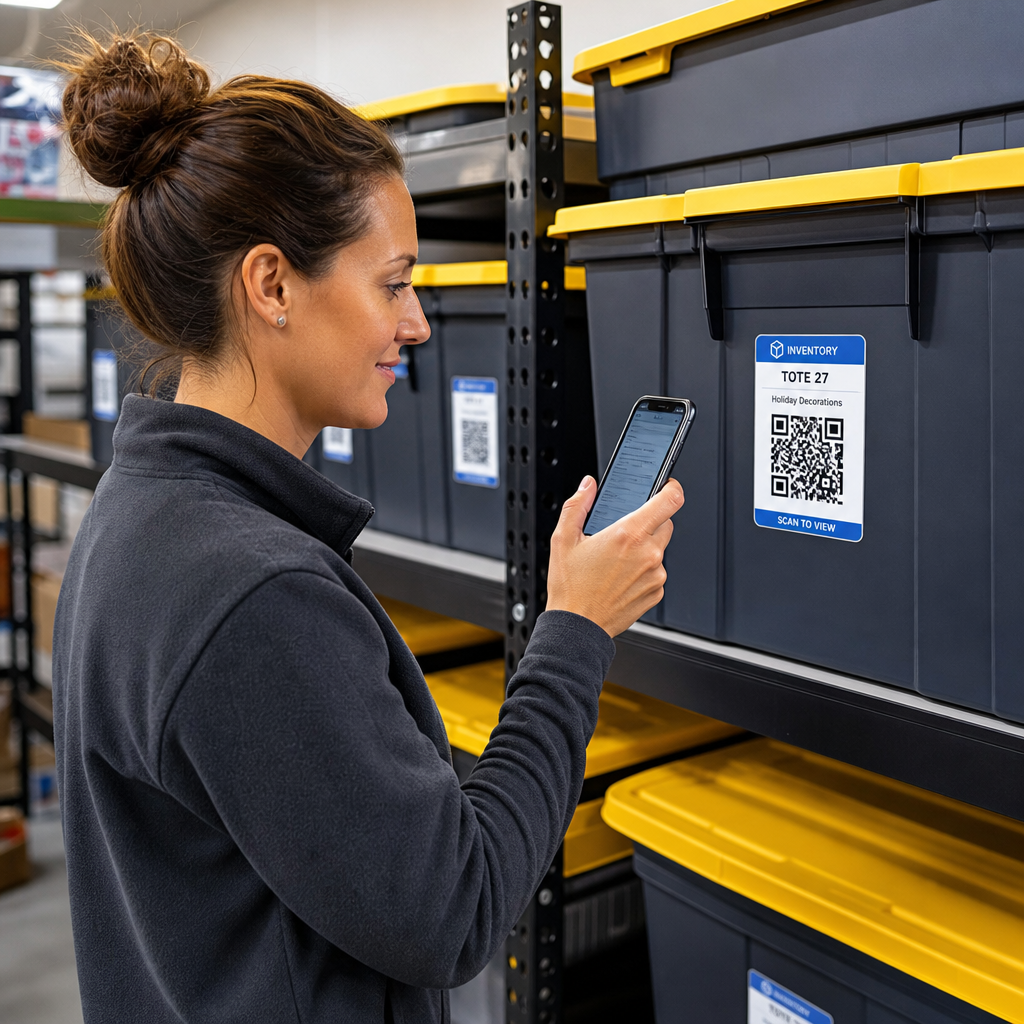

Sind Sie es leid, in unmarkierten Aufbewahrungsboxen zu suchen, nur um einen einzigen Gegenstand zu finden? Blindes Graben in gestapelten Behältern verschwendet wertvolle Zeit und verursacht endlose betriebliche Kopfschmerzen. Die Verwendung von QR-Code-Inventaretiketten ermöglicht es Ihnen, gelagerte Artikel sofort zu verfolgen, zu lokalisieren und zu verwalten, indem Sie einfach Ihr Smartphone scannen.
Wie QR-Code-Lagerverfolgung funktioniert
Ein QR-Code-Lagersystem verbindet physische Behälter, Regale oder Lagereinheiten mit digitalen Aufzeichnungen. Wenn Sie ein Etikett scannen, das an einem Behälter oder Regal angebracht ist, liest Ihr Gerät das codierte Muster und öffnet ein verknüpftes Dokument, eine Webseite oder einen Datenbankeintrag, der den Inhalt anzeigt.
Abhängig von Ihren betrieblichen Anforderungen können Sie zwischen zwei Haupttypen von QR-Codes wählen:
- Statische QR-Codes: Diese codieren Klartext direkt in das physische Muster. Durch die Verwendung eines Text QR-Code Generator, können Sie einfache, offline nutzbare Etiketten erstellen, die grundlegende Artikeldetails anzeigen. Statische Codes können jedoch nach dem Druck nicht mehr geändert werden.
- Dynamische QR-Codes: Diese speichern eine kurze Weiterleitungs-URL, die auf eine Online-Tabelle, einen Cloud-Ordner oder einen Datenbankeintrag verweist. Durch die Verwendung eines Dynamischer QR-Code Generator, können Sie Boxlisten aktualisieren, Inhaltsfotos hinzufügen oder Artikelmengen jederzeit bearbeiten, ohne das physische Etikett neu drucken zu müssen.
Die Einführung digitaler Etiketten schafft einen zuverlässigen Rahmen, um den Bestand in Echtzeit zu verfolgen, was Ihnen vollständige Transparenz über den gelagerten Bestand in heimischen Garagen, gewerblichen Lagern oder Self-Storage-Einheiten verschafft.
Schritte zur Einrichtung eines Lagerinventarsystems
Der Aufbau einer organisierten Lageranordnung erfordert systematische Protokollierung, die Erstellung haltbarer Etiketten und standardisierte Scan-Routinen.
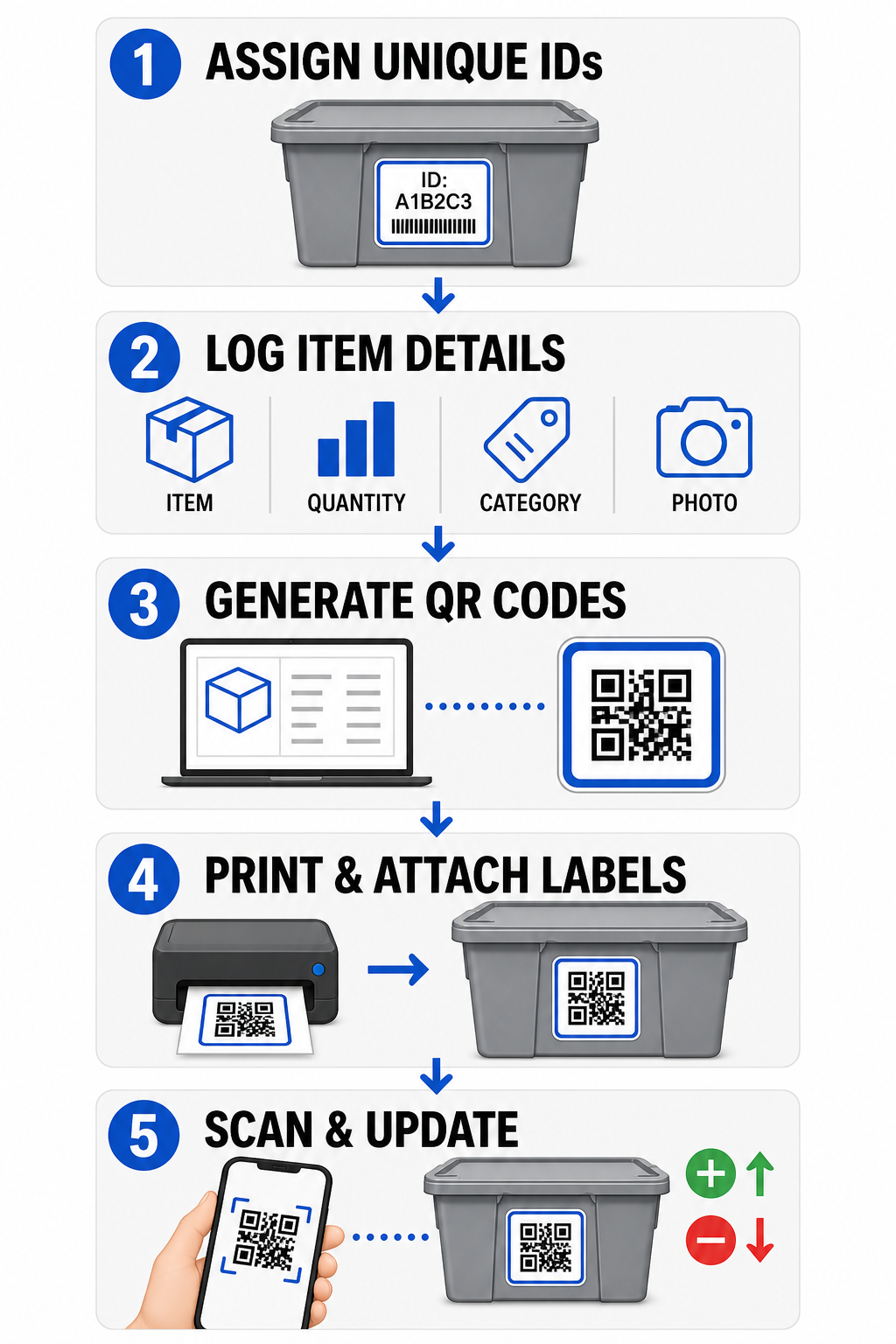
- Eindeutige Kennungen zuweisen: Erstellen Sie ein klares Benennungsformat oder eine SKU-Struktur (Stock Keeping Unit) für jeden Behälter, jede Kiste, jedes Regal oder jedes Lagerfach.
- Artikelaufzeichnungen zusammenstellen: Geben Sie Details wie Artikelnamen, Mengen, Kategorien und Fotos in eine zentralisierte Datenbank oder ein digitales Dokument ein.
- Scanbare Codes generieren: Geben Sie Ihre digitalen Aufzeichnungslinks in einen Online-Generator ein, um QR-Codes für Produktinventar erstellen. Sie können auch einen Google Forms QR-Code erstellen mit einer Tracking-Tabelle verbinden, um die Dateneingabe bei der Annahme zu vereinfachen.
- Etiketten drucken und anbringen: Bringen Sie gedruckte Etiketten an der Vorder- oder Oberseite von Behältern an, wo Mitarbeiter sie scannen können, ohne schwere Stapel bewegen zu müssen.
- Regelmäßig scannen und aktualisieren: Verwenden Sie einen webbasierten QR-Code Scanner oder eine Standard-Smartphone-Kamera, um den Live-Datensatz zu aktualisieren, sobald Artikel hinzugefügt, entfernt oder umgelagert werden.
Optimieren Sie Ihre Lagerverwaltung Benötigen Sie flexible Etiketten, mit denen Sie Details gelagerter Boxen aktualisieren können, ohne Aufkleber neu zu drucken? Verwenden Sie den Dynamischer QR-Code Generator , um noch heute bearbeitbare Inventaretiketten mit integrierter Scan-Verfolgung zu erstellen.
Richtlinien für Etikettendesign und -platzierung
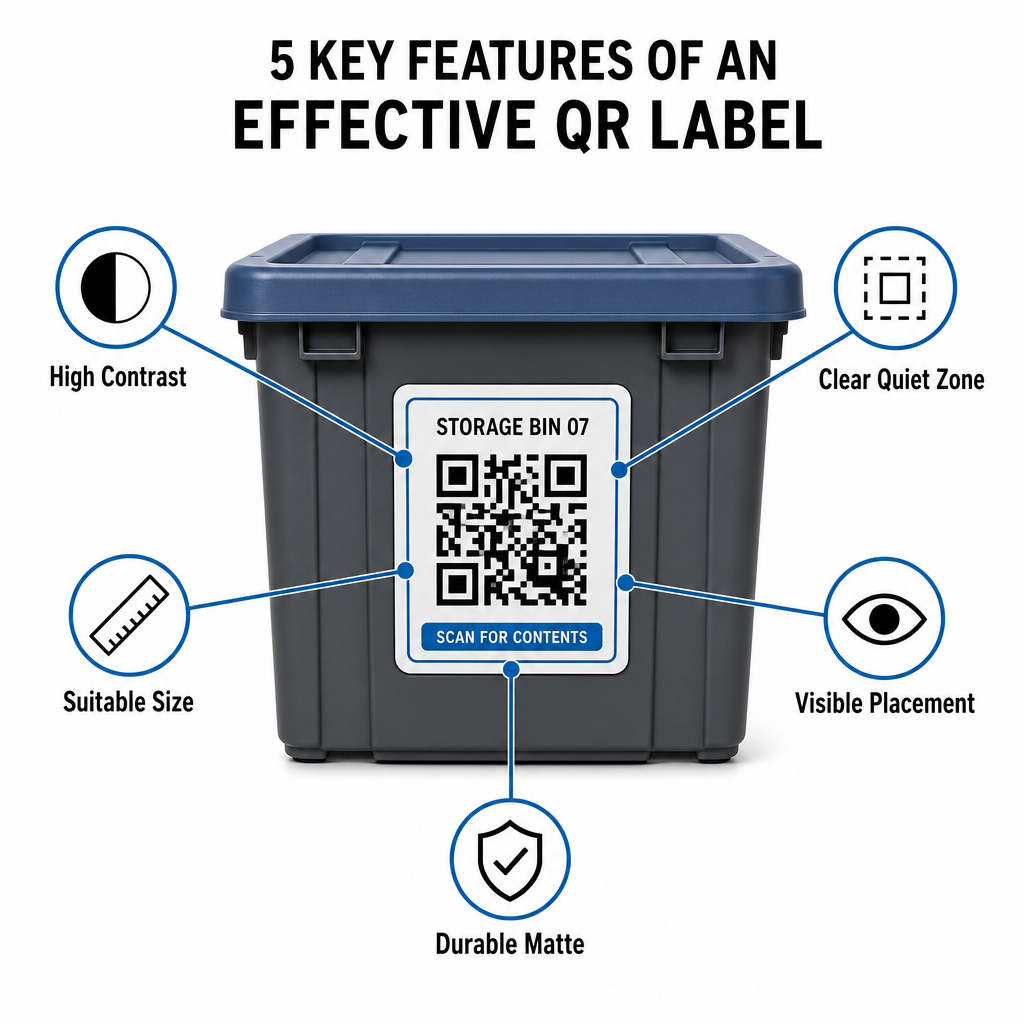
Um schnelle Scans in dunklen Einrichtungen oder überfüllten Lagerräumen zu gewährleisten, müssen Ihre gedruckten Etiketten etablierten Scannbarkeitsstandards entsprechen.
Größen- und Distanzregeln
- Mindestetikettengröße: Drucken Sie Nahbereichscodes nicht kleiner als 2 x 2 cm (0,8 x 0,8 Zoll) für tragbare Behälter oder Archivboxen.
- Distanzverhältnis: Befolgen Sie eine 10:1-Distanz-zu-Größe-Regel für hohe Regale oder Einrichtungsschilder, was bedeutet, dass ein aus 10 Fuß Entfernung gescannter Code mindestens 1 Fuß breit sein muss.
Kontrast- und Randanforderungen
- Hoher Kontrast: Verwenden Sie dunkle Muster auf hellem Hintergrund. Standard-Schwarz-auf-Weiß bietet ein Kontrastverhältnis von 21:1 für maximale optische Lesbarkeit, während die Aufrechterhaltung eines Kontrastverhältnisses von mindestens 12:1 konsistentes Scannen gewährleistet.
- Ruhezonenrand: Lassen Sie einen ungehinderten Rand um den QR-Code, der mindestens viermal so breit ist wie ein einzelnes Modulquadrat.
- Vermeiden Sie visuelles Rauschen: Eliminieren Sie Hintergrundschatten, kontrastarme Farbkombinationen oder starke Farbverläufe, die die Erkennung durch den Kamerasensor beeinträchtigen.
Druck- und Umweltschutz
- Hohe Druckauflösung: Exportieren Sie Grafiken in Vektorformaten wie SVG oder PDF oder speichern Sie Rasterdateien mit 300 DPI oder höher, um unscharfe Kanten zu vermeiden.
- Haltbare Materialien: Verwenden Sie wetterbeständige, matte Vinyl-Etiketten für Industrieanlagen oder Außenregale. Positionieren Sie Außentags auf weniger sonnenexponierten Oberflächen, wie der Nordseite von Geräten, um UV-Abbau im Laufe der Zeit zu verhindern.
| Designparameter | Standardanforderung | Praktischer Grund |
|---|---|---|
| Minimale Nahbereichsgröße |
2 x 2 cm (0,8 x 0,8 Zoll) | Garantiert die Lesbarkeit durch die Smartphone-Kamera. |
| Scan-Distanz-Verhältnis |
10:1 (Distanz : Breite) | Stellt sicher, dass Regaletiketten aus Bodennähe klar gescannt werden. |
| Farbkontrastverhältnis |
Mindestens 12:1 (21:1 ideal) | Hilft optischen Sensoren, Datenmuster leicht zu unterscheiden. |
| Ruhezonenrand |
4 Modulbreiten auf allen Seiten | Verhindert, dass benachbarter Text oder Rahmenlinien Scans verzerren. |
| Druckauflösung |
300 DPI oder SVG/PDF-Export | Verhindert verschmierte oder unscharfe Pixel beim Drucken. |
Praktische Anwendungen für Betreiber und Kunden
Lagerverwalter und private Lagerkunden nutzen QR-Codes, um spezifische organisatorische Anforderungen zu adressieren.
Betreiber von Self-Storage-Einrichtungen
Betreiber platzieren scannbare Etiketten auf ihrem Gelände, um die Anlagenverfolgung und tägliche Wartungsabläufe zu verbessern:
- Einheitenstatusüberwachung
: Kennzeichnen Sie Einheitentüren, damit das Personal bei Rundgängen Schlösser, Wartungsanfragen oder Verfügbarkeitsupdates protokollieren kann. - Geräteausleihen
: Kennzeichnen Sie Handwagen, Werkzeuge und Gabelstapler, um die Nutzung während des täglichen Betriebs zu erfassen. - Erfüllungseffizienz
: Einrichtungen, die Logistikdienstleistungen Dritter unterstützen, nutzen scannbare Etiketten, um die Auftragsabwicklung zu optimieren und Wareneingangsprozesse zu verbessern.
Kunden für persönliche und geschäftliche Lagerung
Privatpersonen und gewerbliche Mieter organisieren Hausgaragen, Archivräume oder Mieteinheiten durch strukturierte digitale Indizierung:
- Saisonale Containerindizierung
: Kennzeichnen Sie Weihnachtsdekoration, Sportausrüstung und saisonale Aufbewahrungsboxen, um den Inhalt zu prüfen, ohne versiegelte Deckel zu öffnen. - Geschäftsarchivverfolgung
: Kategorisieren Sie Steuerunterlagen, Rechtsakten und Kundenakten, indem Sie physische Kistenetiketten mit sicheren Online-Ordnern verknüpfen. - Branchenübergreifende Flexibilität
: Von Einzelhandelswaren bis hin zu Spezialwerkzeugen in verschiedenen Branchen, benutzerdefinierte Etiketten, die mit einem vielseitigen QR-Code-Generator halten gelagerte Bestände organisiert und leicht auffindbar.
Übernehmen Sie die Kontrolle über Ihr eingelagertes Inventar
Die Implementierung von QR-Code-Lageretiketten beseitigt Rätselraten, beschleunigt Inventurprüfungen und verhindert falsch abgelegte Bestände in privaten Lagereinheiten und gewerblichen Lagern. Durch die Auswahl dynamischer Etiketten, das Drucken kontrastreicher Muster und die Anwendung klarer Platzierungsregeln behalten Sie die volle Übersicht über jedes gelagerte Gut.
Beginnen Sie noch heute mit der Digitalisierung Ihrer Lagerabläufe, indem Sie druckfertige Inventaretiketten mit Pageloot erstellen.
Häufig gestellte Fragen
Die Mindestgröße für das Scannen aus nächster Nähe auf Behältern oder Kartons beträgt 2 x 2 cm (0,8 x 0,8 Zoll). Für Etiketten auf hohen Regalen oder Einrichtungstüren, die aus der Ferne gescannt werden, befolgen Sie ein 10:1-Verhältnis, bei dem die Breite des Codes ein Zehntel der gesamten Scan-Distanz beträgt.
Ja, vorausgesetzt Sie verwenden dynamische QR-Codes. Dynamische QR-Codes verweisen auf einen bearbeitbaren Kurzlink, sodass Sie Artikelauflistungen aktualisieren, Fotos hochladen oder Mengen in Ihrer digitalen Datenbank anpassen können, während das exakt gleiche physische Etikett auf Ihrer Box erhalten bleibt.
Facility operators place QR code labels on unit doors, aisle locations, and shared equipment. Scanning these codes allows staff to complete cycle counts, record unit maintenance history, confirm occupancy, and manage asset checkouts in real time.