
首页 > 行业 > How to Track Storage Inventory with QR Codes
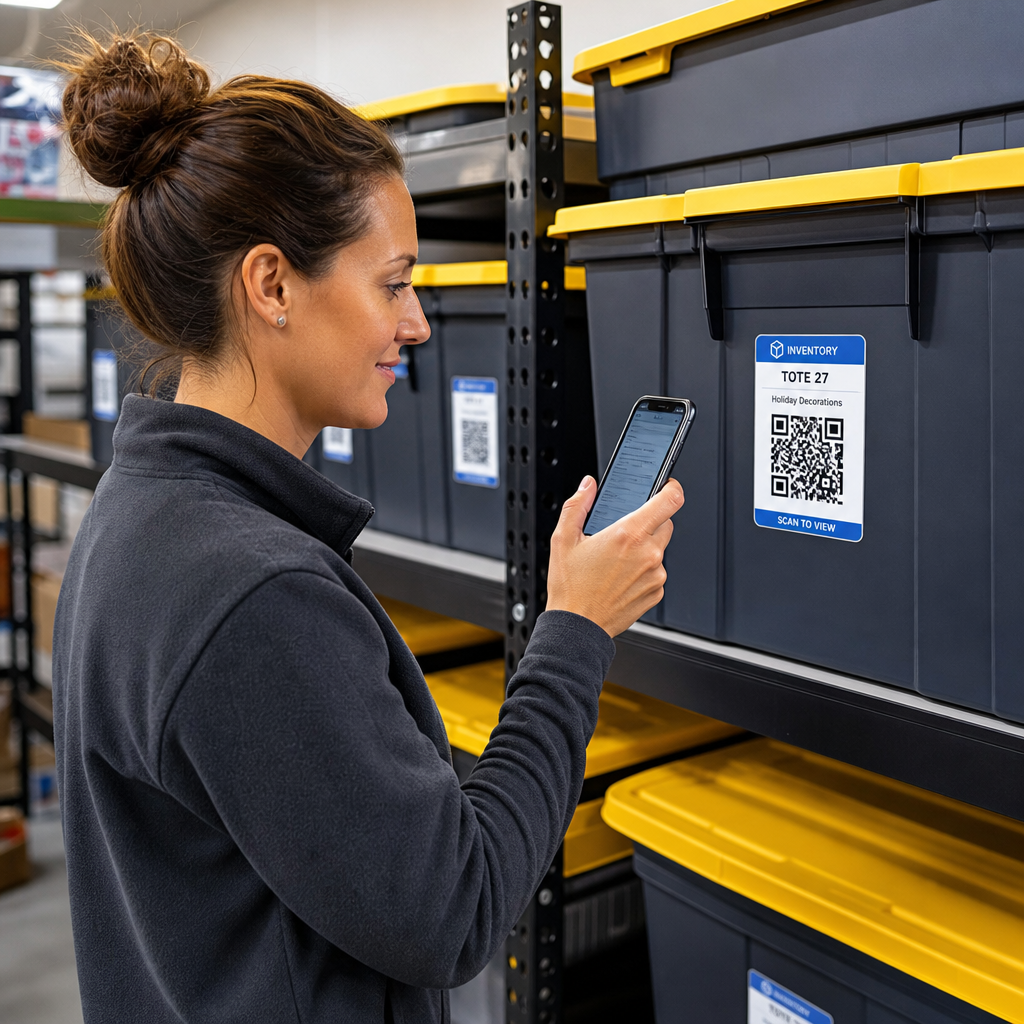
Scanning storage inventory label

How to Track Storage Inventory with QR Codes

Track and manage your storage inventory with QR codes. Learn how to set up dynamic labels, follow best design practices, and locate stored items fast.
Updated on 7 月 27, 2026
目录

Are you tired of searching through unmarked storage boxes just to locate a single item? Digging blindly through stacked containers wastes valuable time and creates endless operational headaches. Using QR code inventory labels allows you to track, locate, and manage stored items instantly with a simple smartphone scan.

How QR Code Storage Tracking Works

A QR code storage system connects physical containers, shelves, or facility units to digital records. When you scan a label attached to a tote or rack, your device reads the encoded pattern and opens a linked document, web page, or database entry displaying the contents stored inside.

Depending on your operational requirements, you can select between two primary types of QR codes:

  • 静态二维码: These encode plain text directly into the physical pattern. By using a text QR code generator, you can create simple, offline labels that display basic item details. However, static codes cannot be modified after printing.
  • 动态 QR 码: These store a short redirect URL pointing to an online spreadsheet, cloud folder, or database entry. By using a 动态二维码生成器, you can update box lists, add content photos, or edit item quantities at any time without reprinting the physical sticker.

Adopting digital labels creates a reliable framework to track inventory in real time, giving you complete visibility into stored stock across home garages, commercial warehouses, or self-storage units.

Steps to Set Up a Storage Inventory System

Building an organized storage layout requires systematic logging, durable label creation, and standardized scanning routines.

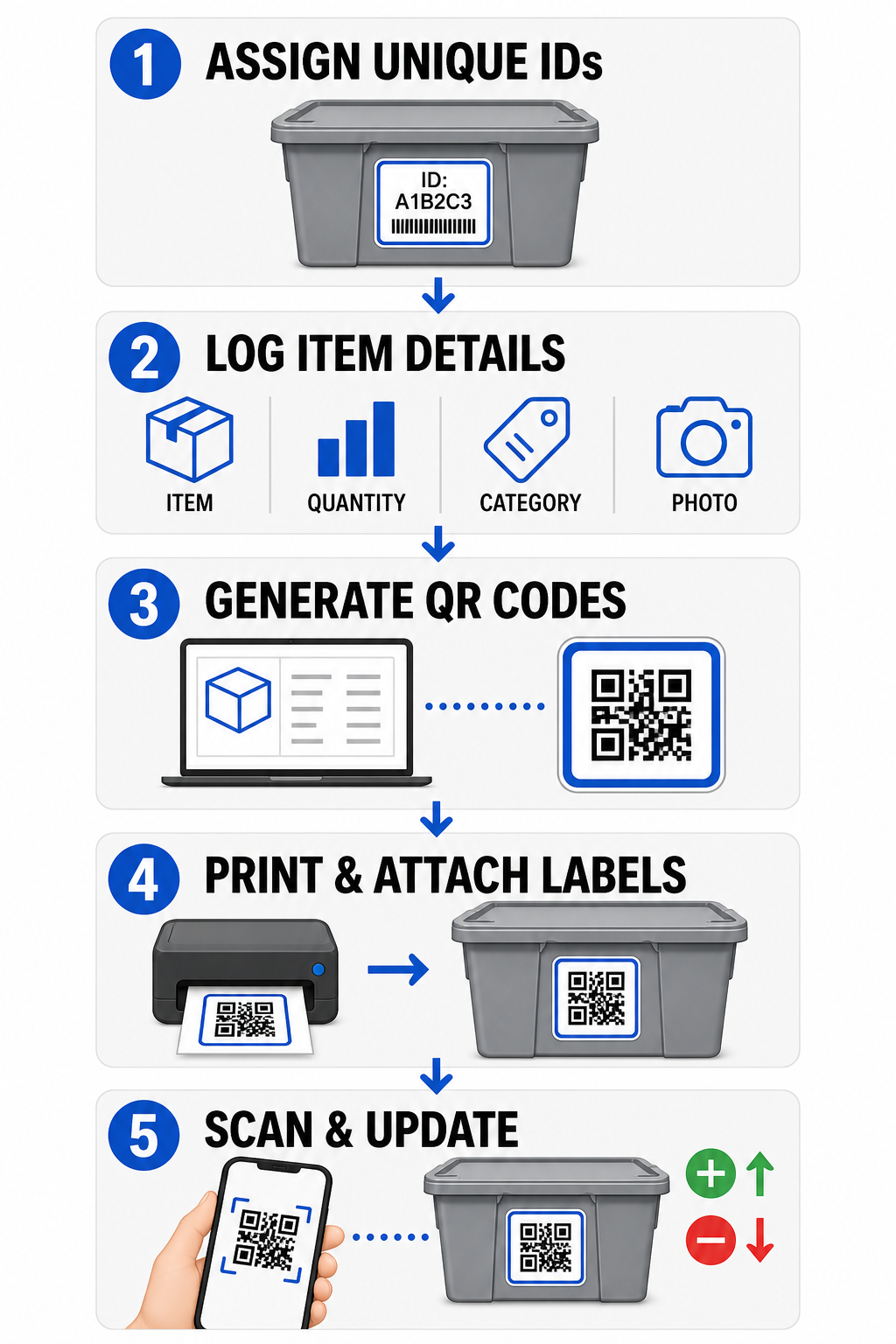
二维码库存设置步骤
  • Assign unique identifiers: Create a clear naming format or stock keeping unit (SKU) structure for every bin, box, shelf, or storage locker.
  • Compile item records: Input details such as item names, quantities, categories, and photographs into a centralized database or digital document.
  • Generate scannable codes: Enter your digital record links into an online generator to 创建用于产品库存的二维码. You can also connect a 谷歌表单二维码生成器 to a tracking spreadsheet to simplify intake data entry.
  • Print and attach labels: Apply printed labels to the front or top of containers where workers can scan them without moving heavy stacks.
  • Scan and update routinely: Use a web-based QR码扫描仪 or standard smartphone camera to update the live record whenever items are added, removed, or relocated.

Streamline Your Storage Management Need flexible labels that let you update stored box details without reprinting stickers? Use the 动态二维码生成器 to build editable inventory tags with built-in scan tracking today.

Label Design and Placement Guidelines

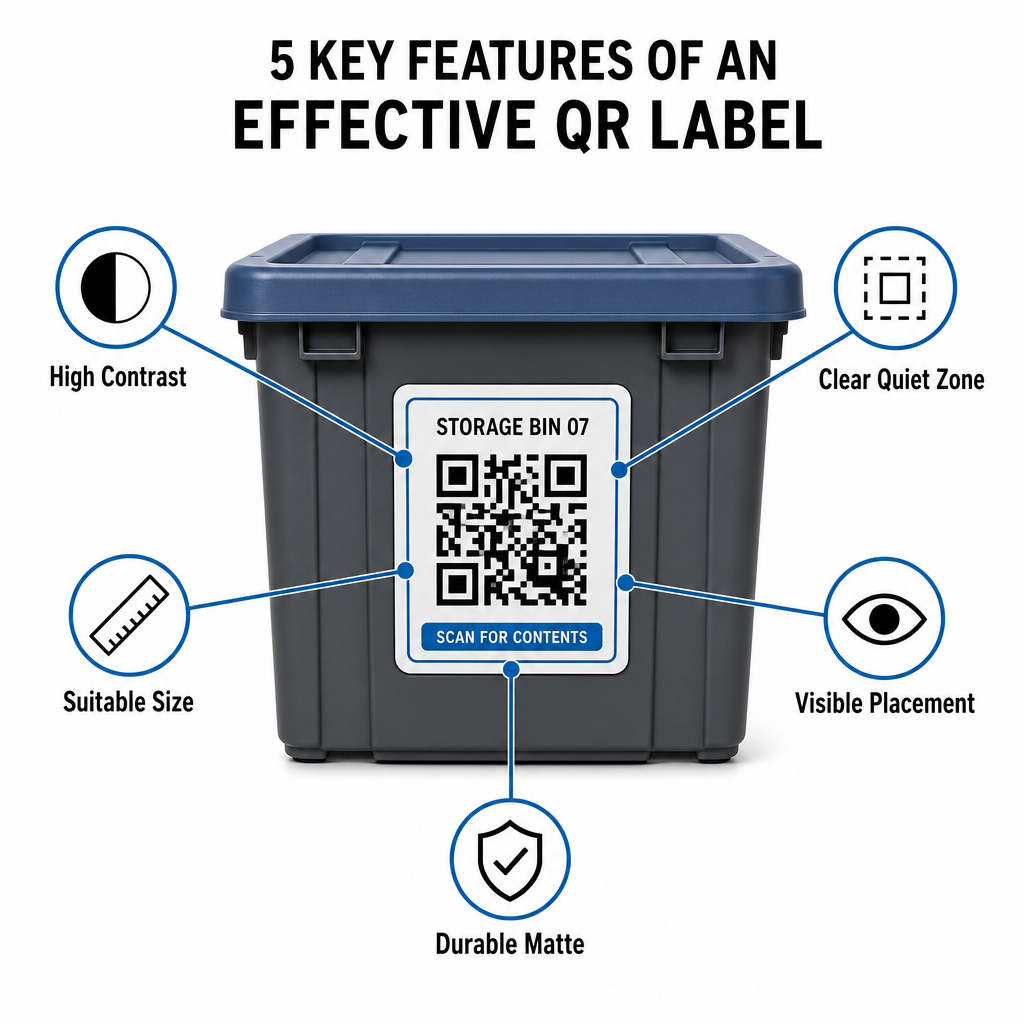
To guarantee fast scans in dim facilities or crowded storage lockers, your printed labels must follow established scannability standards.

Scannable QR label design

Size and Distance Rules

  • Minimum label size: Print close-range codes no smaller than 2 x 2 cm (0.8 x 0.8 inches) for handheld totes or archive boxes.
  • Distance ratio: Follow a 10:1 distance-to-size rule for high shelving or facility signage, meaning a code scanned from 10 feet away must measure at least 1 foot wide.

Contrast and Margin Requirements

  • High contrast: Use dark patterns on light backgrounds. Standard black-on-white provides a 21:1 contrast ratio for maximum optical readability, while maintaining a contrast ratio of at least 12:1 ensures consistent scanning.
  • Quiet zone border: Leave an unobstructed margin around the QR code measuring at least four times the width of a single module square.
  • Avoid visual clutter: Eliminate background shadows, low-contrast color combinations, or heavy gradients that degrade camera sensor detection.

Printing and Environmental Protection

  • High print resolution: Export artwork in vector formats like SVG or PDF, or save raster files at 300 DPI or higher to avoid blurry edges.
  • Durable materials: Use weather-resistant, matte vinyl labels for industrial units or outdoor racks. Position exterior tags on less sun-exposed surfaces, such as the north-facing side of equipment, to prevent UV degradation over time.
Design Parameter Standard Requirement Practical Reason
Minimum Close-Range Size 2 x 2 厘米(0.8 x 0.8 英寸) Guarantees smartphone camera focal legibility.
Scanning Distance Ratio 10:1 (Distance : Width) Ensures high-shelf tags scan clearly from floor level.
Color Contrast Ratio 12:1 minimum (21:1 ideal) Helps optical sensors distinguish data patterns easily.
Quiet Zone Margin 4 module widths on all sides Prevents adjacent text or border lines from distorting scans.
Print Resolution 300 DPI or SVG/PDF export Prevents smudged or blurry pixels during printing.

Practical Applications for Operators and Customers

Storage facility managers and personal storage customers use QR codes to address distinct organizational needs.

Self-Storage Facility Operators

Operators place scannable tags across their properties to improve asset tracking and daily maintenance workflows:

  • Unit status monitoring: Tag unit doors so facility staff can scan during walk-throughs to log lock checks, maintenance requests, or availability updates.
  • Equipment checkouts: Label facility hand trucks, tools, and forklift equipment to log custody during daily operation routines.
  • Fulfillment efficiency: Facilities supporting third-party logistics use scannable tags to streamline order fulfillment and incoming receiving processes.

Personal and Business Storage Customers

Individuals and commercial renters organize home garages, archive rooms, or rental units through structured digital indexing:

  • Seasonal container indexing: Label holiday decorations, sports gear, and seasonal wardrobe totes to review box contents without opening sealed lids.
  • Business archive tracking: Categorize tax documentation, legal files, and client records by linking physical box tags to secure online folders.
  • Cross-sector flexibility: From retail merchandise to specialized tools across various industries, custom tags built with a versatile 二维码生成器 keep stored stock organized and easy to retrieve.

Take Control of Your Stored Inventory

Implementing QR code storage labels eliminates guesswork, speeds up inventory audits, and prevents misplaced stock across personal storage units and commercial warehouses. By selecting dynamic labels, printing high-contrast patterns, and applying clear placement rules, you maintain total visibility over every stored asset.

Start digitizing your storage workflows today by generating print-ready inventory labels with Pageloot.

常见问题

What is the minimum recommended size for a storage QR code label?

The minimum size for close-range scanning on containers or boxes is 2 x 2 cm (0.8 x 0.8 inches). For labels placed on high shelving or facility doors scanned from a distance, follow a 10:1 ratio where the code’s width is one-tenth of the total scanning distance.

Can I update the list of box contents without reprinting the QR label?

Yes, provided you use dynamic QR codes. Dynamic QR codes point to an editable short link, allowing you to update item lists, upload photos, or adjust quantities in your digital database while keeping the exact same physical label on your box.

How do storage operators use QR codes to manage commercial facilities?

Facility operators place QR code labels on unit doors, aisle locations, and shared equipment. Scanning these codes allows staff to complete cycle counts, record unit maintenance history, confirm occupancy, and manage asset checkouts in real time.

关于作者

Siim Kostabi 是 Pageloot 的内容主管,负责撰写关于我们创新型二维码生成器服务的文章。凭借五年多来在二维码领域积累的深厚专业知识,Siim 是该领域的专家。他致力于利用二维码技术简化和增强数字交互,并取得了显著的成果。.

类别
了解更多关于
营销人员与二维码宣传册
如何 编辑QR码
二维码营销
二维码 营销可能性
QR QR码的#1解决方案

如果您需要在线创建QR码,则可以 制作二维码 就在这里免费!
Pageloot是 #1转到解决方案 创建和扫描QR码。

BL-0315

博客生成器

受到超过 20,000 个品牌的信赖,可获得更多销售、评论和关注者。

客户徽标
受到顶级品牌的信赖
评分为 4.8(共 5)

4.86 / 5 星评级

雨果·劳伦特
雨果·劳伦特
餐馆老板
有史以来最容易和最可靠的QR码生成器。PDF文件可以立即上传。我们的餐厅菜单现在是数字化的。
卢卡斯-詹森
卢卡斯-詹森
房地产开发商
这是一个很好的工具,二维码带你到你想要的地方。我们只使用位置二维码,但有许多有用的功能。
艾玛-莫雷蒂
艾玛-莫雷蒂
零售产品
易于使用和快速。它工作得很好,创造了一个完美的图像,所以员工可以下载我的vCard。
雨果·劳伦特
雨果·劳伦特
餐馆老板
有史以来最容易和最可靠的QR码生成器。PDF文件可以立即上传。我们的餐厅菜单现在是数字化的。
卢卡斯-詹森
卢卡斯-詹森
房地产开发商
这是一个很好的工具,二维码带你到你想要的地方。我们只使用位置二维码,但有许多有用的功能。
艾玛-莫雷蒂
艾玛-莫雷蒂
零售产品
易于使用和快速。它工作得很好,创造了一个完美的图像,所以员工可以下载我的vCard。
查看更多QR码
二维码社交
制作二维码 联系信息
将一切转化为数字体验 不到3分钟。

免费试用 14 天。

无需信用卡。

首次购买可享受 30% 折扣

使用代码:

分享您的 MP3 文件

注册以创建 PDF QR 码

上传和显示你需要的一切。

  • 音频文件
  • 播客
  • 音乐

注册即可享 14 天免费试用。.
试用期结束后,二维码将失效。.

注册以创建音频 mp3 二维码

使用边框获得更多扫描

注册以向您的二维码添加更多框架

呼叫行动框架帮助您的客户与QR码轻松互动。试试吧!

注册即可享 14 天免费试用。.
试用期结束后,二维码将失效。.

注册以向您的二维码添加更多框架

使用形状添加更多样式

注册以创建更多形状

二维码不一定是方形的。试着改变它以适应你的品牌形象。

注册即可享 14 天免费试用。.
试用期结束后,二维码将失效。.

注册以创建更多形状

为您的二维码添加徽标

注册以将您的徽标添加到二维码中

通过在二维码上添加你的标志和品牌,使你的二维码脱颖而出。

注册即可享 14 天免费试用。.
试用期结束后,二维码将失效。.

注册以将您的徽标添加到二维码中

智能应用商店重定向

注册以创建应用商店二维码

将您的应用程序链接添加到我们的智能应用程序商店QR码。用户会根据他们的设备被重新定向。

注册即可享 14 天免费试用。.
试用期结束后,二维码将失效。.

注册以创建应用商店二维码

将图片上传到二维码

注册以创建图像二维码

轻松分享你的图像。在几秒钟内动态地改变任何图像。

注册即可享 14 天免费试用。.
试用期结束后,二维码将失效。.

注册以创建图像二维码

分享您的 PDF 文件

注册以创建 PDF QR 码

上传和显示你需要的一切。

  • 菜单和价格表
  • 使用说明
  • 任何文件

注册即可享 14 天免费试用。.
试用期结束后,二维码将失效。.

注册以创建 PDF QR 码

稍后编辑,无需打印

注册即可编辑您的二维码,无需再次打印

动态QR码让你改变你的QR码的内容,而不需要打印新的QR码。

注册即可享 14 天免费试用。.
试用期结束后,二维码将失效。.

注册即可编辑您的二维码,无需再次打印

何时?何地?追踪您的二维码扫描

注册以追踪您的二维码

发现你的哪些二维码收到了最多的扫描,以及什么最能让你的客户兴奋。

注册即可享 14 天免费试用。.
试用期结束后,二维码将失效。.

注册以追踪您的二维码

提供可打印文件

注册以创建 PDF 和 SVG 等矢量二维码

.EPS, .PDF, .SVG

想下载高清分辨率的QR码吗?获得矢量或像素格式,可随时打印。

注册即可享 14 天免费试用。.
试用期结束后,二维码将失效。.

注册以创建 PDF 和 SVG 等矢量二维码

请等待。您的二维码是 正在加载... 正在加载...

打造专属

注册以保存您的二维码以供日后使用

通过创建具有不同颜色、标识和行动呼吁框架的出色的QR码,获得更多的扫描。

注册即可享 14 天免费试用。.
试用期结束后,二维码将失效。.

注册以保存您的二维码以供日后使用