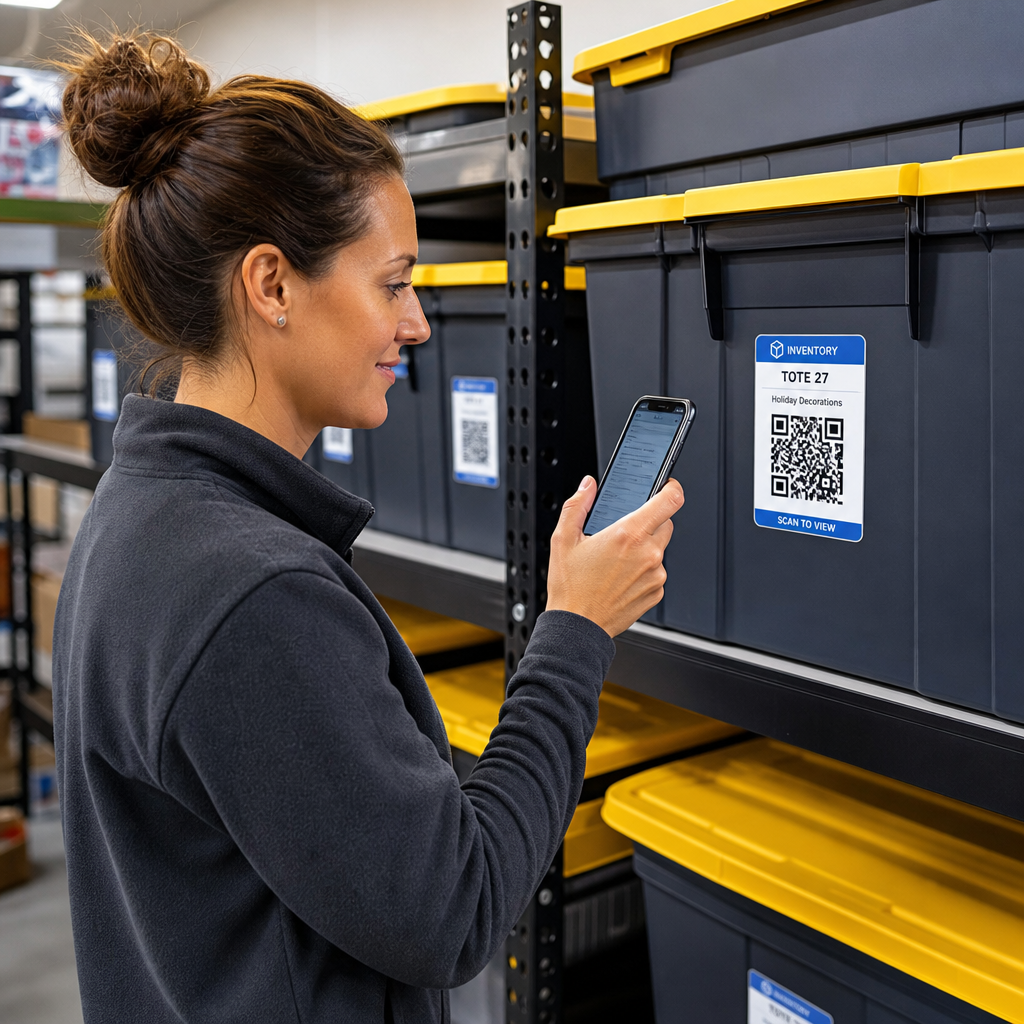

Apakah Anda lelah mencari-cari di kotak penyimpanan tanpa tanda hanya untuk menemukan satu barang? Menggali secara membabi buta melalui tumpukan wadah membuang waktu berharga dan menimbulkan sakit kepala operasional yang tak ada habisnya. Menggunakan label inventaris kode QR memungkinkan Anda melacak, menemukan, dan mengelola barang yang disimpan secara instan hanya dengan pemindaian smartphone sederhana.
Cara Kerja Pelacakan Penyimpanan Kode QR
Sistem penyimpanan kode QR menghubungkan wadah fisik, rak, atau unit fasilitas ke catatan digital. Saat Anda memindai label yang ditempelkan pada wadah atau rak, perangkat Anda membaca pola yang dikodekan dan membuka dokumen, halaman web, atau entri basis data tertaut yang menampilkan konten yang disimpan di dalamnya.
Tergantung pada kebutuhan operasional Anda, Anda dapat memilih di antara dua jenis utama kode QR:
- Kode QR statis: Ini mengenkode teks biasa langsung ke dalam pola fisik. Dengan menggunakan Generator QR Code Teks, Anda dapat membuat label offline sederhana yang menampilkan detail barang dasar. Namun, kode statis tidak dapat dimodifikasi setelah dicetak.
- Kode QR dinamis: Ini menyimpan URL pengalihan pendek yang menunjuk ke spreadsheet online, folder cloud, atau entri basis data. Dengan menggunakan Generator QR Code Dinamis, Anda dapat memperbarui daftar kotak, menambahkan foto konten, atau mengedit jumlah barang kapan saja tanpa mencetak ulang stiker fisik.
Mengadopsi label digital menciptakan kerangka kerja yang andal untuk melacak inventaris secara real-time, memberi Anda visibilitas penuh ke dalam stok yang disimpan di garasi rumah, gudang komersial, atau unit penyimpanan mandiri.
Langkah-langkah untuk Menyiapkan Sistem Inventaris Penyimpanan
Membangun tata letak penyimpanan yang terorganisir memerlukan pencatatan sistematis, pembuatan label yang tahan lama, dan rutinitas pemindaian yang terstandarisasi.
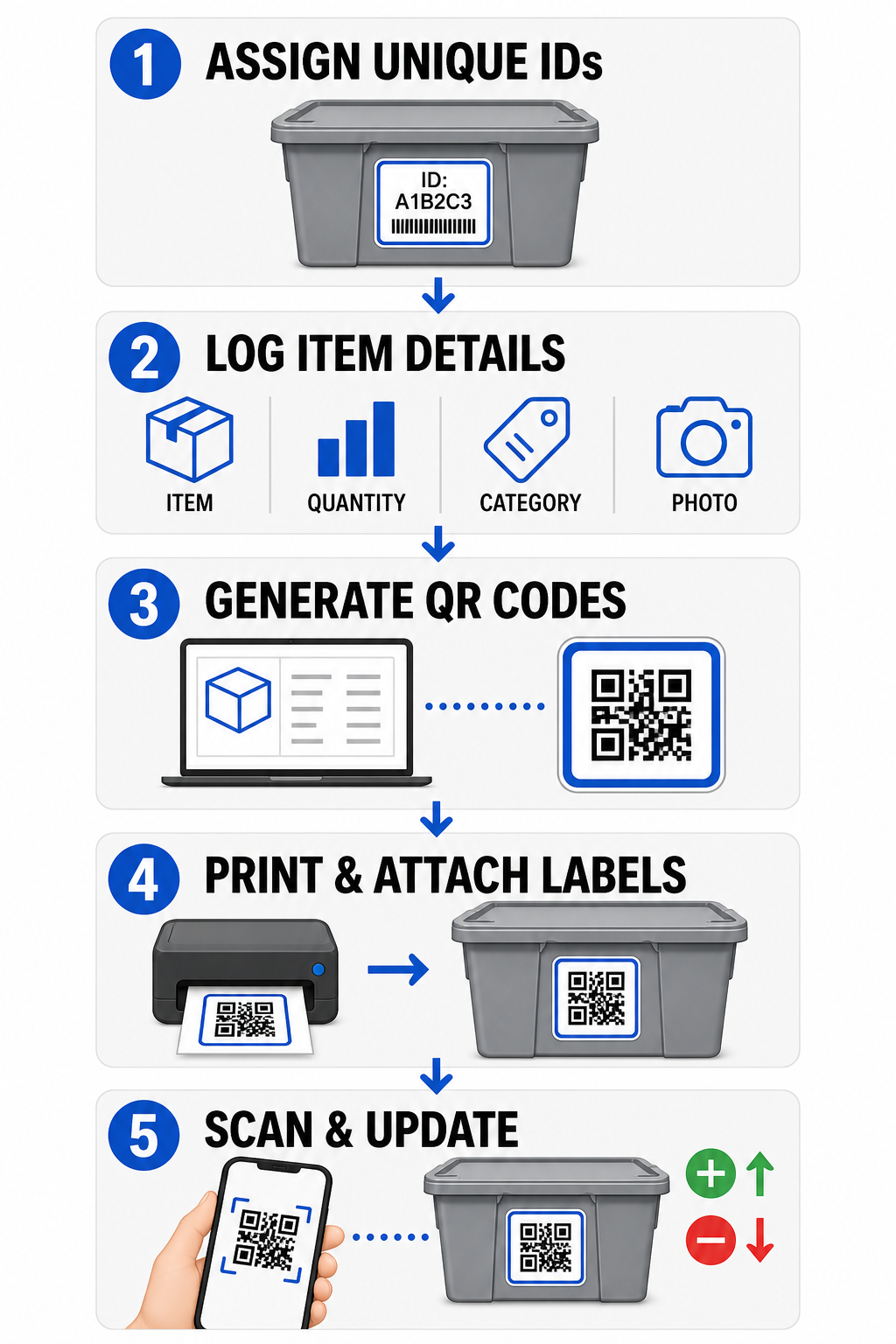
- Tetapkan pengidentifikasi unik: Buat format penamaan yang jelas atau struktur unit penyimpanan stok (SKU) untuk setiap tempat sampah, kotak, rak, atau loker penyimpanan.
- Kumpulkan catatan barang: Masukkan detail seperti nama barang, jumlah, kategori, dan foto ke dalam basis data terpusat atau dokumen digital.
- Hasilkan kode yang dapat dipindai: Masukkan tautan catatan digital Anda ke generator online untuk membuat kode QR untuk inventaris produk. Anda juga dapat menghubungkan Ubah Link Google Form ke QR Code ke spreadsheet pelacakan untuk menyederhanakan entri data penerimaan.
- Cetak dan tempelkan label: Tempelkan label cetak di bagian depan atau atas wadah di mana pekerja dapat memindainya tanpa memindahkan tumpukan yang berat.
- Pindai dan perbarui secara rutin: Gunakan Scan QR Code & Barcode berbasis web atau kamera smartphone standar untuk memperbarui catatan langsung setiap kali barang ditambahkan, dihapus, atau dipindahkan.
Sederhanakan Manajemen Penyimpanan Anda Butuh label fleksibel yang memungkinkan Anda memperbarui detail kotak yang disimpan tanpa mencetak ulang stiker? Gunakan Generator QR Code Dinamis untuk membuat tag inventaris yang dapat diedit dengan pelacakan pemindaian bawaan hari ini.
Pedoman Desain dan Penempatan Label
Untuk menjamin pemindaian cepat di fasilitas yang redup atau loker penyimpanan yang padat, label cetak Anda harus mengikuti standar keterpindaian yang ditetapkan.
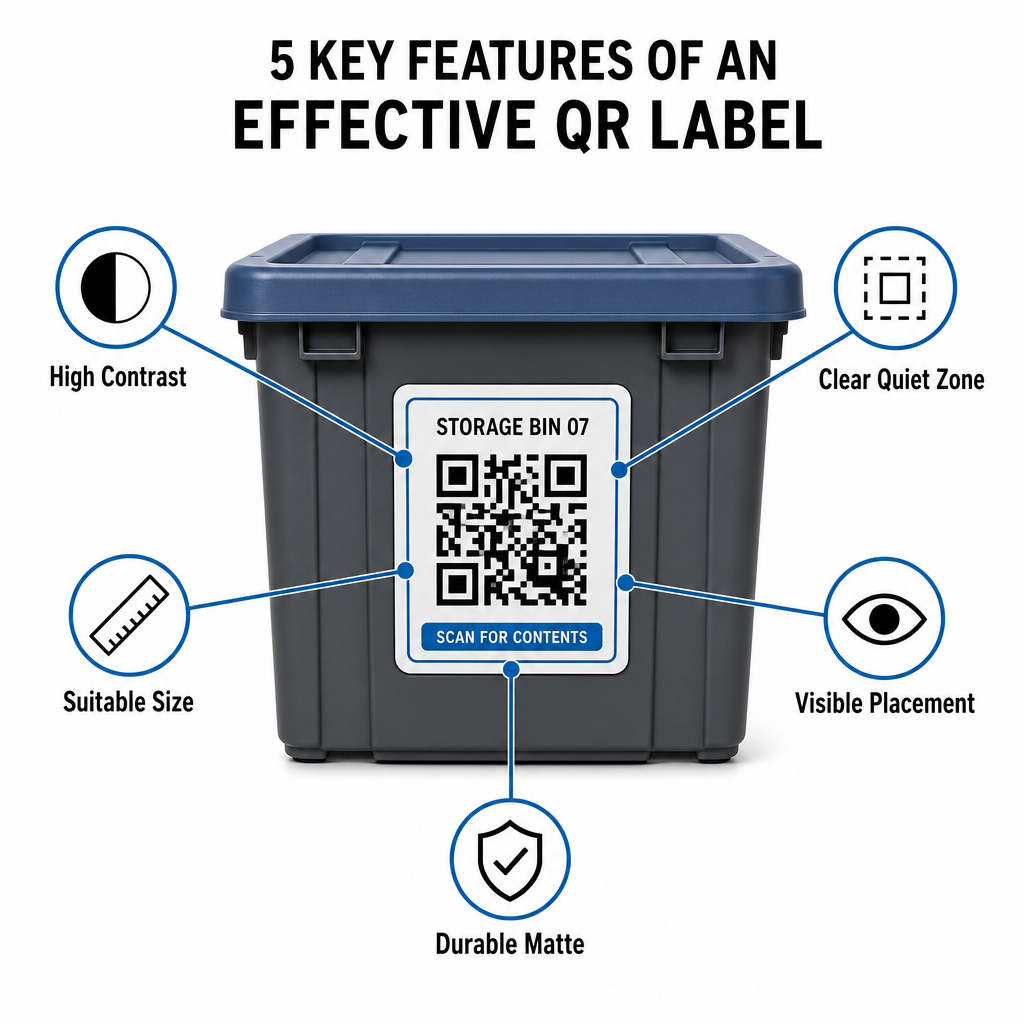
Aturan Ukuran dan Jarak
- Ukuran label minimum: Cetak kode jarak dekat tidak lebih kecil dari 2 x 2 cm (0,8 x 0,8 inci) untuk wadah genggam atau kotak arsip.
- Rasio jarak: Ikuti aturan jarak-ke-ukuran 10:1 untuk rak tinggi atau papan petunjuk fasilitas, artinya kode yang dipindai dari jarak 10 kaki harus memiliki lebar setidaknya 1 kaki.
Persyaratan Kontras dan Margin
- Kontras tinggi: Gunakan pola gelap pada latar belakang terang. Hitam-putih standar memberikan rasio kontras 21:1 untuk keterbacaan optik maksimal, sementara mempertahankan rasio kontras setidaknya 12:1 memastikan pemindaian yang konsisten.
- Batas zona tenang: Sisakan margin tanpa halangan di sekitar kode QR dengan lebar setidaknya empat kali lebar satu modul persegi.
- Hindari kekacauan visual: Hilangkan bayangan latar belakang, kombinasi warna kontras rendah, atau gradien berat yang menurunkan deteksi sensor kamera.
Perlindungan Pencetakan dan Lingkungan
- Resolusi cetak tinggi: Ekspor karya seni dalam format vektor seperti SVG atau PDF, atau simpan file raster pada 300 DPI atau lebih tinggi untuk menghindari tepi buram.
- Bahan tahan lama: Gunakan label vinil matte tahan cuaca untuk unit industri atau rak luar ruangan. Tempatkan tag eksterior pada permukaan yang kurang terkena sinar matahari, seperti sisi utara peralatan, untuk mencegah degradasi UV seiring waktu.
| Parameter Desain | Persyaratan Standar | Alasan Praktis |
|---|---|---|
| Ukuran Jarak Dekat Minimum | 2 x 2 cm (0,8 x 0,8 inci) | Menjamin keterbacaan fokus kamera ponsel pintar. |
| Rasio Jarak Pemindaian | 10:1 (Jarak : Lebar) | Memastikan label rak tinggi terpindai dengan jelas dari permukaan lantai. |
| Rasio Kontras Warna | Minimum 12:1 (ideal 21:1) | Membantu sensor optik membedakan pola data dengan mudah. |
| Margin Zona Hening | 4 lebar modul di semua sisi | Mencegah teks atau garis batas di sekitarnya mengganggu pemindaian. |
| Resolusi Cetak | 300 DPI atau ekspor SVG/PDF | Mencegah piksel buram atau kabur selama pencetakan. |
Aplikasi Praktis untuk Operator dan Pelanggan
Manajer fasilitas penyimpanan dan pelanggan penyimpanan pribadi menggunakan kode QR untuk memenuhi kebutuhan organisasi yang berbeda.
Operator Fasilitas Penyimpanan Mandiri
Operator menempatkan tag yang dapat dipindai di seluruh properti mereka untuk meningkatkan pelacakan aset dan alur kerja pemeliharaan harian:
- Pemantauan status unit: Tag pintu unit sehingga staf fasilitas dapat memindai selama inspeksi untuk mencatat pemeriksaan kunci, permintaan pemeliharaan, atau pembaruan ketersediaan.
- Peminjaman peralatan: Beri label pada gerobak tangan, perkakas, dan forklift fasilitas untuk mencatat kepemilikan selama rutinitas operasi harian.
- Efisiensi pemenuhan: Fasilitas yang mendukung logistik pihak ketiga menggunakan tag yang dapat dipindai untuk menyederhanakan pemenuhan pesanan dan proses penerimaan masuk.
Pelanggan Penyimpanan Pribadi dan Bisnis
Individu dan penyewa komersial mengatur garasi rumah, ruang arsip, atau unit sewaan melalui pengindeksan digital terstruktur:
- Pengindeksan kontainer musiman: Beri label pada dekorasi liburan, perlengkapan olahraga, dan wadah pakaian musiman untuk meninjau isi kotak tanpa membuka tutup yang tersegel.
- Pelacakan arsip bisnis: Kategorikan dokumentasi pajak, file hukum, dan catatan klien dengan menghubungkan tag kotak fisik ke folder online yang aman.
- Fleksibilitas lintas sektor: Dari barang dagangan ritel hingga perkakas khusus di berbagai industri, tag khusus yang dibuat dengan generator kode QR menjaga stok yang disimpan tetap teratur dan mudah diambil.
Kendalikan Inventaris Tersimpan Anda
Menerapkan label penyimpanan kode QR menghilangkan dugaan, mempercepat audit inventaris, dan mencegah stok salah tempat di unit penyimpanan pribadi dan gudang komersial. Dengan memilih label dinamis, mencetak pola kontras tinggi, dan menerapkan aturan penempatan yang jelas, Anda mempertahankan visibilitas penuh atas setiap aset yang disimpan.
Mulai digitalisasi alur kerja penyimpanan Anda hari ini dengan menghasilkan label inventaris siap cetak menggunakan Pageloot.
Pertanyaan yang sering diajukan
Ukuran minimum untuk pemindaian jarak dekat pada kontainer atau kotak adalah 2 x 2 cm (0,8 x 0,8 inci). Untuk label yang ditempatkan di rak tinggi atau pintu fasilitas yang dipindai dari jarak jauh, ikuti rasio 10:1 di mana lebar kode adalah sepersepuluh dari total jarak pemindaian.
Ya, asalkan Anda menggunakan kode QR dinamis. Kode QR dinamis mengarah ke tautan pendek yang dapat diedit, memungkinkan Anda memperbarui daftar barang, mengunggah foto, atau menyesuaikan jumlah di basis data digital Anda sambil tetap mempertahankan label fisik yang sama persis di kotak Anda.
Operator fasilitas menempatkan label kode QR pada pintu unit, lokasi lorong, dan peralatan bersama. Memindai kode-kode ini memungkinkan staf untuk menyelesaikan hitungan siklus, mencatat riwayat perawatan unit, mengonfirmasi okupansi, dan mengelola peminjaman aset secara real-time.