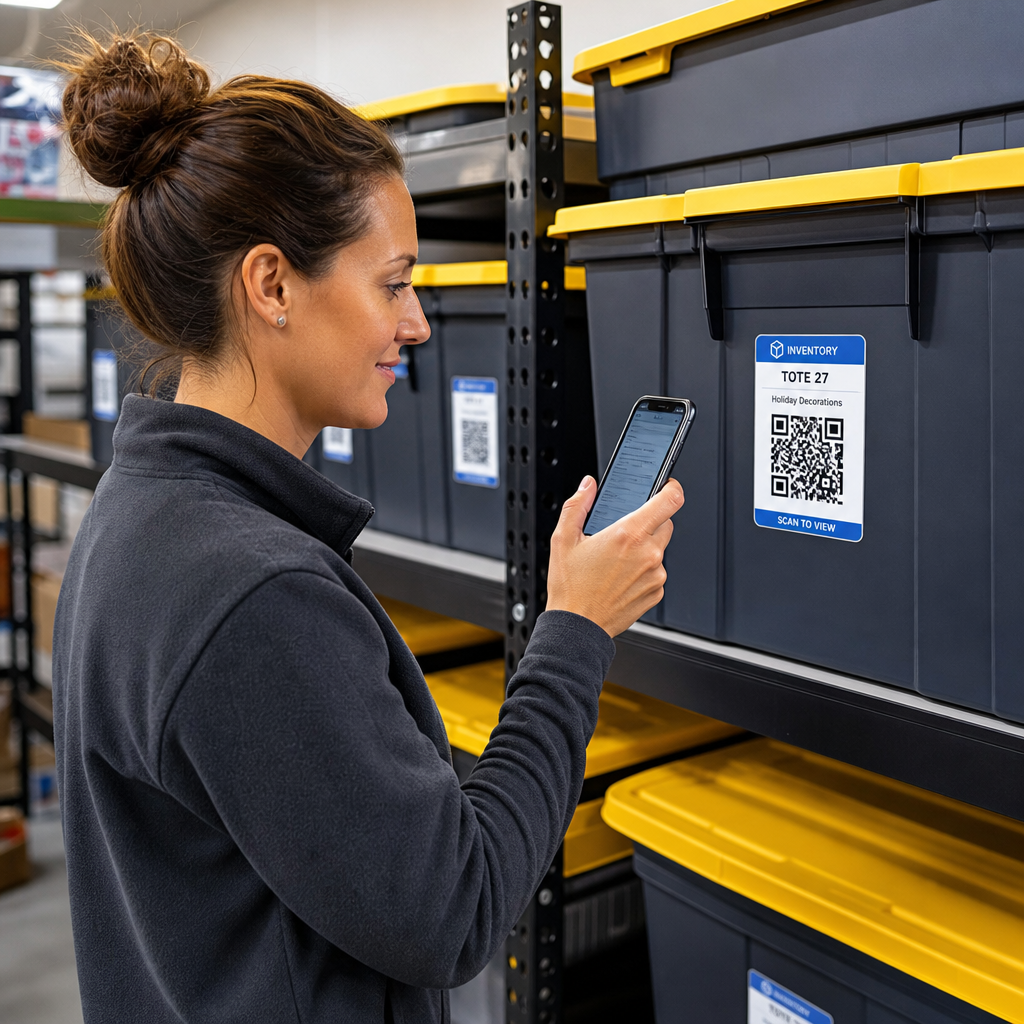

Are you tired of searching through unmarked storage boxes just to locate a single item? Digging blindly through stacked containers wastes valuable time and creates endless operational headaches. Using QR code inventory labels allows you to track, locate, and manage stored items instantly with a simple smartphone scan.
라벨이 없는 보관 상자에서 단일 품목을 찾기 위해 뒤지는 데 지치셨나요? 쌓인 컨테이너를 맹목적으로 뒤지는 것은 소중한 시간을 낭비하고 끝없는 운영상의 골칫거리를 만듭니다. QR 코드 재고 라벨을 사용하면 간단한 스마트폰 스캔만으로 보관된 품목을 즉시 추적, 찾기 및 관리할 수 있습니다.
How QR Code Storage Tracking Works
QR 코드 보관 추적 작동 방식
A QR code storage system connects physical containers, shelves, or facility units to digital records. When you scan a label attached to a tote or rack, your device reads the encoded pattern and opens a linked document, web page, or database entry displaying the contents stored inside.
QR 코드 보관 시스템은 물리적 컨테이너, 선반 또는 시설 단위를 디지털 기록에 연결합니다. 토트백이나 랙에 부착된 라벨을 스캔하면 기기가 인코딩된 패턴을 읽고 내부에 보관된 내용을 표시하는 연결된 문서, 웹 페이지 또는 데이터베이스 항목을 엽니다.
Depending on your operational requirements, you can select between two primary types of QR codes:
운영 요구 사항에 따라 두 가지 주요 유형의 QR 코드 중에서 선택할 수 있습니다.
- 정적 QR 코드: These encode plain text directly into the physical pattern. By using a
: 이는 일반 텍스트를 물리적 패턴에 직접 인코딩합니다. 텍스트 QR 코드 만들기, you can create simple, offline labels that display basic item details. However, static codes cannot be modified after printing.
를 사용하면 기본 품목 세부 정보를 표시하는 간단한 오프라인 라벨을 만들 수 있습니다. 그러나 정적 코드는 인쇄 후 수정할 수 없습니다. - 동적 QR 코드: These store a short redirect URL pointing to an online spreadsheet, cloud folder, or database entry. By using a
: 이는 온라인 스프레드시트, 클라우드 폴더 또는 데이터베이스 항목을 가리키는 짧은 리디렉션 URL을 저장합니다. 동적 QR코드 생성기, you can update box lists, add content photos, or edit item quantities at any time without reprinting the physical sticker.
를 사용하면 물리적 스티커를 다시 인쇄하지 않고도 언제든지 상자 목록을 업데이트하고, 내용물 사진을 추가하거나, 품목 수량을 편집할 수 있습니다.
Adopting digital labels creates a reliable framework to
디지털 라벨을 채택하면 신뢰할 수 있는 프레임워크를 만들어 track inventory in real time
실시간으로 재고를 추적, giving you complete visibility into stored stock across home garages, commercial warehouses, or self-storage units.
하여 가정용 차고, 상업용 창고 또는 셀프 스토리지 시설 전반에 걸쳐 보관된 재고를 완전히 파악할 수 있습니다.
Steps to Set Up a Storage Inventory System
보관 재고 시스템 설정 단계
Building an organized storage layout requires systematic logging, durable label creation, and standardized scanning routines.
체계적인 보관 레이아웃을 구축하려면 체계적인 기록, 내구성 있는 라벨 생성 및 표준화된 스캔 루틴이 필요합니다.
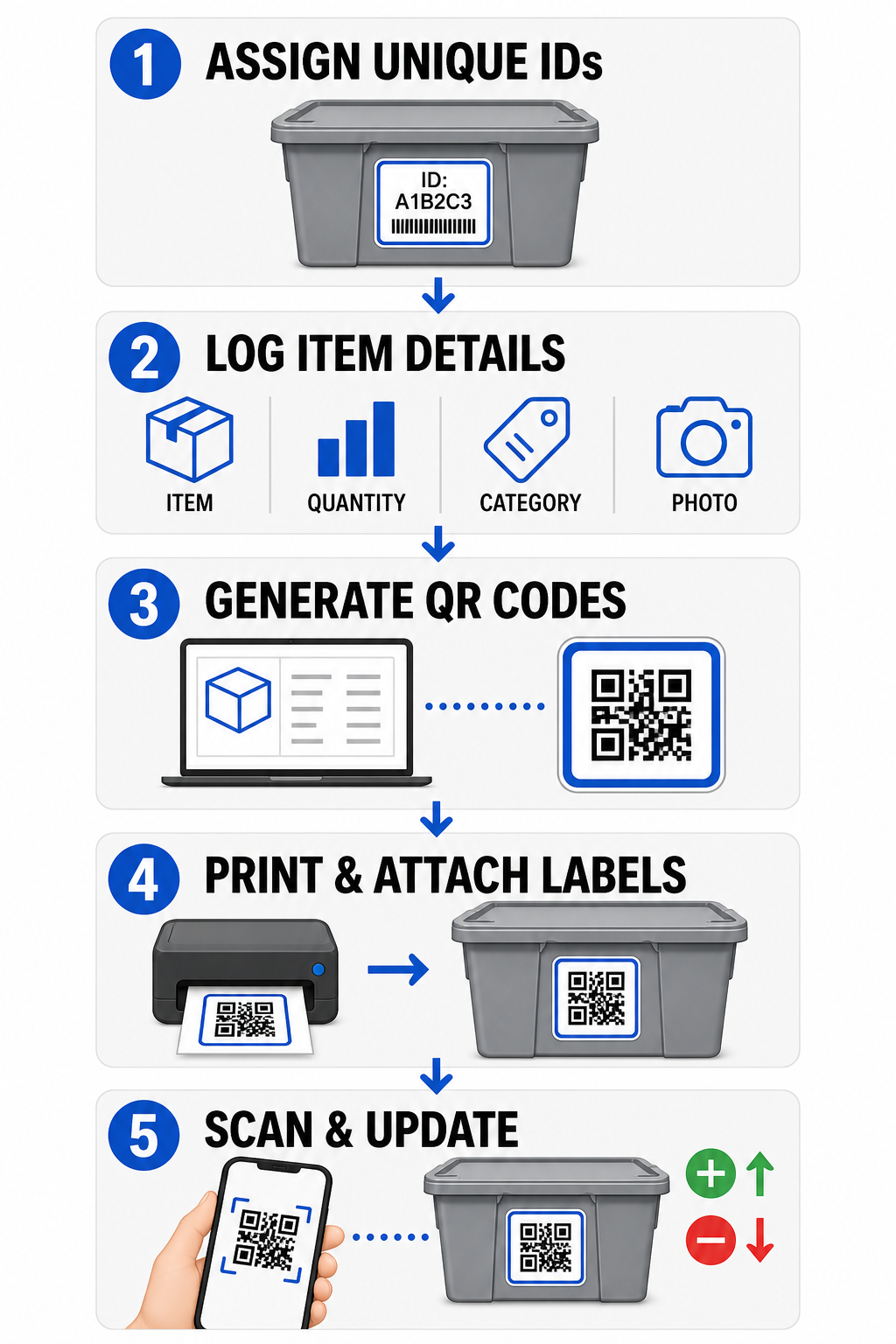
- Assign unique identifiers
고유 식별자 할당: Create a clear naming format or stock keeping unit (SKU) structure for every bin, box, shelf, or storage locker.
: 모든 빈, 상자, 선반 또는 보관함에 대해 명확한 명명 형식 또는 재고 관리 단위(SKU) 구조를 만듭니다. - Compile item records
품목 기록 수집: Input details such as item names, quantities, categories, and photographs into a centralized database or digital document.
: 품목 이름, 수량, 카테고리 및 사진과 같은 세부 정보를 중앙 데이터베이스 또는 디지털 문서에 입력합니다. - Generate scannable codes
스캔 가능한 코드 생성: Enter your digital record links into an online generator to
: 디지털 기록 링크를 온라인 생성기에 입력하여 제품 재고를 위한 QR 코드 생성. You can also connect a 구글폼 QR코드 만들기 to a tracking spreadsheet to simplify intake data entry.
추적 스프레드시트에 연결하여 입고 데이터 입력을 간소화합니다. - Print and attach labels
라벨 인쇄 및 부착: Apply printed labels to the front or top of containers where workers can scan them without moving heavy stacks.
: 무거운 더미를 옮기지 않고 작업자가 스캔할 수 있도록 컨테이너의 앞면이나 상단에 인쇄된 라벨을 부착합니다. - Scan and update routinely
정기적으로 스캔 및 업데이트: Use a web-based
: 웹 기반 QR코드 스캔 or standard smartphone camera to update the live record whenever items are added, removed, or relocated.
또는 표준 스마트폰 카메라를 사용하여 품목이 추가, 제거 또는 재배치될 때마다 실시간 기록을 업데이트합니다.
Streamline Your Storage Management
보관 관리 간소화 Need flexible labels that let you update stored box details without reprinting stickers? Use the
스티커를 다시 인쇄하지 않고 보관된 상자 세부 정보를 업데이트할 수 있는 유연한 라벨이 필요하신가요? 동적 QR코드 생성기 to build editable inventory tags with built-in scan tracking today.
를 사용하여 오늘 바로 내장된 스캔 추적 기능이 있는 편집 가능한 재고 태그를 구축하세요.
Label Design and Placement Guidelines
라벨 디자인 및 배치 지침
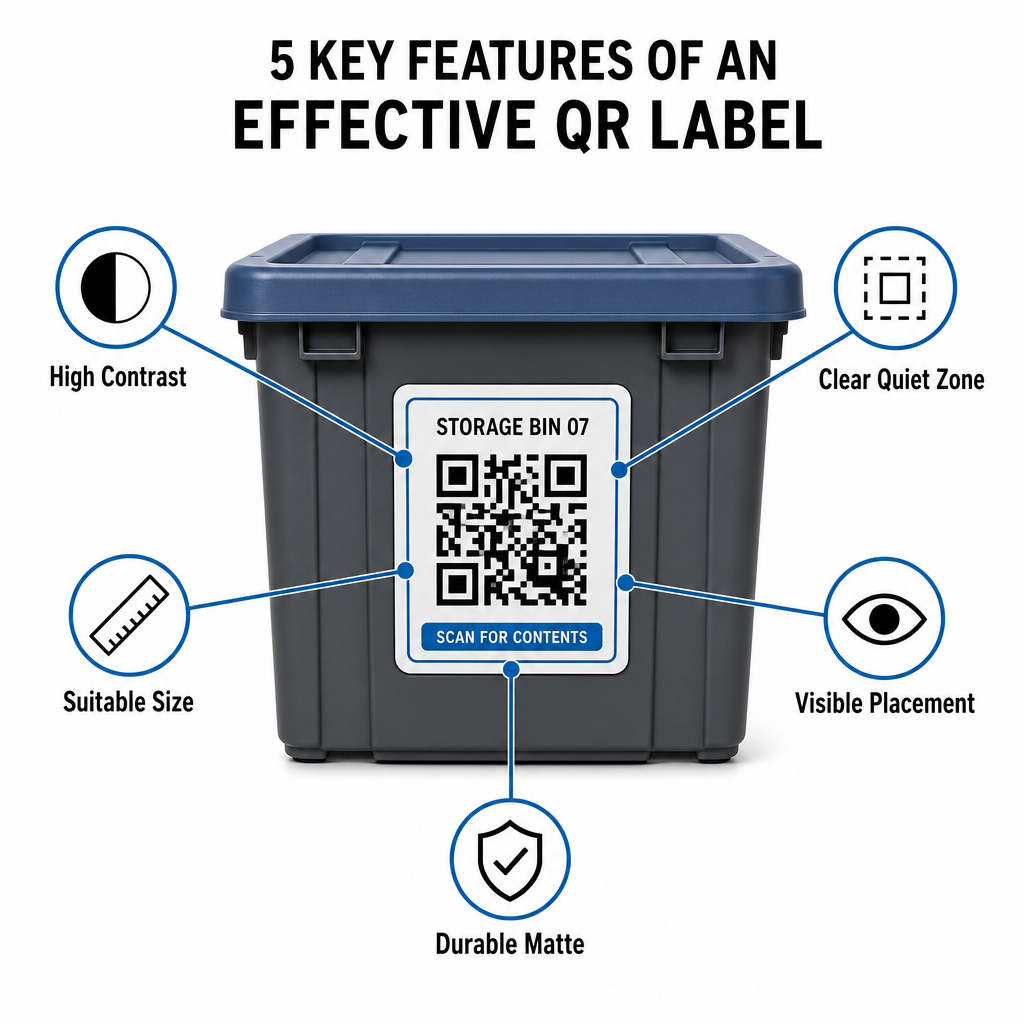
To guarantee fast scans in dim facilities or crowded storage lockers, your printed labels must follow established scannability standards.
어두운 시설이나 붐비는 보관함에서 빠른 스캔을 보장하려면 인쇄된 라벨이 정해진 스캔 가능성 표준을 따라야 합니다.
Size and Distance Rules
크기 및 거리 규칙
- Minimum label size
최소 라벨 크기: Print close-range codes no smaller than 2 x 2 cm (0.8 x 0.8 inches) for handheld totes or archive boxes.
: 휴대용 토트백이나 보관 상자의 경우 근거리 코드를 2 x 2cm(0.8 x 0.8인치)보다 작게 인쇄하지 마십시오. - Distance ratio
거리 비율: Follow a 10:1 distance-to-size rule for high shelving or facility signage, meaning a code scanned from 10 feet away must measure at least 1 foot wide.
: 높은 선반이나 시설 표지판의 경우 10:1의 거리 대 크기 규칙을 따르십시오. 즉, 10피트 거리에서 스캔한 코드는 최소 1피트 너비여야 합니다.
Contrast and Margin Requirements
대비 및 여백 요구 사항
- 높은 대비: Use dark patterns on light backgrounds. Standard black-on-white provides a 21:1 contrast ratio for maximum optical readability, while maintaining a contrast ratio of at least 12:1 ensures consistent scanning.
: 밝은 배경에 어두운 패턴을 사용하십시오. 표준 흰색 바탕에 검은색은 최대 광학 가독성을 위해 21:1의 대비비를 제공하며, 최소 12:1의 대비비를 유지하면 일관된 스캔이 보장됩니다. - Quiet zone border
여백 영역 테두리: Leave an unobstructed margin around the QR code measuring at least four times the width of a single module square.
: QR 코드 주위에 단일 모듈 정사각형 너비의 최소 4배에 해당하는 방해받지 않는 여백을 남겨 둡니다. - Avoid visual clutter
시각적 혼잡 피하기: Eliminate background shadows, low-contrast color combinations, or heavy gradients that degrade camera sensor detection.
: 카메라 센서 감지를 저하시키는 배경 그림자, 저대비 색상 조합 또는 강한 그라데이션을 제거하십시오.
Printing and Environmental Protection
인쇄 및 환경 보호
- High print resolution
높은 인쇄 해상도: Export artwork in vector formats like SVG or PDF, or save raster files at 300 DPI or higher to avoid blurry edges.
: 아트워크를 SVG 또는 PDF와 같은 벡터 형식으로 내보내거나, 흐릿한 가장자리를 방지하기 위해 래스터 파일을 300 DPI 이상으로 저장하십시오. - Durable materials
내구성 있는 재료: Use weather-resistant, matte vinyl labels for industrial units or outdoor racks. Position exterior tags on less sun-exposed surfaces, such as the north-facing side of equipment, to prevent UV degradation over time.
: 산업용 장치 또는 야외 랙에는 내후성 무광택 비닐 라벨을 사용하십시오. 시간이 지남에 따른 UV 열화를 방지하기 위해 외부 태그는 장비의 북향 측면과 같이 햇빛에 덜 노출되는 표면에 배치하십시오.
| Design Parameter 설계 매개변수 |
Standard Requirement 표준 요구 사항 |
Practical Reason 실용적 이유 |
|---|---|---|
| 최소 근거리 크기 | 2 x 2 cm (0.8 x 0.8 in) | 스마트폰 카메라 초점 가독성을 보장합니다. |
| 스캔 거리 비율 | 10:1 (거리 : 너비) | 높은 선반의 태그가 바닥에서도 선명하게 스캔되도록 보장합니다. |
| 색상 대비 비율 | 최소 12:1 (이상적 21:1) | 광학 센서가 데이터 패턴을 쉽게 구별하도록 돕습니다. |
| 무음 영역 여백 | 모든 면에 4 모듈 너비 | 인접한 텍스트나 테두리선이 스캔을 왜곡하는 것을 방지합니다. |
| 인쇄 해상도 | 300 DPI 또는 SVG/PDF 내보내기 | 인쇄 중 번지거나 흐릿한 픽셀을 방지합니다. |
운영자와 고객을 위한 실용적 응용
보관 시설 관리자와 개인 보관 고객은 QR 코드를 사용하여 다양한 조직적 요구를 해결합니다.
셀프 스토리지 시설 운영자
운영자는 자산 추적과 일일 유지보수 작업 흐름을 개선하기 위해 시설 전체에 스캔 가능한 태그를 배치합니다:
- 유닛 상태 모니터링: 유닛 문에 태그를 부착하여 시설 직원이 순찰 중 스캔해 잠금 확인, 유지보수 요청 또는 가용성 업데이트를 기록할 수 있도록 합니다.
- 장비 대여: 시설 핸드 트럭, 도구 및 지게차 장비에 라벨을 부착하여 일일 운영 중 사용 기록을 관리합니다.
- 주문 처리 효율성: 제3자 물류를 지원하는 시설은 스캔 가능한 태그를 사용하여 주문 처리 및 입고 프로세스를 간소화합니다.
개인 및 비즈니스 보관 고객
개인 및 상업 임차인은 구조화된 디지털 인덱싱을 통해 가정용 차고, 보관실 또는 임대 유닛을 정리합니다:
- 계절별 컨테이너 인덱싱: 명절 장식, 스포츠 장비 및 계절별 옷장 토트에 라벨을 부착해 뚜껑을 열지 않고도 상자 내용물을 확인할 수 있습니다.
- 비즈니스 기록물 추적: 세금 문서, 법률 파일 및 고객 기록을 분류하여 물리적 상자 태그를 안전한 온라인 폴더에 연결합니다.
- 업종 간 유연성: 소매 상품부터 다양한 산업, 의 전문 도구까지, 다용도로 제작된 맞춤 태그는 QR 코드 생성기 보관된 재고를 체계적으로 유지하고 쉽게 찾을 수 있도록 합니다.
보관 재고를 관리하세요
QR 코드 보관 라벨을 도입하면 추측이 필요 없어지고, 재고 감사 속도가 빨라지며, 개인 보관 유닛과 상업용 창고에서 물품 분실을 방지할 수 있습니다. 동적 라벨을 선택하고, 고대비 패턴을 인쇄하며, 명확한 부착 규칙을 적용함으로써 모든 보관 자산에 대한 완전한 가시성을 유지할 수 있습니다.
Pageloot으로 인쇄 가능한 재고 라벨을 생성하여 오늘부터 보관 작업 흐름을 디지털화하세요.
자주 묻는 질문
컨테이너나 상자에 근거리 스캔을 위한 최소 크기는 2 x 2 cm (0.8 x 0.8 인치)입니다. 먼 거리에서 스캔하는 높은 선반이나 시설 문에 부착된 라벨의 경우, 코드 너비가 전체 스캔 거리의 10분의 1인 10:1 비율을 따르세요.
예, 동적 QR 코드를 사용하는 경우에 한합니다. 동적 QR 코드는 편집 가능한 단축 링크를 가리키므로, 박스에 부착된 물리적 라벨은 그대로 유지하면서 디지털 데이터베이스에서 항목 목록을 업데이트하거나, 사진을 업로드하거나, 수량을 조정할 수 있습니다.
시설 운영자는 유닛 도어, 통로 위치 및 공용 장비에 QR 코드 라벨을 부착합니다. 이 코드를 스캔하면 직원이 실시간으로 재고 실사, 유닛 유지보수 이력 기록, 점유 확인 및 자산 대여 관리를 수행할 수 있습니다.