Việc thiết kế thủ công từng mã QR trong một chiến dịch không chỉ chậm chạp – nó còn tạo ra sự không nhất quán làm suy yếu thương hiệu của bạn và khiến việc theo dõi gần như không thể. Nếu bạn đang triển khai mã QR ở quy mô thực sự, tự động hóa là cách bạn duy trì chất lượng nhất quán đồng thời cắt giảm thời gian cần thiết để ra mắt.
Hướng dẫn này sẽ đưa bạn qua năm bước thực tế để tự động hóa việc tùy chỉnh mã QR: từ việc lập bản đồ nguồn dữ liệu và chọn nền tảng phù hợp đến xây dựng quy trình làm việc dựa trên sự kiện, theo dõi hiệu suất và tăng cường bảo mật khi bạn mở rộng quy mô.
Bước 1: Lập Bản Đồ Các Yêu Cầu Tự Động Hóa Của Bạn
Trước khi xây dựng bất cứ điều gì, hãy làm rõ những gì bạn thực sự cần tự động hóa. Bỏ qua bước này sẽ dẫn đến các quy trình làm việc bị lỗi khi quá tải hoặc yêu cầu sửa chữa thủ công liên tục.
Bắt đầu bằng cách xác định các nguồn dữ liệu của bạn. Thông tin cần để tạo mỗi mã QR đến từ đâu? Các nguồn phổ biến bao gồm:
- Hệ thống CRM cho các mã dành riêng cho khách hàng được liên kết với chương trình khách hàng thân thiết hoặc quy trình giới thiệu
- Danh mục sản phẩm hoặc cơ sở dữ liệu hàng tồn kho cho việc dán nhãn bán lẻ và thương mại điện tử
- Nền tảng quản lý sự kiện cho các mã QR dành riêng cho người tham dự tại các hội nghị hoặc triển lãm thương mại
- Tệp CSV hoặc Excel cho các chiến dịch hàng loạt như gửi thư trực tiếp hoặc dán nhãn sản phẩm
Khi bạn đã biết các nguồn của mình, hãy quyết định cách kết nối chúng với công cụ tạo mã QR. API cho phép truy xuất dữ liệu theo chương trình và là tùy chọn linh hoạt nhất. Webhook cho phép kích hoạt theo thời gian thực – ví dụ, tạo mã QR ngay khi một khách hàng mới đăng ký. Nếu các công cụ của bạn không có tích hợp trực tiếp, các nền tảng tự động hóa không mã như Zapier, Make hoặc n8n có thể lấp đầy khoảng trống bằng cách sử dụng các quy trình làm việc dựa trên webhook.
Cuối cùng, hãy suy nghĩ về khối lượng và tần suất cập nhật. Một lô 500 mã một lần cho việc ra mắt sản phẩm là một vấn đề khác so với việc tạo mã cá nhân hóa cho mỗi liên hệ CRM mới theo thời gian thực. Các quyết định về công cụ của bạn nên phản ánh cả quy mô hiện tại và nơi bạn mong đợi sẽ đạt được trong sáu tháng tới.
Khám phá Tất cả Các Tính Năng Của Mã QR Không chắc loại mã QR nào phù hợp với trường hợp sử dụng của bạn? Duyệt qua toàn bộ Tổng quan tính năng Pageloot để xem những gì có sẵn cho các chiến dịch của bạn.
Bước 2: Chọn và Cấu hình Nền tảng Mã QR của Bạn
Sau khi đã xác định các yêu cầu của bạn, bước tiếp theo là chọn một nền tảng có thể hỗ trợ tạo mã QR tự động, có thương hiệu với số lượng mục tiêu của bạn.
Những điều cần tìm kiếm ở một nền tảng
Mã QR động là yếu tố cần thiết cho bất kỳ quy trình làm việc tự động nào. Không giống như mã tĩnh, mã động cho phép bạn cập nhật URL đích hoặc nội dung được liên kết sau khi in – mà không cần tạo mã mới hoặc in lại tài liệu. Điều này quan trọng khi các chiến dịch thay đổi, liên kết bị hỏng hoặc bạn muốn chuyển hướng mã dựa trên thời gian hoặc đối tượng. Tính năng Trình tạo mã QR động Pageloot cho phép bạn thay đổi nội dung được liên kết bất cứ lúc nào, ngay cả sau khi mã đã được phân phối.
Kiểm soát thương hiệu và tùy chỉnh xác định mức độ bạn có thể tự động hóa khía cạnh hình ảnh. Tìm kiếm một nền tảng cho phép bạn đặt màu thương hiệu, tải lên logo, chọn kiểu thân và cạnh, và lưu các lựa chọn đó dưới dạng mẫu có thể tái sử dụng. Tính năng của Pageloot Tạo mã QR có logo ở giữa cho phép bạn kiểm soát kiểu dáng, khung, màu nền, mẫu thân, loại cạnh và các cài đặt thiết kế sẵn – tất cả đều có thể được khóa một lần và tái sử dụng một cách nhất quán.
Tạo hàng loạt là điều không thể bỏ qua nếu bạn đang làm việc ở quy mô lớn. Một nền tảng phải có khả năng xử lý hàng trăm hoặc hàng nghìn mã trong một lô duy nhất, cho dù từ tệp CSV tải lên hay qua API, đồng thời áp dụng các thông số thương hiệu và theo dõi nhất quán cho mọi mã.
THỐNG KÊ hoàn thiện quy trình. Bạn cần biết mã nào đang được quét, khi nào, ở đâu và trên thiết bị nào. Các nền tảng hiển thị dữ liệu này theo thời gian thực cho phép bạn hành động dựa trên hiệu suất, chứ không chỉ báo cáo về nó.
Thiết lập Nền tảng
Sau khi bạn đã chọn một nền tảng, hãy cấu hình nó trước khi xây dựng bất kỳ quy trình làm việc nào:
- Xác định vai trò và quyền của người dùng. Gán cấp độ truy cập để quản trị viên quản lý tích hợp, người quản lý chiến dịch xử lý việc tạo mã và nhà phân tích truy cập báo cáo mà không thể thay đổi các chiến dịch đang hoạt động.
- Tạo thông tin xác thực API và cấu hình các điểm cuối của bạn nếu bạn đang sử dụng tích hợp API trực tiếp.
- Thiết lập các mẫu thương hiệu. Tải lên logo của bạn, đặt màu thương hiệu của bạn và lưu các cài đặt đó dưới dạng một mẫu có thể tái sử dụng. Pageloot's Mẫu mã QR cho phép bạn tạo nhiều mẫu cho các trường hợp sử dụng khác nhau – một cho bao bì, một cho tài liệu sự kiện, một cho các chiến dịch kỹ thuật số – để mọi mã trông nhất quán mà không cần tạo kiểu thủ công mỗi lần.
- Bật cài đặt bảo mật. Bật xác thực hai yếu tố cho tài khoản quản trị, đặt chính sách lưu giữ dữ liệu và cấu hình kiểm soát truy cập phù hợp với ngành của bạn.
Xây dựng mã QR có thương hiệu ở quy mô lớn Bạn muốn tự động áp dụng logo và màu thương hiệu của mình cho mọi mã? Sử dụng Tạo mã QR có logo ở giữa để đặt nhận diện hình ảnh của bạn một lần và giữ cho mọi mã đều đúng thương hiệu.
Bước 3: Xây dựng quy trình làm việc tự động để tạo và triển khai
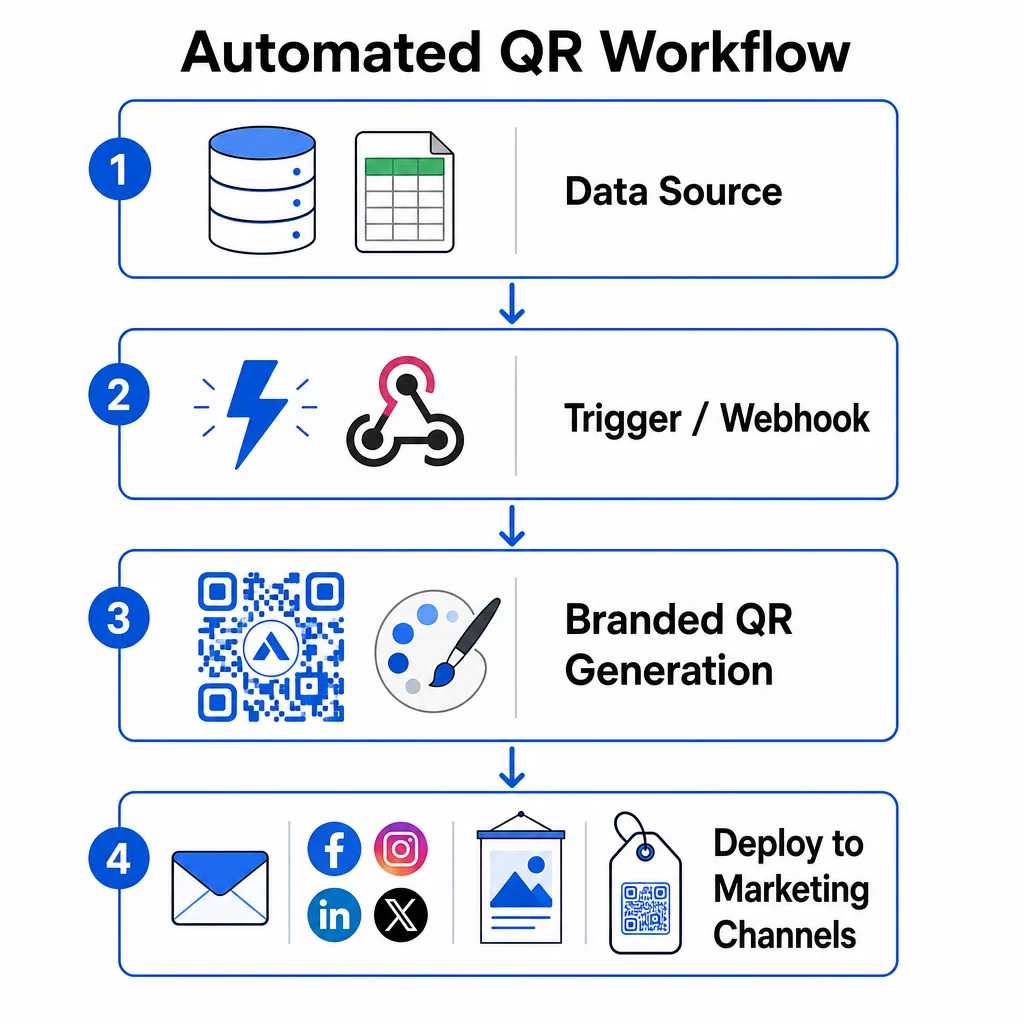
Đây là nơi thiết lập của bạn trở thành một hệ thống hoạt động. Mục tiêu là xác định các sự kiện cụ thể kích hoạt việc tạo mã QR, sau đó kết nối các mã đó trực tiếp với các kênh tiếp thị của bạn để chúng sẵn sàng sử dụng ngay lập tức.
Các trình kích hoạt dựa trên sự kiện
Các trình kích hoạt là thứ khiến tự động hóa trở nên rảnh tay. Thay vì tạo mã thủ công, hệ thống của bạn sẽ tự động phản hồi các sự kiện kinh doanh.
Các loại trình kích hoạt phổ biến bao gồm:
- Cập nhật danh mục sản phẩm: Khi một sản phẩm mới được thêm vào hệ thống kiểm kê của bạn, một quy trình làm việc sẽ tạo ra mã QR có thương hiệu được liên kết với trang sản phẩm đó – sẵn sàng cho bao bì hoặc tài liệu tiếp thị trước khi bất kỳ ai phải yêu cầu.
- Đăng ký khách hàng: Khi một khách hàng mới đăng ký, hệ thống sẽ tạo mã QR cá nhân hóa để truy cập tài khoản, bộ chào mừng hoặc đăng ký chương trình khách hàng thân thiết.
- Đặt chỗ sự kiện: Khi một người tham dự đăng ký hội nghị hoặc triển lãm thương mại, một mã QR duy nhất sẽ được tạo để làm thủ tục hoặc truy cập gian hàng.
- Chiến dịch theo lịch trình: Các trình kích hoạt dựa trên thời gian có thể tạo mã hàng tuần cho các sự kiện sắp tới hoặc hàng tháng cho các chương trình khuyến mãi theo mùa, giữ cho các chiến dịch luôn cập nhật mà không cần cập nhật thủ công.
Đối với các quy trình làm việc dựa trên API, việc tạo mã QR thường diễn ra thông qua yêu cầu HTTP POST truyền cả nội dung (URL hoặc tải trọng dữ liệu) và các thông số kiểu dáng (màu sắc, URL logo, kích thước, định dạng) trong một thân JSON duy nhất. Các trường kiểu dáng thường là tùy chọn – mẫu thương hiệu đã lưu của bạn sẽ tự động xử lý chúng – trong khi trường nội dung là bắt buộc đối với mỗi mã duy nhất.
Đối với các thiết lập không cần mã, trình kích hoạt “Webhooks by Zapier” của Zapier cho phép bạn tạo một URL kích hoạt Zap từ bất kỳ yêu cầu HTTP đến nào. Make và n8n cung cấp các trình kích hoạt dựa trên webhook tương tự với logic nâng cao hơn cho các nhóm cần phân nhánh có điều kiện hoặc chuyển đổi nhiều bước.
Để tìm hiểu sâu hơn về cách API cho phép tạo hàng loạt và cập nhật động, hãy xem Tích hợp API để quản lý mã QR.
Tích hợp với các kênh tiếp thị
Khi một trình kích hoạt được kích hoạt và một mã được tạo, quy trình làm việc sẽ đẩy mã đó trực tiếp vào kênh nơi nó sẽ được sử dụng. Điều này loại bỏ bước thủ công tải xuống, định dạng lại và tải mã lên từng nền tảng.
- Công cụ tiếp thị qua email như Mailchimp hoặc Constant Contact có thể kéo mã QR trực tiếp vào các mẫu bản tin hoặc email quảng cáo tại thời điểm gửi.
- Công cụ lên lịch mạng xã hội như Hootsuite hoặc Buffer có thể nhận mã như một phần của tải trọng bài đăng đã lên lịch, cho phép bạn ghép nội dung với một mã duy nhất cho mỗi nền tảng.
- Nền tảng tự động hóa tiếp thị như HubSpot hoặc Marketo có thể kích hoạt tạo mã QR dựa trên điểm khách hàng tiềm năng hoặc tư cách thành viên phân khúc, tự động nhúng mã kết quả vào một chuỗi email được nhắm mục tiêu.
Đối với các agency quản lý chiến dịch cho nhiều khách hàng, tự động hóa trở nên quan trọng hơn nữa. Quy trình làm việc có thể áp dụng thương hiệu dành riêng cho khách hàng, tạo mã và chuyển chúng qua bước phê duyệt trước khi bất kỳ mã nào được đưa vào sử dụng. Xem cách Pageloot hỗ trợ quy trình làm việc của agency với các tính năng nhãn trắng, quyền dựa trên vai trò và báo cáo khách hàng có thể chia sẻ.
Quản lý mã QR động và hàng loạt
Tạo hàng loạt xử lý số lượng lớn; mã động xử lý sự thay đổi. Cùng nhau, chúng đáp ứng hầu hết các nhu cầu về mã QR quy mô doanh nghiệp.
Với tính năng tạo hàng loạt, bạn truyền một danh sách các giá trị nội dung duy nhất – URL sản phẩm, ID người tham dự, định danh vị trí – cùng với một bộ thông số thương hiệu chung. Nền tảng tạo mọi mã trong một lần, áp dụng kiểu dáng nhất quán và trả về chúng ở định dạng sẵn sàng để đóng gói hoặc in. Để biết thêm về các công cụ hàng loạt cấp doanh nghiệp, hãy xem các công cụ mã QR hàng loạt tự động dành cho doanh nghiệp.
Mã động tăng thêm tính linh hoạt sau khi phân phối. Nếu điểm đến của chiến dịch thay đổi, một chương trình khuyến mãi kết thúc hoặc một liên kết bị hỏng, bạn cập nhật điểm đến trong bảng điều khiển của mình – chứ không phải mã vật lý. Điều này cũng cho phép tự động hóa dựa trên hiệu suất: quy trình làm việc có thể theo dõi tỷ lệ quét và tự động cập nhật điểm đến của mã nếu mức độ tương tác giảm xuống dưới ngưỡng, hoặc chuyển hướng mã đến các trang theo mùa theo lịch trình đã định.
Bước 4: Theo dõi và Tối ưu hóa Hiệu suất Chiến dịch
Tự động hóa không có nghĩa là thiết lập rồi quên đi. Lợi ích hiệu suất thực sự đến từ việc theo dõi những gì đang hoạt động và thực hiện điều chỉnh trong khi các chiến dịch vẫn đang chạy.
Thống kê theo thời gian thực
Theo dõi lượt quét giúp bạn có cái nhìn tức thì về hiệu suất của mã trên các kênh. Một bảng điều khiển phân tích tốt sẽ hiển thị tần suất quét, phân bố địa lý, loại thiết bị và các mẫu theo thời gian trong ngày. Nếu bạn thấy số lượt quét giảm trong những giờ cụ thể, bạn có thể điều chỉnh thời gian khuyến mãi. Nếu một số địa điểm nhất quán vượt trội hơn những địa điểm khác, bạn có thể phân phối lại tài liệu cho phù hợp.
Bảng điều khiển của Pageloot không chỉ ghi lại thời gian và địa điểm quét xảy ra, mà còn ghi lại những gì người dùng làm sau khi quét – mang lại cho bạn một bức tranh hoàn chỉnh hơn về hiệu suất chiến dịch so với chỉ riêng số lượng quét.
Báo cáo tự động
Quản lý nhiều chiến dịch mã QR theo cách thủ công có nghĩa là phải chuyển đổi giữa các bảng điều khiển và tổng hợp dữ liệu bằng tay. Báo cáo tự động loại bỏ gánh nặng đó bằng cách gửi các bản tóm tắt theo lịch trình trực tiếp đến hộp thư đến hoặc nền tảng tích hợp của bạn.
Các tần suất báo cáo hữu ích bao gồm:
- Báo cáo hàng tuần làm nổi bật các mã hoạt động tốt nhất, gắn cờ các mẫu quét bất thường và xác định các chiến dịch có thể cần được chú ý
- Báo cáo hàng tháng nắm bắt các xu hướng dài hạn, sự thay đổi theo mùa và so sánh giữa các chiến dịch
Kết nối phân tích QR của bạn với các nền tảng như Google Analytics, HubSpot hoặc Salesforce sẽ tạo ra một cái nhìn thống nhất về dữ liệu tiếp thị của bạn. Hệ thống cảnh báo bổ sung thêm một lớp – thông báo cho bạn ngay lập tức khi một chiến dịch mã QR gặp phải sự sụt giảm đột ngột về hoạt động, để bạn có thể điều tra trước khi chiến dịch bị ảnh hưởng.
Áp dụng dữ liệu vào các chiến dịch vật lý
Phân tích QR đặc biệt hữu ích để đo lường mức độ tương tác với các tài liệu in ấn, vốn rất khó theo dõi. Bằng cách gán các mã duy nhất cho các địa điểm, sự kiện hoặc đợt in cụ thể, bạn có thể phân bổ lượt quét một cách chính xác.
Ví dụ, một chuỗi bán lẻ có thể gán một mã duy nhất cho từng địa điểm cửa hàng và xem địa điểm nào thúc đẩy tương tác kỹ thuật số nhiều nhất. Tại một triển lãm thương mại, mã QR trên tài liệu gian hàng kết nối các tương tác vật lý với phân tích kỹ thuật số, cung cấp cho các nhóm tiếp thị dữ liệu để biện minh cho chi phí sự kiện.
Khi một mã hoạt động đặc biệt tốt, bạn có thể mở rộng quy mô nó – tăng chi tiêu quảng cáo, mở rộng phân phối hoặc nhân rộng định dạng chiến dịch sang các kênh khác.
Theo dõi chiến dịch của bạn trong thời gian thực Bạn muốn biết chính xác khách hàng của mình đang quét tài liệu của bạn ở đâu và khi nào? Hãy sử dụng Trình tạo mã QR để tạo mã động có thể theo dõi và truy cập bảng điều khiển hiệu suất đầy đủ.
Bước 5: Thiết kế để dễ quét và bảo mật ở quy mô lớn
Tự động hóa xử lý khối lượng lớn, nhưng các mã mà nó tạo ra vẫn cần phải quét đáng tin cậy và đến từ một hệ thống sẽ không làm lộ dữ liệu của bạn hoặc bị hỏng dưới tải.
Xây dựng thương hiệu trong giới hạn kỹ thuật
Tùy chỉnh mở rộng những gì mã QR có thể làm cho thương hiệu của bạn – nhưng nó hoạt động trong các ràng buộc kỹ thuật mà nếu bỏ qua, sẽ tạo ra các mã không thể quét được.
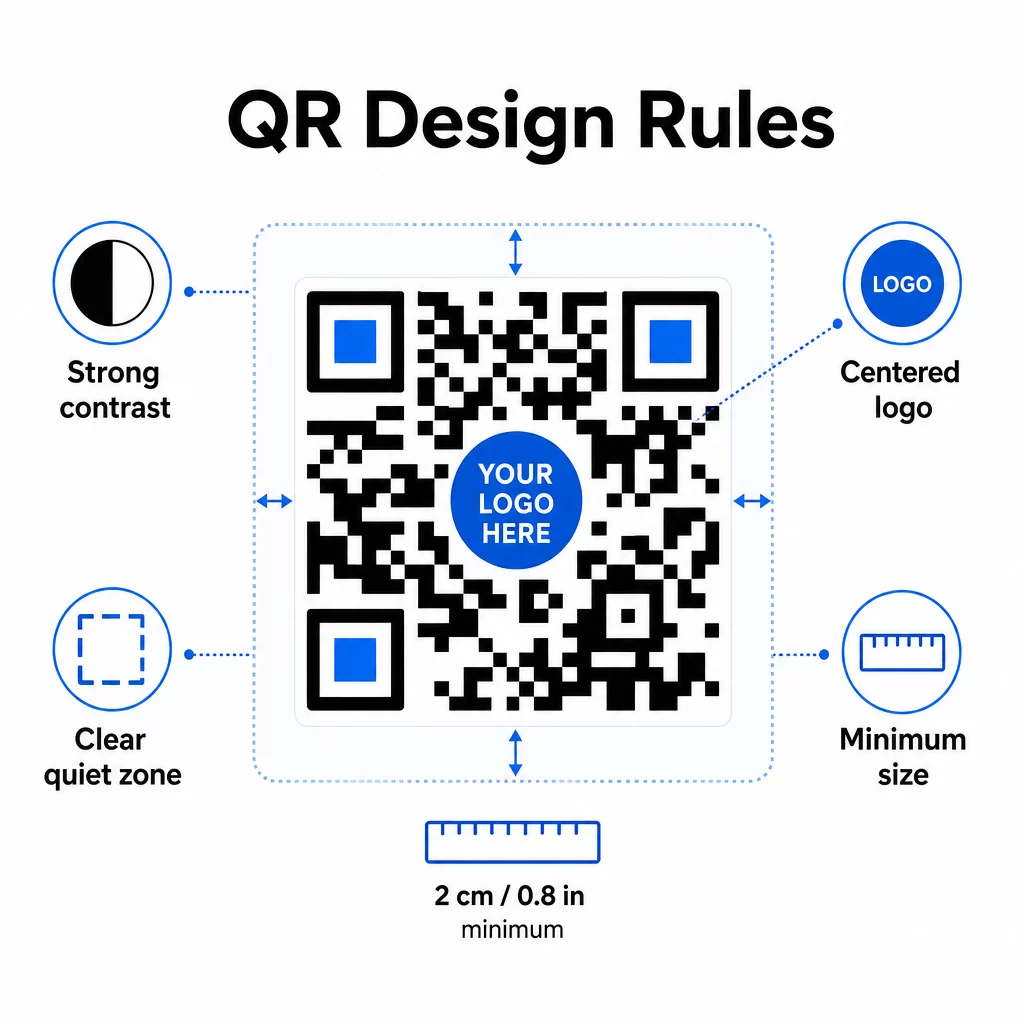
Độ tương phản màu sắc là điểm lỗi phổ biến nhất. Máy quét mã QR đọc sự khác biệt giữa các mô-đun tối và sáng, vì vậy nền trước phải luôn tối hơn nền sau. Không bao giờ đảo ngược mối quan hệ này. Tỷ lệ tương phản tối thiểu 4:1 giữa mã và nền của nó là mức sàn thực tế để quét đáng tin cậy; tỷ lệ cao hơn sẽ tốt hơn. Để biết chi tiết về các kết hợp màu sắc và tỷ lệ tương phản, hãy xem các phương pháp hay nhất về độ tương phản màu của mã QR.
Phạm vi phủ sóng của logo phải duy trì ở mức bằng hoặc dưới 30% tổng diện tích mã. Các logo lớn hơn sẽ che khuất quá nhiều mô-đun dữ liệu để có thể khôi phục. Chỉ đặt logo ở giữa, trên nền sáng đồng nhất và sử dụng các hình dạng đơn giản. Nếu bạn đang nhúng logo, hãy sử dụng mức sửa lỗi Q hoặc H để cung cấp cho máy quét nhiều dự phòng hơn để xử lý.
Vùng yên tĩnh là khoảng trống rõ ràng xung quanh mã. Thông số kỹ thuật mã QR yêu cầu ít nhất bốn mô-đun không gian trống ở tất cả các cạnh. Trong các quy trình làm việc tự động, việc cắt bỏ khoảng trống này một cách vô tình rất dễ xảy ra – hãy tích hợp việc thực thi vùng yên tĩnh vào cài đặt mẫu của bạn để không thể ghi đè.
Kích thước tối thiểu để quét tầm gần là khoảng 0,8 × 0,8 inch (khoảng 2 × 2 cm). Đối với biển báo hoặc áp phích được xem từ xa, hãy áp dụng quy tắc 10:1: khoảng cách quét không được quá mười lần chiều rộng của mã. Một mã trên áp phích được xem từ 10 feet phải rộng ít nhất 12 inch.
Bất kỳ tùy chỉnh nào bạn áp dụng – kết hợp màu sắc mới, vị trí logo, kiểu khung – cần được kiểm tra trước khi đưa vào quy trình làm việc hàng loạt. Kiểm tra trên nhiều thiết bị, ứng dụng quét và điều kiện ánh sáng. Để biết hướng dẫn đọc toàn diện, hãy xem các phương pháp hay nhất để đọc mã QR.
Các biện pháp bảo mật
Khi hệ thống tự động của bạn xử lý nhiều mã và nhiều dữ liệu hơn, bảo mật cần phải theo kịp.
- Kiểm soát truy cập dựa trên vai trò giới hạn những gì mỗi thành viên trong nhóm có thể làm. Điều phối viên tiếp thị có thể tạo và xem trước các chiến dịch; chỉ quản trị viên CNTT mới nên quản lý tích hợp và cài đặt bảo mật.
- Mã hóa dữ liệu bảo vệ thông tin nhạy cảm khi truyền và khi lưu trữ. Mã QR liên kết đến các trang thanh toán, tài khoản khách hàng hoặc tài liệu bí mật phải luôn sử dụng các đích HTTPS được mã hóa với chứng chỉ TLS hợp lệ.
- Tuân thủ GDPR, CCPA hoặc HIPAA (tùy thuộc vào ngành của bạn) có nghĩa là xây dựng các cơ chế đồng ý, chính sách lưu giữ dữ liệu và tùy chọn từ chối tham gia vào các quy trình làm việc tự động của bạn ngay từ đầu – chứ không phải là một suy nghĩ sau đó.
- Kiểm tra bảo mật định kỳ phát hiện các lỗ hổng trước khi chúng trở thành sự cố. Ghi lại lịch trình xem xét của bạn và kiểm tra quyền truy cập mỗi khi một thành viên trong nhóm thay đổi vai trò.
Chiến lược Khả năng Mở rộng
Thiết kế quy trình làm việc theo mô-đun là cách tiếp cận thực tế nhất để mở rộng quy mô. Thay vì một quy trình làm việc lớn xử lý việc tạo, tạo kiểu, phân phối và phân tích, hãy chia chúng thành các mô-đun riêng biệt, liên kết với nhau. Sau đó, bạn có thể cập nhật một thành phần – chẳng hạn như logic thương hiệu – mà không ảnh hưởng đến quy trình phân phối.
Xây dựng tính năng xử lý lỗi tự động với các cơ chế dự phòng. Nếu điểm cuối tạo mã QR chính không khả dụng, quy trình làm việc sẽ chuyển sang dự phòng, ghi lại lỗi và cảnh báo quản trị viên – chứ không phải âm thầm bỏ qua yêu cầu. Logic thử lại xử lý các sự cố kết nối tạm thời mà không cần can thiệp thủ công.
Đối với các hoạt động có khối lượng lớn, giới hạn tốc độ API và hệ thống hàng đợi giúp bạn không làm quá tải các nền tảng được kết nối. Phân phối các yêu cầu đều đặn thay vì gửi tất cả trong một lần, và sử dụng xử lý hàng loạt trong giờ thấp điểm nếu có thể.
Lưu giữ lịch sử phiên bản của cấu hình quy trình làm việc và theo dõi thời gian thực thi, tỷ lệ phản hồi API và mức sử dụng tài nguyên. Nếu thời gian tạo hoặc triển khai bắt đầu tăng lên, đó là tín hiệu để điều tra xem có cần tăng dung lượng hay không trước khi nó ảnh hưởng đến các chiến dịch đang hoạt động.
Tổng Hợp Lại
Năm bước trên tạo thành một hệ thống hoàn chỉnh: các yêu cầu thúc đẩy lựa chọn nền tảng, các lựa chọn nền tảng cho phép tạo mẫu có thương hiệu, các mẫu cung cấp cho quy trình làm việc tự động, các quy trình làm việc tạo ra mã có thể theo dõi và dữ liệu theo dõi giúp bạn cải thiện theo thời gian.
Việc áp dụng mã QR tiếp tục tăng trưởng – một cuộc khảo sát năm 2025 cho thấy 82% người tiêu dùng cảm thấy thoải mái khi quét mã từ các doanh nghiệp mà họ nhận ra, tăng từ 53% vào năm 2021. Tự động hóa là yếu tố giúp việc tiếp cận đối tượng đó ở quy mô lớn trở nên khả thi, với các mã luôn đúng thương hiệu, có thể quét đáng tin cậy và gắn liền với các kết quả có thể đo lường được.
Bắt đầu với trình tạo mã QR Pageloot để thiết lập mẫu có thương hiệu đầu tiên của bạn, sau đó xây dựng lớp tự động hóa của bạn trên nền tảng đó.
Câu hỏi thường gặp
Mã QR động cho phép bạn cập nhật URL đích hoặc nội dung được liên kết sau khi mã đã được in và phân phối. Trong một quy trình làm việc tự động, điều này có nghĩa là bạn có thể chuyển hướng mã đến các ưu đãi mới, sửa các liên kết bị hỏng hoặc xoay vòng nội dung theo mùa mà không cần tạo mã mới hoặc in lại tài liệu. Chúng cũng cung cấp phân tích quét – thời gian, vị trí, loại thiết bị – để đưa vào các quy trình làm việc tối ưu hóa của bạn.
Ba quy tắc quan trọng nhất là độ tương phản, phạm vi phủ sóng của logo và vùng yên tĩnh. Luôn sử dụng nền tối trên nền sáng với tỷ lệ tương phản ít nhất 4:1. Giữ bất kỳ logo nhúng nào ở mức 30% hoặc ít hơn so với diện tích mã, căn giữa trên nền đồng nhất. Duy trì ít nhất bốn mô-đun lề rõ ràng xung quanh toàn bộ mã. Sử dụng mức độ sửa lỗi Q hoặc H khi thêm logo. Xây dựng các ràng buộc này vào các mẫu của bạn để mọi mã được tạo ra bởi hệ thống tự động của bạn đều đáp ứng chúng một cách tự động – sau đó kiểm tra các cấu hình thiết kế mới trên nhiều thiết bị trước khi chạy chúng qua quy trình làm việc hàng loạt.
Các nền tảng không mã như Zapier và Make rất phù hợp cho các nhóm không có nhà phát triển chuyên trách. Cả hai đều sử dụng webhook để kích hoạt tạo mã QR từ các sự kiện trong các công cụ khác – một liên hệ CRM mới, cập nhật danh mục sản phẩm hoặc đăng ký sự kiện. Bạn cấu hình trình kích hoạt, ánh xạ các trường dữ liệu (URL, thông số thương hiệu) và hướng hành động đến điểm cuối API của nền tảng mã QR của bạn. Đối với các nhóm cần logic điều kiện phức tạp hơn hoặc chuyển đổi dữ liệu tùy chỉnh, n8n cung cấp một trình xây dựng quy trình làm việc dựa trên webhook linh hoạt hơn. Tích hợp API vẫn là lựa chọn mạnh mẽ nhất cho các nhóm kỹ thuật quản lý các quy trình làm việc phức tạp hoặc khối lượng lớn.