Diseñar manualmente cada código QR en una campaña no solo es lento, sino que crea inconsistencias que socavan tu marca y hacen que el seguimiento sea casi imposible. Si estás utilizando códigos QR a una escala real, la automatización es la forma de mantener la calidad consistente mientras reduces el tiempo de lanzamiento.
Esta guía te lleva a través de cinco pasos prácticos para automatizar la personalización de códigos QR: desde mapear tus fuentes de datos y elegir la plataforma adecuada hasta construir flujos de trabajo basados en eventos, rastrear el rendimiento y asegurar la seguridad a medida que escalas.
Paso 1: Mapea tus Requisitos de Automatización
Antes de construir cualquier cosa, ten claro qué necesitas automatizar realmente. Omitir este paso lleva a flujos de trabajo que fallan bajo carga o requieren constantes correcciones manuales.
Comienza identificando tus fuentes de datos. ¿De dónde proviene la información que debería impulsar cada código QR? Las fuentes comunes incluyen:
- Sistemas CRM para códigos específicos de clientes vinculados a programas de lealtad o incorporación
- Catálogos de productos o bases de datos de inventario para etiquetado minorista y de comercio electrónico
- Plataformas de gestión de eventos para códigos QR específicos de asistentes en conferencias o ferias comerciales
- Archivos CSV o Excel para campañas por lotes como correo directo o etiquetado de productos
Una vez que conozcas tus fuentes, decide cómo conectarlas a una herramienta de generación de códigos QR. Las API permiten la recuperación programática de datos y son la opción más flexible. Los webhooks habilitan disparadores en tiempo real, por ejemplo, activando un código QR en el momento en que un nuevo cliente se registra. Si tus herramientas no tienen integraciones directas, las plataformas de automatización sin código como Zapier, Make o n8n pueden cerrar la brecha utilizando flujos de trabajo basados en webhooks.
Finalmente, piensa en el volumen y la frecuencia de actualización. Un lote único de 500 códigos para el lanzamiento de un producto es un problema diferente a generar códigos personalizados para cada nuevo contacto de CRM en tiempo real. Tus decisiones de herramientas deben reflejar tanto tu escala actual como dónde esperas estar en seis meses.
Explora Todas las Funcionalidades de Códigos QR ¿No estás seguro de qué tipos de códigos QR se adaptan a tu caso de uso? Explora la lista completa Descripción general de las funciones de Pageloot para ver qué hay disponible para tus campañas.
Paso 2: Elige y Configura tu Plataforma de Códigos QR
Con tus requisitos definidos, el siguiente paso es seleccionar una plataforma que pueda soportar la generación automatizada y personalizada de códigos QR en tu volumen objetivo.
Qué Buscar en una Plataforma
Códigos QR dinámicos son esenciales para cualquier flujo de trabajo automatizado. A diferencia de los códigos estáticos, los códigos dinámicos te permiten actualizar la URL de destino o el contenido vinculado después de la impresión, sin generar un nuevo código ni reimprimir materiales. Esto es importante cuando las campañas cambian, los enlaces se rompen o quieres redirigir códigos según el momento o la audiencia. El Generador de códigos QR dinámicos de Pageloot te permite cambiar el contenido vinculado en cualquier momento, incluso después de que un código haya sido distribuido.
Controles de marca y personalización determinan cuánto puedes automatizar el aspecto visual. Busca una plataforma que te permita establecer colores de marca, subir un logotipo, elegir estilos de cuerpo y borde, y guardar esas opciones como plantillas reutilizables. El Generador de código QR con logo te da control sobre el estilo, el marco, el color de fondo, el patrón del cuerpo, el tipo de borde y los ajustes preestablecidos de diseño, todo lo cual se puede fijar una vez y reutilizar de forma consistente.
Generación masiva es innegociable si trabajas a escala. Una plataforma debe ser capaz de procesar cientos o miles de códigos en un solo lote, ya sea desde una carga CSV o a través de una API, aplicando una marca y parámetros de seguimiento consistentes a cada código.
ESTADÍSTICAS cierran el círculo. Necesitas saber qué códigos se están escaneando, cuándo, dónde y en qué dispositivos. Las plataformas que muestran estos datos en tiempo real te permiten actuar sobre el rendimiento, no solo informarlo.
Configuración de la Plataforma
Una vez que hayas elegido una plataforma, configúrala antes de construir cualquier flujo de trabajo:
- Define roles y permisos de usuario. Asignar niveles de acceso para que los administradores gestionen las integraciones, los gestores de campañas se encarguen de la creación de códigos y los analistas accedan a los informes sin poder alterar las campañas en vivo.
- Generar credenciales de API y configurar sus puntos finales si está utilizando una integración directa de API.
- Configurar plantillas de marca. Suba su logotipo, establezca los colores de su marca y guarde esa configuración como una plantilla reutilizable. Pageloot's Plantillas de códigos QR le permite crear múltiples plantillas para diferentes casos de uso – una para empaques, una para materiales de eventos, una para campañas digitales – para que cada código se vea consistente sin necesidad de un estilo manual cada vez.
- Habilitar la configuración de seguridad. Active la autenticación de dos factores para las cuentas de administrador, establezca políticas de retención de datos y configure controles de acceso apropiados para su industria.
Crear códigos QR de marca a escala ¿Quiere aplicar su logotipo y los colores de su marca a cada código automáticamente? Utilice el Generador de código QR con logo para establecer su identidad visual una vez y mantener cada código acorde a la marca.
Paso 3: Crear flujos de trabajo automatizados para la creación y el despliegue
Aquí es donde su configuración se convierte en un sistema en funcionamiento. El objetivo es definir los eventos específicos que desencadenan la generación de códigos QR, y luego conectar esos códigos directamente a sus canales de marketing para que estén listos para usar de inmediato.
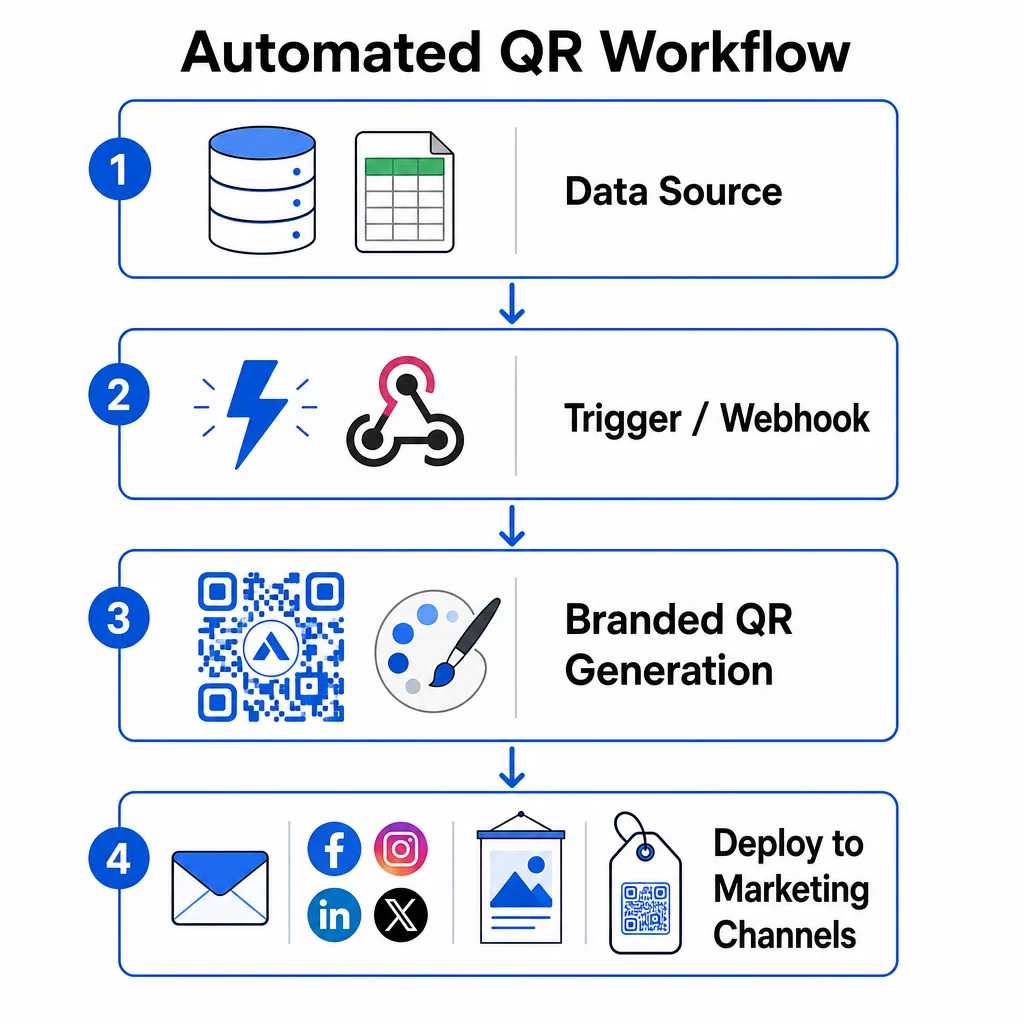
Desencadenadores basados en eventos
Los desencadenadores son lo que hace que la automatización se sienta sin esfuerzo. En lugar de generar códigos manualmente, su sistema responde a los eventos comerciales automáticamente.
Los tipos de desencadenadores comunes incluyen:
- Actualizaciones del catálogo de productos: Cuando se añade un nuevo producto a su sistema de inventario, un flujo de trabajo genera un código QR de marca vinculado a la página de ese producto, listo para el embalaje o los materiales de marketing antes de que nadie tenga que pedirlo.
- Registros de clientes: Cuando un nuevo cliente se registra, el sistema crea un código QR personalizado para el acceso a la cuenta, un kit de bienvenida o la inscripción en un programa de fidelización.
- Reservas de eventos: Cuando un asistente se registra para una conferencia o feria comercial, se genera un código QR único para el registro o el acceso al stand.
- Campañas programadas: Los activadores basados en el tiempo pueden generar códigos semanalmente para próximos eventos o mensualmente para promociones estacionales, manteniendo las campañas actualizadas sin necesidad de actualizaciones manuales.
Para los flujos de trabajo basados en API, la generación de códigos QR suele realizarse mediante una solicitud HTTP POST que pasa tanto el contenido (URL o carga de datos) como los parámetros de estilo (colores, URL del logotipo, tamaño, formato) en un único cuerpo JSON. Los campos de estilo suelen ser opcionales –su plantilla de marca guardada los gestiona automáticamente–, mientras que el campo de contenido es obligatorio para cada código único.
Para configuraciones sin código, el activador “Webhooks by Zapier” de Zapier le permite crear una URL que activa un Zap desde cualquier solicitud HTTP entrante. Make y n8n ofrecen activadores similares basados en webhooks con lógica más avanzada para equipos que necesitan ramificación condicional o transformaciones de varios pasos.
Para una mirada más profunda a cómo las API permiten la generación masiva y las actualizaciones dinámicas, consulte Integración de API para la gestión de códigos QR.
Integración con Canales de Marketing
Una vez que se activa un disparador y se genera un código, el flujo de trabajo debe enviar ese código directamente al canal donde se utilizará. Esto elimina el paso manual de descargar, reformatear y cargar códigos en cada plataforma.
- Herramientas de email marketing como Mailchimp o Constant Contact pueden insertar códigos QR directamente en plantillas de boletines o correos electrónicos promocionales en el momento del envío.
- Programadores de redes sociales como Hootsuite o Buffer pueden recibir códigos como parte de la carga útil de una publicación programada, lo que le permite emparejar contenido con un código único por plataforma.
- Plataformas de automatización de marketing como HubSpot o Marketo pueden activar la generación de códigos QR basándose en puntuaciones de leads o membresía de segmento, incrustando automáticamente el código resultante en una secuencia de correo electrónico dirigida.
Para las agencias que gestionan campañas para múltiples clientes, la automatización se vuelve aún más crítica. Los flujos de trabajo pueden aplicar la marca específica del cliente, generar códigos y dirigirlos a través de un paso de aprobación antes de que cualquier código se active. Vea cómo Pageloot soporta los flujos de trabajo de las agencias con funciones de marca blanca, permisos basados en roles e informes de clientes compartibles.
Gestión de códigos QR dinámicos y masivos
La generación masiva maneja el volumen; los códigos dinámicos manejan el cambio. Juntos, cubren la mayoría de las necesidades de códigos QR a escala empresarial.
Con la generación masiva, usted pasa una lista de valores de contenido únicos – URLs de productos, IDs de asistentes, identificadores de ubicación – junto con un conjunto compartido de parámetros de marca. La plataforma genera cada código en una sola pasada, aplica un estilo consistente y los devuelve en un formato listo para empaquetar o imprimir. Para más información sobre herramientas masivas de nivel empresarial, vea herramientas automatizadas de códigos QR masivos para empresas.
Los códigos dinámicos añaden flexibilidad después de la distribución. Si el destino de una campaña cambia, una promoción termina o un enlace se rompe, usted actualiza el destino en su panel de control, no el código físico. Esto también permite la automatización basada en el rendimiento: los flujos de trabajo pueden monitorear las tasas de escaneo y actualizar automáticamente el destino de un código si la participación cae por debajo de un umbral, o redirigir los códigos a páginas estacionales en un horario establecido.
Paso 4: Rastree y Optimice el Rendimiento de la Campaña
La automatización no significa "configúralo y olvídate". Las ganancias reales de rendimiento provienen de monitorear lo que funciona y hacer ajustes mientras las campañas aún están en curso.
Estadísticas en tiempo real
El seguimiento de escaneos le brinda visibilidad inmediata sobre cómo se están desempeñando los códigos en todos los canales. Un buen panel de análisis muestra la frecuencia de escaneo, la distribución geográfica, los tipos de dispositivos y los patrones de hora del día. Si ve una caída en los escaneos durante horas específicas, puede ajustar el momento de la promoción. Si ciertas ubicaciones superan consistentemente a otras, puede redistribuir los materiales en consecuencia.
El panel de control de Pageloot captura no solo cuándo y dónde ocurren los escaneos, sino también lo que hacen los usuarios después de escanear, lo que le brinda una imagen más completa del rendimiento de la campaña que solo el volumen de escaneos.
Informes Automatizados
Gestionar múltiples campañas de códigos QR manualmente significa alternar entre paneles y compilar datos a mano. La generación de informes automatizada elimina esa sobrecarga al entregar resúmenes programados directamente a su bandeja de entrada o plataforma integrada.
Las cadencias de informes útiles incluyen:
- Informes semanales que revelan los códigos de mejor rendimiento, señalan patrones de escaneo inusuales e identifican campañas que pueden necesitar atención
- Informes mensuales que capturan tendencias a largo plazo, cambios estacionales y comparaciones entre campañas
Conectar sus análisis de QR a plataformas como Google Analytics, HubSpot o Salesforce crea una vista unificada de sus datos de marketing. Los sistemas de alerta añaden otra capa, notificándole inmediatamente cuando una campaña de códigos QR experimenta una caída repentina en la actividad, para que pueda investigar antes de que la campaña se vea afectada.
Aplicar Datos a Campañas Físicas
Los análisis de QR son especialmente útiles para medir la interacción con materiales impresos, que de otro modo son difíciles de rastrear. Al asignar códigos únicos a ubicaciones, eventos o tiradas de impresión específicas, puede atribuir los escaneos con precisión.
Una cadena minorista, por ejemplo, puede asignar un código único a cada ubicación de tienda y ver qué ubicaciones impulsan la mayor interacción digital. En una feria comercial, los códigos QR en los materiales del stand conectan las interacciones físicas con los análisis digitales, proporcionando a los equipos de marketing datos para justificar el gasto en eventos.
Cuando un código funciona excepcionalmente bien, puede escalarlo, aumentando el gasto en publicidad, expandiendo la distribución o duplicando el formato de la campaña a otros canales.
Monitorea Tu Campaña en Tiempo Real ¿Quieres ver exactamente dónde y cuándo tus clientes están escaneando tus materiales? Usa el Generador de códigos QR para crear códigos dinámicos rastreables y acceder a un panel de rendimiento completo.
Paso 5: Diseñar para la Escaneabilidad y la Seguridad a Escala
La automatización maneja el volumen, pero los códigos que produce aún deben escanearse de manera confiable y provenir de un sistema que no exponga sus datos ni falle bajo carga.
Marca Dentro de los Límites Técnicos
La personalización amplía lo que un código QR puede hacer por su marca, pero opera dentro de limitaciones técnicas que, si se ignoran, producen códigos que no se escanean.
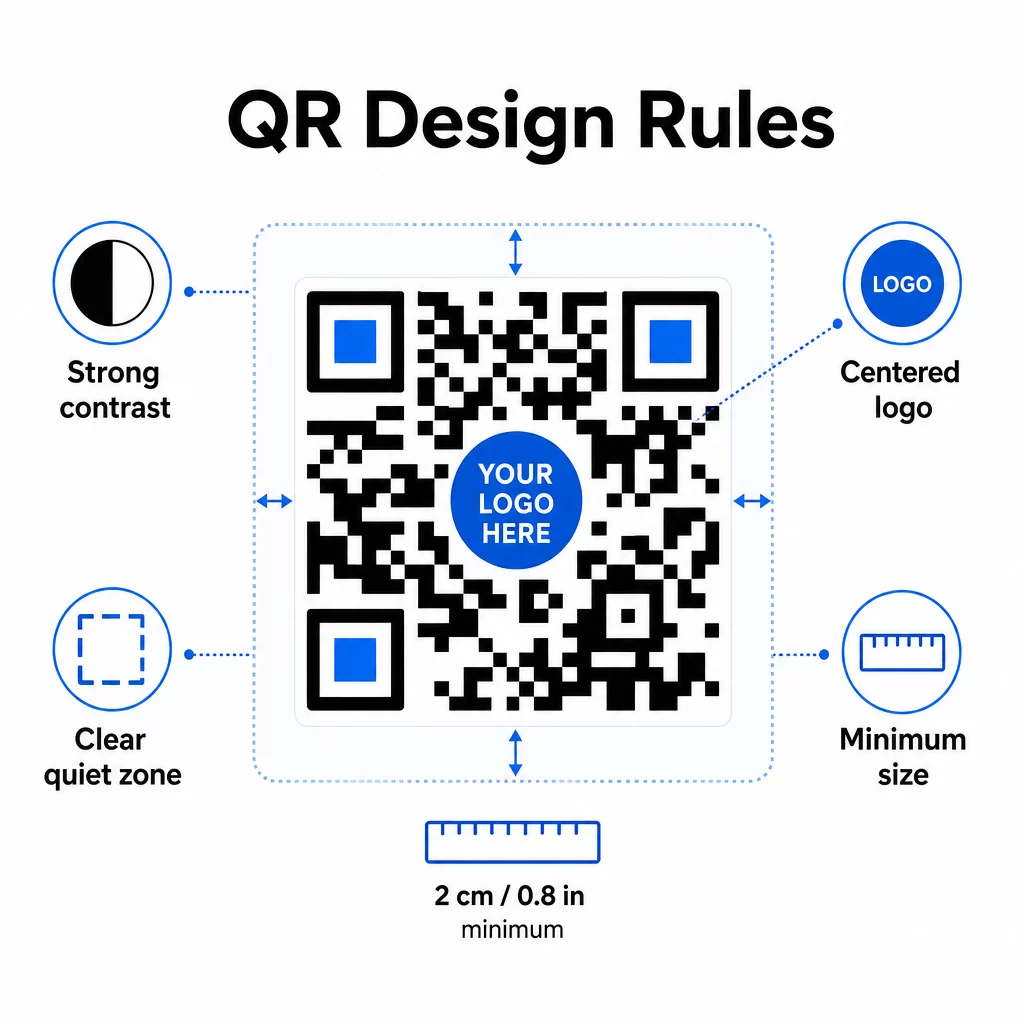
Contraste de color es el punto de fallo más común. Los escáneres QR leen la diferencia entre módulos oscuros y claros, por lo que el primer plano siempre debe ser más oscuro que el fondo. Nunca invierta esta relación. Una relación de contraste mínima de 4:1 entre el código y su fondo es el umbral práctico para un escaneo fiable; cuanto mayor, mejor. Para un desglose detallado de combinaciones de colores y relaciones de contraste, consulte mejores prácticas de contraste de color de códigos QR.
Cobertura del logotipo debe permanecer en o por debajo del 30% del área total del código. Los logotipos más grandes oscurecen demasiados módulos de datos para recuperarlos. Coloque los logotipos solo en el centro, sobre un fondo claro sólido, y use formas simples. Si está incrustando logotipos, use el nivel de corrección de errores Q o H para darle al escáner más redundancia con la que trabajar.
Zonas de silencio son el margen claro alrededor del código. La especificación del código QR requiere al menos cuatro módulos de espacio vacío en todos los lados. En los flujos de trabajo automatizados, es fácil recortar este margen accidentalmente; incorpore la aplicación de la zona de silencio en la configuración de su plantilla para que no pueda ser anulada.
Tamaño mínimo para el escaneo de corto alcance es de aproximadamente 0.8 × 0.8 pulgadas (aproximadamente 2 × 2 cm). Para señalización o carteles vistos a distancia, aplique la regla 10:1: la distancia de escaneo no debe ser más de diez veces el ancho del código. Un código en un cartel visto desde 10 pies debe tener al menos 12 pulgadas de ancho.
Cualquier personalización que aplique – nuevas combinaciones de colores, ubicaciones de logotipos, estilos de marcos – debe probarse antes de que entre en un flujo de trabajo masivo. Pruebe en múltiples dispositivos, aplicaciones de escáner y condiciones de iluminación. Para obtener pautas completas de legibilidad, consulte las mejores prácticas para la legibilidad de los códigos QR.
Medidas de seguridad
A medida que su sistema automatizado maneja más códigos y más datos, la seguridad debe mantenerse al día.
- Control de acceso basado en roles limita lo que cada miembro del equipo puede hacer. Los coordinadores de marketing pueden crear y previsualizar campañas; solo los administradores de TI deben gestionar las integraciones y la configuración de seguridad.
- Cifrado de datos protege la información sensible en tránsito y en reposo. Los códigos QR que enlazan a páginas de pago, cuentas de clientes o documentos confidenciales siempre deben usar destinos HTTPS cifrados con certificados TLS válidos.
- Cumplimiento con GDPR, CCPA o HIPAA (dependiendo de su industria) significa incorporar mecanismos de consentimiento, políticas de retención de datos y opciones de exclusión voluntaria en sus flujos de trabajo automatizados desde el principio, no como una ocurrencia tardía.
- Auditorías de seguridad regulares detectar vulnerabilidades antes de que se conviertan en incidentes. Documente su calendario de revisiones y pruebe sus controles de acceso cada vez que un miembro del equipo cambie de rol.
Estrategias de Escalabilidad
Un diseño de flujo de trabajo modular es el enfoque más práctico para la escalabilidad. En lugar de un único flujo de trabajo grande que maneje la creación, el estilo, la distribución y el análisis, divídalos en módulos interconectados separados. Así podrá actualizar un componente – por ejemplo, la lógica de marca – sin afectar la cadena de distribución.
Incorpore el manejo automatizado de errores con mecanismos de respaldo. Si el punto final principal de generación de códigos QR no está disponible, el flujo de trabajo debe cambiar a una copia de seguridad, registrar el fallo y alertar a un administrador, en lugar de simplemente descartar la solicitud. La lógica de reintento maneja problemas temporales de conectividad sin intervención manual.
Para operaciones de alto volumen, la limitación de velocidad de la API y los sistemas de cola evitan que sature las plataformas conectadas. Distribuya las solicitudes de manera uniforme en lugar de enviar todo en una sola ráfaga, y utilice el procesamiento por lotes durante las horas de menor actividad cuando sea posible.
Mantenga un historial de versiones de las configuraciones del flujo de trabajo y supervise los tiempos de ejecución, las tasas de respuesta de la API y el uso de recursos. Si los tiempos de generación o implementación comienzan a aumentar, es una señal para investigar si la capacidad necesita incrementarse antes de que afecte a las campañas en vivo.
Armándolo Todo
Los cinco pasos anteriores forman un sistema completo: requisitos que impulsan las elecciones de plataforma, elecciones de plataforma que permiten plantillas de marca, plantillas que alimentan flujos de trabajo automatizados, flujos de trabajo que producen códigos rastreables y datos de seguimiento que le ayudan a mejorar con el tiempo.
La adopción de códigos QR sigue creciendo: una encuesta de 2025 encontró que el 82% de los consumidores se sienten cómodos escaneando códigos de empresas que reconocen, frente al 53% en 2021. La automatización es lo que hace práctico llegar a esa audiencia a escala, con códigos que son consistentemente fieles a la marca, fiablemente escaneables y vinculados a resultados medibles.
Empiece con el generador de códigos QR de Pageloot para configurar su primera plantilla de marca, luego construya su capa de automatización sobre esa base.
Preguntas frecuentes
Los códigos QR dinámicos le permiten actualizar la URL de destino o el contenido vinculado después de que un código ha sido impreso y distribuido. En un flujo de trabajo automatizado, esto significa que puede redirigir códigos a nuevas ofertas, arreglar enlaces rotos o rotar contenido estacional sin generar nuevos códigos ni reimprimir materiales. También proporcionan análisis de escaneo – hora, ubicación, tipo de dispositivo – que se retroalimentan en sus flujos de trabajo de optimización.
Las tres reglas más importantes son el contraste, la cobertura del logotipo y las zonas de silencio. Utilice siempre un primer plano oscuro sobre un fondo claro con una relación de contraste de al menos 4:1. Mantenga cualquier logotipo incrustado en el 30% o menos del área del código, centrado sobre un fondo sólido. Mantenga al menos cuatro módulos de margen claro alrededor de todo el código. Utilice el nivel de corrección de errores Q o H al añadir logotipos. Incorpore estas restricciones en sus plantillas para que cada código producido por su automatización las cumpla automáticamente – luego pruebe las nuevas configuraciones de diseño en múltiples dispositivos antes de ejecutarlas a través de un flujo de trabajo masivo.
Las plataformas sin código como Zapier y Make son adecuadas para equipos sin desarrolladores dedicados. Ambas utilizan webhooks para activar la generación de códigos QR a partir de eventos en otras herramientas – un nuevo contacto de CRM, una actualización del catálogo de productos o un registro de eventos. Usted configura el disparador, mapea los campos de datos (URL, parámetros de marca) y apunta la acción al punto final de la API de su plataforma de códigos QR. Para equipos que necesitan más lógica condicional o transformaciones de datos personalizadas, n8n ofrece un constructor de flujos de trabajo basado en webhooks más flexible. La integración de API sigue siendo la opción más potente para equipos técnicos que gestionan flujos de trabajo complejos o de alto volumen.