Iga QR-koodi käsitsi kujundamine kampaanias pole mitte ainult aeglane – see tekitab ebakõlasid, mis õõnestavad teie brändi ja muudavad jälgimise peaaegu võimatuks. Kui kasutate QR-koode märkimisväärses mahus, on automatiseerimine viis, kuidas hoida kvaliteeti ühtlasena, vähendades samal ajal käivitamiseks kuluvat aega.
See juhend tutvustab teile viit praktilist sammu QR-koodi kohandamise automatiseerimiseks: alates andmeallikate kaardistamisest ja õige platvormi valimisest kuni sündmustepõhiste töövoogude loomiseni, jõudluse jälgimiseni ja turvalisuse tagamiseni mastaabi suurendamisel.
1. samm: Kaardistage oma automatiseerimisnõuded
Enne millegi ehitamist tehke endale selgeks, mida te tegelikult automatiseerida vajate. Selle sammu vahelejätmine viib töövoogudeni, mis koormuse all katkevad või vajavad pidevaid käsitsi parandusi.
Alustage oma andmeallikate tuvastamisest. Kust pärineb teave, mis peaks iga QR-koodi looma? Levinud allikad on:
- CRM-süsteemid kliendipõhiste koodide jaoks, mis on seotud lojaalsusprogrammide või sisseelamisega
- Tootekataloogid või laoseisu andmebaasid jaemüügi ja e-kaubanduse märgistamiseks
- Ürituste haldamise platvormid osalejapõhiste QR-koodide jaoks konverentsidel või messidel
- CSV- või Exceli failid partiikampaaniate jaoks, nagu otsepostitus või toote märgistamine
Kui teate oma allikaid, otsustage, kuidas neid QR-koodi genereerimise tööriistaga ühendada. API-d võimaldavad programmeerida andmete hankimist ja on kõige paindlikum variant. Veebihaagid (webhooks) võimaldavad reaalajas käivitajaid – näiteks QR-koodi käivitamist uue kliendi registreerimise hetkel. Kui teie tööriistadel puuduvad otsesed integratsioonid, saavad koodivabad automatiseerimisplatvormid nagu Zapier, Make või n8n ühendada lünga veebihaagipõhiste töövoogude abil.
Lõpuks mõelge läbi maht ja värskendussagedus. Ühekordne 500 koodi partii toote turuletoomiseks on teistsugune probleem kui isikupärastatud koodide genereerimine iga uue CRM-kontakti jaoks reaalajas. Teie tööriistade valikud peaksid peegeldama nii teie praegust ulatust kui ka seda, kus te ootate end kuue kuu pärast olevat.
Avastage kõik QR-koodi funktsioonid Pole kindel, millised QR-koodi tüübid teie kasutusjuhtumiga sobivad? Sirvige täielikku Pagelooti funktsioonide ülevaade et näha, mis on teie kampaaniate jaoks saadaval.
2. samm: Valige ja konfigureerige oma QR-koodi platvorm
Kui teie nõuded on kaardistatud, on järgmiseks sammuks platvormi valimine, mis toetab automatiseeritud, bränditud QR-koodide genereerimist teie sihtmahuga.
Mida platvormi puhul otsida
Dünaamilised QR-koodid on iga automatiseeritud töövoo jaoks hädavajalikud. Erinevalt staatilistest koodidest võimaldavad dünaamilised koodid teil pärast printimist siht-URL-i või lingitud sisu värskendada – ilma uut koodi genereerimata või materjale uuesti printimata. See on oluline, kui kampaaniad muutuvad, lingid katkevad või soovite koode ümber suunata ajastuse või sihtrühma alusel. See Pagelooti dünaamiline QR-koodi generaator võimaldab teil lingitud sisu igal ajal muuta, isegi pärast koodi levitamist.
Brändingu ja kohandamise kontrollid määravad, kui palju saate visuaalset poolt automatiseerida. Otsige platvormi, mis võimaldab teil määrata brändi värve, üles laadida logo, valida keha- ja servastiile ning salvestada need valikud korduvkasutatavate mallidena. Pageloot'i QR-koodi generaator logoga annab teile kontrolli stiili, raami, taustavärvi, keha mustri, servatüübi ja disaini eelseadete üle – kõiki neid saab korra lukustada ja järjepidevalt uuesti kasutada.
Massgenereerimine on läbirääkimatu, kui töötate suuremahuliselt. Platvorm peaks suutma töödelda sadu või tuhandeid koode ühes partiis, olgu see siis CSV-faili üleslaadimise või API kaudu, rakendades samal ajal igale koodile järjepidevat brändingut ja jälgimisparameetreid.
STATISTIKA sulgevad ringi. Peate teadma, milliseid koode skaneeritakse, millal, kus ja millistel seadmetel. Platvormid, mis seda teavet reaalajas kuvavad, võimaldavad teil tegutseda jõudluse alusel, mitte ainult sellest aru anda.
Platvormi seadistamine
Kui olete platvormi valinud, konfigureerige see enne töövoogude loomist:
- Määratlege kasutajarollid ja õigused. Määrake juurdepääsutasemed nii, et administraatorid haldaksid integratsioone, kampaaniate haldurid tegeleksid koodide loomisega ja analüütikud pääseksid aruandlusele ligi, ilma et nad saaksid muuta aktiivseid kampaaniaid.
- Genereerige API mandaadid ja konfigureerige oma lõpp-punktid, kui kasutate otsest API integratsiooni.
- Seadistage brändimallid. Laadige üles oma logo, määrake oma brändivärvid ja salvestage need seaded korduvkasutatava mallina. Pageloot'i QR-koodi mallid võimaldab teil luua mitu malli erinevate kasutusjuhtude jaoks – üks pakendite jaoks, üks ürituste materjalide jaoks, üks digitaalsete kampaaniate jaoks – nii et iga kood näeb välja ühtlane ilma iga kord käsitsi kujundamata.
- Lülitage sisse turvaseaded. Lülitage sisse kaheastmeline autentimine administraatorikontode jaoks, määrake andmete säilitamise poliitikad ja konfigureerige oma tööstusharule sobivad juurdepääsukontrollid.
Looge bränditud QR-koode suures mahus Kas soovite oma logo ja brändivärvid igale koodile automaatselt rakendada? Kasutage QR-koodi generaator logoga et määrata oma visuaalne identiteet üks kord ja hoida iga kood brändiga kooskõlas.
3. samm: Looge automatiseeritud töövoogud loomiseks ja juurutamiseks
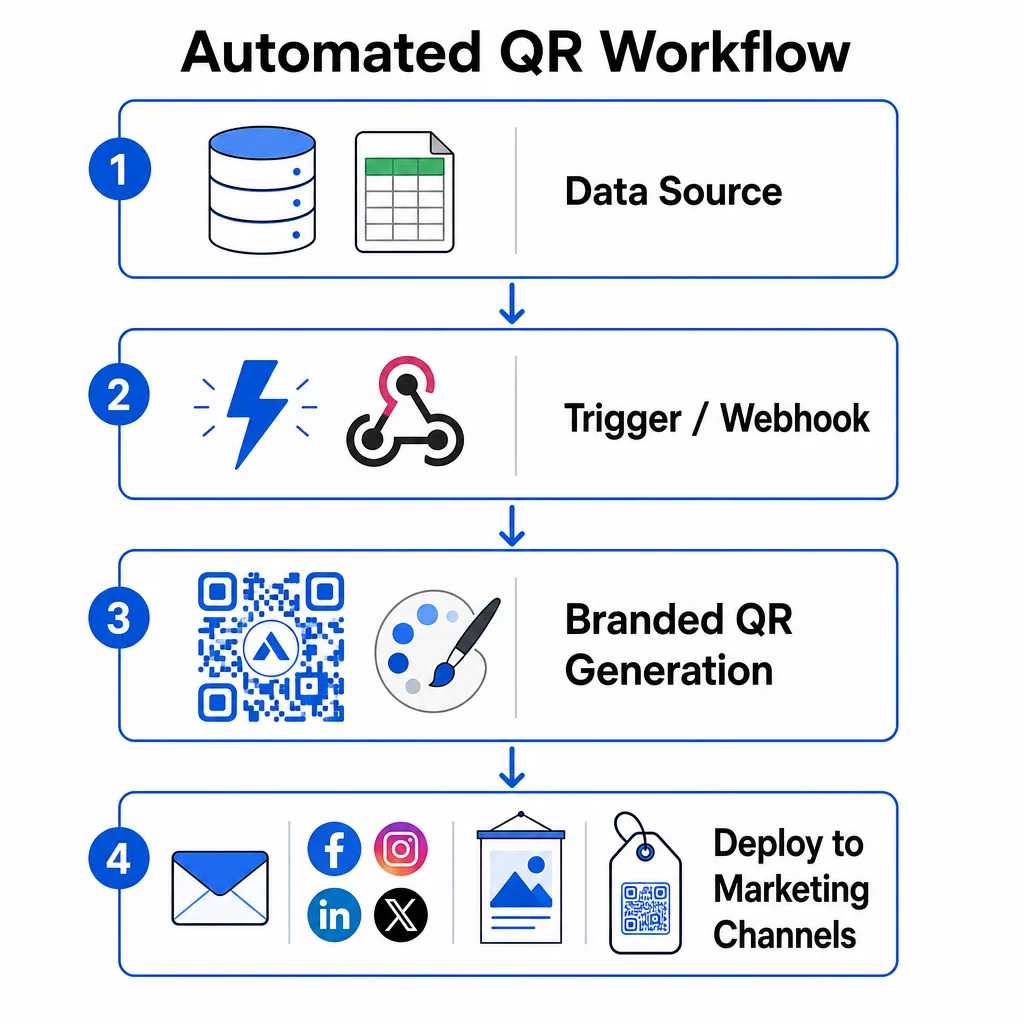
Siin muutub teie seadistus toimivaks süsteemiks. Eesmärk on defineerida konkreetsed sündmused, mis käivitavad QR-koodi genereerimise, ja seejärel ühendada need koodid otse teie turunduskanalitega, et need oleksid kohe kasutusvalmis.
Sündmustepõhised käivitajad
Käivitajad on see, mis muudab automatiseerimise käed-vabaks. Koodide käsitsi genereerimise asemel reageerib teie süsteem ärisündmustele automaatselt.
Levinud käivitajatüübid hõlmavad:
- Tootekataloogi uuendused: Kui teie laosüsteemi lisatakse uus toode, loob töövoog selle tootelehega seotud bränditud QR-koodi – valmis pakendamiseks või turundusmaterjalideks, enne kui keegi seda küsima peab.
- Kliendiregistreerimised: Kui uus klient registreerub, loob süsteem isikupärastatud QR-koodi konto juurdepääsuks, tervituskomplektiks või lojaalsusprogrammi registreerimiseks.
- Ürituste broneeringud: Kui osaleja registreerub konverentsile või messile, luuakse unikaalne QR-kood sisseregistreerimiseks või boksi juurdepääsuks.
- Planeeritud kampaaniad: Aegpõhised käivitajad saavad luua koode iganädalaselt tulevaste sündmuste jaoks või igakuiselt hooajaliste kampaaniate jaoks, hoides kampaaniad ajakohasena ilma käsitsi uuendusteta.
API-põhiste töövoogude puhul toimub QR-koodi genereerimine tavaliselt HTTP POST päringu kaudu, mis edastab nii sisu (URL või andmepakett) kui ka stiiliparameetrid (värvid, logo URL, suurus, formaat) ühes JSON-kehas. Stiiliväljad on tavaliselt valikulised – teie salvestatud brändimall haldab neid automaatselt – samas kui sisuväli on iga unikaalse koodi jaoks kohustuslik.
Koodivabade seadistuste puhul võimaldab Zapieri “Webhooks by Zapier” käivitaja luua URL-i, mis käivitab Zapi mis tahes sissetuleva HTTP päringu alusel. Make ja n8n pakuvad sarnaseid veebikonksupõhiseid käivitajaid täiustatud loogikaga meeskondadele, kes vajavad tingimuslikku hargnemist või mitmeastmelisi teisendusi.
Põhjalikumaks ülevaateks selle kohta, kuidas API-d võimaldavad massgenereerimist ja dünaamilisi uuendusi, vaadake API integreerimine QR-koodide haldamiseks.
Integreerimine turunduskanalitega
Kui käivitaja käivitub ja kood genereeritakse, peaks töövoog selle koodi otse kanalisse lükkama, kus seda kasutatakse. See eemaldab koodide allalaadimise, ümbervormindamise ja igale platvormile üleslaadimise käsitsi sammu.
- E-posti turundustööriistad nagu Mailchimp või Constant Contact saavad saata QR-koode otse uudiskirjade mallidesse või reklaamkirjadesse saatmise hetkel.
- Sotsiaalmeedia ajastajad nagu Hootsuite või Buffer, saavad koodid vastu võtta ajastatud postituse andmepaketi osana, võimaldades teil siduda sisu iga platvormi jaoks unikaalse koodiga.
- Turundusautomaatika platvormid nagu HubSpot või Marketo, saavad käivitada QR-koodi genereerimise vastavalt müügivihjete skooridele või segmendi liikmelisusele, manustades saadud koodi automaatselt sihipärasesse e-posti jadasse.
Agentuuridele, kes haldavad kampaaniaid mitme kliendi jaoks, muutub automatiseerimine veelgi kriitilisemaks. Töövoogudega saab rakendada kliendipõhist brändingut, genereerida koode ja suunata need läbi kinnitusetapi enne, kui ükski kood avalikustatakse. Vaata, kuidas Pageloot toetab agentuuride töövooge valge märgistuse funktsioonide, rollipõhiste õiguste ja jagatavate kliendiaruannetega.
Dünaamiline ja massiline QR-koodide haldamine
Massiline genereerimine tegeleb mahuga; dünaamilised koodid tegelevad muutustega. Koos katavad nad enamiku ettevõtte tasandi QR-koodide vajadustest.
Massilise genereerimisega edastate unikaalsete sisuväärtuste loendi – toote URL-id, osalejate ID-d, asukoha identifikaatorid – koos jagatud brändinguparameetrite komplektiga. Platvorm genereerib iga koodi ühe korraga, rakendab ühtlast stiili ja tagastab need pakendamiseks või printimiseks valmis vormingus. Ettevõtte tasandi massitööriistade kohta lisateabe saamiseks vaadake automatiseeritud hulgi-QR-koodi tööriistu ettevõtetele.
Dünaamilised koodid lisavad paindlikkust pärast levitamist. Kui kampaania sihtkoht muutub, kampaania lõpeb või link katkeb, värskendate sihtkohta oma armatuurlaual – mitte füüsilist koodi. See võimaldab ka jõudluspõhist automatiseerimist: töövoogudega saab jälgida skaneerimismäärasid ja automaatselt värskendada koodi sihtkohta, kui kaasatus langeb alla läve, või suunata koode hooajalistele lehtedele kindla ajakava alusel.
4. samm: Kampaania jõudluse jälgimine ja optimeerimine
Automatiseerimine ei tähenda "seadista ja unusta". Tõeline jõudluse paranemine tuleneb toimiva jälgimisest ja kohanduste tegemisest, samal ajal kui kampaaniad veel käivad.
Reaalajas statistika
Skaneerimise jälgimine annab teile kohese ülevaate sellest, kuidas koodid kanalite lõikes toimivad. Hea analüüsi armatuurlaud näitab skaneerimissagedust, geograafilist jaotust, seadmetüüpe ja kellaaja mustreid. Kui näete skaneerimiste arvu langust teatud tundidel, saate reklaami ajastust kohandada. Kui teatud asukohad toimivad pidevalt teistest paremini, saate materjale vastavalt ümber jaotada.
Pagelooti armatuurlaud jäädvustab mitte ainult seda, millal ja kus skaneerimised toimuvad, vaid ka seda, mida kasutajad pärast skaneerimist teevad – andes teile kampaania jõudlusest täielikuma pildi kui ainult skaneerimismaht.
Automatiseeritud aruandlus
Mitu QR-koodi kampaaniat käsitsi haldamine tähendab armatuurlaudade vahel vahetamist ja andmete käsitsi koostamist. Automatiseeritud aruandlus eemaldab selle lisatöö, edastades ajastatud kokkuvõtted otse teie postkasti või integreeritud platvormile.
Kasulikud aruandluse sagedused hõlmavad:
- Nädalaaruanded mis toovad esile kõige paremini toimivad koodid, märgivad ebatavalised skaneerimismustrid ja tuvastavad kampaaniad, mis võivad vajada tähelepanu
- Kord kuus koostatavad aruanded mis jäädvustavad pikemaajalisi trende, hooajalisi muutusi ja kampaaniatevahelisi võrdlusi
QR-analüütika ühendamine platvormidega nagu Google Analytics, HubSpot või Salesforce loob teie turundusandmetest ühtse vaate. Hoiatussüsteemid lisavad veel ühe kihi – teavitades teid koheselt, kui QR-koodi kampaania aktiivsus järsult langeb, et saaksite uurida enne, kui kampaania kannatab.
Andmete rakendamine füüsilistele kampaaniatele
QR-analüütika on eriti kasulik trükimaterjalidega seotud kaasatuse mõõtmiseks, mida on muidu raske jälgida. Määrates unikaalsed koodid konkreetsetele asukohtadele, sündmustele või trükikogustele, saate skaneeringuid täpselt omistada.
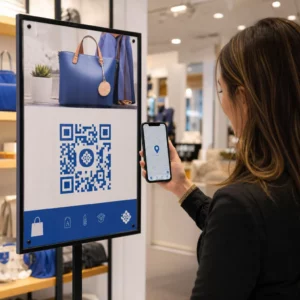
Näiteks jaekett saab määrata igale poe asukohale unikaalse koodi ja näha, millised asukohad toovad kõige rohkem digitaalset kaasatust. Messil ühendavad stendimaterjalidel olevad QR-koodid füüsilised interaktsioonid digitaalse analüütikaga, andes turundusmeeskondadele andmeid ürituse kulutuste õigustamiseks.
Kui kood toimib erakordselt hästi, saate seda skaleerida – suurendades reklaamikulutusi, laiendades levikut või dubleerides kampaania formaati teistele kanalitele.
Jälgige oma kampaaniat reaalajas Kas soovite täpselt näha, kus ja millal teie kliendid teie materjale skannivad? Kasutage QR-koodi generaator jälgitavate dünaamiliste koodide loomiseks ja täielikule jõudluse armatuurlauale juurdepääsuks.
5. samm: Kujundage skaneeritavuse ja turvalisuse tagamiseks suures mahus
Automatiseerimine haldab mahtu, kuid selle toodetud koodid peavad siiski usaldusväärselt skaneerima ja pärinema süsteemist, mis ei paljasta teie andmeid ega purune koormuse all.
Bränding tehniliste piirangute piires
Kohandamine laiendab seda, mida QR-kood teie brändi heaks teha saab – kuid see toimib tehniliste piirangute piires, mis ignoreerimisel toodavad koode, mis ei skaneeri.
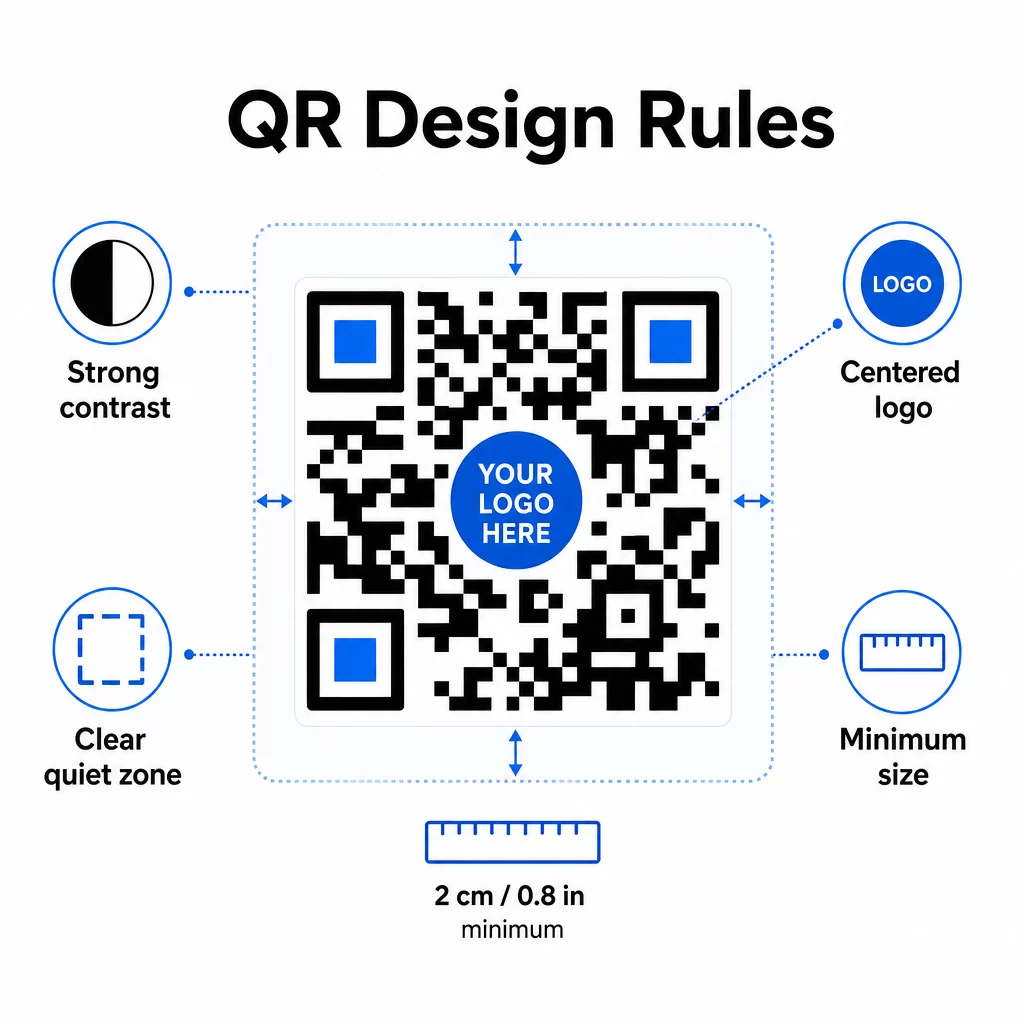
Värvikontrast on kõige levinum veapunkt. QR-skannerid loevad tumedate ja heledate moodulite erinevust, seega peab esiplaan alati olema taustast tumedam. Ärge kunagi seda suhet pöörake. Koodi ja selle tausta vaheline minimaalne kontrastsussuhe 4:1 on usaldusväärse skaneerimise praktiline alampiir; kõrgem on parem. Värvikombinatsioonide ja kontrastsussuhete üksikasjaliku ülevaate saamiseks vaadake QR-koodi värvikontrasti parimaid tavasid.
Logo katvus peab jääma 30% või alla selle kogu koodi pindalast. Suuremad logod varjavad liiga palju andmemooduleid, et neid taastada. Asetage logod ainult keskele, ühtlasele heledale taustale ja kasutage lihtsaid kujundeid. Kui manustate logosid, kasutage veaparandustaset Q või H, et anda skannerile rohkem üleliigsust, millega töötada.
Vaiksed tsoonid on koodi ümber olev selge veeris. QR-koodi spetsifikatsioon nõuab vähemalt nelja mooduli tühja ruumi igast küljest. Automatiseeritud töövoogudes on seda veerist lihtne kogemata kärpida – lisage vaikse tsooni jõustamine oma malli seadetesse, et seda ei saaks tühistada.
Minimaalne suurus lähiskaneerimiseks on ligikaudu 0,8 × 0,8 tolli (umbes 2 × 2 cm). Kaugelt vaadatavate siltide või plakatite puhul rakendage 10:1 reeglit: skaneerimiskaugus ei tohiks olla rohkem kui kümme korda koodi laiusest. 10 jala kauguselt vaadatav plakatil olev kood peaks olema vähemalt 12 tolli lai.
Kõik teie rakendatud kohandused – uued värvikombinatsioonid, logo paigutused, raami stiilid – tuleb enne massilisse töövoogu minekut testida. Testige mitme seadme, skannerirakenduse ja valgustingimuste korral. Põhjalike loetavuse juhiste saamiseks vaadake QR-koodi loetavuse parimaid tavasid.
Turvameetmed
Kuna teie automatiseeritud süsteem käsitleb rohkem koode ja rohkem andmeid, peab turvalisus sammu pidama.
- Rollipõhine juurdepääsukontroll piirab seda, mida iga meeskonnaliige teha saab. Turunduskoordinaatorid võivad luua ja eelvaadata kampaaniaid; ainult IT-administraatorid peaksid haldama integratsioone ja turvaseadeid.
- Andmete krüpteerimine kaitseb tundlikku teavet edastamisel ja puhkeolekus. QR-koodid, mis lingivad makselehtedele, kliendikontodele või konfidentsiaalsetele dokumentidele, peaksid alati kasutama krüpteeritud HTTPS-sihtkohti kehtivate TLS-sertifikaatidega.
- Vastavus GDPR-i, CCPA või HIPAA-ga (sõltuvalt teie tööstusharust) tähendab nõusolekumehhanismide, andmete säilitamise poliitikate ja loobumisvõimaluste sisse ehitamist oma automatiseeritud töövoogudesse algusest peale – mitte tagantjärele mõeldes.
- Regulaarsed turvaauditid püüa haavatavused kinni enne, kui neist saavad intsidendid. Dokumenteeri oma ülevaatuste ajakava ja testi oma juurdepääsukontrolle iga kord, kui meeskonnaliige rolli vahetab.
Skaleeruvuse strateegiad
Modulaarne töövoo disain on kõige praktilisem lähenemine skaleeruvusele. Ühe suure töövoo asemel, mis tegeleb loomise, kujundamise, levitamise ja analüüsiga, jaga need eraldi omavahel ühendatud mooduliteks. Seejärel saad uuendada ühte komponenti – näiteks brändingu loogikat – puudutamata levitamise torujuhet.
Ehita sisse automatiseeritud veakäsitlus koos varumehhanismidega. Kui esmane QR-koodi genereerimise lõpp-punkt pole saadaval, peaks töövoog lülituma varule, logima vea ja teavitama administraatorit – mitte vaikselt päringut maha jätma. Kordusloogika lahendab ajutised ühenduvusprobleemid ilma käsitsi sekkumiseta.
Suuremahuliste toimingute puhul takistavad API päringute piiramine ja järjekorrasüsteemid ühendatud platvormide ülekoormamist. Jaota päringud ühtlaselt, selle asemel et saata kõik ühe hooga, ja kasuta võimalusel partiitöötlust tipptundide välisel ajal.
Hoia töövoo konfiguratsioonide versiooniajalugu ja jälgi täitmisaegu, API vastamismäärasid ja ressursside kasutust. Kui genereerimis- või juurutamisajad hakkavad pikenema, on see märk uurimiseks, kas võimsust on vaja suurendada, enne kui see mõjutab käimasolevaid kampaaniaid.
Kõike kokku pannes
Ülaltoodud viis sammu moodustavad tervikliku süsteemi: nõuded, mis juhivad platvormivalikuid, platvormivalikud, mis võimaldavad bränditud malle, mallid, mis toidavad automatiseeritud töövooge, töövoogud, mis toodavad jälgitavaid koode, ja jälgimisandmed, mis aitavad teil aja jooksul paraneda.
QR-koodide kasutuselevõtt jätkab kasvu – 2025. aasta uuringust selgus, et 82% tarbijatest tunneb end mugavalt skaneerides koode äridest, mida nad tunnevad, võrreldes 53% -ga 2021. aastal. Automatiseerimine on see, mis muudab praktiliseks selle publiku teenindamise suures ulatuses, koodidega, mis on järjepidevalt brändiga kooskõlas, usaldusväärselt skaneeritavad ja seotud mõõdetavate tulemustega.
Alusta Pageloot QR-koodi generaatorit oma esimese bränditud malli seadistamisest, seejärel ehita sellele vundamendile oma automatiseerimiskiht.
Korduma kippuvad küsimused
Dünaamilised QR-koodid võimaldavad teil värskendada siht-URL-i või lingitud sisu pärast koodi printimist ja levitamist. Automatiseeritud töövoos tähendab see, et saate koode ümber suunata uutele pakkumistele, parandada katkiseid linke või vahetada hooajalist sisu ilma uusi koode genereerimata või materjale uuesti printimata. Need pakuvad ka skaneerimisanalüütikat – aeg, asukoht, seadme tüüp – mis suunatakse tagasi teie optimeerimise töövoogudesse.
Kolm kõige olulisemat reeglit on kontrast, logo katvus ja vaiksed tsoonid. Kasutage alati tumedat esiplaanil heledal taustal vähemalt 4:1 kontrastsussuhtega. Hoidke mis tahes manustatud logo 30% või vähem koodialast, tsentreerituna ühtlasele taustale. Hoidke vähemalt neli moodulit selget veerist ümber kogu koodi. Kasutage veaparanduse taset Q või H logode lisamisel. Lisage need piirangud oma mallidesse, nii et iga teie automatiseerimise abil toodetud kood vastaks neile automaatselt – seejärel testige uusi disainikonfiguratsioone mitmes seadmes enne nende läbiviimist hulgipõhise töövoo kaudu.
Koodivabad platvormid nagu Zapier ja Make sobivad hästi meeskondadele, kellel pole pühendunud arendajaid. Mõlemad kasutavad veebihaake (webhooks), et käivitada QR-koodi genereerimine teiste tööriistade sündmustest – uus CRM-kontakt, tootekataloogi uuendus või sündmuse registreerimine. Sa konfigureerid käivitaja, kaardistad andmeväljad (URL, brändingu parameetrid) ja suunad tegevuse oma QR-koodi platvormi API lõpp-punkti. Meeskondadele, kes vajavad rohkem tingimuslikku loogikat või kohandatud andmetöötlust, pakub n8n paindlikumat veebihaakidel põhinevat töövoo koostajat. API integreerimine jääb kõige võimsamaks võimaluseks tehnilistele meeskondadele, kes haldavad keerulisi või suuremahulisi töövooge.