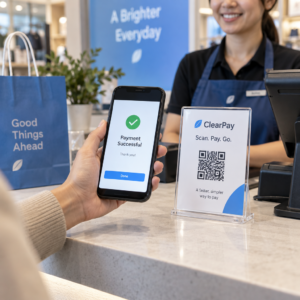
Ručné navrhovanie každého QR kódu v kampani nie je len pomalé – vytvára nekonzistentnosti, ktoré podkopávajú vašu značku a robia sledovanie takmer nemožným. Ak používate QR kódy v akomkoľvek skutočnom rozsahu, automatizácia je spôsob, ako udržať konzistentnú kvalitu a zároveň skrátiť čas potrebný na spustenie.
Tento sprievodca vás prevedie piatimi praktickými krokmi k automatizácii prispôsobenia QR kódov: od mapovania vašich dátových zdrojov a výberu správnej platformy po vytváranie pracovných postupov riadených udalosťami, sledovanie výkonu a zabezpečenie bezpečnosti pri škálovaní.
Krok 1: Zmapujte svoje požiadavky na automatizáciu
Predtým, ako čokoľvek vytvoríte, ujasnite si, čo skutočne potrebujete automatizovať. Preskočenie tohto kroku vedie k pracovným postupom, ktoré sa zrútia pod záťažou alebo vyžadujú neustále manuálne opravy.
Začnite identifikáciou svojich dátových zdrojov. Odkiaľ pochádzajú informácie, ktoré by mali riadiť každý QR kód? Medzi bežné zdroje patria:
- CRM systémy pre kódy špecifické pre zákazníkov spojené s vernostnými programami alebo onboardingom
- Katalógy produktov alebo databázy zásob pre maloobchodné a e-commerce označovanie
- Platformy na správu udalostí pre QR kódy špecifické pre účastníkov na konferenciách alebo veľtrhoch
- Súbory CSV alebo Excel pre dávkové kampane, ako je priama pošta alebo označovanie produktov
Akonáhle poznáte svoje zdroje, rozhodnite sa, ako ich pripojiť k nástroju na generovanie QR kódov. API umožňujú programové získavanie dát a sú najflexibilnejšou možnosťou. Webhooky umožňujú spúšťače v reálnom čase – napríklad spustenie QR kódu v momente, keď sa zaregistruje nový zákazník. Ak vaše nástroje nemajú priame integrácie, no-code automatizačné platformy ako Zapier, Make alebo n8n môžu preklenúť medzeru pomocou pracovných postupov založených na webhookoch.
Nakoniec, premyslite si objem a frekvenciu aktualizácií. Jednorazová dávka 500 kódov pre uvedenie produktu na trh je iný problém ako generovanie personalizovaných kódov pre každý nový kontakt v CRM v reálnom čase. Vaše rozhodnutia o nástrojoch by mali odrážať váš súčasný rozsah a to, kde očakávate, že budete o šesť mesiacov.
Preskúmajte všetky funkcie QR kódov Nie ste si istí, ktoré typy QR kódov sa hodia pre váš prípad použitia? Prezrite si celý Prehľad funkcií Pageloot a zistite, čo je k dispozícii pre vaše kampane.
Krok 2: Vyberte a nakonfigurujte svoju platformu QR kódov
Keď máte zmapované svoje požiadavky, ďalším krokom je výber platformy, ktorá dokáže podporovať automatizované generovanie značkových QR kódov vo vašom cieľovom objeme.
Čo hľadať na platforme
Dynamické kódy QR sú nevyhnutné pre akýkoľvek automatizovaný pracovný postup. Na rozdiel od statických kódov vám dynamické kódy umožňujú aktualizovať cieľovú URL adresu alebo prepojený obsah po vytlačení – bez generovania nového kódu alebo opätovnej tlače materiálov. To je dôležité, keď sa menia kampane, odkazy sa pokazia alebo chcete presmerovať kódy na základe načasovania alebo publika. The Generátor dynamických QR kódov Pageloot vám umožňuje kedykoľvek zmeniť prepojený obsah, dokonca aj po distribúcii kódu.
Ovládacie prvky značky a prispôsobenia určujú, koľko môžete automatizovať vizuálnu stránku. Hľadajte platformu, ktorá vám umožní nastaviť farby značky, nahrať logo, vybrať štýly tela a okrajov a uložiť tieto voľby ako opakovane použiteľné šablóny. Pageloot’s Logo QR kód: generátor QR kódov s logom vám dáva kontrolu nad štýlom, rámom, farbou pozadia, vzorom tela, typom okraja a prednastavenými návrhmi – všetko, čo je možné raz uzamknúť a dôsledne opakovane použiť.
Hromadné generovanie je nevyhnutné, ak pracujete vo veľkom rozsahu. Platforma by mala byť schopná spracovať stovky alebo tisíce kódov v jednej dávke, či už z nahrávania CSV alebo prostredníctvom API, pričom na každý kód aplikuje konzistentné parametre značky a sledovania.
ANALYTIKA uzatvárajú cyklus. Musíte vedieť, ktoré kódy sa skenujú, kedy, kde a na akých zariadeniach. Platformy, ktoré tieto údaje zobrazujú v reálnom čase, vám umožňujú konať na základe výkonu, nielen o ňom podávať správy.
Nastavenie platformy
Keď si vyberiete platformu, nakonfigurujte ju pred vytvorením akýchkoľvek pracovných postupov:
- Definujte používateľské roly a povolenia. Priraďte úrovne prístupu tak, aby administrátori spravovali integrácie, manažéri kampaní sa starali o tvorbu kódov a analytici mali prístup k reportom bez možnosti meniť aktívne kampane.
- Vygenerujte API poverenia a nakonfigurujte svoje koncové body, ak používate priamu API integráciu.
- Nastavte šablóny značky. Nahrajte svoje logo, nastavte farby svojej značky a uložte tieto nastavenia ako opakovane použiteľnú šablónu. Pageloot's Šablóny QR kódov vám umožní vytvoriť viacero šablón pre rôzne prípady použitia – jednu pre balenie, jednu pre materiály k udalostiam, jednu pre digitálne kampane – takže každý kód vyzerá konzistentne bez manuálneho štýlovania zakaždým.
- Povoľte bezpečnostné nastavenia. Zapnite dvojfaktorovú autentifikáciu pre administrátorské účty, nastavte zásady uchovávania údajov a nakonfigurujte kontroly prístupu vhodné pre vaše odvetvie.
Vytvárajte značkové QR kódy vo veľkom Chcete automaticky aplikovať svoje logo a farby značky na každý kód? Použite Logo QR kód: generátor QR kódov s logom na nastavenie vašej vizuálnej identity raz a udržanie každého kódu v súlade so značkou.
Krok 3: Vytvorte automatizované pracovné postupy pre tvorbu a nasadenie
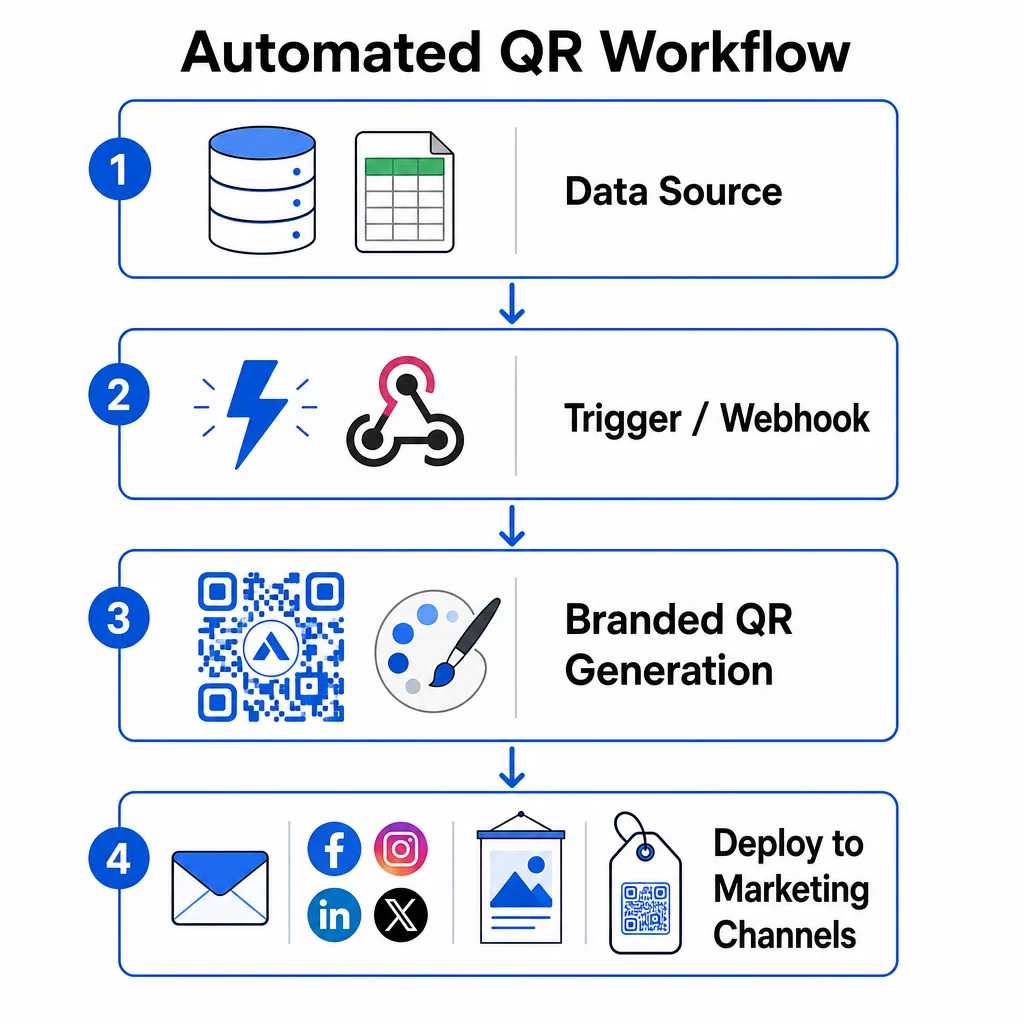
Tu sa vaše nastavenie stáva funkčným systémom. Cieľom je definovať konkrétne udalosti, ktoré spúšťajú generovanie QR kódov, a potom tieto kódy priamo prepojiť s vašimi marketingovými kanálmi, aby boli okamžite pripravené na použitie.
Spúšťače založené na udalostiach
Spúšťače sú to, čo robí automatizáciu bezstarostnou. Namiesto manuálneho generovania kódov váš systém automaticky reaguje na obchodné udalosti.
Medzi bežné typy spúšťačov patria:
- Aktualizácie katalógu produktov: Keď sa do vášho inventárneho systému pridá nový produkt, pracovný postup vygeneruje značkový QR kód prepojený s touto produktovou stránkou – pripravený na balenie alebo marketingové materiály skôr, než oň niekto požiada.
- Registrácie zákazníkov: Keď sa nový zákazník zaregistruje, systém vytvorí personalizovaný QR kód pre prístup k účtu, uvítací balíček alebo registráciu do vernostného programu.
- Rezervácie podujatí: Keď sa účastník zaregistruje na konferenciu alebo veľtrh, vygeneruje sa jedinečný QR kód pre registráciu alebo prístup k stánku.
- Naplánované kampane: Časovo založené spúšťače môžu generovať kódy týždenne pre nadchádzajúce udalosti alebo mesačne pre sezónne akcie, čím udržiavajú kampane aktuálne bez manuálnych aktualizácií.
Pre pracovné postupy založené na API sa generovanie QR kódu zvyčajne deje prostredníctvom požiadavky HTTP POST, ktorá odovzdáva obsah (URL alebo dátový náklad) aj parametre štýlu (farby, URL loga, veľkosť, formát) v jednom tele JSON. Polia štýlu sú zvyčajne voliteľné – vaša uložená šablóna značky ich spracuje automaticky – zatiaľ čo pole obsahu je povinné pre každý jedinečný kód.
Pre nastavenia bez kódu vám spúšťač “Webhooks by Zapier” od Zapieru umožňuje vytvoriť URL, ktorá spustí Zap z akejkoľvek prichádzajúcej požiadavky HTTP. Make a n8n ponúkajú podobné spúšťače založené na webhookoch s pokročilejšou logikou pre tímy, ktoré potrebujú podmienené vetvenie alebo viacstupňové transformácie.
Pre hlbší pohľad na to, ako API umožňujú hromadné generovanie a dynamické aktualizácie, pozrite si Integrácia API pre správu QR kódov.
Integrácia s marketingovými kanálmi
Akonáhle sa spúšťač aktivuje a kód sa vygeneruje, pracovný postup by mal tento kód priamo vložiť do kanála, kde sa bude používať. Tým sa eliminuje manuálny krok sťahovania, preformátovania a nahrávania kódov na každú platformu.
- Nástroje e-mailového marketingu ako Mailchimp alebo Constant Contact môžu vložiť QR kódy priamo do šablón newsletterov alebo propagačných e-mailov v momente odoslania.
- Plánovače sociálnych médií ako Hootsuite alebo Buffer môžu prijímať kódy ako súčasť dátovej časti plánovaného príspevku, čo vám umožní spárovať obsah s jedinečným kódom pre každú platformu.
- Platformy marketingovej automatizácie ako HubSpot alebo Marketo môžu spúšťať generovanie QR kódov na základe skóre potenciálnych zákazníkov alebo členstva v segmente, pričom výsledný kód automaticky vložia do cielenej e-mailovej sekvencie.
Pre agentúry spravujúce kampane pre viacerých klientov sa automatizácia stáva ešte kritickejšou. Pracovné postupy môžu aplikovať branding špecifický pre klienta, generovať kódy a smerovať ich cez schvaľovací krok predtým, ako sa akýkoľvek kód spustí. Pozrite sa, ako Pageloot podporuje pracovné postupy agentúr s funkciami bielej značky, povoleniami založenými na rolách a zdieľateľnými klientskymi správami.
Správa dynamických a hromadných QR kódov
Hromadné generovanie zvláda objem; dynamické kódy zvládajú zmeny. Spolu pokrývajú väčšinu potrieb QR kódov v podnikovom meradle.
Pri hromadnom generovaní odovzdáte zoznam jedinečných hodnôt obsahu – URL adries produktov, ID účastníkov, identifikátorov polohy – spolu so zdieľanou sadou parametrov brandingu. Platforma vygeneruje každý kód v jednom prechode, aplikuje konzistentný štýl a vráti ich vo formáte pripravenom na balenie alebo tlač. Viac o nástrojoch pre hromadné spracovanie na podnikovej úrovni nájdete automatizované nástroje na hromadné vytváranie QR kódov pre podniky.
Dynamické kódy pridávajú flexibilitu po distribúcii. Ak sa zmení cieľ kampane, skončí sa propagácia alebo sa preruší odkaz, aktualizujete cieľ vo svojom paneli – nie fyzický kód. To tiež umožňuje automatizáciu založenú na výkone: pracovné postupy môžu monitorovať miery skenovania a automaticky aktualizovať cieľ kódu, ak angažovanosť klesne pod prahovú hodnotu, alebo presmerovať kódy na sezónne stránky podľa nastaveného plánu.
Krok 4: Sledujte a optimalizujte výkon kampane
Automatizácia neznamená „nastav a zabudni“. Skutočné zlepšenie výkonu pochádza z monitorovania toho, čo funguje, a vykonávania úprav, zatiaľ čo kampane stále bežia.
Analytika v reálnom čase
Sledovanie skenovania vám poskytuje okamžitý prehľad o tom, ako kódy fungujú naprieč kanálmi. Dobrý analytický panel zobrazuje frekvenciu skenovania, geografické rozloženie, typy zariadení a vzorce dennej doby. Ak zaznamenáte pokles skenovania počas konkrétnych hodín, môžete upraviť načasovanie propagácie. Ak určité miesta neustále prekonávajú iné, môžete materiály zodpovedajúcim spôsobom prerozdeliť.
Panel Pageloot zaznamenáva nielen to, kedy a kde dochádza k skenovaniu, ale aj to, čo používatelia robia po skenovaní – čo vám poskytuje úplnejší obraz o výkone kampane než samotný objem skenovania.
Automatizované reportovanie
Ručná správa viacerých kampaní s QR kódmi znamená prepínanie medzi dashboardmi a ručné zostavovanie dát. Automatizované reportovanie odstraňuje túto záťaž tým, že doručuje plánované súhrny priamo do vašej schránky alebo integrovanej platformy.
Užitočné frekvencie reportovania zahŕňajú:
- Týždenné reporty ktoré odhaľujú najvýkonnejšie kódy, označujú neobvyklé vzorce skenovania a identifikujú kampane, ktoré môžu potrebovať pozornosť
- Mesačné reporty ktoré zachytávajú dlhodobejšie trendy, sezónne zmeny a porovnania medzi kampaňami
Prepojenie vašej QR analytiky s platformami ako Google Analytics, HubSpot alebo Salesforce vytvára jednotný pohľad na vaše marketingové dáta. Systémy upozornení pridávajú ďalšiu vrstvu – okamžite vás upozornia, keď kampaň s QR kódom zaznamená náhly pokles aktivity, takže môžete prešetriť situáciu skôr, než kampaň utrpí.
Aplikácia dát na fyzické kampane
QR analytika je obzvlášť užitočná na meranie angažovanosti s tlačenými materiálmi, ktoré je inak ťažké sledovať. Priradením jedinečných kódov konkrétnym miestam, udalostiam alebo tlačovým sériám môžete presne priradiť skeny.
Napríklad maloobchodný reťazec môže priradiť jedinečný kód každému obchodu a zistiť, ktoré miesta generujú najväčšiu digitálnu angažovanosť. Na veľtrhu QR kódy na materiáloch stánku spájajú fyzické interakcie s digitálnou analýzou, čím poskytujú marketingovým tímom dáta na odôvodnenie výdavkov na podujatie.
Keď kód funguje výnimočne dobre, môžete ho škálovať – zvýšiť výdavky na reklamu, rozšíriť distribúciu alebo duplikovať formát kampane na iné kanály.
Monitorujte svoju kampaň v reálnom čase Chcete presne vidieť, kde a kedy vaši zákazníci skenujú vaše materiály? Použite Generátor QR kódov na vytváranie sledovateľných dynamických kódov a prístup k plnému výkonnostnému dashboardu.
Krok 5: Navrhnite pre skenovateľnosť a zabezpečte vo veľkom rozsahu
Automatizácia zvláda objem, ale kódy, ktoré produkuje, musia stále spoľahlivo skenovať a pochádzať zo systému, ktorý neodhalí vaše dáta ani sa nezrúti pod záťažou.
Branding v rámci technických limitov
Prispôsobenie rozširuje možnosti QR kódu pre vašu značku – ale funguje v rámci technických obmedzení, ktoré, ak sa ignorujú, vytvárajú kódy, ktoré sa nedajú skenovať.
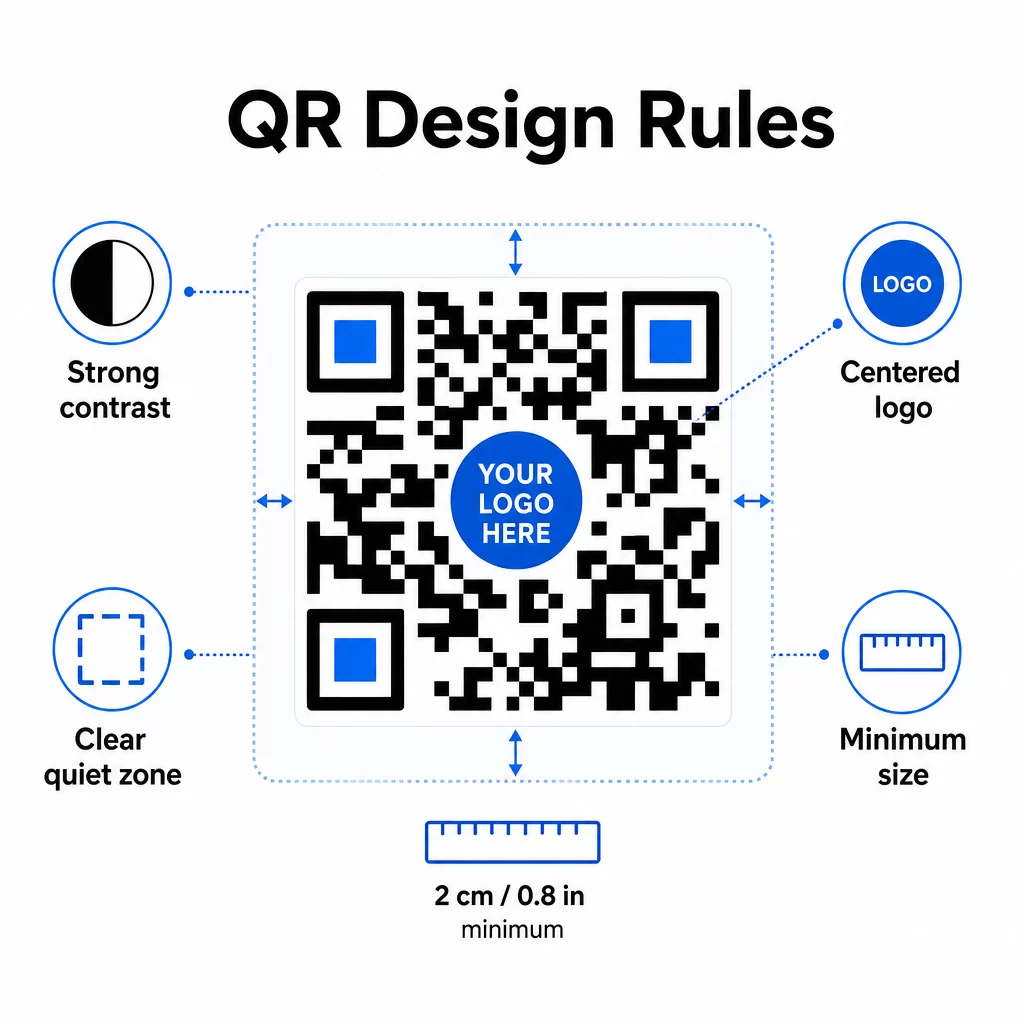
Farebný kontrast je najčastejším bodom zlyhania. QR skenery čítajú rozdiel medzi tmavými a svetlými modulmi, takže popredie musí byť vždy tmavšie ako pozadie. Nikdy tento vzťah neobracajte. Minimálny kontrastný pomer 4:1 medzi kódom a jeho pozadím je praktickým základom pre spoľahlivé skenovanie; vyšší je lepší. Podrobný rozpis farebných kombinácií a kontrastných pomerov nájdete na osvedčené postupy pre farebný kontrast QR kódov.
Pokrytie logom musí zostať na úrovni 30 % alebo pod ňou z celkovej plochy kódu. Väčšie logá zakrývajú príliš veľa dátových modulov na obnovenie. Logá umiestňujte iba do stredu, na jednofarebné svetlé pozadie a používajte jednoduché tvary. Ak vkladáte logá, použite úroveň korekcie chýb Q alebo H, aby mal skener viac redundancie, s ktorou môže pracovať.
Tiché zóny sú jasným okrajom okolo kódu. Špecifikácia QR kódu vyžaduje aspoň štyri moduly prázdneho priestoru na všetkých stranách. V automatizovaných pracovných postupoch je ľahké tento okraj náhodne orezať – zabudujte vynucovanie tichej zóny do nastavení šablóny, aby sa nedalo prepísať.
Minimálna veľkosť pre skenovanie zblízka je približne 0,8 × 0,8 palca (asi 2 × 2 cm). Pre značenie alebo plagáty prezerané z diaľky použite pravidlo 10:1: vzdialenosť skenovania by nemala byť väčšia ako desaťnásobok šírky kódu. Kód na plagáte prezeranom z 10 stôp by mal byť široký aspoň 12 palcov.
Akékoľvek prispôsobenie, ktoré použijete – nové farebné kombinácie, umiestnenie loga, štýly rámov – je potrebné otestovať predtým, ako sa dostane do hromadného pracovného postupu. Testujte na viacerých zariadeniach, skenovacích aplikáciách a svetelných podmienkach. Komplexné pokyny pre čitateľnosť nájdete na osvedčených postupov pre čitateľnosť QR kódov.
Bezpečnostné opatrenia
Keďže váš automatizovaný systém spracováva viac kódov a viac dát, bezpečnosť musí držať krok.
- Riadenie prístupu založené na rolách obmedzuje, čo môže každý člen tímu robiť. Marketingoví koordinátori môžu vytvárať a prezerať kampane; iba IT administrátori by mali spravovať integrácie a bezpečnostné nastavenia.
- Šifrovanie dát chráni citlivé informácie počas prenosu a v pokoji. QR kódy, ktoré odkazujú na platobné stránky, zákaznícke účty alebo dôverné dokumenty, by mali vždy používať šifrované HTTPS destinácie s platnými TLS certifikátmi.
- Súlad s GDPR, CCPA alebo HIPAA (v závislosti od vášho odvetvia) znamená zabudovanie mechanizmov súhlasu, politík uchovávania údajov a možností odhlásenia do vašich automatizovaných pracovných postupov od začiatku – nie ako dodatočnú myšlienku.
- Pravidelné bezpečnostné audity zachyťte zraniteľnosti skôr, než sa stanú incidentmi. Zdokumentujte si plán revízií a otestujte svoje prístupové kontroly vždy, keď člen tímu zmení rolu.
Stratégie škálovateľnosti
Modulárny dizajn pracovného postupu je najpraktickejším prístupom k škálovateľnosti. Namiesto jedného veľkého pracovného postupu, ktorý spracováva tvorbu, štýlovanie, distribúciu a analýzy, rozdeľte ich na samostatné prepojené moduly. Potom môžete aktualizovať jednu komponentu – napríklad logiku značky – bez toho, aby ste sa dotkli distribučného potrubia.
Zabudujte automatické spracovanie chýb s mechanizmami zálohy. Ak primárny koncový bod na generovanie QR kódu nie je dostupný, pracovný postup by sa mal prepnúť na zálohu, zaznamenať zlyhanie a upozorniť administrátora – nie ticho zahodiť požiadavku. Logika opakovania spracováva dočasné problémy s pripojením bez manuálneho zásahu.
Pre operácie s vysokým objemom zabraňujú obmedzenia rýchlosti API a systémy front preťaženiu pripojených platforiem. Rozložte požiadavky rovnomerne namiesto odosielania všetkého v jedinom návale a používajte dávkové spracovanie počas mimošpičkových hodín, ak je to možné.
Uchovávajte históriu verzií konfigurácií pracovných postupov a monitorujte časy vykonávania, rýchlosti odozvy API a využitie zdrojov. Ak sa časy generovania alebo nasadenia začnú predlžovať, je to signál na prešetrenie, či je potrebné zvýšiť kapacitu skôr, než to ovplyvní živé kampane.
Dáme to dokopy
Päť vyššie uvedených krokov tvorí kompletný systém: požiadavky, ktoré riadia výber platformy, výber platformy, ktorý umožňuje značkové šablóny, šablóny, ktoré napájajú automatizované pracovné postupy, pracovné postupy, ktoré produkujú sledovateľné kódy, a sledovacie údaje, ktoré vám pomáhajú zlepšovať sa v priebehu času.
Prijatie QR kódov naďalej rastie – prieskum z roku 2025 zistil, že 82% spotrebiteľov sa cíti pohodlne pri skenovaní kódov od podnikov, ktoré poznajú, čo je nárast z 53% v roku 2021. Automatizácia je to, čo umožňuje prakticky osloviť toto publikum vo veľkom rozsahu, s kódmi, ktoré sú konzistentne v súlade so značkou, spoľahlivo skenovateľné a viazané na merateľné výsledky.
Začnite s Generátor QR kódov Pageloot na nastavenie vašej prvej značkovej šablóny a potom na tomto základe vybudujte svoju automatizačnú vrstvu.
Často kladené otázky
Dynamické QR kódy vám umožňujú aktualizovať cieľovú URL adresu alebo prepojený obsah po vytlačení a distribúcii kódu. V automatizovanom pracovnom postupe to znamená, že môžete presmerovať kódy na nové ponuky, opraviť nefunkčné odkazy alebo obmieňať sezónny obsah bez generovania nových kódov alebo pretláčania materiálov. Poskytujú tiež analytiku skenovania – čas, poloha, typ zariadenia – ktorá sa vracia späť do vašich optimalizačných pracovných postupov.
Tri najdôležitejšie pravidlá sú kontrast, pokrytie loga a tiché zóny. Vždy používajte tmavé popredie na svetlom pozadí s kontrastným pomerom minimálne 4:1. Akékoľvek vložené logo udržujte na úrovni 30% alebo menej z plochy kódu, vycentrované na jednofarebnom pozadí. Udržujte minimálne štyri moduly voľného okraja okolo celého kódu. Pri pridávaní loga použite úroveň korekcie chýb Q alebo H. Zabudujte tieto obmedzenia do svojich šablón, aby každý kód vytvorený vašou automatizáciou spĺňal tieto požiadavky automaticky – potom otestujte nové konfigurácie dizajnu na viacerých zariadeniach predtým, ako ich spustíte hromadným pracovným postupom.
Platformy bez kódu ako Zapier a Make sú vhodné pre tímy bez špecializovaných vývojárov. Obe používajú webhooks na spustenie generovania QR kódov z udalostí v iných nástrojoch – nový kontakt v CRM, aktualizácia katalógu produktov alebo registrácia na udalosť. Nakonfigurujete spúšťač, namapujete dátové polia (URL, parametre značky) a nasmerujete akciu na koncový bod API vašej platformy pre QR kódy. Pre tímy, ktoré potrebujú viac podmienenej logiky alebo vlastných dátových transformácií, n8n ponúka flexibilnejší nástroj na tvorbu pracovných postupov založený na webhookoch. Integrácia API zostáva najvýkonnejšou možnosťou pre technické tímy spravujúce komplexné alebo vysokobjemové pracovné postupy.