> 블로그 > How to Automate QR Code Customization
Automated QR campaign

How to Automate QR Code Customization

Learn how to automate QR code customization to scale your campaigns. This guide covers mapping data sources, building workflows, and tracking performance.
Updated on 6월 10, 2026
목차

Manually designing every QR code in a campaign isn’t just slow – it creates inconsistencies that undermine your brand and make tracking nearly impossible. If you’re running QR codes at any real scale, automation is how you keep quality consistent while cutting the time it takes to launch.

This guide walks you through five practical steps to automate QR code customization: from mapping your data sources and choosing the right platform to building event-driven workflows, tracking performance, and locking down security as you scale.

Step 1: Map Your Automation Requirements

Before building anything, get clear on what you actually need to automate. Skipping this step leads to workflows that break under load or require constant manual fixes.

Start by identifying your data sources. Where is the information that should drive each QR code coming from? Common sources include:

  • CRM systems for customer-specific codes tied to loyalty programs or onboarding
  • Product catalogs or inventory databases for retail and e-commerce labeling
  • Event management platforms for attendee-specific QR codes at conferences or trade shows
  • CSV or Excel files for batch campaigns like direct mail or product labeling

Once you know your sources, decide how to connect them to a QR code generation tool. APIs allow programmatic data retrieval and are the most flexible option. Webhooks enable real-time triggers – for instance, firing off a QR code the moment a new customer registers. If your tools don’t have direct integrations, no-code automation platforms like Zapier, Make, or n8n can bridge the gap using webhook-based workflows.

Finally, think through volume and update frequency. A one-time batch of 500 codes for a product launch is a different problem than generating personalized codes for every new CRM contact in real time. Your tooling decisions should reflect both your current scale and where you expect to be in six months.

Explore All QR Code Features Not sure which QR code types fit your use case? Browse the full Pageloot features overview to see what’s available for your campaigns.

Step 2: Choose and Configure Your QR Code Platform

With your requirements mapped, the next step is selecting a platform that can support automated, branded QR code generation at your target volume.

What to Look for in a Platform

동적 QR 코드 are essential for any automated workflow. Unlike static codes, dynamic codes let you update the destination URL or linked content after printing – without generating a new code or reprinting materials. This matters when campaigns change, links break, or you want to redirect codes based on timing or audience. The Pageloot dynamic QR code generator lets you change linked content at any time, even after a code has been distributed.

Branding and customization controls determine how much you can automate the visual side. Look for a platform that lets you set brand colors, upload a logo, choose body and edge styles, and save those choices as reusable templates. Pageloot’s 로고가 있는 QR 코드 생성기 gives you control over style, frame, background color, body pattern, edge type, and design presets – all of which can be locked in once and reused consistently.

Bulk generation is non-negotiable if you’re working at scale. A platform should be able to process hundreds or thousands of codes in a single batch, whether from a CSV upload or via API, while applying consistent branding and tracking parameters to every code.

해석학 close the loop. You need to know which codes are being scanned, when, where, and on what devices. Platforms that surface this data in real time allow you to act on performance, not just report on it.

Setting Up the Platform

Once you’ve chosen a platform, configure it before building any workflows:

  • Define user roles and permissions. Assign access levels so administrators manage integrations, campaign managers handle code creation, and analysts access reporting without being able to alter live campaigns.
  • Generate API credentials and configure your endpoints if you’re using a direct API integration.
  • Set up brand templates. Upload your logo, set your brand colors, and save those settings as a reusable template. Pageloot’s QR 코드 템플릿 let you create multiple templates for different use cases – one for packaging, one for event materials, one for digital campaigns – so every code looks consistent without manual styling each time.
  • Enable security settings. Turn on two-factor authentication for admin accounts, set data retention policies, and configure access controls appropriate to your industry.

Build Branded QR Codes at Scale Want to apply your logo and brand colors to every code automatically? Use the 로고가 있는 QR 코드 생성기 to set your visual identity once and keep every code on-brand.

Step 3: Build Automated Workflows for Creation and Deployment

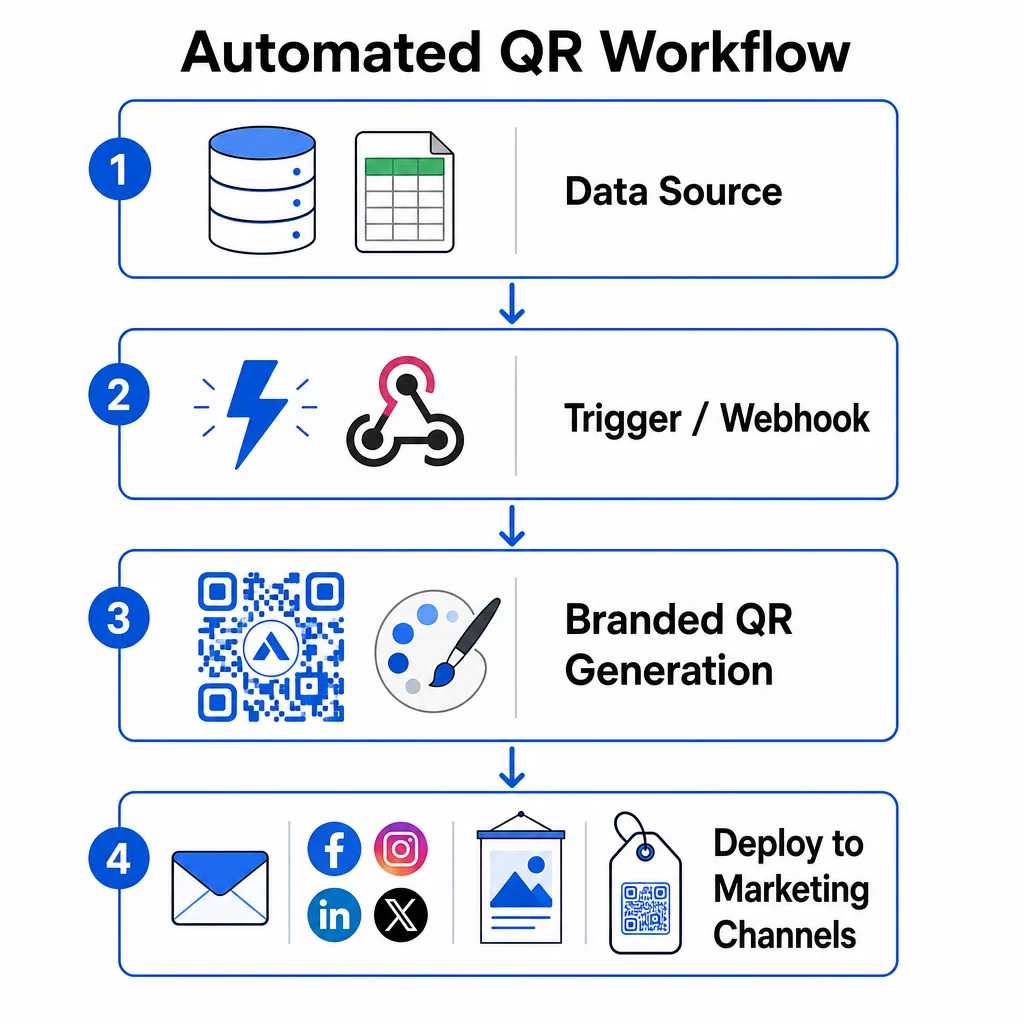
This is where your setup becomes a functioning system. The goal is to define the specific events that trigger QR code generation, then connect those codes directly to your marketing channels so they’re ready to use immediately.

Automated QR workflow

Event-Based Triggers

Triggers are what make automation feel hands-free. Instead of generating codes manually, your system responds to business events automatically.

Common trigger types include:

  • Product catalog updates: When a new product is added to your inventory system, a workflow generates a branded QR code linked to that product page – ready for packaging or marketing materials before anyone has to ask for it.
  • Customer registrations: When a new customer signs up, the system creates a personalized QR code for account access, a welcome kit, or a loyalty program enrollment.
  • Event bookings: When an attendee registers for a conference or trade show, a unique QR code is generated for check-in or booth access.
  • Scheduled campaigns: Time-based triggers can generate codes weekly for upcoming events or monthly for seasonal promotions, keeping campaigns current without manual updates.

For API-based workflows, QR code generation typically happens via an HTTP POST request that passes both the content (URL or data payload) and styling parameters (colors, logo URL, size, format) in a single JSON body. Styling fields are usually optional – your saved brand template handles those automatically – while the content field is required for each unique code.

For no-code setups, Zapier’s “Webhooks by Zapier” trigger lets you create a URL that fires a Zap from any incoming HTTP request. Make and n8n offer similar webhook-based triggers with more advanced logic for teams that need conditional branching or multi-step transformations.

For a deeper look at how APIs enable bulk generation and dynamic updates, see API integration for QR code management.

Integration with Marketing Channels

Once a trigger fires and a code is generated, the workflow should push that code directly into the channel where it will be used. This removes the manual step of downloading, reformatting, and uploading codes to each platform.

  • Email marketing tools like Mailchimp or Constant Contact can pull QR codes directly into newsletter templates or promotional emails at the moment of send.
  • Social media schedulers like Hootsuite or Buffer can receive codes as part of a scheduled post payload, letting you pair content with a unique code per platform.
  • Marketing automation platforms like HubSpot or Marketo can trigger QR code generation based on lead scores or segment membership, embedding the resulting code into a targeted email sequence automatically.

For agencies managing campaigns across multiple clients, automation becomes even more critical. Workflows can apply client-specific branding, generate codes, and route them through an approval step before any code goes live. See how Pageloot supports agency workflows with whitelabel features, role-based permissions, and shareable client reports.

Dynamic and Bulk QR Code Management

Bulk generation handles volume; dynamic codes handle change. Together, they cover most enterprise-scale QR code needs.

With bulk generation, you pass a list of unique content values – product URLs, attendee IDs, location identifiers – along with a shared set of branding parameters. The platform generates every code in one pass, applies consistent styling, and returns them in a format ready for packaging or print. For more on enterprise-grade bulk tools, see 기업을 위한 자동화된 대량 QR 코드 도구.

Dynamic codes add flexibility after distribution. If a campaign destination changes, a promotion ends, or a link breaks, you update the destination in your dashboard – not the physical code. This also enables performance-based automation: workflows can monitor scan rates and automatically update a code’s destination if engagement drops below a threshold, or redirect codes to seasonal pages on a set schedule.

Step 4: Track and Optimize Campaign Performance

Automation doesn’t mean set-it-and-forget-it. Real performance gains come from monitoring what’s working and making adjustments while campaigns are still running.

실시간 분석

Scan tracking gives you immediate visibility into how codes are performing across channels. A good analytics dashboard surfaces scan frequency, geographic distribution, device types, and time-of-day patterns. If you see a drop in scans during specific hours, you can adjust promotional timing. If certain locations consistently outperform others, you can redistribute materials accordingly.

Pageloot’s dashboard captures not just when and where scans happen, but what users do after scanning – giving you a more complete picture of campaign performance than scan volume alone.

Automated Reporting

Managing multiple QR code campaigns manually means toggling between dashboards and compiling data by hand. Automated reporting removes that overhead by delivering scheduled summaries directly to your inbox or integrated platform.

Useful reporting cadences include:

  • Weekly reports that surface top-performing codes, flag unusual scan patterns, and identify campaigns that may need attention
  • Monthly reports that capture longer-term trends, seasonal shifts, and cross-campaign comparisons

Connecting your QR analytics to platforms like Google Analytics, HubSpot, or Salesforce creates a unified view of your marketing data. Alert systems add another layer – notifying you immediately when a QR code campaign experiences a sudden drop in activity, so you can investigate before the campaign suffers.

Applying Data to Physical Campaigns

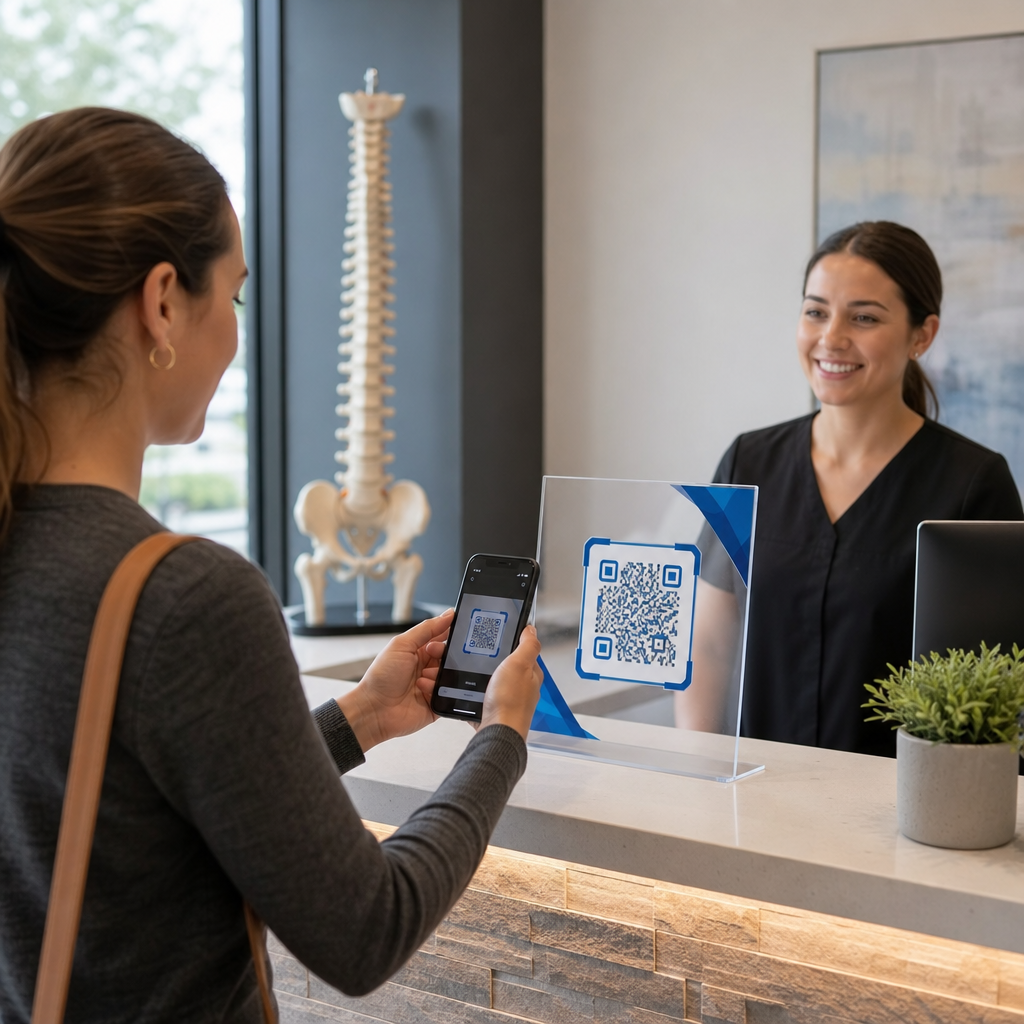
QR analytics are especially useful for measuring engagement with printed materials, which are otherwise difficult to track. By assigning unique codes to specific locations, events, or print runs, you can attribute scans precisely.

A retail chain, for example, can assign a unique code to each store location and see which locations drive the most digital engagement. At a trade show, QR codes on booth materials connect physical interactions to digital analytics, giving marketing teams data to justify event spend.

When a code performs exceptionally well, you can scale it – increasing ad spend, expanding distribution, or duplicating the campaign format to other channels.

캠페인을 실시간으로 모니터링하세요 고객이 언제 어디서 자료를 스캔하는지 정확히 알고 싶으신가요? 다음을 사용하세요. QR 코드 생성기 to create trackable dynamic codes and access a full performance dashboard.

Step 5: Design for Scannability and Secure at Scale

Automation handles volume, but the codes it produces still need to scan reliably and come from a system that won’t expose your data or break under load.

Branding Within Technical Limits

Customization expands what a QR code can do for your brand – but it operates within technical constraints that, if ignored, produce codes that don’t scan.

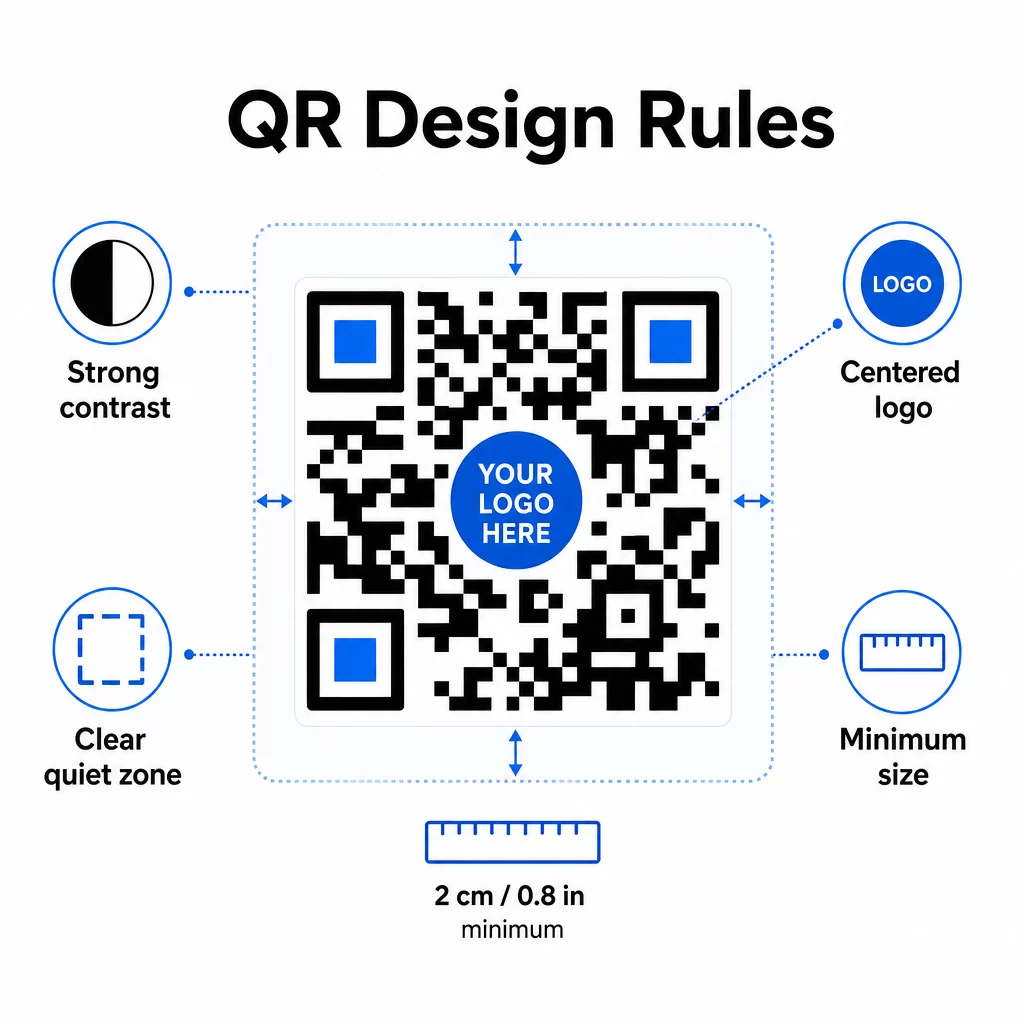
QR design rules

Color contrast is the most common failure point. QR scanners read the difference between dark and light modules, so the foreground must always be darker than the background. Never invert this relationship. A minimum contrast ratio of 4:1 between the code and its background is the practical floor for reliable scanning; higher is better. For a detailed breakdown of color combinations and contrast ratios, see QR 코드 색상 대비 모범 사례.

Logo coverage must stay at or below 30% of the total code area. Larger logos obscure too many data modules to recover. Place logos in the center only, on a solid light background, and use simple shapes. If you’re embedding logos, use error correction level Q or H to give the scanner more redundancy to work with.

Quiet zones are the clear margin around the code. The QR code specification requires at least four modules of empty space on all sides. In automated workflows, it’s easy to crop this margin accidentally – build quiet zone enforcement into your template settings so it can’t be overridden.

Minimum size for close-range scanning is approximately 0.8 × 0.8 inches (about 2 × 2 cm). For signage or posters viewed at a distance, apply the 10:1 rule: the scanning distance should be no more than ten times the code’s width. A code on a poster viewed from 10 feet should be at least 12 inches wide.

Any customization you apply – new color combinations, logo placements, frame styles – needs to be tested before it goes into a bulk workflow. Test across multiple devices, scanner apps, and lighting conditions. For comprehensive readability guidelines, see QR 코드 가독성을 위한 모범 사례.

Security Measures

As your automated system handles more codes and more data, security needs to keep pace.

  • Role-based access control limits what each team member can do. Marketing coordinators might create and preview campaigns; only IT administrators should manage integrations and security settings.
  • Data encryption protects sensitive information in transit and at rest. QR codes that link to payment pages, customer accounts, or confidential documents should always use encrypted HTTPS destinations with valid TLS certificates.
  • Compliance with GDPR, CCPA, or HIPAA (depending on your industry) means building consent mechanisms, data retention policies, and opt-out options into your automated workflows from the start – not as an afterthought.
  • Regular security audits catch vulnerabilities before they become incidents. Document your review schedule and test your access controls each time a team member changes roles.

Scalability Strategies

A modular workflow design is the most practical approach to scalability. Instead of one large workflow that handles creation, styling, distribution, and analytics, break these into separate interconnected modules. You can then update one component – say, the branding logic – without touching the distribution pipeline.

Build in automated error handling with fallback mechanisms. If the primary QR code generation endpoint is unavailable, the workflow should switch to a backup, log the failure, and alert an administrator – not silently drop the request. Retry logic handles temporary connectivity issues without manual intervention.

For high-volume operations, API rate limiting and queue systems prevent you from overwhelming connected platforms. Spread requests evenly rather than sending everything in a single burst, and use batch processing during off-peak hours when possible.

Keep a version history of workflow configurations and monitor execution times, API response rates, and resource usage. If generation or deployment times start creeping up, that’s a signal to investigate whether capacity needs to increase before it affects live campaigns.

Putting It Together

The five steps above form a complete system: requirements that drive platform choices, platform choices that enable branded templates, templates that feed automated workflows, workflows that produce trackable codes, and tracking data that helps you improve over time.

QR code adoption continues to grow – a 2025 survey found that 82% of consumers feel comfortable scanning codes from businesses they recognize, up from 53% in 2021. Automation is what makes it practical to meet that audience at scale, with codes that are consistently on-brand, reliably scannable, and tied to measurable outcomes.

Start with the Pageloot QR 코드 생성기 to set up your first branded template, then build your automation layer on top of that foundation.

자주 묻는 질문

How do dynamic QR codes improve automated marketing campaigns?

Dynamic QR codes let you update the destination URL or linked content after a code has been printed and distributed. In an automated workflow, this means you can redirect codes to new offers, fix broken links, or rotate seasonal content without generating new codes or reprinting materials. They also provide scan analytics – time, location, device type – that feed back into your optimization workflows.

What are the key design rules to follow when automating branded QR codes at scale?

The three most important rules are contrast, logo coverage, and quiet zones. Always use a dark foreground on a light background with at least a 4:1 contrast ratio. Keep any embedded logo to 30% or less of the code area, centered on a solid background. Maintain at least four modules of clear margin around the entire code. Use error correction level Q or H when adding logos. Build these constraints into your templates so every code produced by your automation meets them automatically – then test new design configurations across multiple devices before running them through a bulk workflow.

What automation tools work best for non-technical teams generating QR codes at scale?

No-code platforms like Zapier and Make are well-suited for teams without dedicated developers. Both use webhooks to trigger QR code generation from events in other tools – a new CRM contact, a product catalog update, or an event registration. You configure the trigger, map the data fields (URL, branding parameters), and point the action at your QR code platform’s API endpoint. For teams that need more conditional logic or custom data transformations, n8n offers a more flexible webhook-based workflow builder. API integration remains the most powerful option for technical teams managing complex or high-volume workflows.

작성자 정보

시임 코스타비는 페이지루트의 콘텐츠 책임자입니다. 그는 페이지루트의 혁신적인 QR 코드 생성 서비스에 대한 글을 쓰고 있습니다. 5년 이상 QR 코드 분야에서 쌓아온 깊이 있는 전문 지식을 바탕으로, 시임은 이 분야의 전문가로 인정받고 있습니다. 그는 QR 기술을 활용하여 디지털 상호작용을 간소화하고 향상시키는 데 크게 기여하고 있습니다.

범주
에 대해 자세히 알아보기
QR 브로셔를 든 마케터
어떻게 QR 코드 편집

온라인으로 QR 코드를 생성해야하는 경우 QR 코드 만들기 무료로 여기!
Pageloot는 #1 Go-To 솔루션 QR 코드를 만들고 스캔합니다.

BL-0207

20,000개 이상의 브랜드로부터 신뢰를 받아 더 많은 매출, 리뷰, 팔로워를 확보했습니다.

클라이언트 로고
최고 브랜드의 신뢰
5 중 4.8 평가

4.86 / 5 별점

휴고 로랑
휴고 로랑
레스토랑 주인
가장 쉽고 안정적인 QR 코드 생성기. PDF 파일을 즉시 업로드할 수 있습니다. 이제 레스토랑 메뉴가 디지털화되었습니다.
루카스 얀센
루카스 얀센
부동산 개발사
이것은 훌륭한 도구이며 QR 코드를 사용하면 원하는 곳으로 이동할 수 있습니다. 우리는 위치 QR 코드만 사용하지만 유용한 기능이 너무 많습니다.
엠마 모레티
엠마 모레티
소매 제품
사용하기 쉽고 빠릅니다. 그것은 훌륭하게 작동하고 완벽한 이미지를 생성하므로 직원들이 내 vCard를 다운로드할 수 있습니다.
휴고 로랑
휴고 로랑
레스토랑 주인
가장 쉽고 안정적인 QR 코드 생성기. PDF 파일을 즉시 업로드할 수 있습니다. 이제 레스토랑 메뉴가 디지털화되었습니다.
루카스 얀센
루카스 얀센
부동산 개발사
이것은 훌륭한 도구이며 QR 코드를 사용하면 원하는 곳으로 이동할 수 있습니다. 우리는 위치 QR 코드만 사용하지만 유용한 기능이 너무 많습니다.
엠마 모레티
엠마 모레티
소매 제품
사용하기 쉽고 빠릅니다. 그것은 훌륭하게 작동하고 완벽한 이미지를 생성하므로 직원들이 내 vCard를 다운로드할 수 있습니다.
더 많은 QR 코드보기
QR 라벨 스캔
QR 코드 인쇄 제품 라벨
무엇이든 디지털 경험으로 전환하세요 3분 이내에.

14일 무료 체험.

신용카드는 필요 없습니다.

첫 구매 시 30% 할인

코드를 사용하세요:

MP3 파일 공유

PDF QR 코드를 생성하려면 가입하세요

필요한 모든 것을 업로드하고 표시합니다.

  • 오디오 파일
  • 팟캐스트
  • 음악

가입 시 14일 무료 체험.
체험 기간 후 QR 코드 만료.

오디오 mp3 QR 코드를 생성하려면 가입하세요

프레임으로 더 많은 스캔 확보

QR 코드에 더 많은 프레임을 추가하려면 가입하세요

클릭 유도 문안 프레임은 고객이 QR 코드와 쉽게 상호 작용할 수 있도록 도와줍니다. 사용해 보세요!

가입 시 14일 무료 체험.
체험 기간 후 QR 코드 만료.

QR 코드에 더 많은 프레임을 추가하려면 가입하세요

도형으로 더 많은 스타일 추가

더 많은 도형을 만들려면 가입하세요

QR 코드는 정사각형일 필요가 없습니다. 브랜드 이미지에 맞게 전환해 보세요.

가입 시 14일 무료 체험.
체험 기간 후 QR 코드 만료.

더 많은 도형을 만들려면 가입하세요

QR 코드에 로고 추가

QR 코드에 로고를 추가하려면 가입하세요

로고와 브랜드를 추가하여 QR 코드를 돋보이게 만드세요.

가입 시 14일 무료 체험.
체험 기간 후 QR 코드 만료.

QR 코드에 로고를 추가하려면 가입하세요

스마트 앱 스토어 리디렉션

앱 스토어 QR 코드를 생성하려면 가입하세요

스마트 앱 스토어 QR 코드에 앱 링크를 추가하세요. 사용자는 장치에 따라 리디렉션됩니다.

가입 시 14일 무료 체험.
체험 기간 후 QR 코드 만료.

앱 스토어 QR 코드를 생성하려면 가입하세요

QR 코드에 이미지 업로드

이미지 QR 코드를 생성하려면 가입하세요

이미지를 쉽게 공유하세요. 몇 초 안에 동적으로 이미지를 변경하십시오.

가입 시 14일 무료 체험.
체험 기간 후 QR 코드 만료.

이미지 QR 코드를 생성하려면 가입하세요

PDF 파일 공유

PDF QR 코드를 생성하려면 가입하세요

필요한 모든 것을 업로드하고 표시합니다.

  • 메뉴 및 가격표
  • 명령
  • 모든 문서

가입 시 14일 무료 체험.
체험 기간 후 QR 코드 만료.

PDF QR 코드를 생성하려면 가입하세요

인쇄 없이 나중에 편집

다시 인쇄하지 않고 QR 코드를 편집하려면 가입하세요

동적 QR 코드를 사용하면 새 QR 코드를 인쇄하지 않고도 QR 코드의 내용을 변경할 수 있습니다.

가입 시 14일 무료 체험.
체험 기간 후 QR 코드 만료.

다시 인쇄하지 않고 QR 코드를 편집하려면 가입하세요

언제? 어디서? QR 코드 스캔 추적

QR 코드를 추적하려면 가입하세요

어떤 QR 코드가 가장 많이 스캔되고 무엇이 고객을 가장 흥분시키는지 알아보십시오.

가입 시 14일 무료 체험.
체험 기간 후 QR 코드 만료.

QR 코드를 추적하려면 가입하세요

인쇄 준비 파일 제공

PDF 및 SVG와 같은 벡터 QR 코드를 생성하려면 가입하세요.

.EPS, .PDF, .SVG

HD 해상도로 QR 코드를 다운로드하고 싶으신가요? 인쇄할 준비가 된 벡터 또는 픽셀 형식을 가져옵니다.

가입 시 14일 무료 체험.
체험 기간 후 QR 코드 만료.

PDF 및 SVG와 같은 벡터 QR 코드를 생성하려면 가입하세요.

기다리세요. 귀하의 QR 코드는 로드 중... 로드 중...

나만의 것으로 만들기

나중을 위해 QR 코드를 저장하려면 가입하세요.

다양한 색상, 로고 및 클릭 유도문안 프레임으로 멋진 QR 코드를 만들어 더 많은 스캔을 받으세요.

가입 시 14일 무료 체험.
체험 기간 후 QR 코드 만료.

나중을 위해 QR 코드를 저장하려면 가입하세요.