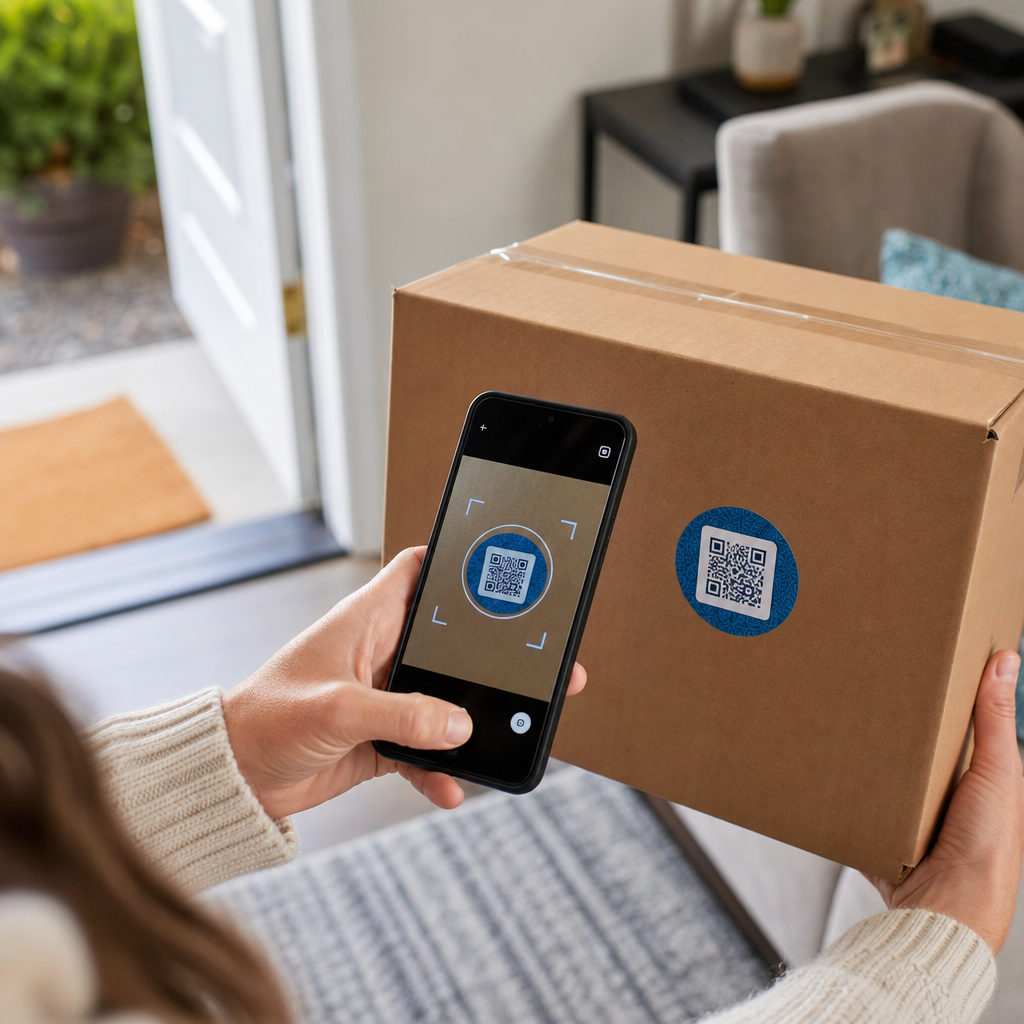

Ste kdaj skenirali QR kodo na škatli za pošiljanje in se vprašali, kaj dejansko počne? Odvisno od tega, kdo jo je tja postavil in zakaj, se odgovor bistveno razlikuje. Ta vodnik pojasnjuje vsak glavni primer uporabe – od usmerjanja prevoznikov do upravljanja skladišč in vračil, usmerjenih k strankam – tako da boste natančno vedeli, kaj gledate in kako implementirati svoje.
Zakaj imajo škatle za pošiljanje QR kode
Škatla za pošiljanje lahko preide skozi na desetine rok, preden doseže svoj cilj. Na vsaki stopnji – centru za izpolnjevanje naročil, vozlišču prevoznika, dostavnem vozilu, pragu stranke – mora nekdo ali nekaj hitro in natančno prebrati informacije o tem paketu.
QR kode to rešujejo tako, da več podatkovnih točk združijo v eno samo skenabilno sliko. Za razliko od standardne 1D črtne kode, ki običajno vsebuje 20–85 znakov, lahko QR koda kodira več kot 7.000 znakov. To pomeni, da lahko ena sama koda na škatli vsebuje številko naročila, naslov za pošiljanje, identifikatorje izdelkov, serijske številke in URL – vse berljivo v enem skeniranju. Za podrobnejši vpogled v primerjavo formatov 1D in 2D etiket si oglejte ta pregled črtnimi kodami za pošiljanje.
Razlog, zakaj se QR koda pojavi na vaši škatli za pošiljanje, je odvisen od tega, katera plast dobavne verige jo je tja postavila.
QR kode prevoznika in nalepke za pošiljanje
Najpogostejše QR kode na škatlah za pošiljanje prihajajo od prevoznika in se pojavijo neposredno na nalepki za pošiljanje ali kot spremljevalni element poleg nje.
Sledenje in usmerjanje
Prevozniki uporabljajo QR kode za usmerjanje paketov skozi svoje omrežje. Ko skener v sortirnem centru prebere kodo, se lokacija paketa posodobi v realnem času. To je isti dogodek skeniranja, ki sproži obvestilo o sledenju, ki ga vidite, ko preverite status pošiljke na spletu. Za stranke skeniranje QR kode na dohodnem paketu takoj prikaže podatke o sledenju v živo – ni treba iskati številke za sledenje ali ročno brskati po spletni strani prevoznika.
Dostava nalepk brez tiskalnika
Ena vse pogostejša uporaba je Posrednik nalepk model. Namesto da bi stranke morale doma natisniti povratno ali odhodno nalepko, trgovec pošlje QR kodo po e-pošti ali SMS-u. Stranka prinese paket na sodelujočo lokacijo prevoznika – pošto USPS, trgovino UPS ali lokacijo FedEx – in uradnik skenira QR kodo, da natisne nalepko na okencu.
USPS Label Broker, na primer, omogoča trgovcem shranjevanje nalepk v digitalnem repozitoriju in njihovo distribucijo strankam kot edinstvene ID-je s QR kodo. Trgovci lahko tudi kadar koli posodobijo, izbrišejo ali preverijo status sledenja za te nalepke. Prevozniki, vključno z USPS in FedEx, podpirajo QR kode za domače povratne pošiljke, UPS pa to zmožnost razširja po svoji maloprodajni mreži trgovin.
Ta delovni tok je praktičen za e-poslovanje, saj odpravlja težave z zahtevo po tiskalniku – kar je pomembna ovira za številne stranke, ki želijo sprožiti vračilo.
Dodajte QR kode v svoj delovni tok pošiljanja Morate ustvariti skenabilne QR kode, povezane s stranmi za sledenje, portali za vračila ali podrobnostmi naročila? Uporabite Generator QR kode Pageloot za ustvarjanje in upravljanje kod za vaše pošiljke v nekaj minutah.
Vračila in povratna logistika
Vračila so velik operativni izziv. Ameriški trgovci na drobno so pričakovali, da bo leta 2025 vrnjenih 15,8 % vseh prodaj, kar znaša približno 849,9 milijarde dolarjev, stopnja vračil v e-trgovini pa znaša približno 19,3 % – kar pomeni, da se skoraj vsako peto spletno naročilo vrne. Obdelava enega vračila stane povprečno med 20 in 30 dolarji, pri nekaterih kategorijah pa celo do 65 dolarjev.
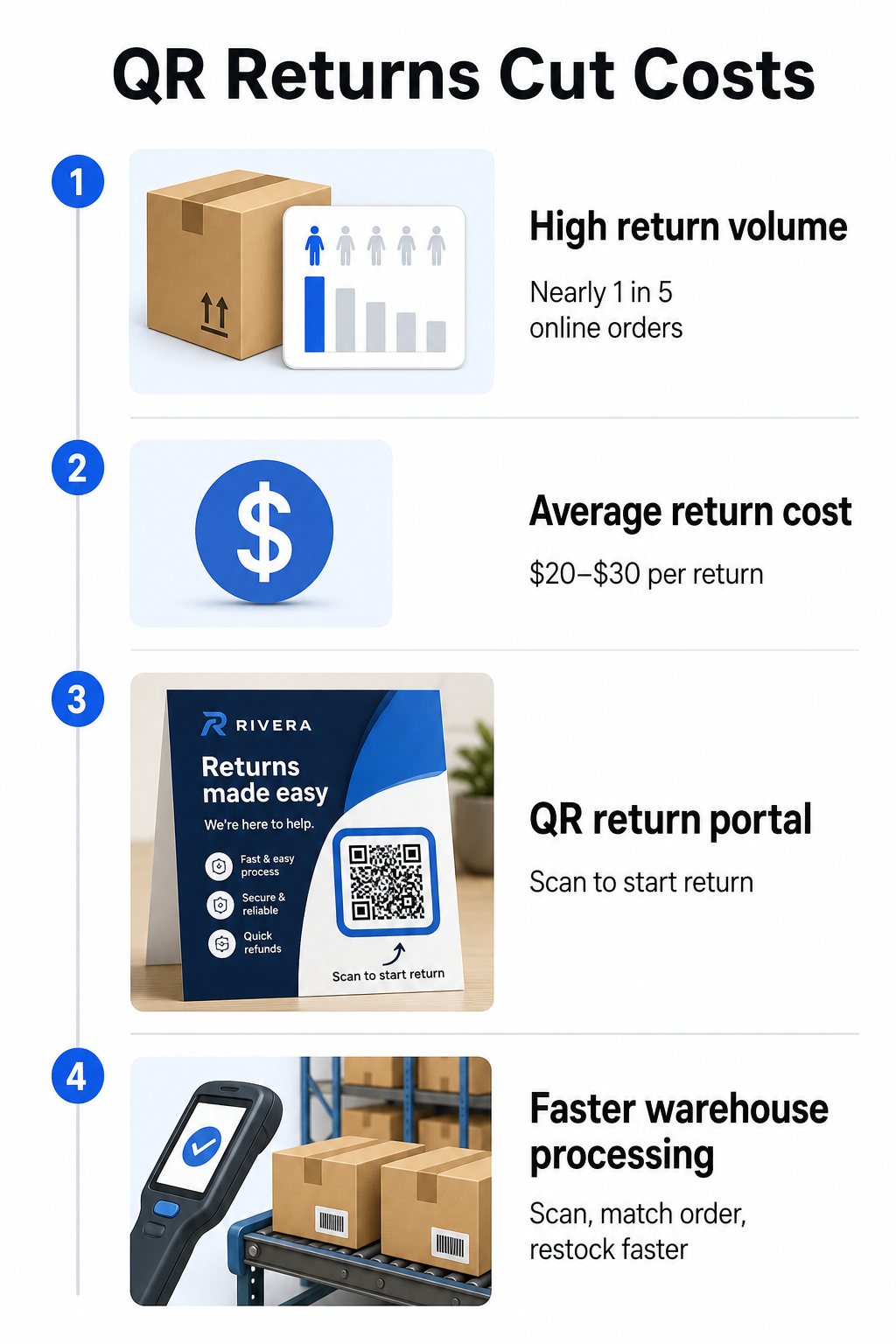
QR kode zmanjšujejo te stroške, saj omogočajo hitrejši in manj nagnjen k napakam postopek vračila. Namesto da bi stranke morale izpolnjevati papirnate obrazce ali iskati naslove za vračila, se lahko QR koda, natisnjena na škatli ali vključena na dobavnico, neposredno poveže s portalom za vračila, kjer stranke digitalno sprožijo postopek.
Prednosti vračil na podlagi QR kod vključujejo:
- Manj stikov s podporo – stranke si pomagajo same, namesto da bi pošiljale e-pošto ali klicale
- Zmanjšana goljufija pri vračilih – QR kode, vezane na specifična naročila, preprečujejo spreminjanje podrobnosti nalepke
- Hitrejša obdelava – Skladiščno osebje skenira QR kodo za vračilo, da takoj pridobi izvirno naročilo, namesto da bi podatke vnašalo ročno
- Možnosti brez tiskalnika – Podprto s strani USPS in FedExa na domačem trgu, pri čemer lahko trgovci kupcem ponudijo QR kodo, natisljivo nalepko ali oboje
Za praktičen vpogled v povezovanje QR kod za vračila z avtomatiziranimi delovnimi tokovi, vodnik o QR kode za dostave v e-trgovini predstavi celotno nastavitev.
Uporaba v skladiščih in notranji logistiki
QR kode na poštnih škatlah niso namenjene samo prevoznikom in strankam. Znotraj izpolnitvenih centrov in skladišč so glavno orodje za sledenje gibanju zalog brez ročnega vnašanja podatkov.
Prejem in odlaganje
Ko škatla prispe v skladišče, skeniranje njene QR kode takoj prikaže zapis o pošiljki – podrobnosti o dobavitelju, število artiklov, identifikatorje SKU in pričakovano lokacijo skladiščenja. Osebju ni treba ničesar tipkati ali preverjati dokumentacije. Skeniranje posodobi sistem za upravljanje skladišča (WMS) v realnem času, kar zmanjšuje neskladja, ki jih običajno povzroči ročni vnos.
Komisioniranje, pakiranje in preverjanje pošiljke
Med izpolnjevanjem naročil QR kode na škatlah in zabojnikih usmerjajo osebje k pravim artiklom in količinam. V fazi pakiranja skeniranje kode škatle služi kot končna kontrolna točka – potrjuje, da so vključeni pravilni artikli, preden se škatla zapečati. V delovnih tokovih izpolnjevanja, kot je Amazon FBA, omogočanje 2D črtnih kod na sistemski ravni omogoča WMS-u, da med pakiranjem ustvari kodo, ki predstavlja vsebino škatle, tako da ista koda obravnava sledenje pošiljke, ne da bi kdo moral pozneje odpreti škatlo.
Sledenje lokaciji in zalogam
QR kode je mogoče dodeliti ne le izdelkom, temveč tudi skladiščnim lokacijam – policam, conam, prostorom ali zabojnikom. Skeniranje kode lokacije skupaj s kodo izdelka natančno zabeleži, kje se zaloga nahaja v določenem trenutku, kar vaši ekipi omogoča sprotni pregled nad celotnim skladiščem. Vodnik o ustvarjanju QR kod za inventar izdelkov pokriva, kako to nastaviti v praksi.
Sledite vsakemu skeniranju, povsod Želite podatke v realnem času o tem, kdaj in kje se skenirajo QR kode na vaših poštnih škatlah? Pagelootova Analitika QR kod nadzorna plošča samodejno zajema čas skeniranja, lokacijo in podrobnosti naprave.
QR kode za stranke na poštnih škatlah
Poleg logistike nekatera podjetja uporabljajo samo poštno škatlo kot marketinško stično točko. QR koda na zunanji ali notranji strani škatle se lahko poveže na:
- Stran za sledenje za trenutno pošiljko
- Pristajalna stran po nakupu z vadnicami za izdelke ali videoposnetki za namestitev
- Vpis v program zvestobe ali ponudba popusta
- Zahteva za oceno ali obrazec za povratne informacije
- Digitalna dokumentacija izdelka ali priročniki
To spremeni trenutek odpiranja paketa v interakcijo z blagovno znamko. Za e-trgovinska podjetja je to ena redkih fizičnih stičnih točk, ki jih v celoti nadzorujete po nakupu. The Pagelootova stran z QR kodami za e-trgovino opisuje predlagane umestitve – zunanjost poštnih škatel, embalažni vložki in priročniki za izdelke – vsaka zasnovana tako, da sproži drugačno vrsto angažiranja.
Ena praktična opomba glede umestitve: na podlagi povratnih informacij zaposlenih USPS, USPS verjetno ne dovoljuje prilagojenih QR kod na sami nalepki za pošiljanje. Vendar je dovoljeno namestiti nalepko z QR kodo neposredno na škatlo – ne na nalepko – in to ne bi smelo povzročati težav pri poštnem ravnanju ali dostavi.
Dinamične QR kode: Praktična prednost za pošiljanje
Če dodajate QR kode na svoje poštne škatle, dinamične QR kode so prava izbira namesto statičnih. Statična QR koda trajno kodira fiksni niz podatkov. Dinamična QR koda kaže na preusmeritveni URL, ki ga lahko kadar koli posodobite, ne da bi spremenili natisnjeno kodo.
Za aplikacije pošiljanja je to pomembno na več načinov:
- URL za sledenje lahko spremeni format ali se premakne na novo domeno brez potrebe po novem tiskanju
- Sezonske promocije, povezane iz škatle, se lahko zamenjajo brez nove embalaže
- Če portal za vračila spremeni svoj naslov, QR koda na že natisnjenih škatlah še naprej deluje
Dinamične kode omogočajo tudi sledenje skeniranj. Vidite lahko, koliko strank je skeniralo kodo na svoji škatli, iz katerega mesta in na kateri vrsti naprave. Ti podatki, ki so na voljo prek Pagelootove analitike, vam povedo, ali se stranke vključujejo v izkušnjo po nakupu in kateri izdelki ali regije ustvarjajo največ aktivnosti. Za širši vpogled v to, kaj lahko sledenje QR kod razkrije o vedenju strank, je vodniku za sledenje QR kod zajema ključne metrike, ki jih je vredno spremljati.
GS1 Digital Link: Industrijski standard, ki se pojavlja v logistiki
Če delate v maloprodaji ali veleprodaji, se lahko srečate z GS1 Digitalna povezava – standardizirano metodo za vdelavo identifikatorjev izdelkov, kot so GTIN (Global Trade Item Numbers), serijske številke in roki uporabe, v eno samo 2D črtno kodo ali QR kodo.
GS1 Digital Link omogoča eni kodi, da hkrati služi več funkcijam. Skenira se lahko na prodajnem mestu za blagajno, v skladišču za sledenje zalog ali s strani potrošnika za informacije o izdelku – vse iz iste natisnjene kode. Dobavitelji lahko tudi posodobijo vsebino, dostavljeno ob skeniranju (promocijska sporočila, navodila za odpoklic, posodobitve alergenov), brez ponovnega tiskanja embalaže, ker koda kaže na spletni razreševalnik, namesto da bi neposredno kodirala vse podatke.
Za podjetja, ki se pripravljajo na zahteve skladnosti GS1 Sunrise 2027, je razumevanje tega standarda vse bolj pomembno. Vodnik o QR kode pri sledenju dobavne verige pokriva, kako se 2D črtne kode, kot so te, vključujejo v širše delovne tokove sledljivosti.
Kako dodati QR kode na vaše pošiljne škatle
Če želite implementirati QR kode na svoje pošiljne škatle, vas bodo naslednji koraki zanesljivo pripeljali od koncepta do uvedbe.
Najprej določite destinacijo. Odločite se, na kaj se bo QR koda povezovala – stran za sledenje, portal za vračila, stran izdelka ali ponudbo po nakupu. Uporabite kratek URL namesto dolgega sledilnega niza; krajši kodirani podatki ustvarijo manj gost vzorec kode, ki se skenira hitreje in zanesljiveje, še posebej pri manjših velikostih tiska.
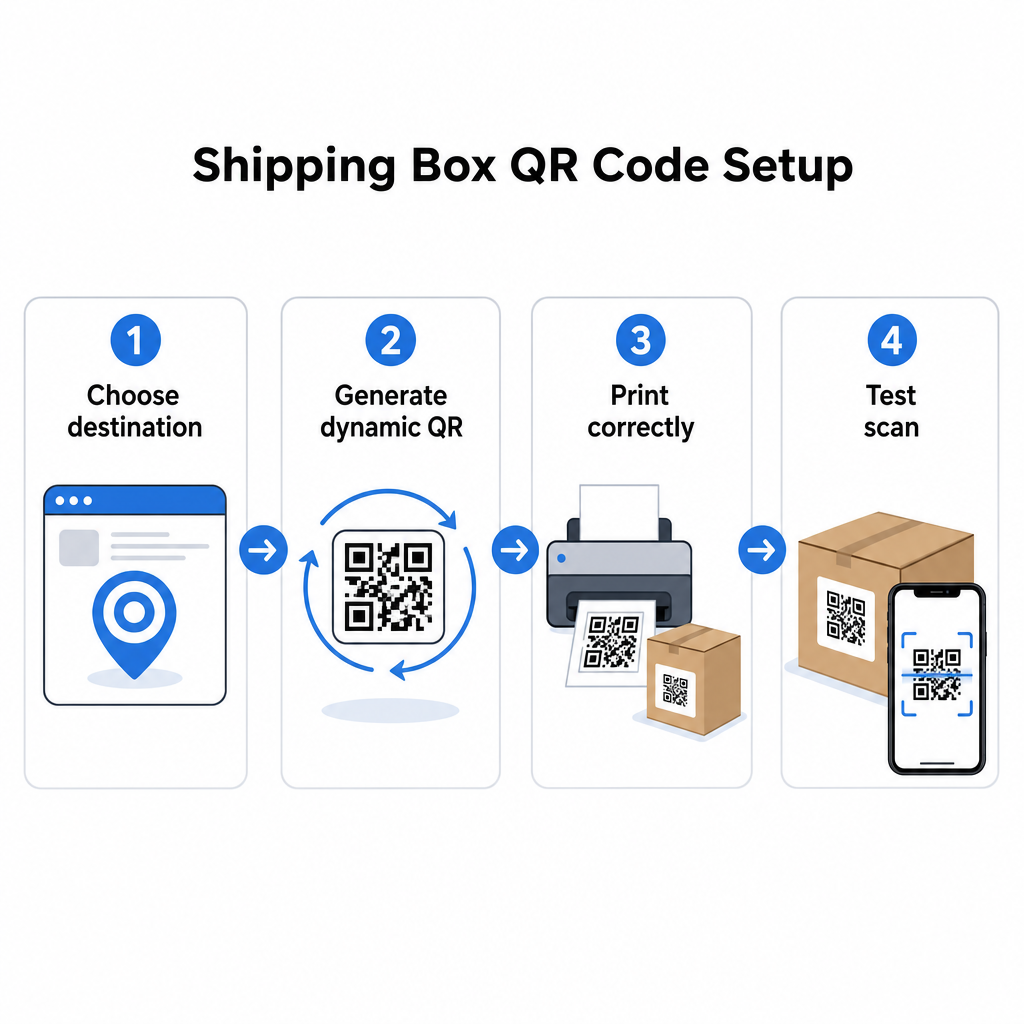
Ustvarite dinamično QR kodo. Uporabi generator QR kod za povezave za ustvarjanje dinamične kode, vezane na vaš ciljni URL. To vam omogoča, da pozneje posodobite destinacijo, ne da bi se dotaknili natisnjene embalaže.
Upoštevajte specifikacije tiska. Natisnite kodo v velikosti najmanj 2 × 2 cm (0,8 × 0,8 in), pri čemer je 3 × 3 cm priporočljivo za zanesljivost v realnem svetu. Uporabite temne module na beli ali svetli podlagi – črna na beli je idealna. Izvozite kot vektorsko datoteko (SVG ali PDF) ali pri 300–600 DPI, da zagotovite ostrino pri končni velikosti. Vzdržujte mirno cono vsaj štirih praznih modulov na vseh štirih straneh kode, brez besedila, logotipov ali obrob, ki bi posegali v to območje.
Pravilno ga namestite. Kodo postavite na ravno, razgrnjeno ploščo, stran od šivov, vogalov, poti traku in območij, ki so med pošiljanjem izpostavljena obrabi. Izogibajte se sijočim površinam okoli območja kode, saj bleščanje moti prepoznavanje kamere. Sprednja ali zgornja plošča najbolje deluje za kode, namenjene strankam. Za podrobna navodila za namestitev, specifična za škatle in etikete, je QR kode na embalaži izdelkov stran pokriva ključne dejavnike.
Preizkusite pred tiskanjem v velikem obsegu. Skenirajte kodo na dejanskih vzorcih škatel z več pametnimi telefoni, v različnih svetlobnih pogojih in z razdalj, s katerih bodo vaše stranke ali skladiščno osebje realistično skenirali. Odkrivanje težave s kontrastom ali velikostjo pred celotno proizvodno serijo je veliko manj stroškovno kot odkritje po njej.
Ste pripravljeni zgraditi svoj sistem QR kod za pošiljanje? Ne glede na to, ali potrebujete kode za strani za sledenje, portale za vračila ali angažiranje po nakupu, vam Generator QR kode Pageloot ponuja dinamične kode, ki jih je mogoče slediti, s popolno analitično nadzorno ploščo. Začnite brezplačno – kreditna kartica ni potrebna.
Pogosta vprašanja
USPS verjetno ne dovoljuje prilagojenih QR kod na sami nalepki za pošiljanje. Vendar pa je namestitev nalepke s QR kodo neposredno na škatlo – ne na nalepko – dovoljena in ne bi smela povzročati težav pri poštnem ravnanju ali dostavi.
QR kode prevoznika so ustvarjene s strani ladijskega prevoznika (USPS, UPS, FedEx) in so povezane z njihovimi sistemi za sledenje in usmerjanje. Prilagojene QR kode doda trgovec in se lahko povežejo na karkoli – strani za sledenje, portale za vračila, vsebino izdelkov ali promocije. Obe se lahko pojavita na isti škatli, vendar služita različnim občinstvom in namenom.
Ne, če uporabljate dinamično QR kodo. Dinamične kode kažejo na preusmeritev, ki jo lahko kadar koli posodobite v svoji platformi za QR kode, tako da natisnjena koda še naprej deluje tudi po spremembi ciljnega URL-ja. To je eden glavnih razlogov, zakaj podjetja izbirajo dinamične kode za aplikacije pakiranja.