> 사용 사례 > QR Codes on Shipping Boxes: Purpose, Uses, and Setup
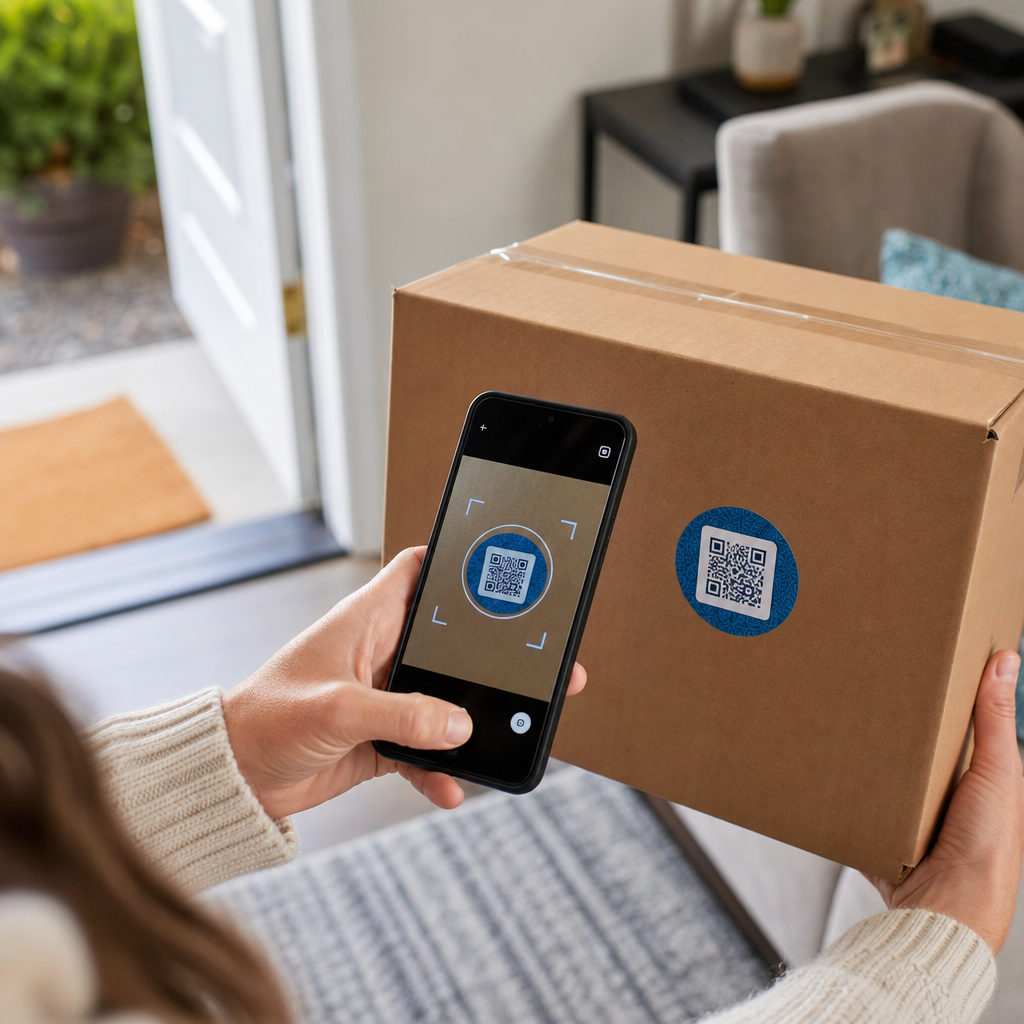
Scanning shipping box QR

QR Codes on Shipping Boxes: Purpose, Uses, and Setup

Discover how QR codes on shipping boxes streamline routing, warehouse tracking, and returns. Learn to implement dynamic codes for more efficient logistics.
Updated on 7월 2, 2026
목차

Ever scan a QR code on a shipping box and wonder what it actually does? Depending on who put it there and why, the answer varies significantly. This guide explains every major use case – from carrier routing to warehouse management to customer-facing returns – so you know exactly what you’re looking at and how to implement your own.

Why Shipping Boxes Carry QR Codes

A shipping box can pass through dozens of hands before it reaches its destination. At each stage – fulfillment center, carrier hub, delivery vehicle, customer doorstep – someone or something needs to read information about that package quickly and accurately.

QR codes solve this by packing multiple data points into a single scannable image. Unlike a standard 1D barcode, which typically holds 20–85 characters, a QR code can encode over 7,000 characters. That means a single code on a box can carry an order number, shipping address, product identifiers, batch numbers, and a URL – all readable in one scan. For a deeper look at how 1D and 2D label formats compare, see this overview of 배송 라벨 바코드.

The reason a QR code appears on your shipping box depends on which layer of the supply chain placed it there.

Carrier and Shipping Label QR Codes

The most common QR codes on shipping boxes come from the carrier and appear directly on the shipping label or as a companion element alongside it.

Tracking and Routing

Carriers use QR codes to route packages through their network. When a scanner at a sorting facility reads the code, the package’s location updates in real time. This is the same scan event that triggers the tracking notification you see when you check a shipment status online. For customers, scanning the QR code on an incoming package immediately pulls up live tracking data – no need to hunt for a tracking number or navigate to a carrier website manually.

Printerless Label Delivery

One increasingly common use is the Label Broker model. Rather than requiring customers to print a return or outbound label at home, the merchant sends a QR code via email or text. The customer brings the package to a participating carrier location – a USPS Post Office, UPS Store, or FedEx location – and the clerk scans the QR code to print the label at the counter.

USPS Label Broker, for example, lets merchants store labels in a digital repository and distribute them to customers as unique QR-coded IDs. Merchants can also update, delete, or check tracking status for those labels at any time. Carriers including USPS and FedEx support QR codes for domestic return shipments, and UPS extends this capability across its retail store network.

This workflow is practical for e-commerce businesses because it removes the friction of requiring a printer – a significant barrier for many customers initiating a return.

Add QR Codes to Your Shipping Workflow Need to generate scannable QR codes linked to tracking pages, return portals, or order details? Use the Pageloot QR 코드 생성기 to create and manage codes for your shipping boxes in minutes.

Returns and Reverse Logistics

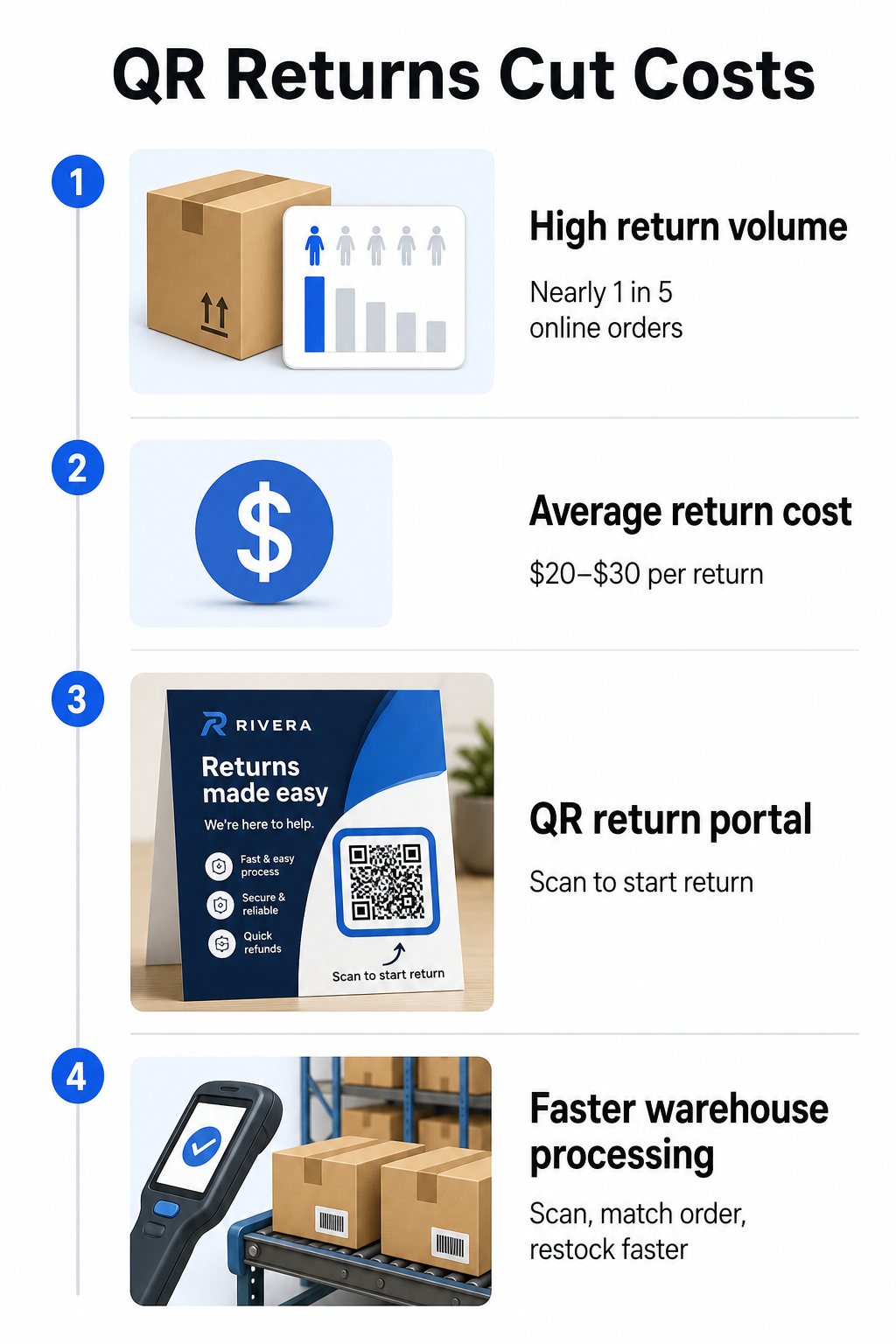
Returns are a major operational challenge. U.S. retailers expected 15.8% of all sales to be returned in 2025, totaling roughly $849.9 billion, and the e-commerce return rate sits at approximately 19.3% – meaning nearly one in five online orders comes back. Processing a single return costs between $20 and $30 on average, with some categories running as high as $65.

QR returns infographic

QR codes reduce that cost by making the return process faster and less error-prone. Instead of requiring customers to fill out paper forms or look up return addresses, a QR code printed on the box or included on a packing slip can link directly to a return portal where they initiate the process digitally.

Benefits of QR-code-based returns include:

  • Fewer support contacts – customers self-serve rather than emailing or calling
  • Reduced return fraud – QR codes tied to specific orders prevent tampering with label details
  • Faster processing – warehouse staff scan the return QR code to instantly retrieve the original order rather than entering data manually
  • Printerless options – supported by USPS and FedEx domestically, with merchants able to offer shoppers a QR code, a printable label, or both

For a practical look at connecting return QR codes to automated workflows, the guide on QR codes for e-commerce deliveries walks through the full setup.

Warehouse and Internal Logistics Uses

QR codes on shipping boxes are not only for carriers and customers. Inside fulfillment centers and warehouses, they are a primary tool for tracking inventory movement without manual data entry.

Receiving and Put-Away

When a box arrives at a warehouse, scanning its QR code instantly pulls the shipment record – supplier details, item count, SKU identifiers, and expected storage location. Staff don’t need to type anything or cross-reference paperwork. The scan updates the warehouse management system (WMS) in real time, reducing the discrepancies that manual entry typically introduces.

Picking, Packing, and Shipment Verification

During order fulfillment, QR codes on boxes and bins guide staff to the right items and quantities. At the packing stage, scanning the box’s code serves as a final checkpoint – confirming the correct items are included before the box is sealed. In fulfillment workflows like Amazon FBA, enabling 2D barcodes at the system level lets the WMS generate a code representing box contents during packing, so that same code handles shipment tracking without anyone needing to open the box later.

Location and Inventory Tracking

QR codes can be assigned not just to products but to storage locations – shelves, zones, rooms, or bins. Scanning a location code alongside a product code logs exactly where inventory is sitting at any given moment, giving your team live visibility across the entire warehouse. The guide on creating QR codes for product inventory covers how to set this up in practice.

Track Every Scan, Everywhere Want real-time data on when and where your shipping box QR codes are being scanned? Pageloot’s QR 코드 분석을 살펴보십시오. dashboard captures scan time, location, and device details automatically.

Customer-Facing QR Codes on Shipping Boxes

Beyond logistics, some businesses use the shipping box itself as a marketing touchpoint. A QR code on the outside or inside of a box can link to:

  • A tracking page for the current shipment
  • A post-purchase landing page with product tutorials or setup videos
  • A loyalty program enrollment or discount offer
  • A review request or feedback form
  • Digital product documentation or manuals

This turns the unboxing moment into a brand interaction. For e-commerce businesses, it is one of the few physical touchpoints you fully control after checkout. The Pageloot e-commerce QR code page outlines suggested placements – shipping box exterior, packing inserts, and product manuals – each designed to trigger a different type of engagement.

One practical note on placement: based on feedback from USPS employees, USPS likely does not permit custom QR codes on the shipping label itself. However, placing a QR code sticker directly on the box – not on the label – is allowed and should not cause any issues with postal handling or delivery.

Dynamic QR Codes: The Practical Advantage for Shipping

If you are adding QR codes to your shipping boxes, 동적 QR 코드 are the right choice over static ones. A static QR code encodes a fixed string of data permanently. A dynamic QR code points to a redirect URL that you can update at any time without changing the printed code.

For shipping applications, this matters in several ways:

  • A tracking URL can change format or move to a new domain without requiring a new print run
  • Seasonal promotions linked from the box can be swapped out without new packaging
  • If a return portal changes its address, the QR code on already-printed boxes continues to work

Dynamic codes also enable scan tracking. You can see how many customers scanned the code on their box, from which city, and on which type of device. That data, available through Pageloot’s analytics, tells you whether customers are engaging with the post-purchase experience and which products or regions generate the most activity. For a broader look at what tracking QR codes can reveal about customer behavior, the QR code tracking guide covers the key metrics worth monitoring.

GS1 Digital Link: The Industry Standard Emerging in Logistics

If you work in retail or wholesale fulfillment, you may encounter GS1 디지털 링크 – a standardized method for embedding product identifiers such as GTINs (Global Trade Item Numbers), batch numbers, and expiry dates into a single 2D barcode or QR code.

GS1 Digital Link allows one code to serve multiple functions simultaneously. It can be scanned at point-of-sale for checkout, at a warehouse for inventory tracking, or by a consumer for product information – all from the same printed code. Suppliers can also update the content delivered on scan (promotional messaging, recall instructions, allergen updates) without reprinting packaging, because the code points to a web-based resolver rather than encoding all data directly.

For businesses preparing for GS1 Sunrise 2027 compliance requirements, understanding this standard is increasingly relevant. The guide on QR codes in supply chain tracking covers how 2D barcodes like these fit into broader traceability workflows.

How to Add QR Codes to Your Shipping Boxes

If you want to implement QR codes on your own shipping boxes, the following steps will get you from concept to deployment reliably.

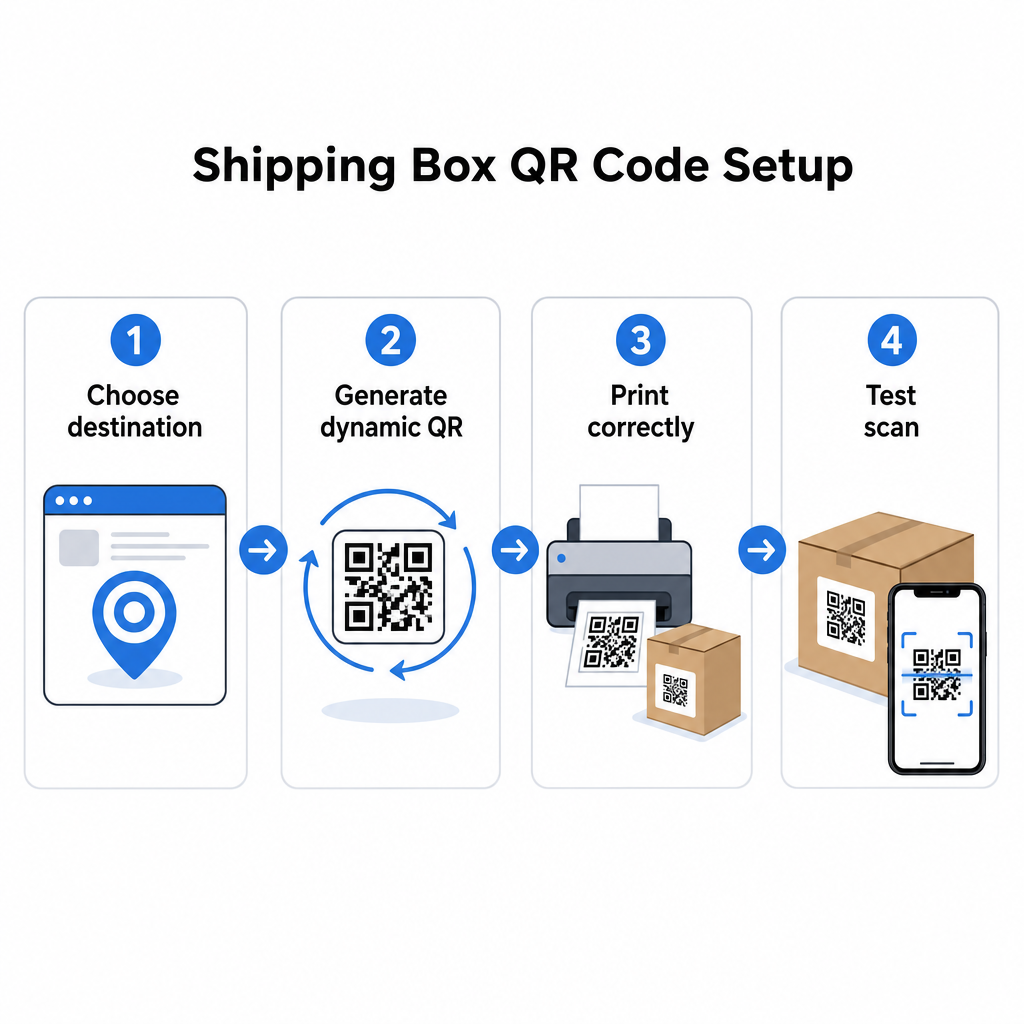
Define the destination first. Decide what the QR code will link to – a tracking page, return portal, product page, or post-purchase offer. Use a short URL rather than a long tracking string; shorter encoded data produces a less dense code pattern that scans faster and more reliably, especially at smaller print sizes.

Shipping QR setup

Generate a dynamic QR code. 사용 링크 QR 코드 생성기 to create a dynamic code tied to your destination URL. This gives you the ability to update the destination later without touching the printed packaging.

Follow print specifications. Print the code at a minimum of 2 × 2 cm (0.8 × 0.8 in), with 3 × 3 cm preferred for real-world reliability. Use dark modules on a white or light background – black on white is ideal. Export as a vector file (SVG or PDF) or at 300–600 DPI to ensure sharpness at final size. Maintain a quiet zone of at least four empty modules on all four sides of the code, with no text, logos, or borders intruding into that margin.

Place it correctly. Position the code on a flat, unfolded panel away from seams, corners, tape paths, and areas subject to wear during shipping. Avoid glossy finishes around the code area, since glare interferes with camera recognition. The front or top panel works best for customer-facing codes. For detailed placement guidance specific to boxes and labels, the 제품 포장의 QR 코드를 스캔하여 page covers the key considerations.

Test before printing at scale. Scan the code on actual box samples using multiple smartphones, in varied lighting conditions, and from the distances your customers or warehouse staff will realistically scan from. Catching a contrast or sizing issue before a full production run is far less costly than discovering it after.

Ready to Build Your Shipping QR Code System? Whether you need codes for tracking pages, return portals, or post-purchase engagement, the Pageloot QR 코드 생성기 gives you dynamic, trackable codes with a full analytics dashboard. Start for free – no credit card required.

자주 묻는 질문

Can I put a QR code on a USPS shipping label?

USPS likely does not allow custom QR codes on the shipping label itself. However, placing a QR code sticker directly on the box – not on the label – is permitted and should not cause issues with postal handling or delivery.

What is the difference between a carrier QR code and a custom QR code on a shipping box?

Carrier QR codes are generated by the shipping carrier (USPS, UPS, FedEx) and are tied to their tracking and routing systems. Custom QR codes are added by the merchant and can link to anything – tracking pages, return portals, product content, or promotions. Both can appear on the same box, but they serve different audiences and purposes.

Do I need to reprint my boxes if the URL behind my QR code changes?

Not if you use a dynamic QR code. Dynamic codes point to a redirect that you can update at any time in your QR code platform, so the printed code continues to work even after the destination URL changes. This is one of the primary reasons businesses choose dynamic codes for packaging applications.

작성자 정보

시임 코스타비는 페이지루트의 콘텐츠 책임자입니다. 그는 페이지루트의 혁신적인 QR 코드 생성 서비스에 대한 글을 쓰고 있습니다. 5년 이상 QR 코드 분야에서 쌓아온 깊이 있는 전문 지식을 바탕으로, 시임은 이 분야의 전문가로 인정받고 있습니다. 그는 QR 기술을 활용하여 디지털 상호작용을 간소화하고 향상시키는 데 크게 기여하고 있습니다.

범주
에 대해 자세히 알아보기

온라인으로 QR 코드를 생성해야하는 경우 QR 코드 만들기 무료로 여기!
Pageloot는 #1 Go-To 솔루션 QR 코드를 만들고 스캔합니다.

BL-0302

블로그 세대

20,000개 이상의 브랜드로부터 신뢰를 받아 더 많은 매출, 리뷰, 팔로워를 확보했습니다.

클라이언트 로고
최고 브랜드의 신뢰
5 중 4.8 평가

4.86 / 5 별점

휴고 로랑
휴고 로랑
레스토랑 주인
가장 쉽고 안정적인 QR 코드 생성기. PDF 파일을 즉시 업로드할 수 있습니다. 이제 레스토랑 메뉴가 디지털화되었습니다.
루카스 얀센
루카스 얀센
부동산 개발사
이것은 훌륭한 도구이며 QR 코드를 사용하면 원하는 곳으로 이동할 수 있습니다. 우리는 위치 QR 코드만 사용하지만 유용한 기능이 너무 많습니다.
엠마 모레티
엠마 모레티
소매 제품
사용하기 쉽고 빠릅니다. 그것은 훌륭하게 작동하고 완벽한 이미지를 생성하므로 직원들이 내 vCard를 다운로드할 수 있습니다.
휴고 로랑
휴고 로랑
레스토랑 주인
가장 쉽고 안정적인 QR 코드 생성기. PDF 파일을 즉시 업로드할 수 있습니다. 이제 레스토랑 메뉴가 디지털화되었습니다.
루카스 얀센
루카스 얀센
부동산 개발사
이것은 훌륭한 도구이며 QR 코드를 사용하면 원하는 곳으로 이동할 수 있습니다. 우리는 위치 QR 코드만 사용하지만 유용한 기능이 너무 많습니다.
엠마 모레티
엠마 모레티
소매 제품
사용하기 쉽고 빠릅니다. 그것은 훌륭하게 작동하고 완벽한 이미지를 생성하므로 직원들이 내 vCard를 다운로드할 수 있습니다.
더 많은 QR 코드보기
LinkedIn QR 네트워킹
어떻게 LinkedIn QR 코드 찾기
무엇이든 디지털 경험으로 전환하세요 3분 이내에.

14일 무료 체험.

신용카드는 필요 없습니다.

첫 구매 시 30% 할인

코드를 사용하세요:

MP3 파일 공유

PDF QR 코드를 생성하려면 가입하세요

필요한 모든 것을 업로드하고 표시합니다.

  • 오디오 파일
  • 팟캐스트
  • 음악

가입 시 14일 무료 체험.
체험 기간 후 QR 코드 만료.

오디오 mp3 QR 코드를 생성하려면 가입하세요

프레임으로 더 많은 스캔 확보

QR 코드에 더 많은 프레임을 추가하려면 가입하세요

클릭 유도 문안 프레임은 고객이 QR 코드와 쉽게 상호 작용할 수 있도록 도와줍니다. 사용해 보세요!

가입 시 14일 무료 체험.
체험 기간 후 QR 코드 만료.

QR 코드에 더 많은 프레임을 추가하려면 가입하세요

도형으로 더 많은 스타일 추가

더 많은 도형을 만들려면 가입하세요

QR 코드는 정사각형일 필요가 없습니다. 브랜드 이미지에 맞게 전환해 보세요.

가입 시 14일 무료 체험.
체험 기간 후 QR 코드 만료.

더 많은 도형을 만들려면 가입하세요

QR 코드에 로고 추가

QR 코드에 로고를 추가하려면 가입하세요

로고와 브랜드를 추가하여 QR 코드를 돋보이게 만드세요.

가입 시 14일 무료 체험.
체험 기간 후 QR 코드 만료.

QR 코드에 로고를 추가하려면 가입하세요

스마트 앱 스토어 리디렉션

앱 스토어 QR 코드를 생성하려면 가입하세요

스마트 앱 스토어 QR 코드에 앱 링크를 추가하세요. 사용자는 장치에 따라 리디렉션됩니다.

가입 시 14일 무료 체험.
체험 기간 후 QR 코드 만료.

앱 스토어 QR 코드를 생성하려면 가입하세요

QR 코드에 이미지 업로드

이미지 QR 코드를 생성하려면 가입하세요

이미지를 쉽게 공유하세요. 몇 초 안에 동적으로 이미지를 변경하십시오.

가입 시 14일 무료 체험.
체험 기간 후 QR 코드 만료.

이미지 QR 코드를 생성하려면 가입하세요

PDF 파일 공유

PDF QR 코드를 생성하려면 가입하세요

필요한 모든 것을 업로드하고 표시합니다.

  • 메뉴 및 가격표
  • 명령
  • 모든 문서

가입 시 14일 무료 체험.
체험 기간 후 QR 코드 만료.

PDF QR 코드를 생성하려면 가입하세요

인쇄 없이 나중에 편집

다시 인쇄하지 않고 QR 코드를 편집하려면 가입하세요

동적 QR 코드를 사용하면 새 QR 코드를 인쇄하지 않고도 QR 코드의 내용을 변경할 수 있습니다.

가입 시 14일 무료 체험.
체험 기간 후 QR 코드 만료.

다시 인쇄하지 않고 QR 코드를 편집하려면 가입하세요

언제? 어디서? QR 코드 스캔 추적

QR 코드를 추적하려면 가입하세요

어떤 QR 코드가 가장 많이 스캔되고 무엇이 고객을 가장 흥분시키는지 알아보십시오.

가입 시 14일 무료 체험.
체험 기간 후 QR 코드 만료.

QR 코드를 추적하려면 가입하세요

인쇄 준비 파일 제공

PDF 및 SVG와 같은 벡터 QR 코드를 생성하려면 가입하세요.

.EPS, .PDF, .SVG

HD 해상도로 QR 코드를 다운로드하고 싶으신가요? 인쇄할 준비가 된 벡터 또는 픽셀 형식을 가져옵니다.

가입 시 14일 무료 체험.
체험 기간 후 QR 코드 만료.

PDF 및 SVG와 같은 벡터 QR 코드를 생성하려면 가입하세요.

기다리세요. 귀하의 QR 코드는 로드 중... 로드 중...

나만의 것으로 만들기

나중을 위해 QR 코드를 저장하려면 가입하세요.

다양한 색상, 로고 및 클릭 유도문안 프레임으로 멋진 QR 코드를 만들어 더 많은 스캔을 받으세요.

가입 시 14일 무료 체험.
체험 기간 후 QR 코드 만료.

나중을 위해 QR 코드를 저장하려면 가입하세요.