
Adakah kepingan mel langsung anda berakhir di tong kitar semula tanpa satu pun respons? Kempen cetakan menjadi boleh diukur sebaik sahaja anda memberikan penerima langkah digital seterusnya yang jelas. Panduan ini membimbing anda cara menambah kod QR pada mel langsung dengan berkesan, saiz dan meletakkannya dengan betul, dan menjejaki setiap imbasan untuk membuktikan ROI.
Mengapa Kod QR Milik Mel Langsung
Mel langsung sudah mengatasi kebanyakan saluran digital dari segi penglibatan. Mel langsung mencapai kadar respons 9% berbanding kira-kira 1% untuk e-mel, carian berbayar, dan sosial digabungkan – dan 74% pemasar melaporkan ia memberikan ROI tertinggi daripada mana-mana saluran yang mereka gunakan. Cabarannya sentiasa menghubungkan penglibatan fizikal itu kepada hasil digital yang boleh diukur. Kod QR menyelesaikan masalah itu secara langsung.
Apabila penerima mengimbas kod pada mel anda, anda menangkap peristiwa imbasan yang dicap masa, ditag lokasi yang terikat pada kempen tertentu. Anda tahu kepingan mana yang mendorong tindakan itu, bila imbasan berlaku, peranti apa yang digunakan, dan sama ada halaman pendaratan membawa kepada penukaran. Jenis atribusi itu secara sejarah sukar dicapai dengan cetakan.
Selain penjejakan, kod QR menghilangkan geseran. Daripada meminta penerima menaip URL atau mencari tawaran anda, satu imbasan membawa mereka terus ke halaman pendaratan, kupon, borang, atau halaman produk. Memahami bagaimana kod QR menghubungkan pemasaran cetak dan digital adalah asas untuk menggunakannya dengan baik.
Kod QR Statik lwn. Dinamik: Yang Mana Satu untuk Digunakan
Ini adalah salah satu keputusan paling penting yang akan anda buat sebelum mencetak satu kepingan pun.
A kod QR statik mengekod URL tetap secara langsung ke dalam corak. Setelah dicetak, anda tidak boleh mengubah ke mana ia menunjuk, dan ia tidak mengumpul data imbasan. Kod statik sesuai untuk maklumat kekal yang tidak akan memerlukan kemas kini.
A kod QR dinamik mengekod URL pengalihan pendek. Destinasi sebenar boleh dikemas kini pada bila-bila masa dari papan pemuka – walaupun selepas puluhan ribu kepingan telah dihantar melalui pos. Ia juga merekodkan setiap imbasan secara automatik, termasuk masa, lokasi, dan jenis peranti.
Untuk kempen mel langsung, kod QR dinamik hampir selalu menjadi pilihan yang tepat kerana:
- Anda boleh membetulkan URL halaman pendaratan tanpa mencetak semula keseluruhan cetakan
- Anda boleh menukar destinasi selepas promosi berakhir untuk memastikan kod itu aktif
- Setiap imbasan direkodkan supaya anda boleh mengukur prestasi kempen dalam masa nyata
- Anda boleh menjalankan ujian A/B dengan menunjuk kumpulan kod yang berbeza ke halaman pendaratan yang berbeza
Yang terperinci perbandingan kod QR statik vs. dinamik meliputi pecahan penuh bila setiap jenis masuk akal.
Cipta Kod QR Mel Langsung Boleh Dijejak Menggunakan Penjana dynamic QR code untuk membina kod yang boleh anda kemas kini pada bila-bila masa dan jejak dari satu papan pemuka – tiada pencetakan semula diperlukan.
Cara Menyediakan Penjejakan untuk Kod QR Mel Langsung
Penjejakan kempen kod QR melibatkan tiga lapisan: analitik imbasan terbina dalam, parameter UTM untuk Google Analytics, dan penargetan semula pilihan melalui Facebook Pixel.
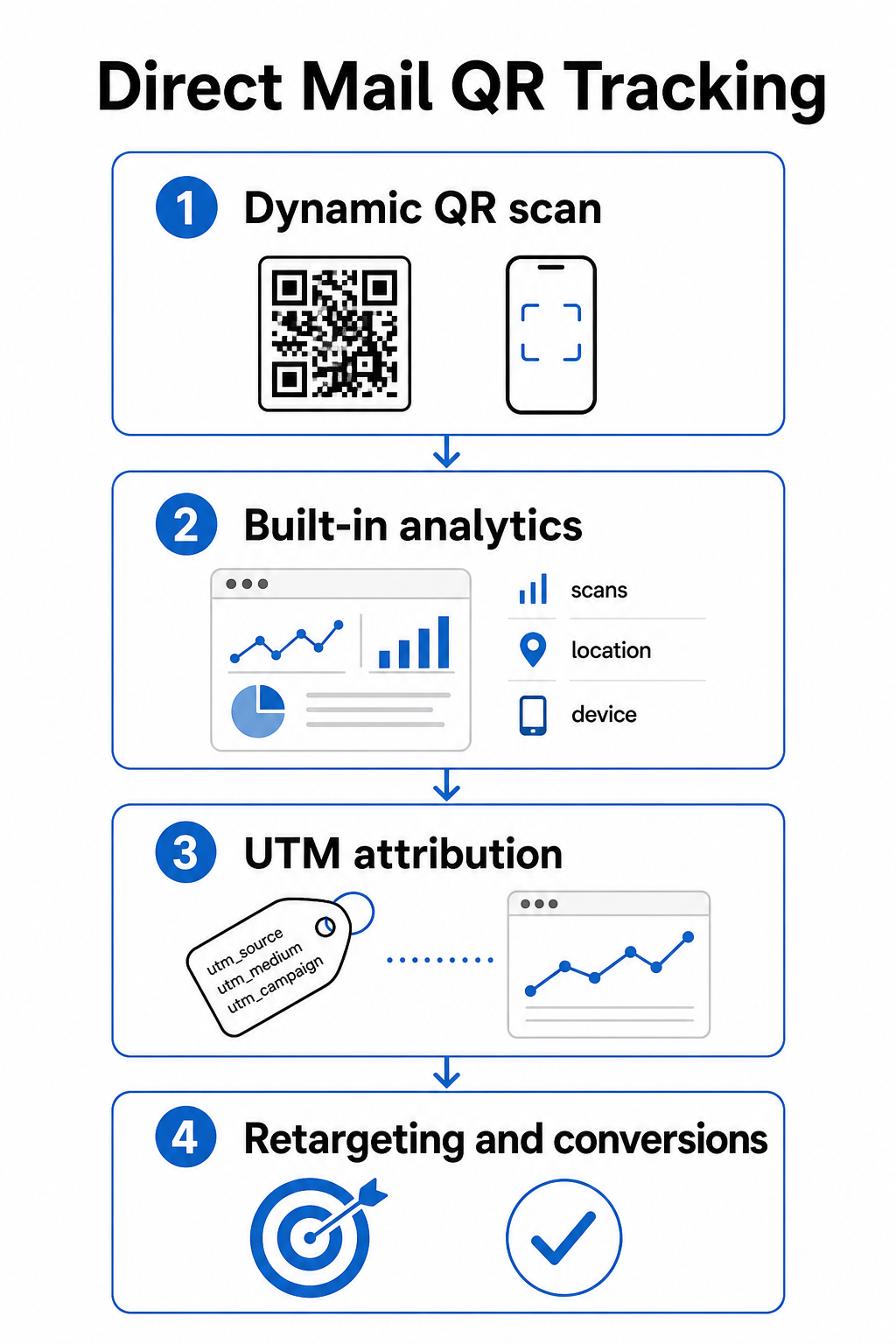
Analitik imbasan terbina dalam tersedia secara automatik apabila anda mencipta kod QR dinamik dengan Pageloot. Papan pemuka anda merekodkan jumlah imbasan, imbasan unik, lokasi imbasan, jenis peranti, dan masa imbasan. Data ini memberitahu anda pasaran dan demografi mana yang paling terlibat.
parameter UTM membawa atribusi itu ke Google Analytics supaya anda boleh mengikuti perjalanan pengguna di luar imbasan. URL UTM yang tersusun baik untuk kempen mel langsung mungkin kelihatan seperti ini:
`https://yoursite.com/offer?utm`source=directmel&utmmedium=qrcode&utmkempen=musim_bunga2025poskad
Menambah parameter `utm_content` membolehkan anda membezakan antara versi mel yang berbeza, saiz sisipan, atau segmen audiens dalam kempen yang sama. Yang panduan kepada parameter UTM untuk kod QR membimbing melalui konvensyen penamaan dan cara membaca data yang terhasil di dalam GA4.
Integrasi Facebook Pixel membolehkan anda menargetkan semula orang yang mengimbas mel anda dan melawat tapak anda tetapi tidak menukar – lapisan susulan yang berkuasa untuk kempen e-dagang dan penjanaan petunjuk.
Ketiga-tiga kaedah penjejakan tersedia di dalam tetapan kod QR dinamik Pageloot. Lihat yang penuh panduan penjejakan kod QR untuk arahan persediaan langkah demi langkah.
Saiz Kod QR untuk Kepingan Mel Langsung
Mendapatkan saiz yang salah adalah salah satu cara terpantas untuk menjejaskan mel yang direka dengan baik. Kod yang terlalu kecil tidak akan mengimbas dengan boleh dipercayai, dan kod yang diletakkan di kawasan yang salah boleh mengganggu automasi pos.
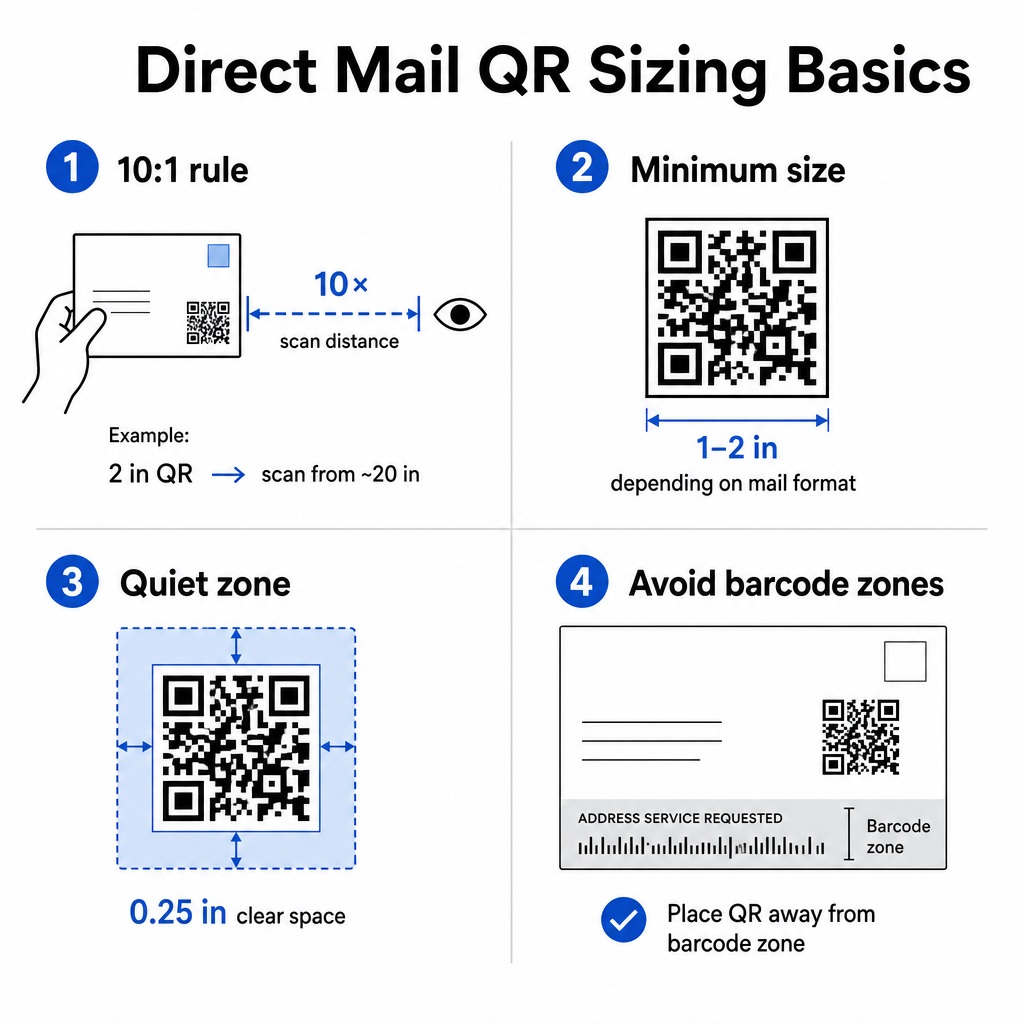
Menggunakan peraturan jarak-ke-saiz 10:1: kod itu hendaklah sekurang-kurangnya satu inci lebar untuk setiap sepuluh inci jarak imbasan yang dijangkakan. Untuk poskad yang dipegang pada jarak lengan – kira-kira 20 inci jauhnya – kod itu hendaklah sekurang-kurangnya 2 inci lebar. Sentiasa kekalkan zon senyap sekurang-kurangnya 0.25 inci (6 mm) ruang kosong di sekeliling keempat-empat sisi kod supaya pengimbas dapat membezakan corak QR daripada elemen reka bentuk di sekelilingnya.
Minimum praktikal mengikut format:
| Format Mel | Saiz Minimum yang Disyorkan |
|---|---|
| Poskad | 2 × 1.2 inci (30 × 30 mm) |
| Surat standard / sisipan sampul #10 | 0 × 1.0 inci (25 × 25 mm) |
| Mel sendiri atau katalog | 2 × 1.6 inci (30 × 40 mm) |
| Format besar / rata bersaiz besar | 6 × 1.6 inci (40 × 40 mm) atau lebih besar |
Yang panduan saiz kod QR dan panduan untuk saiz bagi bahan cetakan yang berbeza meliputi senario tambahan termasuk stok kertas bersalut dan kad stok yang lebih tebal.
Peraturan Penempatan untuk Kod QR Mel Langsung
Di mana anda meletakkan kod pada kepingan itu mempengaruhi kadar imbasan dan pematuhan USPS, jadi penempatan memerlukan perancangan yang teliti.
Untuk pematuhan pos, letakkan kod QR anda di luar blok alamat dan zon jelas kod bar. USPS menggunakan kod bar Mel Pintar (IMb) untuk pengasingan, dan ia berjalan di sepanjang bahagian bawah kepingan mel. Kod QR anda tidak boleh bertindih atau memenuhi kawasan itu. Panduan industri mengesyorkan meletakkan kod QR pada panel hadapan atau bahagian belakang atas mel untuk mengelakkan sebarang konflik dengan peralatan automasi pos.
Untuk kadar imbasan, ikuti prinsip penempatan ini:
- Penempatan panel hadapan menarik perhatian pada saat pembukaan – berguna apabila tawaran anda perlu dilihat serta-merta
- Penempatan kepak belakang atau panel belakang berfungsi dengan baik untuk mel berbentuk lebih panjang di mana penerima membaca keseluruhan kepingan itu sebelum bertindak
- Letakkan kod pada titik rehat semula jadi dalam aliran pembacaan, bukan diselitkan di sudut yang tidak mungkin diperhatikan oleh penerima
- Sentiasa pasangkan kod itu dengan seruan tindakan pendek seperti “Imbas untuk diskaun eksklusif anda” atau “Imbas untuk menjadualkan konsultasi percuma”
Yang panduan penempatan kod QR untuk bahan pemasaran meliputi strategi penempatan merentasi semua format cetakan, termasuk mel langsung, poster, dan pembungkusan produk.
Merekabentuk Kod QR Yang Boleh Diimbas Dengan Boleh Dipercayai
Satu kepingan mel langsung melalui pengendalian, penyusunan, dan keadaan pencahayaan yang berubah-ubah sebelum penerima mengimbasnya. Kod anda perlu bertahan melalui semua itu dan masih boleh diimbas dengan bersih.
Kontras adalah pemboleh ubah reka bentuk yang paling penting. Kekalkan nisbah kontras sekurang-kurangnya 4:1 antara modul gelap dan latar belakang terang. Biru gelap atau hitam pada putih atau pastel yang sangat terang adalah kombinasi paling selamat. Elakkan menterbalikkan warna (corak terang pada latar belakang gelap) dan elakkan meletakkan kod di atas imej bertekstur atau gradien berwarna.
Gunakan format fail resolusi tinggi apabila menghantar fail kepada pencetak anda. Format SVG atau EPS adalah berasaskan vektor dan tidak akan berpiksel pada sebarang saiz cetakan. Mengeksport JPEG atau PNG pada resolusi rendah dan kemudian menskalakannya adalah salah satu punca paling biasa kod cetakan yang tidak boleh diimbas.
Jika anda menyertakan logo anda di dalam kod QR, gunakan tahap pembetulan ralat Q atau H, dan pastikan logo meliputi tidak lebih daripada 30% daripada jumlah kawasan kod. The QR code with logo mengendalikan ini secara automatik dengan melaraskan pembetulan ralat apabila anda memuat naik logo.
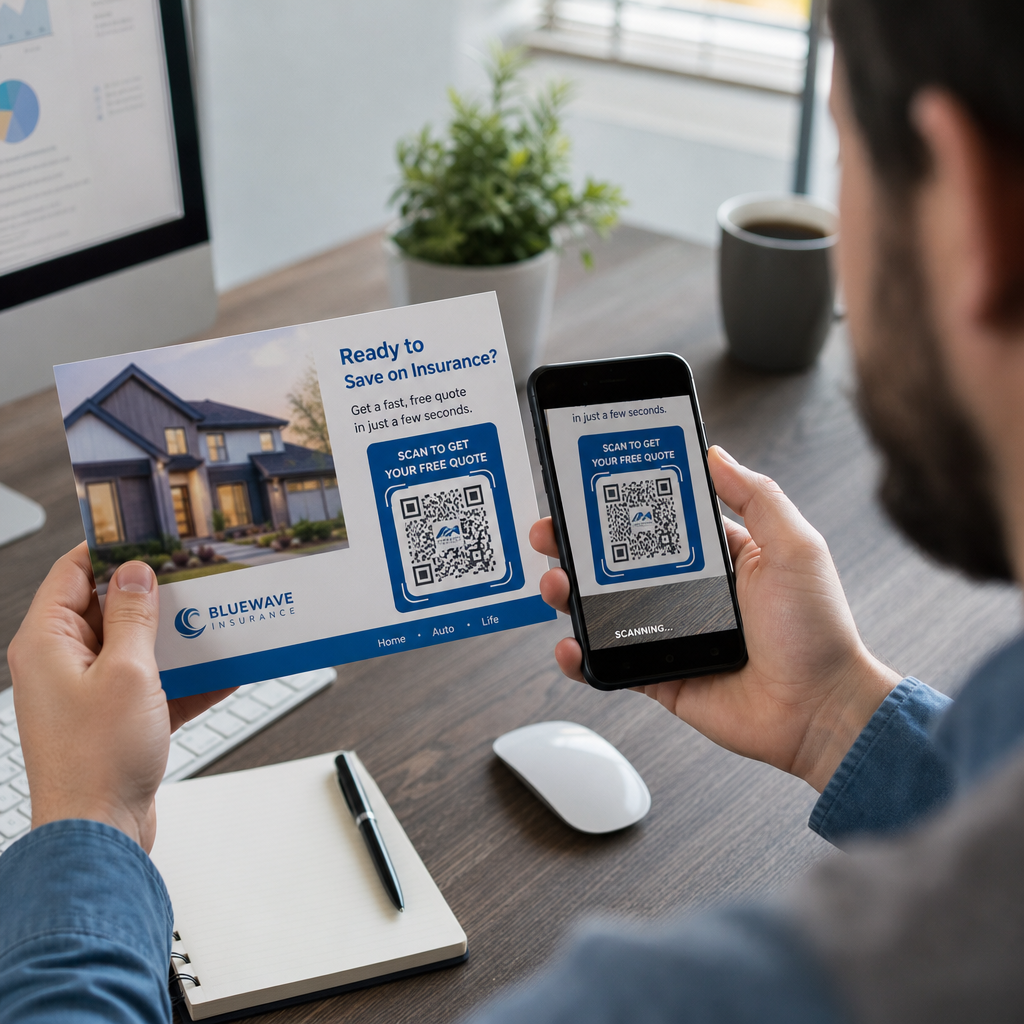
Tambah bingkai seruan tindakan di sekeliling kod itu. Sempadan berlabel – seperti “Imbas untuk Tuntut Tawaran Anda” – menghilangkan kekaburan tentang apa yang dilakukan oleh kod itu dan memberikan penerima yang ragu-ragu sebab untuk bertindak. Kod berbingkai dengan CTA yang jelas secara konsisten mengatasi kod kosong kerana ia menyediakan konteks. Ketahui lebih lanjut tentang bingkai kod QR dan cara menggunakannya dengan berkesan.
Uji sebelum anda mencetak keseluruhan larian. Imbas bukti pada pelbagai peranti, dalam keadaan pencahayaan yang berbeza, dan pada jarak yang biasa dipegang oleh penerima. Kod yang kelihatan betul pada skrin masih boleh gagal dalam cetakan jika tetapan kontras beralih semasa eksport fail. The garis panduan untuk penggunaan kod QR dalam media cetak menyediakan senarai semak praktikal untuk dilalui sebelum menandatangani bukti.
Bina Kod QR Berjenama untuk Mel Anda Seterusnya Tambah logo anda, pilih warna anda, dan tetapkan bingkai CTA dengan the QR code with logo – kemudian muat turun fail SVG atau EPS yang sedia untuk dicetak.
Memautkan Kod QR ke Destinasi Dioptimumkan Mudah Alih
Imbasan yang berjaya hanyalah permulaan. Jika halaman pendaratan gagal pada mudah alih, anda kehilangan penukaran tanpa mengira sejauh mana kempen yang lain berprestasi.
Setiap destinasi kod QR untuk kempen mel langsung haruslah:
- Mudah alih-pertama, dengan teks dan butang bersaiz untuk navigasi ibu jari
- Pemuatan pantas, idealnya di bawah 3 saat – halaman perlahan menyebabkan pengabaian sebelum tawaran itu sempat dibaca
- Berfokuskan tindakan, dengan satu CTA utama diletakkan berhampiran bahagian atas halaman
- Konsisten secara visual dengan reka bentuk mel supaya penerima tahu mereka telah tiba di tempat yang betul
Jika anda menjalankan kempen promosi, the Penjana QR code eCoupon membolehkan anda membina halaman pendaratan yang memaparkan tawaran anda secara langsung – tiada pembinaan halaman berasingan diperlukan. Untuk URL khusus kempen, the Penjana Kod QR Pautan menukar mana-mana URL menjadi kod berjenama yang boleh dijejaki dalam beberapa saat.
Untuk panduan terperinci tentang membina halaman yang menukar selepas imbasan, lihat the amalan terbaik untuk halaman pendaratan kod QR mudah alih.
Promosi USPS Yang Memberi Ganjaran Penggunaan Kod QR
The USPS menjalankan promosi tahunan yang menawarkan diskaun pos kepada penghantar mel yang mengintegrasikan teknologi tertentu. Dua daripadanya berkaitan secara langsung dengan kempen kod QR.
Yang Promosi Teknologi Bersepadu menawarkan diskaun pos 3% apabila kod QR pada sekeping mel memenuhi keperluan USPS untuk menyampaikan pengalaman digital yang relevan. Untuk melayakkan diri, kod tersebut mestilah bersaiz betul, diletakkan dengan jelas, dan pautan ke destinasi yang dioptimumkan untuk mudah alih yang berkaitan secara substantif dengan kandungan mel.
Yang program Informed Delivery membenarkan penghantar mel perniagaan untuk menggandingkan sekeping mel fizikal dengan kandungan digital – imej berwarna dan URL yang boleh diklik – yang muncul dalam e-mel atau pemberitahuan aplikasi yang dihantar oleh USPS kepada pelanggan sebelum mel mereka tiba. Ini mencipta kesan kedua kempen anda sebelum kepingan fizikal itu sampai ke tangan penerima. Fungsi asas kempen Informed Delivery tersedia tanpa bayaran tambahan USPS melebihi pos standard, dan ia boleh digabungkan dengan promosi lain untuk penjimatan gabungan pada mel yang layak.
Untuk menyediakan kempen Informed Delivery, anda mendaftar melalui USPS Business Customer Gateway, mencipta kempen anda dengan tetingkap tarikh pengeposan, dan memuat naik kandungan iringan anda sebelum mel anda dimasukkan di Unit Kemasukan Mel Perniagaan. Jenis mel yang layak termasuk surat First-Class Mail, surat USPS Marketing Mail, dan surat Nonprofit USPS Marketing Mail yang mempunyai kod bar Intelligent Mail.
Jika anda menggunakan Informed Delivery bersama kod QR yang melayakkan diri untuk Promosi Teknologi Bersepadu, anda mungkin boleh menuntut kedua-dua diskaun pada pengeposan yang sama – pengurangan kos yang signifikan pada jumlah yang lebih besar.
Cara Mengukur Prestasi Kempen Kod QR Mel Langsung
Setelah kempen anda aktif, ini adalah metrik yang patut dijejaki:
- JUMLAH IMBASAN – jumlah mentah berapa kali kod itu diimbas merentasi pengeposan
- Imbasan unik – bilangan peranti berbeza, yang menganggarkan penerima individu yang terlibat
- Kadar imbasan-ke-penukaran – peratusan imbasan yang melengkapkan tindakan sasaran anda, seperti pembelian, pengisian borang, atau panggilan telefon
- Lokasi imbasan – data geografi yang menunjukkan kod pos atau wilayah mana yang paling banyak bertindak balas
- Masa imbasan – bila pada siang hari dan pada hari-hari minggu mana penerima terlibat
- Jenis peranti – pecahan iOS lwn. Android, yang boleh memaklumkan keputusan pengoptimuman halaman pendaratan
Papan pemuka Pageloot memaparkan semua ini secara automatik untuk kod QR dinamik. Untuk analisis corong yang lebih mendalam, sambungkan URL bertanda UTM anda ke GA4 dan jejak apa yang berlaku selepas imbasan – halaman mana yang dilawati penerima, berapa lama mereka tinggal, dan sama ada mereka menukar.
Gunakan data ini untuk memperkemas pengeposan anda yang seterusnya. Jika imbasan berkumpul di satu wilayah tetapi penukaran rendah, halaman pendaratan atau tawaran mungkin memerlukan penyetempatan. Jika imbasan memuncak pada hari kedua selepas penghantaran, itu menandakan bila audiens anda membuka mel dan boleh membimbing keputusan masa penghantaran masa depan.
Arahan persediaan penjejakan terperinci tersedia dalam panduan penjejakan kod QR dan panduan parameter UTM untuk Google Analytics.
Menyatukan Semuanya
Kempen kod QR mel langsung yang berkesan kelihatan seperti ini: kod dinamik bersaiz sekurang-kurangnya 1 inci lebar, diletakkan pada panel hadapan jauh dari zon kod bar pos, dicetak dalam kontras tinggi pada latar belakang yang bersih, dipautkan ke halaman pendaratan mudah alih yang pantas, dan dijejaki melalui kedua-dua analitik terbina dalam Pageloot dan URL bertanda UTM dalam GA4. Setiap imbasan menjadi titik data yang boleh anda gunakan untuk kempen seterusnya.
Mulakan dengan mencipta kod QR dinamik pertama anda dan lampirkannya pada URL kempen tertentu. Gunakan Penjana Kod QR untuk membina kod percuma hari ini, atau terus ke Penjana dynamic QR code untuk mendapatkan keupayaan penjejakan dan penyuntingan penuh dari awal.
Soalan lazim
Secara teknikal ya, tetapi ia tidak disyorkan. Menggunakan kod QR dinamik yang berasingan untuk setiap kempen membolehkan anda menjejaki prestasi secara bebas. Jika anda menggunakan semula satu kod, anda tidak dapat membezakan mel mana yang mendorong imbasan mana. Dengan kod QR dinamik, anda boleh mengemas kini URL destinasi antara kempen, tetapi mencipta kod baharu – bersama dengan URL bertanda UTM baharu – untuk setiap mel yang berbeza memastikan analitik anda bersih dan pelaporan anda tepat.
Jika anda menggunakan kod QR dinamik, anda boleh mengemas kini URL destinasi pada bila-bila masa dari papan pemuka Pageloot anda tanpa menyentuh kod yang dicetak. Kod itu sendiri tidak pernah berubah – hanya destinasi pengalihan yang berubah. Ini adalah salah satu sebab utama kod QR dinamik adalah pilihan standard untuk kempen cetakan. Jika anda menggunakan kod QR statik, URL tersebut dikodkan secara kekal ke dalam corak dan tidak boleh diubah selepas dicetak.
Promosi Teknologi Bersepadu USPS mempunyai keperluan tahunan yang khusus meliputi saiz kod QR minimum, penempatan pada item mel, dan jenis pengalaman mudah alih yang disampaikan oleh kod tersebut. Promosi ini biasanya memerlukan kod tersebut untuk pautan ke destinasi yang dioptimumkan untuk mudah alih yang berkaitan secara langsung dengan kandungan item mel. Keperluan dikemas kini setiap tahun, jadi semak garis panduan promosi semasa melalui Gerbang Pelanggan Perniagaan USPS sebelum mereka bentuk item anda. Pembekal perkhidmatan mel atau kedai surat anda juga boleh mengesahkan kelayakan semasa fasa reka bentuk.