
首页 > 使用案例 > QR Codes on Direct Mail: How to Use and Track Them
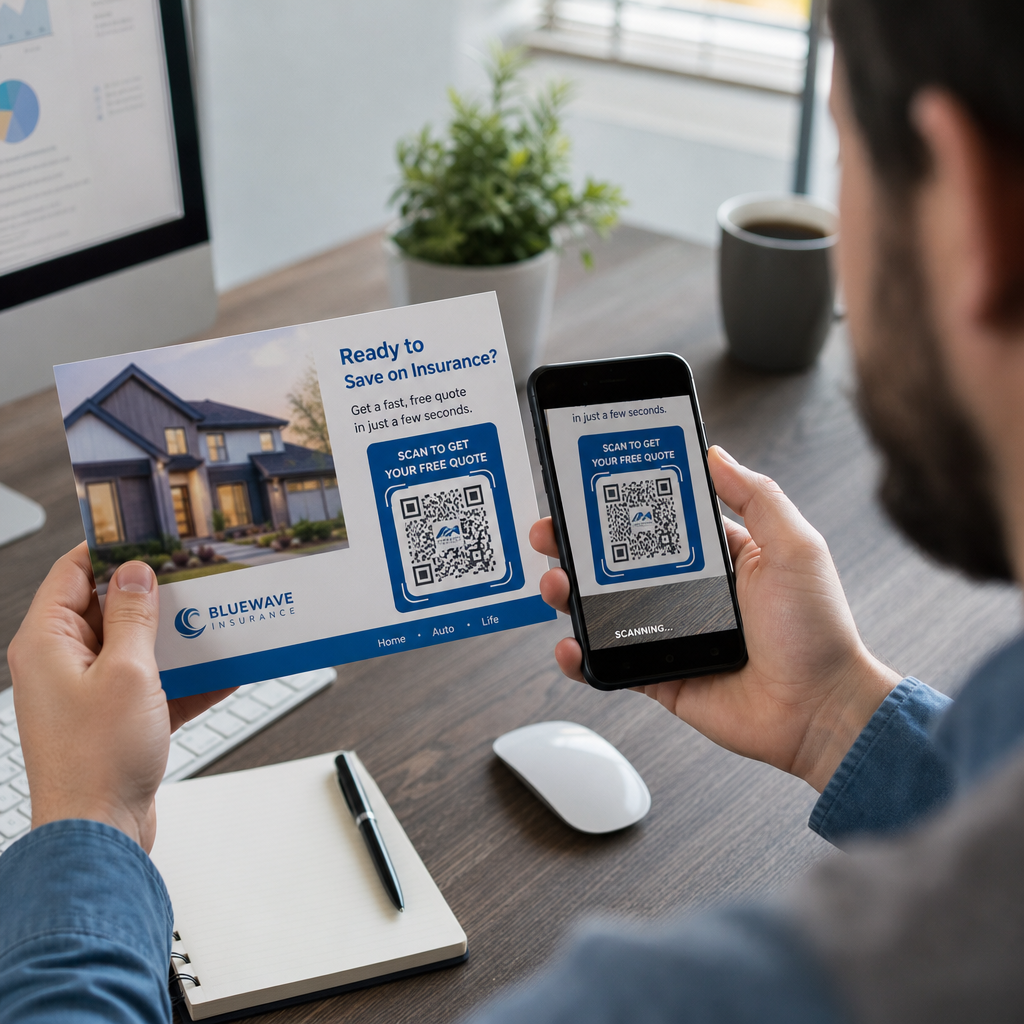
Scanning direct mail

QR Codes on Direct Mail: How to Use and Track Them

Learn how to use QR codes on direct mail to track scans and improve ROI. This guide covers sizing, placement, dynamic vs. static codes, and USPS postage
Updated on 7 月 2, 2026
目录

Are your direct mail pieces landing in recycling bins without a single response? Print campaigns become measurable the moment you give recipients a clear digital next step. This guide walks you through how to add QR codes to direct mail effectively, size and place them correctly, and track every scan to prove ROI.

Why QR Codes Belong on Direct Mail

Direct mail already outperforms most digital channels on engagement. Direct mail achieves a 9% response rate compared to roughly 1% for email, paid search, and social combined – and 74% of marketers report it delivers the highest ROI of any channel they use. The challenge has always been connecting that physical engagement to a measurable digital outcome. QR codes solve that problem directly.

When a recipient scans a code on your mailer, you capture a timestamped, location-tagged scan event tied to a specific campaign. You know which piece drove the action, when the scan happened, what device was used, and whether the landing page led to a conversion. That kind of attribution has historically been difficult to achieve with print.

Beyond tracking, QR codes remove friction. Instead of asking a recipient to type a URL or search for your offer, a single scan takes them directly to a landing page, coupon, form, or product page. Understanding 二维码如何连接印刷和数字营销 is the foundation for using them well.

Static vs. Dynamic QR Codes: Which One to Use

This is one of the most consequential decisions you will make before printing a single piece.

一种 静态二维码 encodes a fixed URL directly into the pattern. Once printed, you cannot change where it points, and it collects no scan data. Static codes are appropriate for permanent information that will never need updating.

一种 动态二维码 encodes a short redirect URL. The actual destination can be updated at any time from a dashboard – even after tens of thousands of pieces have already been mailed. It also records every scan automatically, including the time, location, and device type.

For direct mail campaigns, dynamic QR codes are almost always the right choice because:

  • You can correct a landing page URL without reprinting the entire run
  • You can swap out the destination after a promotion ends to keep the code active
  • Every scan is logged so you can measure campaign performance in real time
  • You can run A/B tests by pointing different code batches to different landing pages

The detailed comparison of static vs. dynamic QR codes covers the full breakdown of when each type makes sense.

Create Trackable Direct Mail QR Codes 使用 动态二维码生成器 to build codes you can update anytime and track from a single dashboard – no reprinting required.

How to Set Up Tracking for Direct Mail QR Codes

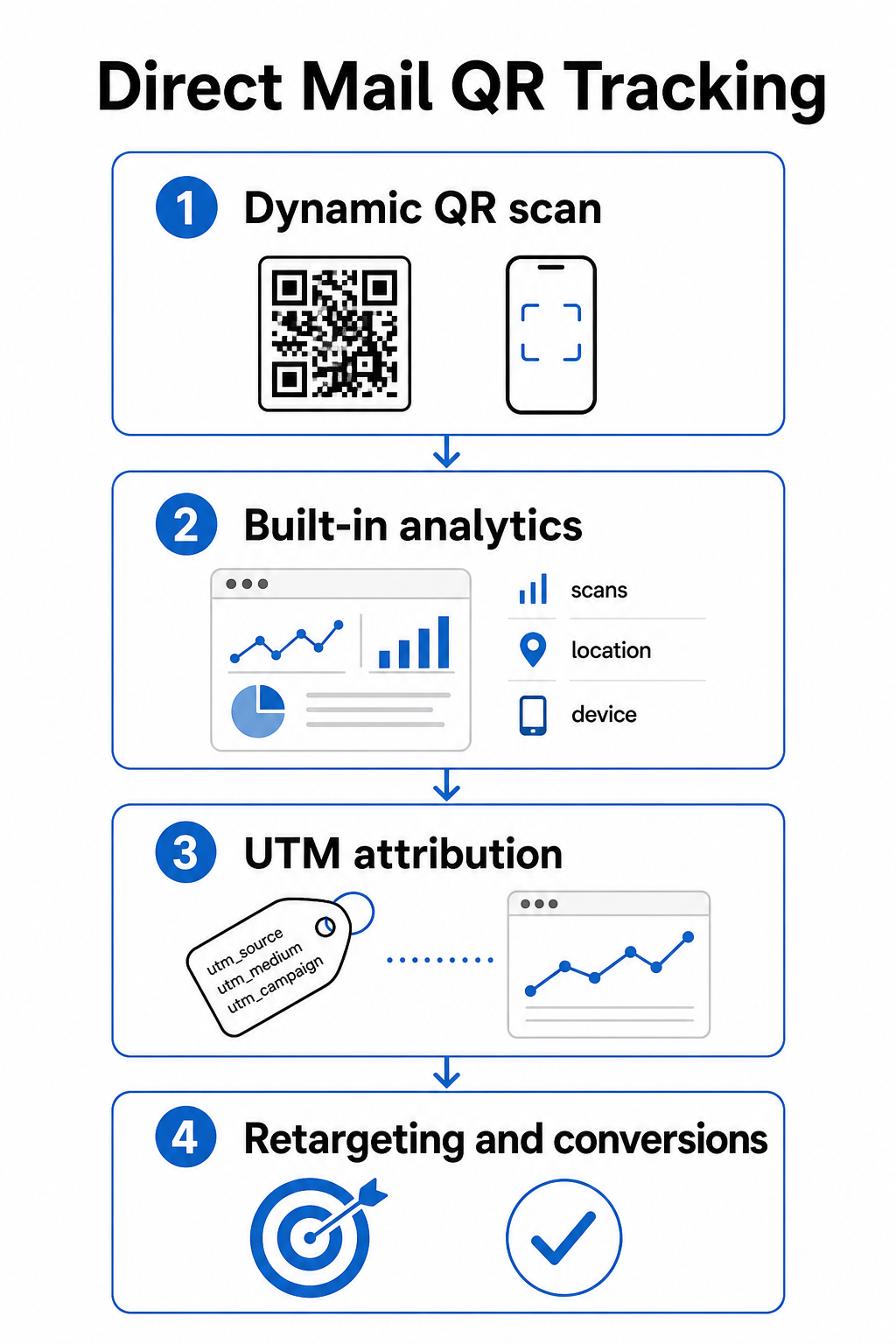
Tracking a QR code campaign involves three layers: built-in scan analytics, UTM parameters for Google Analytics, and optional retargeting through Facebook Pixel.

二维码追踪步骤

Built-in scan analytics are available automatically when you create a dynamic QR code with Pageloot. Your dashboard records total scans, unique scans, scan locations, device types, and scan times. This data tells you which markets and demographics engaged most.

UTM参数 carry that attribution into Google Analytics so you can follow the user journey beyond the scan. A well-structured UTM URL for a direct mail campaign might look like this:

`https://yoursite.com/offer?utmsource=directmail&utm媒介=二维码code&utmcampaign=spring2025postcard`

Adding the `utm_content` parameter lets you distinguish between different mailer versions, insert sizes, or audience segments within the same campaign. The guide to UTM parameters for QR codes walks through naming conventions and how to read the resulting data inside GA4.

Facebook Pixel integration lets you retarget people who scanned your mailer and visited your site but did not convert – a powerful follow-up layer for e-commerce and lead generation campaigns.

All three tracking methods are available inside Pageloot’s dynamic QR code settings. See the full QR code tracking guide for step-by-step setup instructions.

Sizing QR Codes for Direct Mail Pieces

Getting the size wrong is one of the fastest ways to undermine an otherwise well-designed mailer. A code that is too small will not scan reliably, and a code placed in the wrong area can interfere with postal automation.

QR sizing rules

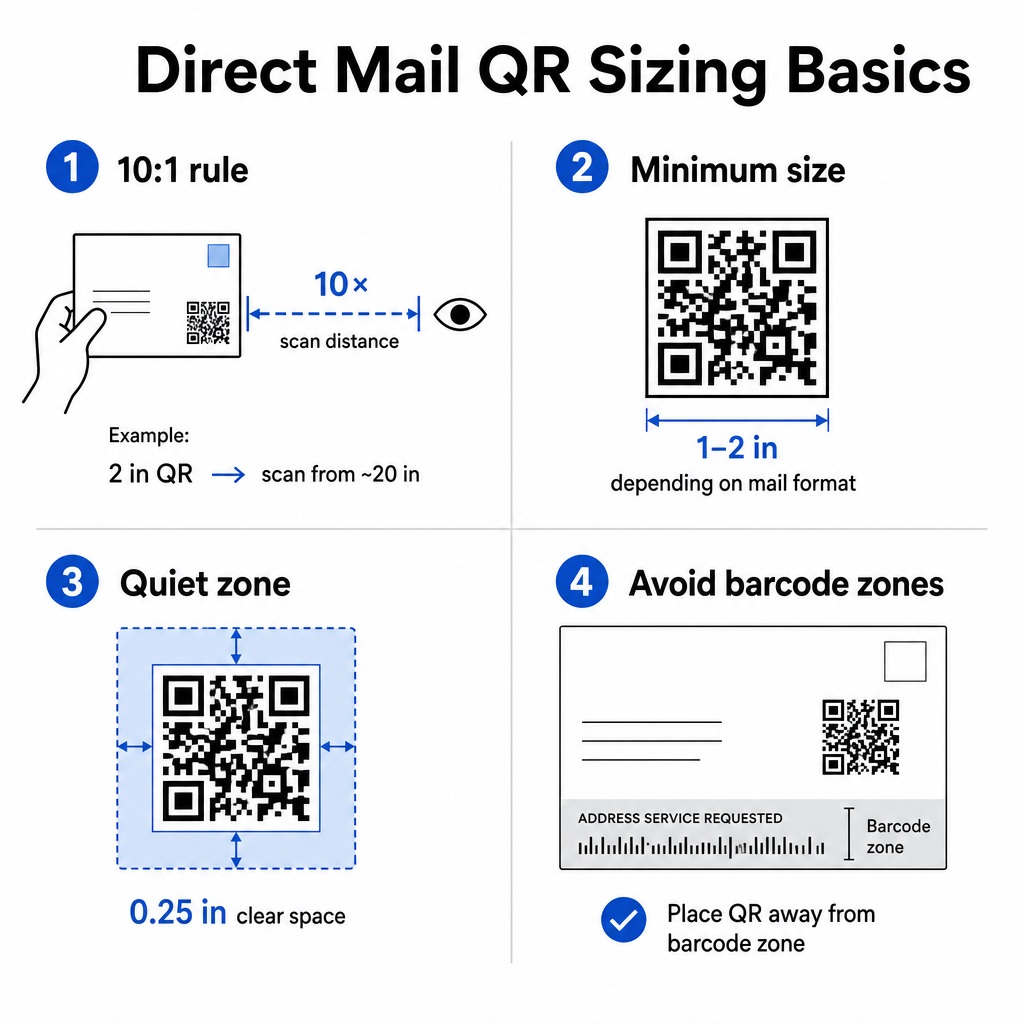
使用 10:1 distance-to-size rule: the code should be at least one inch wide for every ten inches of expected scanning distance. For a postcard held at arm’s length – roughly 20 inches away – the code should be at least 2 inches wide. Always maintain a quiet zone of at least 0.25 inches (6 mm) of clear space around all four sides of the code so scanners can distinguish the QR pattern from surrounding design elements.

Practical minimums by format:

Mail Format 推荐最小尺寸
Postcard 1.2 × 1.2 inches (30 × 30 mm)
Standard letter / #10 envelope insert 1.0 × 1.0 inches (25 × 25 mm)
Self-mailer or catalog 1.2 × 1.6 inches (30 × 40 mm)
Large format / oversized flat 1.6 × 1.6 inches (40 × 40 mm) or larger

二维码尺寸指南 以及 guide to sizing for different print materials cover additional scenarios including coated paper stock and heavier cardstock.

Placement Rules for Direct Mail QR Codes

Where you put the code on the piece affects both scan rates and USPS compliance, so placement deserves deliberate planning.

对于 postal compliance, place your QR code outside the address block and barcode clear zone. USPS uses an Intelligent Mail barcode (IMb) for sorting, and it runs along the bottom of the mailpiece. Your QR code must not overlap or crowd that area. Industry guidance recommends placing QR codes on the front panel or upper back section of a mailer to avoid any conflict with postal automation equipment.

对于 scan rates, follow these placement principles:

  • Front panel placement captures attention at the moment of opening – useful when your offer needs to be seen immediately
  • Back flap or back panel placement works well for longer-form mailers where recipients read through the piece before acting
  • Place the code at a natural resting point in the reading flow, not tucked into a corner that recipients are unlikely to notice
  • Always pair the code with a short call-to-action such as “Scan for your exclusive discount” or “Scan to schedule a free consultation”

QR code placement guide for marketing materials covers placement strategies across all print formats, including direct mail, posters, and product packaging.

Designing QR Codes That Scan Reliably

A direct mail piece goes through handling, stacking, and variable lighting conditions before a recipient ever scans it. Your code needs to survive all of that and still scan cleanly.

Contrast is the most important design variable. Maintain a contrast ratio of at least 4:1 between the dark modules and the light background. Dark navy or black on white or a very light pastel is the safest combination. Avoid inverting the colors (light pattern on a dark background) and avoid placing the code over a textured image or colored gradient.

Use high-resolution file formats when sending files to your printer. SVG or EPS formats are vector-based and will not pixelate at any print size. Exporting a JPEG or PNG at low resolution and then scaling it up is one of the most common causes of unscannable printed codes.

If you include your logo inside the QR code, use error correction level Q or H, and keep the logo covering no more than 30% of the total code area. The 带标志的二维码生成器 handles this automatically by adjusting error correction when you upload a logo.

Add a call-to-action frame around the code. A labeled border – such as “Scan to Claim Your Offer” – removes ambiguity about what the code does and gives hesitant recipients a reason to act. Framed codes with explicit CTAs consistently outperform bare codes because they provide context. Learn more about QR code frames and how to use them effectively.

Test before you print the full run. Scan the proof on multiple devices, in different lighting conditions, and at the distance a typical recipient would hold the piece. A code that looks correct on screen can still fail in print if contrast settings shifted during file export. The guidelines for QR code use in print media provide a practical checklist to work through before signing off on a proof.

Build a Branded QR Code for Your Next Mailer Add your logo, choose your colors, and set a CTA frame with the 带标志的二维码生成器 – then download a print-ready SVG or EPS file.

Linking QR Codes to Mobile-Optimized Destinations

A successful scan is only the beginning. If the landing page fails on mobile, you lose the conversion regardless of how well the rest of the campaign performed.

Every QR code destination for a direct mail campaign should be:

  • Mobile-first, with text and buttons sized for thumb navigation
  • Fast-loading, ideally under 3 seconds – slow pages cause abandonment before the offer is even read
  • Action-focused, with a single primary CTA placed near the top of the page
  • Visually consistent with the mailer’s design so recipients know they have arrived in the right place

If you are running a promotional campaign, the 优惠券二维码生成器 lets you build a landing page that displays your offer directly – no separate page build required. For campaign-specific URLs, the 链接二维码生成器 converts any URL into a trackable, branded code in seconds.

For detailed guidance on building pages that convert after the scan, see the best practices for mobile QR code landing pages.

USPS Promotions That Reward QR Code Use

The USPS runs annual promotions that offer postage discounts to mailers who integrate specific technologies. Two are directly relevant to QR code campaigns.

Integrated Technology Promotion offers a 3% postage discount when QR codes on a mailpiece meet USPS requirements for delivering a relevant digital experience. To qualify, the code must be properly sized, clearly placed, and link to a mobile-optimized destination that is substantively related to the mailpiece content.

Informed Delivery program allows business mailers to pair a physical mailpiece with digital content – a color image and a clickable URL – that appears in the email or app notification USPS sends to subscribers before their mail arrives. This creates a second impression of your campaign before the physical piece is even in the recipient’s hands. Basic Informed Delivery campaign functionality is available at no additional USPS fee beyond standard postage, and it can be stacked with other promotions for combined savings on qualifying mailings.

To set up an Informed Delivery campaign, you register through the USPS Business Customer Gateway, create your campaign with a mailing date window, and upload your ride-along content before your mailing is entered at the Business Mail Entry Unit. Eligible mail types include First-Class Mail letters, USPS Marketing Mail letters, and Nonprofit USPS Marketing Mail letters bearing an Intelligent Mail barcode.

If you use Informed Delivery alongside a QR code that qualifies for the Integrated Technology Promotion, you may be able to claim both discounts on the same mailing – a meaningful cost reduction on larger runs.

How to Measure Direct Mail QR Code Campaign Performance

Once your campaign is live, these are the metrics worth tracking:

  • Total scans – raw volume of how many times the code was scanned across the mailing
  • Unique scans – number of distinct devices, which approximates individual recipients who engaged
  • Scan-to-conversion rate – the percentage of scans that completed your target action, such as a purchase, form fill, or phone call
  • Scan location – geographic data showing which zip codes or regions responded most
  • Scan timing – when during the day and across which days of the week recipients engaged
  • Device type – iOS vs. Android split, which can inform landing page optimization decisions

Pageloot’s dashboard surfaces all of these automatically for dynamic QR codes. For deeper funnel analysis, connect your UTM-tagged URLs to GA4 and track what happens after the scan – which pages recipients visited, how long they stayed, and whether they converted.

Use this data to sharpen your next mailing. If scans clustered in one region but conversions were low, the landing page or offer may need localization. If scans peaked on day two after delivery, that signals when your audience opens mail and can guide future drop timing decisions.

Detailed tracking setup instructions are available in the QR code tracking guide 以及 UTM parameters guide for Google Analytics.

Bringing It All Together

A direct mail QR code campaign that works looks like this: a dynamic code sized to at least 1 inch wide, placed on the front panel away from the postal barcode zone, printed in high contrast on a clean background, linked to a fast mobile landing page, and tracked through both Pageloot’s built-in analytics and UTM-tagged URLs in GA4. Every scan becomes a data point you can act on for the next campaign.

Start by creating your first dynamic QR code and attaching it to a specific campaign URL. Use the 二维码生成器 to build a free code today, or move directly to the 动态二维码生成器 to get full tracking and editing capabilities from the start.

常见问题

Can I use the same QR code on multiple direct mail pieces across different campaigns?

Technically yes, but it is not recommended. Using separate dynamic QR codes for each campaign lets you track performance independently. If you reuse one code, you cannot distinguish which mailing drove which scans. With a dynamic QR code, you can update the destination URL between campaigns, but creating a new code – along with a new UTM-tagged URL – for each distinct mailing keeps your analytics clean and your reporting accurate.

What happens if I need to change the landing page URL after my mailers are already printed?

If you used a dynamic QR code, you can update the destination URL at any time from your Pageloot dashboard without touching the printed code. The code itself never changes – only the redirect destination does. This is one of the primary reasons dynamic QR codes are the standard choice for print campaigns. If you used a static QR code, the URL is permanently encoded into the pattern and cannot be changed after printing.

How do I know if my QR code qualifies for a USPS postage discount?

The USPS Integrated Technology Promotion has specific annual requirements covering minimum QR code size, placement on the mailpiece, and the type of mobile experience the code delivers. The promotion typically requires the code to link to a mobile-optimized destination that is directly relevant to the mailpiece content. Requirements are updated each year, so review the current promotion guidelines through the USPS Business Customer Gateway before designing your piece. Your mail service provider or lettershop can also confirm eligibility during the design phase.

关于作者

Siim Kostabi 是 Pageloot 的内容主管,负责撰写关于我们创新型二维码生成器服务的文章。凭借五年多来在二维码领域积累的深厚专业知识,Siim 是该领域的专家。他致力于利用二维码技术简化和增强数字交互,并取得了显著的成果。.

类别
了解更多关于
扫描二维码海报
二维码 数据限制
玩家扫描二维码
使用扫描二维码 宠物小精灵
QR QR码的#1解决方案

如果您需要在线创建QR码,则可以 制作二维码 就在这里免费!
Pageloot是 #1转到解决方案 创建和扫描QR码。

BL-0277

博客生成器

受到超过 20,000 个品牌的信赖,可获得更多销售、评论和关注者。

客户徽标
受到顶级品牌的信赖
评分为 4.8(共 5)

4.86 / 5 星评级

雨果·劳伦特
雨果·劳伦特
餐馆老板
有史以来最容易和最可靠的QR码生成器。PDF文件可以立即上传。我们的餐厅菜单现在是数字化的。
卢卡斯-詹森
卢卡斯-詹森
房地产开发商
这是一个很好的工具,二维码带你到你想要的地方。我们只使用位置二维码,但有许多有用的功能。
艾玛-莫雷蒂
艾玛-莫雷蒂
零售产品
易于使用和快速。它工作得很好,创造了一个完美的图像,所以员工可以下载我的vCard。
雨果·劳伦特
雨果·劳伦特
餐馆老板
有史以来最容易和最可靠的QR码生成器。PDF文件可以立即上传。我们的餐厅菜单现在是数字化的。
卢卡斯-詹森
卢卡斯-詹森
房地产开发商
这是一个很好的工具,二维码带你到你想要的地方。我们只使用位置二维码,但有许多有用的功能。
艾玛-莫雷蒂
艾玛-莫雷蒂
零售产品
易于使用和快速。它工作得很好,创造了一个完美的图像,所以员工可以下载我的vCard。
查看更多QR码
二维码营销
二维码 营销可能性
将一切转化为数字体验 不到3分钟。

免费试用 14 天。

无需信用卡。

首次购买可享受 30% 折扣

使用代码:

分享您的 MP3 文件

注册以创建 PDF QR 码

上传和显示你需要的一切。

  • 音频文件
  • 播客
  • 音乐

注册即可享 14 天免费试用。.
试用期结束后,二维码将失效。.

注册以创建音频 mp3 二维码

使用边框获得更多扫描

注册以向您的二维码添加更多框架

呼叫行动框架帮助您的客户与QR码轻松互动。试试吧!

注册即可享 14 天免费试用。.
试用期结束后,二维码将失效。.

注册以向您的二维码添加更多框架

使用形状添加更多样式

注册以创建更多形状

二维码不一定是方形的。试着改变它以适应你的品牌形象。

注册即可享 14 天免费试用。.
试用期结束后,二维码将失效。.

注册以创建更多形状

为您的二维码添加徽标

注册以将您的徽标添加到二维码中

通过在二维码上添加你的标志和品牌,使你的二维码脱颖而出。

注册即可享 14 天免费试用。.
试用期结束后,二维码将失效。.

注册以将您的徽标添加到二维码中

智能应用商店重定向

注册以创建应用商店二维码

将您的应用程序链接添加到我们的智能应用程序商店QR码。用户会根据他们的设备被重新定向。

注册即可享 14 天免费试用。.
试用期结束后,二维码将失效。.

注册以创建应用商店二维码

将图片上传到二维码

注册以创建图像二维码

轻松分享你的图像。在几秒钟内动态地改变任何图像。

注册即可享 14 天免费试用。.
试用期结束后,二维码将失效。.

注册以创建图像二维码

分享您的 PDF 文件

注册以创建 PDF QR 码

上传和显示你需要的一切。

  • 菜单和价格表
  • 使用说明
  • 任何文件

注册即可享 14 天免费试用。.
试用期结束后,二维码将失效。.

注册以创建 PDF QR 码

稍后编辑,无需打印

注册即可编辑您的二维码,无需再次打印

动态QR码让你改变你的QR码的内容,而不需要打印新的QR码。

注册即可享 14 天免费试用。.
试用期结束后,二维码将失效。.

注册即可编辑您的二维码,无需再次打印

何时?何地?追踪您的二维码扫描

注册以追踪您的二维码

发现你的哪些二维码收到了最多的扫描,以及什么最能让你的客户兴奋。

注册即可享 14 天免费试用。.
试用期结束后,二维码将失效。.

注册以追踪您的二维码

提供可打印文件

注册以创建 PDF 和 SVG 等矢量二维码

.EPS, .PDF, .SVG

想下载高清分辨率的QR码吗?获得矢量或像素格式,可随时打印。

注册即可享 14 天免费试用。.
试用期结束后,二维码将失效。.

注册以创建 PDF 和 SVG 等矢量二维码

请等待。您的二维码是 正在加载... 正在加载...

打造专属

注册以保存您的二维码以供日后使用

通过创建具有不同颜色、标识和行动呼吁框架的出色的QR码,获得更多的扫描。

注册即可享 14 天免费试用。.
试用期结束后,二维码将失效。.

注册以保存您的二维码以供日后使用