
¿Están sus piezas de correo directo terminando en los contenedores de reciclaje sin una sola respuesta? Las campañas impresas se vuelven medibles en el momento en que les da a los destinatarios un claro siguiente paso digital. Esta guía le explica cómo agregar códigos QR al correo directo de manera efectiva, cómo dimensionarlos y ubicarlos correctamente, y cómo rastrear cada escaneo para probar el ROI.
Por qué los códigos QR pertenecen al correo directo
El correo directo ya supera a la mayoría de los canales digitales en engagement. El correo directo logra una tasa de respuesta del 91% en comparación con aproximadamente el 1% para el correo electrónico, la búsqueda pagada y las redes sociales combinadas, y el 74% de los especialistas en marketing informan que ofrece el ROI más alto de cualquier canal que utilizan. El desafío siempre ha sido conectar ese engagement físico con un resultado digital medible. Los códigos QR resuelven ese problema directamente.
Cuando un destinatario escanea un código en su envío, usted captura un evento de escaneo con marca de tiempo y ubicación, vinculado a una campaña específica. Sabe qué pieza impulsó la acción, cuándo ocurrió el escaneo, qué dispositivo se utilizó y si la página de destino llevó a una conversión. Ese tipo de atribución ha sido históricamente difícil de lograr con la impresión.
Más allá del seguimiento, los códigos QR eliminan la fricción. En lugar de pedir a un destinatario que escriba una URL o busque su oferta, un solo escaneo los lleva directamente a una página de destino, cupón, formulario o página de producto. Comprender cómo los códigos QR conectan el marketing impreso y digital es la base para usarlos bien.
Códigos QR estáticos vs. dinámicos: Cuál usar
Esta es una de las decisiones más trascendentales que tomará antes de imprimir una sola pieza.
UNA código QR estático codifica una URL fija directamente en el patrón. Una vez impreso, no puede cambiar a dónde apunta y no recopila datos de escaneo. Los códigos estáticos son apropiados para información permanente que nunca necesitará actualización.
UNA código QR dinámico codifica una URL de redireccionamiento corta. El destino real se puede actualizar en cualquier momento desde un panel de control, incluso después de que ya se hayan enviado decenas de miles de piezas. También registra cada escaneo automáticamente, incluyendo la hora, la ubicación y el tipo de dispositivo.
Para las campañas de correo directo, los códigos QR dinámicos son casi siempre la elección correcta porque:
- Puede corregir la URL de una página de destino sin reimprimir toda la tirada
- Puede cambiar el destino después de que finalice una promoción para mantener el código activo
- Cada escaneo se registra para que pueda medir el rendimiento de la campaña en tiempo real
- Puede ejecutar pruebas A/B dirigiendo diferentes lotes de códigos a diferentes páginas de destino
El detallado comparación de códigos QR estáticos vs. dinámicos cubre el desglose completo de cuándo tiene sentido cada tipo.
Crear códigos QR de correo directo rastreables Use el Generador de códigos QR dinámicos para crear códigos que puede actualizar en cualquier momento y rastrear desde un único panel de control, sin necesidad de reimpresión.
Cómo configurar el seguimiento para códigos QR de correo directo
El seguimiento de una campaña de códigos QR implica tres capas: análisis de escaneo integrados, parámetros UTM para Google Analytics y retargeting opcional a través de Facebook Pixel.
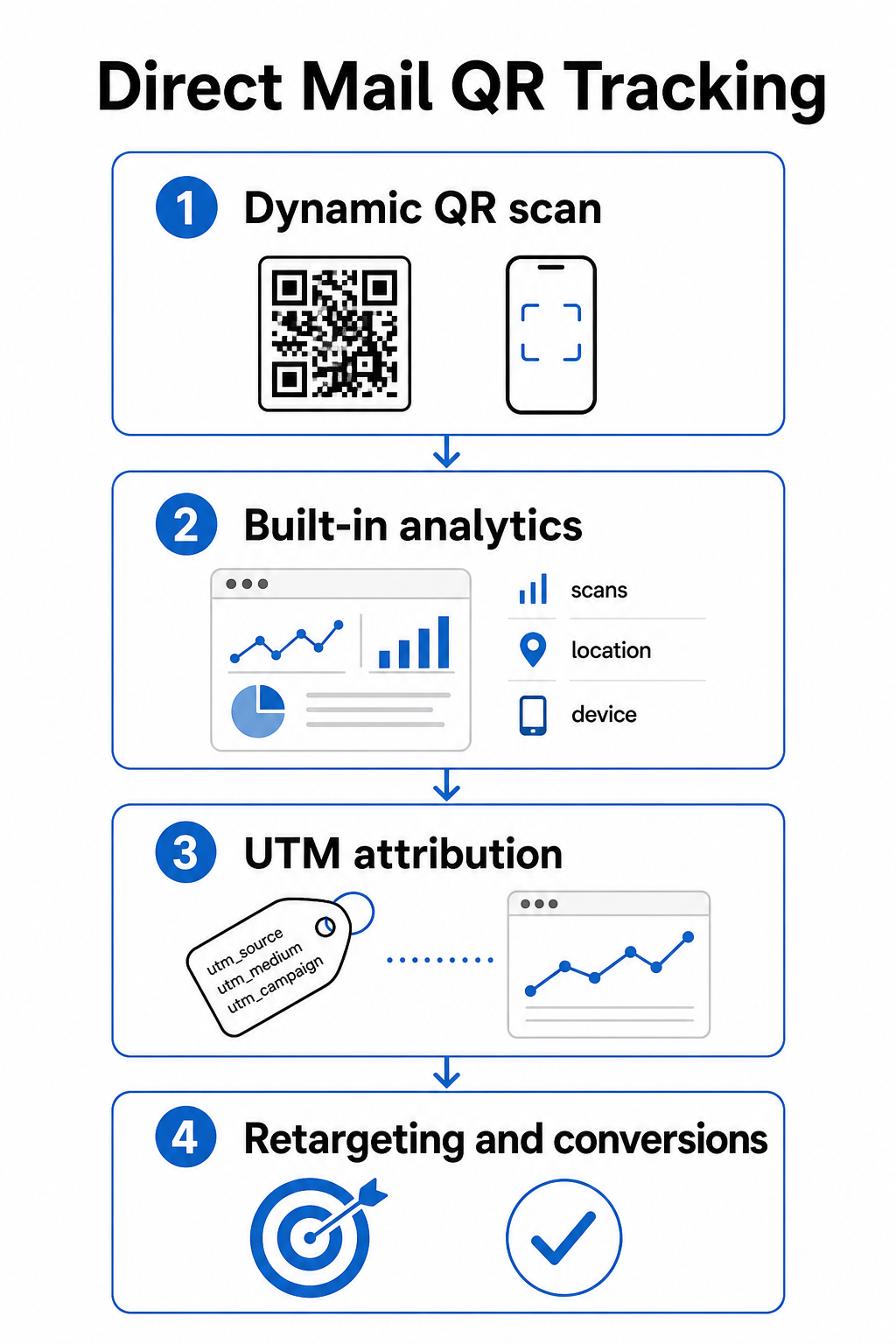
Análisis de escaneo integrados están disponibles automáticamente cuando crea un código QR dinámico con Pageloot. Su panel de control registra el total de escaneos, escaneos únicos, ubicaciones de escaneo, tipos de dispositivos y tiempos de escaneo. Estos datos le indican qué mercados y datos demográficos se involucraron más.
parámetros UTM llevan esa atribución a Google Analytics para que pueda seguir el recorrido del usuario más allá del escaneo. Una URL UTM bien estructurada para una campaña de correo directo podría verse así:
`https://yoursite.com/offer?utm`source=directcorreo&utmmedio=qrcódigo&utmcampaña=primavera2025postal`
Agregar el parámetro `utm_content` le permite distinguir entre diferentes versiones de envío, tamaños de inserción o segmentos de audiencia dentro de la misma campaña. La guía de parámetros UTM para códigos QR explica las convenciones de nomenclatura y cómo leer los datos resultantes dentro de GA4.
Integración de Facebook Pixel le permite hacer retargeting a las personas que escanearon su envío y visitaron su sitio pero no convirtieron, una potente capa de seguimiento para campañas de comercio electrónico y generación de leads.
Los tres métodos de seguimiento están disponibles dentro de la configuración de códigos QR dinámicos de Pageloot. Consulte la guía de seguimiento de códigos QR completa para obtener instrucciones de configuración paso a paso.
Dimensionamiento de códigos QR para piezas de correo directo
Equivocarse con el tamaño es una de las formas más rápidas de socavar un envío por lo demás bien diseñado. Un código demasiado pequeño no escaneará de forma fiable, y un código colocado en el área incorrecta puede interferir con la automatización postal.
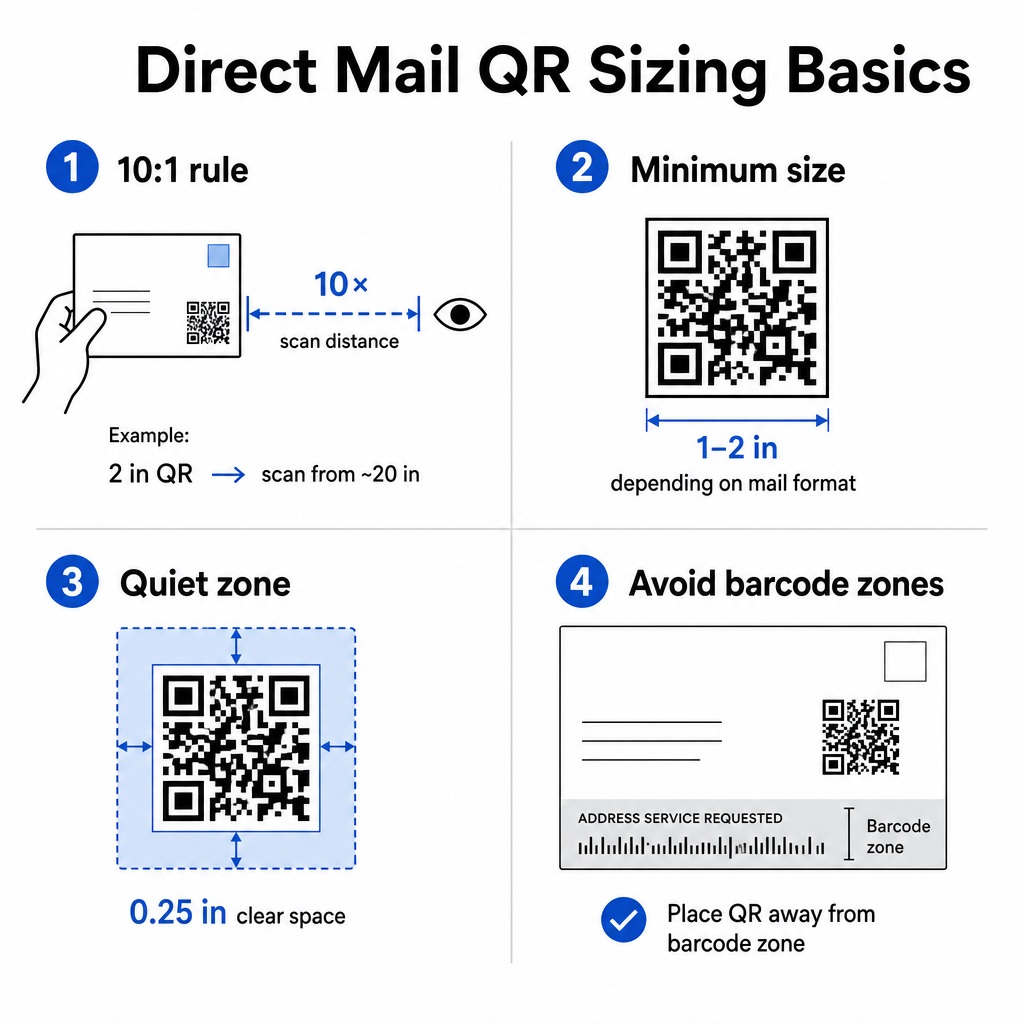
Use el regla de distancia a tamaño 10:1: el código debe tener al menos una pulgada de ancho por cada diez pulgadas de distancia de escaneo esperada. Para una postal sostenida a la distancia de un brazo, aproximadamente a 20 pulgadas de distancia, el código debe tener al menos 2 pulgadas de ancho. Mantenga siempre una zona tranquila de al menos 0.25 pulgadas (6 mm) de espacio libre alrededor de los cuatro lados del código para que los escáneres puedan distinguir el patrón QR de los elementos de diseño circundantes.
Mínimos prácticos por formato:
| Formato de correo | Tamaño Mínimo Recomendado |
|---|---|
| Tarjeta postal | 2 × 1.2 pulgadas (30 × 30 mm) |
| Carta estándar / inserto de sobre | 0 × 1.0 pulgadas (25 × 25 mm) |
| Auto-enviable o catálogo | 2 × 1.6 pulgadas (30 × 40 mm) |
| Gran formato / plano de gran tamaño | 6 × 1.6 pulgadas (40 × 40 mm) o más grande |
El guía de tamaño de códigos QR y la guía para el tamaño de diferentes materiales de impresión cubre escenarios adicionales, incluyendo papel estucado y cartulina más gruesa.
Reglas de colocación para códigos QR de correo directo
Dónde colocas el código en la pieza afecta tanto a las tasas de escaneo como al cumplimiento de USPS, por lo que la colocación merece una planificación deliberada.
Para cumplimiento postal, coloca tu código QR fuera del bloque de dirección y la zona clara del código de barras. USPS utiliza un código de barras de correo inteligente (IMb) para la clasificación, y este se extiende a lo largo de la parte inferior de la pieza de correo. Tu código QR no debe superponerse ni abarrotar esa área. La guía de la industria recomienda colocar los códigos QR en el panel frontal o en la sección superior trasera de un envío para evitar cualquier conflicto con el equipo de automatización postal.
Para tasas de escaneo, sigue estos principios de colocación:
- La colocación en el panel frontal capta la atención en el momento de la apertura – útil cuando tu oferta necesita ser vista inmediatamente
- La colocación en la solapa trasera o en el panel trasero funciona bien para envíos de formato más largo donde los destinatarios leen la pieza antes de actuar
- Coloca el código en un punto de descanso natural en el flujo de lectura, no escondido en una esquina que los destinatarios probablemente no notarán
- Siempre empareja el código con una breve llamada a la acción como “Escanea para tu descuento exclusivo” o “Escanea para programar una consulta gratuita”
El guía de colocación de códigos QR para materiales de marketing cubre estrategias de colocación en todos los formatos de impresión, incluyendo correo directo, carteles y embalaje de productos.
Diseño de Códigos QR que Escanean de Forma Fiable
Una pieza de correo directo pasa por manipulación, apilamiento y condiciones de iluminación variables antes de que un destinatario lo escanee. Tu código necesita sobrevivir a todo eso y aún así escanearse limpiamente.
El contraste es la variable de diseño más importante. Mantén una relación de contraste de al menos 4:1 entre los módulos oscuros y el fondo claro. Azul marino oscuro o negro sobre blanco o un pastel muy claro es la combinación más segura. Evita invertir los colores (patrón claro sobre fondo oscuro) y evita colocar el código sobre una imagen texturizada o un degradado de color.
Utiliza formatos de archivo de alta resolución al enviar archivos a tu impresora. Los formatos SVG o EPS son basados en vectores y no se pixelarán en ningún tamaño de impresión. Exportar un JPEG o PNG en baja resolución y luego escalarlo es una de las causas más comunes de códigos impresos no escaneables.
Si incluyes tu logotipo dentro del código QR, utiliza el nivel de corrección de errores Q o H, y mantén el logotipo cubriendo no más del 30% del área total del código. El Generador de código QR con logo maneja esto automáticamente ajustando la corrección de errores cuando subes un logotipo.
Añade un marco de llamada a la acción alrededor del código. Un borde etiquetado – como “Escanea para reclamar tu oferta” – elimina la ambigüedad sobre lo que hace el código y da a los destinatarios indecisos una razón para actuar. Los códigos enmarcados con CTA explícitas superan consistentemente a los códigos sin marco porque proporcionan contexto. Aprende más sobre marcos de códigos QR y cómo usarlos eficazmente.
Prueba antes de imprimir la tirada completa. Escanea la prueba en múltiples dispositivos, en diferentes condiciones de iluminación, y a la distancia a la que un destinatario típico sostendría la pieza. Un código que parece correcto en pantalla aún puede fallar en la impresión si la configuración de contraste cambió durante la exportación del archivo. Las pautas para el uso de códigos QR en medios impresos proporcionan una lista de verificación práctica para revisar antes de aprobar una prueba.
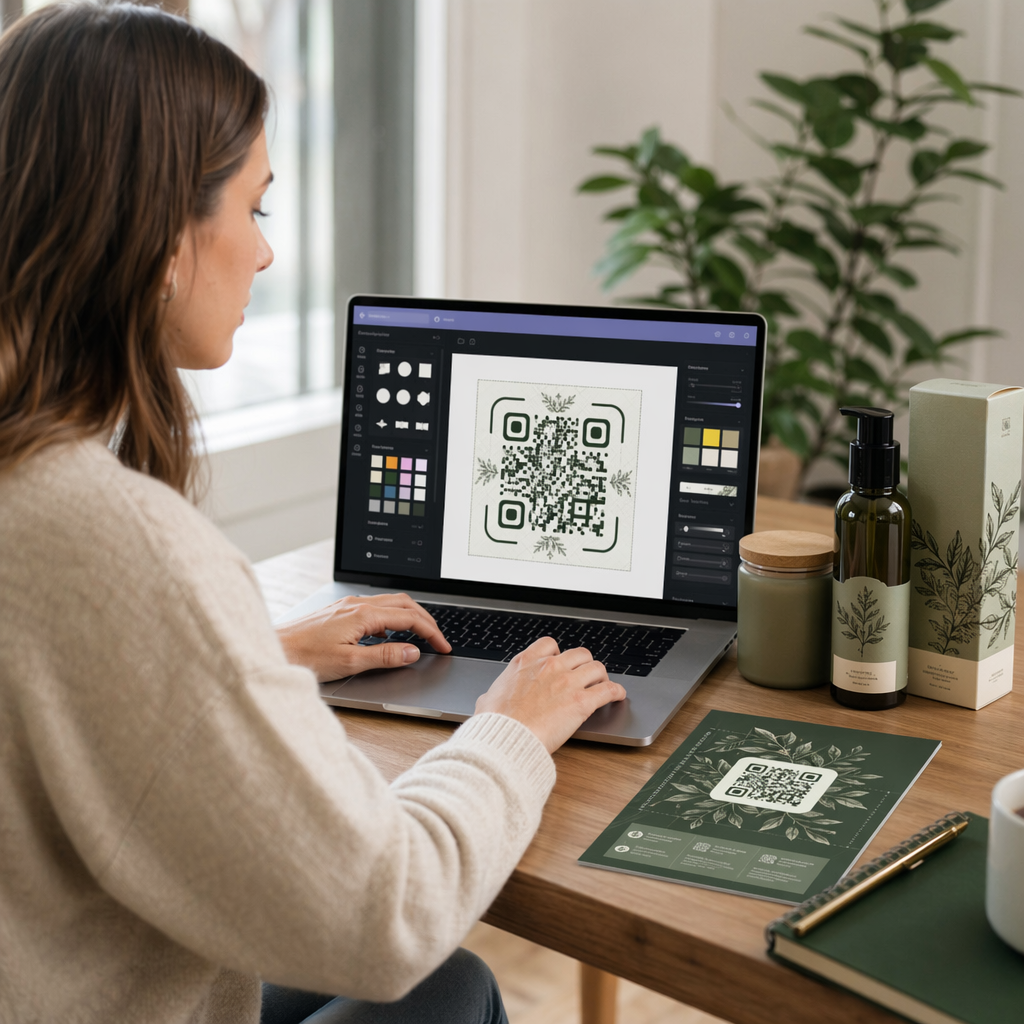
Crea un código QR de marca para tu próximo envío Añade tu logotipo, elige tus colores y establece un marco de CTA con el Generador de código QR con logo – luego descarga un archivo SVG o EPS listo para imprimir.
Vinculación de códigos QR a destinos optimizados para móviles
Un escaneo exitoso es solo el principio. Si la página de destino falla en el móvil, pierdes la conversión independientemente de lo bien que haya funcionado el resto de la campaña.
Cada destino de código QR para una campaña de correo directo debería ser:
- Prioridad móvil, con texto y botones dimensionados para la navegación con el pulgar
- Carga rápida, idealmente en menos de 3 segundos – las páginas lentas causan abandono antes de que la oferta sea siquiera leída
- Orientado a la acción, con una única CTA principal colocada cerca de la parte superior de la página
- Visualmente consistente con el diseño del envío para que los destinatarios sepan que han llegado al lugar correcto
Si estás ejecutando una campaña promocional, el Generador de código QR para cupones te permite construir una página de destino que muestra tu oferta directamente – no se requiere la creación de una página separada. Para URLs específicas de la campaña, el Generador de códigos QR de enlace convierte cualquier URL en un código rastreable y de marca en segundos.
Para una guía detallada sobre la creación de páginas que convierten después del escaneo, consulta el guía de mejores prácticas para páginas de destino de códigos QR móviles.
Promociones de USPS que Recompensan el Uso de Códigos QR
El USPS realiza promociones anuales que ofrecen descuentos en franqueo a los remitentes que integran tecnologías específicas. Dos son directamente relevantes para las campañas de códigos QR.
El Promoción de Tecnología Integrada ofrece un descuento del 3% en franqueo cuando los códigos QR en una pieza de correo cumplen los requisitos del USPS para ofrecer una experiencia digital relevante. Para calificar, el código debe tener el tamaño adecuado, estar claramente colocado y enlazar a un destino optimizado para dispositivos móviles que esté sustancialmente relacionado con el contenido de la pieza de correo.
El programa Informed Delivery permite a los remitentes comerciales emparejar una pieza de correo física con contenido digital – una imagen a color y una URL en la que se puede hacer clic – que aparece en el correo electrónico o la notificación de la aplicación que el USPS envía a los suscriptores antes de que llegue su correo. Esto crea una segunda impresión de su campaña antes de que la pieza física esté incluso en manos del destinatario. La funcionalidad básica de la campaña Informed Delivery está disponible sin tarifa adicional del USPS más allá del franqueo estándar, y se puede combinar con otras promociones para obtener ahorros combinados en envíos que califiquen.
Para configurar una campaña de Informed Delivery, usted se registra a través del USPS Business Customer Gateway, crea su campaña con una ventana de fecha de envío, y carga su contenido complementario antes de que su envío se ingrese en la Unidad de Entrada de Correo Comercial. Los tipos de correo elegibles incluyen cartas de First-Class Mail, cartas de USPS Marketing Mail y cartas de Nonprofit USPS Marketing Mail que lleven un código de barras Intelligent Mail.
Si utiliza Informed Delivery junto con un código QR que califica para la Promoción de Tecnología Integrada, es posible que pueda reclamar ambos descuentos en el mismo envío – una reducción significativa de costos en tiradas más grandes.
Cómo Medir el Rendimiento de una Campaña de Códigos QR en Correo Directo
Una vez que su campaña esté activa, estas son las métricas que vale la pena rastrear:
- ESCANEOS TOTALES – volumen bruto de cuántas veces se escaneó el código en todo el envío
- Escaneos únicos – número de dispositivos distintos, lo que aproxima a los destinatarios individuales que interactuaron
- Tasa de escaneo a conversión – el porcentaje de escaneos que completaron su acción objetivo, como una compra, un formulario rellenado o una llamada telefónica
- Ubicación del escaneo – datos geográficos que muestran qué códigos postales o regiones respondieron más
- Horario de escaneo – cuándo durante el día y en qué días de la semana interactuaron los destinatarios
- Tipo de dispositivo – división iOS vs. Android, que puede informar las decisiones de optimización de la página de destino
El panel de control de Pageloot muestra todo esto automáticamente para los códigos QR dinámicos. Para un análisis de embudo más profundo, conecte sus URL con etiquetas UTM a GA4 y rastree lo que sucede después del escaneo – qué páginas visitaron los destinatarios, cuánto tiempo permanecieron y si se convirtieron.
Utilice estos datos para mejorar su próximo envío. Si los escaneos se agruparon en una región pero las conversiones fueron bajas, la página de destino o la oferta pueden necesitar localización. Si los escaneos alcanzaron su punto máximo el segundo día después de la entrega, eso indica cuándo su audiencia abre el correo y puede guiar futuras decisiones de tiempo de envío.
Las instrucciones detalladas de configuración de seguimiento están disponibles en la guía de seguimiento de códigos QR y la guía de parámetros UTM para Google Analytics.
Uniéndolo Todo
Una campaña de códigos QR en correo directo que funciona se ve así: un código dinámico de al menos 1 pulgada de ancho, colocado en el panel frontal lejos de la zona del código de barras postal, impreso con alto contraste sobre un fondo limpio, enlazado a una página de destino móvil rápida, y rastreado a través de los análisis integrados de Pageloot y las URL con etiquetas UTM en GA4. Cada escaneo se convierte en un punto de datos sobre el que puede actuar para la próxima campaña.
Comience creando su primer código QR dinámico y adjuntándolo a una URL de campaña específica. Utilice el Generador de códigos QR para crear un código gratuito hoy, o pase directamente a la Generador de códigos QR dinámicos para obtener capacidades completas de seguimiento y edición desde el principio.
Preguntas frecuentes
Técnicamente sí, pero no es recomendado. Usar códigos QR dinámicos separados para cada campaña le permite rastrear el rendimiento de forma independiente. Si reutiliza un código, no puede distinguir qué envío generó qué escaneos. Con un código QR dinámico, puede actualizar la URL de destino entre campañas, pero crear un nuevo código – junto con una nueva URL con etiquetas UTM – para cada envío distinto mantiene sus análisis limpios y sus informes precisos.
Si usó un código QR dinámico, puede actualizar la URL de destino en cualquier momento desde su panel de control de Pageloot sin tocar el código impreso. El código en sí nunca cambia, solo lo hace el destino de redirección. Esta es una de las razones principales por las que los códigos QR dinámicos son la elección estándar para las campañas impresas. Si usó un código QR estático, la URL está permanentemente codificada en el patrón y no se puede cambiar después de la impresión.
La Promoción de Tecnología Integrada de USPS tiene requisitos anuales específicos que cubren el tamaño mínimo del código QR, la ubicación en la pieza de correo y el tipo de experiencia móvil que ofrece el código. La promoción normalmente requiere que el código se vincule a un destino optimizado para dispositivos móviles que sea directamente relevante para el contenido de la pieza de correo. Los requisitos se actualizan cada año, así que revise las pautas de promoción actuales a través del Portal de Clientes Comerciales de USPS antes de diseñar su pieza. Su proveedor de servicios postales o taller de impresión también puede confirmar la elegibilidad durante la fase de diseño.