
> 사용 사례 > QR Codes on Direct Mail: How to Use and Track Them
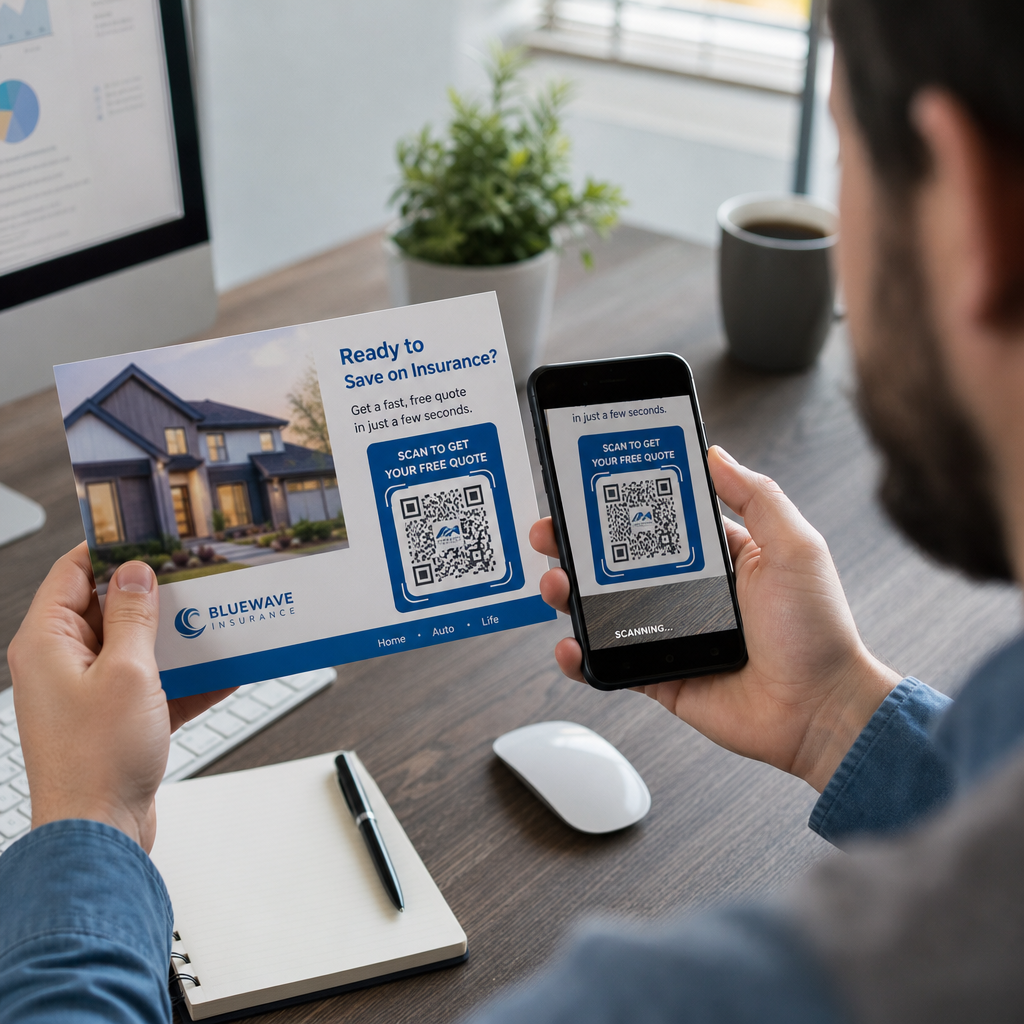
Scanning direct mail

QR Codes on Direct Mail: How to Use and Track Them

Learn how to use QR codes on direct mail to track scans and improve ROI. This guide covers sizing, placement, dynamic vs. static codes, and USPS postage
Updated on 7월 2, 2026
목차

Are your direct mail pieces landing in recycling bins without a single response? Print campaigns become measurable the moment you give recipients a clear digital next step. This guide walks you through how to add QR codes to direct mail effectively, size and place them correctly, and track every scan to prove ROI.

Why QR Codes Belong on Direct Mail

Direct mail already outperforms most digital channels on engagement. Direct mail achieves a 9% response rate compared to roughly 1% for email, paid search, and social combined – and 74% of marketers report it delivers the highest ROI of any channel they use. The challenge has always been connecting that physical engagement to a measurable digital outcome. QR codes solve that problem directly.

When a recipient scans a code on your mailer, you capture a timestamped, location-tagged scan event tied to a specific campaign. You know which piece drove the action, when the scan happened, what device was used, and whether the landing page led to a conversion. That kind of attribution has historically been difficult to achieve with print.

Beyond tracking, QR codes remove friction. Instead of asking a recipient to type a URL or search for your offer, a single scan takes them directly to a landing page, coupon, form, or product page. Understanding QR 코드가 인쇄 및 디지털 마케팅을 연결하는 방법 is the foundation for using them well.

Static vs. Dynamic QR Codes: Which One to Use

This is one of the most consequential decisions you will make before printing a single piece.

정적 QR 코드 encodes a fixed URL directly into the pattern. Once printed, you cannot change where it points, and it collects no scan data. Static codes are appropriate for permanent information that will never need updating.

동적 QR 코드 encodes a short redirect URL. The actual destination can be updated at any time from a dashboard – even after tens of thousands of pieces have already been mailed. It also records every scan automatically, including the time, location, and device type.

For direct mail campaigns, dynamic QR codes are almost always the right choice because:

  • You can correct a landing page URL without reprinting the entire run
  • You can swap out the destination after a promotion ends to keep the code active
  • Every scan is logged so you can measure campaign performance in real time
  • You can run A/B tests by pointing different code batches to different landing pages

The detailed comparison of static vs. dynamic QR codes covers the full breakdown of when each type makes sense.

Create Trackable Direct Mail QR Codes 사용 동적 QR 코드 생성기 to build codes you can update anytime and track from a single dashboard – no reprinting required.

How to Set Up Tracking for Direct Mail QR Codes

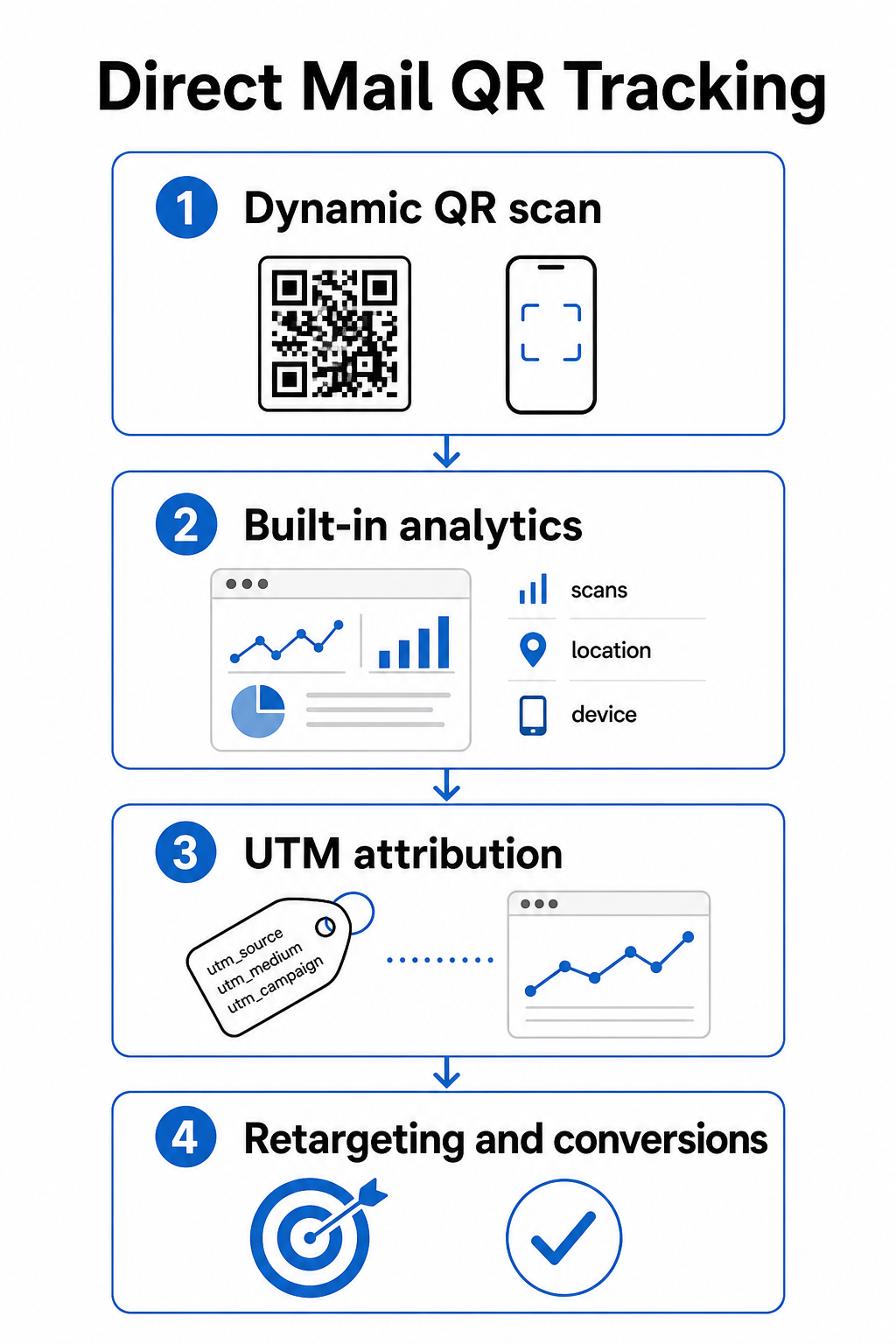
Tracking a QR code campaign involves three layers: built-in scan analytics, UTM parameters for Google Analytics, and optional retargeting through Facebook Pixel.

QR 추적 단계

Built-in scan analytics are available automatically when you create a dynamic QR code with Pageloot. Your dashboard records total scans, unique scans, scan locations, device types, and scan times. This data tells you which markets and demographics engaged most.

UTM 매개변수 carry that attribution into Google Analytics so you can follow the user journey beyond the scan. A well-structured UTM URL for a direct mail campaign might look like this:

`https://yoursite.com/offer?utmsource=directmail&utm매체=qrcode&utmcampaign=spring2025postcard`

Adding the `utm_content` parameter lets you distinguish between different mailer versions, insert sizes, or audience segments within the same campaign. The guide to UTM parameters for QR codes walks through naming conventions and how to read the resulting data inside GA4.

Facebook Pixel integration lets you retarget people who scanned your mailer and visited your site but did not convert – a powerful follow-up layer for e-commerce and lead generation campaigns.

All three tracking methods are available inside Pageloot’s dynamic QR code settings. See the full QR code tracking guide for step-by-step setup instructions.

Sizing QR Codes for Direct Mail Pieces

Getting the size wrong is one of the fastest ways to undermine an otherwise well-designed mailer. A code that is too small will not scan reliably, and a code placed in the wrong area can interfere with postal automation.

QR sizing rules

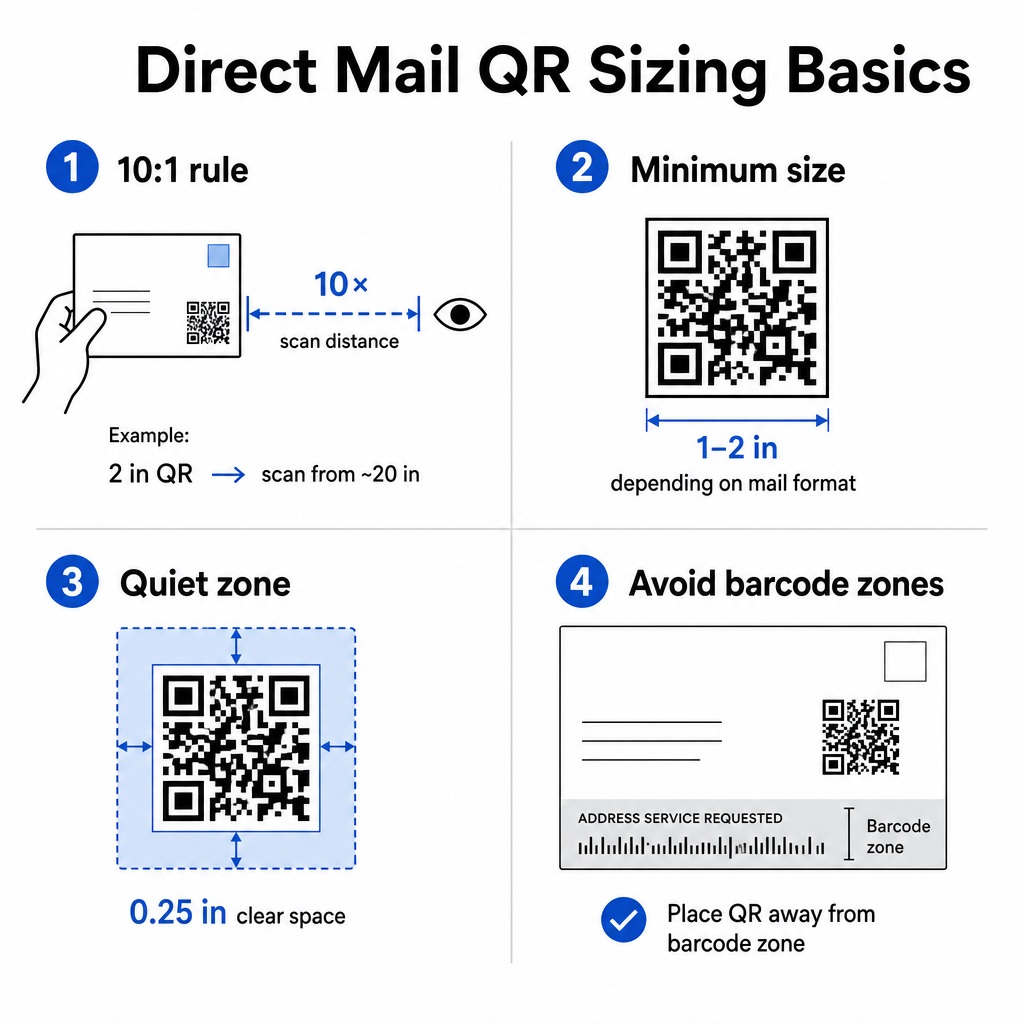
사용 10:1 distance-to-size rule: the code should be at least one inch wide for every ten inches of expected scanning distance. For a postcard held at arm’s length – roughly 20 inches away – the code should be at least 2 inches wide. Always maintain a quiet zone of at least 0.25 inches (6 mm) of clear space around all four sides of the code so scanners can distinguish the QR pattern from surrounding design elements.

Practical minimums by format:

Mail Format 권장 최소 크기
Postcard 1.2 × 1.2 inches (30 × 30 mm)
Standard letter / #10 envelope insert 1.0 × 1.0 inches (25 × 25 mm)
Self-mailer or catalog 1.2 × 1.6 inches (30 × 40 mm)
Large format / oversized flat 1.6 × 1.6 inches (40 × 40 mm) or larger

그만큼 QR 코드 크기 가이드 그리고 guide to sizing for different print materials cover additional scenarios including coated paper stock and heavier cardstock.

Placement Rules for Direct Mail QR Codes

Where you put the code on the piece affects both scan rates and USPS compliance, so placement deserves deliberate planning.

에 대한 postal compliance, place your QR code outside the address block and barcode clear zone. USPS uses an Intelligent Mail barcode (IMb) for sorting, and it runs along the bottom of the mailpiece. Your QR code must not overlap or crowd that area. Industry guidance recommends placing QR codes on the front panel or upper back section of a mailer to avoid any conflict with postal automation equipment.

에 대한 scan rates, follow these placement principles:

  • Front panel placement captures attention at the moment of opening – useful when your offer needs to be seen immediately
  • Back flap or back panel placement works well for longer-form mailers where recipients read through the piece before acting
  • Place the code at a natural resting point in the reading flow, not tucked into a corner that recipients are unlikely to notice
  • Always pair the code with a short call-to-action such as “Scan for your exclusive discount” or “Scan to schedule a free consultation”

그만큼 QR code placement guide for marketing materials covers placement strategies across all print formats, including direct mail, posters, and product packaging.

Designing QR Codes That Scan Reliably

A direct mail piece goes through handling, stacking, and variable lighting conditions before a recipient ever scans it. Your code needs to survive all of that and still scan cleanly.

Contrast is the most important design variable. Maintain a contrast ratio of at least 4:1 between the dark modules and the light background. Dark navy or black on white or a very light pastel is the safest combination. Avoid inverting the colors (light pattern on a dark background) and avoid placing the code over a textured image or colored gradient.

Use high-resolution file formats when sending files to your printer. SVG or EPS formats are vector-based and will not pixelate at any print size. Exporting a JPEG or PNG at low resolution and then scaling it up is one of the most common causes of unscannable printed codes.

If you include your logo inside the QR code, use error correction level Q or H, and keep the logo covering no more than 30% of the total code area. The 로고가 있는 QR 코드 생성기 handles this automatically by adjusting error correction when you upload a logo.

Add a call-to-action frame around the code. A labeled border – such as “Scan to Claim Your Offer” – removes ambiguity about what the code does and gives hesitant recipients a reason to act. Framed codes with explicit CTAs consistently outperform bare codes because they provide context. Learn more about QR code frames and how to use them effectively.

Test before you print the full run. Scan the proof on multiple devices, in different lighting conditions, and at the distance a typical recipient would hold the piece. A code that looks correct on screen can still fail in print if contrast settings shifted during file export. The guidelines for QR code use in print media provide a practical checklist to work through before signing off on a proof.

Build a Branded QR Code for Your Next Mailer Add your logo, choose your colors, and set a CTA frame with the 로고가 있는 QR 코드 생성기 – then download a print-ready SVG or EPS file.

Linking QR Codes to Mobile-Optimized Destinations

A successful scan is only the beginning. If the landing page fails on mobile, you lose the conversion regardless of how well the rest of the campaign performed.

Every QR code destination for a direct mail campaign should be:

  • Mobile-first, with text and buttons sized for thumb navigation
  • Fast-loading, ideally under 3 seconds – slow pages cause abandonment before the offer is even read
  • Action-focused, with a single primary CTA placed near the top of the page
  • Visually consistent with the mailer’s design so recipients know they have arrived in the right place

If you are running a promotional campaign, the 쿠폰 QR코드 생성기 lets you build a landing page that displays your offer directly – no separate page build required. For campaign-specific URLs, the 링크 QR 코드 생성기 converts any URL into a trackable, branded code in seconds.

For detailed guidance on building pages that convert after the scan, see the best practices for mobile QR code landing pages.

USPS Promotions That Reward QR Code Use

The USPS runs annual promotions that offer postage discounts to mailers who integrate specific technologies. Two are directly relevant to QR code campaigns.

그만큼 Integrated Technology Promotion offers a 3% postage discount when QR codes on a mailpiece meet USPS requirements for delivering a relevant digital experience. To qualify, the code must be properly sized, clearly placed, and link to a mobile-optimized destination that is substantively related to the mailpiece content.

그만큼 Informed Delivery program allows business mailers to pair a physical mailpiece with digital content – a color image and a clickable URL – that appears in the email or app notification USPS sends to subscribers before their mail arrives. This creates a second impression of your campaign before the physical piece is even in the recipient’s hands. Basic Informed Delivery campaign functionality is available at no additional USPS fee beyond standard postage, and it can be stacked with other promotions for combined savings on qualifying mailings.

To set up an Informed Delivery campaign, you register through the USPS Business Customer Gateway, create your campaign with a mailing date window, and upload your ride-along content before your mailing is entered at the Business Mail Entry Unit. Eligible mail types include First-Class Mail letters, USPS Marketing Mail letters, and Nonprofit USPS Marketing Mail letters bearing an Intelligent Mail barcode.

If you use Informed Delivery alongside a QR code that qualifies for the Integrated Technology Promotion, you may be able to claim both discounts on the same mailing – a meaningful cost reduction on larger runs.

How to Measure Direct Mail QR Code Campaign Performance

Once your campaign is live, these are the metrics worth tracking:

  • Total scans – raw volume of how many times the code was scanned across the mailing
  • Unique scans – number of distinct devices, which approximates individual recipients who engaged
  • Scan-to-conversion rate – the percentage of scans that completed your target action, such as a purchase, form fill, or phone call
  • Scan location – geographic data showing which zip codes or regions responded most
  • Scan timing – when during the day and across which days of the week recipients engaged
  • Device type – iOS vs. Android split, which can inform landing page optimization decisions

Pageloot’s dashboard surfaces all of these automatically for dynamic QR codes. For deeper funnel analysis, connect your UTM-tagged URLs to GA4 and track what happens after the scan – which pages recipients visited, how long they stayed, and whether they converted.

Use this data to sharpen your next mailing. If scans clustered in one region but conversions were low, the landing page or offer may need localization. If scans peaked on day two after delivery, that signals when your audience opens mail and can guide future drop timing decisions.

Detailed tracking setup instructions are available in the QR code tracking guide 그리고 UTM parameters guide for Google Analytics.

Bringing It All Together

A direct mail QR code campaign that works looks like this: a dynamic code sized to at least 1 inch wide, placed on the front panel away from the postal barcode zone, printed in high contrast on a clean background, linked to a fast mobile landing page, and tracked through both Pageloot’s built-in analytics and UTM-tagged URLs in GA4. Every scan becomes a data point you can act on for the next campaign.

Start by creating your first dynamic QR code and attaching it to a specific campaign URL. Use the QR 코드 생성기 to build a free code today, or move directly to the 동적 QR 코드 생성기 to get full tracking and editing capabilities from the start.

자주 묻는 질문

Can I use the same QR code on multiple direct mail pieces across different campaigns?

Technically yes, but it is not recommended. Using separate dynamic QR codes for each campaign lets you track performance independently. If you reuse one code, you cannot distinguish which mailing drove which scans. With a dynamic QR code, you can update the destination URL between campaigns, but creating a new code – along with a new UTM-tagged URL – for each distinct mailing keeps your analytics clean and your reporting accurate.

What happens if I need to change the landing page URL after my mailers are already printed?

If you used a dynamic QR code, you can update the destination URL at any time from your Pageloot dashboard without touching the printed code. The code itself never changes – only the redirect destination does. This is one of the primary reasons dynamic QR codes are the standard choice for print campaigns. If you used a static QR code, the URL is permanently encoded into the pattern and cannot be changed after printing.

How do I know if my QR code qualifies for a USPS postage discount?

The USPS Integrated Technology Promotion has specific annual requirements covering minimum QR code size, placement on the mailpiece, and the type of mobile experience the code delivers. The promotion typically requires the code to link to a mobile-optimized destination that is directly relevant to the mailpiece content. Requirements are updated each year, so review the current promotion guidelines through the USPS Business Customer Gateway before designing your piece. Your mail service provider or lettershop can also confirm eligibility during the design phase.

작성자 정보

시임 코스타비는 페이지루트의 콘텐츠 책임자입니다. 그는 페이지루트의 혁신적인 QR 코드 생성 서비스에 대한 글을 쓰고 있습니다. 5년 이상 QR 코드 분야에서 쌓아온 깊이 있는 전문 지식을 바탕으로, 시임은 이 분야의 전문가로 인정받고 있습니다. 그는 QR 기술을 활용하여 디지털 상호작용을 간소화하고 향상시키는 데 크게 기여하고 있습니다.

범주
에 대해 자세히 알아보기
웹사이트 QR 코드 스캔
QR 코드 사용 웹 사이트

온라인으로 QR 코드를 생성해야하는 경우 QR 코드 만들기 무료로 여기!
Pageloot는 #1 Go-To 솔루션 QR 코드를 만들고 스캔합니다.

BL-0277

블로그 세대

20,000개 이상의 브랜드로부터 신뢰를 받아 더 많은 매출, 리뷰, 팔로워를 확보했습니다.

클라이언트 로고
최고 브랜드의 신뢰
5 중 4.8 평가

4.86 / 5 별점

휴고 로랑
휴고 로랑
레스토랑 주인
가장 쉽고 안정적인 QR 코드 생성기. PDF 파일을 즉시 업로드할 수 있습니다. 이제 레스토랑 메뉴가 디지털화되었습니다.
루카스 얀센
루카스 얀센
부동산 개발사
이것은 훌륭한 도구이며 QR 코드를 사용하면 원하는 곳으로 이동할 수 있습니다. 우리는 위치 QR 코드만 사용하지만 유용한 기능이 너무 많습니다.

엠마 모레티
엠마 모레티
소매 제품
사용하기 쉽고 빠릅니다. 그것은 훌륭하게 작동하고 완벽한 이미지를 생성하므로 직원들이 내 vCard를 다운로드할 수 있습니다.

휴고 로랑
휴고 로랑
레스토랑 주인
가장 쉽고 안정적인 QR 코드 생성기. PDF 파일을 즉시 업로드할 수 있습니다. 이제 레스토랑 메뉴가 디지털화되었습니다.
루카스 얀센
루카스 얀센
부동산 개발사
이것은 훌륭한 도구이며 QR 코드를 사용하면 원하는 곳으로 이동할 수 있습니다. 우리는 위치 QR 코드만 사용하지만 유용한 기능이 너무 많습니다.
엠마 모레티
엠마 모레티
소매 제품
사용하기 쉽고 빠릅니다. 그것은 훌륭하게 작동하고 완벽한 이미지를 생성하므로 직원들이 내 vCard를 다운로드할 수 있습니다.
더 많은 QR 코드보기
무엇이든 디지털 경험으로 전환하세요 3분 이내에.

14일 무료 체험.

신용카드는 필요 없습니다.

첫 구매 시 30% 할인

코드를 사용하세요:

MP3 파일 공유

PDF QR 코드를 생성하려면 가입하세요

필요한 모든 것을 업로드하고 표시합니다.

  • 오디오 파일
  • 팟캐스트
  • 음악

가입 시 14일 무료 체험.
체험 기간 후 QR 코드 만료.

오디오 mp3 QR 코드를 생성하려면 가입하세요

프레임으로 더 많은 스캔 확보

QR 코드에 더 많은 프레임을 추가하려면 가입하세요

클릭 유도 문안 프레임은 고객이 QR 코드와 쉽게 상호 작용할 수 있도록 도와줍니다. 사용해 보세요!

가입 시 14일 무료 체험.
체험 기간 후 QR 코드 만료.

QR 코드에 더 많은 프레임을 추가하려면 가입하세요

도형으로 더 많은 스타일 추가

더 많은 도형을 만들려면 가입하세요

QR 코드는 정사각형일 필요가 없습니다. 브랜드 이미지에 맞게 전환해 보세요.

가입 시 14일 무료 체험.
체험 기간 후 QR 코드 만료.

더 많은 도형을 만들려면 가입하세요

QR 코드에 로고 추가

QR 코드에 로고를 추가하려면 가입하세요

로고와 브랜드를 추가하여 QR 코드를 돋보이게 만드세요.

가입 시 14일 무료 체험.
체험 기간 후 QR 코드 만료.

QR 코드에 로고를 추가하려면 가입하세요

스마트 앱 스토어 리디렉션

앱 스토어 QR 코드를 생성하려면 가입하세요

스마트 앱 스토어 QR 코드에 앱 링크를 추가하세요. 사용자는 장치에 따라 리디렉션됩니다.

가입 시 14일 무료 체험.
체험 기간 후 QR 코드 만료.

앱 스토어 QR 코드를 생성하려면 가입하세요

QR 코드에 이미지 업로드

이미지 QR 코드를 생성하려면 가입하세요

이미지를 쉽게 공유하세요. 몇 초 안에 동적으로 이미지를 변경하십시오.

가입 시 14일 무료 체험.
체험 기간 후 QR 코드 만료.

이미지 QR 코드를 생성하려면 가입하세요

PDF 파일 공유

PDF QR 코드를 생성하려면 가입하세요

필요한 모든 것을 업로드하고 표시합니다.

  • 메뉴 및 가격표
  • 명령
  • 모든 문서

가입 시 14일 무료 체험.
체험 기간 후 QR 코드 만료.

PDF QR 코드를 생성하려면 가입하세요

인쇄 없이 나중에 편집

다시 인쇄하지 않고 QR 코드를 편집하려면 가입하세요

동적 QR 코드를 사용하면 새 QR 코드를 인쇄하지 않고도 QR 코드의 내용을 변경할 수 있습니다.

가입 시 14일 무료 체험.
체험 기간 후 QR 코드 만료.

다시 인쇄하지 않고 QR 코드를 편집하려면 가입하세요

언제? 어디서? QR 코드 스캔 추적

QR 코드를 추적하려면 가입하세요

어떤 QR 코드가 가장 많이 스캔되고 무엇이 고객을 가장 흥분시키는지 알아보십시오.

가입 시 14일 무료 체험.
체험 기간 후 QR 코드 만료.

QR 코드를 추적하려면 가입하세요

인쇄 준비 파일 제공

PDF 및 SVG와 같은 벡터 QR 코드를 생성하려면 가입하세요.

.EPS, .PDF, .SVG

HD 해상도로 QR 코드를 다운로드하고 싶으신가요? 인쇄할 준비가 된 벡터 또는 픽셀 형식을 가져옵니다.

가입 시 14일 무료 체험.
체험 기간 후 QR 코드 만료.

PDF 및 SVG와 같은 벡터 QR 코드를 생성하려면 가입하세요.

기다리세요. 귀하의 QR 코드는 로드 중... 로드 중...

나만의 것으로 만들기

나중을 위해 QR 코드를 저장하려면 가입하세요.

다양한 색상, 로고 및 클릭 유도문안 프레임으로 멋진 QR 코드를 만들어 더 많은 스캔을 받으세요.

가입 시 14일 무료 체험.
체험 기간 후 QR 코드 만료.

나중을 위해 QR 코드를 저장하려면 가입하세요.