
ホーム > 産業 > How to Use QR Codes in Hair Salons to Streamline Workflows
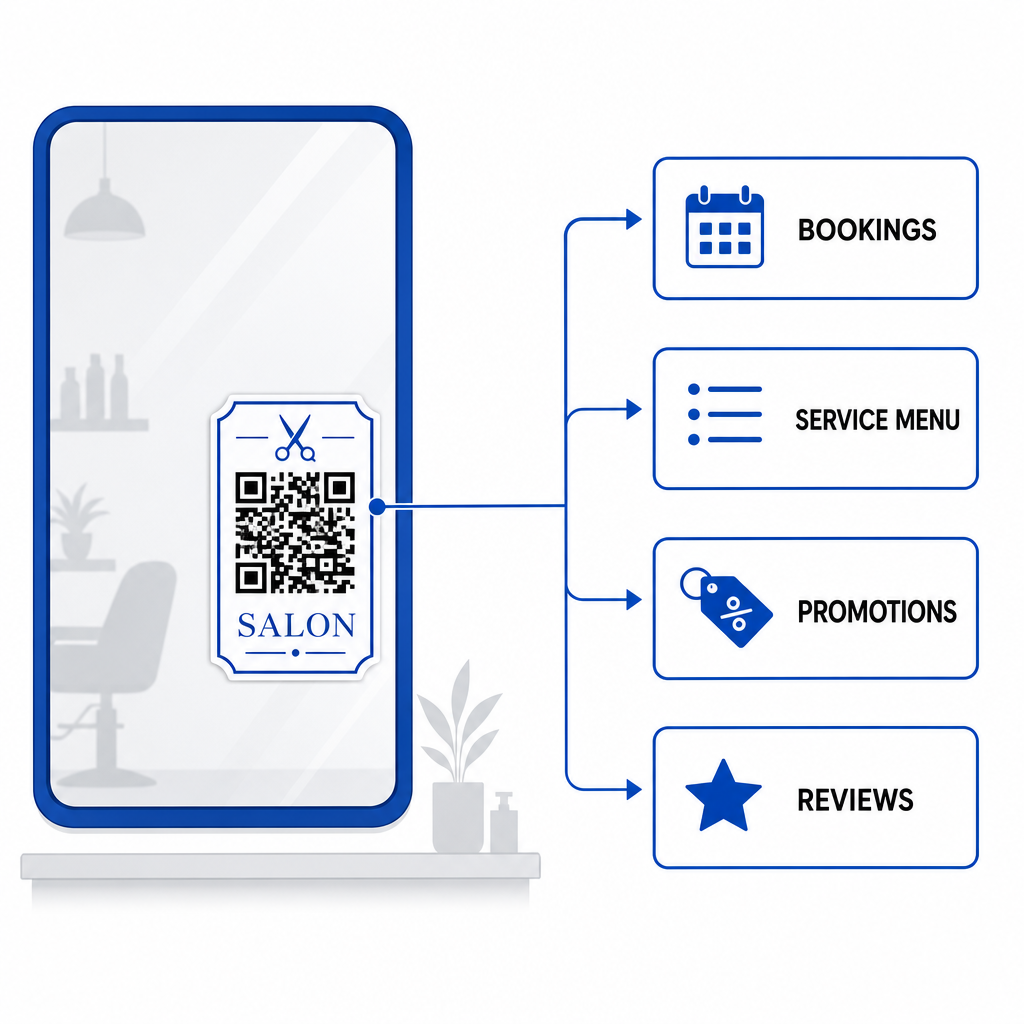
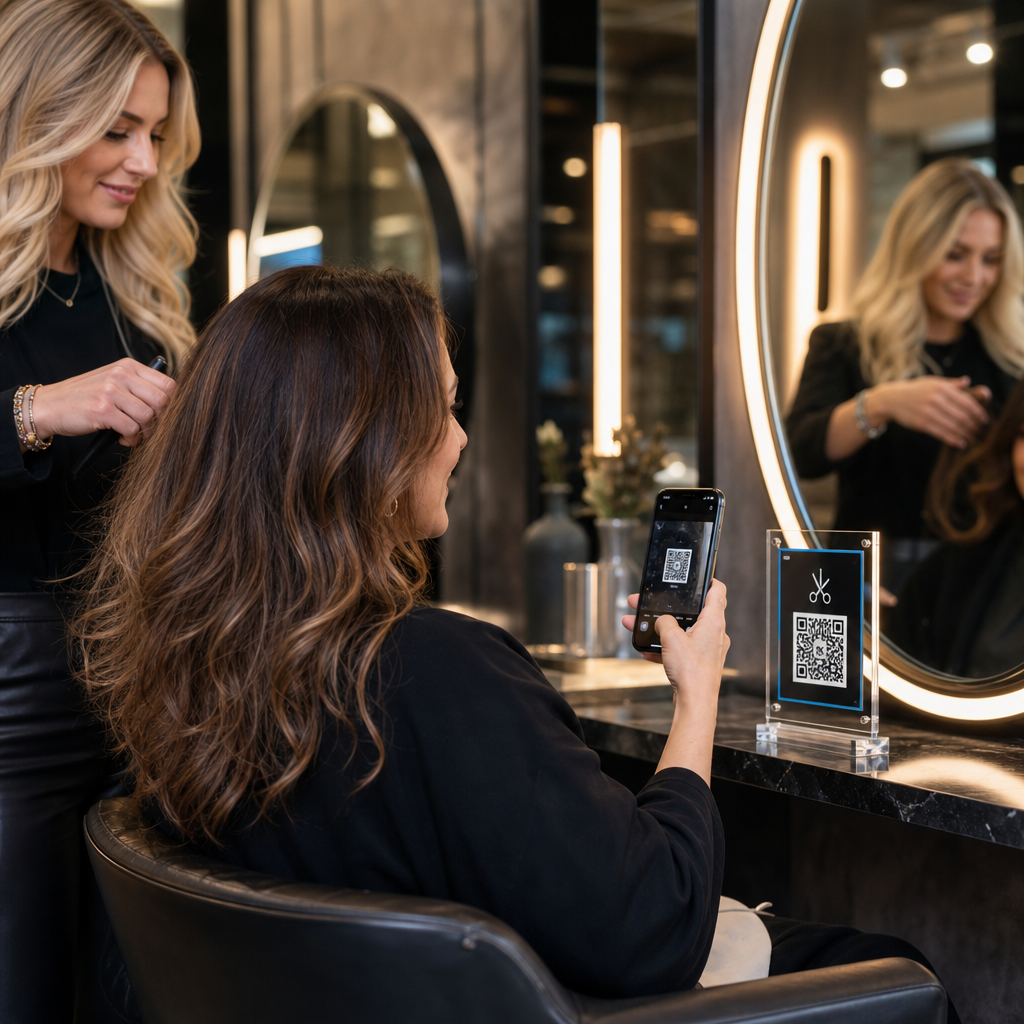
Client scans salon code

How to Use QR Codes in Hair Salons to Streamline Workflows

Learn how hair salons use QR codes to streamline bookings, display digital menus, accept payments, and collect reviews. Explore placement and printing tips.
Updated on 7月 27, 2026
目次

Are manual appointments, front-desk payment bottlenecks, and constant phone interruptions slowing down your salon workflow? Handling administrative tasks during client visits frustrates waiting guests and pulls your stylists away from revenue-generating services. Placing strategic QR codes across your salon allows clients to book appointments, view treatment menus, submit Google reviews, and make contactless payments directly from their smartphones.

Key Client Touchpoints for QR Codes in Your Salon

Converting downtime in styling chairs into active digital engagement helps streamline daily operations. You can implement scannable touchpoints across several core salon operations:

Upgrade Your Salon’s Digital Client Experience Ready to streamline bookings, payments, and client reviews with customizable codes? Use the QRコードジェネレーター to build branded dynamic codes for your salon stations today.

Optimal Placement Areas for Salon QR Codes

Strategic placement ensures high visibility without creating visual clutter across your salon interior. Positioning digital displays where clients naturally rest their eyes encourages immediate interaction during idle moments.

Placement Area Primary Action Recommended Material
Styling Mirrors & Stations Rebooking appointments & reviewing services Mirror decals or acrylic frame displays
Reception Counter Payment processing & review requests Compact counter signs or table tents
Storefront Window / Door After-hours booking & browsing service menus Weatherproof vinyl stickers
Retail Product Shelves Product tutorials & ingredient guides Shelf talkers or bottle tags
Appointment Cards Following social media & direct rebooking High-quality cardstock print

For comprehensive guidelines on layout strategies across physical commercial spaces, review our guide to QR code placement in marketing.

Technical Standards for Reliable Code Scanning

A code that fails to scan creates friction and undermines client trust. Following established printing and technical guidelines ensures smartphone cameras capture your codes instantly under salon lighting.

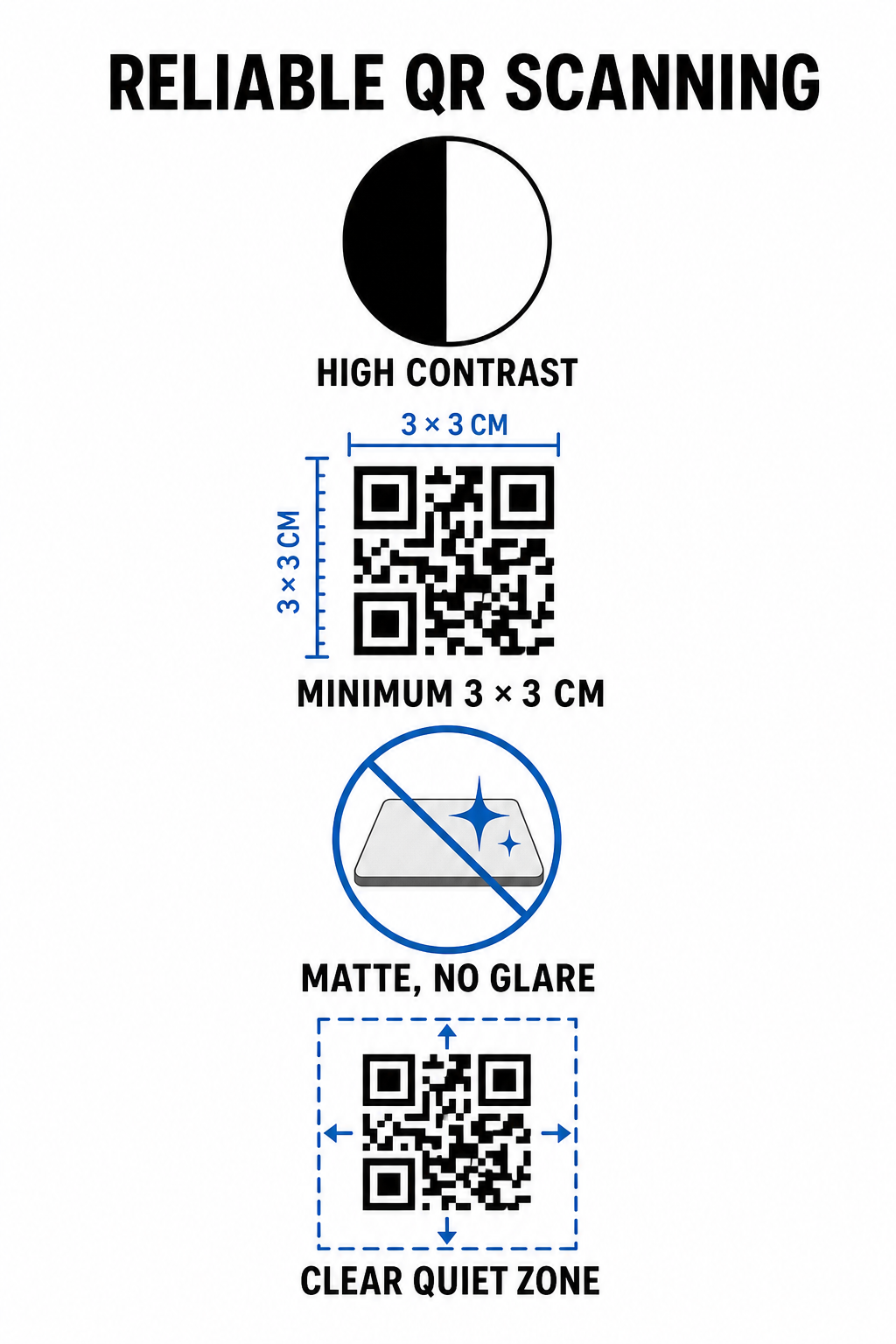
Reliable QR scanning standards
  • Maintain high color contrast: Apply dark foreground patterns on light backgrounds. Black on white offers an optimal 21:1 contrast ratio, while smaller codes require at least a 4.5:1 ratio to ensure camera sensors detect the code pattern immediately.
  • Calculate appropriate print dimensions: Follow a 10:1 scanning distance-to-size ratio, making the code width one-tenth of the expected distance. For close-range mirror stickers and counter displays, print codes at a minimum size of 1.2 x 1.2 inches (3 x 3 cm).
  • Apply a non-reflective matte finish: Select matte cardstock, vinyl, or non-glare laminates instead of glossy paper. Glossy finishes reflect bright overhead salon lighting into smartphone lenses, causing scan failures.
  • Preserve the quiet zone margin: Maintain a blank, unprinted border around all four sides of the code pattern. This quiet zone must measure at least four times the width of a single module square.
  • Export in high-resolution print formats: Save final graphics as vector files like SVG or PDF, or export PNG files at 300 DPI to prevent pixelation during physical printing.

How Dynamic QR Codes Flexibly Scale Salon Operations

Static QR codes hardcode destination URLs directly into the printed matrix, meaning any web link change requires reprinting physical displays. In contrast, dynamic QR codes route through a short redirect link, enabling salon managers to update encoded destinations at any time through a central management platform.

Managing a growing service business involves frequent menu adjustments, promotional shifts, and software updates. Dynamic codes allow you to change destination links without replacing mirror decals or counter signage.

Dynamic salon code updates

Additionally, dynamic codes capture valuable scan analytics, such as scan frequencies, peak engagement times, and user device types. Monitoring these metrics helps managers identify high-performing styling stations and refine promotional layouts across broader small business operations.

Streamlining Your Salon Workflows

Integrating digital QR codes across key physical touchpoints reduces administrative burdens on your front desk while offering clients a convenient, modern salon experience. By prioritizing strategic code placement, high color contrast, and proper print dimensions, you remove friction from booking, payments, and feedback collection.

Audit your existing salon layout today to identify high-dwell areas where scannable touchpoints provide immediate value. Start creating custom dynamic codes using Pageloot tools to build trackable physical signage that elevates client satisfaction and operational efficiency.

よくある質問

What is the ideal size for a QR code placed on a salon mirror?

For close-up scanning from a salon chair (about 1 to 2 feet away), the QR code should be at least 1.2 x 1.2 inches (3 x 3 cm). Always maintain a quiet zone margin of at least four times the module width around the code pattern.

Can I update the web link behind a salon QR code after printing it?

Yes, if you use a dynamic QR code. Dynamic codes allow you to edit the destination URL anytime in your dashboard without reprinting your stickers, signs, or appointment cards.

How do QR codes help collect more Google reviews for my salon?

QR codes remove manual searching by opening your Google review form directly upon scanning. Placing them near styling mirrors or counter displays prompts satisfied clients to rate your services before leaving.

著者について

Siim KostabiはPagelootのコンテンツリードです。Pagelootの革新的なQRコード生成サービスについて執筆しています。5年以上にわたるQRコードに関する深い専門知識を持つSiimは、この分野の専門家です。QRテクノロジーを活用してデジタルインタラクションを簡素化・拡張する上で、大きな進歩を遂げています。.

カテゴリー
について詳しくはこちら
✅ QRコードの#1ソリューション

オンラインでQRコードを作成する必要がある場合は QRコードを作る ここで無料で
ページルートは #1のGo-Toソリューション でQRコードを作成してスキャンすることができます。

BL-0333

ブログジェネ

売上、レビュー、フォロワーを増やすために 20,000 を超えるブランドから信頼されています。

クライアントのロゴ
トップブランドから信頼される
5 のうち 4.8 と評価しました

4.86 / 5つ星評価

ユーゴ・ローラン
ユーゴ・ローラン
レストランオーナー
最も簡単で信頼性の高いQRコードジェネレータです。PDFファイルを即座にアップロードできます。レストランのメニューがデジタル化されました。
ルーカス・ジャンセン
ルーカス・ジャンセン
不動産開発業者
これは優れたツールで、QRコードでちょうど欲しいところに連れて行ってくれます。私たちは位置情報のQRコードしか使っていませんが、とても便利な機能がたくさんあります。
エマ・モレッティ
エマ・モレッティ
小売製品
使いやすいし、早い。素晴らしい機能で、完璧な画像を作成してくれるので、社員は私のvCardをダウンロードすることができます。
ユーゴ・ローラン
ユーゴ・ローラン
レストランオーナー
最も簡単で信頼性の高いQRコードジェネレータです。PDFファイルを即座にアップロードできます。レストランのメニューがデジタル化されました。
ルーカス・ジャンセン
ルーカス・ジャンセン
不動産開発業者
これは優れたツールで、QRコードでちょうど欲しいところに連れて行ってくれます。私たちは位置情報のQRコードしか使っていませんが、とても便利な機能がたくさんあります。
エマ・モレッティ
エマ・モレッティ
小売製品
使いやすいし、早い。素晴らしい機能で、完璧な画像を作成してくれるので、社員は私のvCardをダウンロードすることができます。
QRコードをもっと見る
あらゆるものをデジタル体験に変えよう 3分以内に。

14日間の無料トライアル。

クレジットカードは必要ありません。

初回購入で30%オフ

次のコードを使用してください:

MP3ファイルを共有

PDF QRコードを作成するにはサインアップしてください

必要なものをすべてアップロードして表示する。

  • オーディオファイル
  • ポッドキャスト
  • 音楽

サインアップで14日間無料トライアル。.
トライアル終了後、QRコードは期限切れになります。.

オーディオmp3 QRコードを作成するにはサインアップしてください

フレームでより多くのスキャンを獲得

QRコードにフレームを追加するにはサインアップしてください

コールトゥアクションフレームは、お客様が簡単にQRコードと対話できるようにします。ぜひお試しください。

サインアップで14日間無料トライアル。.
トライアル終了後、QRコードは期限切れになります。.

QRコードにフレームを追加するにはサインアップしてください

シェイプでスタイルを追加

より多くの図形を作成するにはサインアップしてください

QRコードは四角いものである必要はありません。あなたのブランドのイメージに合わせて変えてみてください。

サインアップで14日間無料トライアル。.
トライアル終了後、QRコードは期限切れになります。.

より多くの図形を作成するにはサインアップしてください

QRコードにロゴを追加

QRコードにロゴを追加するにはサインアップしてください

QRコードにロゴやブランドを入れることで、目立たせることができます。

サインアップで14日間無料トライアル。.
トライアル終了後、QRコードは期限切れになります。.

QRコードにロゴを追加するにはサインアップしてください

スマートなApp Storeリダイレクト

アプリストアのQRコードを作成するにはサインアップしてください

スマートなApp StoreのQRコードに、あなたのアプリのリンクを追加します。ユーザーは、デバイスに応じてリダイレクトされます。

サインアップで14日間無料トライアル。.
トライアル終了後、QRコードは期限切れになります。.

アプリストアのQRコードを作成するにはサインアップしてください

QRコードに画像をアップロード

画像QRコードを作成するにはサインアップしてください

画像を簡単に共有できます。どんな画像も、数秒でダイナミックに変化します。

サインアップで14日間無料トライアル。.
トライアル終了後、QRコードは期限切れになります。.

画像QRコードを作成するにはサインアップしてください

PDFファイルを共有

PDF QRコードを作成するにはサインアップしてください

必要なものをすべてアップロードして表示する。

  • メニュー&プライスリスト
  • 指示
  • 任意の書類

サインアップで14日間無料トライアル。.
トライアル終了後、QRコードは期限切れになります。.

PDF QRコードを作成するにはサインアップしてください

印刷せずに後で編集

再度印刷せずにQRコードを編集するにはサインアップしてください

ダイナミックQRコードは、新たにQRコードを印刷することなく、QRコードの内容を変更することができます。

サインアップで14日間無料トライアル。.
トライアル終了後、QRコードは期限切れになります。.

再度印刷せずにQRコードを編集するにはサインアップしてください

いつ?どこで?QRコードのスキャンを追跡

QRコードを追跡するにはサインアップしてください

どのQRコードが最も多くスキャンされ、何が最も顧客を喜ばせているのかを知ることができます。

サインアップで14日間無料トライアル。.
トライアル終了後、QRコードは期限切れになります。.

QRコードを追跡するにはサインアップしてください

印刷可能なファイルが利用可能

PDFやSVGのようなベクターQRコードを作成するにはサインアップしてください

.eps、.pdf、.svg

QRコードをHD解像度でダウンロードしたいですか?すぐに印刷できるベクターまたはピクセル形式を入手しましょう。

サインアップで14日間無料トライアル。.
トライアル終了後、QRコードは期限切れになります。.

PDFやSVGのようなベクターQRコードを作成するにはサインアップしてください

しばらくお待ちください。あなたのQRコードは ロード... ロード...

あなただけのものに

サインアップしてQRコードを後で保存してください

異なる色、ロゴ、コールトゥアクションフレームで素晴らしいQRコードを作成することで、より多くのスキャンを得ることができます。

サインアップで14日間無料トライアル。.
トライアル終了後、QRコードは期限切れになります。.

サインアップしてQRコードを後で保存してください