Butuh cara cepat dan dapat dipindai untuk menghubungkan materi fisik ke konten digital? Stiker kode QR mengubah permukaan apa pun menjadi titik sentuh interaktif – dan membuatnya tepat berarti memahami bahan, pilihan desain, dan jenis kode yang menentukan apakah pelanggan benar-benar memindainya.
Apa itu Stiker Kode QR?
Stiker kode QR adalah label berperekat yang dicetak dengan kode QR yang dapat dipindai. Ketika pelanggan mengarahkan kamera ponsel cerdas ke salah satunya, kode tersebut langsung mengarahkan mereka ke situs web, menu digital, halaman kontak, penawaran promosi, atau konten lain yang telah Anda tautkan. Bisnis menggunakannya pada kemasan produk, etalase toko, kendaraan, meja restoran, papan nama acara, dan bahan pengiriman – di mana pun permukaan fisik dapat memulai interaksi digital.
Perbedaan utama yang penting sebelum Anda mencetak satu stiker pun: apakah kode Anda adalah statis atau dinamis.
- SEBUAH kode QR statis mengkodekan tujuannya secara permanen. Setelah dicetak, tidak dapat diubah, dan tidak melacak pemindaian.
- SEBUAH kode QR dinamis mengarah ke URL pengalihan singkat yang dapat Anda perbarui kapan saja – tanpa mencetak ulang. Ini juga merekam data pemindaian termasuk waktu, volume, dan lokasi geografis.
Untuk aplikasi stiker di mana Anda akan mencetak dalam jumlah besar atau menjalankan kampanye berbatas waktu, Generator Kode QR Dinamis adalah pilihan praktis. Mengubah promosi atau memperbarui URL tidak dikenakan biaya apa pun saat stiker sudah ada di rak atau kendaraan.
Lacak Setiap Pemindaian dari Stiker Anda Ingin tahu persis penempatan stiker mana yang mendorong keterlibatan? Gunakan Generator Kode QR Dinamis untuk membuat kode yang dapat diedit dan dilacak dengan dasbor analitik lengkap – tidak perlu mencetak ulang saat konten Anda berubah.
Cara Membuat Kode QR untuk Stiker Anda
Mendapatkan kode QR siap cetak membutuhkan tiga langkah:
- Hasilkan kode QR Anda. Gunakan generator kode QR untuk membuat kode yang menautkan ke konten target Anda – URL, PDF, menu digital, vCard, atau tujuan lainnya. Jika Anda berharap untuk memperbarui tujuan tersebut atau melacak kinerja pemindaian, buatlah kode dinamis.
- Sesuaikan desainnya. Tambahkan logo Anda, warna merek, dan bingkai ajakan bertindak untuk membuat stiker mudah dikenali dan layak dipindai. Fitur Generator Kode QR dengan Logo memungkinkan Anda menyematkan logo langsung di dalam kode, yang meningkatkan pengenalan merek dan tingkat pemindaian dibandingkan dengan kode hitam-putih biasa.
- Unduh dalam format siap cetak. Ekspor kode Anda sebagai SVG, EPS, atau PDF untuk penskalaan vektor, atau sebagai PNG resolusi tinggi jika Anda menggabungkannya ke dalam desain label. Serahkan file-file ini kepada pencetak stiker Anda atau gunakan dengan lembaran stiker yang dapat dicetak di rumah.
Memilih Bahan Stiker yang Tepat
Pilihan bahan secara langsung memengaruhi apakah kode QR Anda dapat dipindai dengan andal di lingkungan yang dimaksudkan. Pilihan utama yang akan Anda temui dari pencetak stiker adalah:
- Laminasi BOPP atau PET Mengkilap – cocok untuk penggunaan di dalam dan luar ruangan, warna cerah, tetapi dapat memantulkan cahaya di bawah pencahayaan atas dan membuat pemindaian lebih sulit pada sudut tertentu.
- Laminasi BOPP Matte – mengurangi silau di bawah pencahayaan ritel dan sinar matahari, menjadikannya pilihan yang disukai untuk stiker yang akan dipindai di toko atau di kasir. Banyak merek dan desainer juga menyukai tampilan yang lebih halus.
- Bahan stiker transparan – dicetak dengan tinta putih di belakang warna untuk menjaga desain tetap terlihat; bekerja dengan baik untuk label botol dan kemasan di mana Anda menginginkan tampilan “tanpa label”.
- Vinil dengan laminasi – tahan lama dan tahan cuaca, direkomendasikan untuk aplikasi luar ruangan, stiker kendaraan, dan permukaan apa pun yang terpapar kelembapan atau sinar UV. Stiker kode QR vinil bertahan jauh lebih lama daripada label kertas standar dalam kondisi tersebut.
- Bahan label BOPP tipis – cukup fleksibel untuk menyesuaikan dengan permukaan melengkung, menjadikannya pilihan praktis untuk botol dan kemasan produk.
Hasil akhir matte umumnya memindai lebih cepat dan lebih andal daripada yang glossy ketika kode akan dipindai di bawah cahaya terang atau langsung. Jika stiker Anda akan berada di luar ruangan atau di kendaraan, prioritaskan vinil tahan air daripada bahan berbasis kertas.
Spesifikasi Ukuran dan Desain Yang Mempengaruhi Kemampuan Pindai
Stiker kode QR yang tidak dapat dipindai dengan andal lebih buruk daripada tidak ada stiker sama sekali. Sebelum mengirim file untuk dicetak, pastikan persyaratan ini terpenuhi:
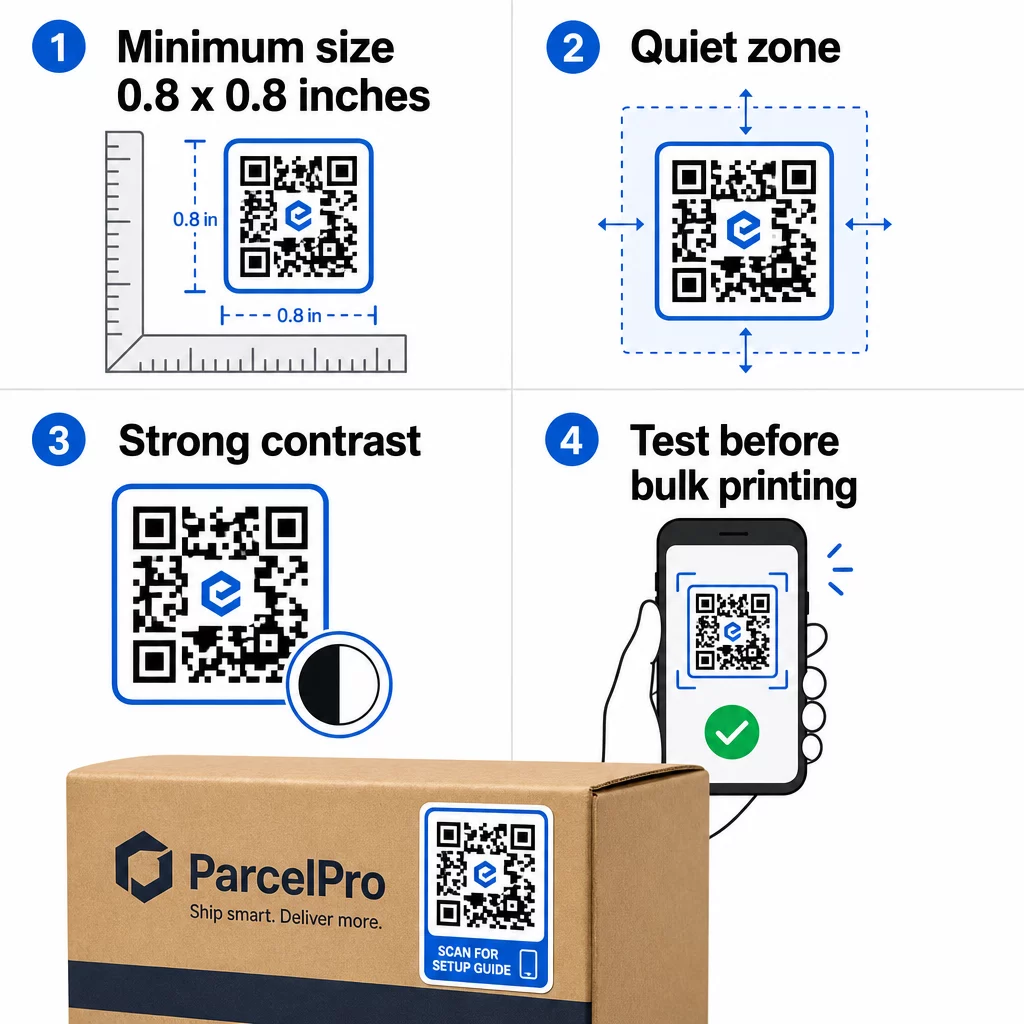
- Ukuran minimum: 0,8 × 0,8 inci (2 × 2 cm) untuk URL sederhana. Kode yang lebih besar dengan kepadatan data lebih tinggi perlu diperbesar secara proporsional.
- Zona tenang: Sisakan setidaknya empat modul ruang kosong, tidak tercetak di keempat sisi kode. Teks, logo, atau batas yang ditempatkan di dalam margin ini menyebabkan kegagalan pemindaian.
- Rasio kontras: Pertahankan rasio kontras minimal 4:1 antara modul gelap dan latar belakang terang. Hitam di atas putih tetap menjadi kombinasi paling andal. Hindari inversi terang-di-gelap – banyak pemindai gagal pada skema warna terbalik.
- Tanpa gradien pada modul kode: Gradien menciptakan nada tengah yang sulit dibaca pemindai. Gunakan warna solid saja.
- Uji sebelum mencetak dalam jumlah besar: Pindai kode Anda dengan beberapa perangkat – ponsel yang berbeda, aplikasi kamera yang berbeda – dan uji dalam kondisi pencahayaan di mana stiker akan benar-benar digunakan. Untuk stiker luar ruangan, uji di bawah sinar matahari. Untuk stiker rak ritel, uji di bawah pencahayaan neon.
Untuk rincian lengkap tentang ukuran di berbagai bahan cetak, lihat panduan di ukuran kode QR untuk berbagai bahan cetak. For contrast and color guidance, praktik terbaik kontras warna kode QR . Untuk panduan kontras dan warna,.
Tempat Menggunakan Stiker Kode QR
Stiker kode QR berfungsi di berbagai aplikasi bisnis. Berikut adalah penempatan yang paling umum dan efektif:
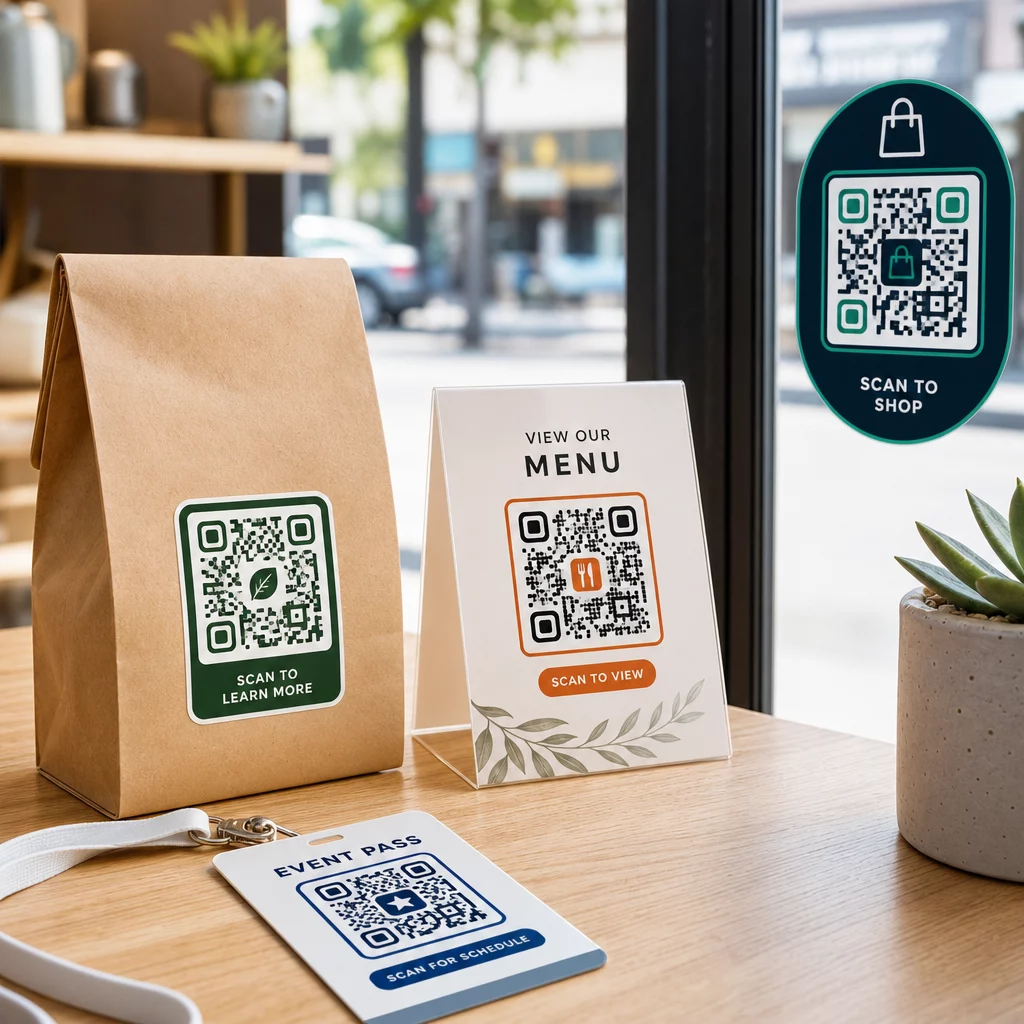
Kemasan dan label produk – Menghubungkan pelanggan ke instruksi produk, detail bahan, tutorial video, kode diskon, atau halaman ulasan. Stiker berfungsi pada kemasan primer (produk itu sendiri) dan kemasan sekunder (kotak, selongsong). Untuk melihat lebih dalam kemungkinan-kemungkinannya, lihat kode QR pada kemasan produk dan panduan utama kode QR untuk label produk.
Meja restoran dan perhotelan – Stiker kode QR di meja atau pintu menghubungkan tamu ke menu digital, kata sandi Wi-Fi, atau platform ulasan. Kode dinamis memungkinkan Anda memperbarui menu atau promosi tanpa mengganti setiap stiker.
Jendela dan pintu toko – Stiker jendela yang membawa kode QR adalah cara yang efisien untuk berbagi jam operasional, promosi, atau tautan media sosial dengan pejalan kaki yang lewat di luar jam operasional.
Stiker kendaraan – Stiker kode QR pada kendaraan perusahaan mengubahnya menjadi iklan bergerak, menghubungkan siapa pun yang memindainya ke halaman pemesanan, daftar layanan, atau formulir kontak.
Kemasan ritel dan e-commerce – Stiker pada pengiriman keluar atau kotak produk dapat mengarahkan pelanggan ke video unboxing, program loyalitas, atau halaman penjualan silang tanpa menambah volume pada paket.
Papan nama dan tiket acara – Tambahkan stiker QR ke lencana, papan nama, atau tiket untuk menghubungkan peserta ke jadwal, alur check-in, atau sumber daya pembicara.
| Jenis Stiker | Bahan Terbaik | Penggunaan Umum |
|---|---|---|
| Stiker merek kustom | BOPP doff atau glossy | Kemasan produk, promosi |
| Stiker luar ruangan tahan air | Vinil dengan laminasi | Decal kendaraan, papan nama luar ruangan |
| Stiker atau decal jendela | Vinil bening atau putih | Etalase toko, jendela ritel |
| Stiker label kecil | BOPP tipis | Botol, label produk, kartu nama |
| Stiker meja restoran | Laminasi doff | Tautan menu, tautan halaman ulasan |
Menggunakan Kode QR Dinamis untuk Kampanye Stiker
Untuk setiap kampanye di mana tujuan mungkin berubah – promosi musiman, pembaruan menu, penawaran bergilir – kode QR dinamis sangat penting. Stiker itu sendiri tidak berubah; hanya URL tujuan di baliknya yang berubah. Ini penting ketika Anda telah mencetak ribuan stiker dan URL halaman arahan berubah, atau ketika promosi berakhir dan Anda ingin mengarahkan pemindai ke penawaran baru.
Kode dinamis juga memberi Anda analitik pemindaian: total pemindaian, waktu pemindaian, dan data geografis. Ini memungkinkan Anda mengevaluasi penempatan mana yang benar-benar mendorong keterlibatan dan menyesuaikan diri. Stiker pada kemasan produk berkinerja berbeda dari stiker di jendela toko, dan analitik membantu Anda melihat perbedaan itu dengan jelas.
Untuk Kode QR pada kemasan yang melayani kampanye ritel, kode dinamis juga memungkinkan Anda menjalankan tes A/B dengan mengarahkan batch kode yang berbeda ke halaman arahan yang berbeda dan membandingkan hasilnya.
Perbarui Kampanye Stiker Anda Tanpa Mencetak Ulang Menjalankan promosi berbatas waktu? Fitur Generator Kode QR Dinamis memungkinkan Anda mengarahkan ulang stiker Anda ke URL baru saat kampanye berakhir – tidak ada stiker baru, tidak ada cetakan yang terbuang.
Pertanyaan yang Sering Diajukan
Ukuran minimum yang dapat diandalkan untuk URL sederhana adalah 0,8 × 0,8 inci (2 × 2 cm). Untuk stiker yang ditempatkan lebih jauh dari pemindai – pada papan nama atau stiker kendaraan – perbesar secara proporsional. Aturan umumnya adalah membuat kode setidaknya sepersepuluh dari jarak pemindaian. Selalu sisakan zona tenang yang jelas setidaknya empat modul di sekitar kode di semua sisi, dan uji ukuran akhir pada perangkat nyata sebelum mencetak dalam jumlah besar.
Tidak jika itu adalah kode QR statis – kode tersebut mengkodekan tujuannya secara permanen. Namun, dengan kode QR dinamis, Anda dapat mengubah URL, file, atau konten yang tertaut kapan saja melalui dasbor akun Anda tanpa menyentuh stiker. Ini menjadikan kode dinamis pilihan praktis untuk setiap aplikasi di mana URL atau promosi mungkin berubah, termasuk kemasan produk, kampanye musiman, dan menu restoran.
Stiker vinil dengan lapisan laminasi adalah pilihan paling tahan lama untuk penggunaan di luar ruangan. Mereka tahan terhadap air, paparan UV, dan keausan fisik jauh lebih baik daripada label kertas atau BOPP standar. Laminasi matte mengurangi silau di bawah sinar matahari langsung, yang meningkatkan kemampuan pindai. Untuk permukaan seperti kendaraan atau papan nama eksterior, pastikan pencetak Anda menawarkan bahan tahan UV yang dirancang untuk aplikasi luar ruangan jangka panjang.