Sind Ihre QR-Codes ignoriert? Die meisten Menschen überspringen einen QR-Code nicht, weil sie ihn nicht scannen können, sondern weil sie nicht wissen, warum sie es tun sollten. Dieser Leitfaden führt Sie durch spezifische CTA-Beispiele, Designstrategien und Platzierungsprinzipien, die den Menschen einen echten Grund geben, ihre Kamera darauf zu richten.
Warum Ihr QR-Code mehr als nur den Code selbst braucht
Ein QR-Code ist nur ein Muster. Ohne Kontext fordert er die Menschen auf, einen Vertrauensvorschuss zu geben – scannen Sie dieses unbekannte Ding und sehen Sie, was passiert. Das ist eine hohe Hürde, und die meisten Menschen werden sie nicht nehmen.
Ein starker Call-to-Action löst dies, indem er die eine Frage beantwortet, die jeder potenzielle Scanner stellt: Was habe ich davon? Forschung von Pageloot zeigt, dass das Hinzufügen eines klaren CTA zu einem QR-Code die Scanraten um bis zu 52 % erhöhen kann – und in einigen Kontexten kann die Steigerung je nach Design und Angebot sogar noch höher sein.
Der CTA muss nicht kompliziert sein. Er muss spezifisch, nutzenorientiert und dort platziert sein, wo die Leute ihn sehen können, bevor sie sich entscheiden, ob sie scannen.
Erstellen Sie gebrandete QR-Codes mit integrierten CTAs Gestalten Sie QR-Codes mit benutzerdefinierten Rahmen, Logos und Call-to-Action-Texten, die den Menschen genau sagen, was sie bekommen. Probieren Sie die QR-Code-Generator 14 Tage lang kostenlos – keine Kreditkarte erforderlich.
Rabatt- und Angebots-CTAs
Dies sind die unkompliziertesten CTAs und gehören durchweg zu den leistungsstärksten, da sie den Wert sofort konkret machen.
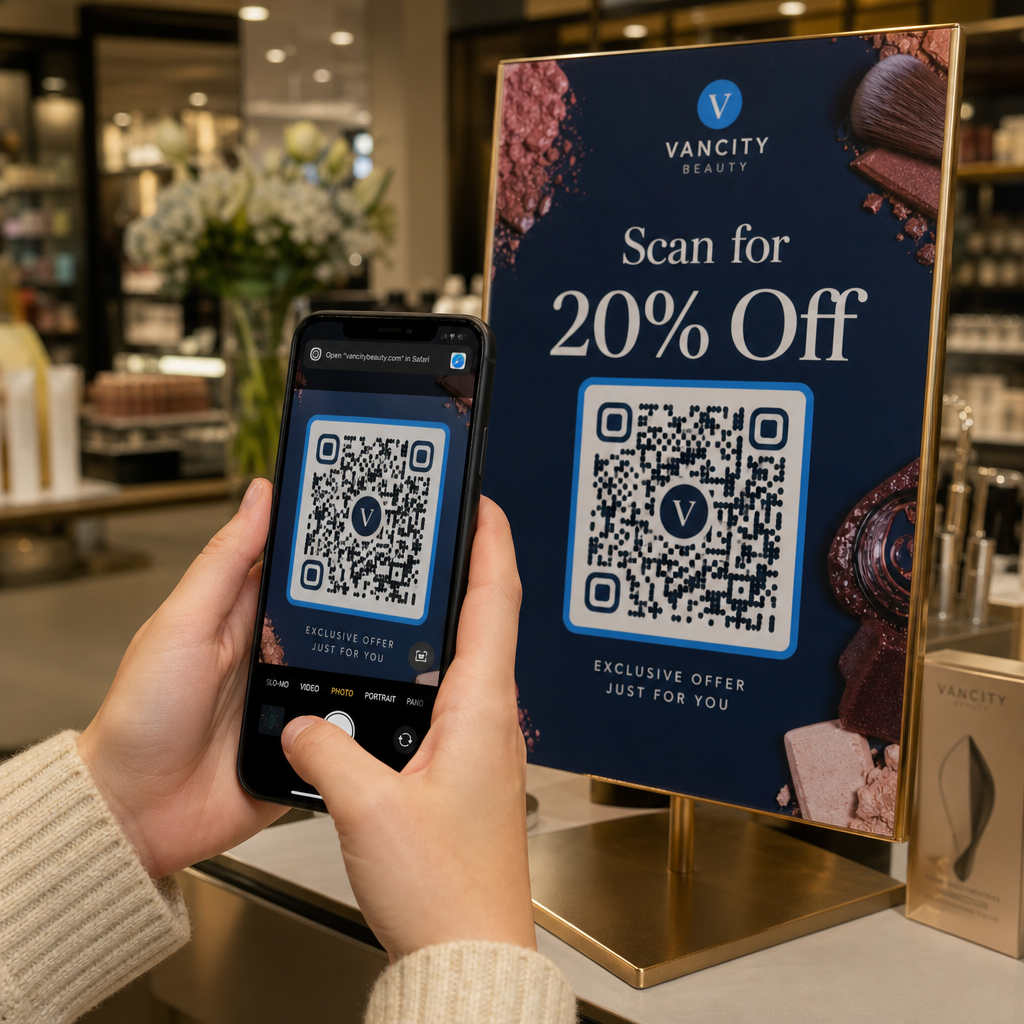
- “Scannen Sie für 20 % Rabatt auf Ihre nächste Bestellung”
- “Scannen Sie, um das heutige Angebot freizuschalten”
- “Holen Sie sich den Rabattcode – Hier scannen”
- “Scannen Sie für einen kostenlosen Versandcode”
Der Schlüssel ist Spezifität. “Scannen Sie für einen Rabatt” ist schwächer als “Scannen Sie für 20 % Rabatt”, weil die zweite Version der Person genau sagt, was sie bekommt. In einem dokumentierten Test generierte ein Einzelhandels-CTA mit der Formulierung “15 % Rabatt! Finden Sie heraus, wie, indem Sie scannen” 250 Scans, während “Scannen und einen Preis gewinnen!” nur 90 von derselben Platzierung zog.
Am besten für: Produktverpackungen, Regalbeschilderung im Einzelhandel, Flyer, Direktwerbung, Fensteraufkleber.
Menü- und Produktinformations-CTAs
48 % der US-Verbraucher nutzen QR-Codes am häufigsten, um Restaurantmenüs anzusehen, und 43 % nutzen sie, um auf Produktinformationen zuzugreifen. Dies macht informative CTAs zu einem der natürlichsten und reibungslosesten Anwendungsfälle.
- “Scannen Sie, um die vollständige Speisekarte zu sehen”
- “Scannen Sie für Inhaltsstoffe & Allergeninformationen”
- “Anleitung ansehen – Hier scannen”
- “Scannen Sie für Spezifikationen, Bewertungen & Videos”
Diese CTAs funktionieren, weil sie ein spezifisches Problem lösen, das die Person in diesem Moment bereits hat. Sie werden nicht gebeten, etwas Zusätzliches zu tun – ihnen wird ein schnellerer Weg zu Informationen geboten, die sie bereits wünschen.
Am besten für: Restaurant-Tischkarten, Produktetiketten, Verpackungsbeilagen, Messestände.
Event- und Ticketing-CTAs
31 % der Verbraucher nutzen QR-Codes, um Veranstaltungstickets zu erhalten, was bedeutet, dass ereignisbezogene CTAs ein bereits etabliertes Verhalten aufgreifen. Bei Veranstaltungen übertreffen CTAs, die Reibung reduzieren, tendenziell generische Aufforderungen – die Person, die vor Ihrem Plakat steht, ist bereits interessiert, daher muss der CTA nur die verbleibende Barriere beseitigen.
- “Überspringen Sie die Warteschlange – Scannen Sie, um Tickets zu kaufen”
- “Scannen Sie für das vollständige Event-Lineup”
- “Hier registrieren – Scannen Sie, um Ihren Platz zu sichern”
- “Scannen Sie für exklusive Event-Updates”
Am besten für: Event-Plakate, Werbetafeln in der Nähe von Veranstaltungsorten, Konferenzbeschilderung, gedruckte Programme.
Social Media und Follow-CTAs
Das Aufbauen einer sozialen Fangemeinde von physischen Berührungspunkten ist eine der am wenigsten genutzten Anwendungen von QR-Codes. Anstatt einen Benutzernamen aufzulisten, den sich die Leute merken und eingeben müssen, macht ein QR-Code das Folgen zu einer Ein-Tap-Aktion.
- “Folgen Sie uns auf Instagram – Hier scannen”
- “Sehen Sie Inhalte hinter den Kulissen – Scannen Sie, um zu folgen”
- “Scannen Sie, um unserer Community beizutreten”
- “Sehen Sie unser neuestes Video – Jetzt scannen”
Der CTA sollte die spezifische Plattform und den spezifischen Nutzen nennen. “Scannen Sie, um zu folgen” ist in Ordnung; “Scannen Sie, um uns auf TikTok für wöchentliche Tutorials zu folgen” ist besser, weil es der Person sagt, welche Art von Inhalten sie abonniert.
Am besten für: Produktverpackungen, Ladenbeschilderung, Visitenkarten, Messestände, Printanzeigen.
App-Download-CTAs
Das Antreiben von App-Installationen von physischen Materialien ist ein Bereich, in dem QR-Codes einen klaren Vorteil gegenüber jeder anderen Druckmechanik haben. Der Code eliminiert die Reibung der Suche nach einer App per Namen, und die Kombination der Download-Aufforderung mit einem sofortigen Nutzen – einem Rabatt, exklusiven Inhalten oder schnellerem Kontozugriff – erhöht die Konversion erheblich über einfache, auf Neugier basierende Aufforderungen hinaus.
- “Laden Sie die App herunter – Scannen Sie zur Installation”
- “Holen Sie sich die App – Verfügbar für iOS & Android”
- “Scannen Sie zum Download & erhalten Sie 10 % Rabatt auf Ihre erste Bestellung”
- “Scannen Sie, um auf Ihr Konto auf dem Handy zuzugreifen”
Am besten für: Produktverpackungen, Quittungen, Visitenkarten, Außenwerbung, Ladenbeschilderung.
Lassen Sie Ihren QR-Code mit einem Logo hervorstechen Ein gebrandeter QR-Code mit Ihrem Logo in der Mitte wird schneller bemerkt und schafft Vertrauen, bevor jemand scannt. Erstellen Sie Ihren mit dem QR-Code Generator mit Logo und beginnen Sie, mehr Scans von jedem gedruckten Stück zu generieren.
Feedback- und Bewertungs-CTAs
Kundenbewertungen sind für die meisten Unternehmen entscheidend, aber das Sammeln ist notorisch schwierig. QR-Codes, die im richtigen Moment in der Customer Journey platziert werden – direkt nach einer Mahlzeit, an der Kasse, auf einem Kassenbon – machen die Aufforderung einfach, sofort darauf zu reagieren. Timing und Platzierung sind hier von großer Bedeutung: Ein QR-Code, der auf einem Tischaufsteller um eine Bewertung bittet, ist weitaus effektiver als einer, der auf einem Kassenbon vergraben ist, weil die Person sich noch in der Erfahrung befindet und eher dazu neigt, zu handeln.
- “Hat Ihnen Ihr Besuch gefallen? Scannen Sie, um eine Bewertung abzugeben.”
- “Bewerten Sie uns – Dauert 30 Sekunden”
- “Ihr Feedback ist uns wichtig – Hier scannen”
- “Scannen Sie, um Ihre Erfahrung zu teilen”
Am besten für: Restaurant-Tischkarten, Kassenbons, Verpackungsbeilagen nach dem Kauf, Kassen, Service-Wartebereiche.
Lead-Generierungs- und Beratungs-CTAs
Für Dienstleistungsunternehmen können QR-Codes eine Webformular-URL ersetzen, die niemand eingeben wird. Ein gut platzierter Code mit dem richtigen CTA bietet potenziellen Kunden einen direkten, reibungsarmen Weg, um in Kontakt zu treten. Das Wort “kostenlos” hat hier besonderes Gewicht – es senkt die wahrgenommene Verpflichtung ausreichend, sodass neugierige, aber unüberzeugte Interessenten scannen, um mehr zu erfahren, und Ihnen einen warmen Lead verschafft, anstatt jemanden, der weiterzieht.
- “Holen Sie sich ein kostenloses Angebot – Scannen Sie, um zu beginnen”
- “Vereinbaren Sie Ihre kostenlose Beratung – Hier scannen”
- “Scannen Sie, um den kostenlosen Leitfaden herunterzuladen”
- “Fordern Sie Ihre kostenlose Testversion an – Jetzt scannen”
Am besten für: Servicebroschüren, Visitenkarten, Werbetafeln, Messeunterlagen, Direktwerbung.
Networking- und Kontakt-CTAs
Ein QR-Code auf einer Visitenkarte verwandelt ein Stück Papier in einen interaktiven Kontaktaustausch. Anstatt dass jemand Ihre Daten später manuell eingibt (falls sie es überhaupt tun), scannen sie einmal und Ihre Informationen werden sofort gespeichert.
- “Scannen Sie, um meine Kontaktinformationen zu speichern”
- “Verbinden Sie sich auf LinkedIn – Hier scannen”
- “Scannen Sie für mein vollständiges Portfolio”
- “Holen Sie sich meine digitale Karte – Scannen Sie, um sich zu verbinden”
Mit Pageloots Visitenkarten mit QR-Code erstellen, können Sie einen Code erstellen, der eine vollständige vCard liefert, Links zu Ihrem LinkedIn enthält und sogar verfolgt, wie oft der Code gescannt wurde – nützliche Daten für die Nachbereitung nach Networking-Veranstaltungen.
Am besten für: Visitenkarten, Konferenz-Namensschilder, Messestandmaterialien, E-Mail-Signaturen.
Designprinzipien, die QR-Code-CTAs funktionieren lassen
Die Formulierung Ihres CTA ist wichtig, aber auch, wie er präsentiert wird. Die folgenden Designprinzipien bestimmen, ob Ihr CTA tatsächlich gelesen und darauf reagiert wird.
Verwenden Sie einen Rahmen, um den CTA mit dem Code zu verbinden
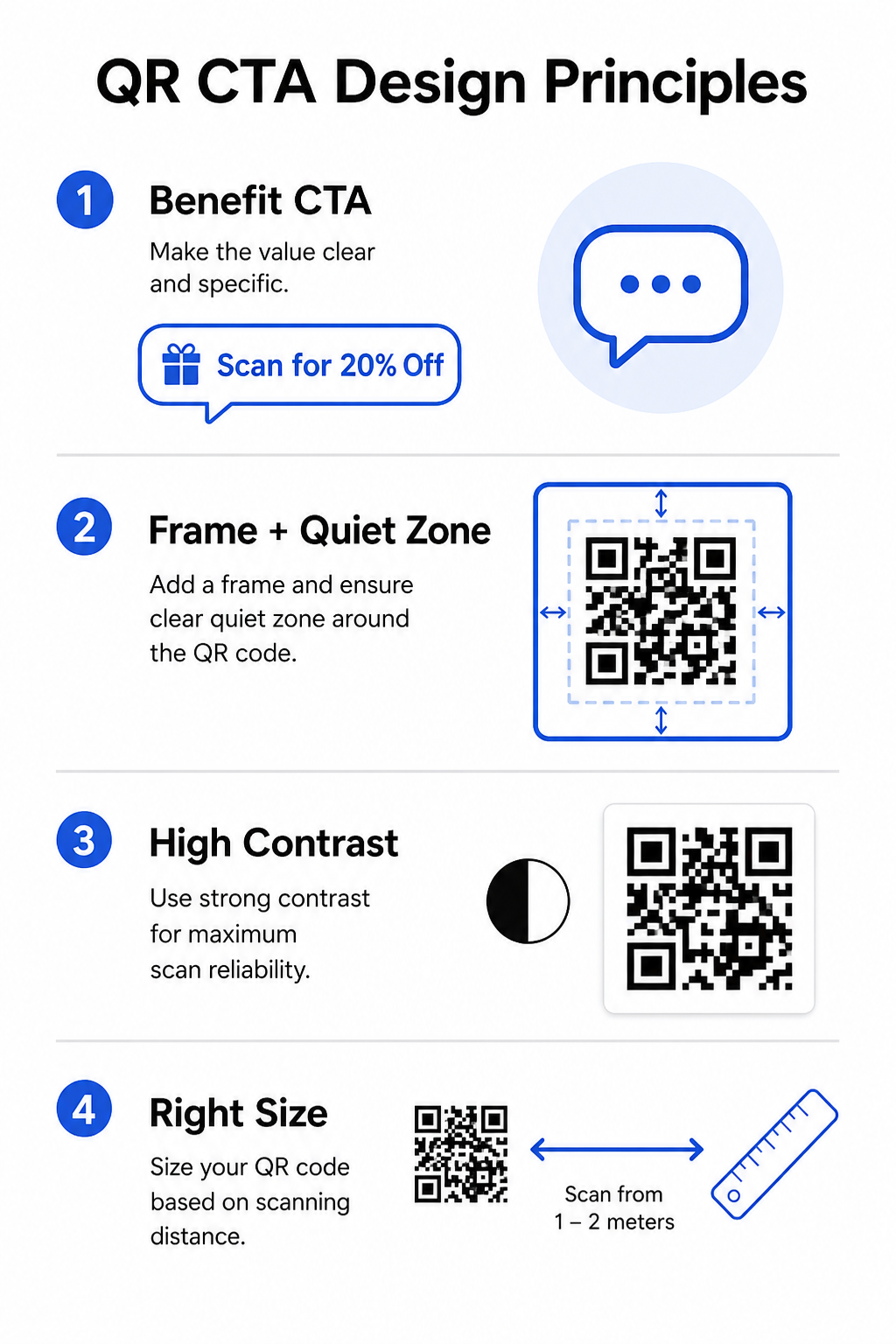
EIN QR-Code-Rahmen ist ein Rahmen, der den Code umgibt und Ihren CTA-Text enthält. Er gruppiert die Anweisung und den Code visuell zusammen, sodass sie als eine Einheit gelesen werden. Gängige Formate umfassen Text über oder unter dem Code (“Scannen Sie, um das Menü zu sehen”) oder einen voll umrandeten Rahmen mit einem Call-to-Action-Tab.
Die entscheidende Regel: Halten Sie immer eine Ruhezone von mindestens vier Modulen auf allen Seiten des Codes. Dies ist der klare Rand, der es Scannern ermöglicht, das Muster von umgebenden Designelementen zu isolieren. Ein Rahmen, der diesen Bereich verletzt, verringert die Scan-Zuverlässigkeit.
Halten Sie den CTA-Text kurz und handlungsorientiert
Ihr CTA sollte möglichst in eine Zeile passen. Beginnen Sie mit einem Verb und folgen Sie mit dem Nutzen. “Scannen Sie für 20% Rabatt” und “Holen Sie sich den kostenlosen Leitfaden” funktionieren gut, weil sie direkt und ergebnisorientiert sind. “Bitte scannen Sie diesen QR-Code, um weitere Informationen zu unseren aktuellen Werbeangeboten zu erhalten” funktioniert nicht – es vergräbt den Nutzen und überfordert die Geduld des Lesers.
Längere CTAs funktionieren nur, wenn das Format ihnen Platz bietet – zum Beispiel eine ganzseitige Zeitschriftenanzeige oder eine Einzelhandelsanzeige mit geringem Besucheraufkommen. Auf Werbetafeln, Beschilderungen oder kleineren Druckmaterialien gewinnt die Kürze jedes Mal. Für detaillierte Beispiele, die auf Outdoor-Formate zugeschnitten sind, siehe QR-Code-Call-to-Actions für Werbetafeln.
Kontrast und Farbe
Der QR-Code selbst benötigt dunkle Module auf hellem Hintergrund für zuverlässiges Scannen. Ein Mindestkontrastverhältnis von 4:1 ist für Standardlesbarkeit erforderlich – Schwarz auf Weiß bleibt die universell zuverlässigste Kombination. Dies gilt für das Codemuster selbst, nicht unbedingt für den umgebenden Rahmen oder den CTA-Text.
Wenn Sie Markenfarben in Ihrem QR-Code verwenden, testen Sie den Code auf mehreren Geräten vor dem Druck. Farben, die auf dem Bildschirm deutlich aussehen, können beim Drucken einen unzureichenden Kontrast aufweisen, was zu Scanfehlern im Feld führt.
Passen Sie die Größe an die Scan-Entfernung an
Passen Sie die Größe Ihres QR-Codes an, wie weit Personen entfernt sein werden, wenn sie ihn scannen. Eine praktische Regel: Die Codebreite sollte ungefähr ein Zehntel der erwarteten Scan-Entfernung. Für einen Code auf einem Restauranttisch, aus 50 cm Entfernung betrachtet, bedeutet das mindestens 5 x 5 cm. Für eine Visitenkarte, die auf Armeslänge gehalten wird, beträgt das Minimum 2 x 2 cm. Für weitere Details dazu, wie Platzierung und Größe die Scanraten bei verschiedenen Materialien beeinflussen, siehe die ultimativer Leitfaden zur Platzierung von QR-Codes im Marketing.
Testen und Iterieren mit dynamischen QR-Codes
Statische QR-Codes kodieren ein festes Ziel. Wenn sich Ihre Landingpage ändert, Ihre Kampagne sich verschiebt oder Sie zwei verschiedene CTAs testen möchten, um zu sehen, welcher mehr Scans generiert, zwingt Sie ein statischer Code dazu, alles neu zu drucken.
Dynamische QR-Codes ermöglichen es Ihnen, das Ziel nach dem Drucken zu aktualisieren und geben Ihnen Zugang zu Scan-Analysen – einschließlich wann, wo und auf welchem Gerät jeder Scan erfolgte. Dies macht es praktisch, A/B-Tests für CTAs durchzuführen, saisonale Angebote auszutauschen und zu messen, welche Platzierungen tatsächlich funktionieren. Für jede Kampagne, die gedruckte Materialien in großem Umfang umfasst, sind dynamische Codes die einzig sinnvolle Wahl.
CTAs an Kontext und Platzierung anpassen
Unterschiedliche Umgebungen erfordern unterschiedliche Ansätze. Die folgende Tabelle bietet eine schnelle Referenz, um Ihren CTA-Stil an das Material anzupassen, auf dem er erscheint.
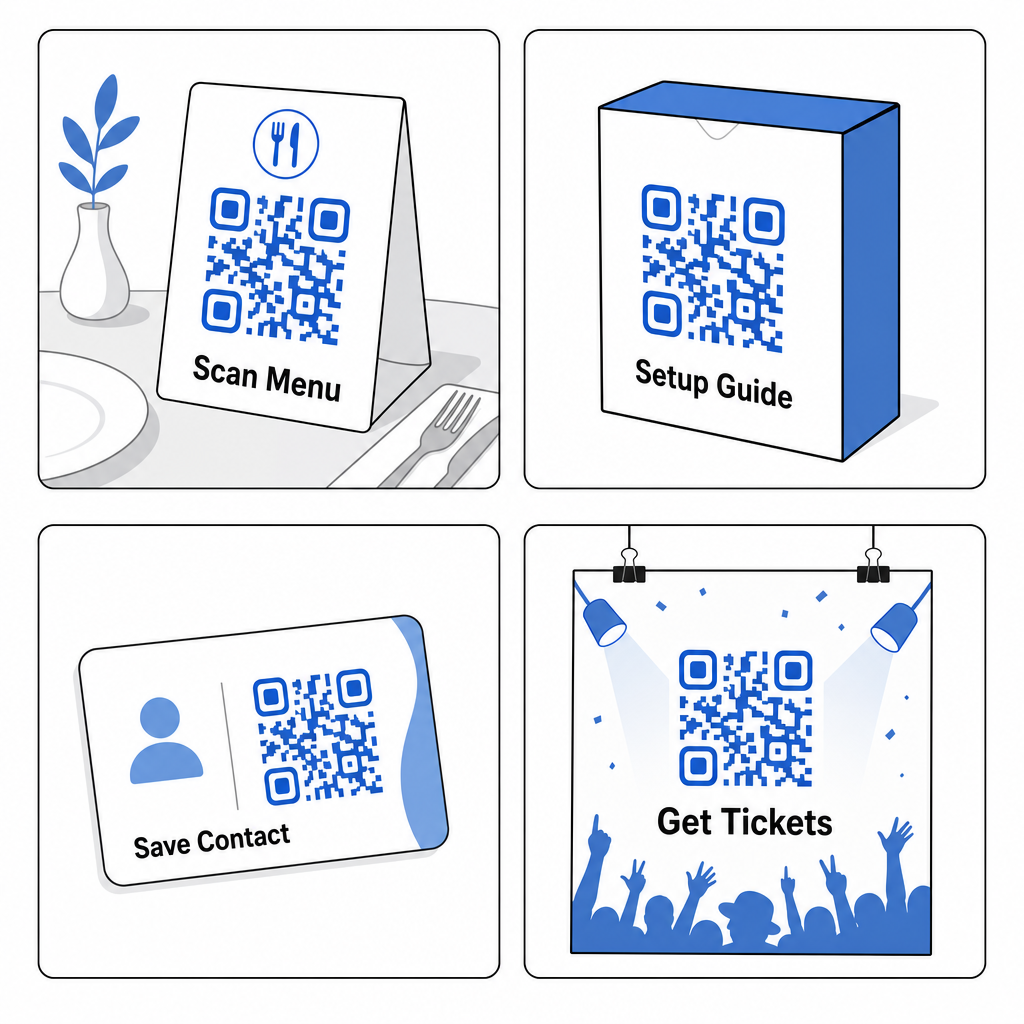
| PLATZIERUNG | Empfohlener CTA-Stil | Anmerkungen |
|---|---|---|
| Plakatwand / Außenwerbung | Kurz, dringlichkeitsbasiert (“Scannen Sie für das heutige Angebot”) | Maximal eine Zeile; große Code-Größe erforderlich |
| Restaurant-Tischkarte | Funktional (“Scannen Sie, um die vollständige Speisekarte zu sehen”) | Bereits motiviertes Publikum; minimaler Verkaufsaufwand erforderlich |
| Produktverpackungen | Nutzenorientiert (“Scannen Sie für die Einrichtungsanleitung”) | Erfasst die Aufmerksamkeit nach dem Kauf |
| Visitenkarte | Kontaktorientiert (“Scannen Sie, um meine Informationen zu speichern”) | Saubere, professionelle Gestaltung funktioniert am besten |
| Ladenregal / Display | Angebotsorientiert (“Scannen Sie für 20 % Rabatt”) | Der Nutzen muss sofort und sichtbar sein |
| Messestand / Veranstaltungsstand | Erlebnis oder Lead (“Scannen Sie für eine kostenlose Probe”) | Anreize für Aktionen in einer geschäftigen Umgebung schaffen |
| Direktwerbung | Neugier oder Angebot (“Schalten Sie Ihr exklusives Angebot frei”) | Mit Personalisierung für höhere Resonanz kombinieren |
Der richtige CTA am richtigen Ort ist das, was einen QR-Code, der gescannt wird, von einem unterscheidet, der ignoriert wird. Beginnen Sie mit den obigen Beispielen, testen Sie Ihre Botschaften mit dynamischen Codes und nutzen Sie Scan-Analysen, um herauszufinden, was funktioniert. Die QR-Code-Generator gibt Ihnen die Werkzeuge, um jeden Code von einem einzigen Dashboard aus zu erstellen, anzupassen und zu verfolgen – damit Sie sich kontinuierlich verbessern können, ohne neu drucken zu müssen.
Häufig gestellte Fragen
Beginnen Sie mit einem Verb und nennen Sie den spezifischen Nutzen – zum Beispiel “Scannen Sie für 20 % Rabatt” oder “Scannen Sie, um meine Kontaktinformationen zu speichern.” Vermeiden Sie vage Aufforderungen wie “Hier scannen”, die den Leuten nicht sagen, was sie bekommen werden. Je spezifischer der Nutzen, desto höher ist die Wahrscheinlichkeit, dass jemand scannt.
CTA-Text kann oberhalb, unterhalb oder innerhalb eines Rahmens um den QR-Code erscheinen. Die entscheidende Anforderung ist die Einhaltung einer Ruhezone – ein klarer Rand von mindestens vier Modulen Breite – zwischen dem Code-Muster und jeglichem umgebenden Text oder grafischen Elementen. Ein QR-Code-Rahmen, der diesen Bereich verletzt, kann zu Scanfehlern führen.
Der CTA selbst funktioniert auf die gleiche Weise, unabhängig vom Codetyp. Der Unterschied ist, dass dynamische QR-Codes es Ihnen ermöglichen, das Ziel nach dem Drucken zu ändern und Ihnen Zugang zu Scan-Analysen geben – einschließlich Scan-Anzahlen, Standorten und Gerätetypen. Dies macht es möglich, verschiedene CTAs und Landing Pages zu testen, zu messen, was funktioniert, und Kampagnen zu aktualisieren, ohne Materialien neu drucken zu müssen.