Are your marketing efforts driving traffic but not converting it into sales? The gap between a customer discovering your product and completing a purchase is where most e-commerce revenue is lost. QR codes close that gap by connecting physical touchpoints directly to digital buying experiences – and they’re measurable every step of the way.
Why QR Codes Belong in Your E-Commerce Strategy
Consumer adoption of QR codes has reached a point where friction to scanning is minimal. According to industry data, 64% of shoppers scanned a QR code on a product while shopping in stores, and 42% said QR codes have significantly improved their in-person shopping experience. That behavioral shift creates a real opportunity for e-commerce brands to meet customers where they already are.
For online sellers, QR codes serve a dual purpose: they accelerate the path to purchase by removing extra steps, and they generate scan-level data that helps you understand exactly how your campaigns perform. A динамічний QR-код goes further – it lets you update the destination URL at any time without reprinting, which means a code on product packaging can point to a seasonal promotion today and a product tutorial next month.
The core benefits for e-commerce businesses include:
- Reduced purchase friction – Customers scan and land directly on a product page or checkout flow, bypassing search entirely
- Cross-channel continuity – Physical packaging, printed ads, and email materials all connect seamlessly to your digital store
- Measurable engagement – Scan analytics reveal which placements drive the most traffic and which convert
- Flexible content – Dynamic codes let you change destinations without reissuing printed materials
- Post-purchase engagement – Packaging inserts and shipping materials become active marketing channels
Key Use Cases for E-Commerce QR Codes
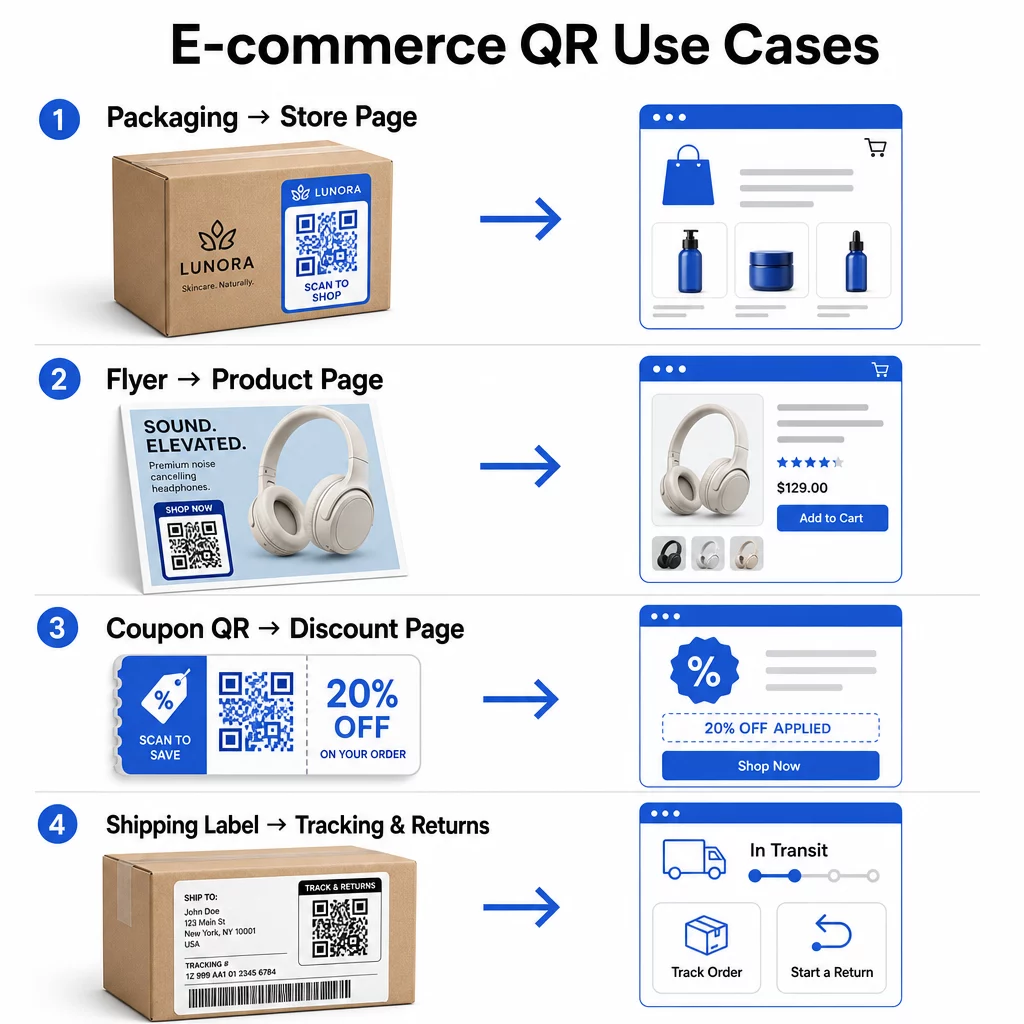
Understanding where QR codes deliver the most value helps you prioritize where to start. Each use case below addresses a specific friction point in the customer journey.
Link Physical Products to Online Stores
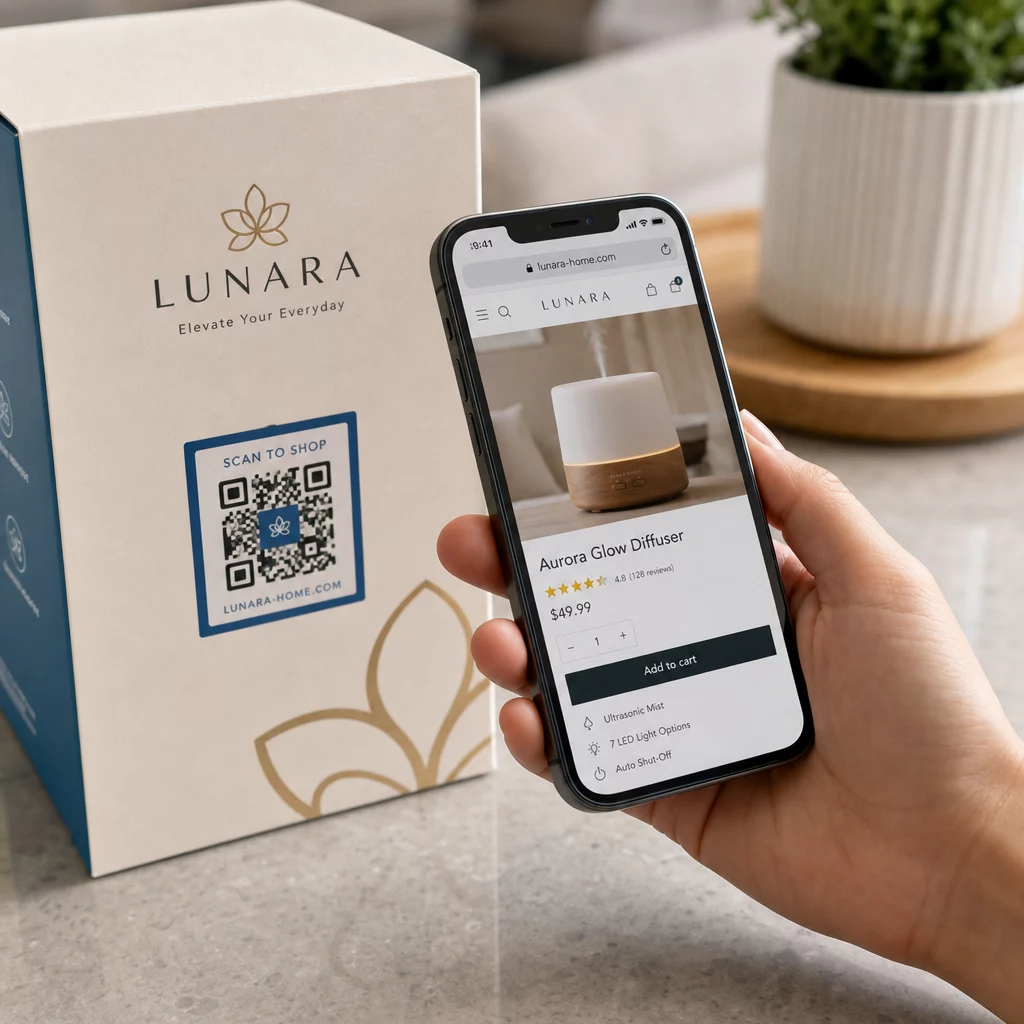
Product packaging is the most direct bridge between a physical item and your digital storefront. A QR code on the box or label can send customers to the full product page, related accessories, instructional videos, or a reorder link. One Pageloot customer placed QR codes inside their packaging and reported a 27% increase in repeat visits to their Shopify store within two weeks.
This approach is especially valuable for products with more detail than fits on a label – ingredients, certifications, tutorials, and warranty information can all live behind a single scannable code. Learn more about QR codes on packaging and how they benefit retail.
Drive Sales with Shoppable QR Codes
When a customer sees your product in a print ad, a catalog, or an in-store display, a QR code eliminates the steps between interest and purchase. Rather than searching for your product or typing in a URL, they scan and land directly on the product page or a curated collection.
Використовуйте a генератор QR-кодів посилань to point each code at a specific URL. With dynamic codes, you can update that destination to reflect stock availability, seasonal pricing, or a limited-time bundle without reprinting any materials.
Offer Coupons and Time-Sensitive Promotions
QR codes are particularly effective for delivering discount codes and promotional offers because the experience is instant and frictionless. A customer scans, sees a coupon landing page, and can redeem the offer immediately rather than searching their inbox for a promo code.
Place promotion codes on product packaging, printed receipts, direct mail, and physical signage to encourage both first purchases and repeat orders. The генератор QR-кодів для купонів lets you build a dedicated landing page with multiple offers and a clear call to action.
Create Coupon QR Codes for Your Store Display time-sensitive deals, promo codes, and exclusive offers on a branded landing page your customers reach with one scan. Use the Генератор QR-кодів купонів щоб почати.
Enable QR Code Payments
Contactless checkout is a growing expectation, particularly in retail and hybrid commerce environments where customers want to pay without queuing at a register or entering card details manually. QR code payments work by directing the customer to a hosted payment page – they scan, confirm the amount, and pay using a stored card or mobile wallet like Apple Pay or Google Pay.
Статичні QR-коди link to a generic payment page where customers enter the amount themselves. Динамічні QR-коди can be generated with transaction-specific data so the customer only needs to confirm and authorize. For businesses handling recurring payments or variable amounts, dynamic payment codes reduce input errors and speed up checkout.
Security is a critical consideration here. Each payment QR code should use a verified, HTTPS-secured destination. Use dynamic codes where possible, as they can be deactivated or updated if tampered with. The Генератор QR-кодів PayPal provides a straightforward way to create payment codes that route customers to your payment flow. You can also review best practices for accessible QR code payments to ensure your implementation is both secure and inclusive.
Collect Google Reviews and Customer Feedback
Social proof is one of the highest-leverage assets an e-commerce business has. The challenge is that most satisfied customers don’t leave reviews unless the process is frictionless. A QR code on a packaging insert, shipping box, or receipt reduces that friction to a single scan.
Point the code directly to your Google review submission page so customers land exactly where you need them. The генератор QR-кодів для відгуків Google lets you create and customize review codes you can embed across your physical materials. For broader feedback collection, QR codes can also link to post-purchase surveys, allowing you to gather structured insights about the buying experience. Read more about how QR codes support e-commerce customer service.
Improve Delivery and Returns Logistics
Shipping labels and order confirmation emails are underused marketing and service channels. A QR code on the shipping label can give customers instant access to real-time tracking updates without them needing to find a tracking number and enter it manually.
For returns, a QR code linking directly to a return request form removes the most frustrating part of the post-purchase experience. Brands like IKEA have adopted this model – sending QR codes via email or SMS after a customer registers a return – to streamline reverse logistics and reduce support contacts. Explore how QR codes improve e-commerce delivery experiences in more detail.
Grow Social Media Audiences
Every piece of physical packaging is a potential channel for growing your social following. A QR code that links directly to your Instagram, TikTok, or YouTube profile can turn a first-time buyer into a long-term follower without any additional ad spend.
This works especially well in unboxing moments, where customer attention is high and enthusiasm about the product is at its peak.
How to Track QR Code Campaign Performance
Generating a QR code is only half the work – understanding how it performs is what separates a tactical experiment from a scalable strategy.
Dynamic QR Codes and Built-In Analytics
Динамічні QR-коди provide the most comprehensive tracking because they route scans through a managed redirect that logs metrics in real time. A QR code management platform like Pageloot captures:
- Total scans and unique scans
- Time and date of each scan
- Geographic location of the scan
- Device type and operating system
This data tells you which placements drive the most engagement, when customers are most likely to scan, and where geographic demand is concentrated. For a deeper look at how tracking works, see the guide to tracking QR code scans and analytics.
Відстежуйте свою кампанію в реальному часі Хочете точно знати, де і коли ваші клієнти сканують ваші матеріали? Використовуйте Генератора динамічних QR-кодів щоб створити коди, які можна відстежувати, та отримати доступ до повної інформаційної панелі продуктивності вже сьогодні.
UTM Parameters for Attribution in Google Analytics
For campaigns where you need QR code performance to appear alongside other channel data in Google Analytics, add UTM parameters to the destination URL before generating the code. UTM parameters are short snippets appended to a URL that tell your analytics platform the source, medium, and campaign name associated with a visit.
A basic UTM-tagged URL for a QR code on product packaging might look like:
“`
https://yourstore.com/product?utmsource=packaging&utmmedium=qrcode&utmcampaign=spring_launch
“`
The five standard UTM parameters are:
- utm_source – Where the traffic originates (e.g., `packaging`, `flyer`, `receipt`)
- utmmedium – The marketing channel (e.g., `qrcode`)
- utmcampaign – The specific campaign name (e.g., `springlaunch`)
- utm_term – Keywords, typically for paid search campaigns
- utm_content – To differentiate similar links or creative variants
Once tagged, shorten the URL and generate your QR code from the shortened link. Scans will then appear as a distinct traffic source in your analytics reports, letting you measure conversion rates, revenue, and behavior specific to QR-driven traffic.
QR Code Design Best Practices for E-Commerce
A QR code that customers can’t or won’t scan delivers no value. These design principles ensure your codes work reliably across all placements:
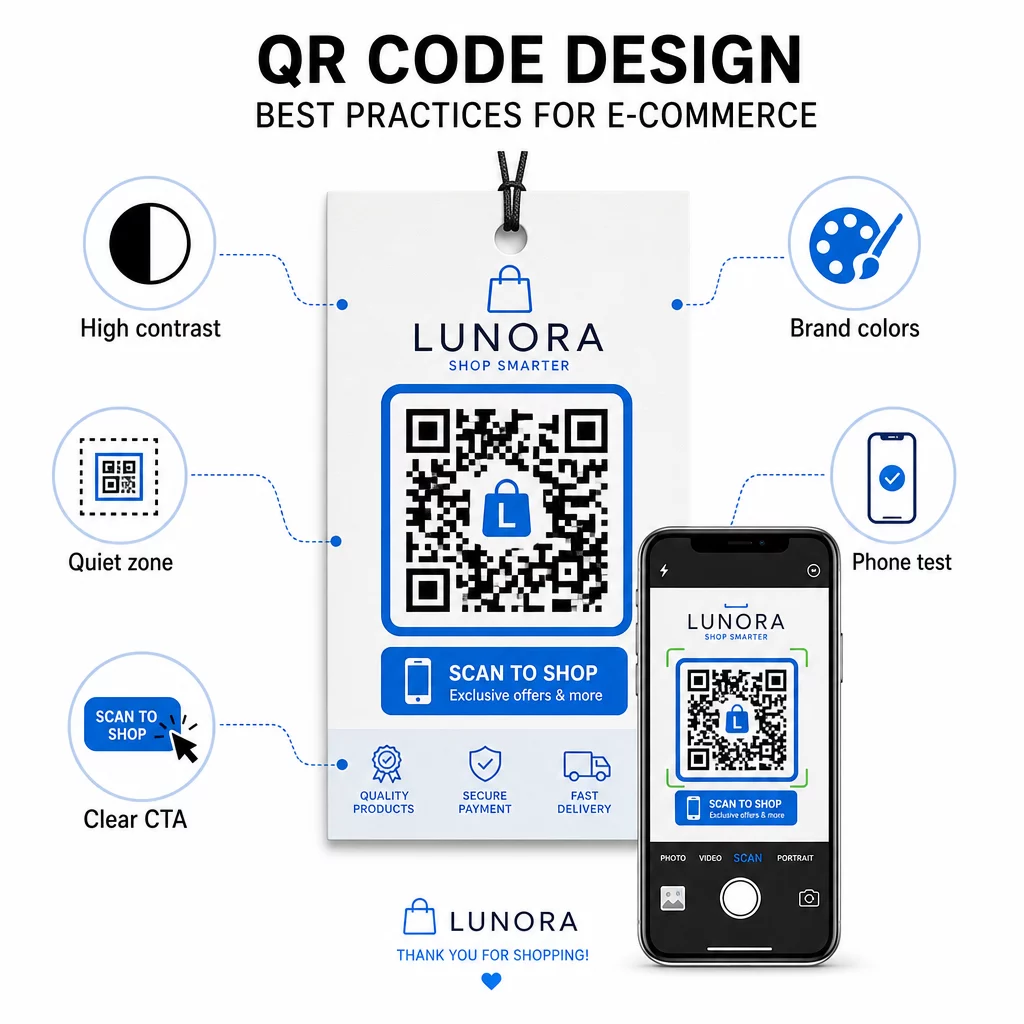
- Use dark modules on a light background – Black on white provides the strongest contrast for camera recognition and is more accessible for users in low-light conditions
- Maintain a quiet zone – Keep at least four modules of empty space around the code so surrounding graphics don’t interfere with scanning
- Follow minimum size guidelines – At least 1 inch × 1 inch for printed materials; larger for signage, where the rule of thumb is that maximum scanning distance should be roughly ten times the code’s width
- Include a clear call to action – Label the code with a brief instruction such as “Scan for 10% off” or “Scan to track your order” to reduce hesitation and increase scan rates
- Test before you print – Verify the code scans correctly at the final printed size, from expected distances, in realistic lighting, and across multiple phone models
For mobile landing pages linked from your QR codes, load speed and mobile-first layout are critical. Pages should load in under three seconds, and buttons should be large enough to tap easily. See найкращих практик для мобільних цільових сторінок QR-кодів for a detailed checklist.
How to Create a QR Code for Your E-Commerce Store
Getting started with QR codes for your store takes three steps:
- Generate the code – Use the Генератор QR-кодів Pageloot to create a dynamic QR code linked to a product page, payment flow, review form, or any other destination. Choose dynamic over static if you want to update the destination later or track performance.
- Customize and brand it – Add your logo, match your brand colors, and include a frame with a call-to-action label. Branded codes build recognition and tend to generate more scans than plain black-and-white codes.
- Deploy and monitor – Place the code on packaging, emails, printed materials, or in-store signage. Use the analytics dashboard to review scan performance and adjust campaigns based on what’s working.
For industry-specific implementation ideas, the e-commerce QR code solutions page covers use cases across Shopify, WooCommerce, and other platforms. You can also browse QR code solutions by industry for context on how other sectors approach similar challenges.
Real-world results demonstrate the scale of what’s possible: case studies of leading e-commerce brands show outcomes like a 130% increase in online sales and a 239% increase in app engagement from targeted QR code deployments. The e-commerce QR code case studies page covers these examples in detail.
QR codes work best when they solve a specific problem for the customer – getting information faster, paying more easily, or completing a return without hassle. Start with one or two high-value touchpoints, measure the results, and expand from there.
Часті запитання
A static QR code encodes the destination URL directly into the pattern and cannot be changed after creation. A dynamic QR code points to a short redirect link that can be updated at any time, even after the code has been printed. For e-commerce, dynamic codes are generally preferable because they support real-time analytics, allow destination updates when promotions change, and produce a cleaner visual pattern that scans faster. Learn more on the static vs. dynamic QR codes page.
The most reliable method combines two approaches. First, use dynamic QR codes through a management platform like Pageloot, which logs scan counts, timestamps, device types, and geographic locations automatically. Second, add UTM parameters to your destination URLs so scans appear as a distinct traffic source in Google Analytics, where you can measure conversion rates and revenue attributed to each code. See the QR code tracking guide for step-by-step instructions.
The placements with the highest engagement in e-commerce are product packaging, shipping boxes, packaging inserts, and order confirmation emails. These touchpoints reach customers at moments of high intent – right after purchase or during the unboxing experience – making them ideal for driving reviews, repeat purchases, and social follows. Post-purchase materials like receipts and return instructions are also effective because customers are actively engaged with your brand at that moment.