Need a fast, scannable way to connect physical materials to digital content? QR code stickers turn any surface into an interactive touchpoint – and getting them right means understanding the materials, design choices, and code types that determine whether customers actually scan them.
Vad är QR-kodklistermärken?
QR code stickers are adhesive labels printed with a scannable QR code. When a customer points a smartphone camera at one, the code instantly redirects them to a website, digital menu, contact page, promotional offer, or any other content you’ve linked. Businesses use them on product packaging, storefronts, vehicles, restaurant tables, event signage, and shipping materials – anywhere a physical surface can start a digital interaction.
The key distinction that matters before you print a single sticker: whether your code is static or dynamic.
- A statisk QR-kod encodes its destination permanently. Once printed, it cannot be changed, and it does not track scans.
- A dynamisk QR-kod points to a short redirect URL that you can update at any time – without reprinting. It also records scan data including time, volume, and geographic location.
For sticker applications where you’ll print in volume or run time-limited campaigns, the Dynamiska QR-kodgenerator is the practical choice. Changing a promotion or updating a URL costs nothing when the stickers are already on shelves or vehicles.
Track Every Scan from Your Stickers Want to know exactly which sticker placements are driving engagement? Use the Dynamiska QR-kodgenerator to create editable, trackable codes with a full analytics dashboard – no reprinting needed when your content changes.
How to Create a QR Code for Your Stickers
Getting a print-ready QR code takes three steps:
- Generate your QR code. Använda en QR-kodgenerator to create a code that links to your target content – a URL, PDF, digital menu, vCard, or other destination. If you expect to update that destination or track scan performance, create a dynamic code.
- Customize the design. Add your logo, brand colors, and a call-to-action frame to make the sticker recognizable and worth scanning. The QR-kodgenerator med logotyp lets you embed a logo directly inside the code, which increases brand recognition and scan rates compared to plain black-and-white codes.
- Download in a print-ready format. Export your code as an SVG, EPS, or PDF for vector scaling, or as a high-resolution PNG if you’re compositing it into a label design. Hand these files to your sticker printer or use them with printable sticker sheets at home.
Choosing the Right Sticker Material
Material choice directly affects whether your QR code scans reliably in its intended environment. The main options you’ll encounter from sticker printers are:
- Glossy BOPP or PET laminate – suitable for indoor and outdoor use, bright colors, but can reflect under overhead lighting and make scanning harder at certain angles.
- Matte BOPP laminate – reduces glare under retail lighting and sunlight, making it a preferred choice for stickers that will be scanned in-store or at checkout. Many brands and designers also prefer the refined look.
- Clear sticker material – printed with white ink behind the colors to keep designs visible; works well for bottle labels and packaging where you want a “no-label” appearance.
- Vinyl with laminate – durable and weather-resistant, recommended for outdoor applications, vehicle decals, and any surface exposed to moisture or UV light. Vinyl QR code stickers hold up significantly longer than standard paper labels in those conditions.
- Thin BOPP label stock – flexible enough to conform to curved surfaces, making it a practical choice for bottles and product packaging.
Matte finishes generally scan faster and more reliably than glossy ones when codes will be scanned under bright or direct light. If your stickers will live outdoors or on vehicles, prioritize waterproof vinyl over paper-based materials.
Size and Design Specifications That Affect Scannability
A QR code sticker that doesn’t scan reliably is worse than no sticker at all. Before sending files to print, confirm these requirements are met:
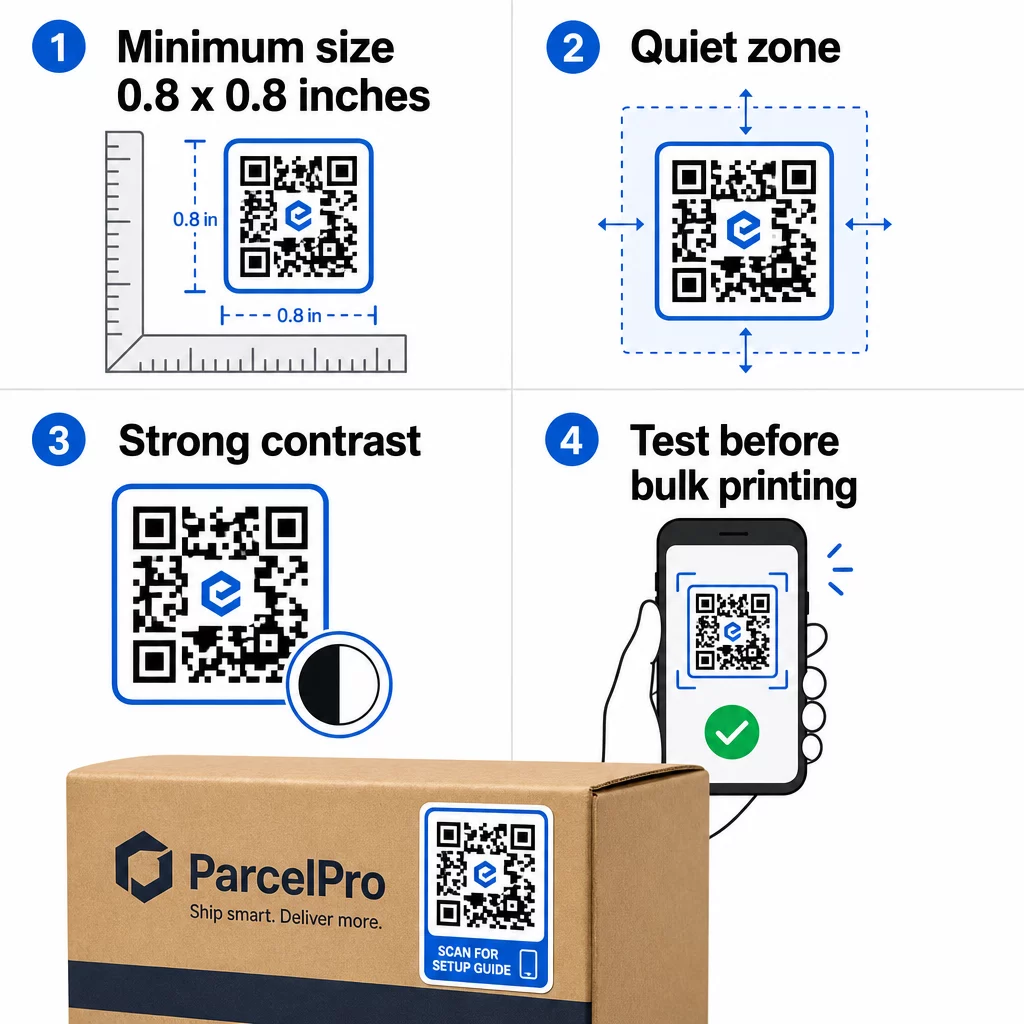
- Minsta storlek: 0.8 × 0.8 inches (2 × 2 cm) for a simple URL. Larger codes with more data density need to be scaled up proportionally.
- Tyst zon: Leave at least four modules of clear, unprinted space around all four sides of the code. Text, logos, or borders placed inside this margin cause scan failures.
- Contrast ratio: Maintain at least a 4:1 contrast ratio between the dark modules and the light background. Black on white remains the most reliable combination. Avoid light-on-dark inversions – many scanners fail on reversed color schemes.
- No gradients on the code modules: Gradients create mid-tones that scanners struggle to read. Use solid colors only.
- Test before printing at volume: Scan your code with multiple devices – different phones, different camera apps – and test in the lighting conditions where the sticker will actually be used. For outdoor stickers, test in sunlight. For retail shelf stickers, test under fluorescent lighting.
For a full breakdown of sizing across different print materials, see the guide on QR-kodstorlek för olika tryckmaterial. For contrast and color guidance, bästa praxis för färgkontrast i QR-koder covers the specific ratios and combinations to use and avoid.
Var kan man använda QR-kodklistermärken
QR code stickers work across a wide range of business applications. Here are the most common and effective placements:
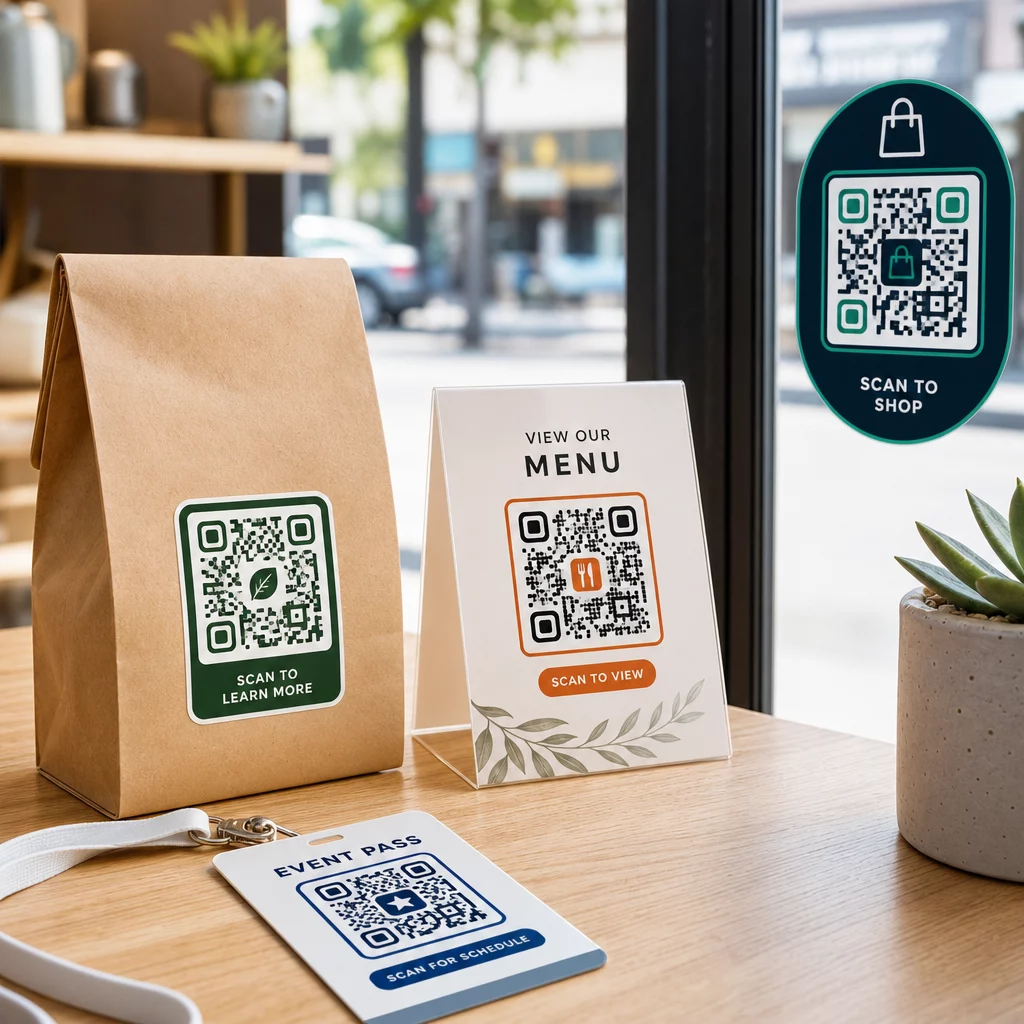
Product packaging and labels – Link customers to product instructions, ingredient details, video tutorials, discount codes, or review pages. Stickers work on both primary packaging (the product itself) and secondary packaging (boxes, sleeves). For a deeper look at the possibilities, see QR-koder på produktförpackningar och ultimat guide till QR-koder för produktetiketter.
Restaurant and hospitality tables – A QR code sticker on a table or door links guests to a digital menu, Wi-Fi password, or review platform. Dynamic codes let you update the menu or promotion without replacing every sticker.
Storefront windows and doors – Window decals carrying a QR code are an efficient way to share business hours, promotions, or social media links with foot traffic that passes outside of operating hours.
Vehicle decals – A QR code decal on a company vehicle turns it into a mobile advertisement, linking anyone who scans it to a booking page, service list, or contact form.
Retail and e-commerce packaging – Stickers on outgoing shipments or product boxes can drive customers to unboxing videos, loyalty programs, or cross-sell pages without adding bulk to the package.
Event signage and tickets – Add QR stickers to badges, signage, or tickets to link attendees to schedules, check-in flows, or speaker resources.
| Sticker Type | Best Material | Typical Use |
|---|---|---|
| Custom branded sticker | Matte or glossy BOPP | Product packaging, promotions |
| Waterproof outdoor sticker | Vinyl with laminate | Vehicle decals, outdoor signage |
| Window cling or decal | Clear or white vinyl | Storefronts, retail windows |
| Small label sticker | Thin BOPP | Bottles, product tags, business cards |
| Restaurant table sticker | Matte laminate | Menu links, review page links |
Using Dynamic QR Codes for Sticker Campaigns
For any campaign where the destination might change – seasonal promotions, menu updates, rotating offers – dynamic QR codes are essential. The sticker itself doesn’t change; only the destination URL behind it does. This matters when you’ve printed thousands of stickers and a landing page URL changes, or when a promotion ends and you want to redirect scanners to a new offer.
Dynamic codes also give you scan analytics: total scans, scan timing, and geographic data. This lets you evaluate which placements are actually driving engagement and adjust accordingly. A sticker on a product package performs differently than one in a storefront window, and analytics help you see that difference clearly.
För QR codes on packaging that serve retail campaigns, dynamic codes also allow you to run A/B tests by pointing different code batches to different landing pages and comparing results.
Update Your Sticker Campaign Without Reprinting Running a time-limited promotion? The Dynamiska QR-kodgenerator lets you redirect your stickers to a new URL the moment a campaign ends – no new stickers, no wasted print runs.
Vanliga frågor
The minimum reliable size for a simple URL is 0.8 × 0.8 inches (2 × 2 cm). For stickers placed farther from the scanner – on signage or vehicle decals – scale up proportionally. A general rule is to make the code at least one-tenth the scanning distance. Always leave a clear quiet zone of at least four modules around the code on all sides, and test the final size on real devices before printing at volume.
Not if it’s a static QR code – those encode their destination permanently. With a dynamic QR code, however, you can change the linked URL, file, or content at any time through your account dashboard without touching the sticker. This makes dynamic codes the practical choice for any application where URLs or promotions might change, including product packaging, seasonal campaigns, and restaurant menus.
Vinyl stickers with a laminate finish are the most durable option for outdoor use. They resist water, UV exposure, and physical wear far better than paper or standard BOPP labels. Matte laminate reduces glare under direct sunlight, which improves scannability. For surfaces like vehicles or exterior signage, confirm your printer offers UV-resistant materials designed for long-term outdoor applications.