
Adakah kakitangan praktik veterinar anda tertekan dengan bilik menunggu yang sesak dan borang kertas yang tidak berkesudahan? Tugas pentadbiran manual melambatkan penjagaan, meningkatkan tekanan di kaunter hadapan, dan mengecewakan pemilik haiwan kesayangan. Melaksanakan aliran kerja digital yang boleh diimbas membolehkan klinik anda menyelaraskan daftar masuk, mengautomasikan arahan selepas penjagaan, dan memudahkan pemasaran pelanggan.
Menyelaraskan Operasi Harian dan Daftar Masuk Pesakit
Menguruskan aliran pelanggan semasa waktu puncak pagi adalah cabaran berterusan bagi pengurus praktik. Menggantikan papan klip pendaftaran kertas dengan titik sentuhan digital mengurangkan kesesakan lobi dan mencegah ralat kemasukan data manual dalam perisian pengurusan praktik anda.
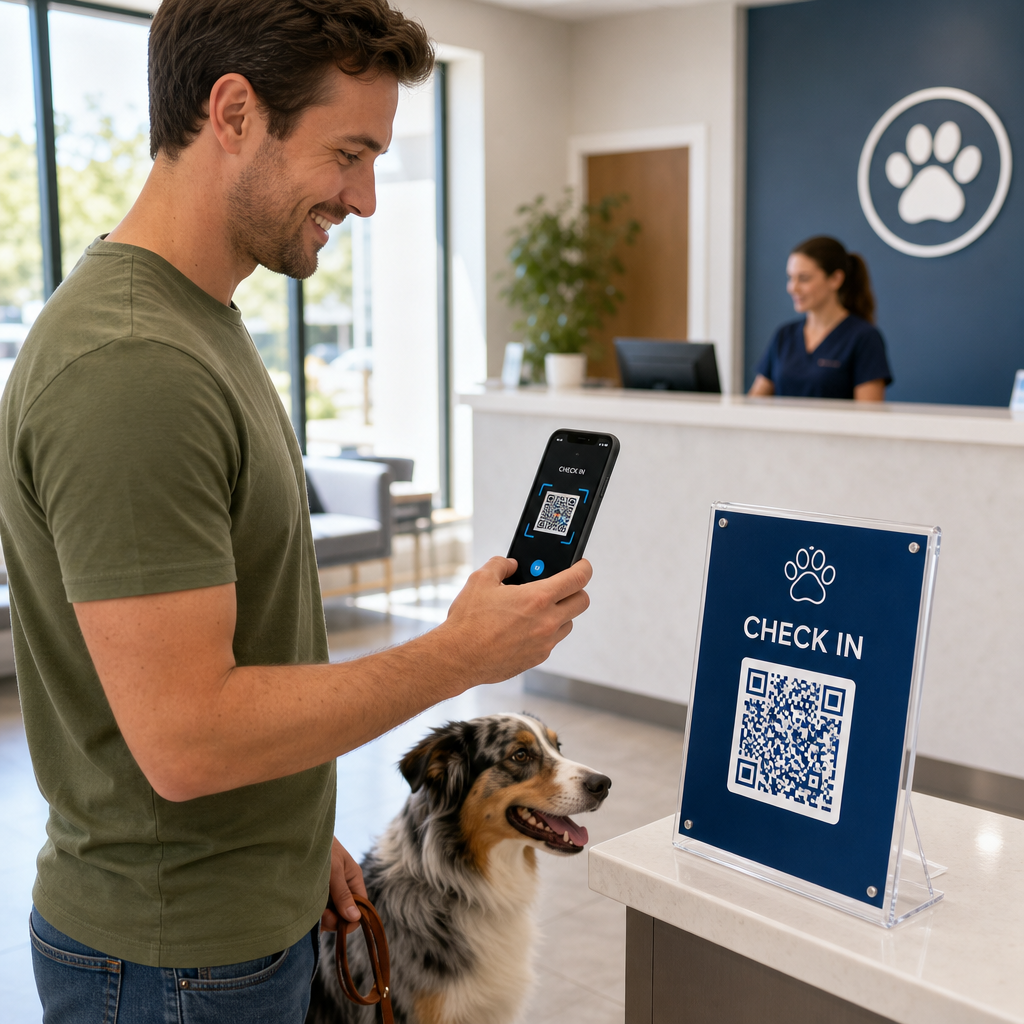
Meletakkan kod daftar masuk tanpa sentuhan pada dirian akrilik lobi atau papan tanda pintu hadapan membolehkan pemilik haiwan kesayangan memulakan daftar masuk terus dari telefon pintar mereka. Apabila pelanggan mengimbas kod, mereka membuka borang digital yang selamat untuk mengesahkan maklumat hubungan, melengkapkan sejarah kesihatan, atau menandatangani perjanjian persetujuan pra-pembedahan.
Titik sentuhan operasi utama untuk klinik veterinar termasuk:
- Pengambilan pesakit digital: Arahkan pelanggan ke borang pengambilan digital sebelum janji temu untuk merekodkan kemas kini sejarah kesihatan tanpa kelewatan di kaunter hadapan menggunakan Cara buat QR code untuk Google Form.
- Kutipan pembayaran tanpa sentuhan: Paparkan papan tanda pembayaran pantas di kaunter pelepasan supaya pemilik haiwan kesayangan dapat menyelesaikan bil melalui penyelesaian kod QR pembayaran melalui dompet digital atau PayPal.
- Perkongsian kenalan kecemasan: Sediakan kod kenalan vCard digital pada edaran magnet peti sejuk supaya pemilik dapat menyimpan nombor klinik kecemasan anda terus ke buku alamat telefon bimbit mereka.
Memudahkan Pengambilan Pesakit dan Pengumpulan Borang Hapuskan timbunan kertas dan percepatkan daftar masuk lobi dengan borang digital yang disesuaikan. Gunakan Cara buat QR code untuk Google Form untuk mencipta borang pengambilan yang boleh diimbas untuk klinik anda hari ini.
Meningkatkan Pendidikan Pelanggan dan Pematuhan Penjagaan Selepas Rawatan
Pemilik haiwan peliharaan sering berasa tertekan semasa pelepasan dan terlupa arahan penjagaan di rumah secara lisan. Menyediakan akses digital segera kepada garis panduan pasca-pembedahan meningkatkan kepatuhan rawatan dan mengurangkan panggilan telefon panik yang tidak perlu.
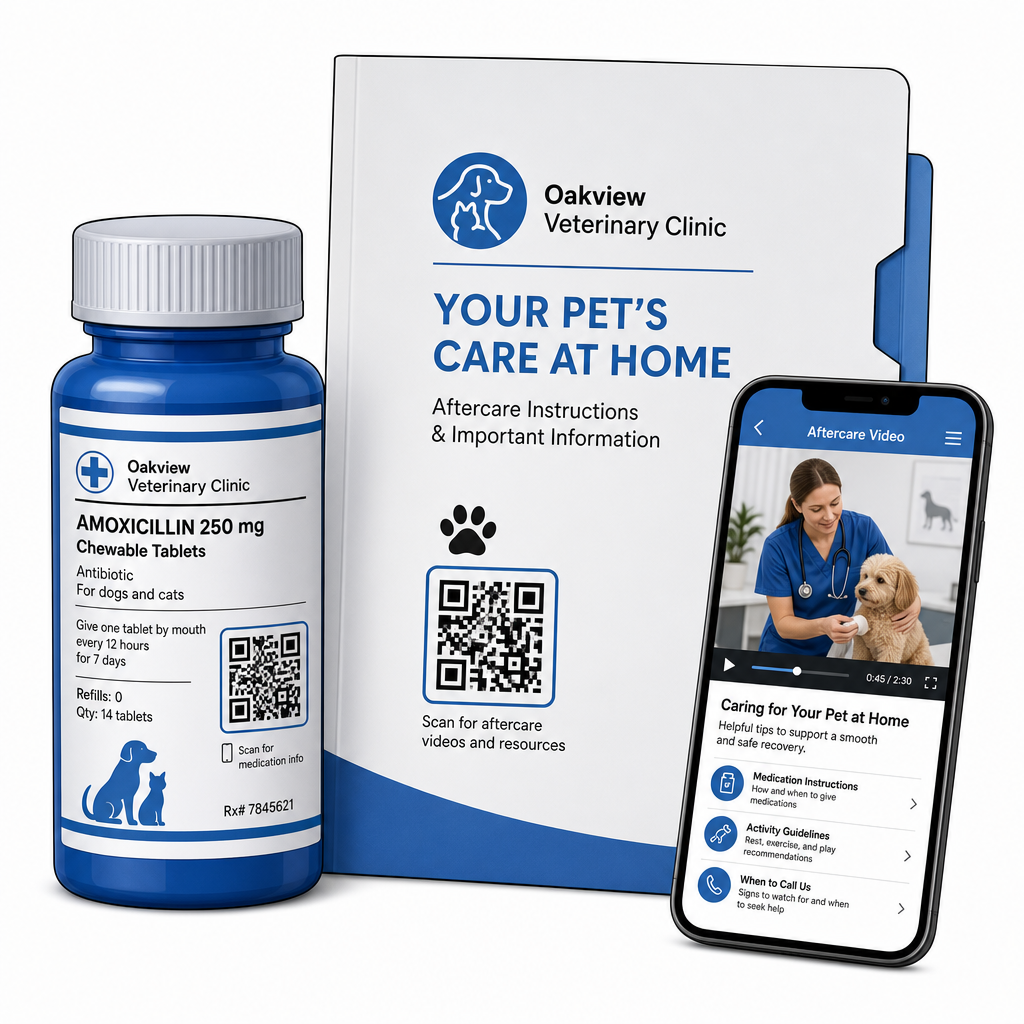
Mencetak kod boleh imbas pada botol ubat, folder pelepasan, atau helaian penjagaan menghubungkan pelanggan terus kepada video instruksional, panduan pemantauan luka, dan demonstrasi pemulihan fizikal. Sama seperti lebih luas aplikasi kod QR penjagaan kesihatan, alatan penjagaan selepas rawatan digital memastikan panduan perubatan kritikal kekal boleh diakses 24/7.
Anda boleh menyampaikan bahan pasca-lawatan dengan berkesan melalui:
- Paket pelepasan digital: Muat naik manual pemulihan pasca-pembedahan yang komprehensif menggunakan Cara buat QR code untuk dokumen PDF supaya pemilik haiwan peliharaan boleh menyimpan fail dokumen terus ke telefon mereka.
- Panduan pentadbiran ubat: Pautkan label botol preskripsi terus ke demonstrasi video pendek yang menunjukkan pentadbiran pil yang betul, teknik titisan mata, atau suntikan insulin.
- Panduan diet dan kesejahteraan: Paparkan pautan boleh imbas kepada panduan nutrisi khusus baka, jadual pencegahan parasit, dan cadangan penjagaan gigi di dalam bilik pemeriksaan.
Mendorong Pemasaran Amalan dan Pengurusan Reputasi
Membangunkan amalan veterinar memerlukan penglibatan tempatan yang konsisten dan ulasan dalam talian yang positif. Penempatan strategik titik sentuh digital merentasi aset pemasaran fizikal membantu menukar lawatan rutin menjadi pertumbuhan amalan jangka panjang.
Dengan meletakkan gesaan ulasan di meja pelepasan atau mencetaknya pada resit bil, anda menggalakkan pelanggan yang berpuas hati untuk meninggalkan maklum balas semasa pengalaman mereka masih segar. Anda boleh menyelaraskan proses ini dengan menggunakan Cara buat QR Google review untuk mengarahkan pemilik haiwan peliharaan terus ke profil anda.
Untuk mengekalkan kepercayaan dan mematuhi piawaian kawal selia, amalan mesti mengikuti peraturan pematuhan utama:
| Kawasan Pemasaran | Piawaian Amalan Terbaik | Keperluan Kawal Selia & Platform |
|---|---|---|
| Ulasan Google | Arahkan semua pelanggan ke profil Perniagaan Google anda yang disahkan. | Garis panduan FTC dan dasar Google melarang keras penyekatan ulasan, ulasan palsu, atau menawarkan diskaun dan hadiah sebagai pertukaran untuk ulasan. |
| Pelan Kesejahteraan | Arahkan klien ke pautan berbilang halaman pendaratan untuk pendaftaran penjagaan pencegahan. | Sediakan butiran harga yang telus dan terma yang jelas untuk pakej kesejahteraan tahunan. |
| Rujukan Klien | Paparkan kod pendaftaran rujukan pada kad perniagaan dan folder sambutan. | Pastikan terma rujukan terpakai sama rata kepada semua klien sedia ada. |
Pemantauan penglibatan merentasi risalah bercetak, promosi bermusim, dan kad rujukan adalah mudah apabila menggunakan kod QR dinamik yang boleh dijejak. Pengurus klinik boleh melihat metrik imbasan masa nyata untuk menilai penempatan promosi mana yang menjana penglibatan klien tertinggi.
Amalan Terbaik untuk Kebolehimbasan, Keselamatan, dan Kebolehcapaian
Kod QR yang gagal diimbas menimbulkan kekecewaan kepada pemilik haiwan peliharaan dan kakitangan klinik. Mengikuti piawaian teknikal dan protokol keselamatan memastikan prestasi yang boleh dipercayai merentasi semua titik sentuh veterinar.
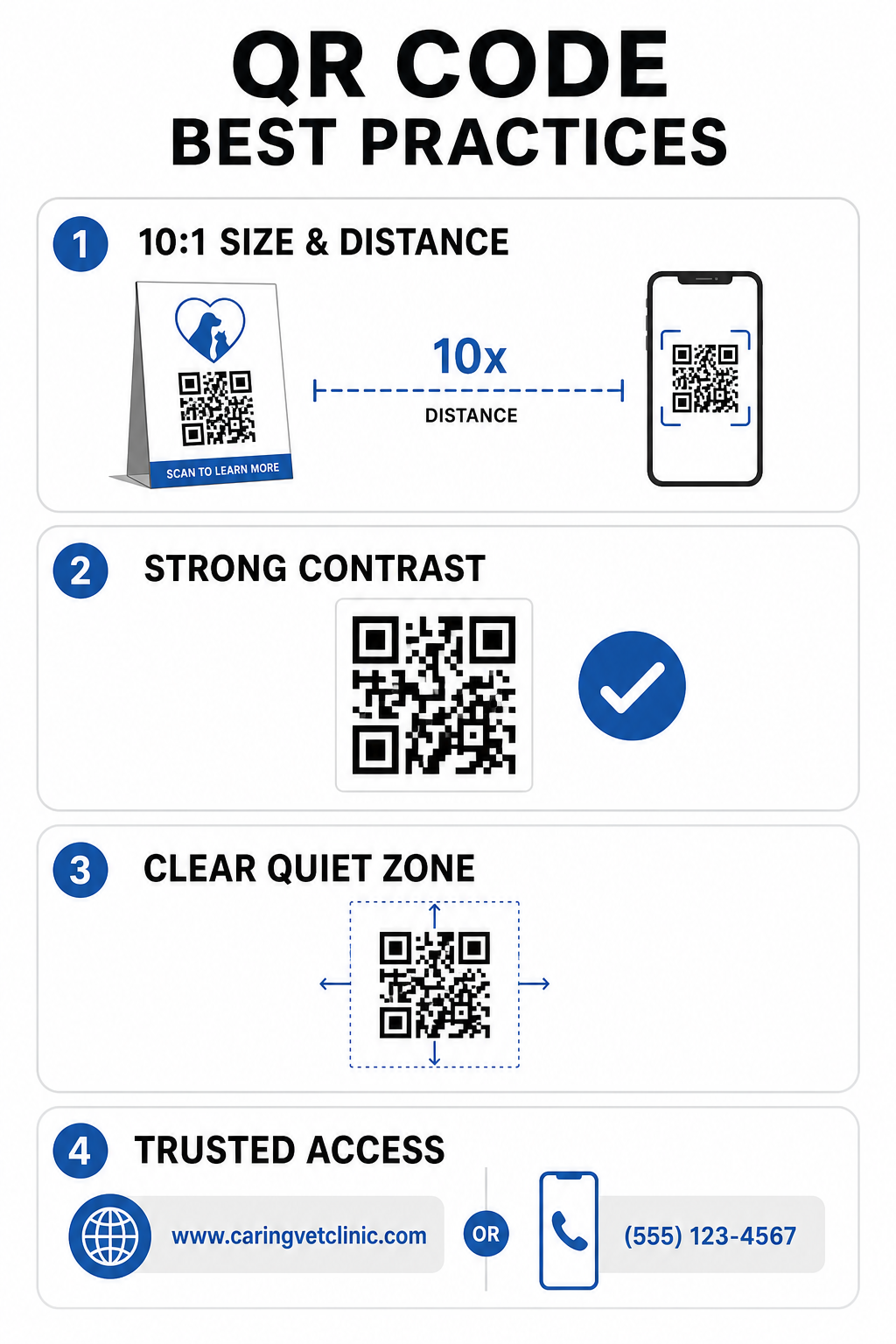
Garis Panduan Cetakan Teknikal
- Kekalkan nisbah saiz-ke-jarak 10:1: Jadikan kod sekurang-kurangnya 1 cm lebar untuk setiap 10 cm jarak imbasan yang dijangkakan, mengekalkan kod jarak dekat pada saiz minimum 2 x 2 cm.
- Pastikan kontras warna yang tinggi: Kekalkan nisbah kontras sekurang-kurangnya 4:1 antara corak kod gelap dan latar belakang cerah, mengelakkan corak berwarna terang pada latar belakang cerah.
- Kekalkan zon senyap: Tinggalkan sempadan putih yang jelas di sekeliling tepi luar kod untuk mengelakkan gangguan daripada elemen grafik di sekeliling.
- Eksport fail resolusi tinggi: Simpan aset cetakan dalam format vektor seperti SVG atau EPS pada 300 DPI atau lebih tinggi untuk mengelakkan pikselasi, mengikut yang ditetapkan amalan terbaik untuk kebolehbacaan kod QR.
Piawaian Keselamatan dan Kebolehcapaian
- Lindungi papan tanda fizikal daripada pancingan data (phishing): Periksa papan tanda klinik secara berkala untuk mengelakkan pelekat tindanan berniat jahat (quishing) yang menyasarkan pemilik haiwan peliharaan.
- Gunakan domain tersuai yang dipercayai: Pautkan kod terus ke domain klinik yang disahkan dan bukannya pemendek URL generik untuk memastikan keselamatan destinasi.
- Sediakan kaedah akses alternatif: Sertakan URL bertulis pendek, nombor telefon, atau bantuan kakitangan bersama kod, disertakan dengan arahan imbasan bahasa mudah yang jelas.
Meningkatkan Titik Sentuh Veterinar Anda
Mengintegrasikan aliran kerja yang boleh diimbas ke dalam amalan veterinar anda merapatkan jurang antara titik sentuh fizikal pelanggan dan alat pengurusan digital. Menggantikan borang kertas dengan pilihan pengambilan digital, menyediakan video penjagaan selepas rawatan segera, dan memudahkan pengumpulan maklum balas mengurangkan keletihan kakitangan sambil meningkatkan taraf penjagaan untuk pesakit anda.
Mulakan dengan mengenal pasti titik-titik geseran trafik tinggi di klinik anda, seperti daftar masuk lobi atau pengeluaran ubat. Pilih pilihan dinamik supaya anda boleh mengemas kini alamat web yang dihubungkan atau dokumen yang boleh dimuat turun pada bila-bila masa tanpa mencetak semula tanda fizikal. Bina, sesuaikan, dan jejak titik sentuh digital amalan anda menggunakan Penjana Kod Pageloot QR hari ini.
Soalan lazim
Kod QR Dinamik membenarkan kakitangan untuk mengemas kini halaman web sasaran atau dokumen PDF yang dipautkan pada bila-bila masa tanpa mencetak semula risalah fizikal, papan tanda, atau botol pil. Mereka juga menyediakan analitik imbasan supaya pengurus amalan boleh menilai penglibatan pelanggan.
Tidak. Garis panduan FTC dan polisi ulasan Google melarang keras menawarkan insentif, produk percuma, atau diskaun sebagai balasan untuk ulasan dalam talian. Amalan mesti mengumpul maklum balas yang sahih, tanpa insentif.
Patuhi garis panduan nisbah jarak-ke-saiz 10:1. Jika pemilik haiwan peliharaan mengimbas poster dari jarak 100 cm (kira-kira 3 kaki), kod tersebut hendaklah berukuran sekurang-kurangnya 10 x 10 cm, dikelilingi oleh sempadan putih yang jelas.