
Nhân viên phòng khám thú y của bạn có đang quá tải vì phòng chờ đông đúc và vô số biểu mẫu giấy tờ? Các công việc hành chính thủ công làm chậm quá trình chăm sóc, tăng căng thẳng cho nhân viên lễ tân và gây khó chịu cho chủ nuôi thú cưng. Việc triển khai quy trình làm việc kỹ thuật số có thể quét mã cho phép phòng khám của bạn hợp lý hóa việc đăng ký, tự động hóa hướng dẫn chăm sóc sau điều trị và đơn giản hóa việc tiếp thị cho khách hàng.
Tối ưu hóa hoạt động hàng ngày và quy trình đăng ký bệnh nhân.
Quản lý lưu lượng khách hàng trong giờ cao điểm buổi sáng là một thách thức thường trực đối với các nhà quản lý phòng khám. Thay thế bảng đăng ký giấy bằng các điểm tiếp xúc kỹ thuật số giúp giảm tắc nghẽn khu vực chờ và ngăn ngừa lỗi nhập liệu thủ công trong phần mềm quản lý phòng khám của bạn.
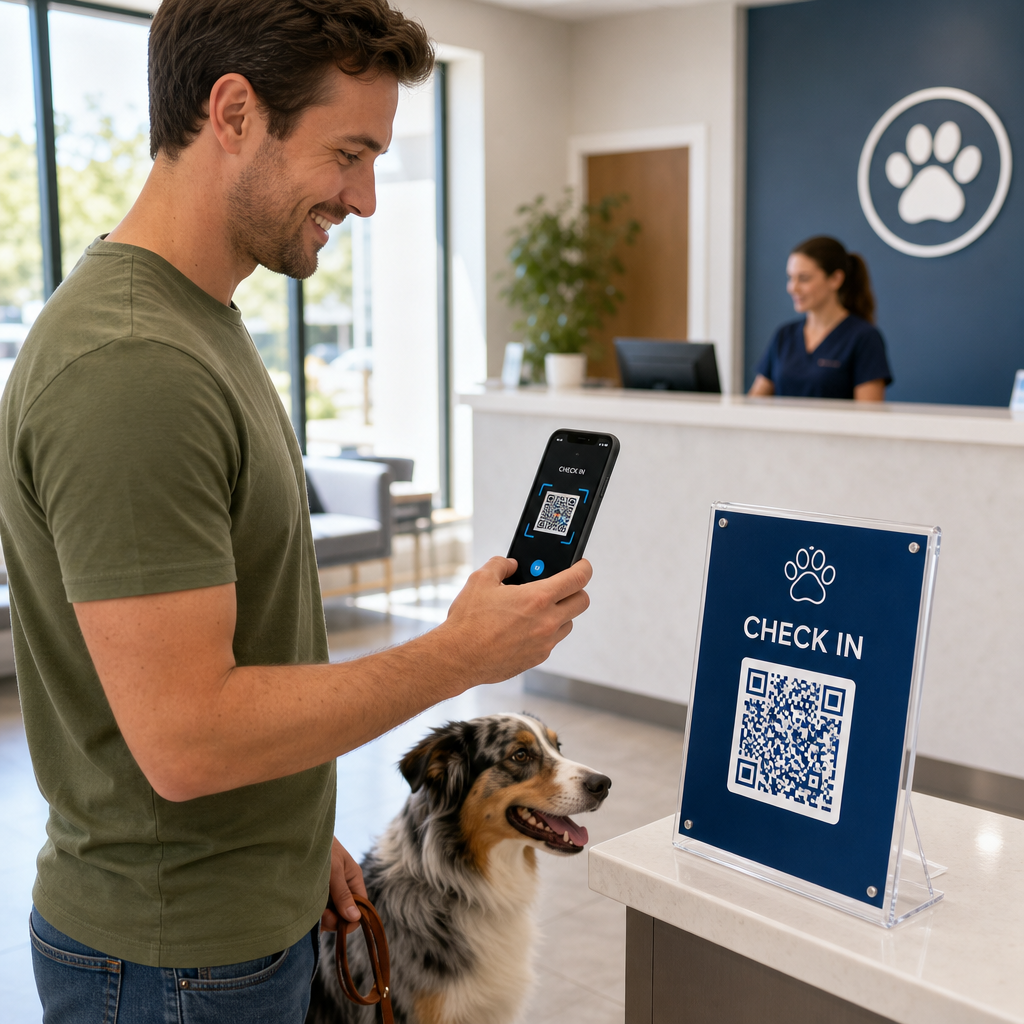
Việc đặt mã check-in không tiếp xúc trên các giá đỡ bằng acrylic ở sảnh hoặc biển báo ở cửa ra vào cho phép chủ nuôi thú cưng bắt đầu quá trình check-in trực tiếp từ điện thoại thông minh của họ. Khi khách hàng quét mã, họ sẽ mở một biểu mẫu điện tử an toàn để xác nhận thông tin liên hệ, hoàn thành lịch sử sức khỏe hoặc ký các thỏa thuận đồng ý trước phẫu thuật.
Các điểm tiếp xúc quan trọng trong hoạt động của các phòng khám thú y bao gồm:
- Tiếp nhận bệnh nhân kỹ thuật sốHướng dẫn khách hàng điền vào các biểu mẫu đăng ký trực tuyến trước khi đến khám để cập nhật thông tin sức khỏe mà không cần chờ đợi tại quầy lễ tân. Tạo mã QR cho Google Form.
- Thu tiền thanh toán không tiếp xúcĐặt biển báo thanh toán nhanh tại quầy xuất viện để chủ vật nuôi có thể thanh toán hóa đơn. giải pháp mã QR thanh toán thông qua ví điện tử hoặc PayPal.
- Chia sẻ thông tin liên lạc khẩn cấpCung cấp mã liên hệ vCard kỹ thuật số trên nam châm dán tủ lạnh để chủ sở hữu có thể lưu số điện thoại khẩn cấp của phòng khám trực tiếp vào danh bạ điện thoại di động của họ.
Đơn giản hóa quy trình tiếp nhận bệnh nhân và thu thập biểu mẫu. Loại bỏ sự lộn xộn giấy tờ và tăng tốc quá trình làm thủ tục nhận phòng tại sảnh với các biểu mẫu điện tử được tùy chỉnh. Sử dụng Tạo mã QR cho Google Form Tạo các mẫu đơn đăng ký có thể quét cho phòng khám của bạn ngay hôm nay.
Nâng cao kiến thức cho khách hàng và tuân thủ quy trình chăm sóc sau điều trị.
Chủ nuôi thú cưng thường cảm thấy choáng ngợp khi thú cưng xuất viện và quên những hướng dẫn chăm sóc tại nhà bằng lời nói. Việc cung cấp quyền truy cập kỹ thuật số tức thời vào các hướng dẫn sau phẫu thuật giúp cải thiện việc tuân thủ điều trị và giảm các cuộc gọi điện thoại hoảng loạn không cần thiết.
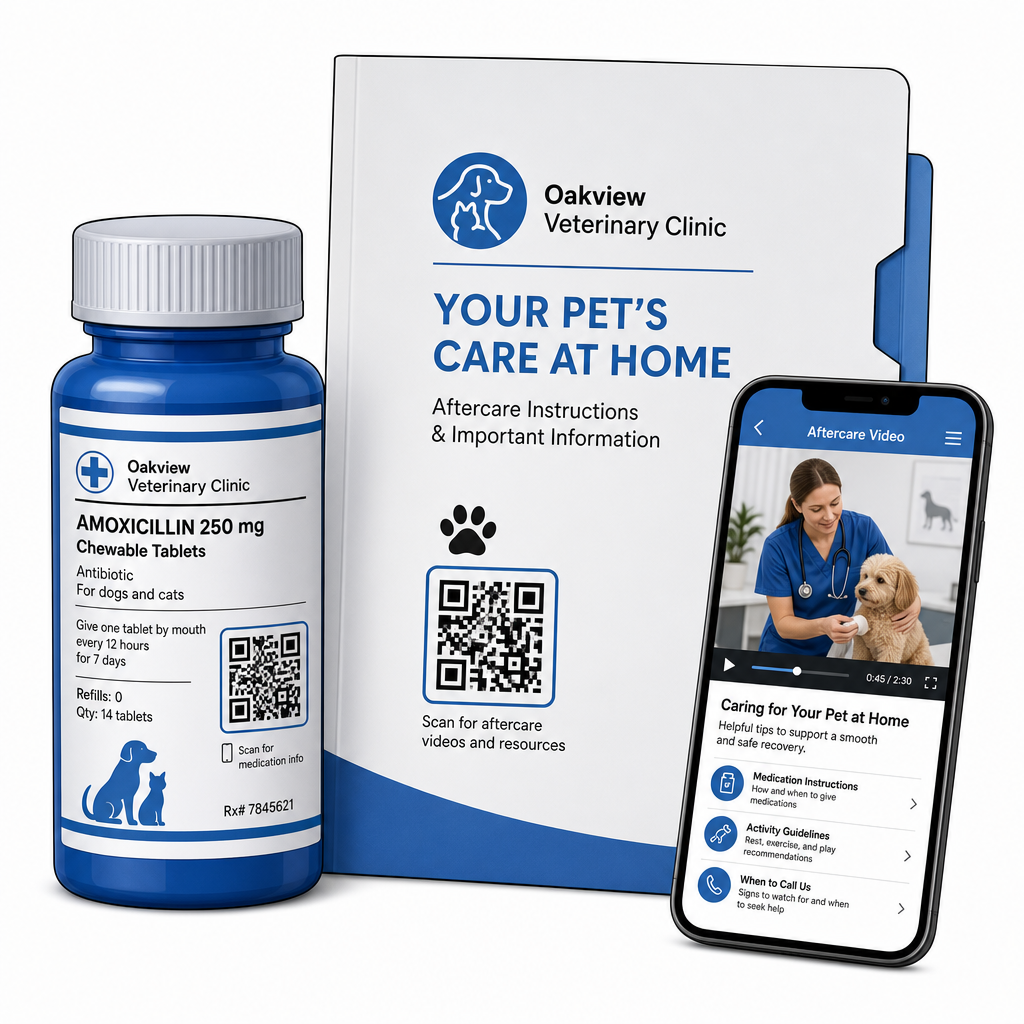
Việc in mã quét lên vỏ chai thuốc, hồ sơ xuất viện hoặc phiếu chăm sóc giúp người bệnh kết nối trực tiếp với các video hướng dẫn, hướng dẫn theo dõi vết thương và các bài trình diễn phục hồi chức năng. Tương tự như các phương pháp rộng rãi hơn ứng dụng mã QR chăm sóc sức khỏe, Các công cụ chăm sóc hậu phẫu kỹ thuật số đảm bảo hướng dẫn y tế quan trọng luôn sẵn có 24/7.
Bạn có thể cung cấp tài liệu sau chuyến thăm một cách hiệu quả thông qua:
- Gói xả điện tửTải lên các hướng dẫn phục hồi sau phẫu thuật toàn diện bằng cách sử dụng... Chuyển PDF sang QR Như vậy, chủ nuôi thú cưng có thể lưu trực tiếp các tập tin tài liệu vào điện thoại của mình.
- Hướng dẫn sử dụng thuốcLiên kết trực tiếp nhãn chai thuốc với các video ngắn hướng dẫn cách uống thuốc đúng cách, kỹ thuật nhỏ thuốc nhỏ mắt hoặc tiêm insulin.
- Hướng dẫn về chế độ ăn uống và sức khỏeHiển thị các liên kết có thể quét được dẫn đến hướng dẫn dinh dưỡng dành riêng cho từng giống chó, lịch phòng ngừa ký sinh trùng và khuyến nghị chăm sóc răng miệng bên trong phòng khám.
Thực hành lái xe, tiếp thị và quản lý danh tiếng
Phát triển một phòng khám thú y đòi hỏi sự tương tác thường xuyên với cộng đồng địa phương và những đánh giá tích cực trên mạng. Việc định vị chiến lược các điểm tiếp xúc kỹ thuật số trên các kênh tiếp thị truyền thống giúp chuyển đổi các lượt thăm khám thông thường thành sự tăng trưởng lâu dài cho phòng khám.
Bằng cách đặt các câu hỏi đánh giá tại quầy tiếp nhận hồ sơ hoặc in chúng trên hóa đơn, bạn khuyến khích khách hàng hài lòng để lại phản hồi ngay khi trải nghiệm của họ còn mới mẻ. Bạn có thể tối ưu hóa quy trình này bằng cách triển khai một hệ thống... Tạo mã QR đánh giá Google Map Để hướng chủ nuôi thú cưng trực tiếp đến hồ sơ của bạn.
Để duy trì lòng tin và tuân thủ các tiêu chuẩn pháp lý, các hoạt động kinh doanh phải tuân theo các quy tắc tuân thủ chính:
| Khu vực tiếp thị | Tiêu chuẩn thực hành tốt nhất | Yêu cầu về quy định và nền tảng |
|---|---|---|
| Đánh giá trên Google | Hướng tất cả khách hàng đến hồ sơ Google Business đã được xác minh của bạn. | Các hướng dẫn của FTC và chính sách của Google nghiêm cấm tuyệt đối việc hạn chế đánh giá, tạo đánh giá giả mạo hoặc cung cấp giảm giá và quà tặng để đổi lấy đánh giá. |
| Kế hoạch chăm sóc sức khỏe | Hướng khách hàng trực tiếp đến nhiều liên kết trang đích để đăng ký chăm sóc sức khỏe dự phòng. | Cung cấp thông tin giá cả minh bạch và điều khoản rõ ràng cho các gói chăm sóc sức khỏe hàng năm. |
| Giới thiệu khách hàng | In mã đăng ký giới thiệu trên danh thiếp và thư chào mừng. | Đảm bảo các điều khoản giới thiệu được áp dụng bình đẳng cho tất cả khách hàng hiện có. |
Việc theo dõi mức độ tương tác trên các tờ rơi in, chương trình khuyến mãi theo mùa và thẻ giới thiệu trở nên dễ dàng hơn khi sử dụng... Mã QR động có thể theo dõi. Các quản lý phòng khám có thể xem số liệu quét theo thời gian thực để đánh giá vị trí quảng cáo nào tạo ra mức độ tương tác cao nhất với khách hàng.
Các phương pháp tốt nhất về khả năng quét, bảo mật và khả năng truy cập
Mã QR không quét được gây khó chịu cho cả chủ nuôi thú cưng và nhân viên phòng khám. Tuân thủ các tiêu chuẩn kỹ thuật và giao thức bảo mật đảm bảo hiệu suất đáng tin cậy trên tất cả các điểm tiếp xúc trong hoạt động thú y.
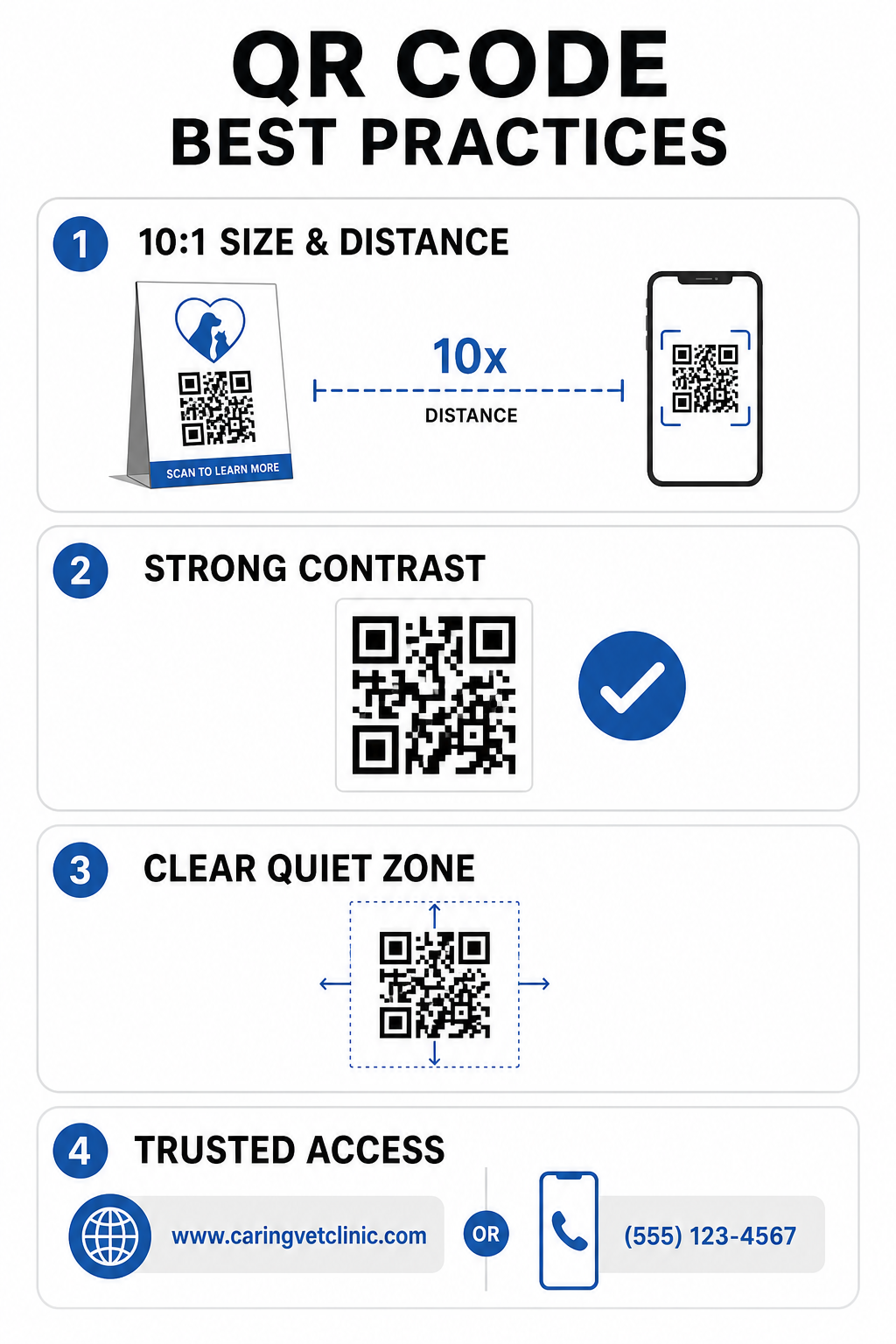
Hướng dẫn in kỹ thuật
- Duy trì tỷ lệ kích thước trên khoảng cách là 10:1.Hãy đảm bảo mã vạch có chiều rộng ít nhất 1 cm cho mỗi 10 cm khoảng cách quét dự kiến, và giữ kích thước tối thiểu của mã vạch ở cự ly gần là 2 x 2 cm.
- Đảm bảo độ tương phản màu caoDuy trì tỷ lệ tương phản tối thiểu 4:1 giữa các mẫu mã màu tối và nền sáng, tránh sử dụng các mẫu màu sáng trên nền sáng.
- Giữ gìn khu vực yên tĩnhĐể lại một đường viền trắng rõ ràng xung quanh các cạnh ngoài của mã để tránh sự can thiệp từ các yếu tố đồ họa xung quanh.
- Xuất các tệp có độ phân giải caoLưu các tài liệu in ở định dạng vector như SVG hoặc EPS với độ phân giải 300 DPI trở lên để tránh hiện tượng vỡ pixel, tuân theo các quy trình đã được thiết lập. các phương pháp hay nhất để đọc mã QR.
Tiêu chuẩn về bảo mật và khả năng truy cập
- Bảo vệ biển báo vật lý khỏi các cuộc tấn công lừa đảo trực tuyến.Kiểm tra thường xuyên các biển hiệu phòng khám để đề phòng các nhãn dán dán chồng lên nhau (dán nhãn giả mạo) nhằm vào chủ nuôi thú cưng.
- Sử dụng các tên miền tùy chỉnh đáng tin cậyLiên kết mã trực tiếp đến các tên miền phòng khám đã được xác minh thay vì các công cụ rút gọn URL chung chung để đảm bảo an toàn cho đích đến.
- Cung cấp các phương thức truy cập thay thếBao gồm các URL ngắn gọn, số điện thoại hoặc thông tin hỗ trợ của nhân viên bên cạnh mã, kèm theo hướng dẫn quét rõ ràng bằng ngôn ngữ dễ hiểu.
Nâng cấp các điểm tiếp xúc thú y của bạn
Việc tích hợp quy trình làm việc có thể quét mã vào phòng khám thú y của bạn sẽ thu hẹp khoảng cách giữa các điểm tiếp xúc trực tiếp với khách hàng và các công cụ quản lý kỹ thuật số. Thay thế các biểu mẫu giấy bằng các tùy chọn tiếp nhận kỹ thuật số, cung cấp video hướng dẫn chăm sóc sau điều trị tức thì và đơn giản hóa việc thu thập phản hồi sẽ giảm bớt sự mệt mỏi cho nhân viên đồng thời nâng cao tiêu chuẩn chăm sóc cho bệnh nhân của bạn.
Hãy bắt đầu bằng cách xác định các điểm gây tắc nghẽn có lưu lượng truy cập cao trong phòng khám của bạn, chẳng hạn như khu vực đăng ký ở sảnh hoặc khu vực phát thuốc. Chọn các tùy chọn linh hoạt để bạn có thể cập nhật địa chỉ web được liên kết hoặc tài liệu có thể tải xuống bất cứ lúc nào mà không cần in lại các biển báo vật lý. Xây dựng, tùy chỉnh và theo dõi các điểm tiếp xúc kỹ thuật số của phòng khám bằng cách sử dụng... Trình tạo mã QR Pageloot của chúng tôi ngay hôm nay.
Câu hỏi thường gặp
Mã QR động cho phép nhân viên cập nhật trang web đích hoặc tài liệu PDF được liên kết bất cứ lúc nào mà không cần in lại tờ rơi vật lý, bảng hiệu hoặc lọ thuốc. Chúng cũng cung cấp phân tích lượt quét để các nhà quản lý phòng khám có thể đánh giá mức độ tương tác của khách hàng.
Không. Hướng dẫn của FTC và chính sách đánh giá của Google nghiêm cấm việc đưa ra ưu đãi, sản phẩm miễn phí hoặc giảm giá để đổi lấy các đánh giá trực tuyến. Các hoạt động phải thu thập phản hồi chân thực, không bị khuyến khích.
Hãy tuân theo nguyên tắc tỷ lệ khoảng cách so với kích thước là 10:1. Nếu chủ nuôi thú cưng quét mã vạch trên áp phích từ khoảng cách 100 cm (khoảng 3 feet), mã vạch phải có kích thước ít nhất 10 x 10 cm, được bao quanh bởi viền trắng rõ nét.