
ホーム > 産業 > How to Implement QR Codes in Daycare Centers
Daycare QR check-in

How to Implement QR Codes in Daycare Centers

Learn how to implement QR codes in daycare centers to simplify parent drop-offs, automate digital attendance records, and meet regulatory compliance.
Updated on 7月 27, 2026
目次

Are long drop-off lines and manual sign-in sheets slowing down your daycare operations every morning? Paper logs create entryway bottlenecks, risk misplaced files, and complicate mandatory licensing audits. Implementing QR codes allows parents to log arrivals in seconds on their smartphones while automatically updating digital attendance records.

Streamlining Daily Parent Check-In and Attendance

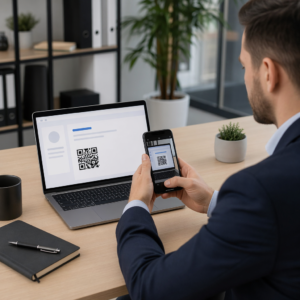
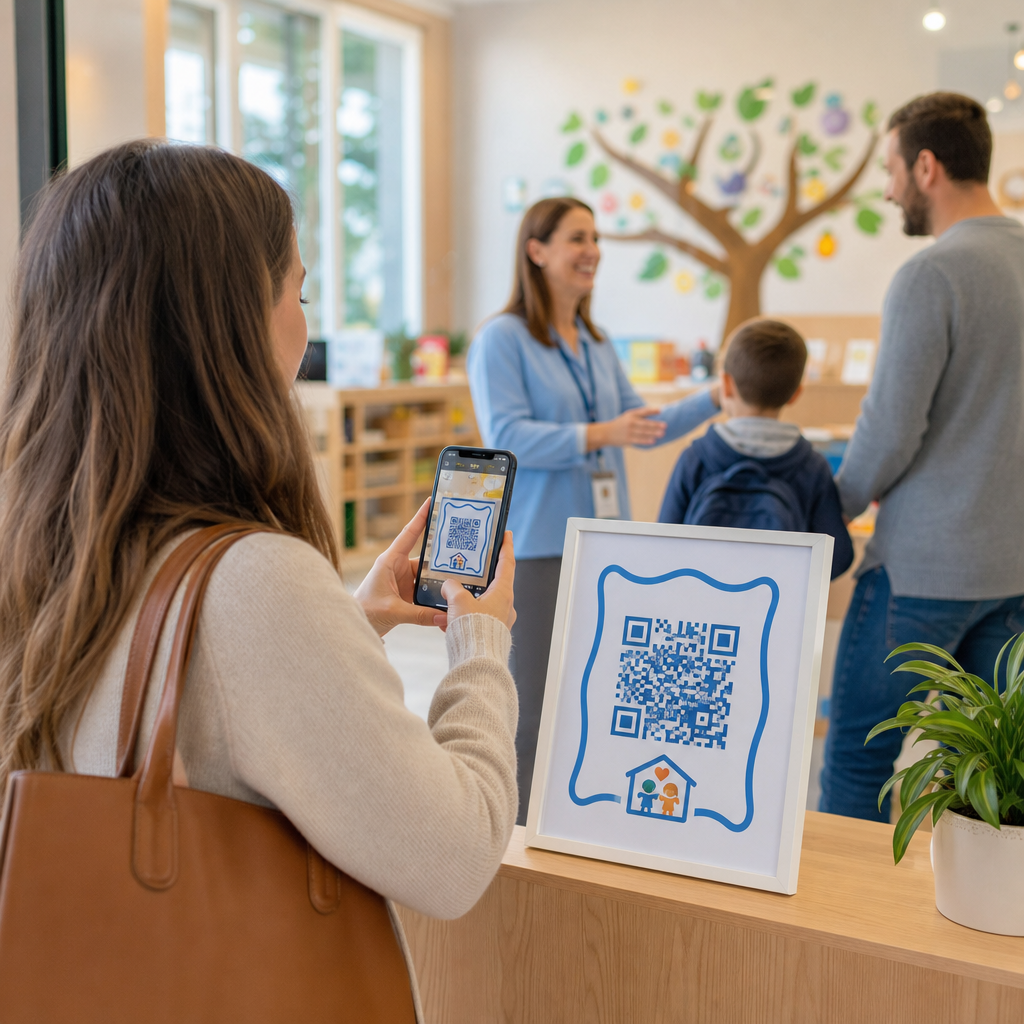
Transitioning to digital sign-ins eliminates physical paper logs and reduces morning check-in delays. Parents can use their own mobile devices to scan a displayed code, complete a brief sign-in form, and proceed to their child’s classroom without touching shared pens or clipboards.

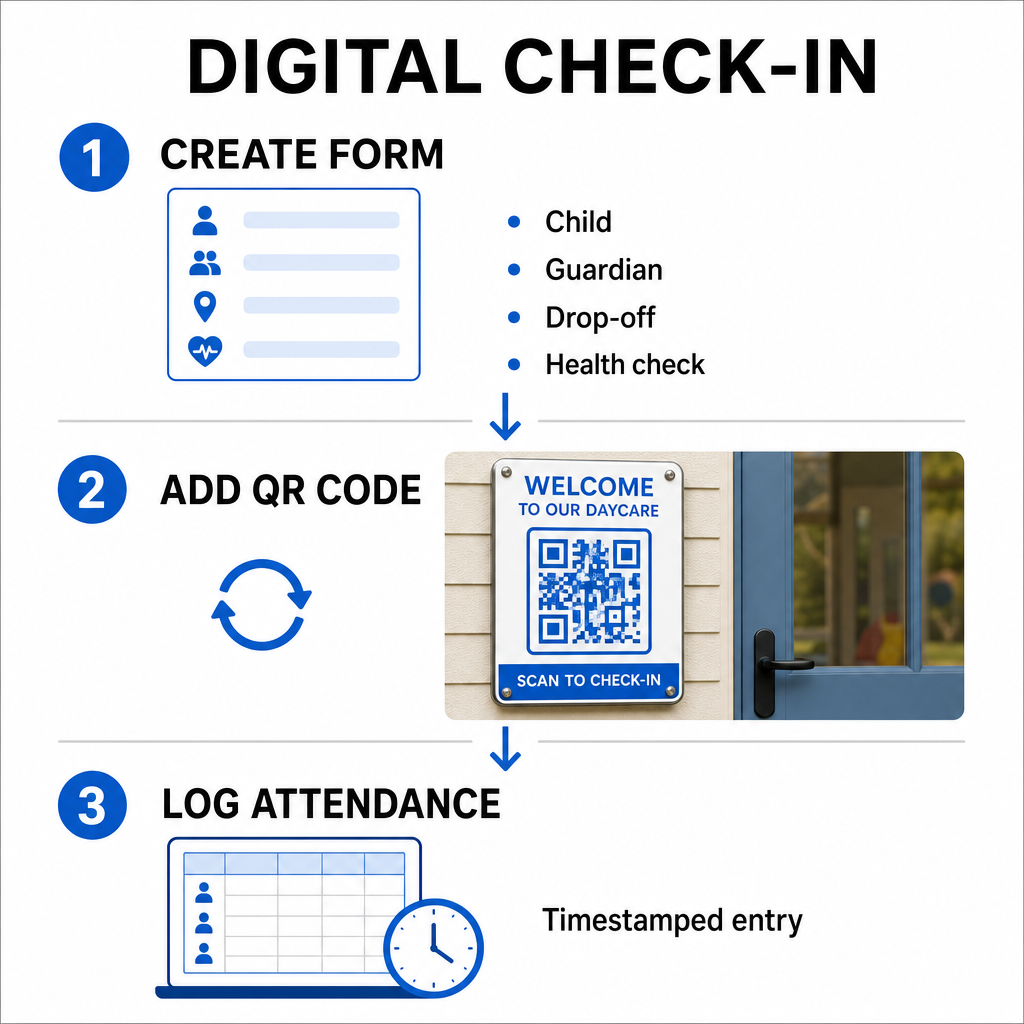
Setting up a digital attendance system involves a simple three-step workflow:

Digital check-in workflow
  • Create your check-in form: Build an online check-in form using tools like Google Forms or Typeform. Include fields for the child’s name, parent or guardian name, drop-off time, and daily health screening questions.
  • Generate a dynamic QR code: Link your form URL using an 出席QRコードジェネレータ または GoogleフォームQRコードジェネレーター. Selecting dynamic QR codes lets you update destination links or modify forms in the future without reprinting physical posters.
  • Automate record collection: Configure your online form to log entries automatically into a centralized spreadsheet, such as Google Sheets. Every scan generates a timestamped entry that staff can review in real time.

For administrative pick-up verification, your center can also issue individual QR badges to authorized pickup persons. Staff members can use a web-based QRコードスキャナ on a tablet or smartphone to scan parent badges, ensuring swift identity verification during peak afternoon hours. You can also explore sector-specific workflows across various QR code industry solutions to see how digital touchpoints improve operations.

Automate Your Childcare Attendance Tracking Need a faster, contact-free way to log student arrivals and stay audit-ready? Use the 出席QRコードジェネレータ to create trackable check-in points for your center today.

Meeting State and Federal Attendance Compliance

Childcare facilities must adhere to strict record-keeping standards to maintain licensing and retain federal funding. Paper sign-in sheets are prone to missing signatures, illegible handwriting, and misplaced binders. Digital check-in workflows resolve these issues by creating immediate, unalterable digital audit trails.

Digital QR systems assist with several key compliance frameworks:

  • Child Care and Development Fund (CCDF): Federal CCDF funding rules require childcare providers to maintain detailed, documented attendance records for at least three years to qualify for subsidy reimbursements.
  • Child and Adult Care Food Program (CACFP): Under federal regulations (7 CFR 226.15(e)), centers participating in CACFP must maintain accurate daily attendance records separately from meal counts. Automated logs ensure these records stay accurate for fiscal reviews.
  • State Licensing Mandates: States such as Texas, Washington, and Florida require childcare centers to maintain daily tracking systems recording arrival times, departure times, and unique identifiers or authorized signatures. Automated timestamps satisfy state licensing requirements for precise time tracking.

Digital records can also be backed up to cloud servers, helping your center maintain strong business continuity and disaster recovery plans for vital administrative files.

Creating Contactless Workflows for Forms and Handbooks

Beyond daily sign-ins, QR codes streamline communication across your facility by connecting parents instantly to essential digital documents.

を使用することができます。 PDF QRコードジェネレータ to post scannable codes on classroom doors, front desk counters, or notice boards. This allows parents to open and view important materials on their personal phones, such as:

  • Parent handbooks and center policies
  • Monthly meal and snack menus
  • Emergency contact forms and medical consents
  • Seasonal activity sign-ups and permission slips

Additionally, utilizing a リンクQRコードジェネレーター lets you route parents directly to online tuition payment portals, enrollment portals, or staff feedback forms. By converting physical paperwork into accessible digital links, your center cuts printing costs while keeping families informed. Discover all available QR code platform features to expand your facility’s digital strategy.

Best Practices for Printing and Placing Daycare QR Codes

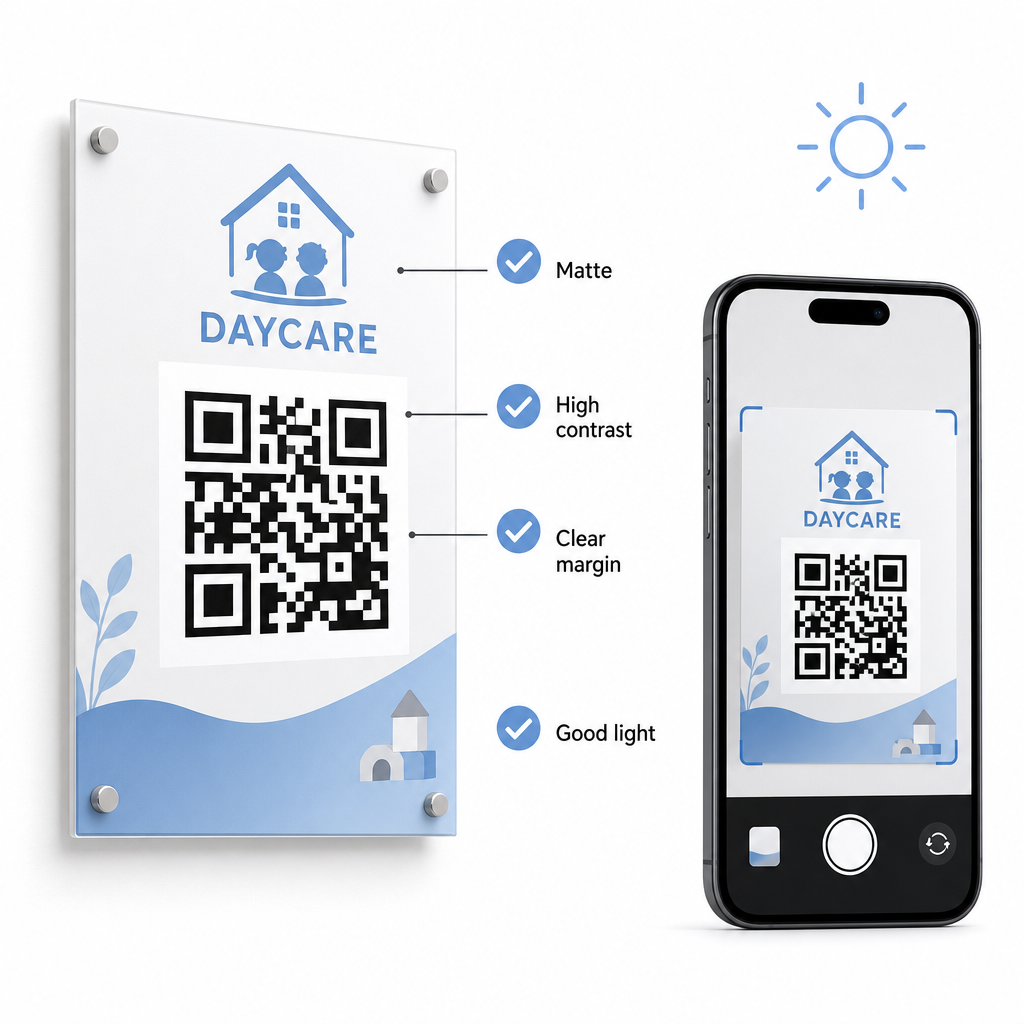
To maintain high scan rates and avoid check-in delays, your printed QR codes must follow established readability standards. Poor lighting, undersized prints, or reflective surfaces can hinder camera sensors during peak morning drop-offs.

Readable QR code setup

Follow these technical guidelines when displaying codes in your facility:

  • Maintain appropriate size ratios: Follow a 10:1 ratio between scanning distance and code width, maintaining a minimum size of 2×2 cm for close-range scanning.
  • Ensure high color contrast: Use dark patterns on light backgrounds to achieve a 21:1 contrast ratio, ensuring at least a 4.5:1 ratio for smaller prints.
  • Preserve quiet zone margins: Keep a clear white border around all four sides of the code to prevent nearby text or visuals from interfering with scanners.
  • Select non-reflective materials: Print signage on matte paper or board rather than glossy laminate or glass to prevent lighting glare.
  • Export vector file formats: Download print files in high-resolution vector formats like SVG or EPS so images remain sharp when scaled.
  • Test in real-world conditions: Scan test prints across multiple mobile devices under various lighting conditions before installing permanent signage. Review our detailed guide on QRコードの読みやすさに関するベストプラクティス for additional technical guidance.

Data Security, Privacy, and Parent Safety

Handling child and family information requires strict attention to data security. Childcare operations collecting personal details online must align with federal standards, including the Children’s Online Privacy Protection Act (COPPA) where child-directed digital services are involved, and maintain clear disclosures regarding how parent data is stored and managed.

Review these key security measures when deploying QR codes in your facility:

  • Display clear privacy notices: Ensure that linked forms or landing pages include a direct link to your center’s privacy policy before collecting family data.
  • Inspect physical signage regularly: Verify that unauthorized stickers or altered codes have not been placed over original sign-in boards, as physical tampering can redirect users to malicious sites.
  • Secure administrative data access: Encrypt online check-in forms with HTTPS protocols and restrict administrative spreadsheet access to authorized personnel only.

By applying proper security practices and selecting reliable tools, you protect family privacy while optimizing daily center management. For a broader look at regulatory frameworks, consult our overview of QR code privacy laws and key regulations.

Modernizing your daycare check-in process reduces entryway congestion, improves data accuracy, and simplifies audit compliance. Replacing physical paper logs with dynamic QR codes gives parents a fast, hygienic drop-off experience while keeping administrative records organized in real time. Start designing your custom check-in workflow today by creating dynamic codes and custom forms tailored to your center’s daily operational needs.

よくある質問

What type of QR code is best for daycare check-in?

Dynamic QR codes are ideal for daycare check-ins because they allow administrators to update linked forms or destination URLs without reprinting physical door signage.

Do parents need to download a special app to scan the check-in QR code?

No, parents do not need a special app. Most modern smartphones scan QR codes directly through their native camera applications.

How long must daycare centers keep digital attendance logs for compliance?

Federal subsidy programs such as CCDF and CACFP require centers to maintain attendance documentation for at least three years, though state regulations or specific funding contracts may mandate longer retention periods.

著者について

Siim KostabiはPagelootのコンテンツリードです。Pagelootの革新的なQRコード生成サービスについて執筆しています。5年以上にわたるQRコードに関する深い専門知識を持つSiimは、この分野の専門家です。QRテクノロジーを活用してデジタルインタラクションを簡素化・拡張する上で、大きな進歩を遂げています。.

カテゴリー
について詳しくはこちら
✅ QRコードの#1ソリューション

オンラインでQRコードを作成する必要がある場合は QRコードを作る ここで無料で
ページルートは #1のGo-Toソリューション でQRコードを作成してスキャンすることができます。

BL-0348

ブログジェネ

売上、レビュー、フォロワーを増やすために 20,000 を超えるブランドから信頼されています。

クライアントのロゴ
トップブランドから信頼される
5 のうち 4.8 と評価しました

4.86 / 5つ星評価

ユーゴ・ローラン
ユーゴ・ローラン
レストランオーナー
最も簡単で信頼性の高いQRコードジェネレータです。PDFファイルを即座にアップロードできます。レストランのメニューがデジタル化されました。
ルーカス・ジャンセン
ルーカス・ジャンセン
不動産開発業者
これは優れたツールで、QRコードでちょうど欲しいところに連れて行ってくれます。私たちは位置情報のQRコードしか使っていませんが、とても便利な機能がたくさんあります。
エマ・モレッティ
エマ・モレッティ
小売製品
使いやすいし、早い。素晴らしい機能で、完璧な画像を作成してくれるので、社員は私のvCardをダウンロードすることができます。
ユーゴ・ローラン
ユーゴ・ローラン
レストランオーナー
最も簡単で信頼性の高いQRコードジェネレータです。PDFファイルを即座にアップロードできます。レストランのメニューがデジタル化されました。
ルーカス・ジャンセン
ルーカス・ジャンセン
不動産開発業者
これは優れたツールで、QRコードでちょうど欲しいところに連れて行ってくれます。私たちは位置情報のQRコードしか使っていませんが、とても便利な機能がたくさんあります。
エマ・モレッティ
エマ・モレッティ
小売製品
使いやすいし、早い。素晴らしい機能で、完璧な画像を作成してくれるので、社員は私のvCardをダウンロードすることができます。
QRコードをもっと見る
プレイヤーがQRコードをスキャン
QRコードをスキャンして ポケモン
Students scanning classroom QR
のQRコードを作る 教室
QRラベルのスキャン
のQRコードを印刷する 製品ラベル
アプリのQRコードをスキャンする
どのように アプリをダウンロードする
あらゆるものをデジタル体験に変えよう 3分以内に。

14日間の無料トライアル。

クレジットカードは必要ありません。

初回購入で30%オフ

次のコードを使用してください:

MP3ファイルを共有

PDF QRコードを作成するにはサインアップしてください

必要なものをすべてアップロードして表示する。

  • オーディオファイル
  • ポッドキャスト
  • 音楽

サインアップで14日間無料トライアル。.
トライアル終了後、QRコードは期限切れになります。.

オーディオmp3 QRコードを作成するにはサインアップしてください

フレームでより多くのスキャンを獲得

QRコードにフレームを追加するにはサインアップしてください

コールトゥアクションフレームは、お客様が簡単にQRコードと対話できるようにします。ぜひお試しください。

サインアップで14日間無料トライアル。.
トライアル終了後、QRコードは期限切れになります。.

QRコードにフレームを追加するにはサインアップしてください

シェイプでスタイルを追加

より多くの図形を作成するにはサインアップしてください

QRコードは四角いものである必要はありません。あなたのブランドのイメージに合わせて変えてみてください。

サインアップで14日間無料トライアル。.
トライアル終了後、QRコードは期限切れになります。.

より多くの図形を作成するにはサインアップしてください

QRコードにロゴを追加

QRコードにロゴを追加するにはサインアップしてください

QRコードにロゴやブランドを入れることで、目立たせることができます。

サインアップで14日間無料トライアル。.
トライアル終了後、QRコードは期限切れになります。.

QRコードにロゴを追加するにはサインアップしてください

スマートなApp Storeリダイレクト

アプリストアのQRコードを作成するにはサインアップしてください

スマートなApp StoreのQRコードに、あなたのアプリのリンクを追加します。ユーザーは、デバイスに応じてリダイレクトされます。

サインアップで14日間無料トライアル。.
トライアル終了後、QRコードは期限切れになります。.

アプリストアのQRコードを作成するにはサインアップしてください

QRコードに画像をアップロード

画像QRコードを作成するにはサインアップしてください

画像を簡単に共有できます。どんな画像も、数秒でダイナミックに変化します。

サインアップで14日間無料トライアル。.
トライアル終了後、QRコードは期限切れになります。.

画像QRコードを作成するにはサインアップしてください

PDFファイルを共有

PDF QRコードを作成するにはサインアップしてください

必要なものをすべてアップロードして表示する。

  • メニュー&プライスリスト
  • 指示
  • 任意の書類

サインアップで14日間無料トライアル。.
トライアル終了後、QRコードは期限切れになります。.

PDF QRコードを作成するにはサインアップしてください

印刷せずに後で編集

再度印刷せずにQRコードを編集するにはサインアップしてください

ダイナミックQRコードは、新たにQRコードを印刷することなく、QRコードの内容を変更することができます。

サインアップで14日間無料トライアル。.
トライアル終了後、QRコードは期限切れになります。.

再度印刷せずにQRコードを編集するにはサインアップしてください

いつ?どこで?QRコードのスキャンを追跡

QRコードを追跡するにはサインアップしてください

どのQRコードが最も多くスキャンされ、何が最も顧客を喜ばせているのかを知ることができます。

サインアップで14日間無料トライアル。.
トライアル終了後、QRコードは期限切れになります。.

QRコードを追跡するにはサインアップしてください

印刷可能なファイルが利用可能

PDFやSVGのようなベクターQRコードを作成するにはサインアップしてください

.eps、.pdf、.svg

QRコードをHD解像度でダウンロードしたいですか?すぐに印刷できるベクターまたはピクセル形式を入手しましょう。

サインアップで14日間無料トライアル。.
トライアル終了後、QRコードは期限切れになります。.

PDFやSVGのようなベクターQRコードを作成するにはサインアップしてください

しばらくお待ちください。あなたのQRコードは ロード... ロード...

あなただけのものに

サインアップしてQRコードを後で保存してください

異なる色、ロゴ、コールトゥアクションフレームで素晴らしいQRコードを作成することで、より多くのスキャンを得ることができます。

サインアップで14日間無料トライアル。.
トライアル終了後、QRコードは期限切れになります。.

サインアップしてQRコードを後で保存してください