
> 산업 > How to Implement QR Codes in Daycare Centers
Daycare QR check-in

How to Implement QR Codes in Daycare Centers

Learn how to implement QR codes in daycare centers to simplify parent drop-offs, automate digital attendance records, and meet regulatory compliance.
Updated on 7월 27, 2026
목차

Are long drop-off lines and manual sign-in sheets slowing down your daycare operations every morning? Paper logs create entryway bottlenecks, risk misplaced files, and complicate mandatory licensing audits. Implementing QR codes allows parents to log arrivals in seconds on their smartphones while automatically updating digital attendance records.

Streamlining Daily Parent Check-In and Attendance

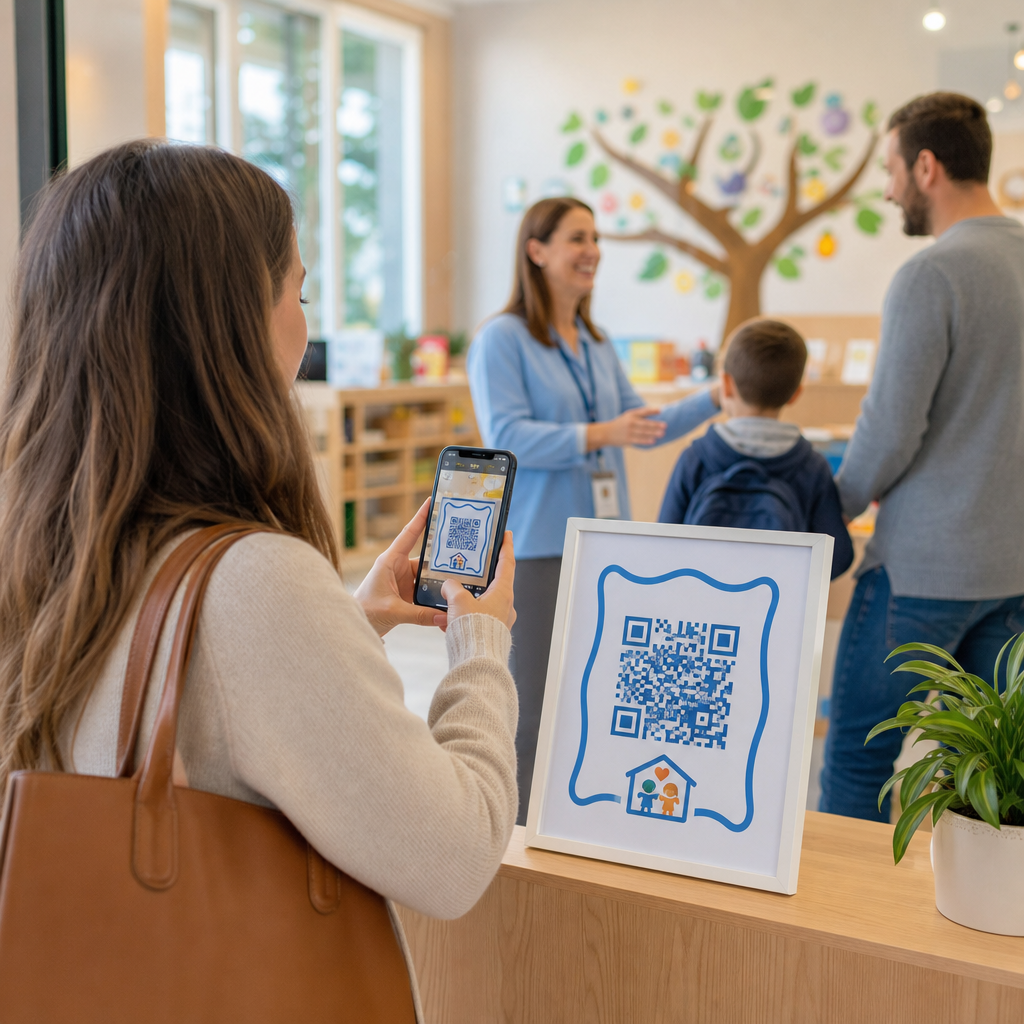
Transitioning to digital sign-ins eliminates physical paper logs and reduces morning check-in delays. Parents can use their own mobile devices to scan a displayed code, complete a brief sign-in form, and proceed to their child’s classroom without touching shared pens or clipboards.

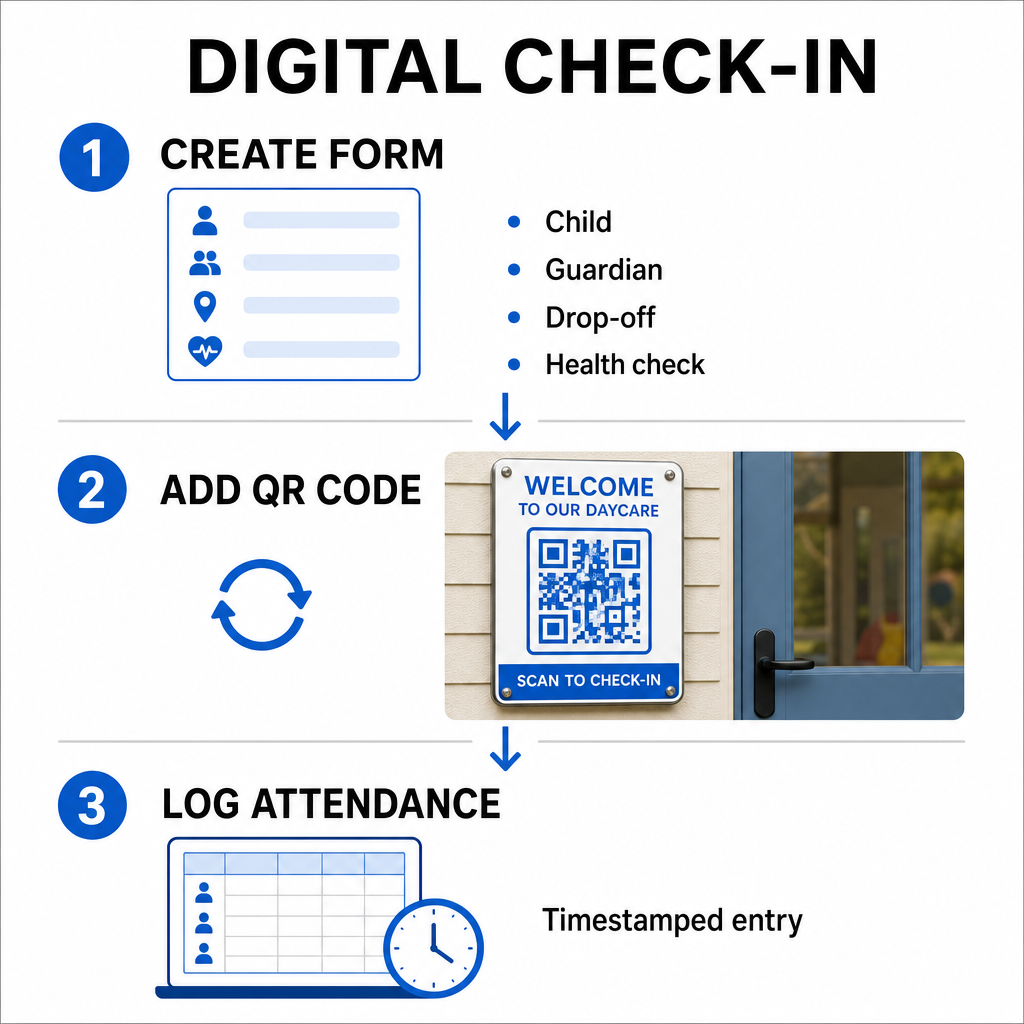
Setting up a digital attendance system involves a simple three-step workflow:

Digital check-in workflow
  • Create your check-in form: Build an online check-in form using tools like Google Forms or Typeform. Include fields for the child’s name, parent or guardian name, drop-off time, and daily health screening questions.
  • Generate a dynamic QR code: Link your form URL using an 출석 QR 코드 생성기 또는 Google 양식 QR 코드 생성기. Selecting dynamic QR codes lets you update destination links or modify forms in the future without reprinting physical posters.
  • Automate record collection: Configure your online form to log entries automatically into a centralized spreadsheet, such as Google Sheets. Every scan generates a timestamped entry that staff can review in real time.

For administrative pick-up verification, your center can also issue individual QR badges to authorized pickup persons. Staff members can use a web-based QR 코드 스캐너 on a tablet or smartphone to scan parent badges, ensuring swift identity verification during peak afternoon hours. You can also explore sector-specific workflows across various QR code industry solutions to see how digital touchpoints improve operations.

Automate Your Childcare Attendance Tracking Need a faster, contact-free way to log student arrivals and stay audit-ready? Use the 출석 QR 코드 생성기 to create trackable check-in points for your center today.

Meeting State and Federal Attendance Compliance

Childcare facilities must adhere to strict record-keeping standards to maintain licensing and retain federal funding. Paper sign-in sheets are prone to missing signatures, illegible handwriting, and misplaced binders. Digital check-in workflows resolve these issues by creating immediate, unalterable digital audit trails.

Digital QR systems assist with several key compliance frameworks:

  • Child Care and Development Fund (CCDF): Federal CCDF funding rules require childcare providers to maintain detailed, documented attendance records for at least three years to qualify for subsidy reimbursements.
  • Child and Adult Care Food Program (CACFP): Under federal regulations (7 CFR 226.15(e)), centers participating in CACFP must maintain accurate daily attendance records separately from meal counts. Automated logs ensure these records stay accurate for fiscal reviews.
  • State Licensing Mandates: States such as Texas, Washington, and Florida require childcare centers to maintain daily tracking systems recording arrival times, departure times, and unique identifiers or authorized signatures. Automated timestamps satisfy state licensing requirements for precise time tracking.

Digital records can also be backed up to cloud servers, helping your center maintain strong business continuity and disaster recovery plans for vital administrative files.

Creating Contactless Workflows for Forms and Handbooks

Beyond daily sign-ins, QR codes streamline communication across your facility by connecting parents instantly to essential digital documents.

사용할 수 있습니다 PDF QR 코드 생성기 to post scannable codes on classroom doors, front desk counters, or notice boards. This allows parents to open and view important materials on their personal phones, such as:

  • Parent handbooks and center policies
  • Monthly meal and snack menus
  • Emergency contact forms and medical consents
  • Seasonal activity sign-ups and permission slips

Additionally, utilizing a 링크 QR 코드 생성기 lets you route parents directly to online tuition payment portals, enrollment portals, or staff feedback forms. By converting physical paperwork into accessible digital links, your center cuts printing costs while keeping families informed. Discover all available QR code platform features to expand your facility’s digital strategy.

Best Practices for Printing and Placing Daycare QR Codes

To maintain high scan rates and avoid check-in delays, your printed QR codes must follow established readability standards. Poor lighting, undersized prints, or reflective surfaces can hinder camera sensors during peak morning drop-offs.

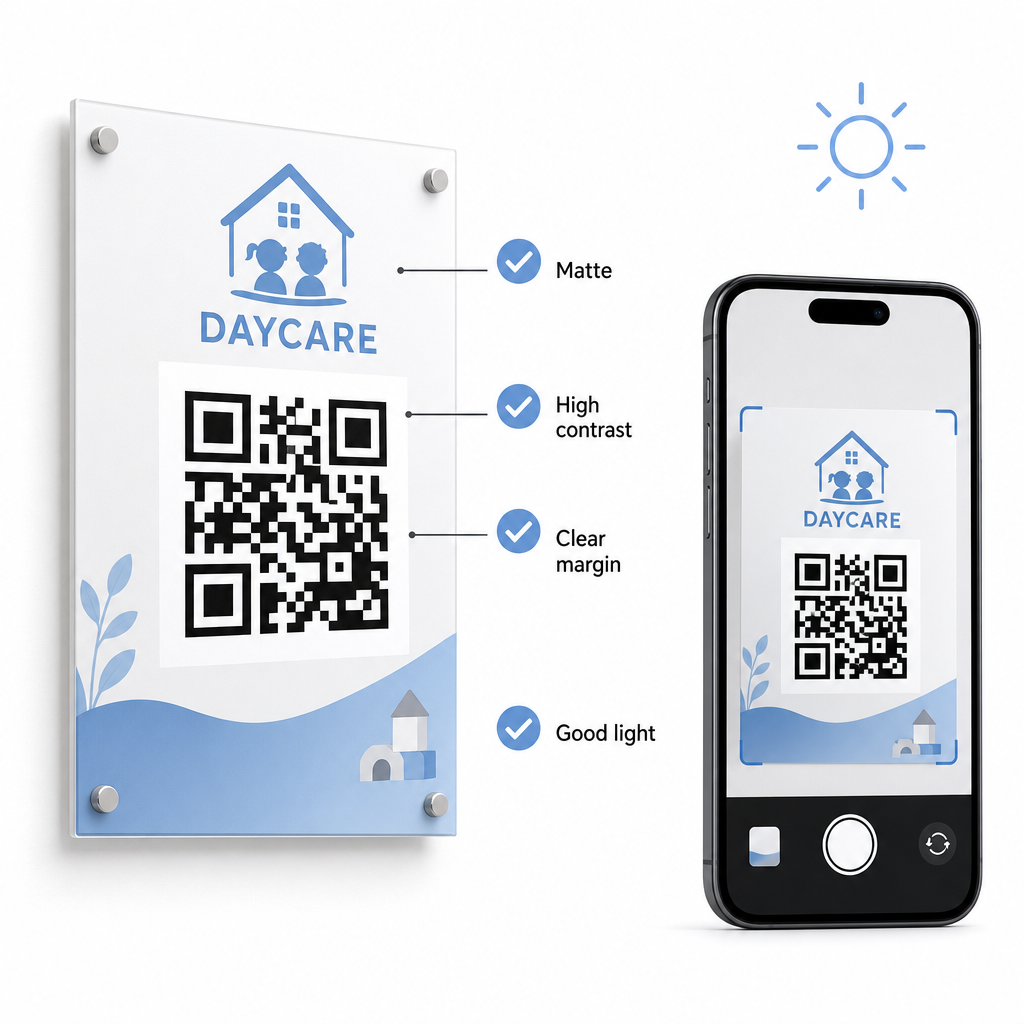
Readable QR code setup

Follow these technical guidelines when displaying codes in your facility:

  • Maintain appropriate size ratios: Follow a 10:1 ratio between scanning distance and code width, maintaining a minimum size of 2×2 cm for close-range scanning.
  • Ensure high color contrast: Use dark patterns on light backgrounds to achieve a 21:1 contrast ratio, ensuring at least a 4.5:1 ratio for smaller prints.
  • Preserve quiet zone margins: Keep a clear white border around all four sides of the code to prevent nearby text or visuals from interfering with scanners.
  • Select non-reflective materials: Print signage on matte paper or board rather than glossy laminate or glass to prevent lighting glare.
  • Export vector file formats: Download print files in high-resolution vector formats like SVG or EPS so images remain sharp when scaled.
  • Test in real-world conditions: Scan test prints across multiple mobile devices under various lighting conditions before installing permanent signage. Review our detailed guide on QR 코드 가독성을 위한 모범 사례 for additional technical guidance.

Data Security, Privacy, and Parent Safety

Handling child and family information requires strict attention to data security. Childcare operations collecting personal details online must align with federal standards, including the Children’s Online Privacy Protection Act (COPPA) where child-directed digital services are involved, and maintain clear disclosures regarding how parent data is stored and managed.

Review these key security measures when deploying QR codes in your facility:

  • Display clear privacy notices: Ensure that linked forms or landing pages include a direct link to your center’s privacy policy before collecting family data.
  • Inspect physical signage regularly: Verify that unauthorized stickers or altered codes have not been placed over original sign-in boards, as physical tampering can redirect users to malicious sites.
  • Secure administrative data access: Encrypt online check-in forms with HTTPS protocols and restrict administrative spreadsheet access to authorized personnel only.

By applying proper security practices and selecting reliable tools, you protect family privacy while optimizing daily center management. For a broader look at regulatory frameworks, consult our overview of QR code privacy laws and key regulations.

Modernizing your daycare check-in process reduces entryway congestion, improves data accuracy, and simplifies audit compliance. Replacing physical paper logs with dynamic QR codes gives parents a fast, hygienic drop-off experience while keeping administrative records organized in real time. Start designing your custom check-in workflow today by creating dynamic codes and custom forms tailored to your center’s daily operational needs.

자주 묻는 질문

What type of QR code is best for daycare check-in?

Dynamic QR codes are ideal for daycare check-ins because they allow administrators to update linked forms or destination URLs without reprinting physical door signage.

Do parents need to download a special app to scan the check-in QR code?

No, parents do not need a special app. Most modern smartphones scan QR codes directly through their native camera applications.

How long must daycare centers keep digital attendance logs for compliance?

Federal subsidy programs such as CCDF and CACFP require centers to maintain attendance documentation for at least three years, though state regulations or specific funding contracts may mandate longer retention periods.

작성자 정보

시임 코스타비는 페이지루트의 콘텐츠 책임자입니다. 그는 페이지루트의 혁신적인 QR 코드 생성 서비스에 대한 글을 쓰고 있습니다. 5년 이상 QR 코드 분야에서 쌓아온 깊이 있는 전문 지식을 바탕으로, 시임은 이 분야의 전문가로 인정받고 있습니다. 그는 QR 기술을 활용하여 디지털 상호작용을 간소화하고 향상시키는 데 크게 기여하고 있습니다.

범주
에 대해 자세히 알아보기

온라인으로 QR 코드를 생성해야하는 경우 QR 코드 만들기 무료로 여기!
Pageloot는 #1 Go-To 솔루션 QR 코드를 만들고 스캔합니다.

BL-0348

블로그 세대

20,000개 이상의 브랜드로부터 신뢰를 받아 더 많은 매출, 리뷰, 팔로워를 확보했습니다.

클라이언트 로고
최고 브랜드의 신뢰
5 중 4.8 평가

4.86 / 5 별점

휴고 로랑
휴고 로랑
레스토랑 주인
가장 쉽고 안정적인 QR 코드 생성기. PDF 파일을 즉시 업로드할 수 있습니다. 이제 레스토랑 메뉴가 디지털화되었습니다.
루카스 얀센
루카스 얀센
부동산 개발사
이것은 훌륭한 도구이며 QR 코드를 사용하면 원하는 곳으로 이동할 수 있습니다. 우리는 위치 QR 코드만 사용하지만 유용한 기능이 너무 많습니다.

엠마 모레티
엠마 모레티
소매 제품
사용하기 쉽고 빠릅니다. 그것은 훌륭하게 작동하고 완벽한 이미지를 생성하므로 직원들이 내 vCard를 다운로드할 수 있습니다.

휴고 로랑
휴고 로랑
레스토랑 주인
가장 쉽고 안정적인 QR 코드 생성기. PDF 파일을 즉시 업로드할 수 있습니다. 이제 레스토랑 메뉴가 디지털화되었습니다.
루카스 얀센
루카스 얀센
부동산 개발사
이것은 훌륭한 도구이며 QR 코드를 사용하면 원하는 곳으로 이동할 수 있습니다. 우리는 위치 QR 코드만 사용하지만 유용한 기능이 너무 많습니다.
엠마 모레티
엠마 모레티
소매 제품
사용하기 쉽고 빠릅니다. 그것은 훌륭하게 작동하고 완벽한 이미지를 생성하므로 직원들이 내 vCard를 다운로드할 수 있습니다.
더 많은 QR 코드보기
인스타그램 QR 코드 스캔
QR 코드 만들기 인스 타 그램
무엇이든 디지털 경험으로 전환하세요 3분 이내에.

14일 무료 체험.

신용카드는 필요 없습니다.

첫 구매 시 30% 할인

코드를 사용하세요:

MP3 파일 공유

PDF QR 코드를 생성하려면 가입하세요

필요한 모든 것을 업로드하고 표시합니다.

  • 오디오 파일
  • 팟캐스트
  • 음악

가입 시 14일 무료 체험.
체험 기간 후 QR 코드 만료.

오디오 mp3 QR 코드를 생성하려면 가입하세요

프레임으로 더 많은 스캔 확보

QR 코드에 더 많은 프레임을 추가하려면 가입하세요

클릭 유도 문안 프레임은 고객이 QR 코드와 쉽게 상호 작용할 수 있도록 도와줍니다. 사용해 보세요!

가입 시 14일 무료 체험.
체험 기간 후 QR 코드 만료.

QR 코드에 더 많은 프레임을 추가하려면 가입하세요

도형으로 더 많은 스타일 추가

더 많은 도형을 만들려면 가입하세요

QR 코드는 정사각형일 필요가 없습니다. 브랜드 이미지에 맞게 전환해 보세요.

가입 시 14일 무료 체험.
체험 기간 후 QR 코드 만료.

더 많은 도형을 만들려면 가입하세요

QR 코드에 로고 추가

QR 코드에 로고를 추가하려면 가입하세요

로고와 브랜드를 추가하여 QR 코드를 돋보이게 만드세요.

가입 시 14일 무료 체험.
체험 기간 후 QR 코드 만료.

QR 코드에 로고를 추가하려면 가입하세요

스마트 앱 스토어 리디렉션

앱 스토어 QR 코드를 생성하려면 가입하세요

스마트 앱 스토어 QR 코드에 앱 링크를 추가하세요. 사용자는 장치에 따라 리디렉션됩니다.

가입 시 14일 무료 체험.
체험 기간 후 QR 코드 만료.

앱 스토어 QR 코드를 생성하려면 가입하세요

QR 코드에 이미지 업로드

이미지 QR 코드를 생성하려면 가입하세요

이미지를 쉽게 공유하세요. 몇 초 안에 동적으로 이미지를 변경하십시오.

가입 시 14일 무료 체험.
체험 기간 후 QR 코드 만료.

이미지 QR 코드를 생성하려면 가입하세요

PDF 파일 공유

PDF QR 코드를 생성하려면 가입하세요

필요한 모든 것을 업로드하고 표시합니다.

  • 메뉴 및 가격표
  • 명령
  • 모든 문서

가입 시 14일 무료 체험.
체험 기간 후 QR 코드 만료.

PDF QR 코드를 생성하려면 가입하세요

인쇄 없이 나중에 편집

다시 인쇄하지 않고 QR 코드를 편집하려면 가입하세요

동적 QR 코드를 사용하면 새 QR 코드를 인쇄하지 않고도 QR 코드의 내용을 변경할 수 있습니다.

가입 시 14일 무료 체험.
체험 기간 후 QR 코드 만료.

다시 인쇄하지 않고 QR 코드를 편집하려면 가입하세요

언제? 어디서? QR 코드 스캔 추적

QR 코드를 추적하려면 가입하세요

어떤 QR 코드가 가장 많이 스캔되고 무엇이 고객을 가장 흥분시키는지 알아보십시오.

가입 시 14일 무료 체험.
체험 기간 후 QR 코드 만료.

QR 코드를 추적하려면 가입하세요

인쇄 준비 파일 제공

PDF 및 SVG와 같은 벡터 QR 코드를 생성하려면 가입하세요.

.EPS, .PDF, .SVG

HD 해상도로 QR 코드를 다운로드하고 싶으신가요? 인쇄할 준비가 된 벡터 또는 픽셀 형식을 가져옵니다.

가입 시 14일 무료 체험.
체험 기간 후 QR 코드 만료.

PDF 및 SVG와 같은 벡터 QR 코드를 생성하려면 가입하세요.

기다리세요. 귀하의 QR 코드는 로드 중... 로드 중...

나만의 것으로 만들기

나중을 위해 QR 코드를 저장하려면 가입하세요.

다양한 색상, 로고 및 클릭 유도문안 프레임으로 멋진 QR 코드를 만들어 더 많은 스캔을 받으세요.

가입 시 14일 무료 체험.
체험 기간 후 QR 코드 만료.

나중을 위해 QR 코드를 저장하려면 가입하세요.