ホーム > ユースケース > How to Use QR Codes on Candle Packaging and Labels
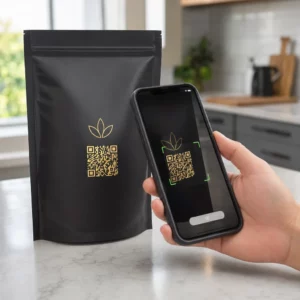
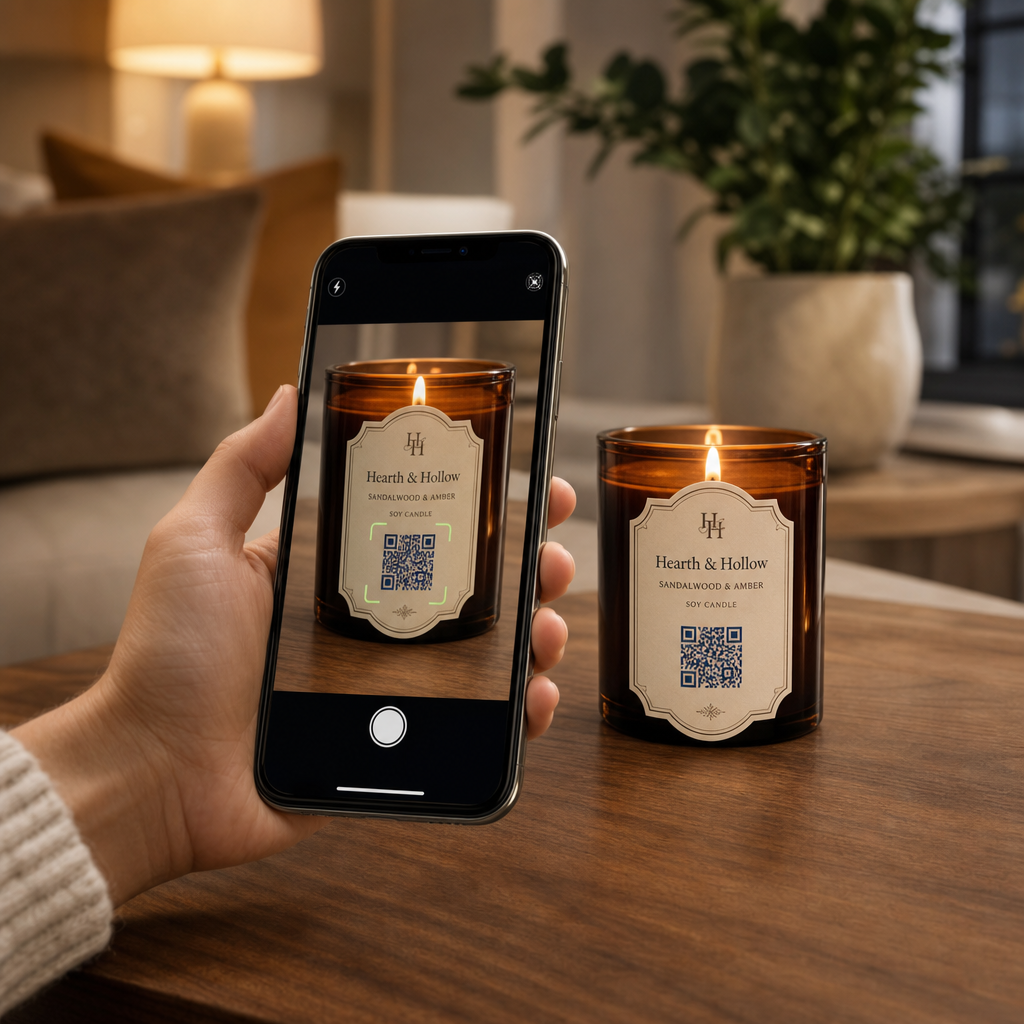
Scanning a candle label

How to Use QR Codes on Candle Packaging and Labels

Discover how QR codes on candle packaging can share care guides, custom playlists, and discounts while keeping your labels clean and legally compliant.
Updated on 7月 27, 2026
目次

Are you struggling to share your brand story and promotions on small candle labels? Physical label real estate is extremely limited, forcing makers to sacrifice product narratives, usage guides, or gift messages. Adding QR codes to your packaging bridges physical products with interactive digital content while keeping your visual layout clean.

Creative Ways to Use QR Codes on Candle Labels

Candles are versatile products commonly purchased as personal home decor, wellness items, or thoughtful gifts. Integrating a scannable digital point onto your container or packaging elevates an ordinary product into an engaging brand experience.

  • Delivering personalized gift messages: Enabling buyers to attach video, audio, or written notes using a text QR code generator または MP3 QRコードジェネレーター turns candles into memorable gifts for holidays, weddings, or memorials.
  • Pairing fragrance with curated playlists: Matching scent profiles with audio vibes using a Spotify QRコードジェネレーター lets buyers scan the jar to play music matched to the scent, with additional setup details available in our guide on sharing Spotify playlists.
  • Driving repeat sales through promotional discounts: Encouraging customer loyalty by offering targeted deals using a クーポンQRコードジェネレーター directly on the box drives repeat online orders.
  • Providing comprehensive candle care instructions: Sharing details about hand-poured wax, essential oil profiles, wick trimming guidelines, and jar repurposing tips keeps physical labels clutter-free.

Balancing Regulatory Compliance with Label Space

When planning strategic placements for placing QR codes on product packaging, you must balance digital engagement with mandatory legal packaging requirements.

In the United States, consumer candle labels must follow the Fair Packaging and Labeling Act (FPLA). This federal law mandates that primary display panels include specific informational elements:

  • A statement of identity clearly describing the item (such as “Scented Soy Candle”).
  • The net quantity of contents displayed in both U.S. customary units (ounces) and metric units (grams).
  • The business name and physical location (city, state, and ZIP code) of the manufacturer, packer, or distributor.

Furthermore, safety standards established under ASTM F2058 require explicit fire safety warnings. Standard warning labels outline three core precautions: “Burn within sight,” “Keep away from flammables,” and “Keep away from children and pets.” If you place full fire safety instructions on the bottom panel of a jar, packaging standards specify that the side or top label must instruct users to “See bottom panel for safety information.”

Moving background stories, fragrance pyramids, and marketing links behind a scannable code helps satisfy mandatory regulatory text requirements while protecting your overall packaging aesthetic.

Boost Repeat Orders with Dynamic Discounts Want to reward customer loyalty without reprinting your candle packaging for every campaign? Create editable discount links using the クーポンQRコードジェネレーター で今すぐ利用可能なツールをご覧ください。.

Design and Printing Guidelines for Scannable Candle Labels

A scannable code must function reliably under everyday lighting and handling conditions. When applying designs to glass jars, aluminum tins, or cardboard boxes, apply critical QRコードの読みやすさに関するベストプラクティス:

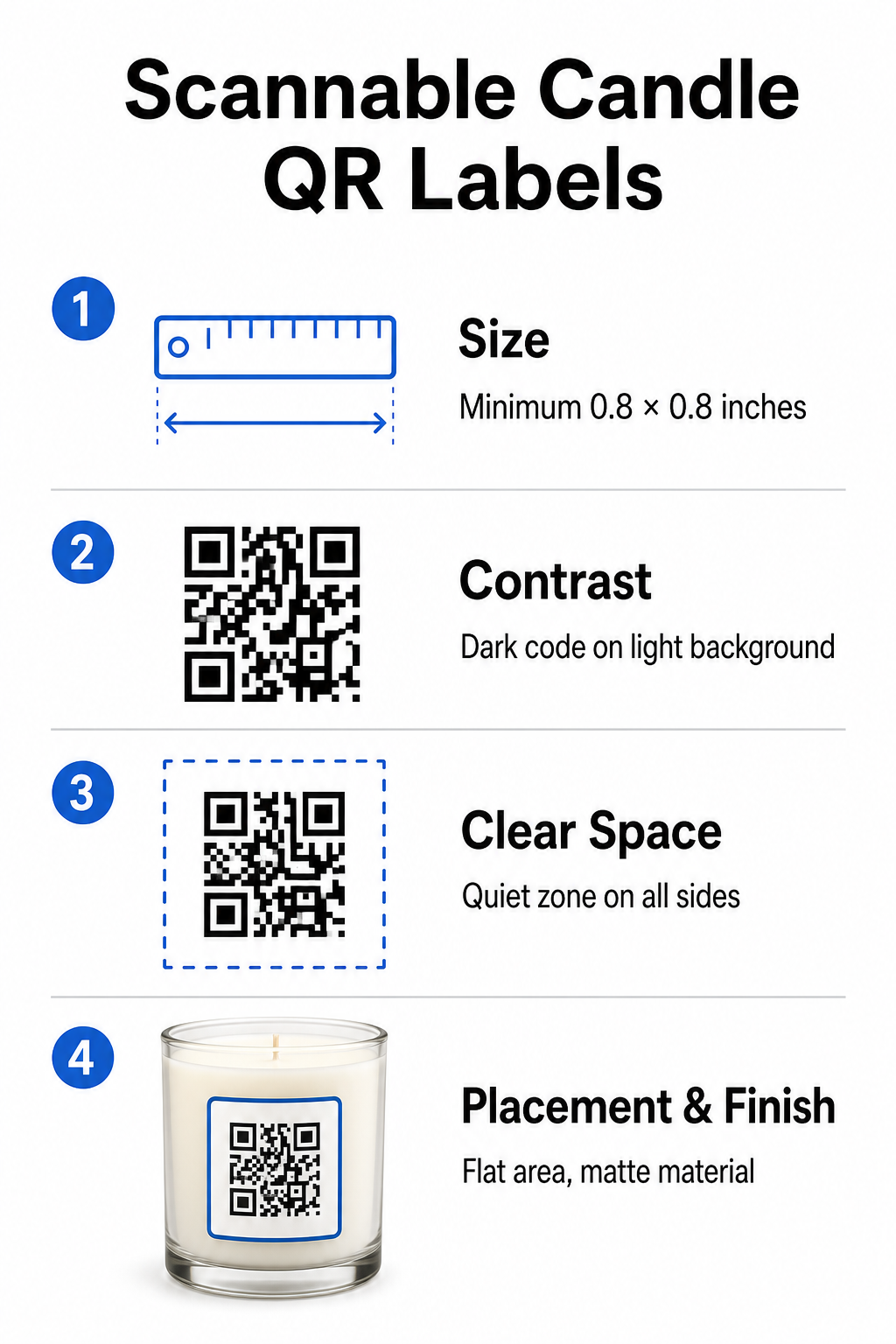
Candle QR design guidelines
  • Maintaining proper print dimensions: Keep physical dimensions to at least 0.8 x 0.8インチ (2 x 2 cm) for labels, expanding to 3 x 3 cm for outer boxes as noted in our guide to QR code sizes.
  • Ensuring strong visual contrast: Use dark patterns on light backgrounds so standard phone camera sensors can easily read the matrix.
  • Preserving an adequate quiet zone: Maintain an unprinted border around all four sides that measures at least four times the module width.
  • Mitigating container glare and surface curvature: Place codes on flat secondary packaging or keep label codes narrow to prevent curved distortion, choosing matte or semi-gloss label materials over high-gloss finishes.
  • Exporting high-resolution vector assets: Save artwork in SVG or EPS format at 300 DPI or higher to keep edges sharp, following our guide to printing a QR code on a label.

Enhance Your Candle Experience with Sound Pair your signature scents with custom audio tracks or playlists to captivate your customers. Use the Spotify QRコードジェネレーター to create scannable music codes for your products.

Comparing Static and Dynamic QR Codes for Candle Brands

Selecting the correct code architecture dictates whether your post-sale marketing remains adaptable over time.

機能 静的QRコード 動的QRコード
Editable Link Permanent (Cannot be changed after printing) Fully editable anytime without reprinting packaging
スキャン分析 トラッキング不可 Tracks total scans, location, device OS, and time
パターン密度 Denser pattern with long destination URLs Clean, lower-density pattern using short redirect links
ベスト・ユースケース Permanent instructions or simple text notes Seasonal sales, changing playlists, dynamic gift messages

を使用している。 ダイナミックQRコードジェネレーター allows you to change promotional destinations, refresh seasonal music playlists, or update digital gift messages long after your products leave the shelves. For complete implementation details, review our comprehensive guide to QR codes for product labels.

How to Create Branded QR Codes for Candle Packaging

Designing customized, print-ready codes for your candle packaging requires only a few structured steps:

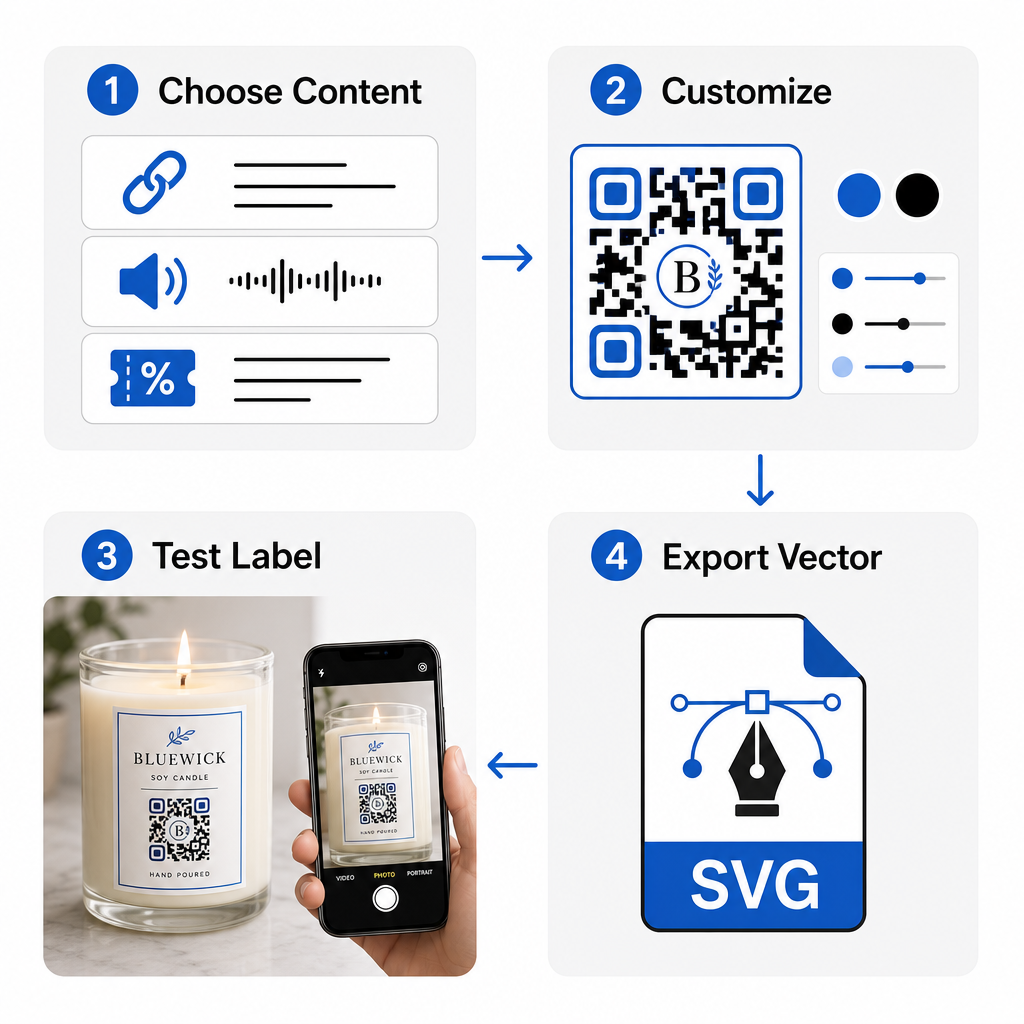
Branded QR creation workflow
  • Selecting your QR code type: Decide whether to direct buyers to a website, audio file, PDF guide, or coupon using our フリーのQRコードジェネレータ.
  • Entering your destination data: Input the destination web address or upload your digital media file.
  • Customizing the visual design: Apply custom brand colors, frames, and logos with a ロゴ付きQRコードジェネレーター to build visual trust.
  • Testing across multiple devices: Verify scan performance on test prints using different smartphones and lighting environments.
  • Downloading print-ready files: Export vector files in SVG or EPS format for high-resolution printing.

Integrating scannable codes into your candle packaging transforms standard physical products into interactive brand touchpoints without overcrowding required label space. Whether you are embedding seasonal audio playlists, offering promotional discounts, or delivering personalized customer messages, digital links give your brand long-term flexibility. Start creating trackable, customizable codes today with Pageloot’s フリーのQRコードジェネレータ to elevate your candle packaging strategy.

よくある質問

Can I place a QR code on the bottom safety label of a candle container?

Yes. You can print a QR code on the bottom safety panel alongside fire warnings, provided you maintain sufficient color contrast, an adequate quiet zone, and a clear call-to-action on the primary label pointing customers to scan the bottom.

What is the minimum recommended size for a QR code printed on candle packaging?

The minimum recommended size for a printed QR code on a primary candle label is 0.8 x 0.8 inches (2 x 2 cm). For secondary outer packaging or shipping boxes, a size of 3 x 3 cm ensures faster and more consistent scanning.

What happens if I need to update my QR code destination after printing packaging?

If you use dynamic QR codes, you can change the target URL or digital content in your management dashboard at any time without reprinting your physical candle labels or packaging boxes.

著者について

Siim KostabiはPagelootのコンテンツリードです。Pagelootの革新的なQRコード生成サービスについて執筆しています。5年以上にわたるQRコードに関する深い専門知識を持つSiimは、この分野の専門家です。QRテクノロジーを活用してデジタルインタラクションを簡素化・拡張する上で、大きな進歩を遂げています。.

カテゴリー
について詳しくはこちら
✅ QRコードの#1ソリューション

オンラインでQRコードを作成する必要がある場合は QRコードを作る ここで無料で
ページルートは #1のGo-Toソリューション でQRコードを作成してスキャンすることができます。

BL-0325

ブログジェネ

売上、レビュー、フォロワーを増やすために 20,000 を超えるブランドから信頼されています。

クライアントのロゴ
トップブランドから信頼される
5 のうち 4.8 と評価しました

4.86 / 5つ星評価

ユーゴ・ローラン
ユーゴ・ローラン
レストランオーナー
最も簡単で信頼性の高いQRコードジェネレータです。PDFファイルを即座にアップロードできます。レストランのメニューがデジタル化されました。
ルーカス・ジャンセン
ルーカス・ジャンセン
不動産開発業者
これは優れたツールで、QRコードでちょうど欲しいところに連れて行ってくれます。私たちは位置情報のQRコードしか使っていませんが、とても便利な機能がたくさんあります。
エマ・モレッティ
エマ・モレッティ
小売製品
使いやすいし、早い。素晴らしい機能で、完璧な画像を作成してくれるので、社員は私のvCardをダウンロードすることができます。
ユーゴ・ローラン
ユーゴ・ローラン
レストランオーナー
最も簡単で信頼性の高いQRコードジェネレータです。PDFファイルを即座にアップロードできます。レストランのメニューがデジタル化されました。
ルーカス・ジャンセン
ルーカス・ジャンセン
不動産開発業者
これは優れたツールで、QRコードでちょうど欲しいところに連れて行ってくれます。私たちは位置情報のQRコードしか使っていませんが、とても便利な機能がたくさんあります。
エマ・モレッティ
エマ・モレッティ
小売製品
使いやすいし、早い。素晴らしい機能で、完璧な画像を作成してくれるので、社員は私のvCardをダウンロードすることができます。
QRコードをもっと見る
化粧品用QRコードメーカー
のQRコード ビューティープロダクツ
あらゆるものをデジタル体験に変えよう 3分以内に。

14日間の無料トライアル。

クレジットカードは必要ありません。

初回購入で30%オフ

次のコードを使用してください:

MP3ファイルを共有

PDF QRコードを作成するにはサインアップしてください

必要なものをすべてアップロードして表示する。

  • オーディオファイル
  • ポッドキャスト
  • 音楽

サインアップで14日間無料トライアル。.
トライアル終了後、QRコードは期限切れになります。.

オーディオmp3 QRコードを作成するにはサインアップしてください

フレームでより多くのスキャンを獲得

QRコードにフレームを追加するにはサインアップしてください

コールトゥアクションフレームは、お客様が簡単にQRコードと対話できるようにします。ぜひお試しください。

サインアップで14日間無料トライアル。.
トライアル終了後、QRコードは期限切れになります。.

QRコードにフレームを追加するにはサインアップしてください

シェイプでスタイルを追加

より多くの図形を作成するにはサインアップしてください

QRコードは四角いものである必要はありません。あなたのブランドのイメージに合わせて変えてみてください。

サインアップで14日間無料トライアル。.
トライアル終了後、QRコードは期限切れになります。.

より多くの図形を作成するにはサインアップしてください

QRコードにロゴを追加

QRコードにロゴを追加するにはサインアップしてください

QRコードにロゴやブランドを入れることで、目立たせることができます。

サインアップで14日間無料トライアル。.
トライアル終了後、QRコードは期限切れになります。.

QRコードにロゴを追加するにはサインアップしてください

スマートなApp Storeリダイレクト

アプリストアのQRコードを作成するにはサインアップしてください

スマートなApp StoreのQRコードに、あなたのアプリのリンクを追加します。ユーザーは、デバイスに応じてリダイレクトされます。

サインアップで14日間無料トライアル。.
トライアル終了後、QRコードは期限切れになります。.

アプリストアのQRコードを作成するにはサインアップしてください

QRコードに画像をアップロード

画像QRコードを作成するにはサインアップしてください

画像を簡単に共有できます。どんな画像も、数秒でダイナミックに変化します。

サインアップで14日間無料トライアル。.
トライアル終了後、QRコードは期限切れになります。.

画像QRコードを作成するにはサインアップしてください

PDFファイルを共有

PDF QRコードを作成するにはサインアップしてください

必要なものをすべてアップロードして表示する。

  • メニュー&プライスリスト
  • 指示
  • 任意の書類

サインアップで14日間無料トライアル。.
トライアル終了後、QRコードは期限切れになります。.

PDF QRコードを作成するにはサインアップしてください

印刷せずに後で編集

再度印刷せずにQRコードを編集するにはサインアップしてください

ダイナミックQRコードは、新たにQRコードを印刷することなく、QRコードの内容を変更することができます。

サインアップで14日間無料トライアル。.
トライアル終了後、QRコードは期限切れになります。.

再度印刷せずにQRコードを編集するにはサインアップしてください

いつ?どこで?QRコードのスキャンを追跡

QRコードを追跡するにはサインアップしてください

どのQRコードが最も多くスキャンされ、何が最も顧客を喜ばせているのかを知ることができます。

サインアップで14日間無料トライアル。.
トライアル終了後、QRコードは期限切れになります。.

QRコードを追跡するにはサインアップしてください

印刷可能なファイルが利用可能

PDFやSVGのようなベクターQRコードを作成するにはサインアップしてください

.eps、.pdf、.svg

QRコードをHD解像度でダウンロードしたいですか?すぐに印刷できるベクターまたはピクセル形式を入手しましょう。

サインアップで14日間無料トライアル。.
トライアル終了後、QRコードは期限切れになります。.

PDFやSVGのようなベクターQRコードを作成するにはサインアップしてください

しばらくお待ちください。あなたのQRコードは ロード... ロード...

あなただけのものに

サインアップしてQRコードを後で保存してください

異なる色、ロゴ、コールトゥアクションフレームで素晴らしいQRコードを作成することで、より多くのスキャンを得ることができます。

サインアップで14日間無料トライアル。.
トライアル終了後、QRコードは期限切れになります。.

サインアップしてQRコードを後で保存してください