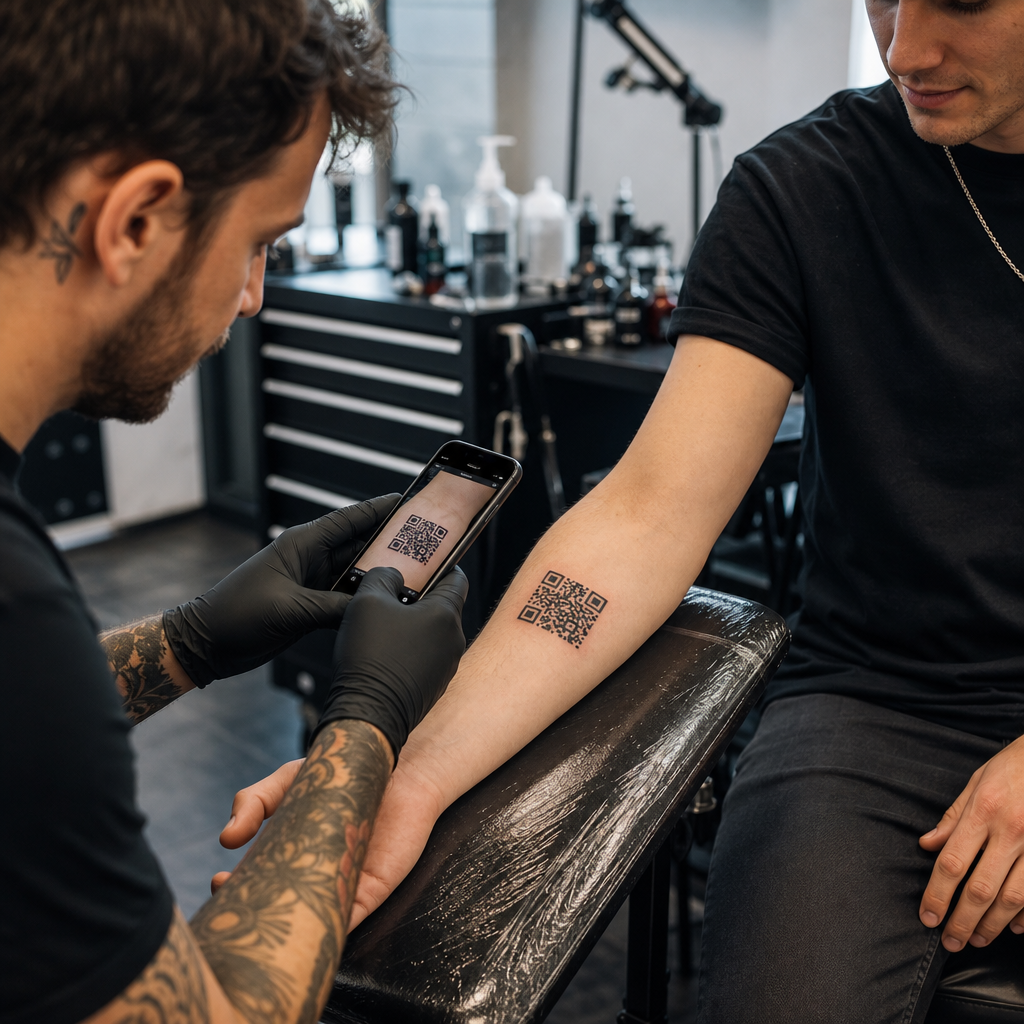

Vai apsverat QR koda tetovēšanu klientam vai tā izmantošanu sava veikala mārketingā, bet uztraucaties, ka tas pārstās skenēt? Nefunkcionējošs ādas tetovējums rada pastāvīgu klientu neapmierinātību, savukārt bojāti reklāmas kodi izšķērdē jūsu mārketinga budžetu. Lūk, kas jums jāzina par ādas fiziku, skenējamības riskiem un studijas mārketinga labāko praksi.
QR koda tetovējumu tehniskā dzīvotspēja
Skenējama QR koda tetovēšana tieši uz cilvēka ādas ir tehniski iespējama, taču tas rada ievērojamas fiziskas grūtības. Atšķirībā no papīra vai plakanām izkārtnēm, cilvēka āda stiepjas, liecas un izliecas pār zemāk esošajām muskuļu grupām. Kad viedtālruņa kamera mēģina atšifrēt QR kodu, tā meklē tīru ģeometriju, atšķirīgas moduļa malas un precīzas kvadrātveida proporcijas. Ķermeņa kustības izkropļo šīs proporcijas, izraisot skenera programmatūras nepareizu datu modeļa nolasīšanu.
Laika gaitā dabiska ādas novecošanās un pigmentu migrācija rada papildu skenējamības riskus. Tintes daļiņas mikroskopiski izplatās zem ādas, tetovējumam gadu gaitā dzīstot un novecojot. Šī pakāpeniskā aso melno līniju mīkstināšana samazina mobilo ierīču sensoriem nepieciešamo moduļu atšķiršanas spēju.
Lai uz ādas veidotam kodam būtu jebkāda iespēja ilgtermiņā būt lasāmam, ir jāsaprot, kā kļūdu labošana darbojas rediģējamos QR kodos. QR kodi izmanto Rīda-Solomona kļūdu labošanas algoritmus, lai atgūtu trūkstošus vai neskaidrus datus, kas ir iedalīti četros standartizētos līmeņos:
- L līmenis (7%)Atgūst līdz pat 7% trūkstošo datu, padarot to nepiemērotu organiskām vai kustīgām virsmām.
- M līmenis (15%)Atgūst līdz pat 15% trūkstošo datu, kas kalpo kā standarts pamata drukas materiāliem.
- Q līmenis (25%)Atgūst līdz pat 25% trūkstošo datu, aizsargājot pret mērenu virsmas deformāciju.
- H līmenis (30%)Atgūst līdz pat 30% trūkstošo datu, nodrošinot maksimālu noturību, kas nepieciešama ādas lietojumprogrammām.
Pat ar H līmeņa kļūdu labošanu, uz ādas uztetovēta cietkodēta statiska saite neatgriezeniski sabojāsies, ja mainīsies vai pazudīs mērķa URL. Izmantojot dinamiskos kodus, tiek nodrošināts, ka pat tad, ja jūsu klients vēlēsies mainīt savu saistīto portfolio, sociālo tīklu profilu vai audio celiņu pēc gadiem, mērķa saite joprojām būs pilnībā rediģējama aiz tā paša fiziskā tetovējuma raksta.
Izveidojiet elastīgas saites pirms rakstīšanas ar tinti Nekad neiekodējiet cietkodā statisku saiti, kas varētu sabrukt gada laikā. Izmantojiet Dinamisks QR kodu ģenerators lai nodrošinātu, ka galamērķa saiti var atjaunināt jebkurā laikā.
Pastāvīgo ādas kodu dizaina un izvietošanas noteikumi
Ja klients uzstāj uz QR koda tetovējuma uzklāšanu, jums ir jāizturas pret ķermeņa izvietojumu un trafareta dizainu ar īpašu disciplīnu. Āda uzvedas līdzīgi kā elastīgi tekstilizstrādājumi, kur kustība rada dabisku saraušanos un stiepšanos. Plašāku kontekstu par elastīgām virsmām skatiet mūsu ceļvedī. Skenējami QR kodi apģērbam.
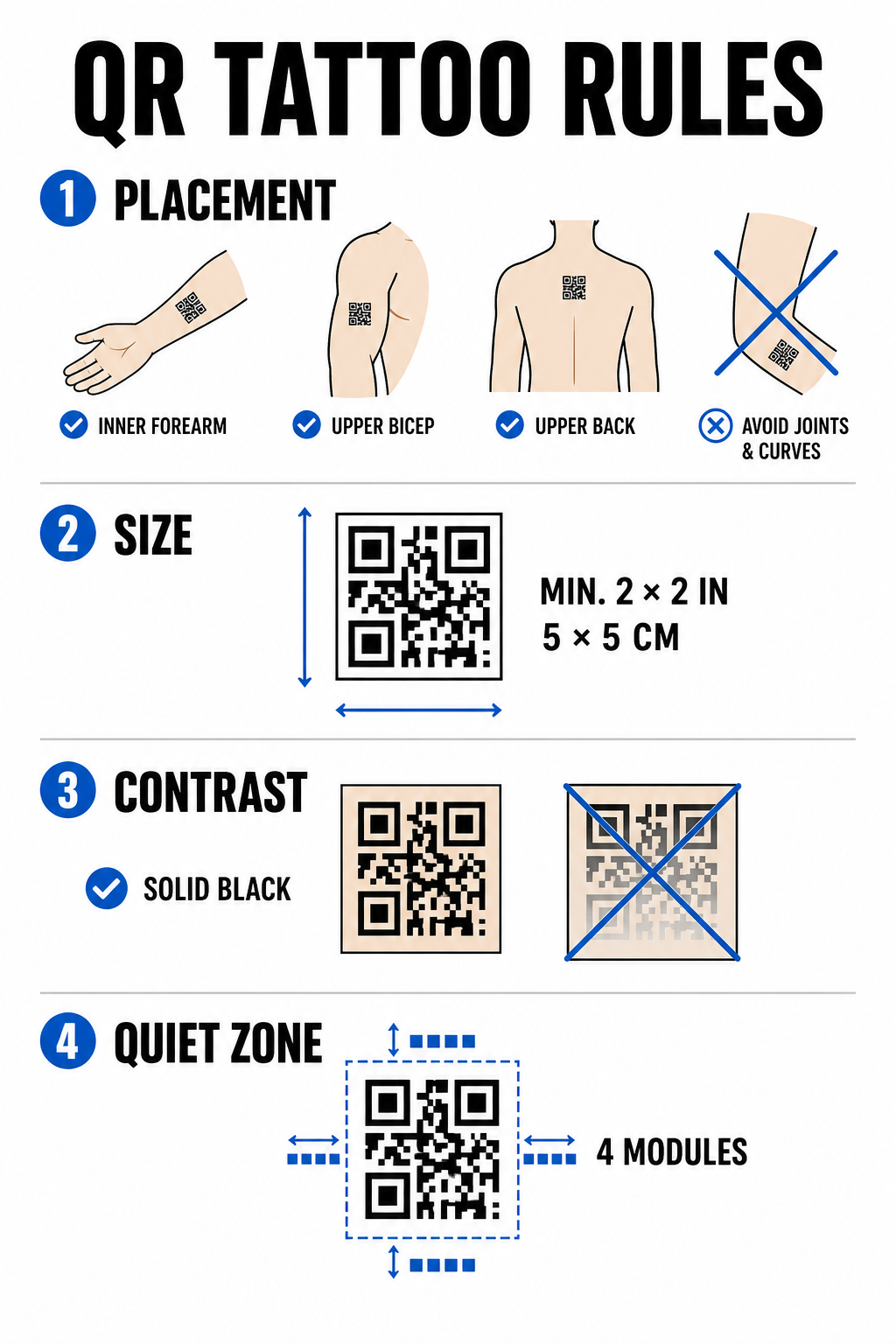
Lai laika gaitā samazinātu skenēšanas kļūmes, ievērojiet šos konstrukcijas projektēšanas ierobežojumus.
Izvietojuma izvēle
Izvēlieties plakanas, stabilas anatomiskas vietas ar minimālu muskuļu saliekšanos vai tauku sadalījuma nobīdi. Ideālas vietas ir apakšdelma iekšpuse, bicepsa augšdaļas plakanā daļa vai muguras augšdaļa zem kakla. Izvairieties no novietošanas uz locītavām, ribām, plaukstas locītavām, potītēm vai vietām, kur ir tendence uz ievērojamām strijām.
Izmēru ierobežojumi
Nekad netetējiet QR kodu, kas ir mazāks par 2 × 2 collām (5 × 5 cm). Blīvām datu struktūrām ir nepieciešami vēl lielāki izmēri, lai tās saglabātu salasāmību. Mazāki moduļi dažu gadu laikā saplūdīs cietā masā, tintei migrējot caur dermu, padarot kodu neskenējamu.
Kontrasta standarti
Skeneri balstās uz augstu kontrastu starp gaišu fona ādu un tumšu priekšplāna tinti. Vienmērīgi melna tinte uz gaišas līdz vidēji gaišas ādas nodrošina visaugstāko kontrasta attiecību. Izvairieties no krāsainu tinšu, nelielu gradientu vai baltas tintes izcēlumu izmantošanas datu režģa iekšpusē, jo kameras sensori šos vidējos toņus nolasa nekonsekventi. Skatiet stingrus noteikumus. krāsu kontrasta labāko praksi plānojot līnijas darbu.
Klusās zonas noteikumi
Katram kodam ir nepieciešama skaidra, nepārtraukta rezerve ap tā perimetru — tā sauktā klusā zona —, kuras platums ir vismaz četri moduļi. Neaptiniet apkārtējos mākslas darbus, ēnojumu vai fona aizpildītāju tuvu tetovējuma režģa ārējām malām.
| Faktors | Tetovēti QR kodi (āda) | Studijas mārketinga QR kodi (drukātā/digitālā formātā) |
|---|---|---|
| Izturība | Augsts fiziskais risks novecošanās un tintes izplatīšanās dēļ | Ilgmūžīgs un viegli nomaināms |
| Izmēra ierobežojums | Ierobežots pieejamā anatomiskās virsmas laukuma dēļ | Pielāgojams plakātiem, kartītēm un baneriem |
| Kļūdu labošana | Obligātais H līmenis (30%) | Standarta līmenis M (15%) vai līmenis H (30%) |
| Saišu pārvaldība | Nepieciešami dinamiskie kodi, lai novērstu bojātus URL | Izmanto dinamiskos kodus vienkāršai kampaņu atjaunināšanai |
Augstas ietekmes QR koda stratēģijas studijas mārketingam
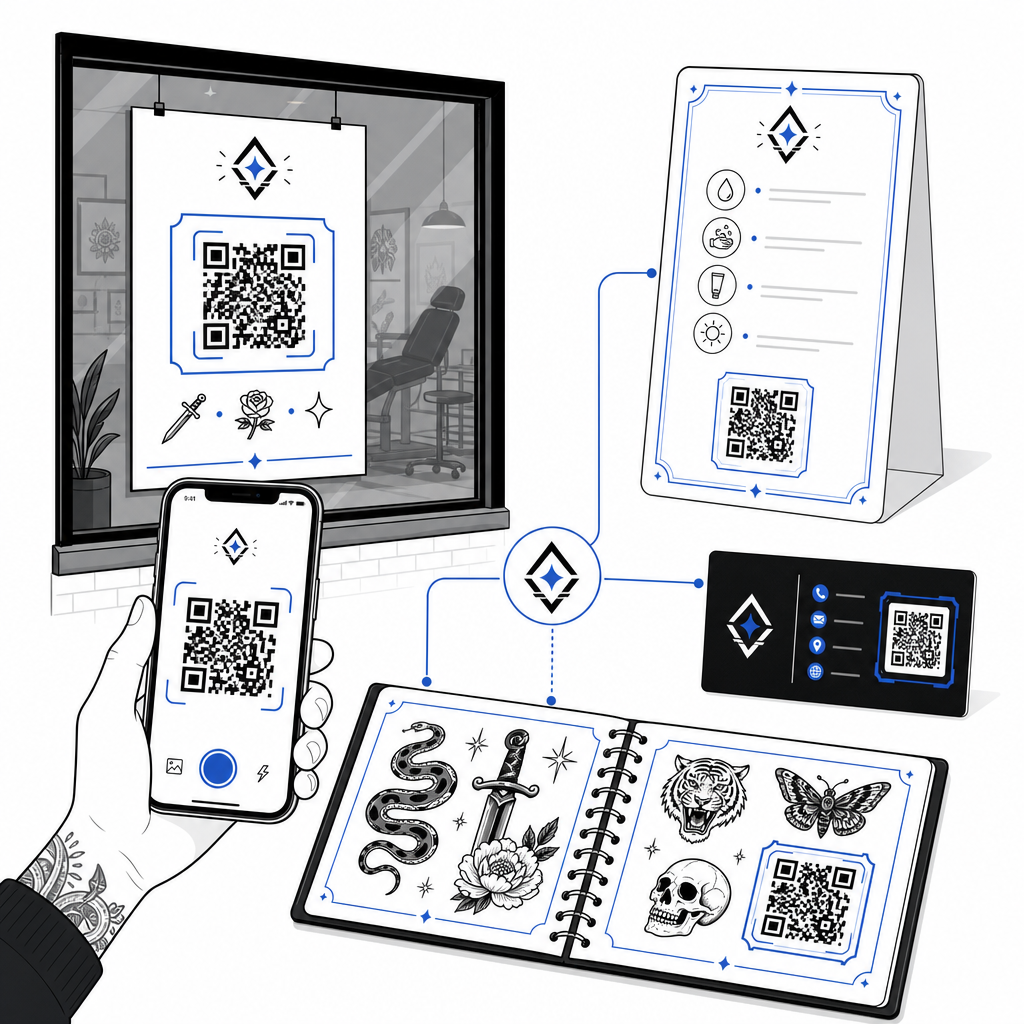
Lai gan kodu tetovēšana uz klientiem rada bioloģiskus riskus, QR kodu izmantošana studijas reklamēšanai uz fiziskām precēm sniedz uzticamu iespēju veicināt rezervāciju pieaugumu un pārvaldīt klientu saziņu. dažādas biznesa lietojumprogrammas.
Digitālās pēcaprūpes instrukcijas
Izsniedzot klientiem izdrukātas pēcaprūpes kartes ar dinamisko QR kodu, viņi var skenēt tās, lai piekļūtu tiešām aprūpes vadlīnijām, ieteicamajām produktu saitēm vai instrukciju video. Ja jūsu veikals atjaunina savus pēcaprūpes zīmola ieteikumus vai produktu partnerus, varat atjaunināt digitālo failu tiešsaistē, atkārtoti neizdrukājot fiziskās kartes.
Interaktīvas zibatmiņas lapas un portfolio
Iekļaujiet neuzkrītošus QR kodus blakus zibspuldžu dizainiem savu fizisko veikalu katalogos vai skatlogos. Klienti, kas gaida tikšanās, var skenēt zibspuldžu darbus, lai pārbaudītu cenas, priekšskatītu izlabotas fotogalerijas vai rezervētu konkrēto zibspuldžu mākslas darbu tieši jūsu plānošanas platformā.
Veikalu skatlogu izkārtnes un vizītkartes
Garāmgājēji var skenēt logu uzlīmes ārpus darba laika, lai pārbaudītu studijas pieejamību, skatītu mākslinieku sarakstus vai pārietu tieši uz Instagram plūsmām. Pievienojot zīmolu kodus mākslinieku vizītkartēm, tradicionālā tīklošanās tiek pārvērsta tūlītējā digitālo kontaktu saglabāšanā.
Izveidojiet pielāgotus zīmola kodus savai studijai Piešķiriet saviem mārketinga materiāliem profesionālu pieskārienu, pievienojot sava veikala logotipu un pielāgotus rāmju stilus. Izveidojiet savu zīmola dizainu ar QR koda ģenerators ar logotipu šodien.
Labākā prakse skenējamībai un testēšanai
Neatkarīgi no tā, vai gatavojat trafaretu ādas uzklāšanai vai veidojat reklāmas izkārtnes reģistratūras zonai, stingru kvalitātes pārbaužu ievērošana novērš neveiksmīgus skenējumus uz vietas.
- Saglabājiet datu vienkāršībuIzmantojiet saīsinātas dinamiskās saites, lai samazinātu datu blīvumu, kā rezultātā moduļu bloki ir lielāki un mazāk pārblīvēti.
- Pārbaudiet krāsu kontrastuUz gaiša fona uzklājiet tumši melnu tinti, nodrošinot, ka kontrasts atbilst mobilās kameras lasāmības prasībām.
- Saglabājiet kluso zonuSaglabājiet skaidru apmali ap visām četrām koda malām, bez fona ēnojuma, apkārtējiem tetovējumiem vai grafiskām apmalēm.
- Pārbaude reālos apstākļosPārbaudiet savu sākotnējo trafaretu uz ādas, izmantojot viedtālruņa kameru vai tiešsaistes lietotni. Skenēt QR kodu tiešsaistē kamēr klients kustina vai rotē savu ķermeni.
- Ievērojiet vispārējos lasāmības noteikumusPirms jebkura drukas vai tetovējuma projekta pabeigšanas pārskatiet ierīces kameras attālumu, apkārtējo apgaismojumu un līniju skaidrību. Apskatiet mūsu pilno sarakstu. QR koda lasāmības vadlīnijas lai veiktu jūsu dizaina auditu.
QR kodu apgūšana jūsu studijā
QR kodu tetovēšana uz cilvēka ādas prasa reālistiskas klienta cerības: bioloģiskā novecošanās, tintes izplatīšanās un ādas kustība padara ādas kodus daudz neparedzamākus nekā standarta drukātie materiāli. Izmantojot augstu kļūdu labošanas līmeni un dinamiskas saites, ādas tetovējumiem ir vislabākās izdzīvošanas iespējas. Tikmēr dinamisko QR kodu izvietošana jūsu veikala fiziskajos mārketinga materiālos nodrošina tīru un elastīgu saikni starp jūsu bezsaistes zibatmiņas sienu un tiešsaistes rezervāciju kalendāru.
Lai sāktu iestatīt izsekojamus, pielāgojamus kodus sava veikala izkārtnēm, pēcapstrādes lapām un portfolio, sāciet veidot ar Pageloot QR kodu ģenerators šodien.
Biežāk uzdotie jautājumi
Āda noveco, stiepjas, un tinte laika gaitā dabiski migrē, kas var aizmiglot asas malas un samazināt skenējamību. Izmantojot H līmeņa kļūdu labošanu un dinamiskos URL, tetovējums tiek maksimāli ilgi kalpots, taču ilgtermiņa salasāmība uz ādas nevar tikt garantēta.
QR koda tetovējumam jābūt vismaz 2 × 2 collu (5 × 5 cm) izmēram. Kodētiem datiem ir nepieciešama pietiekami daudz vietas, lai atsevišķi moduļi nesaplūstu kopā dzīšanas procesa laikā vai gadu gaitā, ādai kustoties.
Dinamiskie QR kodi ļauj mainīt galamērķa saiti, piemēram, atjaunināt savu zibatmiņas katalogu, rezervācijas veidlapu vai pēcapstrādes rokasgrāmatu, bez nepieciešamības atkārtoti drukāt fiziskas vizītkartes, plakātus vai logu uzlīmes.