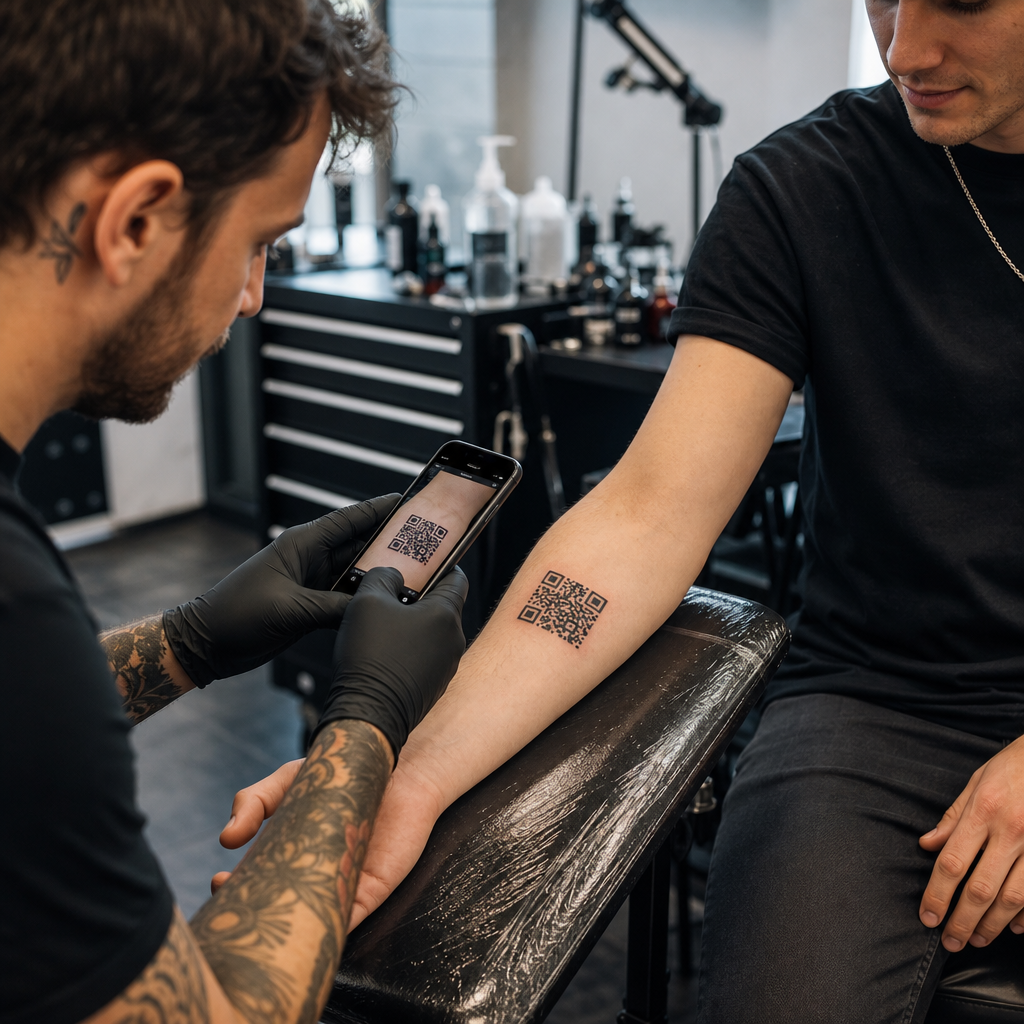

Erwägen Sie, einem Kunden einen QR-Code auf die Haut zu tätowieren oder ihn in Ihrem Studio-Marketing einzusetzen, befürchten aber, dass er nicht mehr funktioniert? Ein nicht funktionierendes Tattoo führt zu dauerhafter Kundenfrustration, während defekte Aktionscodes Ihr Marketingbudget verschwenden. Hier erfahren Sie alles Wichtige über die Physik der Haut, Risiken der Scanbarkeit und Best Practices im Studio-Marketing.
Die technische Machbarkeit von QR-Code-Tattoos
Das Tätowieren eines scannbaren QR-Codes direkt auf die menschliche Haut ist technisch möglich, birgt aber erhebliche physische Herausforderungen. Anders als Papier oder flache Schilder ist die menschliche Haut dehnbar, flexibel und wölbt sich über den darunterliegenden Muskelgruppen. Wenn eine Smartphone-Kamera versucht, einen QR-Code zu dekodieren, sucht sie nach klarer Geometrie, deutlichen Modulkanten und präzisen quadratischen Proportionen. Körperbewegungen verzerren diese Proportionen, wodurch die Scanner-Software das Datenmuster falsch interpretiert.
Mit der Zeit führen die natürliche Hautalterung und die Pigmentwanderung zu weiteren Risiken für die Scanbarkeit. Tintenpartikel verteilen sich mikroskopisch unter der Haut, während ein Tattoo über die Jahre abheilt und altert. Diese allmähliche Verwischung der scharfen schwarzen Linien verringert die von den Sensoren mobiler Geräte benötigte Modulunterscheidung.
Um einem auf einer Benutzeroberfläche basierenden Code überhaupt eine Chance auf langfristige Lesbarkeit zu geben, müssen Sie verstehen, wie Die Fehlerkorrektur funktioniert in editierbaren QR-Codes.. QR-Codes nutzen Reed-Solomon-Fehlerkorrekturalgorithmen, um fehlende oder verdeckte Daten wiederherzustellen, die in vier standardisierte Stufen unterteilt sind:
- Level L (7%): Stellt bis zu 7% fehlende Daten wieder her, wodurch es für organische oder sich bewegende Oberflächen ungeeignet ist.
- Level M (15%): Stellt bis zu 15% fehlende Daten wieder her und dient damit als Standard für einfache Druckmedien.
- Level Q (25%): Stellt bis zu 25% fehlende Daten wieder her und schützt vor mäßigen Oberflächenverzerrungen.
- Stufe H (30%): Stellt bis zu 30% fehlende Daten wieder her und bietet damit die für Hautanwendungen erforderliche maximale Ausfallsicherheit.
Selbst mit Fehlerkorrektur der Stufe H wird ein fest codierter, statischer Link, der auf die Haut tätowiert wurde, dauerhaft ungültig, wenn sich die Ziel-URL ändert oder nicht mehr existiert. Dynamische Codes hingegen gewährleisten, dass der Ziellink auch Jahre später noch vollständig editierbar bleibt, selbst wenn Ihr Kunde sein verlinktes Portfolio, sein Social-Media-Profil oder seinen Audiotrack ändern möchte – und das hinter demselben physischen Tattoo-Muster.
Erstellen Sie flexible Links vor dem Zeichnen Niemals einen fest codierten statischen Link einbetten, der in einem Jahr möglicherweise nicht mehr funktioniert. Verwenden Sie stattdessen den Dynamischer QR-Code Generator um sicherzustellen, dass der Ziellink jederzeit aktualisiert werden kann.
Gestaltungs- und Platzierungsregeln für permanente Skin-Codes
Wenn ein Kunde unbedingt ein QR-Code-Tattoo möchte, müssen Sie bei der Platzierung auf der Haut und der Gestaltung der Schablone äußerst sorgfältig vorgehen. Die Haut verhält sich ähnlich wie flexible Textilien: Bewegung führt zu natürlichem Zusammenziehen und Dehnen. Weitere Informationen zu flexiblen Oberflächen finden Sie in unserem Leitfaden zu diesem Thema. scannbare QR-Codes für Bekleidung.
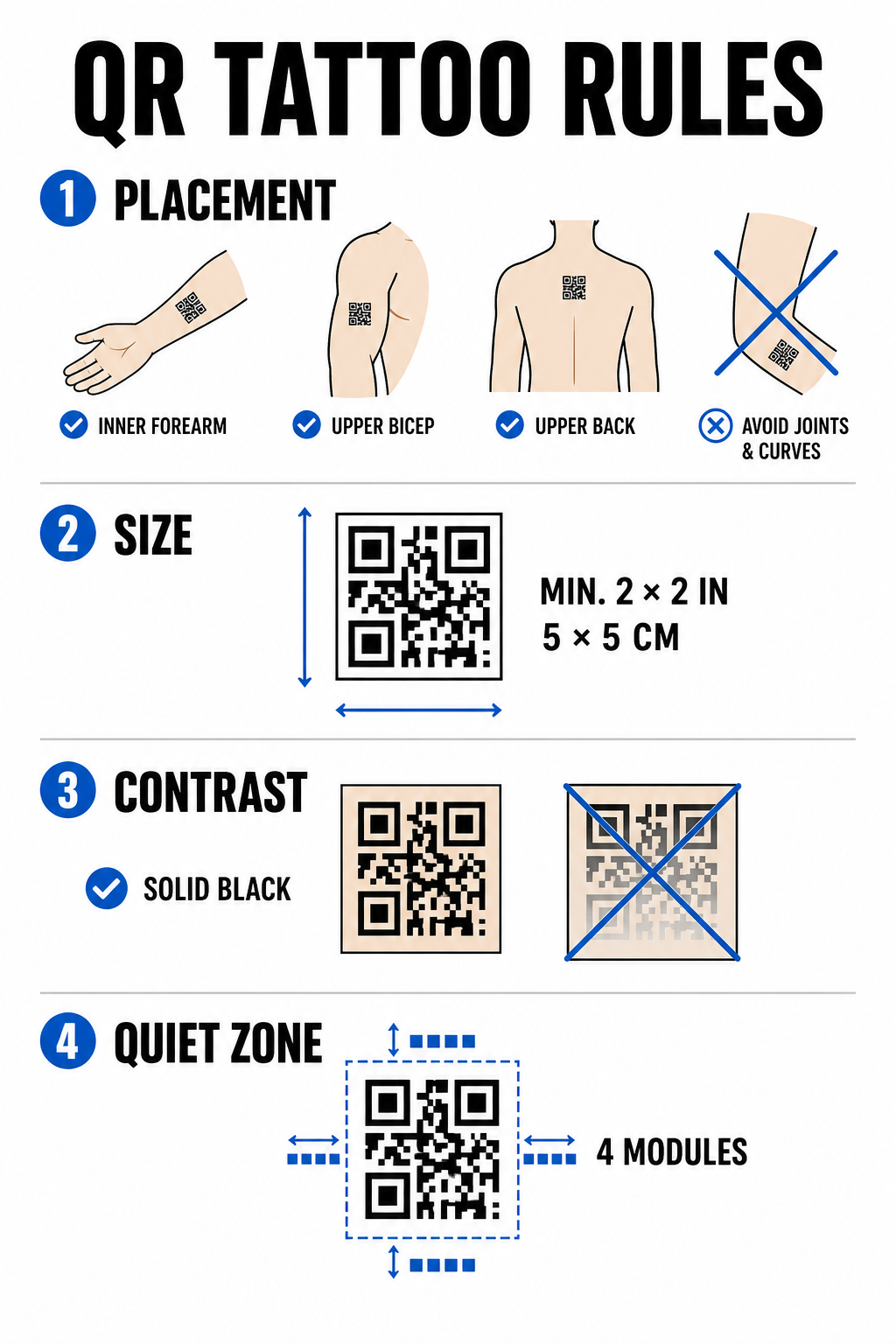
Um Scanfehler im Laufe der Zeit zu minimieren, müssen diese strukturellen Konstruktionsvorgaben eingehalten werden.
Auswahl des Praktikumsplatzes
Wählen Sie flache, stabile Körperstellen mit minimaler Muskelspannung oder geringer Fettverteilung. Ideale Stellen sind die Innenseite des Unterarms, der flache Bereich des oberen Bizeps oder der obere Rücken unterhalb des Nackens. Vermeiden Sie Stellen über Gelenken, Rippen, Handgelenken, Knöcheln oder Bereichen, die zu starken Dehnungsstreifen neigen.
Größenbeschränkungen
Tätowieren Sie niemals einen QR-Code, der kleiner als 5 × 5 cm ist. Dichte Datenstrukturen erfordern noch größere Abmessungen, um lesbar zu bleiben. Kleinere Module verschmelzen innerhalb weniger Jahre zu einer festen Masse, da die Tinte durch die Dermis wandert, wodurch der Code unlesbar wird.
Kontraststandards
Scanner benötigen einen hohen Kontrast zwischen hellem Hautton im Hintergrund und dunkler Tinte im Vordergrund. Vollflächige schwarze Tinte auf heller bis mittlerer Haut bietet das höchste Kontrastverhältnis. Vermeiden Sie farbige Tinte, feine Farbverläufe oder weiße Tintenmarkierungen innerhalb des Datenrasters, da Kamerasensoren diese Mitteltöne uneinheitlich erfassen. Beachten Sie die strengen Richtlinien. Best Practices für den Farbkontrast bei der Planung von Leitungsarbeiten.
Regeln der Ruhezone
Jeder Code benötigt einen klaren, ununterbrochenen Rand – die sogenannte Ruhezone –, der mindestens vier Module breit ist. Umgebende Grafiken, Schattierungen oder Hintergrundfüllungen dürfen nicht zu nah an die Außenkanten des Tattoo-Rasters heranreichen.
| Faktor | Tätowierte QR-Codes (Haut) | Studio-Marketing-QR-Codes (Print/Digital) |
|---|---|---|
| Dauerhaftigkeit | Hohes physisches Risiko aufgrund von Alterung und Tintenausbreitung | Langlebig und leicht austauschbar |
| Größenbeschränkung | Beschränkt durch die verfügbare anatomische Oberfläche | Flexibel einsetzbar für Poster, Karten und Banner |
| Fehlerkorrektur | Pflichtstufe H (30%) | Standard Level M (15%) oder Level H (30%) |
| Linkverwaltung | Erfordert dynamische Codes, um fehlerhafte URLs zu verhindern. | Verwendet dynamische Codes für einfache Kampagnenaktualisierungen |
Wirkungsvolle QR-Code-Strategien für das Studio-Marketing
Während das Tätowieren von Codes auf Kunden biologische Risiken birgt, bietet die Verwendung von QR-Codes zur Vermarktung Ihres Studios auf physischen Produkten eine zuverlässige Möglichkeit, Buchungen zu generieren und die Kundenkommunikation zu verwalten. verschiedene Geschäftsanwendungen.
Digitale Pflegehinweise
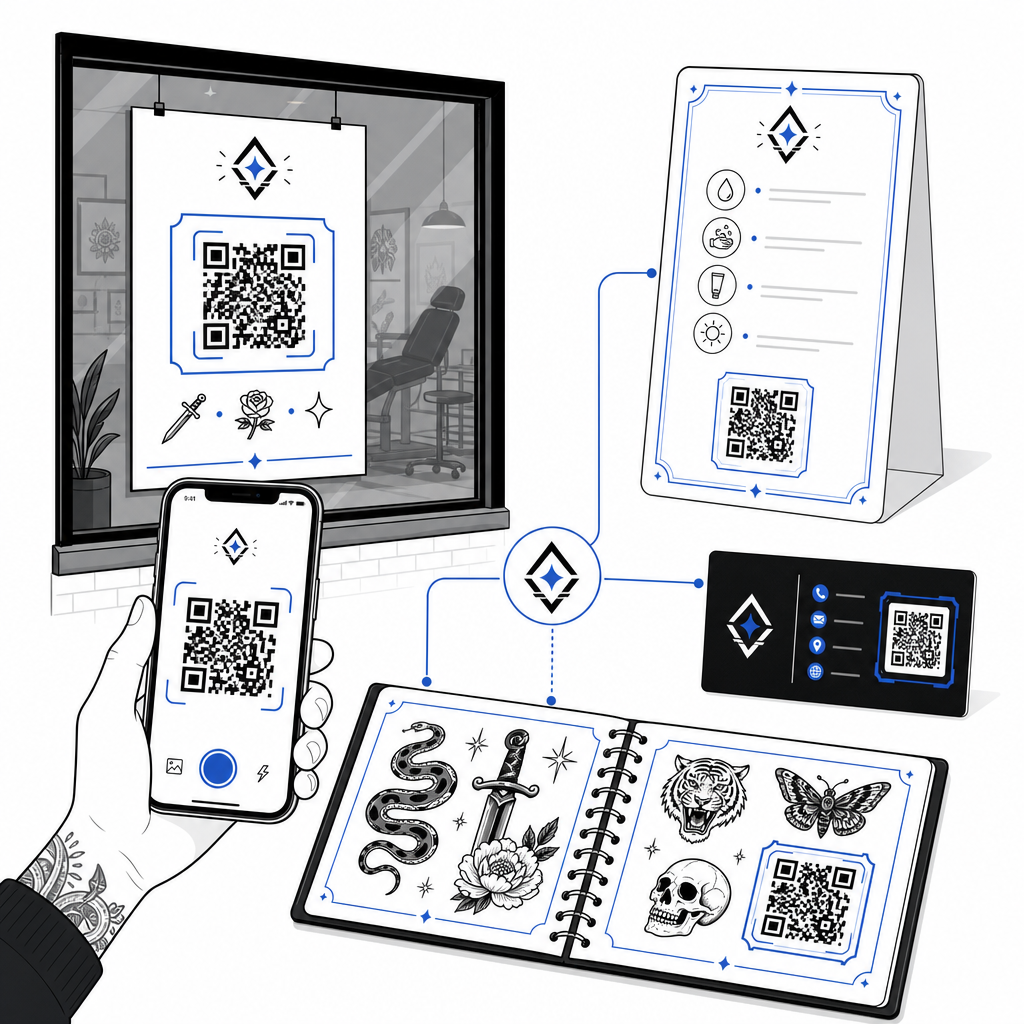
Durch das Aushändigen gedruckter Nachsorgekarten mit einem dynamischen QR-Code können Kunden direkt auf Pflegehinweise, Produktempfehlungen oder Anleitungsvideos zugreifen. Aktualisiert Ihr Geschäft seine Empfehlungen für Nachsorgeprodukte oder Produktpartner, können Sie die digitale Datei online aktualisieren, ohne die Karten neu drucken zu müssen.
Interaktive Lernblätter und Portfolios
Integrieren Sie dezente QR-Codes neben Ihren Flash-Designs in Ihren Katalogen oder Schaufenstern. Kunden, die auf ihren Termin warten, können die Flash-Motive scannen, um Preise einzusehen, fertige Fotos anzusehen oder das gewünschte Motiv direkt über Ihre Terminplanungsplattform zu buchen.
Schaufensterbeschriftung und Visitenkarten
Vorbeikommende können außerhalb der Öffnungszeiten Aufkleber an den Fenstern scannen, um die Verfügbarkeit des Studios zu prüfen, Künstlerlisten einzusehen oder direkt zu Instagram-Feeds zu gelangen. Durch das Hinzufügen von Markencodes zu Visitenkarten wird traditionelles Networking in die sofortige digitale Speicherung von Kontakten verwandelt.
Erstellen Sie individuelle Markencodes für Ihr Studio Verleihen Sie Ihren Marketingmaterialien einen professionellen Touch, indem Sie Ihr Firmenlogo und individuelle Rahmenstile hinzufügen. Erstellen Sie Ihr Markendesign mit dem QR-Code Generator mit Logo heute verfügbar sind.
Bewährte Verfahren für Scanbarkeit und Tests
Ob Sie eine Schablone für eine Hautapplikation anfertigen oder Werbeschilder für Ihren Empfangsbereich entwerfen – die Einhaltung strenger Qualitätskontrollen verhindert Fehlscans im Feld.
- Halten Sie die Daten einfach: Verwenden Sie verkürzte dynamische Links, um die Datendichte zu reduzieren. Dies führt zu größeren, übersichtlicheren Modulblöcken.
- Farbkontrast prüfen: Tiefschwarze Tinte auf hellem Hintergrund auftragen und darauf achten, dass der Kontrast den Anforderungen an die Lesbarkeit mit mobilen Kameras entspricht.
- Ruhezone einhalten: Um den Code herum muss ein klarer Rand entstehen, der frei von Hintergrundschattierungen, umgebenden Tattoos oder grafischen Rändern ist.
- Test unter realen BedingungenTesten Sie Ihre vorläufige Schablone auf der Haut mithilfe einer Smartphone-Kamera oder einer Online-App. QR-Code Scanner während der Klient seinen Körper bewegt oder dreht.
- Beachten Sie die allgemeinen Lesbarkeitsregeln.Überprüfen Sie vor der endgültigen Fertigstellung eines Druck- oder Tattoo-Projekts den Kameraabstand, die Umgebungsbeleuchtung und die Linienschärfe. Unsere vollständige Liste finden Sie hier. Richtlinien zur Lesbarkeit von QR-Codes um Ihr Design zu prüfen.
QR-Codes im Studio meistern
Das Tätowieren von QR-Codes auf der Haut erfordert realistische Kundenerwartungen: Biologische Alterung, Farbverlauf und Hautbewegungen machen Hautcodes deutlich unberechenbarer als herkömmliche Printmedien. Durch den Einsatz hoher Fehlerkorrektur und dynamischer Links erhalten Haut-Tattoos die besten Überlebenschancen. Gleichzeitig bietet die Verwendung dynamischer QR-Codes auf Ihren physischen Marketingmaterialien eine nahtlose und flexible Verbindung zwischen Ihrer Offline-Präsentationswand und Ihrem Online-Buchungskalender.
Um nachverfolgbare, anpassbare Codes für Ihre Ladenbeschilderung, Pflegehinweise und Portfolios einzurichten, beginnen Sie mit dem Aufbau mit dem Pageloot QR-Code-Generator heute verfügbar sind.
Häufig gestellte Fragen
Die Haut altert, dehnt sich und die Tinte wandert mit der Zeit auf natürliche Weise, was zu verschwimmenden Kanten und eingeschränkter Lesbarkeit führen kann. Fehlerkorrektur der Stufe H und dynamische URLs maximieren zwar die Lebensdauer des Tattoos, die langfristige Lesbarkeit auf der Haut kann jedoch nicht garantiert werden.
Ein QR-Code-Tattoo sollte mindestens 5 × 5 cm groß sein. Die kodierten Daten benötigen ausreichend Platz, damit die einzelnen Module während des Heilungsprozesses oder durch jahrelange Hautbewegungen nicht verschwimmen.
Dynamische QR-Codes ermöglichen es Ihnen, den Ziellink zu ändern – beispielsweise um Ihren Flash-Katalog, Ihr Buchungsformular oder Ihren Nachsorgeleitfaden zu aktualisieren – ohne physische Visitenkarten, Poster oder Fensteraufkleber neu drucken zu müssen.