
Kas kaalute QR-koodi kliendile tätoveerimist või selle kasutamist oma poe turunduses, kuid muretsete, et see ei skanni enam? Mittefunktsionaalne nahatätoveering põhjustab klientidele püsivat frustratsiooni, samas kui katkised sooduskoodid raiskavad teie turunduseelarvet. Siin on see, mida peate teadma naha füüsika, skannimisriskide ja stuudioturunduse parimate tavade kohta.
QR-koodiga tätoveeringute tehniline teostatavus
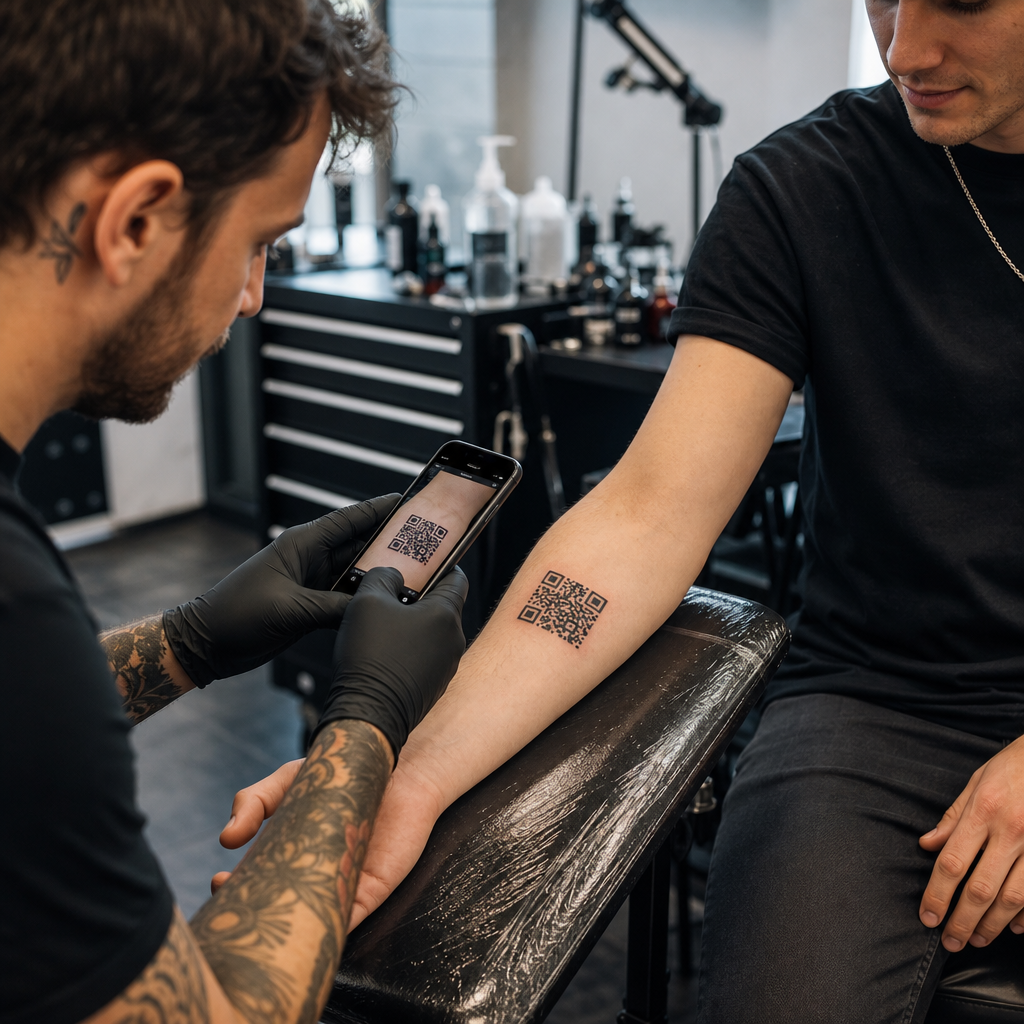
QR-koodi otse inimese nahale tätoveerimine on tehniliselt võimalik, kuid sellega kaasnevad märkimisväärsed füüsilised väljakutsed. Erinevalt paberist või lamedatest siltidest venib, paindub ja kõverdub inimese nahk aluslihaste kohal. Kui nutitelefoni kaamera üritab QR-koodi dekodeerida, otsib see puhast geomeetriat, selgeid mooduli servi ja täpseid ruudukujulisi proportsioone. Keha liikumine moonutab neid proportsioone, põhjustades skanneritarkvara andmemustri valesti lugemist.
Aja jooksul tekitavad naha loomulik vananemine ja pigmendi migratsioon täiendavaid skannimisriske. Tindiosakesed levivad mikroskoopiliselt naha alla, kui tätoveering aastate jooksul paraneb ja vananeb. See teravate mustade joonte järkjärguline pehmenemine vähendab mobiilseadmete andurite jaoks vajalikku moodulite eristamist.
Selleks, et anda nahapõhisele koodile mingigi võimalus pikaajaliseks loetavuseks, peate mõistma, kuidas Veaparandus töötab muudetavates QR-koodides. QR-koodid tuginevad Reed-Solomoni veaparandusalgoritmidele puuduvate või varjatud andmete taastamiseks, mis on jagatud neljaks standardiseeritud tasemeks:
- Tase L (7%)Taastab kuni 7% puuduvaid andmeid, mistõttu see ei sobi orgaaniliste või liikuvate pindade jaoks.
- Tase M (15%)Taastab kuni 15% puuduvaid andmeid, mis on põhiliste prindikandjate standard.
- Q-tase (25%)Taastab kuni 25% puuduvaid andmeid, kaitstes mõõduka pinna moonutuse eest.
- Tase H (30%)Taastab kuni 30% puuduvaid andmeid, pakkudes naharakenduste jaoks vajalikku maksimaalset vastupidavust.
Isegi H-taseme veaparanduse korral lakkab nahale tätoveeritud kõvakodeeritud staatiline link jäädavalt töötamast, kui siht-URL muutub või kaob. Dünaamiliste koodide kasutamine tagab, et isegi kui teie klient soovib aastaid hiljem oma lingitud portfooliot, sotsiaalmeedia profiili või heliriba muuta, jääb sihtlink sama füüsilise tätoveeringumustri taga täielikult muudetavaks.
Enne tindiga joonistamist looge paindlikud lingid Ära kunagi tätoveeri kõvakodeeritud staatilist linki, mis võib aasta pärast katki minna. Kasuta Dünaamilise QR koodi generaator et sihtkoha linki saaks igal ajal uuendada.
Püsivate nahakoodide kujundamise ja paigutamise reeglid
Kui klient nõuab QR-koodi tätoveeringu tegemist, peate keha paigutust ja šablooni kujundust käsitlema äärmise distsipliiniga. Nahk käitub sarnaselt painduvatele tekstiilidele, kus liikumine loob loomuliku kokkutõmbumise ja venituse. Laiema konteksti saamiseks painduvate pindade kohta vaadake meie juhendit... skannitavad QR-koodid rõivaste jaoks.
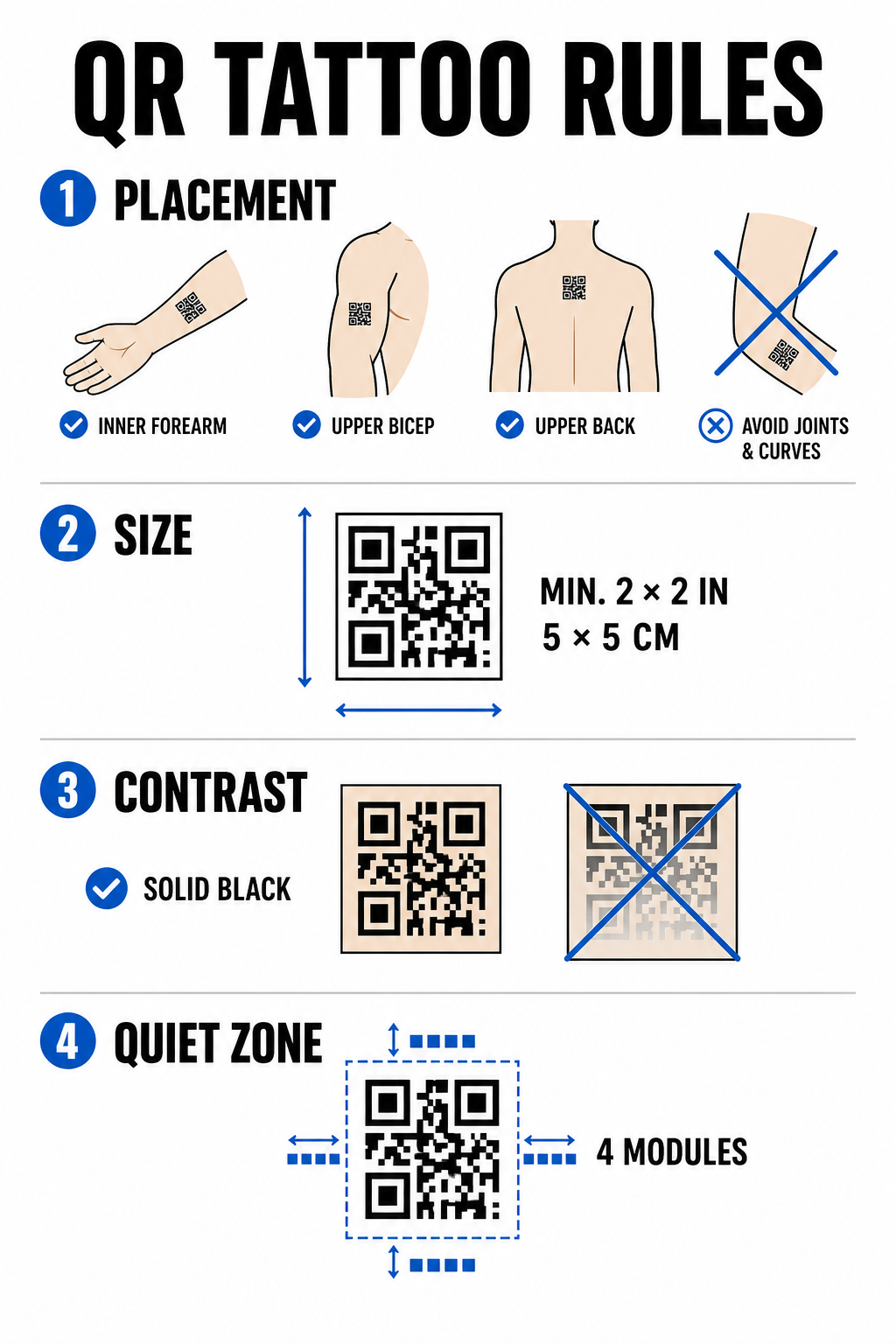
Skaneerimise ebaõnnestumise minimeerimiseks aja jooksul pidage kinni järgmistest konstruktsioonipiirangutest.
Paigutuse valik
Valige lamedad ja stabiilsed anatoomilised asukohad, kus lihaste paindumine või rasva jaotumise nihked on minimaalsed. Ideaalseteks asukohtadeks on käsivarre sisekülg, ülemise biitsepsi lame piirkond või ülaselja kaelast allpool. Vältige asetamist liigeste, ribide, randmete, pahkluude või oluliste venitusarmide tekkele kalduvate piirkondade peale.
Suurusepiirangud
Ära kunagi tätoveeri QR-koodi, mis on väiksem kui 2 × 2 tolli (5 × 5 cm). Tihedad andmestruktuurid vajavad loetavaks jäämiseks veelgi suuremaid mõõtmeid. Väiksemad moodulid sulanduvad mõne aasta jooksul tahkeks massiks, kui tindi läbi dermise imbudes muutub kood skannimatuks.
Kontraststandardid
Skannerid tuginevad heleda tausta naha ja tumeda esiplaani tindi vahelisele suurele kontrastsusele. Ühtlane must tint heledal kuni keskmisel nahal pakub suurimat kontrastsuse suhet. Vältige andmevõrgu sees värviliste tintide, peente gradientide või valge tindi esiletõstude kasutamist, kuna kaameraandurid loevad neid keskmisi toone ebajärjekindlalt. Järgige rangeid värvikontrasti parimaid tavasid liinitööde planeerimisel.
Vaikse tsooni reeglid
Iga kood nõuab oma perimeetri ümber selget ja katkematut äärt – tuntud kui vaikne tsoon –, mis on vähemalt nelja mooduli laiune. Ärge mähkige ümbritsevat kujundust, varjutust ega taustatäidist tätoveeringuruudustiku välisservade lähedale.
| Tegur | Tätoveeritud QR-koodid (nahk) | Stuudioturunduse QR-koodid (trükitud/digitaalsed) |
|---|---|---|
| Vastupidavus | Vananemise ja tindi leviku tõttu suur füüsiline risk | Pikaajaline ja kergesti vahetatav |
| Suurusepiirang | Piiratud saadaoleva anatoomilise pinna pindalaga | Paindlik plakatite, kaartide ja bännerite osas |
| Veaparandus | Kohustuslik H-tase (30%) | Standardtase M (15%) või tase H (30%) |
| Lingihaldus | Nõuab dünaamilisi koode vigaste URL-ide vältimiseks | Kasutab dünaamilisi koode kampaaniate hõlpsaks värskendamiseks |
Suure mõjuga QR-koodi strateegiad stuudioturunduseks
Kuigi koodide tätoveerimine klientidele tekitab bioloogilisi riske, pakub QR-koodide kasutamine oma stuudio turundamiseks füüsiliste esemete kaudu usaldusväärset võimalust broneeringute suurendamiseks ja klientidega suhtlemise haldamiseks. mitmesugused ärirakendused.
Digitaalsed järelhooldusjuhised
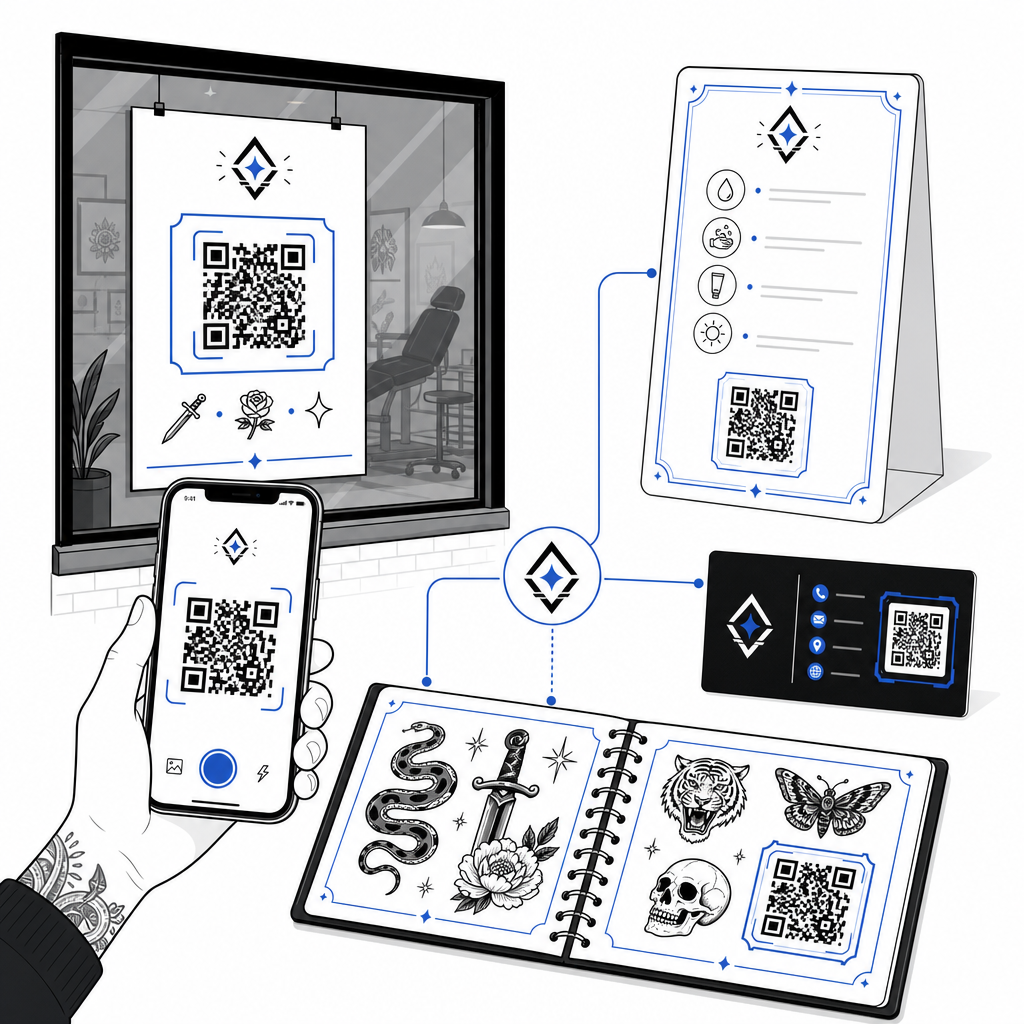
Klientidele dünaamilise QR-koodiga prinditud järelhoolduskaartide andmine võimaldab neil skannida, et pääseda ligi otsehooldusjuhistele, soovitatud tootelinkidele või õppevideotele. Kui teie pood uuendab oma järelhooldusbrändi soovitusi või tootepartnereid, saate digitaalset faili veebis uuendada ilma füüsilisi kaarte uuesti printimata.
Interaktiivsed välklad ja portfooliod
Lisage oma füüsilistes kauplustes või vitriinides välktööde kõrvale peeneid QR-koode. Kohtumist ootavad kliendid saavad välktööde skannimisega kontrollida hindu, eelvaadata paranenud fotogaleriisid või broneerida just seda konkreetset välkteost otse teie broneerimisplatvormi kaudu.
Poeakende sildid ja visiitkaardid
Möödujad saavad väljaspool lahtiolekuaega skannida aknakleebiseid, et kontrollida stuudio saadavust, vaadata artistide nimekirju või hüpata otse Instagrami voogudesse. Bränditud koodide lisamine artistide visiitkaartidele muudab traditsioonilise suhtluse koheseks digitaalseks kontaktide salvestamiseks.
Looge oma stuudio jaoks kohandatud kaubamärgiga koode Andke oma turundusmaterjalidele professionaalne ilme, lisades oma poe logo ja kohandatud raamid. Looge oma bränditud disain koos QR-koodi generaator logoga täna.
Skannitavuse ja testimise parimad tavad
Olenemata sellest, kas valmistate ette šablooni naha pealekandmiseks või kujundate reklaamsilte oma vastuvõtualale, hoiab rangete kvaliteedikontrollide järgimine ära skannimisvead kohapeal.
- Hoidke andmed lihtsadKasutage lühemaid dünaamilisi linke andmetiheduse vähendamiseks, mille tulemuseks on suuremad ja vähem segamini ajatud mooduliplokid.
- Värvikontrasti kontrollimineKandke heledale taustale sügavmusta tinti, veendudes, et kontrastsus vastab mobiilkaamera loetavuse nõuetele.
- Säilita vaikne tsoonSäilita koodi kõigi nelja külje ümber selge ääris, mis on vaba taustavarjustusest, ümbritsevatest tätoveeringutest või graafilistest ääristest.
- Testi reaalsetes tingimustesTesti oma esialgset šablooni nahal nutitelefoni kaamera või veebirakenduse abil. QR-koodi lugeja samal ajal kui klient oma keha liigutab või pöörab.
- Järgige üldisi loetavuse reegleidEnne mis tahes prindi- või tätoveerimisprojekti lõpetamist vaadake üle seadme kaamera kaugus, ümbritsev valgustus ja joonte selgus. Vaadake meie täielikku nimekirja QR-koodi loetavuse juhiseid oma disaini auditeerimiseks.
QR-koodide valdamine oma stuudios
QR-koodide tätoveerimine inimese nahale nõuab realistlike kliendiootuste seadmist: bioloogiline vananemine, tindi levik ja naha liikumine muudavad nahakoodid palju ettearvamatumaks kui tavalised trükimeedia materjalid. Kõrge veaparandusastme ja dünaamiliste linkide kasutamine annab nahatätoveeringutele parimad ellujäämisvõimalused. Samal ajal pakub dünaamiliste QR-koodide paigutamine teie poe füüsilistesse turundusmaterjalidesse puhta ja paindliku silla teie offline-turundusseina ja veebipõhise broneerimiskalendri vahel.
Jälgitavate ja kohandatavate koodide seadistamise alustamiseks oma poe siltide, järelhoolduslehtede ja portfooliote jaoks alustage järgmisest: Pageloot QR-koodi generaator täna.
Korduma kippuvad küsimused
Nahk vananeb, venib ja tint liigub aja jooksul loomulikult edasi, mis võib teravaid servi hägustada ja skannitavust vähendada. H-taseme veaparanduse ja dünaamiliste URL-ide kasutamine annab tätoveeringule parima eluea, kuid pikaajalist loetavust nahal ei saa garanteerida.
QR-koodi tätoveeringu suurus peaks olema vähemalt 2 × 2 tolli (5 × 5 cm). Kodeeritud andmete jaoks on vaja piisavalt ruumi, et üksikud moodulid paranemisprotsessi või aastatepikkuse naha liikumise käigus kokku ei seguneks.
Dünaamilised QR-koodid võimaldavad teil sihtkoha linki muuta – näiteks oma välkkataloogi, broneerimisvormi või järelhooldusjuhendit värskendada – ilma et peaksite füüsilisi visiitkaarte, plakateid või aknakleebiseid uuesti printima.