ホーム > ブログ > QRコードがテーブル予約をいかに簡素化するか
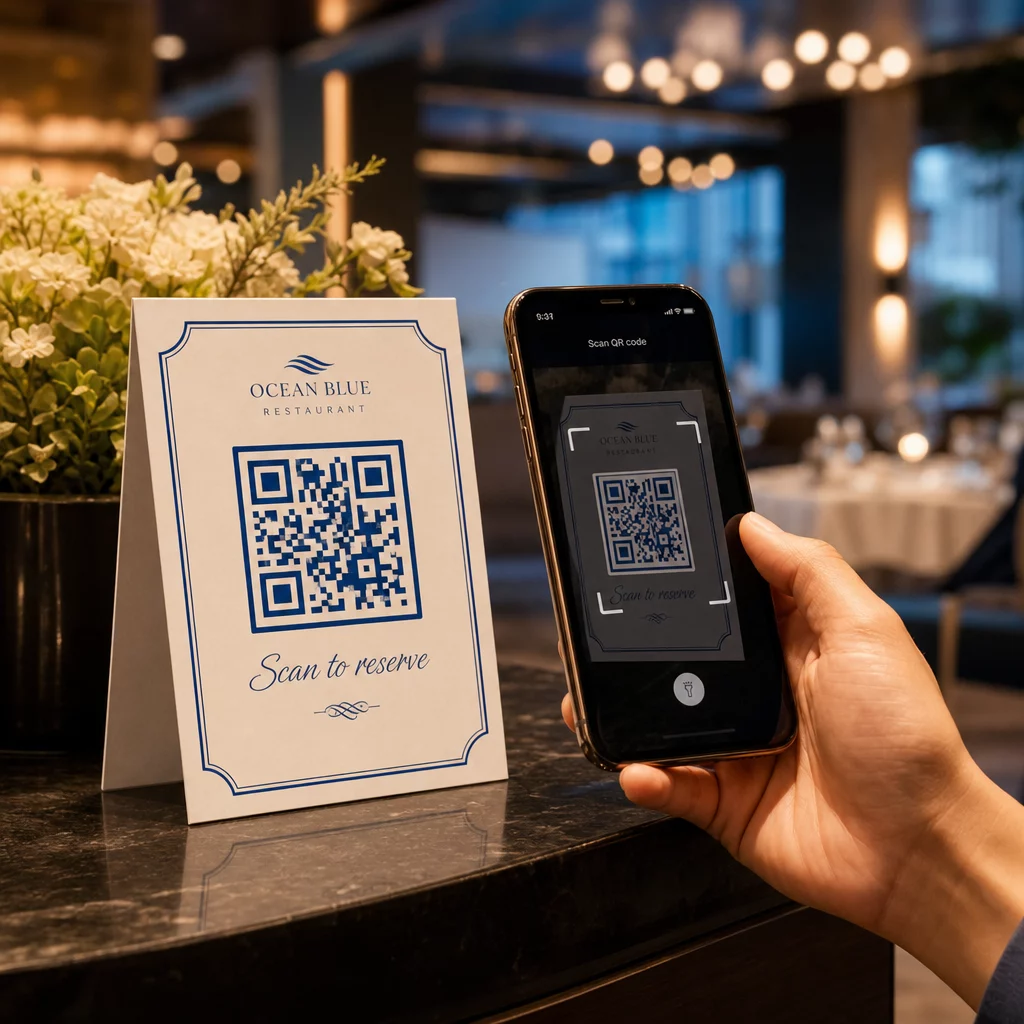
Guest scanning reservation QR

QRコードがテーブル予約をいかに簡素化するか

Streamline your restaurant reservations with QR codes. Learn how to set up dynamic codes, reduce phone calls, and improve guest service with live booking data.
Updated on 6月 10, 2026
目次

Are your phone lines constantly tied up with reservation calls during peak hours? That backlog costs you tables, tips, and staff focus. This guide shows you how to implement QR codes for table reservations, waitlists, and digital ordering – so your team can spend less time on the phone and more time delivering great service.

Why QR Codes Work for Restaurant Reservations

The shift toward digital booking is well underway. Nearly half of all diners now prefer to book online or through social media rather than calling ahead. QR codes meet that preference head-on by turning any printed surface – a table tent, a window sticker, a takeout bag – into a direct entry point for your reservation system.

When a guest scans the code, they land immediately on your booking page, check real-time availability, and confirm a table in under a minute. No hold music. No miscommunication over a noisy dining room. No double bookings from a handwritten log.

For restaurants managing high volumes, that simplicity translates directly into operational gains. Restaurants implementing QR-based reservation and waitlist tools report fewer overbookings, more accurate seating data, and staff freed from repetitive phone handling. QR codes can also help guests join a waitlist remotely, see real-time status updates, and arrive at the right moment – reducing crowding at the host stand and cutting perceived wait times.

Beyond reservations, the same infrastructure supports digital menus, contactless ordering, and payments – making QR codes a versatile foundation for your entire guest journey.

Setting Up QR Code Reservations: A Step-by-Step Guide

QR reservation steps

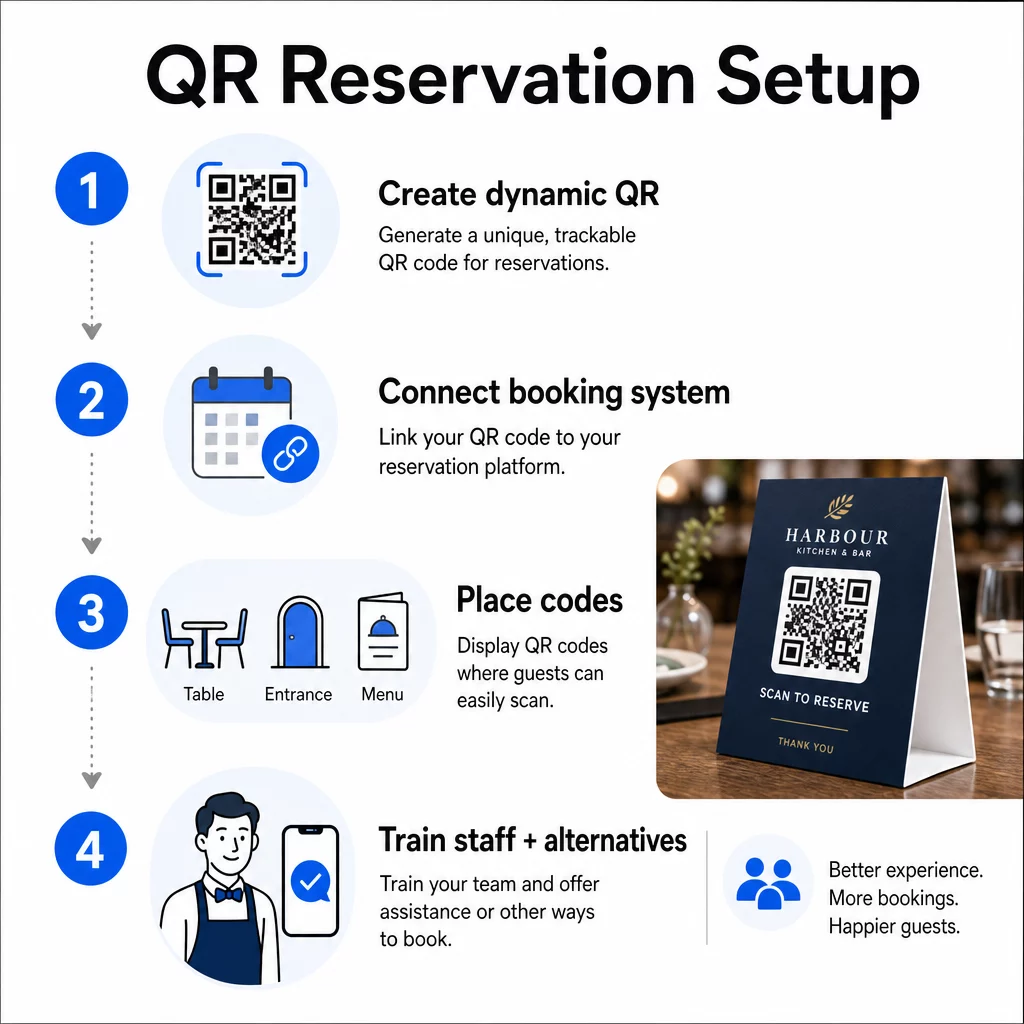
Step 1: Create Your QR Code

Start by choosing a platform that supports ダイナミックQRコード. Unlike static codes, which are permanently tied to a single URL, dynamic QR codes use a redirect layer – meaning you can update the destination link at any time without reprinting anything. If you switch reservation platforms, adjust your booking page, or run a seasonal promotion, you change the link in your dashboard and every printed code updates automatically.

Pagelootの QRコードジェネレーター to create a link QR code that points to your reservation platform – whether that’s OpenTable, Resy, or a custom booking page. From there, customize it with your logo, brand colors, and a frame that matches your restaurant’s aesthetic. Branded codes look more trustworthy and are more likely to be scanned by first-time guests.

Before you print anything, test the code on multiple devices and operating systems to confirm it routes correctly and loads quickly on mobile.

Ready to Create Your Reservation QR Code? Build a dynamic, branded QR code in minutes with Pageloot’s QRコードジェネレーター – no design experience required, and no reprinting needed when your links change.

Step 2: Connect to Your Reservation System

Link your QR code to a booking page that shows live availability and sends instant confirmation to the guest. This closes the loop cleanly: the guest scans, selects a time, and receives a confirmation – without any staff involvement.

Sync your reservation system with your POS so bookings flow directly into your table management without manual entry. This eliminates duplicate records and gives your front-of-house team accurate, real-time seating data throughout the shift.

When the system is integrated properly, you also gain a data layer. Every scan carries information about when and where the booking originated, what device was used, and how guests move through your funnel from scan to confirmed reservation. That data becomes useful for staffing decisions, promotional timing, and identifying your busiest periods.

Step 3: Place Codes Where Guests Will See Them

Placement drives scan rates. Put your QR codes where guests naturally pause or look – tabletops, the entrance, the host stand, printed menus, and window displays. Research on restaurant QR code usage shows that 60% of all restaurant scans happen when codes are placed directly on the table, such as on stickers or table tents.

Follow these sizing guidelines based on where each code appears:

プレースメント 推奨サイズ 標準的なスキャン距離
テーブルテント 1.2 × 1.2インチ (3 × 3 cm) 6~12インチ
Menu inserts 0.8 × 0.8インチ (2 × 2 cm) 8–16 inches
Posters / sandwich boards 1.2–1.6 in (3–4 cm) 2–4 feet
Window displays 1.6+ in (4+ cm) 3–6 feet
レシート 0.8 × 0.8インチ (2 × 2 cm) 6~12インチ

Use high-contrast colors – dark modules on a light background – and preserve a clear quiet zone (white space) around the code. For outdoor or high-wear surfaces, laminated table tents or weatherproof stickers protect the code from damage. In dimly lit environments, fluorescent or glow-in-the-dark backgrounds help maintain visibility.

Always include a brief instruction next to the code, such as “Scan to reserve your table.” Clear prompts remove hesitation, especially for guests who haven’t used QR codes before. Following QRコードのユーザビリティに関するベストプラクティス from the start prevents the most common scanning failures.

Step 4: Brief Your Team

Technology only works if your staff supports it. Train front-of-house employees to help guests who encounter trouble scanning – whether that’s an older device, a camera that isn’t QR-enabled by default, or simple unfamiliarity with the process.

Accessibility matters here. Not every guest can or wants to use a QR code. Title III of the Americans with Disabilities Act requires restaurants to make reasonable modifications when serving guests with disabilities, which extends to how they access menus and booking systems. Always keep a traditional reservation option available – a phone number, a host who can take bookings directly, or a printed URL guests can type in manually. QR codes should be an efficient option, not the only option.

Key Benefits for Guests and Staff

What Guests Gain

QR code reservations offer 24/7 booking access. Guests can secure a table during their lunch break, late at night, or while browsing social media – not just during your hours of operation. The process is fast: scan, check availability, confirm, done. That speed matters when nearly two-thirds of guests say they would rather order or interact digitally than wait for a staff member.

Contactless interaction also removes a hygiene concern that many diners still carry from recent years. No shared physical menus to handle at the booking stage, no touching a host’s tablet. And because the guest inputs their own details, booking errors caused by miscommunication drop significantly.

QR codes can do more than just hold a reservation link. Use them to share your digital menu before guests arrive, highlight daily specials, or prompt guests to join your loyalty program. Pageloot’s メニューQRコードジェネレーター lets you build a branded menu landing page with photos, descriptions, categories, and even allergen information – all accessible from the same scan.

What Your Operation Gains

Reducing inbound reservation calls frees your front-of-house team to focus on guests who are actually in the room. Fewer phone interruptions means better service quality during service, not just faster bookings.

The financial case is clear, too. Restaurants that adopt digital ordering and self-service tools consistently report higher check averages – one study found a 9% increase in spend when guests use tableside digital ordering. Table turnover improves when the overall dining cycle shortens. And switching to digital menus can eliminate thousands of dollars in annual reprinting costs.

QR code systems also generate first-party data that phone reservations can’t match. You can track booking patterns by time of day, day of week, and guest segment. That intelligence feeds better staffing schedules, more targeted promotions, and smarter inventory planning. For an overview of the full range of digital tools available to restaurants, see QR code solutions for hospitality.

Using Dynamic QR Codes to Stay Current

Dynamic QR codes give you operational flexibility that static codes can’t provide. Since the code itself only stores a short redirect URL, you can change where it points at any time from your dashboard – no reprinting, no replacing table tents mid-service.

This matters in practice. If you migrate to a new reservation platform, test a new booking flow, or temporarily redirect the code to a “fully booked” notice on a sold-out night, you make one change centrally and every printed code responds immediately.

Dynamic codes also support promotional agility. Sixty-eight percent of diners are more likely to book when a restaurant advertises a time-sensitive offer. With dynamic codes, you can redirect to a flash deal landing page during a slow Tuesday afternoon and switch back to your standard reservation page by dinner service – without touching a single printed material.

The same codes that drive reservations can also link to your digital ordering system, feedback forms, or review requests. Pageloot’s GoogleフォームQRコードジェネレーター makes it simple to connect a QR code to a post-meal survey or feedback form, capturing guest sentiment while the experience is still fresh.

Using Analytics to Improve Performance

Restaurant QR analytics

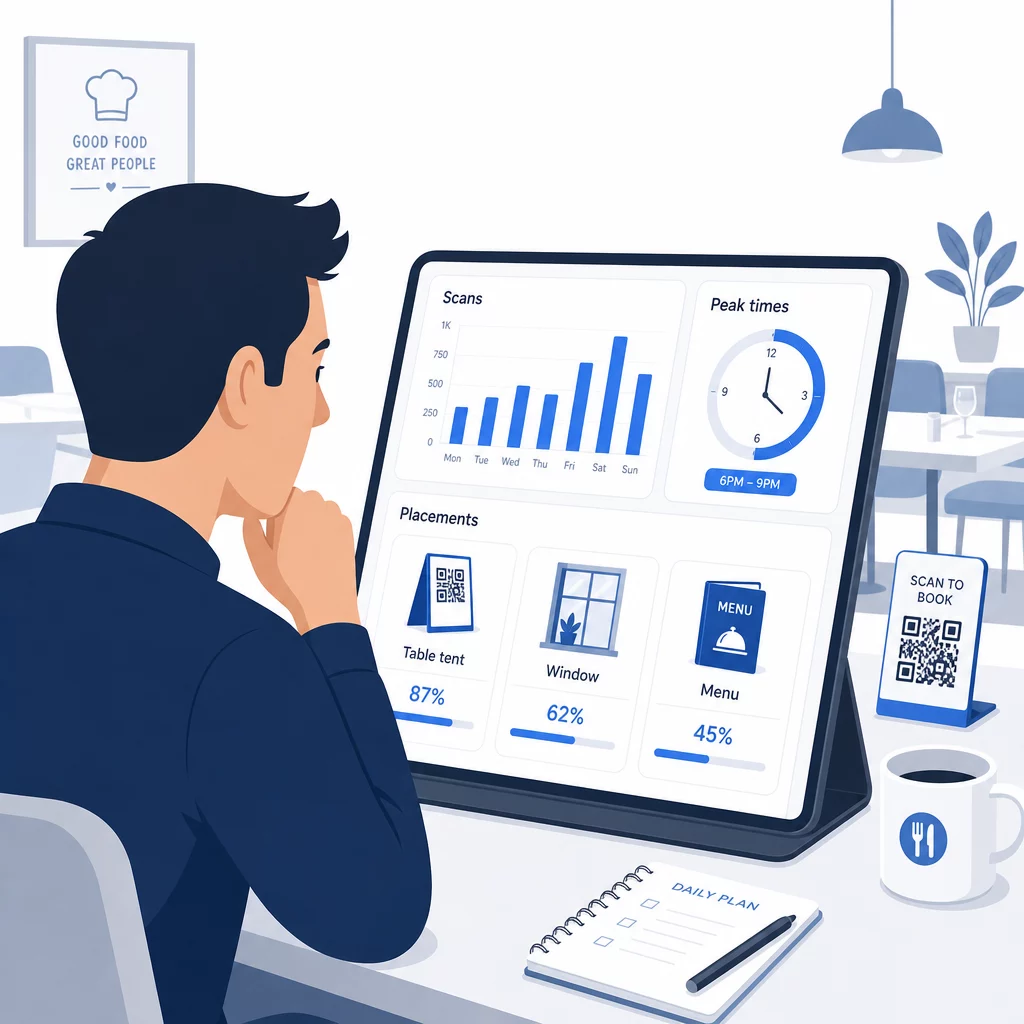
Every scan on a dynamic QR code generates data. Pageloot’s dashboard surfaces metrics including total scans, scan timestamps, device types, operating systems, and geographic location. Over time, this data reveals which placements are driving the most reservations, when guests are most likely to book, and whether a campaign is working before you’ve committed to a full print run.

Practical ways to apply that data:

  • 人材配置: If scan activity spikes on Friday afternoons, that’s a leading indicator of Friday night demand. Adjust floor staffing accordingly.
  • Menu timing: If guests scan menu QR codes heavily between 4–6 PM, that’s your window to promote happy hour specials or early-bird offers.
  • Placement optimization: Compare scan rates across table tents, window stickers, and printed menus to identify which locations earn the most engagement – then concentrate future investment there.
  • Campaign testing: Experiment with different call-to-action phrases or code designs and measure the effect on scan-through rates against the industry benchmark CTR of around 12.8%.

Restaurants on average see a 45% scan-through rate with well-placed QR codes. Reviewing your analytics weekly and acting on what you find keeps that rate climbing.

For a deeper look at how different QR code formats serve different restaurant needs – from payment integration to loyalty programs – see the guide to 7 QR code types for restaurant menus.

Troubleshooting Common QR Code Issues

Even well-executed QR codes occasionally run into friction. Here are the most common issues and how to address them:

  • Scanning fails: Usually caused by low contrast, blurry printing, or insufficient quiet zone. Reprint using a vector file (SVG, EPS, or PDF) and confirm the contrast ratio is at least 55% between the code modules and the background.
  • Broken links: Test every code after printing and set up a schedule for monthly re-testing. Dynamic codes make link corrections instant – no reprinting needed.
  • Poor lighting: In dark dining environments, consider backlit displays or glow-in-the-dark backgrounds. Advise guests to hold their phone 6–8 inches from the code.
  • Older devices: Some phones require a third-party QR scanning app. Brief your staff on how to assist, and always offer an alternative booking method.
  • Guest hesitation: Branded QR codes with your logo and a clear label like “Scan to reserve” reduce the distrust that comes from anonymous-looking codes.

For detailed sizing, contrast, and design requirements, refer to the full QR code usability guidelines.

Expanding QR Codes Beyond Reservations

Once your reservation QR codes are running smoothly, the same infrastructure extends naturally to other parts of the guest experience:

  • デジタルメニュー: Update prices, add seasonal items, or remove sold-out dishes instantly – no reprint required. See how to create a QR code menu step by step.
  • Contactless ordering: Guests browse, customize, and submit orders directly from their phones. Research shows that 64% of diners would rather order digitally when dining in than interact with waitstaff for order-taking.
  • 支払い: QR-based checkout speeds up table turnover and reduces the friction around splitting bills. Learn more about QR code payment benefits for restaurants.
  • Feedback collection: A post-meal QR code linked to a short survey or review prompt captures responses while the experience is still top of mind.
  • Promotions and loyalty: Redirect codes to time-limited offers, event sign-ups, or loyalty program enrollment without reprinting a single piece of collateral.

Explore the full range of QR code applications by industry to see how other hospitality operators are extending this technology.

Build Your Restaurant’s QR Code System From reservations to digital menus, Pageloot gives you the tools to create, manage, and track every QR code in one place. Get started with the Restaurant QR Code Generator and see why over 220 restaurants in 54 countries rely on Pageloot.

よくある質問

What is the difference between a static and dynamic QR code for restaurant reservations?

A static QR code permanently encodes a single URL into its pixel pattern – once printed, the destination cannot be changed. A dynamic QR code stores a short redirect URL, so you can update the destination link at any time from your dashboard without reprinting the code. For reservations, dynamic codes are strongly preferred: if you switch booking platforms, update your reservation page, or temporarily redirect guests to a “fully booked” notice, you make one change centrally and every printed code responds immediately. Dynamic codes also enable scan analytics, which static codes cannot provide.

How should I size and place QR codes so guests actually scan them?

Size depends on scanning distance. For table tents scanned from 6–12 inches, a minimum of 1.2 × 1.2 inches works well. For menu inserts, 0.8 × 0.8 inches is the practical minimum. Window displays visible from 3–6 feet need codes of at least 1.6 inches. Place codes in high-visibility, uncluttered spots – tabletops, the entrance, and the host stand are the highest-performing locations. Always use high-contrast colors, preserve adequate white space around the code, include a brief instruction like “Scan to reserve your table,” and test across multiple devices before going live.

Do I need to offer an alternative for guests who cannot use QR codes?

Yes. Title III of the Americans with Disabilities Act requires restaurants to make reasonable modifications for guests with disabilities, which includes how they access booking and menu systems. Some guests – including those who are blind or have mobility limitations – may be unable to use a QR code. Always provide an equivalent alternative: a phone number, a host who can take reservations directly, or a printed URL that guests can type in manually. QR codes should enhance access, not replace it entirely.

著者について

Siim KostabiはPagelootのコンテンツリードです。Pagelootの革新的なQRコード生成サービスについて執筆しています。5年以上にわたるQRコードに関する深い専門知識を持つSiimは、この分野の専門家です。QRテクノロジーを活用してデジタルインタラクションを簡素化・拡張する上で、大きな進歩を遂げています。.

カテゴリー
について詳しくはこちら
✅ QRコードの#1ソリューション

オンラインでQRコードを作成する必要がある場合は QRコードを作る ここで無料で
ページルートは #1のGo-Toソリューション でQRコードを作成してスキャンすることができます。

BL-0069

売上、レビュー、フォロワーを増やすために 20,000 を超えるブランドから信頼されています。

クライアントのロゴ
トップブランドから信頼される
5 のうち 4.8 と評価しました

4.86 / 5つ星評価

ユーゴ・ローラン
ユーゴ・ローラン
レストランオーナー
最も簡単で信頼性の高いQRコードジェネレータです。PDFファイルを即座にアップロードできます。レストランのメニューがデジタル化されました。
ルーカス・ジャンセン
ルーカス・ジャンセン
不動産開発業者
これは優れたツールで、QRコードでちょうど欲しいところに連れて行ってくれます。私たちは位置情報のQRコードしか使っていませんが、とても便利な機能がたくさんあります。
エマ・モレッティ
エマ・モレッティ
小売製品
使いやすいし、早い。素晴らしい機能で、完璧な画像を作成してくれるので、社員は私のvCardをダウンロードすることができます。
ユーゴ・ローラン
ユーゴ・ローラン
レストランオーナー
最も簡単で信頼性の高いQRコードジェネレータです。PDFファイルを即座にアップロードできます。レストランのメニューがデジタル化されました。
ルーカス・ジャンセン
ルーカス・ジャンセン
不動産開発業者
これは優れたツールで、QRコードでちょうど欲しいところに連れて行ってくれます。私たちは位置情報のQRコードしか使っていませんが、とても便利な機能がたくさんあります。
エマ・モレッティ
エマ・モレッティ
小売製品
使いやすいし、早い。素晴らしい機能で、完璧な画像を作成してくれるので、社員は私のvCardをダウンロードすることができます。
QRコードをもっと見る
Tourist scanning QR code
のQRコード 都市観光
マーケティングQRコードのスキャン
QRコード 基礎知識
あらゆるものをデジタル体験に変えよう 3分以内に。

14日間の無料トライアル。

クレジットカードは必要ありません。

初回購入で30%オフ

次のコードを使用してください:

MP3ファイルを共有

PDF QRコードを作成するにはサインアップしてください

必要なものをすべてアップロードして表示する。

  • オーディオファイル
  • ポッドキャスト
  • 音楽

サインアップで14日間無料トライアル。.
トライアル終了後、QRコードは期限切れになります。.

オーディオmp3 QRコードを作成するにはサインアップしてください

フレームでより多くのスキャンを獲得

QRコードにフレームを追加するにはサインアップしてください

コールトゥアクションフレームは、お客様が簡単にQRコードと対話できるようにします。ぜひお試しください。

サインアップで14日間無料トライアル。.
トライアル終了後、QRコードは期限切れになります。.

QRコードにフレームを追加するにはサインアップしてください

シェイプでスタイルを追加

より多くの図形を作成するにはサインアップしてください

QRコードは四角いものである必要はありません。あなたのブランドのイメージに合わせて変えてみてください。

サインアップで14日間無料トライアル。.
トライアル終了後、QRコードは期限切れになります。.

より多くの図形を作成するにはサインアップしてください

QRコードにロゴを追加

QRコードにロゴを追加するにはサインアップしてください

QRコードにロゴやブランドを入れることで、目立たせることができます。

サインアップで14日間無料トライアル。.
トライアル終了後、QRコードは期限切れになります。.

QRコードにロゴを追加するにはサインアップしてください

スマートなApp Storeリダイレクト

アプリストアのQRコードを作成するにはサインアップしてください

スマートなApp StoreのQRコードに、あなたのアプリのリンクを追加します。ユーザーは、デバイスに応じてリダイレクトされます。

サインアップで14日間無料トライアル。.
トライアル終了後、QRコードは期限切れになります。.

アプリストアのQRコードを作成するにはサインアップしてください

QRコードに画像をアップロード

画像QRコードを作成するにはサインアップしてください

画像を簡単に共有できます。どんな画像も、数秒でダイナミックに変化します。

サインアップで14日間無料トライアル。.
トライアル終了後、QRコードは期限切れになります。.

画像QRコードを作成するにはサインアップしてください

PDFファイルを共有

PDF QRコードを作成するにはサインアップしてください

必要なものをすべてアップロードして表示する。

  • メニュー&プライスリスト
  • 指示
  • 任意の書類

サインアップで14日間無料トライアル。.
トライアル終了後、QRコードは期限切れになります。.

PDF QRコードを作成するにはサインアップしてください

印刷せずに後で編集

再度印刷せずにQRコードを編集するにはサインアップしてください

ダイナミックQRコードは、新たにQRコードを印刷することなく、QRコードの内容を変更することができます。

サインアップで14日間無料トライアル。.
トライアル終了後、QRコードは期限切れになります。.

再度印刷せずにQRコードを編集するにはサインアップしてください

いつ?どこで?QRコードのスキャンを追跡

QRコードを追跡するにはサインアップしてください

どのQRコードが最も多くスキャンされ、何が最も顧客を喜ばせているのかを知ることができます。

サインアップで14日間無料トライアル。.
トライアル終了後、QRコードは期限切れになります。.

QRコードを追跡するにはサインアップしてください

印刷可能なファイルが利用可能

PDFやSVGのようなベクターQRコードを作成するにはサインアップしてください

.eps、.pdf、.svg

QRコードをHD解像度でダウンロードしたいですか?すぐに印刷できるベクターまたはピクセル形式を入手しましょう。

サインアップで14日間無料トライアル。.
トライアル終了後、QRコードは期限切れになります。.

PDFやSVGのようなベクターQRコードを作成するにはサインアップしてください

しばらくお待ちください。あなたのQRコードは ロード... ロード...

あなただけのものに

サインアップしてQRコードを後で保存してください

異なる色、ロゴ、コールトゥアクションフレームで素晴らしいQRコードを作成することで、より多くのスキャンを得ることができます。

サインアップで14日間無料トライアル。.
トライアル終了後、QRコードは期限切れになります。.

サインアップしてQRコードを後で保存してください