ホーム > 産業 > QR Codes for Vending Machines: How They Work and Why They Matter
QR vending payment

QR Codes for Vending Machines: How They Work and Why They Matter

Enable cashless payments and loyalty programs on vending machines with QR codes. Learn about dynamic code tracking, security standards, and design tips.
Updated on 7月 2, 2026
目次

Are your vending machines turning away customers who don’t carry cash? With cashless vending machines accounting for 75% of U.S. vending revenue in 2024, operators who rely solely on coins and bills are leaving real money on the table. This guide explains how QR codes work in vending machines, what they can do beyond payments, and how to implement them effectively.

How QR Code Payments Work at a Vending Machine

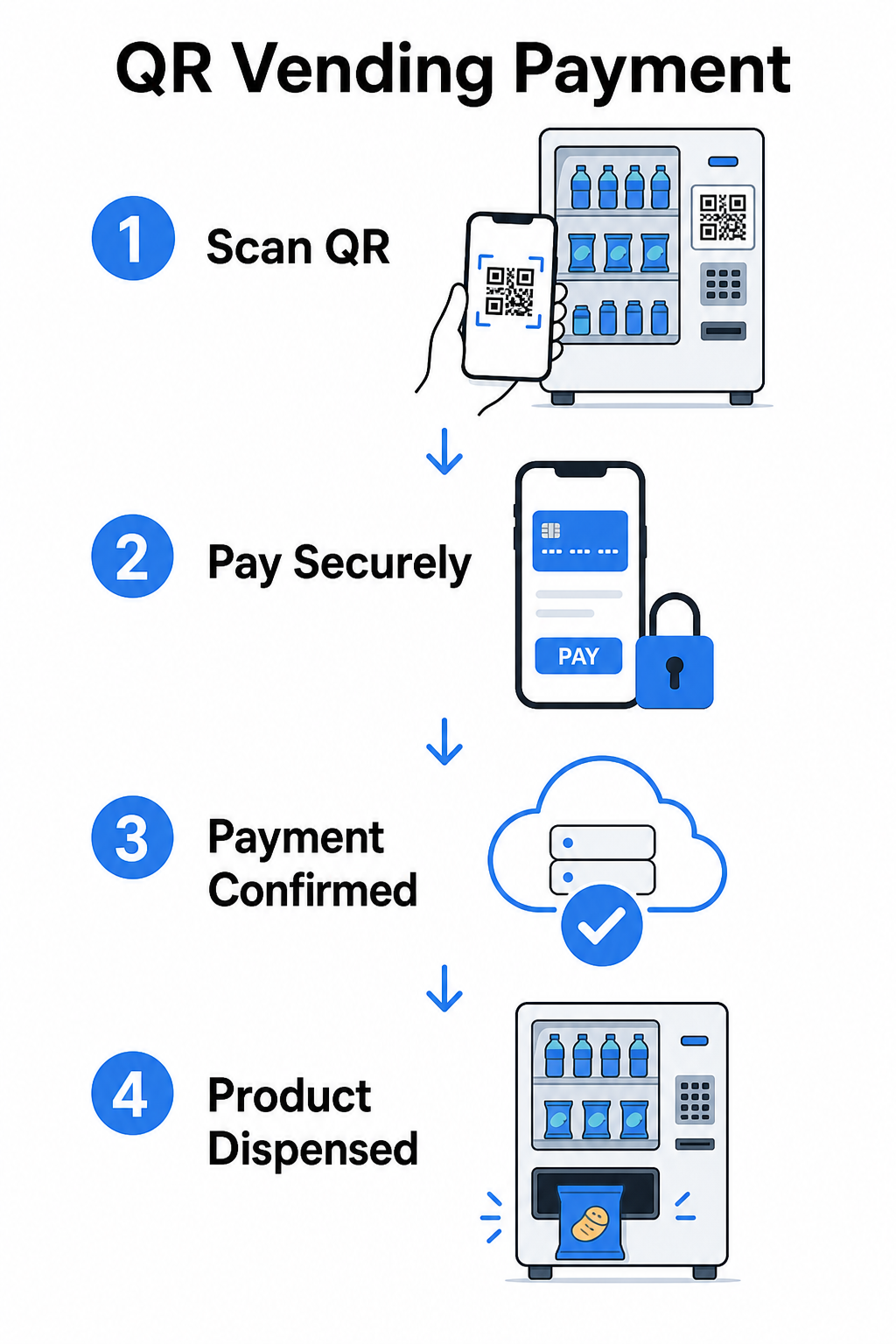
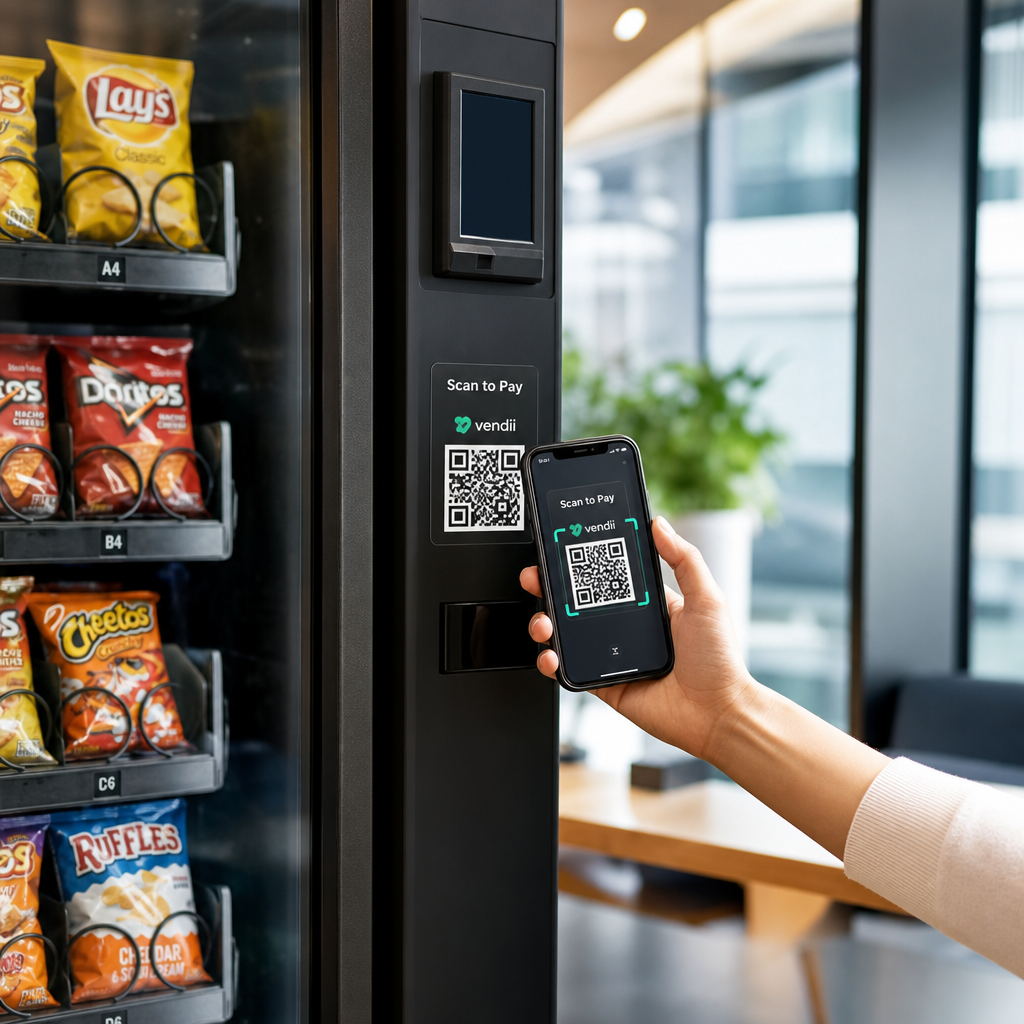
The core concept is straightforward: instead of inserting a card or cash, a customer scans a QR code displayed on the machine, completes payment on their phone, and the machine receives a confirmation signal before dispensing the product.

Vending payment flow

There are two main approaches to this flow.

Consumer scans machine QR – The machine displays a static or dynamic QR code. The customer opens their camera app, scans the code, and lands on a hosted payment page that supports cards, PayPal, Apple Pay, Google Pay, or other mobile wallets. Once the payment gateway authorizes the transaction, it sends a confirmation back to the machine via an API, triggering the vend.

Machine scans consumer QR – The customer’s app generates a QR code representing stored value or account credits. The machine’s scanner reads it, the system deducts the appropriate amount, and the machine activates. This model is common in closed-loop systems like campus or corporate accounts.

Both architectures rely on backend APIs to confirm transactions, synchronize inventory, and log item-level data. The practical difference is who does the scanning and where the payment credentials live.

Accept Payments Without a Card Reader Need a simple way to turn a URL into a scannable payment touchpoint? The PayPal QRコードジェネレーター lets you create a branded payment QR in minutes – no hardware required.

Static vs. Dynamic QR Codes for Vending

Not all QR codes behave the same way, and the distinction matters for vending operators.

機能 静的QRコード ダイナミックQRコード
Destination editable after printing いいえ はい
スキャン追跡と分析 いいえ はい
Deactivate if compromised いいえ はい
Requires reprinting to update はい いいえ
Suitable for permanent machine decals 限定 推奨

静的QRコード encodes a fixed URL directly into the pattern. If your payment provider changes, your checkout URL updates, or you want to redirect to a promotion, you need to print a new code and physically replace it on every machine.

ダイナミックQRコード points to a short redirect link that you control. You can update the destination at any time without touching the physical code on the machine. For a vending operator managing dozens or hundreds of machines across multiple locations, this flexibility eliminates reprinting costs and reduces maintenance visits.

Dynamic codes also capture scan analytics – total scans, unique scans, scan times, and geographic data – giving you visibility into which machines are generating payment activity and when.

Beyond Payments: Other Ways QR Codes Add Value to Vending

Cashless payment is the most obvious use case, but QR codes open up several other operational and marketing possibilities.

Customer Engagement and Loyalty

A QR code on a vending machine can link to more than a checkout page. You can direct customers to a loyalty program where they scan to earn points, access rewards, and redeem benefits instantly – replacing the friction of physical loyalty cards with a smartphone-based experience. These programs support instant enrollment, real-time rewards, and personalized offers based on purchase behavior.

You can also deliver digital coupons or limited-time discounts to customers who scan, creating an incentive that drives repeat visits to specific machines. Linking a QR code to a payment or digital pass compatible with Apple Wallet or Google Wallet takes this a step further, letting customers save their loyalty credentials directly to their phone.

Remote Machine Management Support

QR codes can serve an operational function that has nothing to do with the customer. Placing a unique QR code on each machine – linked to that machine’s management page or service portal – gives technicians and route drivers instant access to the right machine record when they arrive on-site, with no searching through spreadsheets or calling the office to identify a unit.

When combined with a telemetry system, this approach means the person standing in front of a machine can immediately pull up its transaction history, inventory status, or fault log by scanning the code.

Maintenance and Reporting Shortcuts

A QR code linked to a reporting form lets customers flag a stuck product, a malfunctioning payment reader, or an out-of-stock machine – without requiring a phone number or email address. The submission is tied to the specific machine, giving your operations team actionable information without a site visit to diagnose the problem.

Keep Your QR Codes Flexible If you want one code that can serve multiple purposes over time – payments today, a loyalty program next quarter – use the ダイナミックQRコードジェネレーター to update destinations without reprinting.

What QR Code Analytics Tell You About Your Machines

One underappreciated advantage of dynamic QR codes is the data they generate. Every scan is logged with a timestamp, location, and device type. For vending operators, this creates a lightweight layer of behavioral data that complements your telemetry.

Scan volume at a specific machine can tell you:

  • When customers are most active at that location, helping you optimize restocking schedules
  • Whether a machine is being ignored, which might indicate a placement problem or a product assortment issue
  • How promotional changes perform, since you can compare scan rates before and after updating the linked destination

For a deeper look at how to set up and interpret this data, see the guide to トラッキングQRコード.

Security and Compliance Considerations

QR code payments at unattended machines introduce specific security responsibilities that operators need to understand before deployment.

PCI DSS Applies to You

If your vending machines accept credit or debit card payments via a QR code workflow, you are required to comply with PCI DSS – the Payment Card Industry Data Security Standard. This applies regardless of whether the payment is processed by a third-party gateway. The QR code payments PCI DSS compliance guide covers this in detail, but the key requirements include:

  • Encrypting cardholder data during transmission using protocols like TLS
  • Never storing sensitive authentication data such as CVV codes, PINs, or magnetic stripe data after authorization
  • Validating your compliance level through Self-Assessment Questionnaires or third-party audits, depending on your transaction volume

Operators who redirect customers to a hosted payment page managed by a PCI-compliant gateway significantly reduce their compliance scope, since cardholder data never touches their own systems.

Physical Tampering Is a Real Risk

Unattended machines are vulnerable to a specific fraud vector: someone places a fraudulent QR code sticker over your legitimate one. The customer scans what appears to be your payment code but is redirected to a phishing page that captures their payment details. Mitigation steps include:

  • Using tamper-evident materials for QR code signage
  • Applying branded QR codes that include your logo and colors, making unauthorized replacements visually obvious
  • Instructing route drivers to inspect QR codes during regular visits
  • Enabling real-time scan analytics so that unusual geographic scan patterns – for example, scans originating far from the machine’s known location – trigger an alert

For a full breakdown of QR payment risks and how to address them, see the guide on QR code risks in payments and how to mitigate them.

Design Guidelines for Vending Machine QR Codes

A QR code that doesn’t scan reliably creates customer frustration at precisely the moment they want a quick transaction. Follow these practical guidelines to get it right.

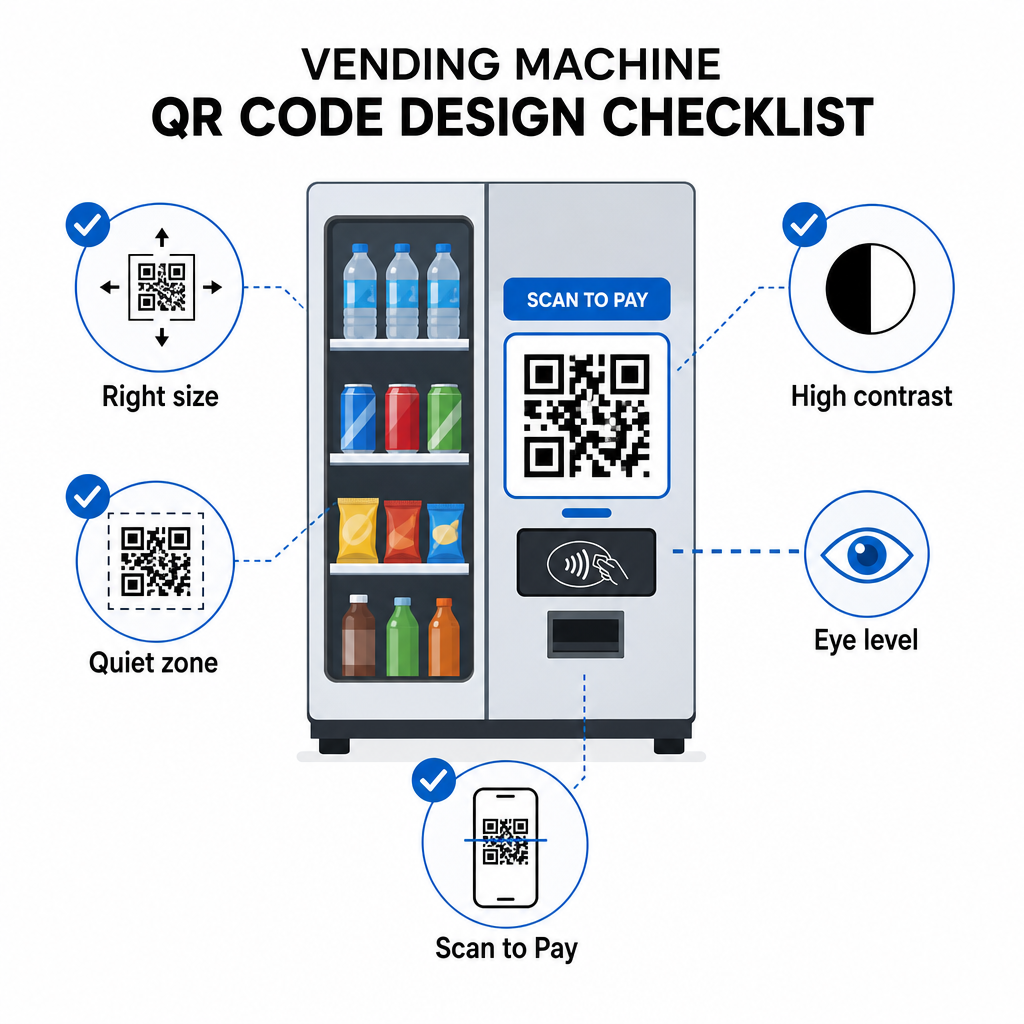
Size and scanning distance – Use the 10:1 ratio as your baseline: a code scanned from 20 inches away should be at least 2 inches wide. Most vending machine interactions happen at arm’s length, so a code sized between 2 and 3 inches square is appropriate for face-level placement. The QRコードサイズガイド covers this formula in detail for different contexts.

QR design checklist

Color and contrast – Dark patterns on a light background scan most reliably. Black on white is the most consistent combination. If you’re using branded colors, aim for at least a 4:1 contrast ratio between the QR module color and the background, with 4.5:1 preferred. The guidelines for QRコードの読みやすさ explain why contrast directly affects whether a scanner can detect the code pattern under different lighting conditions.

Quiet zone – Maintain a clear blank margin around the QR code. Placing design elements, text, or branding inside this border can prevent scanners from correctly identifying the code boundaries.

Print format – For physical application on machines, export QR codes in vector formats such as SVG, EPS, or PDF to ensure they remain sharp at any size and don’t lose scannability due to pixelation.

Do not distort – QR codes must remain square. Stretching or compressing the code to fit a template will misalign the internal modules and make it unscannable.

Provide a clear call to action – Label the code clearly: “Scan to Pay,” “Scan for Cashless Payment,” or “Scan to Earn Points.” Customers at a vending machine are not browsing – they want to complete a task quickly, and a direct label removes hesitation.

Getting Started: Implementation Steps

If you’re adding QR code payments to existing machines, the typical path looks like this:

  • Choose a payment gateway that supports QR-based checkout and is PCI DSS certified. The gateway provides the hosted payment page your QR code will link to.
  • Generate a dynamic QR code for each machine, linking to that machine’s unique checkout URL. Using ダイナミックQRコード means you can update payment destinations or add features later without replacing physical signage.
  • Brand the code with your logo and color scheme to make it recognizable and harder to tamper with.
  • Apply the code to each machine at eye level using tamper-evident materials.
  • Test across multiple devices before full deployment – scan the code with both iOS and Android devices under the lighting conditions present at each machine location.
  • Monitor scan analytics after launch to identify machines with low engagement, track payment activity, and detect any anomalous scan patterns.

For operators accepting international payment methods like Alipay or WeChat Pay, there are additional integration steps covered in the guide to Alipay and WeChat Pay QR code integration.

QR codes give vending operators a low-barrier path to cashless payments, customer engagement tools, and better operational visibility – all without replacing existing hardware. The most durable implementations use dynamic codes, so the physical sticker on the machine can serve changing purposes over time without a technician visit. Start with a single location, measure performance through scan analytics, and expand based on what the data shows.

Create Your First Vending Machine QR Code を使用しています。 QRコードジェネレーター to build a branded, trackable code for your machines – or explore the full range of industry-specific QR solutions to find the right approach for your operation.

よくある質問

Do customers need a special app to use QR code payments at vending machines?

In most implementations, no. When a machine displays a QR code linked to a hosted payment page, customers can scan it using their phone’s native camera app and complete the transaction in their browser using a saved card or mobile wallet. Some closed-loop systems – like campus account apps – do require a specific app, but open payment flows are designed to work without one.

Can I add a QR code to an existing vending machine without replacing the payment hardware?

Yes. A static or dynamic QR code linked to a hosted checkout page can be applied as a sticker or printed insert to most existing machines. The payment authorization is handled by the gateway’s backend, which communicates with the machine’s cashless interface to trigger the vend. This makes QR a relatively low-cost upgrade compared to installing a new card reader.

What happens if someone covers my QR code with a fraudulent one?

A customer who scans the fraudulent code will be redirected to a different page rather than your checkout. You can reduce this risk by using branded QR codes that include your logo – making tampering visually obvious – and applying tamper-evident materials that show damage when the sticker is removed. Dynamic QR code analytics can also help: if scans suddenly drop to zero or originate from unexpected locations, that’s a signal to investigate the physical code at that machine.

著者について

Siim KostabiはPagelootのコンテンツリードです。Pagelootの革新的なQRコード生成サービスについて執筆しています。5年以上にわたるQRコードに関する深い専門知識を持つSiimは、この分野の専門家です。QRテクノロジーを活用してデジタルインタラクションを簡素化・拡張する上で、大きな進歩を遂げています。.

カテゴリー
について詳しくはこちら
顧客がQRバナーをスキャン
QRコードの 屋外バナー
Shopper scans electronics QR
のQRコード コンシューマーエレクトロニクス
✅ QRコードの#1ソリューション

オンラインでQRコードを作成する必要がある場合は QRコードを作る ここで無料で
ページルートは #1のGo-Toソリューション でQRコードを作成してスキャンすることができます。

BL-0298

ブログジェネ

売上、レビュー、フォロワーを増やすために 20,000 を超えるブランドから信頼されています。

クライアントのロゴ
トップブランドから信頼される
5 のうち 4.8 と評価しました

4.86 / 5つ星評価

ユーゴ・ローラン
ユーゴ・ローラン
レストランオーナー
最も簡単で信頼性の高いQRコードジェネレータです。PDFファイルを即座にアップロードできます。レストランのメニューがデジタル化されました。
ルーカス・ジャンセン
ルーカス・ジャンセン
不動産開発業者
これは優れたツールで、QRコードでちょうど欲しいところに連れて行ってくれます。私たちは位置情報のQRコードしか使っていませんが、とても便利な機能がたくさんあります。
エマ・モレッティ
エマ・モレッティ
小売製品
使いやすいし、早い。素晴らしい機能で、完璧な画像を作成してくれるので、社員は私のvCardをダウンロードすることができます。
ユーゴ・ローラン
ユーゴ・ローラン
レストランオーナー
最も簡単で信頼性の高いQRコードジェネレータです。PDFファイルを即座にアップロードできます。レストランのメニューがデジタル化されました。
ルーカス・ジャンセン
ルーカス・ジャンセン
不動産開発業者
これは優れたツールで、QRコードでちょうど欲しいところに連れて行ってくれます。私たちは位置情報のQRコードしか使っていませんが、とても便利な機能がたくさんあります。
エマ・モレッティ
エマ・モレッティ
小売製品
使いやすいし、早い。素晴らしい機能で、完璧な画像を作成してくれるので、社員は私のvCardをダウンロードすることができます。
QRコードをもっと見る
あらゆるものをデジタル体験に変えよう 3分以内に。

14日間の無料トライアル。

クレジットカードは必要ありません。

初回購入で30%オフ

次のコードを使用してください:

MP3ファイルを共有

PDF QRコードを作成するにはサインアップしてください

必要なものをすべてアップロードして表示する。

  • オーディオファイル
  • ポッドキャスト
  • 音楽

サインアップで14日間無料トライアル。.
トライアル終了後、QRコードは期限切れになります。.

オーディオmp3 QRコードを作成するにはサインアップしてください

フレームでより多くのスキャンを獲得

QRコードにフレームを追加するにはサインアップしてください

コールトゥアクションフレームは、お客様が簡単にQRコードと対話できるようにします。ぜひお試しください。

サインアップで14日間無料トライアル。.
トライアル終了後、QRコードは期限切れになります。.

QRコードにフレームを追加するにはサインアップしてください

シェイプでスタイルを追加

より多くの図形を作成するにはサインアップしてください

QRコードは四角いものである必要はありません。あなたのブランドのイメージに合わせて変えてみてください。

サインアップで14日間無料トライアル。.
トライアル終了後、QRコードは期限切れになります。.

より多くの図形を作成するにはサインアップしてください

QRコードにロゴを追加

QRコードにロゴを追加するにはサインアップしてください

QRコードにロゴやブランドを入れることで、目立たせることができます。

サインアップで14日間無料トライアル。.
トライアル終了後、QRコードは期限切れになります。.

QRコードにロゴを追加するにはサインアップしてください

スマートなApp Storeリダイレクト

アプリストアのQRコードを作成するにはサインアップしてください

スマートなApp StoreのQRコードに、あなたのアプリのリンクを追加します。ユーザーは、デバイスに応じてリダイレクトされます。

サインアップで14日間無料トライアル。.
トライアル終了後、QRコードは期限切れになります。.

アプリストアのQRコードを作成するにはサインアップしてください

QRコードに画像をアップロード

画像QRコードを作成するにはサインアップしてください

画像を簡単に共有できます。どんな画像も、数秒でダイナミックに変化します。

サインアップで14日間無料トライアル。.
トライアル終了後、QRコードは期限切れになります。.

画像QRコードを作成するにはサインアップしてください

PDFファイルを共有

PDF QRコードを作成するにはサインアップしてください

必要なものをすべてアップロードして表示する。

  • メニュー&プライスリスト
  • 指示
  • 任意の書類

サインアップで14日間無料トライアル。.
トライアル終了後、QRコードは期限切れになります。.

PDF QRコードを作成するにはサインアップしてください

印刷せずに後で編集

再度印刷せずにQRコードを編集するにはサインアップしてください

ダイナミックQRコードは、新たにQRコードを印刷することなく、QRコードの内容を変更することができます。

サインアップで14日間無料トライアル。.
トライアル終了後、QRコードは期限切れになります。.

再度印刷せずにQRコードを編集するにはサインアップしてください

いつ?どこで?QRコードのスキャンを追跡

QRコードを追跡するにはサインアップしてください

どのQRコードが最も多くスキャンされ、何が最も顧客を喜ばせているのかを知ることができます。

サインアップで14日間無料トライアル。.
トライアル終了後、QRコードは期限切れになります。.

QRコードを追跡するにはサインアップしてください

印刷可能なファイルが利用可能

PDFやSVGのようなベクターQRコードを作成するにはサインアップしてください

.eps、.pdf、.svg

QRコードをHD解像度でダウンロードしたいですか?すぐに印刷できるベクターまたはピクセル形式を入手しましょう。

サインアップで14日間無料トライアル。.
トライアル終了後、QRコードは期限切れになります。.

PDFやSVGのようなベクターQRコードを作成するにはサインアップしてください

しばらくお待ちください。あなたのQRコードは ロード... ロード...

あなただけのものに

サインアップしてQRコードを後で保存してください

異なる色、ロゴ、コールトゥアクションフレームで素晴らしいQRコードを作成することで、より多くのスキャンを得ることができます。

サインアップで14日間無料トライアル。.
トライアル終了後、QRコードは期限切れになります。.

サインアップしてQRコードを後で保存してください